Neste artigo
Double-entry accounting is an application of Banana Accounting Plus that allows you to manage accounts with precision, flexibility and reliability, following the most recognized and widely used accounting method internationally.
It is the ideal solution for companies, associations, organizations, freelancers, self-employed workers and also for schools, used worldwide by training institutes and universities for practical teaching.
Note: usage requires basic accounting knowledge.
Benefits of double-entry accounting with Banana
Banana Accounting Plus offers various tools that simplify the daily management of double-entry accounting, including:
- Predefined double-entry accounting templates with a pre-set chart of accounts.
- Table structure that allows quick entry of transactions.
- Customizable chart of accounts, with the possibility to add or modify accounts and groups.
- Import from e-banking and Rules for recurring transactions.
- Linking digital documents via dedicated fields.
- Automatic reports such as balance sheet, income statement and account cards.
- VAT management, Customers/Suppliers, Multi-currency and Budget, if needed.
Below you will find an overview of the key elements of the accounting file: from the initial settings to the operational tables, up to the closing, printing, and opening functions.
Getting started
The Getting started page guides you through the first steps with the double-entry accounting file, explaining what to set up initially and how to properly prepare the work.
File Properties
On the File Properties page, you can define the basic accounting data: start and end dates of the accounting period, company name and address, base currency and other additional data.
Accounts Table
The Accounts table includes all asset and income statement accounts (Assets, Liabilities, Costs, Revenues) with real-time updated balances. You can customize the table by adding or removing accounts, changing descriptions, adding your customers and suppliers, etc.
Based on the selected template, the Accounts table suggests the accounts needed to manage your business. You can freely adapt the structure of the chart of accounts, always maintaining data consistency:
- Add or delete accounts and groups at any time.
- Edit descriptions, totals and subtotals.
- Create new sections or custom balance sheet structures.

The grouping system explains how Banana calculates totals and subtotals in the tables (Chart of accounts, Categories, etc.).
Thanks to the group levels, you can set up custom balance sheets, create subtotal groups and analyze in detail the various areas of your management.
For more detailed analysis, you can use:
which allow you to classify transactions by projects, departments or specific activities, without having to create additional accounts.
If your needs change over time, you can always change the chart of accounts by updating its structure easily while maintaining continuity and compatibility with existing data.
In the Accounts table, at the end of the Income Statement, if the equation Assets = Liabilities + Equity is correct, the row Difference must be zero remains empty.
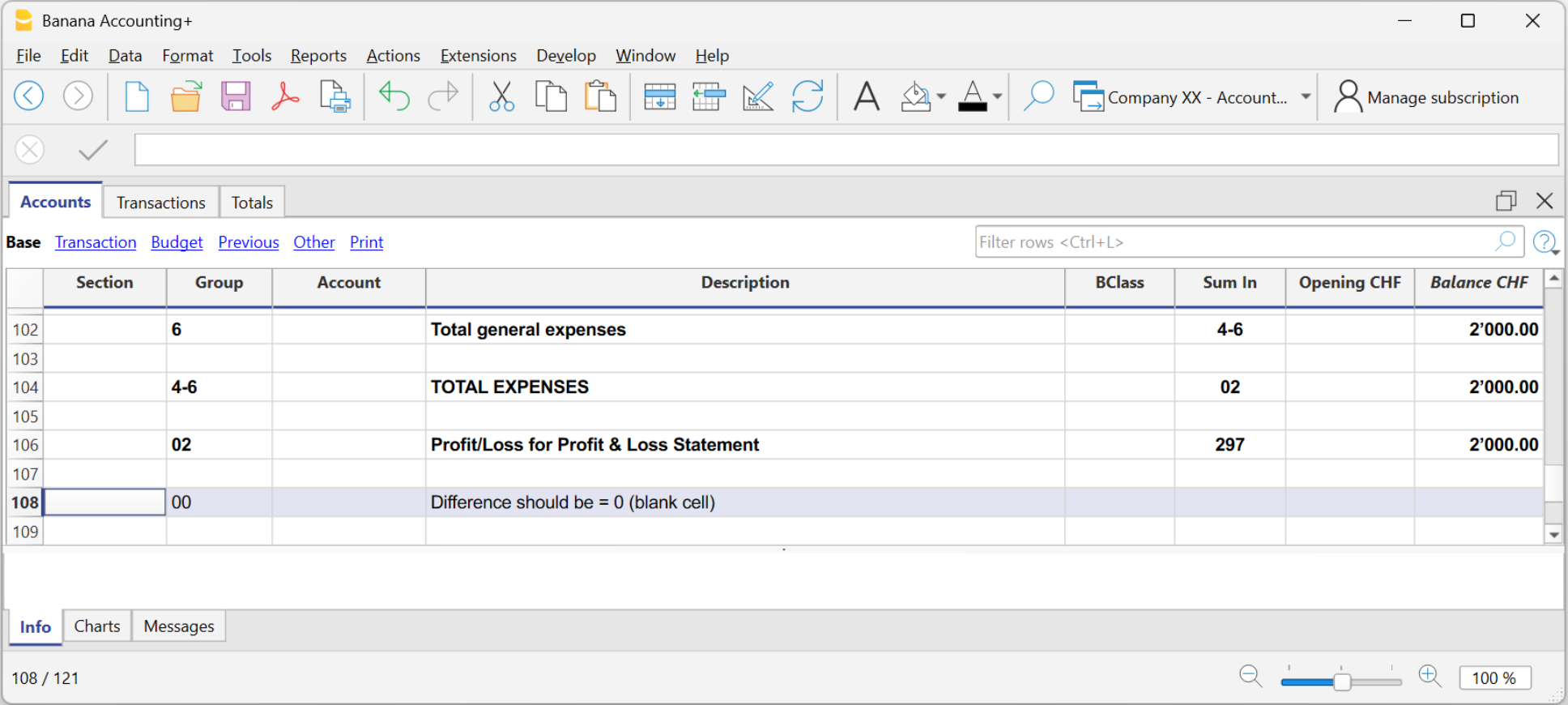
Differences and imbalances are caused by:
- Errors in opening balances
- Errors in grouping
- Errors in transactions
Transactions Table
The Transactions table is the heart of double-entry accounting, where you enter all daily transactions by specifying the accounts involved in the Debit and Credit columns, the dates, amounts, and descriptions. Depending on the selected accounting template, it already has predefined columns.
You can customize the table by adding new columns or changing their layout to suit your viewing preferences.

The Transactions table offers many features to speed up your work and maintain perfect, error-free accounting:
- Smart autocomplete for accounts and descriptions
- Rules for recurring transactions
- Automatic import from e-banking, which instantly fills in rows
- Links to digital documents directly in the row (Link column)
- Advanced search and filters to view only the relevant transactions
- Option to add custom columns or rearrange existing ones
If you use customer and supplier management, the table also automatically updates their balances and supports invoice reconciliation.
Totals Table
In the Totals Table, you get an instant overview of account trends and main balances: it automatically summarizes the accounting results, displaying total assets, liabilities, costs and revenues. If there are any accounting balancing errors, the difference is shown in the "Difference must be zero" row.
Budget Table
In the Budget Table, you can plan both financial and economic aspects. Once you enter the budget values, you can generate a forecast Balance Sheet and Income Statement and also compare them with actual values.
Other Tables
For more specific needs, you can also use the dedicated tables for:
Accounting Closures
Accounting closures verify that the data is complete and correct and prepare the accounting for a new period. Thanks to specific features, Banana Accounting Plus helps you review transactions, identify possible errors, and generate final documents.
Some of the main features:
- Balance column: immediately shows any discrepancies between Debit and Credit.
- Temporary row filter: to display only the transactions you're interested in and edit or correct them directly in the filtered rows.
- Check accounting: a set of tools for automatically verifying data and reporting any errors.
Printouts, Analysis and Automatic Reports
Banana processes the recorded data in real time, offering professional reports and constantly updated analyses to monitor the financial performance of your business.
With just one click, you can generate all the main accounting documents:
- Balance Sheet and Income Statement
- Account cards and Journal
- VAT reports with XML export (only with the Advanced plan)
- Budget and project analysis using Cost/Profit Centers and Segments
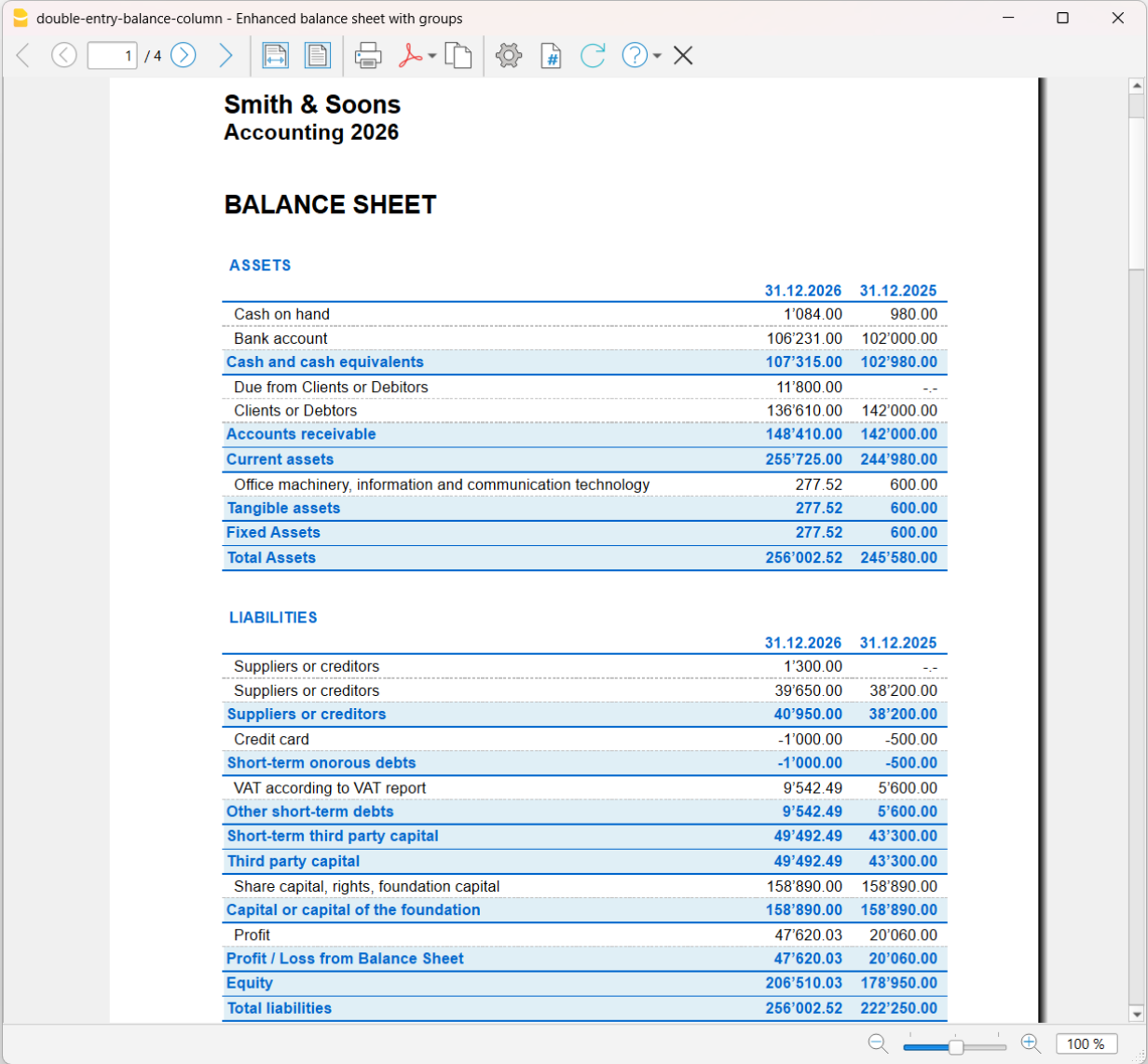
Example of Balance Sheet printout
Opening Balances
Opening balances are the starting point of a new accounting year; they are essential for correctly setting the initial balances, the file parameters, and any data to be carried over from the previous year or from another accounting system.
In Banana Accounting Plus, opening is done simply using the Create New Year command: the program creates a new file (to be saved under the new year's name), copying all accounts from the previous year and automatically inserting the opening balances. The new year can be opened even before the previous year is closed. With the Update Opening Balances command, you can automatically update the new year's opening balances once the previous year has been definitively closed or modified.