Jaarafsluiting | Dubbel boekhouden
De verrichtingen aan het einde van het jaar omvatten alle controles, analyses en tijdgebonden verrichtingen die aan het einde van het jaar moeten worden uitgevoerd voordat de financiële overzichten voor het jaar worden opgesteld.
Technische aspecten
Met Banana Boekhouding heeft elk boekjaar zijn eigen aparte bestand; technisch gezien is er geen concept van afsluiting van het boekjaar:
- Wanneer een nieuw jaar begint, wordt een nieuw bestand aangemaakt met het commando Nieuw Jaar aanmaken.
- U kunt tegelijkertijd blijven werken aan het bestand van het nieuwe jaar en het bestand van het vorige jaar. Zodra de afsluitingen zijn voltooid, kunt u de beginsaldi van het bestand van het nieuwe jaar bijwerken.
Belasting aspecten
Vóór het afsluiten van de boekhouding is het nodig een aantal bewerkingen uit te voeren die gevolgen hebben voor de belastingen. De rekening goederen moet worden aangepast, de transacties voor afschrijvingen moeten worden ingevoerd, het opgebouwde inkomen en schulden, de BTW aangifte moeten worden gecompleteerd, bepaling hoe en op welke rekeningen de winst en verlies moeten verrekend en zo zijn er nog veel meer bewerkingen voor controle en waarmerking.
Voor het programma is er geen verschil of de winst hoog is of laag. Echter voor de belastingen maakt dit veel uit. Deze aspecten moeten worden geverifieerd met uw belastingadviseur of accountant. Het kan heel nuttig zijn een specialist te raadplegen om te begrijpen wat er allemaal nodig is voordat u de boeken sluit, vooral als u voor de eerste keer een boekhouding beheert. Accountants zijn erg druk aan het begin van het jaar en gedurende de periode voorafgaand aan de deadline van de belastingaangifte. Het kan daarom handig zijn dit te bespreken met uw accountant - of hem het boekhoudbestand toe te sturen - een paar maanden voordat de boeken gesloten worden, zodat u zelf thuisraakt in wat er moet gebeuren.
Commando boekhouding controleren
Banana Boekhouding laat u toe om snel te registreren en ook om uitstaande operaties te onderbreken zonder de voortzetting van het werk te hinderen.
Het commando Acties → Boekhouding controleren voert een hele reeks controles uit, alsof u de gegevens vanaf het begin opnieuw invoert, en wanneer er fouten of verschillen worden ontdekt, worden deze gesignaleerd.
Het is raadzaam om het commando Boekhouding controleren met een zekere regelmaat te gebruiken en telkens wanneer er verschillen of foutsignalen zijn, belangrijke wijzigingen (opening wisselkoersen, BTW codes) en vooral voor het afsluiten van de boekhouding.
Controles en verificaties
Verificatie van de beginsaldi
- In de Rekeningen-tabel moet in de kolommen Begin- en Saldo in de rij "Verschil moet nul zijn" geen bedrag worden vermeld, anders is er een fout die moet worden gevonden en gecorrigeerd opdat de openingssaldi correct zijn.
Opmerking: In de Transacties weergave, in de Debit en Credit kolommen, is het normaal bedragen te hebben. - Zorg ervoor dat de debiteuren- en crediteurentransacties van het vorige jaar zijn afgesloten.
- Controleer of de beginsaldi in overeenstemming zijn met de eindsaldi van het vorige jaar die reeds gecontroleerd en aan de belastingdienst gemeld zijn.
- Voor boekhouding met vreemde valuta, zie de betreffende pagina Beginsaldi in boekhouding met vreemde valuta.
Verificatie van de boekhoudsaldi
Het eerste wat moet worden gedaan is ongetwijfeld ervoor zorgen dat de rekeningsaldi met elkaar overeenstemmen. Het saldo van de kasrekening moet overeenstemmen met het werkelijke kassaldo. Het saldo van bankrekeningen, creditcards, leningen of tegoeden moet overeenstemmen met het saldo op het bankafschrift. Hetzelfde geldt voor alle andere rekeningen waarop u uitstel van betaling heeft, BTW, leveranciers, enz.
Als er een verschil is, moet u nagaan waarom en dienovereenkomstig hetzij het beginsaldo, hetzij de transacties corrigeren.
Verschillen in de Transactiestabel
Controleer in de Transactiestabel (Info venster onderaan) of er geen verschillen worden gerapporteerd. Naast de functies die aanwezig zijn in de opdracht Boekhouding controleren, is er in de Transacties tabel van Banana Boekhoiuding Plus ook de kolom Saldo, waarmee u alle rijen kunt opsporen waar verschillen zijn ontstaan. Een snelle scroll van de kolom is voldoende om de boekhoudkundige verschillen onmiddellijk te identificeren en ze te corrigeren, zonder de fouten in het nieuwe jaar te laten voortduren.
Verschillen tussen banksaldi van bankafschriften en boekhoudsaldi (functie CheckBalance)
Deze verrichting is van fundamenteel belang voor de waarheidsgetrouwheid van de boekhouding. Wij raden u aan de verificatie van de saldi, #CheckBalance, niet alleen aan het einde van de boekhoudperiode uit te voeren, maar periodiek aan het einde van elke maand, om te voorkomen dat eventuele onjuiste saldi van maand tot maand worden doorgegeven.
Meer informatie over de verificatie van de balans op de Checkbalance-pagina.
Vreemde valuta boekhouding
Als u vreemde valuta boekhouding gebruikt, moet u ook slotwisselkoersen instellen en ongerealiseerde wisselkoerswinsten en -verliezen boeken. Raadpleeg hiervoor deze pagina:
Boekhoudkundige afsluitingsboekingen
Aan het einde van het jaar, vóór de aanvang van het nieuwe jaar, moeten er afsluitende boekingen worden verricht. Dit zijn correctieboekingen, waardecorrecties en aanpassingen in verband met personeelsbijdragen. Dit zijn de belangrijkste:
Importeer de bewegingen van de kasrekening in het hoofdboekhoudbestand
Deze bewerking wordt alleen uitgevoerd in het geval dat de kasrekening apart wordt bijgehouden in een apart bestand van de boekhouding.
Nadat de import heeft plaatsgevonden, moet worden gecontroleerd of het saldo van de kasrekening in het hoofdboekhoudbestand overeenkomt met het saldo van het kasbestand. Deze controle kan ook worden uitgevoerd met de Check Balance functie, beschreven in de vorige paragraaf.
Importeren van de loonverrichtingen in het boekhoudbestand
Deze handeling wordt alleen uitgevoerd als de salarisadministratie wordt beheerd met een specifieke boekhoudsoftware waarmee u de transacties kunt importeren in het Banana Boekhouding Plus bestand.
De import wordt uitgevoerd via het menu Acties → Naar boekhouding importeren → Transacties met kolomkop importeren.
Vergeet niet om de 13e maand van december quota in te voegen, als deze niet is gemaakt door de payroll software.
Correctie van de Delcredere-rekening
Ondernemingen die op basis van het toerekeningsbeginsel boeken, moeten, indien zij potentiële verliezen voorzien, de Delcredere-rekening vereffenen.
Afschrijving
Op 31.12 moet u de afschrijvingen van roerende en onroerende activa boeken en de eventuele versnelde afschrijvingen evalueren voor de activa die snel verouderd zijn.
U kunt onze applicatie Register Aktiva gebruiken die automatisch de afschrijvingstransactie aanmaakt en u kunt ze hervatten in het boekhoudbestand.
Inventaris aanpassing
Met onze Inventarisapplicatie beschikt u over nauwkeurige tellingen, zowel per stuk als per waarde, zodat u uw voorraadafrekening sneller kunt bepalen.
Openstaande facturen van klanten en leveranciers controleren op 31.12
Om het proces te vergemakkelijken, kunt u met de functie openstaande facturen per klant en openstaande facturen per leverancier snel de waarden per 31.12 vaststellen.
Privégebruik
Als de onderneming een bedrijfswagen gebruikt, moet u de transactie voor het privégebruik met de juiste BTW-code invoeren.
Afsluiting en BTW-aangifte
Alvorens de BTW-aangifte in te dienen, raden wij u aan de volgende verificaties uit te voeren:
- Gebruik het commando Boekhouding controleren. In geval van fouten en verschillen, vindt u de berichten in het Informatievenster (onderaan het scherm), in de rubriek Berichten.
- Controleer of er geen verschillen zijn in de kolom Saldo van de Transacties-tabel.
- Controleer of uw banksaldi overeenkomen met die op de bankafschriften.
- Controleer of, na terugboeking van het saldo op de verschuldigde BTW-rekening (aan de belastingdienst te betalen BTW), de automatische BTW-rekening op nul staat. Op de verschuldigde BTW-rekening moet het te betalen bedrag of het te ontvangen kredietbedrag worden vermeld.
- Voordat je de laatste BTW-aangifte indient, bekijk je de BTW-overzichten van de voorgaande kwartalen, om te controleren of de aan de belastingdienst betaalde bedragen nog steeds overeenkomen met de weergegeven bedragen.
- Gebruik het VAT Overzicht commando om de verschillende rapporten te bekijken en een PDF afdruk te maken om de gegevens te archiveren. In geval van belastingcontroles zullen deze nuttig zijn.
De rekening vereffenen voor de Bronbelasting
Na de berekening en de boeking van de salarissen van december, gaat u over tot de boeking van de verrekening van de "Bronbelasting", op basis van de afrekening die naar de Belastingdienst is gezonden.
Vergoedingen voor het hoger management
Indien voorzien, neem het bedrag dat door de fiscus als forfaitaire terugbetaling is toegestaan op in het salaris van december.
Verrekening privérekening
Verifieer het saldo van de privérekening. Als er een debet/credit-relatie bestaat tussen het bedrijf en de eigenaar(s) (of naaste personen), boek dan de inkomsten- of uitgavenrente zoals bepaald in de leenovereenkomst of volgens de toepasselijke belastingrichtlijnen.
Verrekening van belastingen en vergoedingen
Controleer of de in de loop van het jaar verrichte aanbetalingen betrekking hebben op het lopende jaar. Belastingbetalingen die betrekking hebben op voorgaande jaren moeten eerst worden geboekt om de overeenkomstige gereserveerde bedragen af te sluiten, en vervolgens (indien er overschotten zijn) moeten deze worden geboekt via de rekening "Directe Belastingen" (activa). Indien het saldo van de voorzieningen onvoldoende of te hoog is, moet het verschil als buitengewone bate/last of met betrekking tot voorgaande perioden worden geregistreerd.
Boeking van de eindsaldi AOW en sociale bijdragen
Boeking van de eindsaldi van de sociale verzekeringen
Stuur het bestand naar de boekhouder voor afsluitingen
Als de afsluitingen en/of audits door uw boekhouder worden uitgevoerd, stuurt u het met Banana Boekhouding Plus aangemaakte boekhoudbestand gewoon per e-mail of slaat u de gegevens op een USB-stick op.
- Als uw boekhouder Banana Boekhouding heeft, stuurt u het ac2-bestand gewoon per e-mail of via een USB-stick. U kunt uw bestanden en digitale documenten ook opslaan in een gedeelde map met uw vertrouwenspersoon op Dropbox. U hoeft geen zware papieren documenten meer naar de boekhouder te brengen. Bovendien zal hij snel werken zonder de papieren documentatie te moeten doornemen.
- Indien uw mandataris geen Banana Boekhouding heeft, kunt u een PDF-bestand maken van de boekhoudkundige gegevens, via het menu Bestand → PDF bestand aanmaken en stuur hem/haar het bestand per e-mail. Hij/zij zal u alle wijzigingen en toevoegingen aangeven die moeten worden opgenomen om de boekhoudkundige periode correct af te sluiten.
Als alternatief kan uw gevolmachtigde uw boekhoudbestand openen met de gratis versie van Banana Boekhouding Plus, door het te downloaden van onze Download pagina. Als uw bestand meer dan 70 transacties bevat, zal hij/zij niet in staat zijn om boekingen toe te voegen of wijzigingen aan te brengen, maar hij/zij zal nog steeds in staat zijn om alle gegevens te zien, gedetailleerde kaarten van de rekeningen te krijgen door gewoon te dubbelklikken op een rekeningnummer, enz, en u adviseren over mogelijke correcties en / of verbeteringen.
Transacties blokkeren
Zodra de afsluitings- en verificatieboekingen zijn uitgevoerd, raden wij u aan om over te gaan tot het blokkeren van uw boekhoudtransacties.
- Menu Acties → Transacties blokkeren
De transactierijen worden genummerd en krijgen een blockchaincode die hun veiligheid garandeert
Printouts voor de Jaarafsluiting
Voor de afdrukken aan het einde van het boekjaar kunt u de informatie vinden door op de volgende links te klikken:
- Rekeningkaarten / Grootboek
- Journaal
- Uitgebreide Balans op groepen
- Boekhoudingsoverzicht
- BTW Overzicht
- Eindejaar PDF afdrukken
PDF Bestand
Met het commando PDF Bestand aanmaken kunt u alle documenten van de volledige boekhoudperiode (rekeningkaarten, journaal, BTW-overzichten, maand-, kwartaal- en jaarverslagen...) in één enkel PDF-bestand bewaren.
U kunt de boekhoudgegevens archiveren door het boekhoudbestand en de PDF-afdrukken op te slaan. Maak eventueel back-ups op een externe schijf.
Documentatie voor het auditproces
Op de pagina De documentatie voor de audit voorbereiden hebben wij een reeks opmerkingen en suggesties geplaatst over documentatie die naar de auditor moet worden gestuurd. Een volledige documentatie is een goede basis om het werk van de auditor efficiënter en sneller te laten verlopen.
Winst/verlies toewijzing
In Banana Boekhouding Plus vindt de verdeling van de winst of het verlies automatisch plaats bij de start van het nieuwe jaar. Voor meer informatie raadpleeg de pagina Nieuw jaar aanmaken.
Year-end closure checklist
On this page you will find a general checklist for those using Banana Accounting Plus, useful for carrying out all the necessary checks to close the accounting year and start the new one.
We also explain how to proceed if, after closing, differences or missing transactions emerge. More information on the page Changes after closing the accounting year.
Use the Temporary Filter for quick checks and corrections
To perform a quick check, especially at year-end, we recommend using the Temporary row filter function, which shows you all the transactions that match a keyword, phrase, account or a group of elements. You can correct or edit the transactions directly in the rows displayed by the Filter, without having to scroll through the entire Transactions table. When you remove the Temporary Filter, the rows return to their original order. More information on the page:
- Temporary row filter (only with Advanced plan).
Accounting check command
With Banana Accounting you can record quickly, even leaving some operations pending without interrupting your workflow.
The Actions > Check accounting command performs multiple checks, as if re-entering the data from scratch, and immediately reports any detected errors or differences.
Use this command regularly, especially in case of differences or error messages, significant changes (initial balances, VAT codes), and especially before closing the accounting.
Check the opening balances
- In the Accounts table, in the Opening and Balance columns, on the row "Difference must be zero" there must be no amount, otherwise you need to find the error and correct it to balance the opening balance sheet.
Note: in the Transactions view, it's normal to have amounts in the Debit and Credit columns. - Make sure that the accrued and deferred accounts from the previous year have been closed.
- Verify that the opening balances match the final balances from the previous year, already reviewed and declared to the tax office.
- For multi-currency accounting, see the page Opening balances in multi-currency accounting.
Check correspondence of account balances
The first check is undoubtedly to ensure that the account balances match reality. The cash account balance must match the actual cash status. The balance of bank accounts, credit cards, loans or assets must match the statement balance. The same applies to all other accounts with reconciliations, VAT, suppliers, etc.
If there is a difference, you must find the cause and update either the opening balance or the transactions.
Differences in the Transactions table
In the Transactions table (Info panel at the bottom), check that there are no reported differences. In addition to using the Check accounting command, with Banana Accounting Plus you can activate the Balance column in the Transactions table. This column detects all the rows where there are differences. You can then quickly scroll through the column to immediately spot and correct discrepancies, avoiding errors in the new year.
Differences between bank statement balances and accounting balances (CheckBalance function)
The #CheckBalance function checks that accounting balances match the bank statement balances. We recommend running this check not only at the end of the accounting period, but every month, to prevent mismatched balances from carrying over incorrectly month after month.
Information about the verification transactions is available on the page Verification balance transactions.
Multi-currency accounting
If you are using multi-currency accounting, you must also set the closing exchange rates and record the unrealized exchange rate gains and losses. More information on the page:
Checks before closing
To ensure the year’s accounting is complete and consistent, it is important that:
- All transactions of the year have been entered (bank, cash, customers, suppliers).
- There are no unbalanced or inconsistent rows.
- VAT transactions are consistent (if applicable).
- The multi-currency accounting includes all currency movements.
- The exchange rate differences in multi-currency accounting have been calculated.
- The Check accounting command has been run and no errors were found.
Year-end operations
- Record depreciations.
- Enter accruals and deferrals.
- Verify cost and revenue allocation.
- Reconcile bank accounts and customer and supplier balances.
More information on the page: Closing accounting transactions.
Exchange rate differences (if multi-currency)
- Update the exchange rate on 12/31 in the Exchange rates table (use the official rate from the Federal Tax Administration).
- Run the command Create exchange rate difference transactions.
Create a custom checklist
Every year, there are many review and closing operations, and from one fiscal year to another, it’s not always easy to remember everything. To avoid omissions, with Banana Accounting Plus you can create a simple table directly in your accounting file to note:
- All information related to the checks.
- The comments and corrections made by the auditor in the previous year, so as not to repeat the same mistakes.
- The list of documents to print.
- The documents to send to the auditor.
- Links to pages or resources you find useful.
More information on the following pages:
Year-end closure accounting transactions
At the end of the fiscal year, before opening the new accounting year, it is necessary to carry out some closing operations. Some transactions are simple and can be done independently, while others require specific technical skills or have tax and social security implications for which it is advisable to consult an accountant or fiduciary.
Preliminary checks
Before closing, make sure that:
- There are no errors using the Check accounting command.
- Bank balances in the accounting match the bank statements.
- Use the #CheckBalance function.
- There are no differences between the Debit and Credit columns in the Transactions table.
- Display the Balance column and check that there are no discrepancies.
- All transactions for the year have been entered.
- The balance of the automatic VAT account has been transferred to the VAT due account.
Open customer and supplier invoices (with cash accounting)
If you use cash accounting, at the end of the year you must record:
- Customer invoices issued but not yet paid.
- Supplier invoices received but not yet paid.
These entries allow you to correctly allocate costs and revenues to the correct fiscal year.
You can use the Open customer invoices and Open supplier invoices functions.
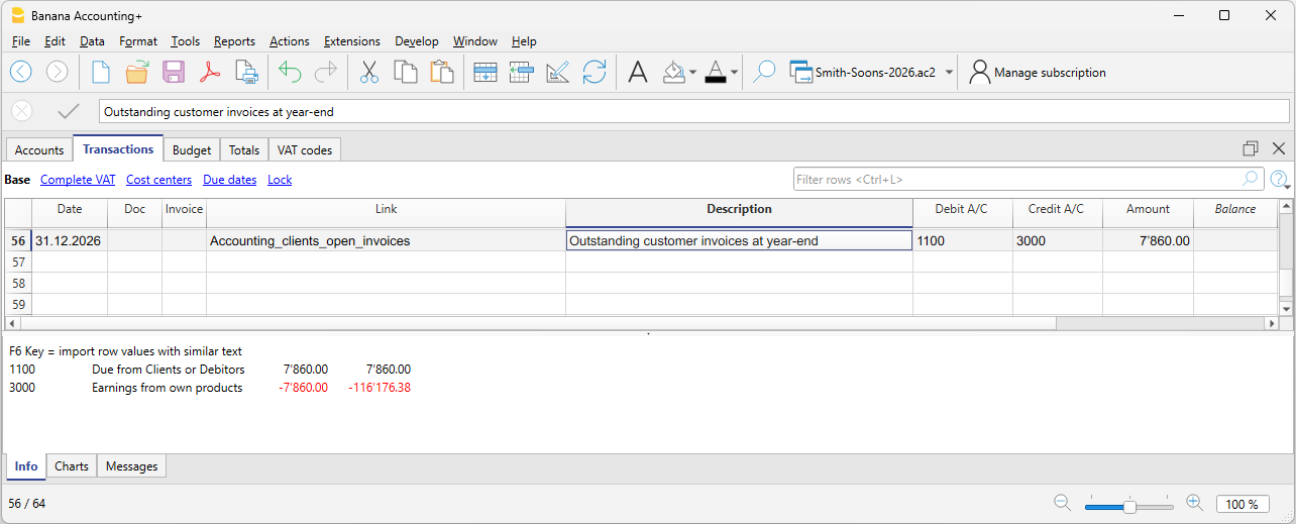
Open customer invoices as of 12/31
If you use cash accounting, at the end of the year you must record customer invoices that have been issued but not yet paid. This closing operation serves to determine the costs and revenues pertaining to the fiscal year. To make the process easier, you can quickly identify the values as of 12/31 using the open invoices by customer functions.
Open supplier invoices as of 12/31
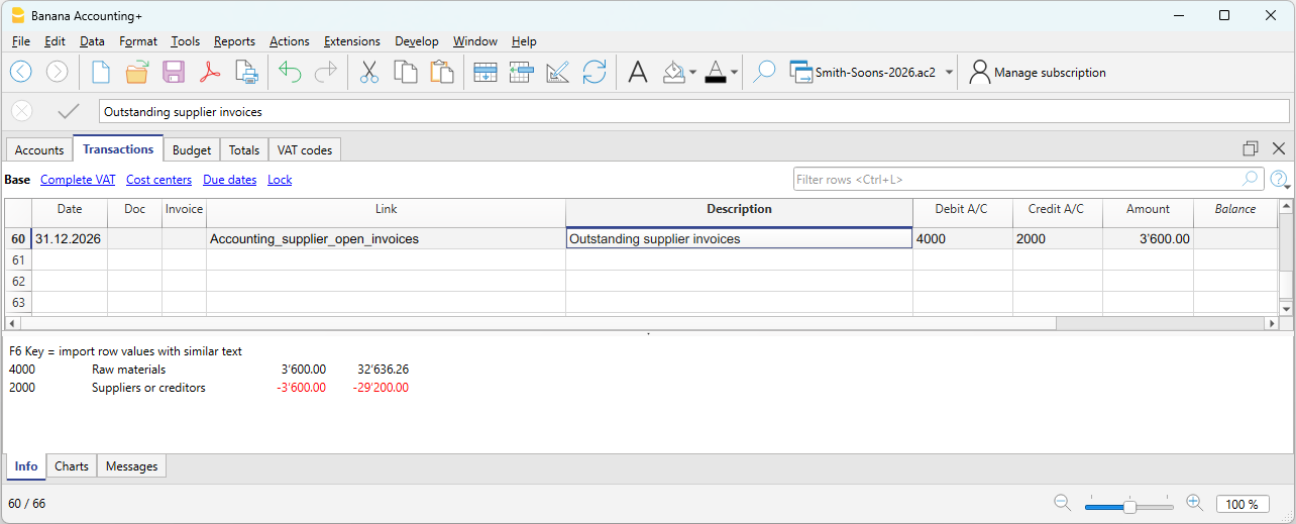
If you use cash accounting, at the end of the year you must record supplier invoices received but not yet paid. This closing operation serves to determine the costs and revenues pertaining to the fiscal year. To make the process easier, you can quickly identify the values as of 12/31 using the open invoices by supplier functions.
Depreciation
At the end of the fiscal year, you must record the depreciation of movable and immovable assets and consider accelerated depreciation for assets subject to rapid obsolescence.
You can use our application Fixed assets register which automatically creates depreciation transactions that you can import into your accounting file. The depreciation transaction varies depending on the method used:
- Direct depreciation: the depreciation is recorded directly in the income statement, using the depreciation account on the debit side and the asset account on the credit side. In the balance sheet, the asset always appears with its residual value.
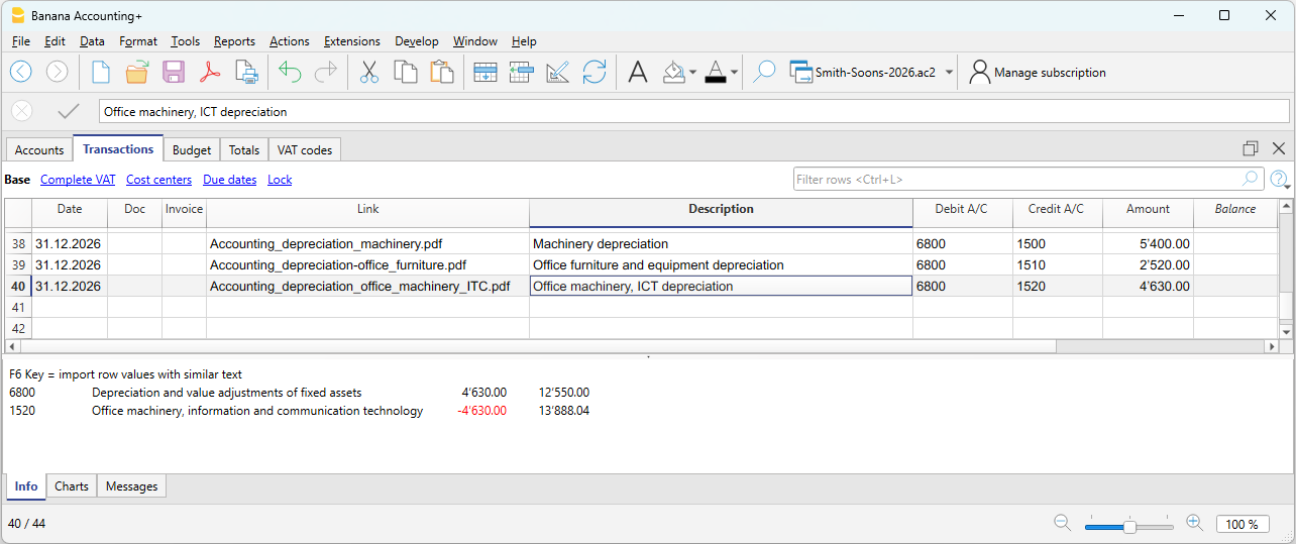
- Indirect depreciation: in this case, the depreciation is recorded not as a reduction of the asset but as an adjustment by posting it to a depreciation fund (reduction of assets).
Inventory adjustment
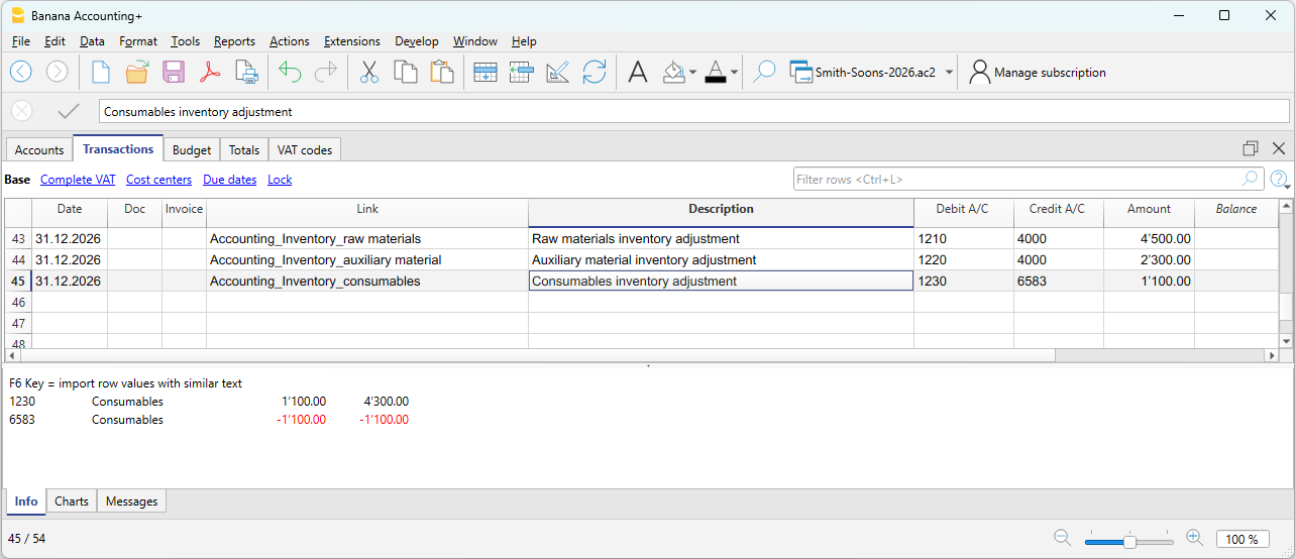
If you have inventory with goods, or simply a company material inventory, the inventory value at year-end must be adjusted in accounting. During the year, inventory movements are not recorded in the accounting file:
- Incoming and outgoing goods and their respective values are managed and updated in a dedicated inventory file or application.
Our Inventory application makes it easier to manage incoming and outgoing quantities, unit prices and final inventory values, allowing you to quickly determine the adjustment to be recorded at year-end in your accounting.
To calculate the inventory value to report correctly in the Balance Sheet:
- Determine the inventory value.
- Compare the beginning inventory value with the ending value.
- Record the difference as a change in inventory using the income statement account for goods as the offset.
In our example shown in Banana, there is an assumed increase in inventory compared to the opening value. Therefore, inventory (account 1200) is recorded on the Debit side, while the decrease in cost of goods is recorded on the Credit side.
Private use
Private use occurs when the business owner uses goods or services belonging to the company (goods, materials, vehicles, premises, etc.) for personal purposes.
For tax purposes, it is as if the company sells to the owner and therefore it must be recorded as revenue. If the company is subject to VAT, the transaction is VAT taxable.
In Switzerland, according to the VAT Act (LIVA), private use is taxable because it represents a private use of goods for which the company has previously deducted VAT.
The value to be considered is generally:
- Market value of the used item, or
- Purchase cost if lower.
The applicable VAT rate is the one of the good (e.g. 8.1%).
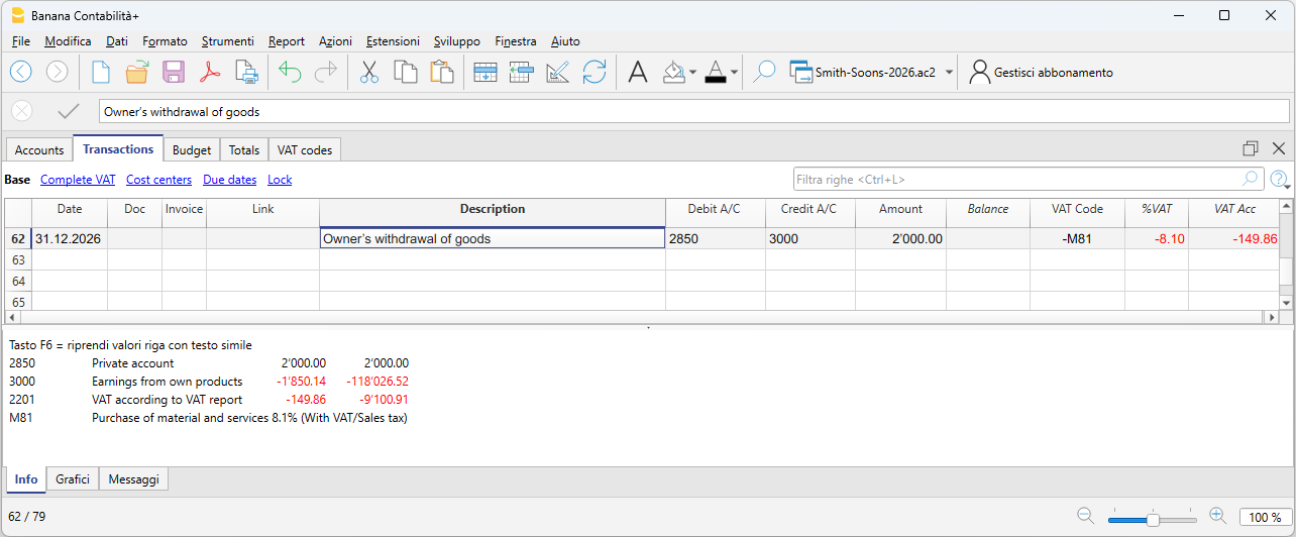
If the owner withdraws goods from the company for personal use:
- Revenue is recorded (as if it were a sale).
- VAT is calculated on the value of the goods.
- Inventory is reduced.
Private use of company vehicles:
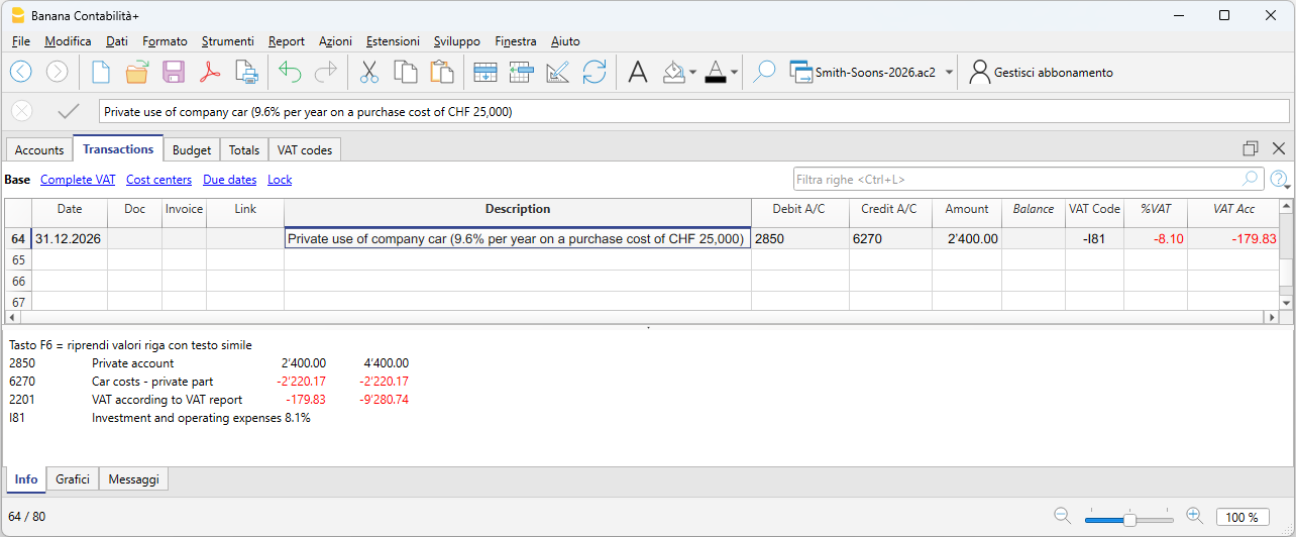
If the owner uses the company car for personal purposes, the private use must be recorded as if it were company revenue. If the company is subject to VAT, the transaction is VAT taxable.
- The amount to be recorded is either a flat rate or calculated according to tax rules (e.g. 9.6% of the purchase price per year).
- Private use is considered revenue.
- VAT must be declared as VAT payable.
- The offset can be:
- a reduction in vehicle costs (6900), or
- a reduction in the asset value (vehicle), often preferred for sole proprietorships.
Adjustment of Taxes and Duties account
The adjustment of taxes and duties is a year-end entry that serves to:
- Record the taxes and duties accrued during the year but not yet paid.
- Adjust previously estimated amounts based on the actual tax assessment.
This ensures the correct cost is recognized for the fiscal year and the related liability to the tax authority is recorded.
It is also necessary to check that the advance payments made during the year refer to the current fiscal year.
Tax payments relating to previous years must be recorded to close the accruals present in the "Direct taxes" (balance sheet) account.
If the accrual balance is insufficient or excessive, the difference must be recorded as an extraordinary cost or revenue, or as a prior period item, depending on the nature of the variation.
Adjustment of the Private account
The private account (usually 2850 / 2860) is used in sole proprietorships or partnerships to record:
- Personal withdrawals by the owner
- Personal deposits by the owner
- Use of company assets for personal purposes (private use)
- Private expenses mistakenly paid by the company
- Year-end adjustments
At the end of the year, this account must be adjusted to reflect the correct balance between the owner and the company.
If the private account is an asset (debit balance) and therefore represents a receivable from the owner to the company, interest could theoretically be recognized.
VAT closing and declaration
For companies subject to VAT, it is important at year-end to check the VAT entries and proceed with the closings correctly. Banana Accounting Plus supports data checking and the preparation of VAT declarations (Advanced plan) for Switzerland, making it easier to manage everything in an orderly and compliant manner. At the end of the year, after proper checks and error corrections, you must:
- Record VAT for the fourth quarter (or the last semester in the case of the flat-rate VAT method).
- You must transfer the balance of the automatic VAT account to the VAT due account.
- Before submitting the final VAT declaration:
- Open the PDF files of the VAT reports previously submitted to the FTA.
- Use the VAT extensions to recalculate the VAT reports for each previous period.
- Verify that the newly calculated VAT reports still match those already submitted.
- Use the VAT Summary command to view various reports and create a PDF printout for data archiving. These documents will be useful in case of a tax audit.
Adjustments for AVS/AI/IPG/AD
The AVS/AI/IPG/AD contributions are mandatory social security contributions in Switzerland covering pension (AVS), disability (AI), allowances for military service and maternity (IPG), and unemployment (AD).
- During the year, the AVS contributions account usually records advance payments made to the Cantonal AVS Compensation Office (Debit) and the amounts withheld from employee salaries (Credit).
- If during the year the family allowances paid to employees were recorded in a dedicated account, for example in the “Family allowance contributions” account, to reconcile the accounting with the AVS year-end statement and record the corresponding adjustment, you can transfer the balance from this account to the AVS/AD Contributions account.
Accident insurance adjustments (LAINF, supplementary LAINF)
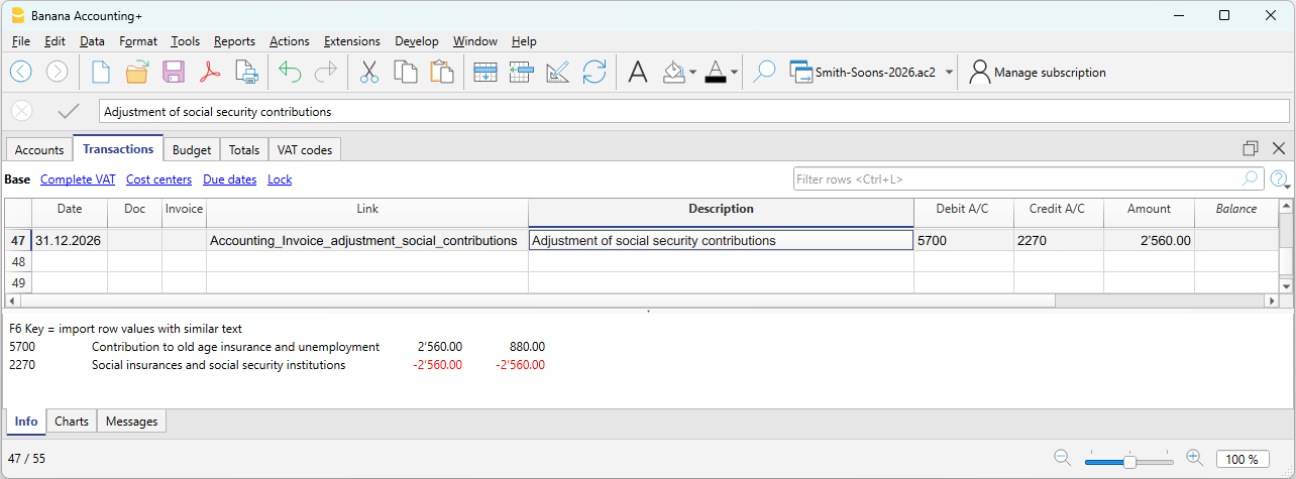
LAINF and supplementary LAINF contributions in Switzerland are mandatory insurance contributions against professional and non-professional accidents (LAINF) and additional coverage provided by the employer (supplementary LAINF).
With the recording of the December salaries and the payment of the thirteenth salaries, you need to print the salary list showing all gross wages. You must report the total AVS gross wages to the employee insurance providers, who will determine any adjustments to be paid.
Pension fund adjustments
The pension fund (or LPP) is the mandatory Swiss occupational pension insurance that complements the AVS pension.
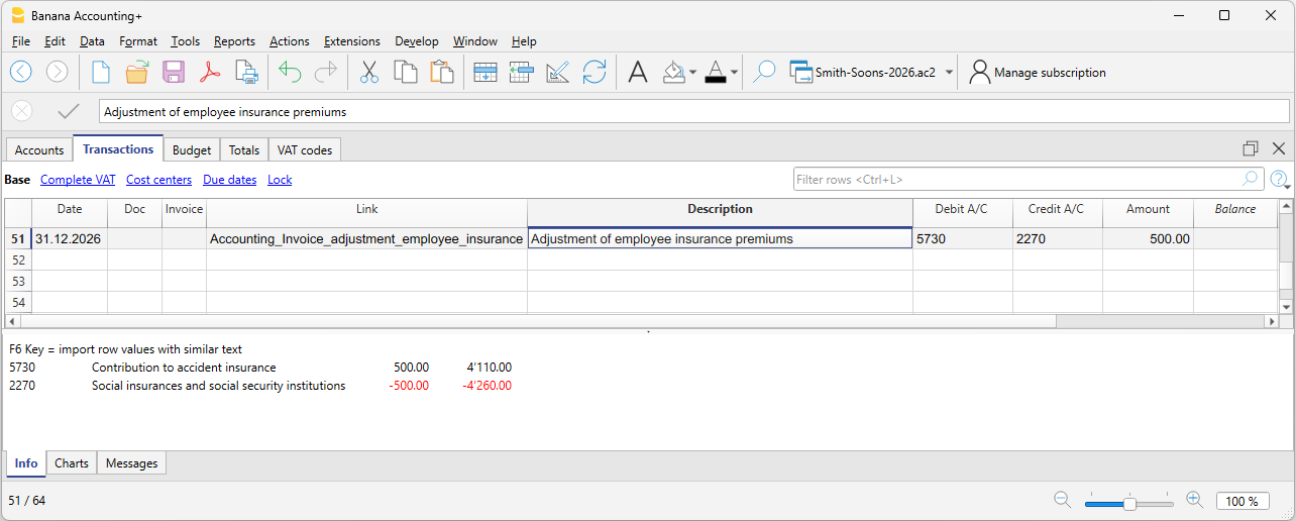
Many second pillar (LPP) pension providers calculate the annual premium based on salary estimates provided by the company before the end of the year. Bonuses are not included. Important changes during the year must be communicated promptly so the insurance can adjust the premium. The company may also decide to pay a higher amount in advance to avoid a deficit due to changes during the year.
At the end of the year, the LPP insurance sends a final statement showing either a payable or receivable balance, depending on whether too much or too little was paid.
In the following example, a balance is assumed to be payable. Therefore, the entry will be made in two accounts: Debit to the LPP Contributions account and Credit to the Liabilities to pension institutions account.
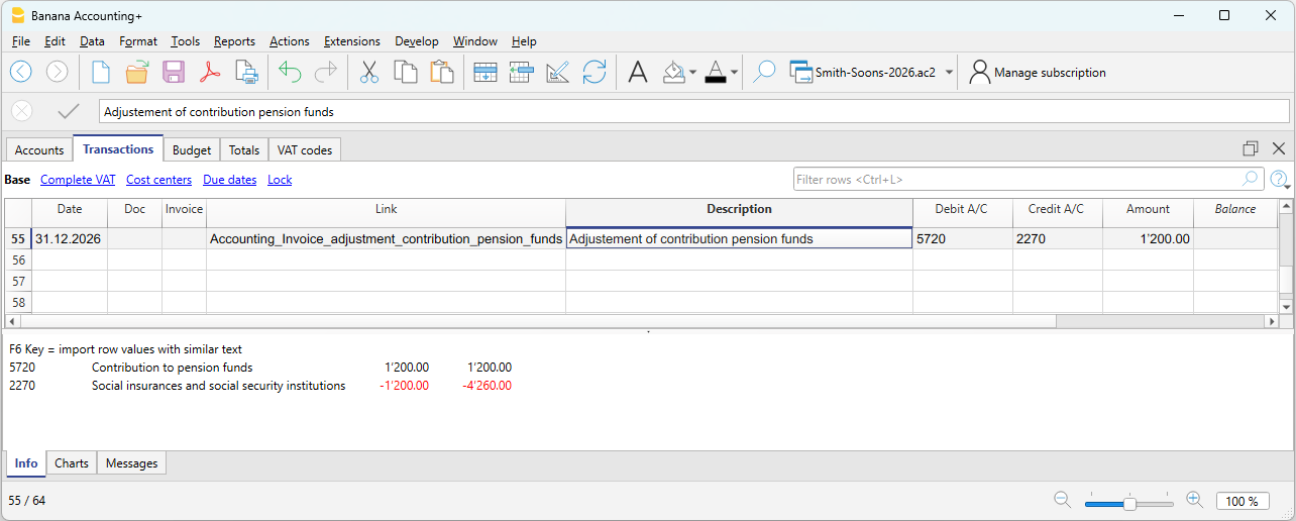
In case of a receivable, the LPP Contributions account is reversed: Debit the Receivables from pension institutions account and Credit the LPP Contributions account (as a decrease).
In the new year, the receivable must be reversed from the LPP Contributions account (for the new year) and the receivable is closed on the Credit side.
Adjustment of the allowance for doubtful accounts (Delcredere)
The allowance for doubtful accounts / Delcredere is a contra asset account associated with receivables. It is used to reduce the value of customer receivables to account for the risk that some may not be collected.
In practice:
- Receivables on the balance sheet are shown at a realistic value.
- The allowance represents an estimate of possible losses.
- It increases the prudence of the balance sheet, as required by the Swiss Code of Obligations.
Debit the expense account "Doubtful accounts" and credit the allowance for doubtful accounts.
Adjustment of withholding tax (IAF)
During the year, the employer withholds the tax at source from the salaries of foreign employees who are not fiscally domiciled in Switzerland. The withheld amounts must be paid to the Tax Office each quarter.
At the end of the year, with the final December report, the declaration for the last quarter’s withholding tax is made. All gross salaries paid are reviewed, and in case of changes or errors, corrections can be made in the final declaration.
Generally, the total amount payable for fourth quarter withholding tax is recorded as a liability as of 12/31 or, if too much was paid, as a receivable. The offset account is always the salaries account (account 5000).
Reimbursements for executive staff
“Executive staff” refers to management figures (CEO, directors, unit heads).
Reimbursements may be for actual expenses incurred by the executive employee on behalf of the company. These are not taxable for the employee and are therefore not subject to AVS, LPP, or withholding tax, provided that they are documented or, in the case of flat-rate allowances, approved through regulations by the FTA.
In this case, they are recorded in accounting as expense reimbursements or personnel expenses.
Overlopende activa en passiva
Overlopende posten zijn eindejaarscorrecties die worden gebruikt om het toerekeningsbeginsel toe te passen, waarbij kosten en opbrengsten worden toegerekend aan het jaar waarop zij economisch betrekking hebben, ongeacht het moment van betaling of ontvangst.
Let op
Overlopende posten hebben geen betrekking op facturen die eenvoudigweg niet zijn betaald of nog niet zijn ontvangen, maar op correcties die nodig zijn om de economische toerekening van het boekjaar correct te bepalen.
Verschil tussen overlopende posten
Aan het einde van het jaar kunnen zich twee situaties voordoen:
- Kosten of opbrengsten die zijn opgebouwd maar nog niet zijn geboekt → Overlopende posten
- Kosten of opbrengsten die al zijn geboekt maar niet volledig tot het boekjaar behoren → Overlopende posten
Eenvoudige regel
- Overlopende posten voegen toe wat ontbreekt.
- Overlopende posten stellen uit wat te veel is geboekt.
Overlopende activa en passiva
Overlopende posten hebben betrekking op kosten of opbrengsten die al in het boekjaar zijn opgebouwd, maar die een financiële afwikkeling (ontvangst of betaling) zullen hebben in het volgende boekjaar.
Ze worden onderscheiden in:
- Overlopende activa → Te ontvangen opbrengsten
- Overlopende passiva → Te betalen kosten
De kost of opbrengst behoort volledig tot het lopende jaar, maar is nog niet ontvangen of betaald.
Overlopende activa en passiva (vooruitbetaalde kosten en vooruitontvangen opbrengsten)
Overlopende posten stellen kosten en opbrengsten uit die al zijn geboekt maar betrekking hebben op het volgende boekjaar.
Ze worden onderscheiden in:
- Vooruitbetaalde kosten → stellen een deel van een reeds geboekte kost uit
- Vooruitontvangen opbrengsten → stellen een deel van een reeds geboekte opbrengst uit.
Overlopende posten in de structuur van het rekeningschema van Banana Boekhouding
Overlopende posten worden geboekt via normale boekingen in de tabel Boekingen, met gebruik van specifieke balansrekeningen in het rekeningschema.
De rekeningen zijn opgenomen in de volgende subgroepen:
Vlottende activa
- 1300 Vooruitbetaalde kosten (kosten vooraf betaald)
- 1301 Te ontvangen opbrengsten
Kortlopende schulden
- 2300 Te betalen kosten
- 2301 Vooruitontvangen opbrengsten
Hieronder presenteren wij enkele voorbeelden van overlopende activa en passiva die zijn aangemaakt in de tabel Boekingen van Banana Boekhouding.
Boekhoudmethode en overlopende posten
- In de Facturatiemethode of het toerekeningsbeginsel worden uitgereikte of ontvangen facturen rechtstreeks geboekt op de rekeningen Debiteuren of Crediteuren en verschijnen zij als open posten.
- In de Kasstelsel zijn overlopende posten aan het einde van het jaar nodig om kosten en opbrengsten te boeken die zijn opgebouwd maar nog niet zijn ontvangen of betaald.
- In de Gemengd systeem wordt de oplossing toegepast die het meest in overeenstemming is met de gekozen boekingsmethode.
Geval 1 - Overlopende activa (Te ontvangen opbrengsten)
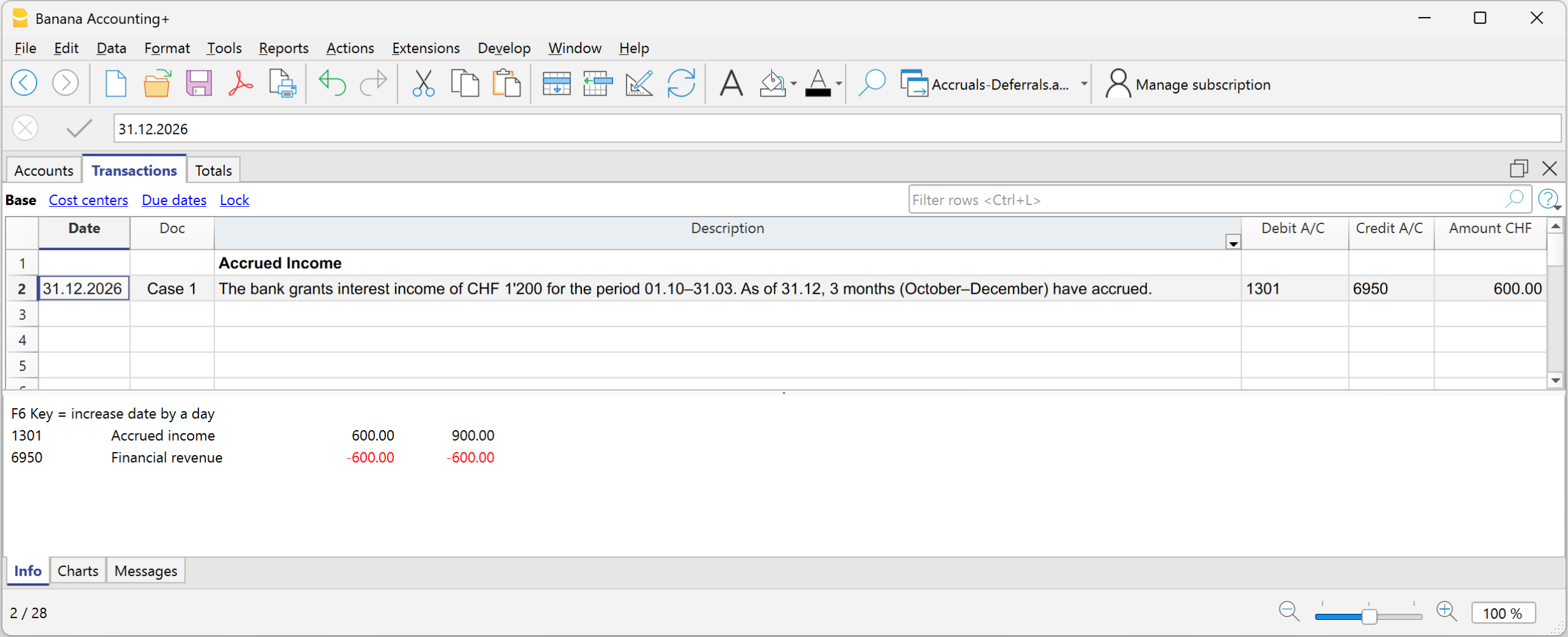
Voorbeeld: de bank kent renteopbrengsten toe van CHF 1’200 voor de periode van 01.10 tot 31.03. Op 31.12 zijn 3 maanden opgebouwd (oktober–december).
Deel dat tot het jaar behoort:
- 1’200 ÷ 6 maanden × 3 maanden = CHF 600
Boeking op 31.12
- Debet: 1301 Te ontvangen opbrengsten CHF 600
- Credit: 6950 Renteopbrengsten CHF 600
In de Resultatenrekening wordt CHF 600 opgenomen voor het deel van de renteopbrengsten dat tot 31.12 is opgebouwd; op de Balans wordt het overlopende actief opgenomen voor de opgebouwde maar nog niet ontvangen rente.
Geval 2 - Overlopende passiva (Te betalen kosten)
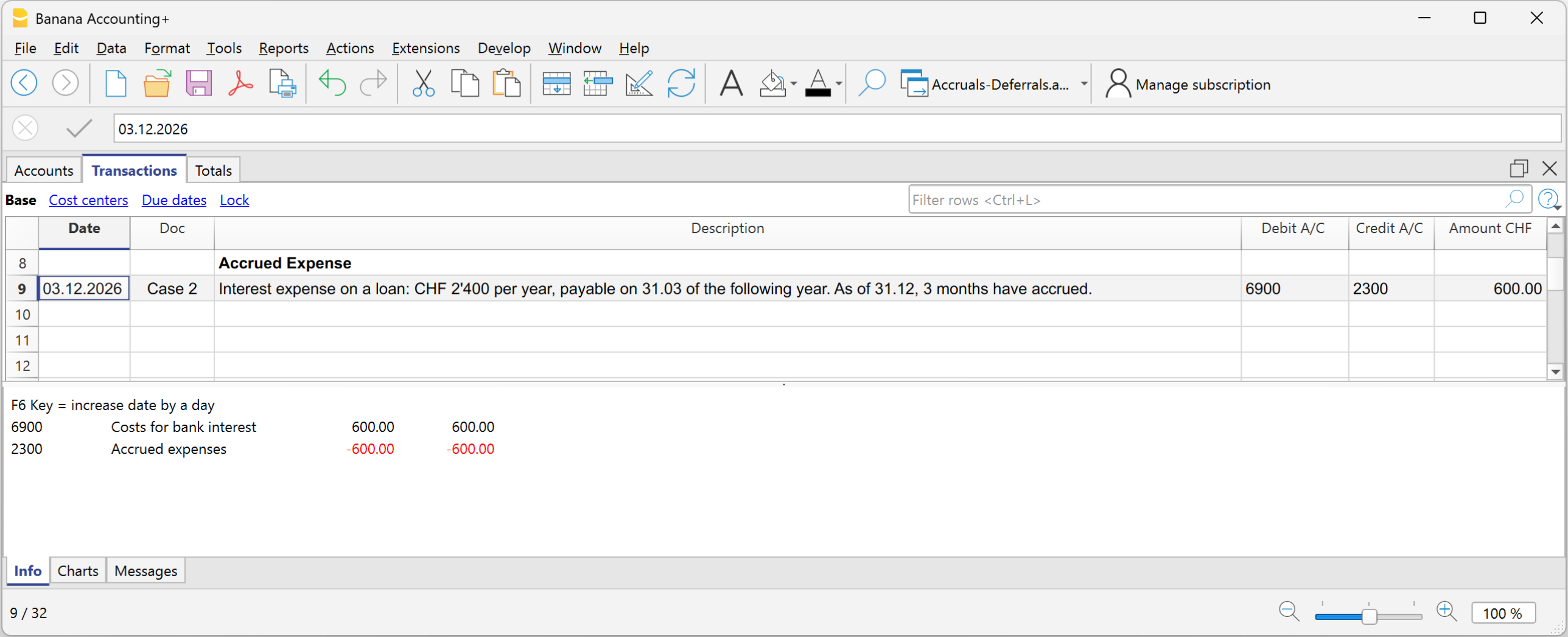
Voorbeeld: Rentelasten op een lening: CHF 2’400 per jaar, betaalbaar op 31.03 van het volgende jaar.
Op 31.12 zijn 3 maanden opgebouwd.
2’400 ÷ 12 × 3 = CHF 600
Boeking op 31.12
- Debet: 6900 Opgebouwde rentekosten CHF 600
- Credit: 2300 rekening Te betalen kosten (schuld) CHF 600
In de Resultatenrekening worden de tot 31.12 opgebouwde rentelasten opgenomen; op de Balans wordt het overlopende passief opgenomen voor de te betalen schuld.
Geval 3 - Vooruitbetaalde kosten
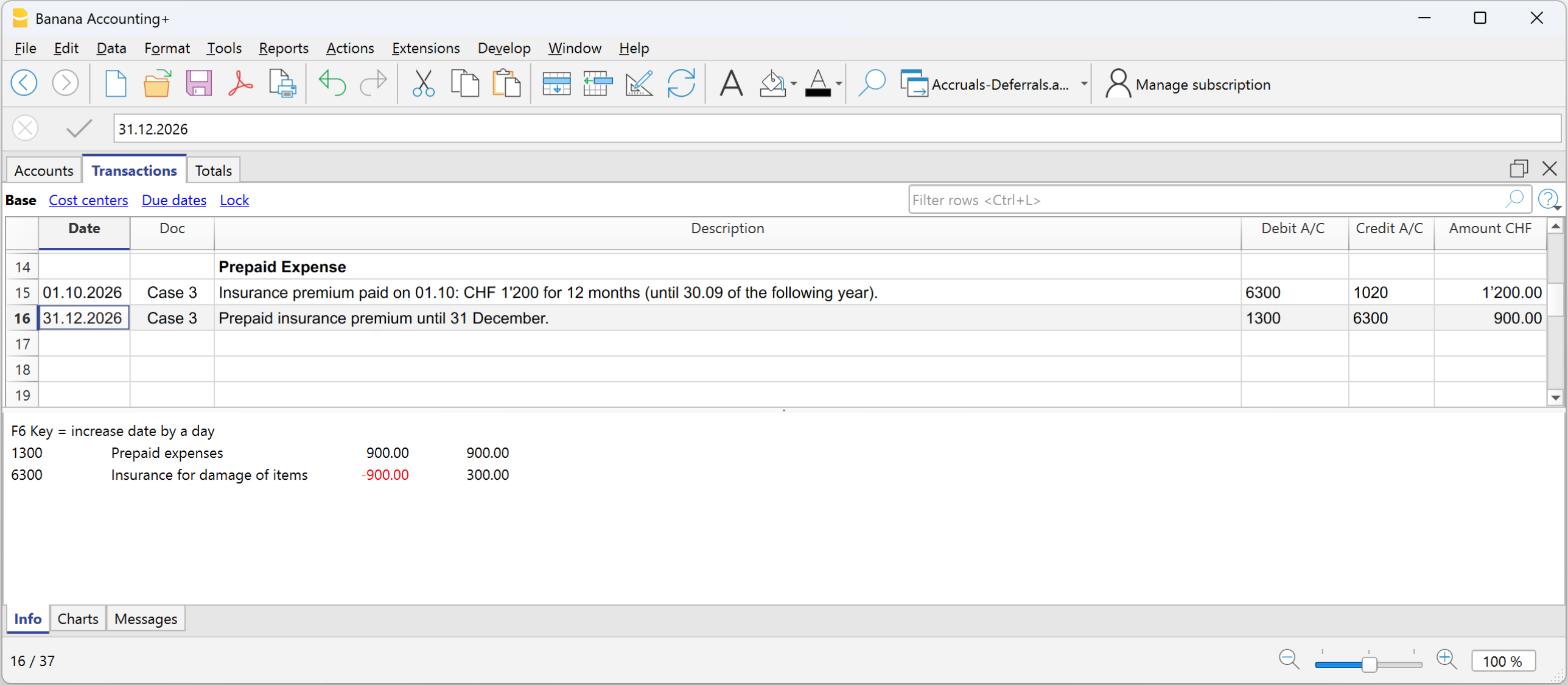
Voorbeeld - Verzekeringspremie betaald van CHF 1’200 voor 12 maanden, voor de periode van 01.10 tot 30.09 van het volgende boekjaar:
Periode die tot het lopende jaar behoort:
Oktober–december = 3 maanden
Deel dat tot het lopende jaar behoort:
1’200 ÷ 12 × 3 = CHF 300
Deel volgend jaar:
1’200 − 300 = CHF 900
Boeking op 31.12
- Debet: Vooruitbetaalde kosten CHF 900
- Credit: Verzekering CHF 900
In de Resultatenrekening blijft een kost van CHF 300 staan omdat een vermindering van de verzekeringspremie wordt geboekt voor het vooruitbetaalde deel; op de Balans blijft CHF 900 staan omdat dit het deel van de kost is dat betrekking heeft op het volgende boekjaar.
Rekeningskaart van de vooruitbetaalde kosten
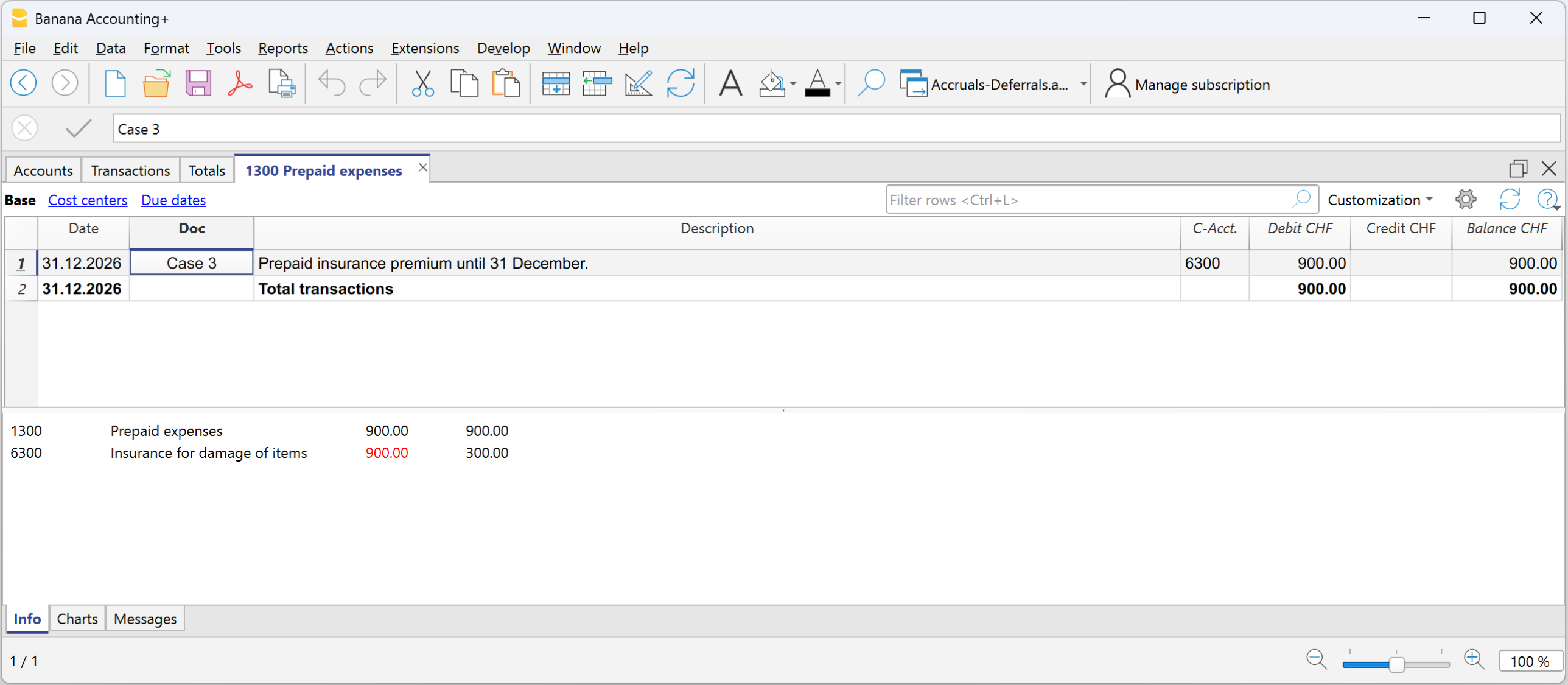
Rekeningskaart van de kost verzekeringspremie

Geval 4 - Vooruitontvangen opbrengsten
Voorbeeld - Halfjaarlijkse huur van CHF 6'000, vooruit ontvangen op 01.12, voor de periode van 01.12 tot 31.05:
Maandelijks deel:
6’000 ÷ 6 = 1’000 per maand
Deel dat tot het lopende jaar behoort:
December = CHF 1’000
Deel volgend jaar:
5 maanden = CHF 5’000
Initiële boeking:
- Debet: Bank CHF 6’000
- Credit: Huuropbrengsten CHF 6’000
Boeking op 31.12
- Debet: Huuropbrengsten CHF 5’000
- Credit: Vooruitontvangen opbrengsten CHF 5’000 (vooruit ontvangen opbrengsten)
In de Resultatenrekening moet de vermindering van de huuropbrengsten worden opgenomen voor het deel dat betrekking heeft op het volgende boekjaar; op de Balans wordt de vooruitontvangen opbrengst opgenomen voor het deel dat vooruit is ontvangen en betrekking heeft op het volgende boekjaar en dat een schuld tegenover de klant vertegenwoordigt.
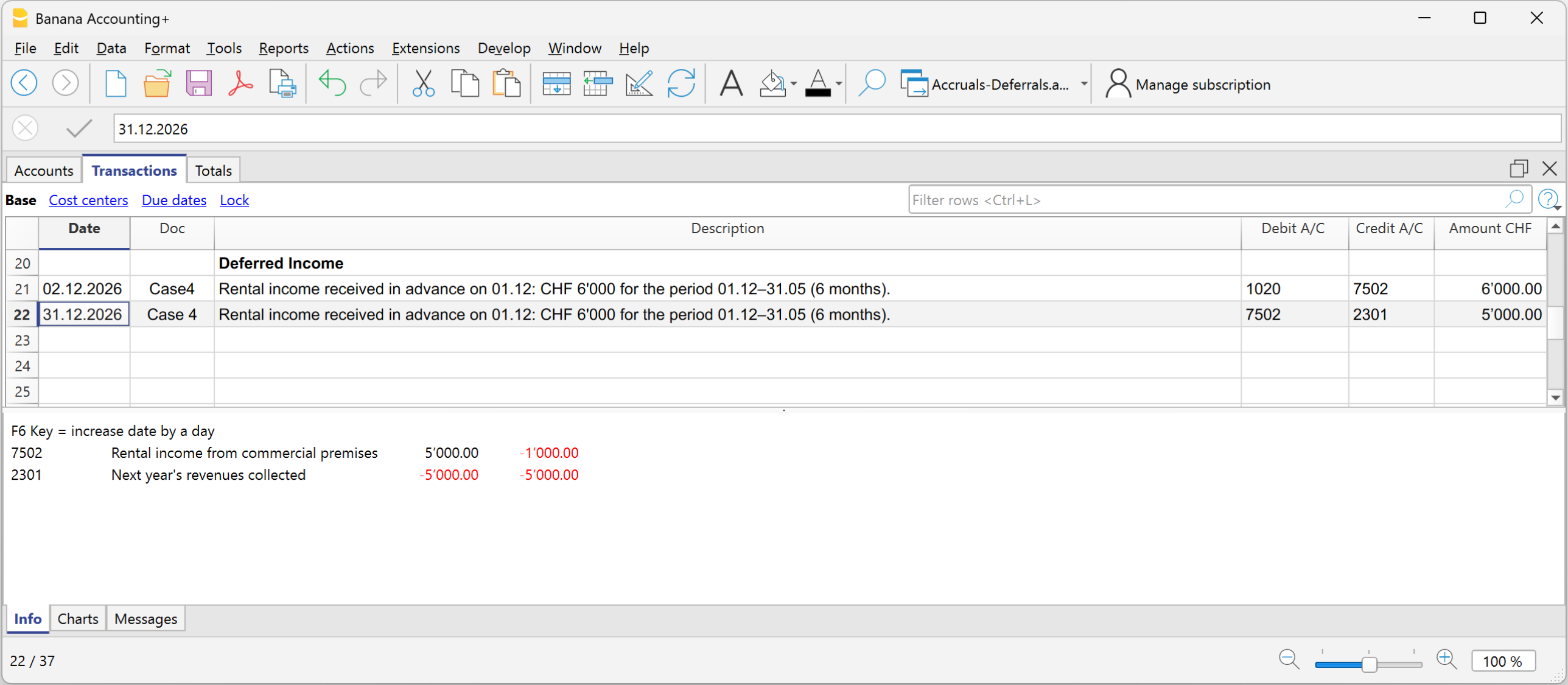
Rekeningskaart Huuropbrengsten
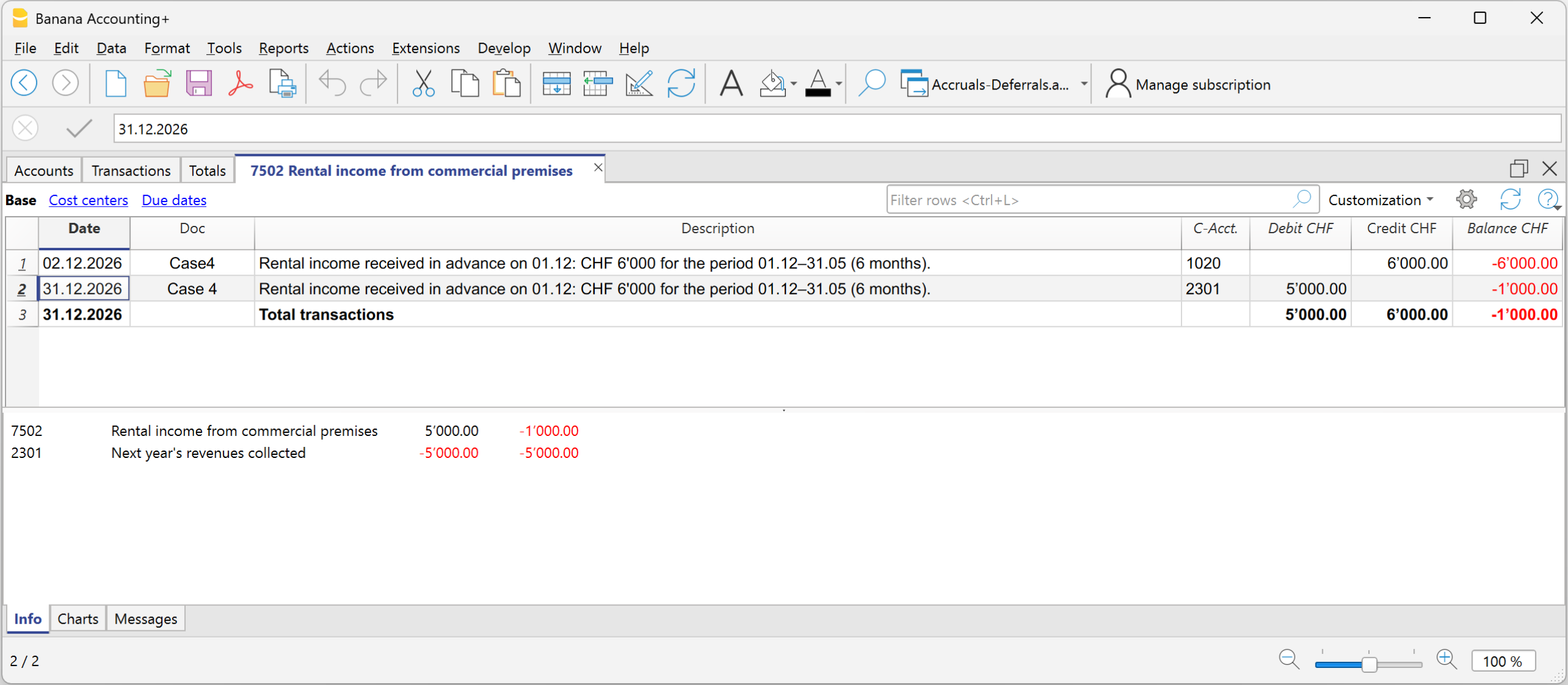
Rekeningskaart Vooruitontvangen opbrengsten
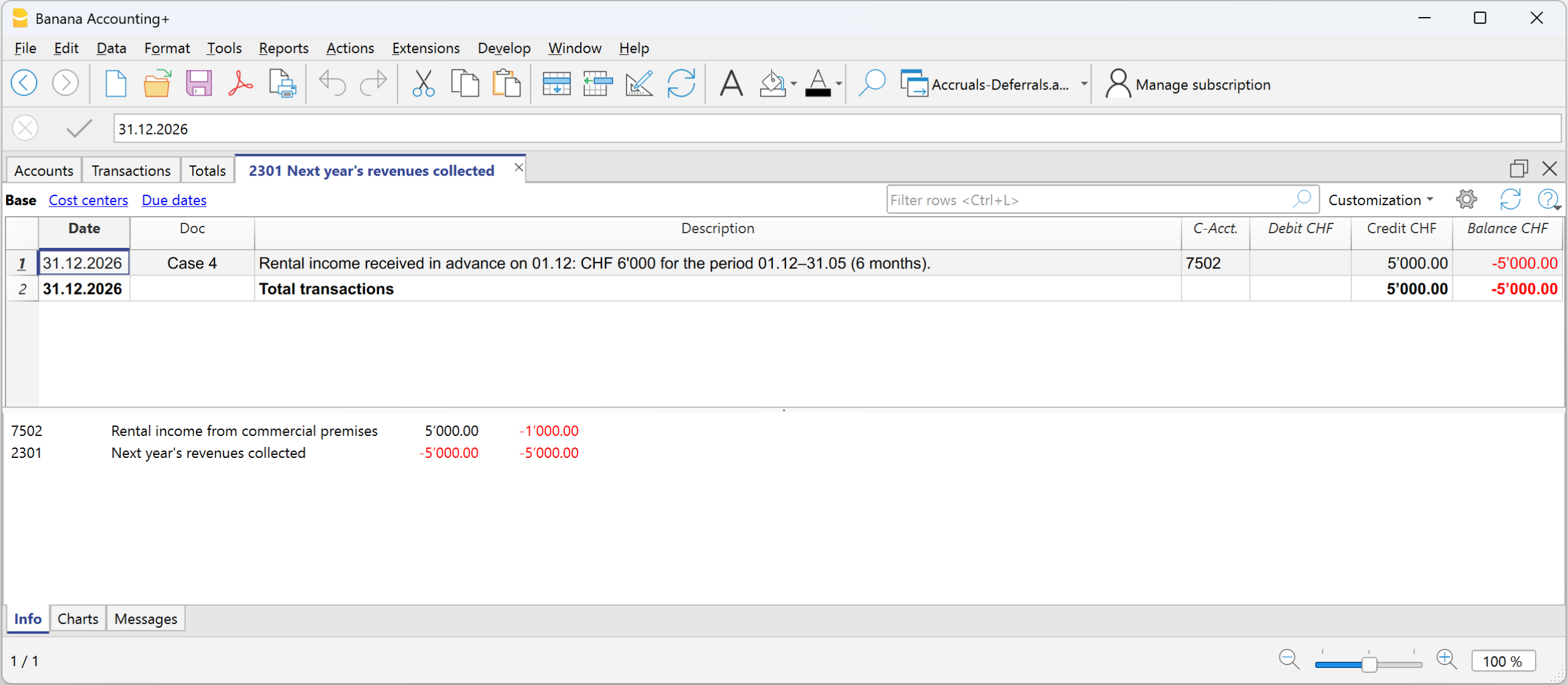
Terugboeking in het volgende boekjaar
Aan het begin van het nieuwe boekjaar worden de overlopende activa en passiva teruggeboekt.
Voor de terugboeking worden dezelfde rekeningen gebruikt die aanleiding hebben gegeven tot de overlopende posten:
- de rekeningen van overlopende posten en de rekeningen van kosten en opbrengsten worden omgekeerd
- of zij worden verrekend op het moment van betaling of ontvangst.
De terugboeking is noodzakelijk om de rekeningen van overlopende activa en passiva af te sluiten.
Samengevat:
Overlopende posten vullen aan wat ontbreekt, vooruitbetaalde kosten en vooruitontvangen opbrengsten stellen uit wat vooraf is geboekt.
Carry forward profit/loss for the accounting period
In Banana Accounting, the profit or loss is automatically allocated during the carry forward of opening balances to the new year using the Create New Year command.
In the dialog window, in the Profit/Loss Allocation section, by clicking the down arrow of the first field, all available balance sheet accounts are displayed.
You can select the account or accounts to which the profit or loss will be allocated. The allocation can be made to a maximum of three accounts, using the three available fields.
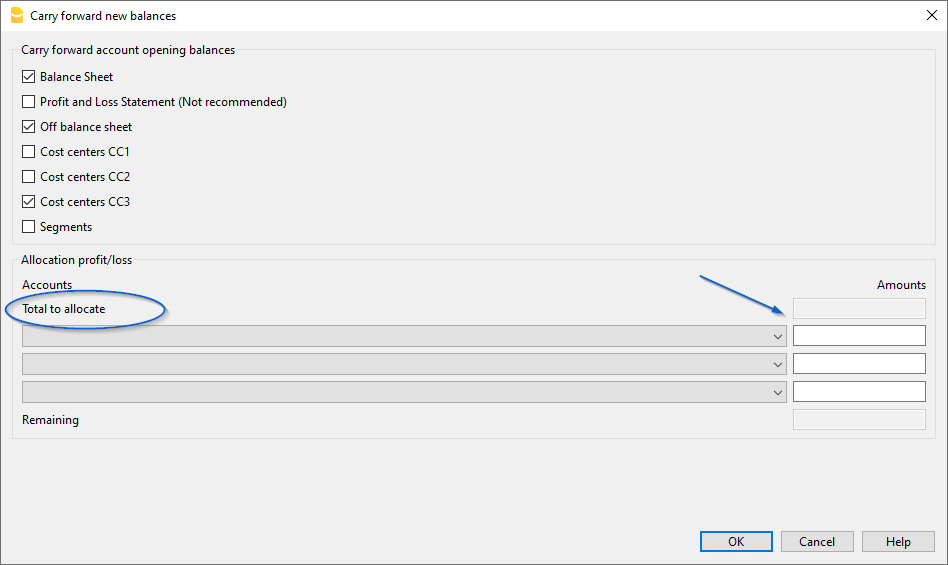
In the field(s) under the Amount column, enter the amount to be allocated for each selected account.
Detailed information about the Create New Year dialog window is available on the documentation page: Carry forward new balances dialog
Uitkering van winst over het jaar
In de boekhouding wordt de registratie van de winstverdeling uitgevoerd wanneer de algemene vergadering van aandeelhouders of het bevoegde orgaan formeel de bestemming van de winst uit de jaarrekening goedkeurt.
Jaarafsluiting
Aan het einde van het jaar worden de rekeningen afgesloten en wordt de winst (of het verlies) van het boekjaar vastgesteld.
- Boekhoudkundige winst = het positieve resultaat van de bedrijfsvoering (inkomsten > uitgaven).
- De winst wordt geboekt in de Resultatenrekening en overgedragen naar het Eigen Vermogen onder de rekening Overgedragen winsten.
De winstverdeling is de bestemming van dit resultaat over verschillende posten, vastgesteld door de algemene vergadering.
Besluit over winstbestemming
De algemene vergadering beslist hoe de winst wordt aangewend.
Hieronder geven we enkele algemene aanbevelingen, maar we raden u aan uw vertrouwde professional te raadplegen
Voorbeeld van rekeningen voor de winstverdeling:
- Wettelijke reserve
- Andere reserves
- Dividenden aan aandeelhouders
- Overgedragen winsten
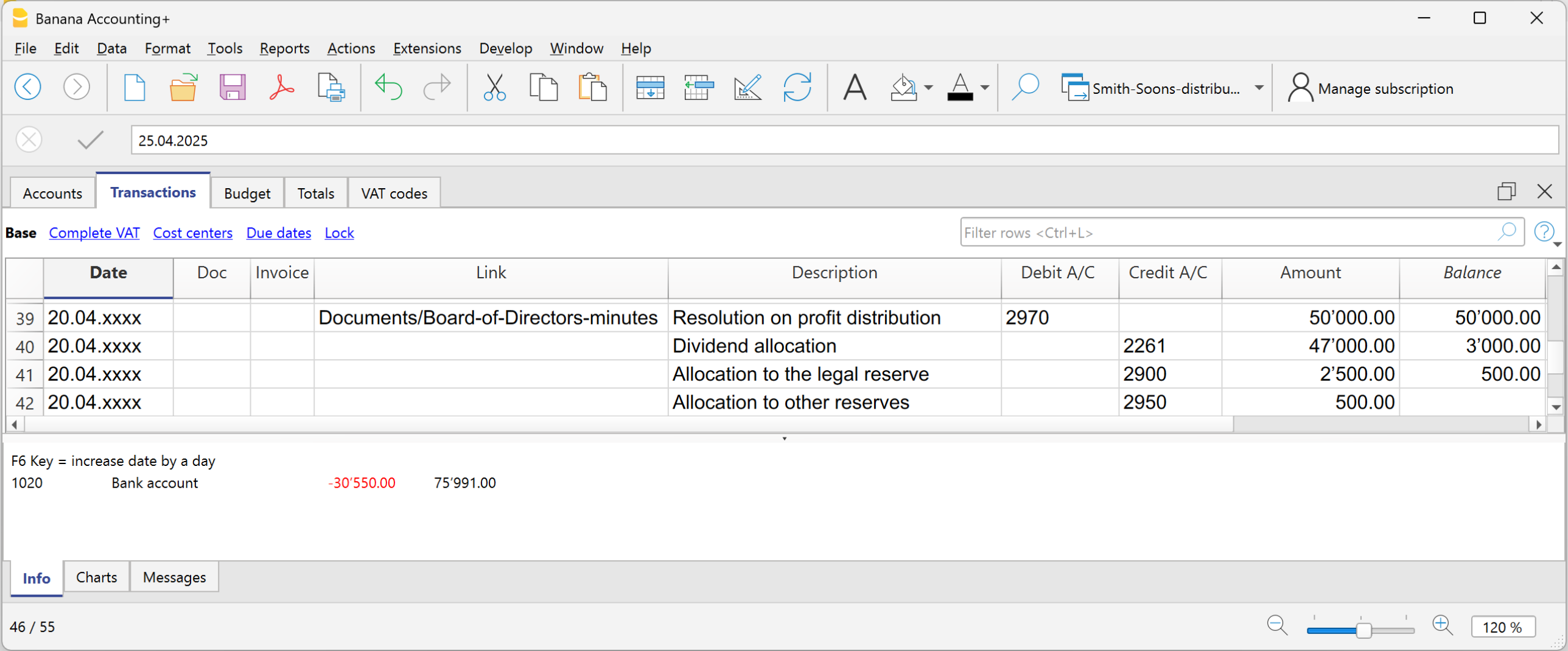
De winstverdeling wordt niet geboekt op het moment van betaling, maar op de datum van het officiële besluit. De betaling is slechts de volgende stap in het aflossen van de schuld aan de aandeelhouders.
- Van de ingehouden winstrekening worden de bedragen overgeboekt naar de verschillende rekeningen die in de resolutie zijn vastgelegd.
Bronbelasting op dividenden in Zwitserland
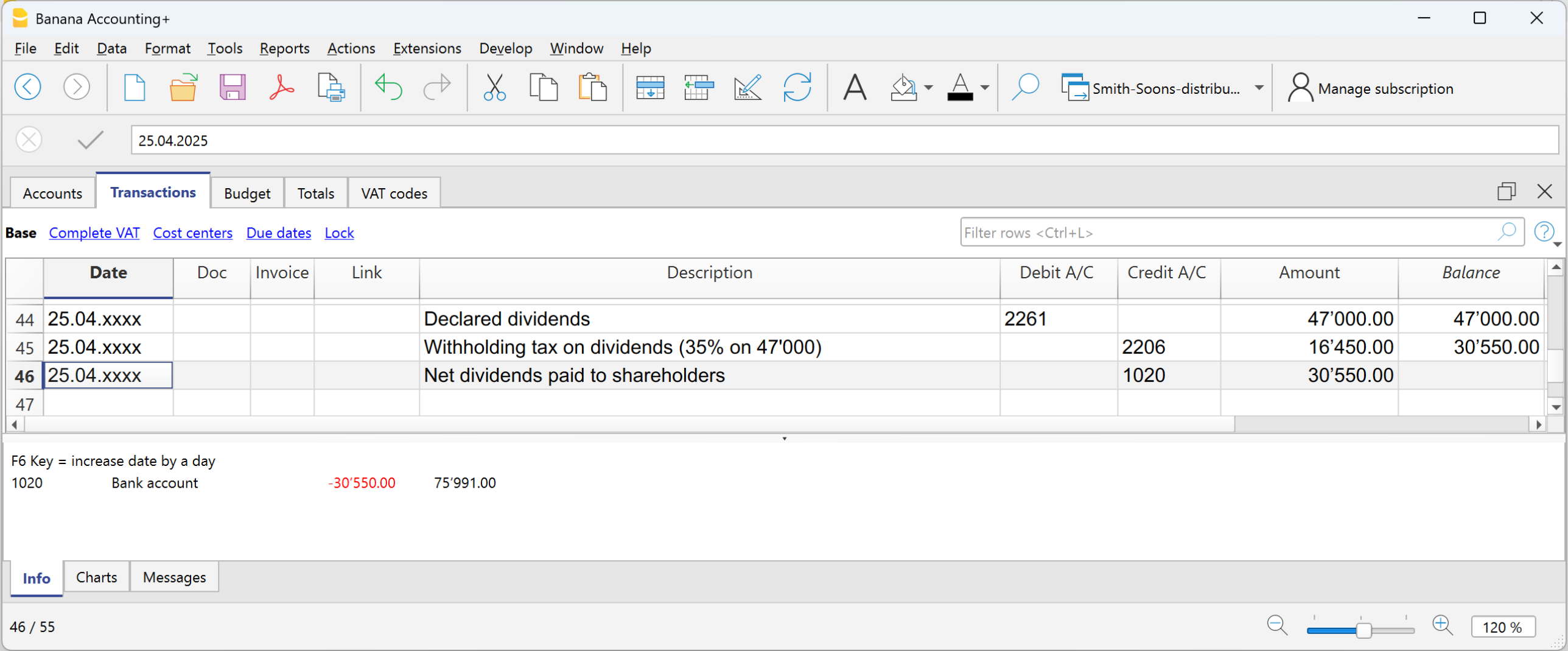
In Zwitserland moet een vennootschap bij het uitkeren van dividenden aan haar aandeelhouders een belasting inhouden die “bronbelasting” wordt genoemd, ten belope van 35% van het uitgekeerde bedrag.
Ze wordt “bronbelasting” genoemd omdat ze aan de bron wordt geheven, dus onmiddellijk, op het moment van betaling, vóór de aandeelhouder het geld ontvangt.
De bronbelasting op dividenden is een verplichte fiscale inhouding van 35%, die twee functies vervult:
- Het garanderen van belastinginkomsten (de staat ontvangt de belasting onmiddellijk).
- Het voorkomen van belastingontduiking (wie dividenden niet aangeeft, krijgt de inhouding niet terug).
Uitbetaling van dividenden
Op het moment van de uitbetaling van de dividenden houdt de vennootschap 35% in als bronbelasting.
De bronbelasting moet worden aangegeven op het officiële portaal en vervolgens worden overgemaakt aan de Zwitserse Federale Belastingdienst (SFTA).
Terugbetaling van de bronbelasting op dividenden
- Aandeelhouders die in Zwitserland wonen, kunnen de volledige inhouding terugkrijgen door hun belastingaangifte in te dienen (de fiscus verrekent dit met de verschuldigde belastingen).
- Aandeelhouders in het buitenland kunnen ze gedeeltelijk terugkrijgen, afhankelijk van de dubbelbelastingverdragen tussen Zwitserland en hun woonland.
Preparing the documentation for Audit
Before sending the accounting to the auditor, it’s important to make sure the closing work is complete and consistent. We recommend visiting the page Year-end closure, where you’ll find guidelines on preliminary checks and the Banana Accounting features useful for properly finalizing the year.
Since the documents requested by the auditor may vary each year, we suggest preparing a custom checklist, noting which documents were requested in past years and what closing or adjustment operations were needed.
Preliminary preparation
Good organization throughout the year greatly simplifies the work for both the person doing the accounting and the auditor. We recommend:
Creating a folder for digital documents
Store all digitized documents for the fiscal year in a single folder: invoices, cash receipts, AVS statements, insurance and pension documents, bank communications, and other relevant documents.
Scanning the supporting documents
Regularly scan paper documents. This allows you to have organized and always accessible documentation.
Linking documents to transactions
With Banana Accounting Plus, you can attach supporting documents directly to accounting entries. The auditor will be able to view them with a single click, without searching through paper folders, making the work faster and more efficient.
How to send accounting to the auditor or fiduciary
With Banana Accounting Plus, you can digitally share all fiscal year data: the accounting file (.ac2), digitized documents, and required reports.
Sharing via Cloud
If you store your data on a cloud service (Dropbox, OneDrive, Google Drive), you can share the folder containing the accounting and supporting documents.
For added security:
- Share the most sensitive documents as read-only
- or create a copy of the folder before sharing it
- if necessary, prepare a second folder with edit permissions
See the page Accounting in the Cloud for more information.
Sharing via USB stick
If you store the data on your hard drive, you can copy it to a USB stick or another storage device and hand it over directly to the auditor or fiduciary.
If the auditor or fiduciary doesn’t have Banana Accounting Plus
The auditor can download Banana Accounting Plus for free from our website and use the Free plan to open the accounting file (.ac2).
With the Free plan, they will be able to:
- open and review the accounting
- view the transactions and account details
- access the attachments linked to the entries
The Free plan does not allow saving changes or printing, but it still allows the auditor to carry out all necessary checks.
Sending documentation in PDF format
If you prefer not to share the .ac2 file or if the auditor does not use Banana Accounting Plus, the program still allows you to generate a complete PDF dossier.
Using the command from the File menu > Create PDF dossier you can include:
- Account cards
- Journal
- Enhanced balance sheet with groups
- Accounting report
- VAT summary
- End-of-year PDF printouts
With the Advanced plan, you can also include the digital attachments linked to the entries, creating a single comprehensive document to send via email.
Support for closing operations
If the year-end checks or closing are managed by the fiduciary:
- you can send them the .ac2 file
- or share the Cloud folder that also contains the digitized documents
This way, there is no need to deliver paper files and the fiduciary can work faster by consulting the digital documents independently.
If they do not use Banana Accounting, you can send them the PDF dossier. The fiduciary will be able to review the data and inform you of any changes or entries to be made.
Documents to be sent to the auditor
Below is a list of documents that are normally requested during an audit. You can use it as a base and customize it according to the needs of your company or the requests of your auditor.
Employee Declarations
- AVS salary declaration and adjustment as of 31.12
- Family allowance declaration (included in the AVS declaration)
- Employee salary journal
- Salary account cards
- Salary certificates
- LAINF and complementary LAINF declarations with adjustment
- Sickness benefit declarations
- LPP statement as of 31.12
- Withholding tax calculations, quarterly and annual
Bank/Post Account Statements and Calculations
- Final statements as of 31.12
- Bank calculations for withholding tax
- Loan statements
- Investment statements
- Copy of form 103 sent to the FTA
VAT Declarations
- Quarterly VAT calculations
- Quarterly VAT declarations
- Turnover – VAT reconciliation
- Any VAT adjustments
Documents for Year-End Closing
- List of open customer and supplier invoices as of 31.12
- Inventory valuation
- Details of accruals and deferrals
- Details of fixed assets and depreciation
Official Documents
- Minutes of ordinary and extraordinary meetings
- Tax ruling from the previous year
- Payment order for withholding tax
- Copies of active contracts (leasing, loans, rental)
- Insurance values of buildings
- Documents for any patents
- Annual reports and appendix to the financial statement
Printouts and Archiving
With Banana Accounting Plus you can automatically generate:
- Account cards
- Journal
- Enhanced balance sheet with groups
- Watch the video tutorial showing how to create and print the enhanced balance sheet with groups.
- Accounting report
- VAT summary
- Year-end PDF printouts
PDF Dossier
The Create PDF dossier command allows you to generate a single file with the entire documentation of the fiscal year.
Archiving
It is good practice to keep:
- the accounting file
- the PDF printouts
- backup copies on an external drive.
Tools and exports useful for the auditor
Banana Accounting Plus allows you to export data in various formats.
- The auditor can use the Free plan to open the accounting file.
- Data can be copied and pasted into other programs.
- Tables can be exported in various formats.
- The Create PDF dossier command generates a complete file ideal for reading.
- Extensions allow specific exports:
- Audit File Reports creates reports that can be useful for the auditor and can be copied and pasted into Excel.
- Standard Audit File - for Tax.
Export of data in XML and other formats according to OECD guidelines and for specific countries. - Search the extensions to see if there are specific extensions for your country.
Other Useful Information
Changes after the end of the financial year
Closing the fiscal year is the moment when you verify that the accounting is complete, consistent, and ready for the next year. Once completed, ideally no further changes should be made. However, it may happen that missing transactions, errors, or unrecorded exchange rate differences are identified.
This page explains when it is necessary to make changes after closing and which tools Banana Accounting offers to do so correctly.
When it is necessary to intervene after closing
The most common situations are:
- Exchange rate differences not recorded in multi-currency accounting.
- Missing transactions entered late.
- Posting errors identified afterwards.
In any case, it is important to document the reason for the intervention and ensure that the changes comply with the fiscal and legal framework.
Adjustments in the following year (recommended procedure)
If you have already reviewed the accounting or submitted the tax return, you should not make changes to a closed year.
In this case, we recommend that you:
- Record the adjustment in the new year.
- Clearly describe the issue in the entry or in an attached document.
- Check the tax impact with your accountant.
Multi-currency case
For unrecorded exchange rate differences in a closed year:
- record the difference in a transition account (e.g. Prior year exchange adjustment)
- create an opening entry to reset the account
- allocate the change to the exchange gain/loss account
This procedure allows you to keep balances correct without retroactively modifying the closed year.
Changes to a closed year
If you have not yet reviewed or submitted the tax return, you can still make corrections directly in the file of the closed year. In this case:
- Proceed with caution, limiting yourself only to essential changes.
- Run the Check accounting command again to verify that the entries are correct and balanced.
- Save and reclose the year.
- Open the new year and run the Update opening balances command to realign the balances.
Useful Banana tools to manage adjustments
Create exchange rate difference entries
Allows you to automatically generate transactions for exchange rate differences as of the closing date, using the rates in the Exchange rates table. This is especially useful if the year has not been definitively closed.
Update opening balances
This command, available from the Actions > Update opening balances menu, transfers the final balances of the previous year into the new fiscal year. Use it whenever you make changes to the closed year or to the chart of accounts, to ensure consistency between years.
Check accounting
This command, available from the Actions > Check accounting menu, performs a complete check of imbalances, posting errors, or inconsistent entries. It is recommended after each change, both in the previous year and in the new one.
Common errors and how to fix them
- Opening balances of the Income Statement reported by mistake
Delete the amounts from the Opening column and run Update opening balances. - Profit or loss for the year not reported correctly
Correct the entry in the previous year and then update the opening balances in the new year. - Imbalances after changes to the previous year
Use Update opening balances and run Check accounting again.
Best practices
- Always run the checks and record all exchange rate differences before creating the new year.
- In case of changes after closing, always document the reasons for the intervention.
- Before making changes to a closed year, consider the legal and tax implications with a professional.
- After each adjustment, use the Update opening balances and Check accounting commands to ensure data consistency.