Risorse universali per Aziende
Banana Contabilità Plus è un software di contabilità professionale, facile da usare e disponibile a un prezzo altamente competitivo. È ideale per piccole imprese e liberi professionisti.
Scegli tra i modelli universali pronti all'uso, facilmente adattabili al tuo Paese, alla tua attività e alle tue specifiche esigenze contabili.
Applicazioni contabili
Banana Contabilità include diverse applicazioni contabili in un unico software: Gestione cassa, Contabilità entrate e uscite, Contabilità in partita doppia e Contabilità multimoneta, con o senza gestione IVA.
Per ogni applicazione contabile sono disponibili modelli pronti all'uso, facilmente adattabili a qualsiasi Paese o attività aziendale.
Crea fatture facilmente
Ogni attività ha esigenze di fatturazione diverse. Banana Contabilità offre quindi diversi modi per creare e gestire le fatture:
- Crea fatture direttamente dal tuo file contabile
- Crea offerte e fatture separatamente dalla contabilità
Gestisci clienti e fornitori
Con i modelli pronti all'uso che includono i registri clienti e fornitori, puoi tenere facilmente sotto controllo fatture, pagamenti e incassi.
Basta inserire il conto del cliente o del fornitore nelle registrazioni per ottenere uno storico completo per ogni contatto. Puoi anche aggiungere la gestione clienti e fornitori a un file contabile esistente.
Importa le registrazioni e automatizza la tua contabilità
Banana Contabilità Plus è disponibile in due piani di abbonamento e consente di importare rapidamente gli estratti conto elettronici della banca, della carta di credito o del conto PayPal.
Il piano Advanced è particolarmente utile se gestisci regolarmente la contabilità o hai molte registrazioni. I suoi strumenti di automazione possono ridurre notevolmente il lavoro manuale:
- Regole per completare automaticamente le registrazioni importate
Completa automaticamente le registrazioni ricorrenti per risparmiare tempo e ridurre gli errori.
Video: ▶ Importare e completare automaticamente le registrazioni
- Funzioni Filtra e Ordina nella Tabella Registrazioni
Trova, controlla e modifica rapidamente i dati contabili esistenti.
Applicazioni di produttività per la tua attività
Oltre alla contabilità, Banana Contabilità Plus include applicazioni utili per aziende e liberi professionisti:
- Offerte e Fatture – crea e gestisci le fatture indipendentemente dal tuo file contabile
- Gestione del Foglio ore
- Gestione dell'inventario e del magazzino
- Registro beni ammortizzabili
Vedi tutte le applicazioni di produttività
Inizia gratuitamente
Scarica Banana Contabilità e inizia subito con il piano Free. Non sono richieste informazioni personali e anche l'indirizzo email è facoltativo.
Puoi provare tutte le funzionalità, incluse quelle del piano Advanced, con un massimo di 70 registrazioni e senza limiti di tempo. Puoi passare a un piano a pagamento in qualsiasi momento mantenendo tutti i tuoi dati contabili.
Imposta la tua contabilità in pochi minuti
Iniziare da un modello è semplice e veloce. In pochi minuti, il tuo file contabile può essere pronto all'uso.
I nostri brevi video passo dopo passo possono aiutarti a iniziare:
- Video: ▶ Come impostare la contabilità in 3 passaggi (0'54'')
Vedi tutti i video di Banana Contabilità
Aggiorna da una versione precedente
Utilizzi già una versione precedente di Banana Contabilità? Passa a Banana Contabilità Plus e ottieni un mese gratuito. I tuoi dati contabili esistenti rimangono compatibili, rendendo il passaggio semplice e veloce.
“Uso Banana per il mio studio da 7 anni. Il programma è davvero ottimo, offre moltissime possibilità e il rapporto qualità-prezzo è più che soddisfacente. Anche quando si hanno domande, il supporto è sempre molto valido.” – Judith Klee
Modelli contabilità universale senza IVA
I modelli universali per Banana Contabilità sono file pronti all'uso, facilmente adattabili ad ogni Paese, alla tua attività e alle tue specifiche esigenze contabili.
Ecco i modelli universali senza IVA attualmente disponibili:
Potrebbero anche interessarti:
商店会计
商店会计 feiSimple Accounting for a Shop | Universal
Simple Accounting for a Shop | Universal michaelIncome & Expense Accounting for Property Management
Income & Expense Accounting for Property Management michaelIncome & Expense Accounting for a Corporation
Income & Expense Accounting for a Corporation michaelComptabilité pour sociétés anonymes
Comptabilité pour sociétés anonymes caterinaComptabilité pour sociétés de personnes morales avec les registres clients/fournisseurs
Comptabilité pour sociétés de personnes morales avec les registres clients/fournisseursModèle idéal pour la gestion de la comptabilité de personnes morales. Le plan comptable est structuré conformément au régime des PME. Il y a des centres de coûts et la gestion des clients et fournisseurs.
公司会计 (含中英文报表)
公司会计 (含中英文报表) feiComptabilité pour Entreprises Individuelles
Comptabilité pour Entreprises IndividuellesPour gérer les comptes d'une petite entreprise individuelle. Le plan comptable est structuré avec des groupes et sousgroupes et centres de coût.
Double-Entry Accounting for a Corporation
Double-Entry Accounting for a Corporation michaelContabilità e registro entrate e uscite di yacht, barche, crociere con budget e piano della liquidità
Contabilità e registro entrate e uscite di yacht, barche, crociere con budget e piano della liquidità michaelContabilità/Preventivo Ristorante | Entrate / Uscite
Contabilità/Preventivo Ristorante | Entrate / Uscite
Come fare il preventivo per un ristorante
In tutte le attività è fondamentale prendere con tranquillità le decisioni sulla situazione economica e finanziaria durante l'anno, soprattutto con la possibilità di intervenire in anticipo prima che sia troppo tardi. Per questo motivo Banana Contabilità ha previsto nei propri modelli la funzionalità "Preventivo", nel quale poter creare il budget del proprio ristorante.
Vogliamo aiutarti passo dopo passo con la stesura del preventivo e, per fare ciò, devi solamente seguire le indicazioni riportate qui di seguito. È facile e veloce, così potrai subito concentrarti a gestire la tua attività e occuparti dei clienti!
1. Inserisci le Entrate
Devi fare riferimento alle entrate certe, ma per avere un'idea puoi basarti sulle entrate dell'anno precedente.
Principalmente le entrate comprendono:
- Vendite cibo
- Vendite bevande
Nel caso di un ristorante è molto utile dividere le vendite di cibo e bevande per mese, in quanto possono variare molto in base alle festività e al periodo durante l'anno. Ovviamente potrai liberamente personalizzare le voci delle vendite, ad esempio renderle più dettagliate per le tipologie di cibo e bevande.
Inoltre ci possono essere anche entrate non legate all'attività principale:
- Rendite immobiliari
- Interessi attivi bancari e postali
Per le indicazioni su come inserire tecnicamente i dati del preventivo nel programma Banana Contabilità puoi consultare la pagina Tabella preventivo.

2. Inserisci le uscite fisse e variabili
Devi elencare tutte le spese che prevedi di avere durante l'anno. Anche in questo caso puoi basarti sulle spese dell'anno precedente e riflettere su eventuali variazioni e modificare gli importi.
Le principale spese possono essere:
- Acquisti di merce o materie prime (cibo e bevande)
- Stipendi
- Attrezzature
- Contributi previdenziali
- Assicurazioni del personale
- Assicurazioni macchine e cose
- Affitto o ipoteca ed interessi
- Imposte e tasse
- Luce, acqua e gas
- Spese telefoniche e internet
- Pulizia
- Pubblicità
Anche per quanto riguarda le spese di cibo e bevande è molto utile dividerle per mese.

3. Controlla le entrate e le uscite
Dopo aver stilato tutte le entrate e le uscite è il momento di confrontarle, per scoprire se si riesce a raggiungere l'obiettivo principale del guadagno.
Per fare il confronto bisogna avere il report del Preventivo: se stai usando il nostro modello di Banana Contabilità, basta che vai in Report > Rendiconto abbellito con gruppi, e scegli un preventivo che desideri (di solito quello più utile in questo caso è il preventivo annuale).
Controllando il Preventivo potrai verificare a quanto ammonteranno la liquidità, i debiti e il totale patrimonio, in base alle spese ed entrate preventivate.
Avendo un quadro generale delle spese e delle entrate, potrai accorgerti se hai sopravvalutato o sottovalutato alcune spese o entrate.
Se ti trovi con una probabile perdita, è meglio pensare già da subito dove poter risparmiare, valutando le varie spese che hai elencato e modificando gli importi.
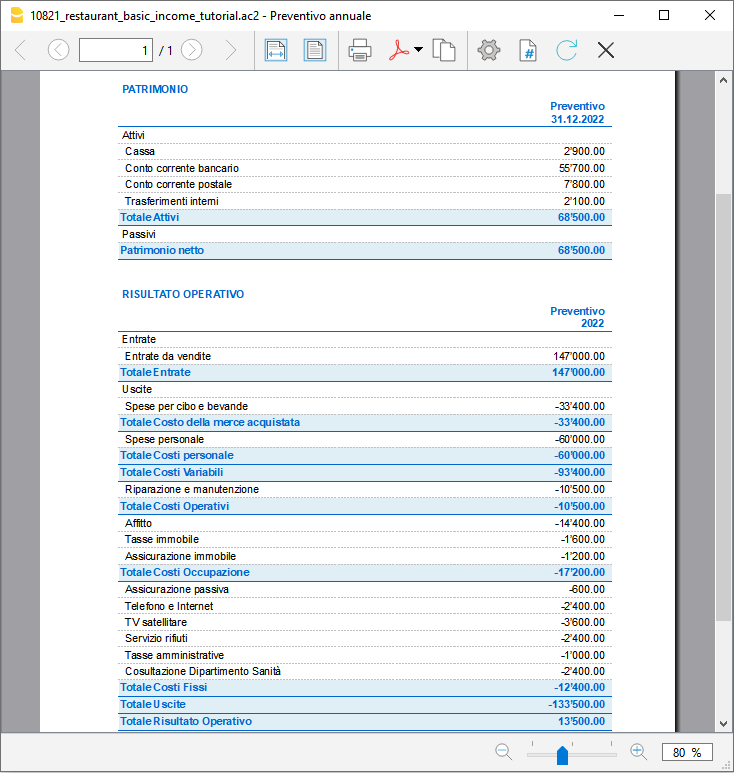
4. La verifica a fine anno con il consuntivo
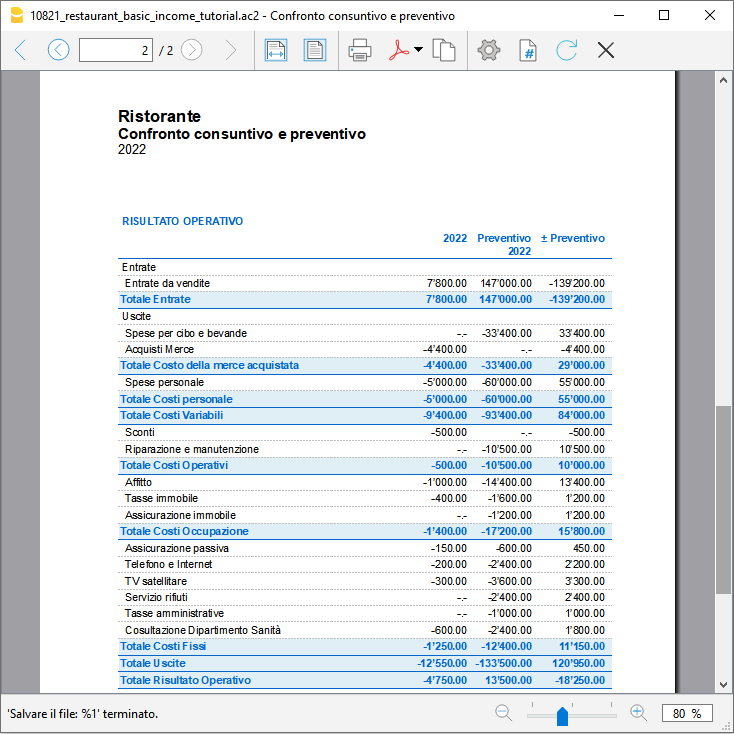
A fine anno quando avrai finito di registrare tutti i movimenti potrai preparare un report, che ti farà vedere gli importi di tutti i conti del consuntivo e confrontarli con quelli preventivati. Potrai verificare con certezza se il tuo preventivo preparato a inizio anno è risultato attendibile e se sei riuscito a guadagnare quanto previsto a inizio anno.
Per avere il confronto del consuntivo con il preventivo vai nel menu Report, clicca su Rendiconto abbellito con gruppi e scegli Confronto consuntivo e preventivo.
Se dovesse variare di molto, potrai controllare su quali entrate o uscite ti sei sbagliato e correggere gli importi nel preventivo del nuovo anno.
Double-Entry Accounting for a Corporation with foreign currencies
Double-Entry Accounting for a Corporation with foreign currencies michaelPayPal Templates | Double-entry
PayPal Templates | Double-entryPayPal import transaction
Banana has an import filter that allows you to directly import the PayPal transactions data in your accounting file.
The attached files are predefined with the accounts so that you can start immediately using it.
There are two template example files you can download and open in Banana:
Files suitable for
These template files are especially suitable in case you have only one PayPal preferred currency.
The imported transactions will automatically be imported to the currency account, so that you can separately see all transactions.
If in PayPal you keep balances in different currencies, it will be more suitable to use a PayPal accounting in Multicurrency.
Even if you use another accounting software, you will find that is very efficient to keep a separate accounting in Banana and keep your PayPal accounting in it. Instead of recording all transactions in your accounting solution, you can keep a separated accounting in Banana and once a month or when needed, only record the summary movement for the period in your accounting solution .
Further adapting the file
The file can easily be adapted to suit your needs.
Adding new accounts and new currencies
-
In the Accounts table, add new accounts for other currencies or for different Income or Expense types.
Changing to another Basic currency
This file can easily be converted into one with another Basic currency.
- Change the Basic currency in the File properties.
Add VAT/Sales Tax, change language or convert into another type
Use Convert to new file to add more options or change the accounting file settings.
Contabilità Ristorante (Multi-Moneta)
Contabilità Ristorante (Multi-Moneta)Come fare il preventivo per un ristorante
Segui passo per passo la nostra guida alla pagina Come fare il preventivo per un ristorante che ti insegna come creare e gestire un budget familiare.
PayPal Templates | Multi-currency accounting
PayPal Templates | Multi-currency accountingPayPal import transactions
Banana has an import filter that allows you to directly import the PayPal transaction data into your accounting files.
The attached files are predefined with the accounts so that you can immediately start using it.
There are two template example files that you can download and open in Banana:
- Multi currency accounting with EUR as a Basic Currency
- Multi currency accounting with USD as a Basic Currency
Files suitable for
These example files are especially suitable in case you have PayPal transactions in different currencies and especially if you have set up your PayPal account to use and keep different currencies (see also PayPal template for Double-entry accounting) .
The imported transactions will automatically be imported to the currency account, so that you can see all transactions separately and have a balance in the currency.
Even if you use another accounting software, you will find that is very efficient to keep a separate accounting in Banana and keep your PayPal accounting in it. Instead of recording all transctions in your accounting solution, you can keep a separated accounting in Banana and once a month or when needed, only record the summary movement for the period in your accounting solution .
Further adapting the file
The file can easily be adapted to suit your needs.
Adding new accounts and new currencies
-
In the Accounts table, add new accounts for other currencies or for different Income or Expense types.
-
Add new currencies in the Exchange rates Table
Changing to another basic currency
This file can easily be converted into one with another Basic Currency
- Change the Basic currency in the Accounting properties.
- Adapt the Exchange Rates table with the appropriate currencies and exchange rates.
- In the Accounts table, change the currency for the accounts that need to be in Basic currency.
Add VAT/Sales Tax, change language or convert into another type
Use the Convert to new file command to add more options or change the accounting file settings.
Modelli universali contabili con IVA
I modelli universali per Banana Contabilità sono file pronti all'uso, facilmente adattabili a qualsiasi Paese, alla tua attività e alle tue specifiche esigenze contabili.
I modelli universali attualmente disponibili che includono la gestione IVA sono disponibili in inglese:
Nei modelli universali con gestione IVA, i codici IVA inclusi nella tabella IVA sono codici di esempio. Puoi modificarli e personalizzarli in base ai codici IVA utilizzati nel tuo Paese.
Potrebbero anche interessarti:
商店会计
商店会计 feiComptabilité multidevise pour PME
Comptabilité multidevise pour PMEModèle idéal pour la gestion de la comptabilité des sociétés anonymes. Le plan comptable est structuré selon le schéma PME et présente les registres clients/fournisseurs. Il y a des comptes en devises étrangères et des centres de coûts.
Comptabilité pour sociétés de personnes morales avec les registres clients/fournisseurs
Comptabilité pour sociétés de personnes morales avec les registres clients/fournisseursModèle idéal pour la gestion de la comptabilité des sociétés anonymes. Le plan comptable est structuré conformément au régime des PME. Il y a des centres de coûts.
Comptabilité pour Entreprise jusqu'à 500'000 CHF chiffre d'affaires
Comptabilité pour Entreprise jusqu'à 500'000 CHF chiffre d'affairesPlan comptable structuré pour gérer une entreprise dont le chiffre d'affaires annuel n'excède pas 500'000 CHF. Avec TVA et des centres de coûts.
Comptabilité pour Entreprises individuelles
Comptabilité pour Entreprises individuellesPour gérer les comptes d'une petite entreprise individuelle avec TVA et centres de coût.
Double-Entry Accounting for a Corporation with VAT/Sales tax
Double-Entry Accounting for a Corporation with VAT/Sales tax michaelLibro de caja para un Comercio con IVA (con transacciones)
Libro de caja para un Comercio con IVA (con transacciones) barbaraDouble-Entry Accounting for a Corporation with foreign currencies and VAT/Sales tax
Double-Entry Accounting for a Corporation with foreign currencies and VAT/Sales tax michael公司 (含中英文报表)
公司 (含中英文报表)使用Banana财务会计软件,做专业的复式记账会计,一键生成资产负债表,损益表。多语言多汇率,使用中文做账一键点击生成外文报表。
创建您的文件
- 从该模板开始,创建一个新文件(模板编号+10680),使用在文中所解释的任何一种方式。
- 文件菜单→文件和账户属性命令,设置公司名称,会计期间及本位币。
- 文件菜单→另存为命令保存文件。以公司名称和年份作为文件名很有用。
例如“公司-2020.ac2”
文件和账户属性
- 账套
此标签可以编辑账套的信息,账套名称,开账日期和结账日期,以及记账本位币。 - 选项
此标签可以激活会计发生业务所需的功能。 - 地址
此标签中可以填入该会计账套的公司或个人信息,这些信息会做为本公司信息显示在给客户开具的发票中。 - 外汇
此标签中选择汇兑损益的会计科目代码。 - 增值税
此标签中选择应交增值税的会计科目代码。 - 其它
此标签中选择做账的语言和出报表的语言。 - 密码
此标签中设置账套密码。 - 文字
此标签中可以输入额外的信息,比如会计的名字。
编辑账户表
账户表格内显示有资产负债表及损益表的账户。
- 资产负债表显示所有资产账户的余额,即资产和负债。资产与负债之间的差额决定了个人资本。
- 损益表显示所有收入和费用的账户,它们的差额决定会计年度的损益状况。
所有的账户都可以根据您的需求进行客制化的编辑。例如,可以更改账号或摘要,可以在期初列内输入初始的余额,可以添加账户并且删除那些不需要的账户。
创建您的预算
在预算表格内,您可以输入指定年份的预估收入和费用。
- 列出每月费用和收入
例如,在办公室的租金中输入日期,重复,摘要,费用,借方账户,贷方账户和金额。
也可以会月收入执行相同的操作,并输入预估的收入。
输入会计发生业务
在会计发生业务表格中,输入实际的会计发生业务。
- 日期
- 摘要
- 借方账户
输入相对应的账户科目 - 贷方账户
输入相对应的账户科目 - 金额
对所有的会计发生业务执行同样的操作。
导入银行对账单
为了加快这些操作的进程,您可以导入银行对账单的数据并将其链接到数字收据。可以使用报表菜单→导入到账套命令。
报告和预算的比较
在输入会计发生业务后,程序将自动更新账户余额,您可以立即将其与预算余额进行比较。可随时查看并比较过去,现在和未来的会计数据。
外贸公司 (含中英文报表)
外贸公司 (含中英文报表) feiIFRS per PMI: Contabilità internazionale per le PMI
Lo standard contabile IFRS per le PMI è un principio internazionale di rendicontazione finanziaria sviluppato dall'International Accounting Standards Board (IASB) specificamente per le imprese senza obbligo di rendicontazione pubblica.
Si basa sui principi contabili IFRS completi, ma semplifica molti requisiti di rilevazione, valutazione e informativa, rendendolo più adatto alle piccole e medie imprese.
In questa sezione puoi conoscere la struttura e i principi dell'IFRS per le PMI e trovare modelli pratici per preparare e riclassificare i rendiconti finanziari con Banana Contabilità ed Excel.
Caratteristiche principali dell'IFRS per le PMI
- Facile da comprendere grazie al fatto che la numerazione dei conti segue la struttura di presentazione.
- La numerazione dei gruppi segue la stessa sequenza dei numeri di conto.
- Completo ma non complesso. Copre tutte le esigenze delle PMI, senza la complessità tipica dei piani contabili delle grandi imprese.
- Stato patrimoniale e Conto economico.
- IFRS (International Financial Reporting Standard) per le PMI conforme.
La struttura e la presentazione del piano contabile sono conformi alle regole dell'International Financial Reporting Standard per le PMI. - Facilmente adattabile.
- Completamente testato.
Questo piano dei conti è stato sviluppato dalla più grande associazione contabile svizzera appositamente per le PMI. Si è dimostrato facile da usare e in grado di fornire tutti i risultati importanti ai proprietari e ai responsabili delle aziende.
Modelli contabili globali per le PMI
Il piano contabile globale è la base per creare i modelli contabili globali Banana per le piccole e medie imprese.
- Contabilità in partita doppia.
- Contabilità multimoneta.
- I modelli sono disponibili in molte lingue.
- Può essere facilmente tradotto, se necessario.
- È disponibile un modello che riunisce più lingue. In questo modo puoi ottenere i rendiconti finanziari in diverse lingue.
Adatto a molti Paesi
Utilizzalo se le autorità del tuo Paese non impongono un piano contabile specifico. Molti Paesi richiedono che la rendicontazione contabile sia conforme alle regole IFRS, ma non impongono un piano contabile o una numerazione specifici.
Un'azienda che desidera gestire la propria contabilità in modo moderno può adottare questo piano contabile e adattarlo alle proprie esigenze.
Maggiori informazioni
- Introduzione all'IFRS per le PMI
- Struttura dell'IFRS per le PMI
- Riclassificazione IFRS con Banana
- Struttura del file Excel
- Modello Excel gratuito per l'IFRS per le PMI
Stato patrimoniale - Prospetto della situazione patrimoniale-finanziaria
Nelle PMI la posizione di liquidità è molto importante, quindi la presentazione inizia con il conto 1000 Cassa.
Il gruppo 100 è destinato a Cassa e mezzi equivalenti e il gruppo 10 alle Attività correnti.
- 1. Attività
- 10. Attività correnti
- 100. Cassa e mezzi equivalenti
- 106. Attività a breve termine quotate in borsa
- 109. Conti di trasferimento
- 110. Crediti verso clienti
- 114. Altri crediti a breve termine
- 120. Rimanenze
- 130. Ratei e risconti attivi
- 14. Attività immobilizzate
- 140. Attività finanziarie
- 148. Partecipazioni
- 150. Immobilizzazioni materiali
- 160. Immobilizzazioni materiali immobiliari
- 170. Immobilizzazioni immateriali
- 180. Capitale sociale o capitale di fondazione non versato
- 10. Attività correnti
- 2. Passività e patrimonio netto
- 20. Capitale di terzi a breve termine
- 200. Fornitori o creditori
- 210. Debiti onerosi a breve termine
- 220. Altri debiti a breve termine
- 230. Ratei e risconti passivi
- 24. Capitale di terzi a lungo termine
- 240. Debiti onerosi a lungo termine
- 250. Altri debiti a lungo termine
- 260. Accantonamenti e poste analoghe previste dalla legge
- 28. Patrimonio netto
- 280. Capitale sociale o capitale della fondazione
- 290. Riserve legali
- 295. Riserva legale da utili
- 296. Riserve facoltative da utili
- 297. Utile / Perdita riportato a nuovo
- 298. Azioni proprie, quote, diritti di partecipazione (negativo)
- 20. Capitale di terzi a breve termine
Prospetto del risultato economico complessivo
Il conto economico inizia con il conto 3000 per i ricavi e con il gruppo 3 per i gruppi dei ricavi.
La struttura è sufficientemente dettagliata per soddisfare le esigenze di presentazione del rendiconto. A seconda della situazione, è possibile aggiungere altri conti e gruppi per rappresentare meglio la situazione.
- 3. Ricavi da forniture e servizi
- 30. Ricavi netti da forniture e servizi
- 39. Variazione delle rimanenze e servizi non fatturati
- 4. Costi per materiali, merci, servizi ed energia
- E1. Risultato operativo lordo dopo la deduzione dei costi per materiali e merci
- 5. Costi del personale
- E2. Risultato operativo lordo dopo la deduzione dei costi del personale
- 6. Altri costi operativi, ammortamenti, rettifiche di valore e risultati finanziari
- 60. Affitti
- 61. Manutenzione, riparazioni e sostituzione di immobilizzazioni materiali
- 62. Costi per veicoli e trasporti
- 63. Assicurazioni contro danni alle cose
- 64. Costi energetici e di smaltimento
- 65. Costi amministrativi e informatici
- 66. Pubblicità
- 67. Costi vari dell'esercizio
- 6. Altri costi operativi, ammortamenti, rettifiche di valore e risultati finanziari
- E3. Risultato operativo prima di ammortamenti e rettifiche di valore, risultati finanziari e imposte (EBITDA)
- 68. Ammortamenti e rettifiche di valore delle immobilizzazioni
- E4. Risultato operativo prima dei risultati finanziari e delle imposte (EBIT)
- 69. Costi e ricavi finanziari
- E5. Risultato operativo prima delle imposte (EBT)
- 7. Componenti non operativi
- 8. Risultati estranei alla gestione, straordinari o unici, o relativi ad altri periodi contabili
- E6. Utile o perdita prima delle imposte
- 89. Imposte dirette
- E7. Utile o perdita d'esercizio
Piano contabile completo
| Sezione | Gruppo | Conto | Descrizione |
| * | STATO PATRIMONIALE | ||
| 1 | ATTIVITÀ | ||
| 1000 | Cassa | ||
| 1020 | Conto bancario | ||
| 100 | Cassa e mezzi equivalenti | ||
| 1060 | Obbligazioni e azioni | ||
| 106 | Attività a breve termine quotate in borsa | ||
| 1090 | Trasferimenti interni | ||
| 1091 | Conto di trasferimento per salari | ||
| 1099 | Importi da chiarire | ||
| 109 | Conti di trasferimento | ||
| 1100 | Crediti verso clienti o debitori | ||
| 1109 | Fondo svalutazione crediti | ||
| 110 | Crediti verso clienti | ||
| 1140 | Anticipi e prestiti | ||
| 1176 | Imposta preventiva | ||
| 1180 | Crediti verso assicurazioni sociali e istituti di previdenza sociale | ||
| 1188 | Imposta alla fonte | ||
| 1190 | Crediti diversi a breve termine | ||
| 1199 | Titoli | ||
| 114 | Altri crediti a breve termine | ||
| 1200 | Merci destinate alla rivendita | ||
| 1210 | Materie prime | ||
| 1220 | Materiali ausiliari | ||
| 1230 | Materiali di consumo | ||
| 1260 | Prodotti finiti | ||
| 1270 | Prodotti in lavorazione | ||
| 1280 | Servizi non fatturati | ||
| 120 | Rimanenze | ||
| 1300 | Risconti attivi | ||
| 1301 | Ratei attivi | ||
| 130 | Ratei e risconti attivi | ||
| 10 | Attività correnti | ||
| 1400 | Obbligazioni e azioni | ||
| 1440 | Prestiti | ||
| 1460 | Prestito ad azionista | ||
| 140 | Attività finanziarie | ||
| 1480 | Partecipazioni | ||
| 148 | Partecipazioni | ||
| 1500 | Macchinari | ||
| 1510 | Mobili e attrezzature d'ufficio | ||
| 1520 | Macchine d'ufficio, tecnologie dell'informazione e della comunicazione | ||
| 1530 | Veicoli | ||
| 1540 | Utensili e attrezzature | ||
| 150 | Immobilizzazioni materiali | ||
| 1600 | Immobili commerciali | ||
| 160 | Immobilizzazioni materiali immobiliari | ||
| 1700 | Brevetti, know-how, licenze, diritti e sviluppo | ||
| 1710 | Marchi | ||
| 1712 | Modelli | ||
| 1770 | Avviamento | ||
| 170 | Immobilizzazioni immateriali | ||
| 1850 | Capitale sociale, diritti non versati o capitale di fondazione non versato | ||
| 180 | Capitale sociale o capitale di fondazione non versato | ||
| 14 | Attività immobilizzate | ||
| 1 | Totale attività | ||
| 2 | PASSIVITÀ | ||
| 2000 | Fornitori o creditori | ||
| 2030 | Depositi ricevuti | ||
| 200 | Fornitori o creditori | ||
| 2100 | Debiti verso banche a breve termine | ||
| 2120 | Impegni per leasing finanziario | ||
| 2140 | Altri debiti onerosi | ||
| 210 | Debiti onerosi a breve termine | ||
| 2206 | Imposta preventiva | ||
| 2208 | Imposte dirette | ||
| 2210 | Altri debiti a breve termine | ||
| 2260 | Debiti verso azionisti | ||
| 2261 | Dividendi | ||
| 2270 | Assicurazioni sociali e istituti di previdenza sociale | ||
| 2279 | Imposta alla fonte | ||
| 220 | Altri debiti a breve termine | ||
| 2300 | Ratei passivi | ||
| 2301 | Ricavi dell'anno successivo già incassati | ||
| 2330 | Accantonamenti a breve termine | ||
| 230 | Ratei e risconti passivi | ||
| 20 | Capitale di terzi a breve termine | ||
| 2400 | Debiti verso banche | ||
| 2420 | Impegni per leasing finanziario | ||
| 2430 | Prestiti obbligazionari | ||
| 2450 | Prestiti | ||
| 2451 | Ipoteca | ||
| 240 | Debiti onerosi a lungo termine | ||
| 2500 | Altri debiti a lungo termine (non onerosi) | ||
| 250 | Altri debiti a lungo termine | ||
| 2600 | Accantonamenti | ||
| 260 | Accantonamenti e poste analoghe previste dalla legge | ||
| 24 | Capitale di terzi a lungo termine | ||
| 2A | Capitale di terzi | ||
| 2800 | Capitale sociale, diritti, capitale della fondazione | ||
| 280 | Capitale sociale o capitale della fondazione | ||
| 2900 | Riserve legali | ||
| 2940 | Riserve di rivalutazione | ||
| 290 | Riserve legali | ||
| 2950 | Riserva legale da utili | ||
| 295 | Riserva legale da utili | ||
| 2960 | Riserve facoltative da utili | ||
| 296 | Riserve facoltative da utili | ||
| 2970 | Utile / Perdita riportato a nuovo | ||
| 29A | Utile / Perdita dell'esercizio | ||
| 297 | Utile / Perdita da stato patrimoniale | ||
| 2980 | Azioni proprie, quote, diritti di partecipazione (negativo) | ||
| 298 | Azioni proprie, quote, diritti di partecipazione (negativo) | ||
| 28 | Patrimonio netto | ||
| 2 | Totale passività | ||
| * | CONTO ECONOMICO | ||
| 4 | |||
| 3000 | Ricavi da prodotti propri | ||
| 3200 | Ricavi da rivendita | ||
| 3400 | Ricavi da servizi prestati | ||
| 3600 | Altri ricavi e servizi | ||
| 3710 | Autoconsumo | ||
| 3800 | Riduzioni dei ricavi | ||
| 3805 | Perdite su crediti, variazione del rischio di credito | ||
| 30 | Ricavi netti da forniture e servizi | ||
| 3900 | Variazione delle rimanenze di prodotti in lavorazione | ||
| 3901 | Variazione delle rimanenze di prodotti finiti | ||
| 3940 | Variazione dei servizi non fatturati | ||
| 39 | Variazione delle rimanenze e dei servizi non fatturati | ||
| 3 | Ricavi da forniture e servizi | ||
| 4000 | Materie prime | ||
| 4200 | Costi per merci destinate alla rivendita | ||
| 4400 | Costi per prestazioni di terzi | ||
| 4500 | Consumo di energia per la produzione | ||
| 4900 | Riduzione dei costi | ||
| 4 | Costi per materiali, merci, servizi ed energia | ||
| E1 | Risultato operativo lordo dopo la deduzione dei costi per materiali e merci | ||
| 5000 | Salari | ||
| 5700 | Contributi per assicurazione vecchiaia e disoccupazione | ||
| 5710 | Cassa di compensazione familiare | ||
| 5720 | Contributi ai fondi pensione | ||
| 5730 | Contributi all'assicurazione infortuni | ||
| 5740 | Contributi all'assicurazione facoltativa d'indennità giornaliera | ||
| 5790 | Imposta alla fonte | ||
| 5800 | Altri costi del personale | ||
| 5810 | Formazione del personale | ||
| 5820 | Spese effettive di viaggio e rappresentanza | ||
| 5830 | Indennità per spese di viaggio e rappresentanza | ||
| 5900 | Personale temporaneo | ||
| 5 | Costi del personale | ||
| E2 | Risultato operativo lordo dopo la deduzione dei costi del personale | ||
| 6000 | Affitti | ||
| 6040 | Pulizia dei locali | ||
| 60 | Affitti | ||
| 6100 | Manutenzione, riparazioni e sostituzione di immobilizzazioni materiali | ||
| 6105 | Costi di leasing delle immobilizzazioni materiali | ||
| 61 | Manutenzione, riparazioni e sostituzione di immobilizzazioni materiali | ||
| 6200 | Riparazioni | ||
| 6210 | Carburante | ||
| 6220 | Assicurazione auto | ||
| 6260 | Leasing e noleggio auto | ||
| 6270 | Costi auto - quota privata | ||
| 6282 | Spese di trasporto | ||
| 62 | Costi per veicoli e trasporti | ||
| 6300 | Assicurazioni contro danni alle cose | ||
| 63 | Assicurazioni contro danni alle cose | ||
| 6402 | Elettricità | ||
| 6410 | Spese di riscaldamento | ||
| 6430 | Acqua | ||
| 6460 | Smaltimento rifiuti | ||
| 64 | Costi energetici e di smaltimento | ||
| 6500 | Materiale d'ufficio | ||
| 6503 | Riviste tecniche, giornali e periodici | ||
| 6510 | Telefono / Internet | ||
| 6511 | Hosting presso terzi | ||
| 6513 | Spese postali | ||
| 6570 | Costi informatici, incluso il leasing | ||
| 6580 | Licenze e aggiornamenti | ||
| 6583 | Materiali di consumo | ||
| 65 | Costi amministrativi e informatici | ||
| 6600 | Pubblicità | ||
| 6642 | Omaggi ai clienti | ||
| 66 | Pubblicità | ||
| 6700 | Costi vari dell'esercizio | ||
| 67 | Costi vari dell'esercizio | ||
| 6 | Altri costi operativi, ammortamenti, rettifiche di valore e risultati finanziari | ||
| E3 | Risultato operativo prima di ammortamenti e rettifiche di valore, risultati finanziari e imposte (EBITDA) | ||
| 6800 | Ammortamenti e rettifiche di valore delle immobilizzazioni | ||
| 68 | Ammortamenti e rettifiche di valore delle immobilizzazioni | ||
| E4 | Risultato operativo prima dei risultati finanziari e delle imposte (EBIT) | ||
| 6900 | Costi per interessi bancari | ||
| 6940 | Spese bancarie | ||
| 6950 | Ricavi finanziari | ||
| 69 | Costi e ricavi finanziari | ||
| E5 | Risultato operativo prima delle imposte (EBT) | ||
| 7000 | Ricavi non operativi | ||
| 7010 | Costi non operativi | ||
| 7500 | Ricavi da immobili aziendali | ||
| 7510 | Costi degli immobili aziendali | ||
| 7 | Componenti non operativi | ||
| 8000 | Costi estranei alla gestione | ||
| 8100 | Ricavi estranei alla gestione | ||
| 8500 | Costi straordinari, unici o relativi ad altri periodi contabili | ||
| 8510 | Ricavi straordinari, unici o relativi ad altri periodi contabili | ||
| 8 | Risultati estranei alla gestione, straordinari o unici, o relativi ad altri periodi contabili | ||
| E6 | Utile o perdita prima delle imposte | ||
| 8900 | Imposte dirette | ||
| 89 | Imposte dirette | ||
| E7 | Utile o perdita d'esercizio |
Definizione e principi degli IFRS per le PMI
```html
Lo Standard contabile IFRS per le PMI è uno standard internazionale di rendicontazione finanziaria sviluppato dall'International Accounting Standards Board (IASB) per le entità che non hanno responsabilità pubblica.
Fornisce un quadro semplificato basato sugli standard contabili IFRS completi, concepito per rendere i rendiconti finanziari trasparenti, affidabili e comparabili, riducendo al contempo la complessità della rendicontazione per le piccole e medie imprese.
Obiettivi degli IFRS
L'obiettivo principale è creare un quadro contabile comune per la maggior parte delle aziende che operano all'interno della Comunità Europea, offrendo il vantaggio di una maggiore semplicità e trasparenza in relazione ai bilanci e alle informazioni finanziarie.
Gli obiettivi si caratterizzano nei seguenti aspetti:
Trasparenza:
fornire alle parti interessate informazioni chiare e dettagliate sulla situazione finanziaria e sulle prestazioni dell'azienda.
Affidabilità:
creare rendiconti finanziari che corrispondano alla realtà aziendale e siano affidabili.
Uniformità:
presentare informazioni finanziarie comparabili a livello globale.
Rilevanza:
garantire che vengano fornite informazioni importanti ai potenziali investitori e alle altre parti interessate.
Principi fondamentali degli IFRS per le PMI
Le caratteristiche degli standard IFRS si basano sui principi illustrati di seguito:
Informativa completa
Tutte le informazioni rilevanti devono essere comunicate in modo completo.
Principio della prevalenza della sostanza sulla forma
Le operazioni devono essere contabilizzate e presentate in base alla loro sostanza economica e alla realtà, e non soltanto in base alla loro forma giuridica.
Principio di prudenza
Le incertezze e i rischi devono essere debitamente considerati.
Valutazione al fair value
Numerose voci di bilancio devono essere valutate al loro fair value, anziché al costo storico.
Caratteristiche qualitative delle informazioni finanziarie
Comprensibilità
La presentazione delle informazioni contenute nel bilancio deve essere comprensibile in relazione alle attività commerciali ed economiche dell'azienda. Questo principio non consente di omettere informazioni importanti solo perché potrebbero risultare difficili da comprendere per alcuni utenti.
Comparabilità
Le informazioni relative a un'entità sono utili se possono essere confrontate con informazioni simili di altre entità. Questa caratteristica consente alle parti interessate di individuare e comprendere le somiglianze e le differenze nelle realtà contabili aziendali.
Verificabilità
La verificabilità contribuisce a garantire una rappresentazione fedele delle informazioni contabili e finanziarie dell'azienda. Le informazioni contabili quantificate non devono necessariamente essere una stima esatta per poter essere verificabili.
Tempestività
La tempestività significa disporre delle informazioni in tempo utile per prendere decisioni. In questo senso, più le informazioni sono datate, meno risultano utili. Esistono tuttavia delle eccezioni: alcune informazioni possono mantenere la loro utilità anche se meno recenti, poiché vengono valutate su un periodo di tempo più lungo per studiare e individuare le tendenze.
Riferimenti:
- Rendicontazione finanziaria - Commissione europea (europa.eu)
- IFRS - International Accounting Standards Board
- Principi e obiettivi contabili
```
Composizione degli IFRS per SME
Secondo l’articolo 3.17 del documento “Exposure Draft IFRS for SMEs® Accounting Standard - Third edition of the IFRS for SMEs Accounting Standard – September 2022”, la struttura deve includere tutti i seguenti documenti per avere un set completo di bilancio:
- Financial statement.
- Income Statement.
- Statement of changes in equity.
- Cash flow.
- Notes.
Referenze
Statement of financial position
È un documento che rappresenta la situazione patrimoniale e finanziaria di un’azienda. Il bilancio è separato da attività correnti e non correnti, ed è composto da attivi, capitale proprio e passivi.
Gli elementi dell’attività corrente comprendono risorse che si prevedono siano liquidate o utilizzate come parte delle operazioni aziendali usuali entro un anno dalla data del bilancio. La distinzione è particolarmente utile agli investitori che identificano in presenza di un ciclo operativo il capitale circolante netto rispetto al capitale usato per operazioni a lungo termine.
Esiste anche un’altra presentazione dei conti che si basa sul grado di liquidità, ma è adatta a realtà bancarie e a istituti finanziari che non forniscono beni o servizi entro un termine operativo identificabile.
Le attività non correnti sono risorse aziendali che si prevede rimarranno in uso per un periodo esteso oltre i dodici mesi dalla chiusura del bilancio o oltre il ciclo operativo.
Le passività a breve termine (correnti) sono quelle esigibili entro il consueto ciclo operativo oppure entro dodici mesi dalla data di riferimento del bilancio. I debiti commerciali devono essere sempre classificati come passività a breve termine anche se il loro regolamento avverrà oltre il normale ciclo operativo o oltre dodici mesi dalla data di bilancio.
Le passività a lungo termine (non correnti) sono quelle esigibili oltre il consueto ciclo operativo o oltre dodici mesi dalla data di riferimento del bilancio.
Income statement
L’income statement è la rappresentazione del conto economico ed è classificato secondo il metodo delle by nature of expense.
La classificazione per natura è una delle possibilità disponibili dagli IFRS per SME, ed essendo quella più semplice e flessibile a più realtà aziendali, è stato deciso di implementare questa.
Il concetto è che i costi sono aggregati secondo la loro natura, come ad esempio ammortamento, acquisti di materiali, costi di trasporto.
Esiste anche la classificazione secondo la destinazione dei costi, dove i costi vengono distinti con i costi del venduto. La stessa fornisce informazioni più significative ma richiede un considerevole margine discrezionale al redattore del bilancio.
Statement of changes in equity
Il prospetto delle variazioni del patrimonio netto di un’azienda tra due esercizi rispecchia le variazioni del patrimonio netto dato l’incremento o il decremento delle sue attività nette d’esercizio o della ricchezza generata, in base ai criteri di valutazione specifici implementati e indicati nel bilancio.
Cash flow
Gli IFRS per le PMI prevedono che le entità debbano classificare le loro transazioni in tre attività distinte:
- Operativo.
- Investimento.
- Finanziamento.
Consente inoltre alle entità di presentare i propri flussi di cassa operativi utilizzando il metodo diretto o indiretto. In definitiva, l’obiettivo del quadro è quello di fornire agli utenti informazioni utili alle decisioni, aiutandoli a fare scelte economiche informate.
Notes
Le note al bilancio rappresentano una parte fondamentale del reporting finanziario secondo gli IFRS per le PMI. Esse forniscono informazioni aggiuntive e di dettaglio che integrano e spiegano i dati presentati nei prospetti contabili principali.
Inoltre, svolgono un ruolo cruciale nel garantire la trasparenza e la completezza dell'informativa finanziaria, consentendo agli utilizzatori del bilancio di comprendere appieno la situazione patrimoniale, economica e finanziaria dell'impresa.
In conclusione, rappresentano quindi uno strumento essenziale per migliorare la trasparenza e la comparabilità dell'informativa finanziaria a livello internazionale.
Riclassificazione IFRS con Banana
Riclassificazione IFRS con BananaIntroduzione
All'interno di questa pagina vi é una breve spiegazione sui template creati con il software di Banana contabilità e su come utilizzarli per stampare il report di conto economico e di bilancio secondo gli standard degli IFRS per SME.
In fondo alla pagina ci sono i link dei download dei modelli.
Template IFRS SME
Il file del template é impostato con il piano contabile IFRS SME nel quale é presente lo Statement of financial position, Income statement e lo Statement of changes in equity.
Questo file fa riferimento al documento "Reclassification IFRS SME" per stampare il report secondo l'impostazione IFRS SME, con l'utilizzo del bilancio abbellito per gruppi.
Per approfondimenti sul bilancio abbellito per gruppi:
- Video di come fare il bilancio abbellito.
- Documentazione sul bilancio abbellito.
- Documentazione sulla riclassificazione del bilancio e conto economico.
Reclassification IFRS SME
Il documento contiene l'impostazione base per stampare il layout della pagina (titolo del documento, dati anagrafici dell'azienda), gli importi, i totali, i subtotali dei conti dello Statement of financial position e del Income statement.
I conti verranno stampati anche se l'importo é a zero. Se si vuole modificare l'impostazione di questa stampa o lo stile si può fare all'interno di questo file.
Creazione report con lo Statement of financial position ed Income statement
Per creare un report con i documenti dello Statement of financial position e Income statement si deve seguire i prossimi passaggi:
- Aprire il file di template e registrare tutte le operazioni contabili specifiche del caso.
- Click su Reports -> Enhaced balance sheet with groups
- Inserire i dati importanti relativi all'azienda di riferimento (esempio: nome del documento, dati anagrafici dell'azienda) nella sezione Page-Header and Footer.
- È possibile fare altre impostazioni, leggendo gli approfondimenti sul sito di Banana sul bilancio abbellito.
- Click ok.
Alla fine del processo verrà aperto un nuovo file con all'interno lo Statement of financial position e Income statement.
Download IFRS SME per Banana
Mettiamo a disposizione i modelli senza alcuna responsabilità, come previsto dai nostri Termini e condizioni d'uso.
Struttura del file Excel
In questa pagina vi é la spiegazione completa di come utilizzare il file, di cosa trovare al suo interno e della sua logica.
Oltremodo, vi sono illustrate delle immagini e figure d'esempio utili a spiegare come utilizzare il file Excel. Gli importi visualizzati in queste immagini sono puramente a scopo illustrativo e non riflettono necessariamente valori reali o significativi.
Referenze del documento
Per la creazione della struttura contabile all’interno del modello Excel si è seguito le indicazioni della documentazione relativa agli standard IFRS per SME.
Nello specifico la documentazione è composta da:
- Principi contabili, note e altro: “Exposure Draft IFRS for SMEs Accounting Standard” di settembre 2022;
- La presentazione dei conti e delle note esplicative: “IFRS Taxonomy Illustrated IFRS Accounting Taxonomy 2023”.
Descrizione della struttura del file
Il modello Excel è suddiviso in dieci parti principali:
- General information
- Financial Statement
- Income Statement
- Financial Statement detailed
- Income Statement detailed
- Statement of changes in equity
- Cash flow indirect
- Notes of financial statements
- Notes of income statement
- Notes of cash flow statement.
Per avere un set completo del bilancio secondo gli IFRS per SME é obbligatorio compilare i fogli relativi alle informazioni generali (General information), alle informazioni di bilancio (Financial Statement e Notes of financial statements), alle informazioni di conto economico (Income statement e Notes of income statement), il prospetto delle variazioni nel patrimonio netto (Statement of changes in equity) e il rendiconto dei flussi con metodo indiretto (Cash flow indirect e Notes of cash flow statement).
I fogli Financial Statement detailed e Income Statement detailed, sono un'alternativa rispetto alla procedura di compilazione precisata prima, in quanto integrano tutto l'aspetto del Financial Statement e del Income Statement, con tutti i conti dettagliati dalle note, avendo una visione di diretta della composizione e la struttura di un conto con le note.
Organizzazione del file
Contenuto del file
Il file contiene sette campi:
- Campo principale
- Conto principale
- Sottocategoria del conto principale
- Codice
- Formula
- Nota
- Importo del conto.
Nel campo principale, si specifica il nome del conto principale, la referenza del documento e un'informazione generica dell'azienda.
Il conto principale è il nome del conto principale.
La sottocategoria del conto principale è visualizzabile soltanto se si usa il foglio Statement Financial detailed e Statement Income detailed. È un conto ripreso dalle note e serve a dettagliare la struttura di un conto, come richiesto nelle note degli IFRS per PMI.
Il codice è utilizzato per il modello contabile di Banana e serve per identificare il conto.
La formula è applicata per totali e subtotali dei conti.
La nota è specifica al conto ed é inserita per alcuni conti come secondo la documentazione degli IFRS per PMI.
L'importo del conto è un numero a due decimali senza indicazioni sulla valuta.
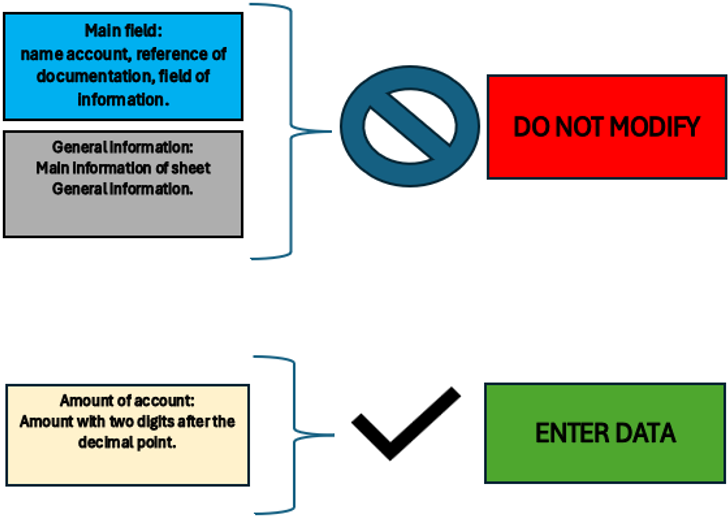
Alcuni campi non sono modificabili in quanto sono parte essenziale della struttura del file. L'unica parte da modificare sono gli importi da inserire per i vari conti e le descrizioni nel foglio note.
La legenda sotto riassume quanto scritto in riferimento a cosa corrispondono i campi e quali sono e non sono modificabili.
General information
Nel foglio General information si inseriscono le informazioni essenziali necessarie agli IFRS per PMI.
Le informazioni essenziali sono utili per comprendere i dati anagrafici dell’azienda, il periodo di attività contabile di riferimento, la valuta usata, le attività principali e il contenuto di tale file che è la struttura completa del financial statement.
Alcune informazioni quali nome dell’azienda, ragione sociale, domicilio e periodo contabile di riferimento viene riportato su tutti i fogli nello specifico per la parte di Identifying information of company.
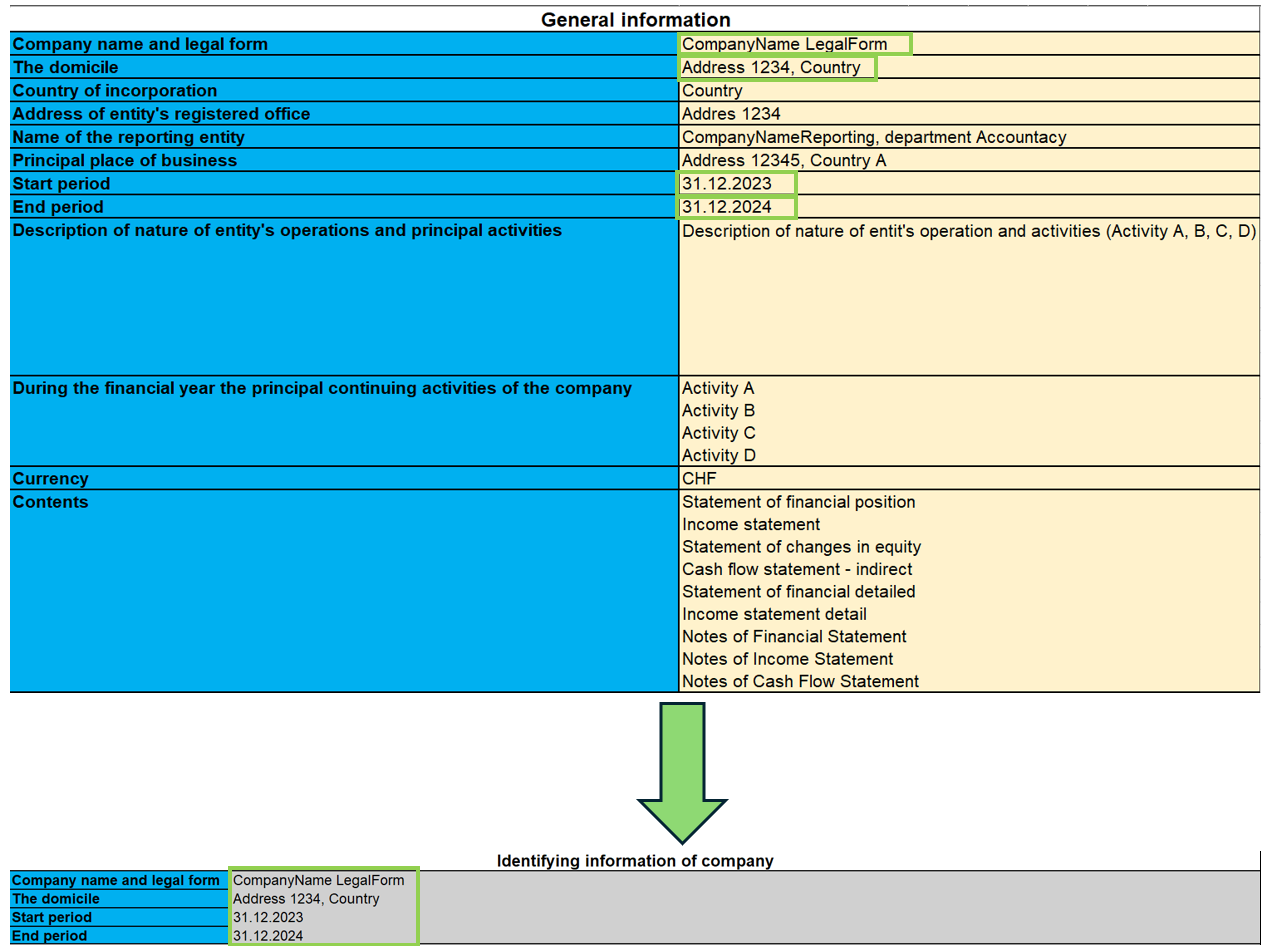
Come viene mostrato nell'immagine, le informazioni inserite in questo foglio vengono riportate su tutti i fogli, cosicché si possa identificare la società su ogni documento IFRS, come ad esempio: la denominazione completa della società, l'indirizzo e la sede, l'esercizio contabile di inizio e di fine da considerare ai fini della contabilità.
Statement of financial position
Nel Financial Statement sono contenute tutte le voci di conto relative alle posizioni correnti e non correnti dell’attività aziendale per gli anni 2023 e 2024.
In questa parte è richiesto che si inseriscano gli importi di bilancio nei conti specifici. I totali e sotto totali vengono calcolati automaticamente dalle formule.
Bisogna inoltre osservare che per alcuni conti è obbligatorio compilare le Note. Per farlo si inseriscono gli importi e altre note descrittive nel foglio “Notes of Finacial Statement ”.
Qualora un conto abbia le note, il suo importo dell'ultimo anno fa riferimento alla cella corrispondente del totale del conto messo nelle note, perciò é necessario prima compilare gli importi nelle note.
Per le note c’è anche la possibilità di consultare la documentazione indicata nel campo "Reference documentation", con specificata la pagina e la sezione dove trovare le informazioni relative alle note.
C’è infine un’ultima parte di controllo per verificare se il totale degli attivi e dei passivi risultano essere uguali.
Modalità d'uso
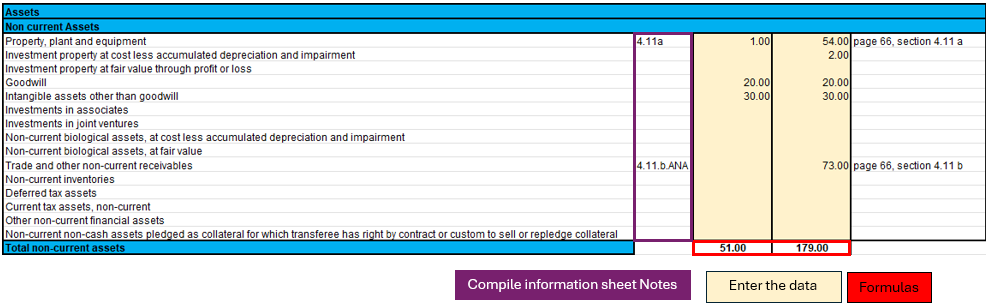
Nella figura mostrata, si é selezionata una parte dello Statement of financial position, come esempio esplicativo come guida per l'utente. Nell'immagine ci sono tre parti evidenziate:
- Le note.
- Le formule.
- I dati da compilare.
Ogni parte ha una sua specifica funzione ed in alcuni casi i dati sono direttamente collegati tra loro.
Nello specifico se un conto ha delle note, significa che nel saldo finale (31.12.xx) ci sarà il totale dell'importo calcolato nel foglio "Notes of financial statement". Questo implica che per modificare quell'importo, bisogna compilare i dati del conto nel foglio "Notes of financial statement".
In questo foglio quindi bisogna:
- Verificare che il conto non sia collegato a delle note e inserire l'importo del conto.
- Se esistono delle note, allora bisogna compilare solo la parte del foglio "Notes of financial statement".
Le formule integrate in questo foglio faranno i totali e subtotali dei conti del Statement of financial position.
Income Statement
L’Income Statement è presentato secondo la classificazione “by nature of expense”.
Questa classificazione è un’aggregazione dei costi secondo la loro natura (esempio ammortamento, acquisti di materiali, costi di trasporto, stipendi, costi pubblicità, ecc.) e non sono ripartiti in base alla loro destinazione all’interno dell’impresa.
L’implementazione di tale classificazione è stata decisa perché è semplice e di diffusa applicazione per le PMI. L’altra classificazione era secondo i costi per destinazione, dove si faceva distinzione tra i costi del venduto rispetto agli altri costi (esempio costi di distribuzione o costi amministrativi) e tale rappresentazione richiede un considerevole grado di discrezionalità da parte dell’utente finale.
Come precedentemente fatto per il Financial Statement, ci sono gli importi da inserire mentre i totali sono già calcolati mediante le formule applicate nei fogli.
Inoltre è stata fatta un’ulteriore suddivisione per EBIT (earnings before interest and tax) e EBT (earnings before interest).
Modalità d'uso
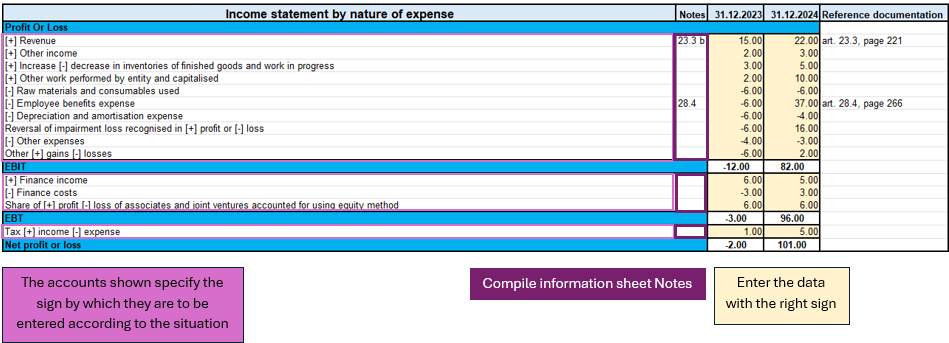
In questa figura vengono evidenziate le parti importanti dell'Income statement.
Guardando i conti, ci sono delle indicazioni relativi ai segni (+/-) da utilizzare nelle varie circostanze, ciò implica che per i conti che hanno il segno sia positivo che negativo, ci sia una valutazione sull'impatto positivo o negativo di tale importo sul risultato del Income Statement.
Come precedentemente visto nel documento "Statement of financial position", anche in questo caso ci sono le note da inserire nel relativo foglio "Notes of income statement" per poter definire correttamente l'importo, siccome quest'ultimo dipende dal totale in note.
In sintesi quello che bisogna fare in questo foglio sono i seguenti passaggi:
- Valutare le circostanze del conto che abbia indicato il segno sia positivo che negativo e comprendere se ci si trova in una situazione in cui esso ha impatto positivo o negativo sul risultato.
- Verificare che il conto non sia collegato a delle note e inserire l'importo corrispettivo con il segno corretto.
- Se il conto é corrispettivo con le note, allora bisogna compilare solo il foglio "Notes of income statement".
Statement Financial detailed
Questo documento si differenzia dallo Statement of financial position in quanto ci sono maggiori dettagli relativi ai conti. La presentazione ufficiale dei conti si trova nel foglio "Statement of financial position" per come sono riassunti i conti, in questo foglio invece abbiamo un dettaglio maggiorato, con l'obiettivo di evitare di compilare le note direttamente nel foglio specifico. L'utilizzo di questo foglio esclude l'uso del foglio "Statement of financial position" perché fanno riferimento alle stesse note.
La differenza sostanziale é che si mostrano non soltanto i conti principali richiesti come presentazione dagli IFRS per PMI, ma vengono dettagliati in sottocategorie di conti che sono i medesimi che si ritrovano nelle note, di modo che usando questo documento si può evitare di compilare le note, utilizzando soltanto le sottocategorie di conto, eccetto in alcuni casi che il conto richiede dei dettagli di tipo testuale descrittivo, senza usare formule di calcolo o importi. Per questa ragione, non sono integrate tutte le parti di note visto che alcuni conti serve una descrizione di tipo testuale.
Per distinguere i conti principali dalle sottocategorie di conti sono state colorate le categorie principali con colore scuro, mentre quelle chiare sono i conti relativi a quelli delle note.
Per sapere se ci sono note di tipo testo, é sufficiente che non ci siano sottocategorie di conti (colorate di chiaro), allora significa che bisogna andare nel foglio specifico Notes of Statement o financial position.
Modalità d'uso
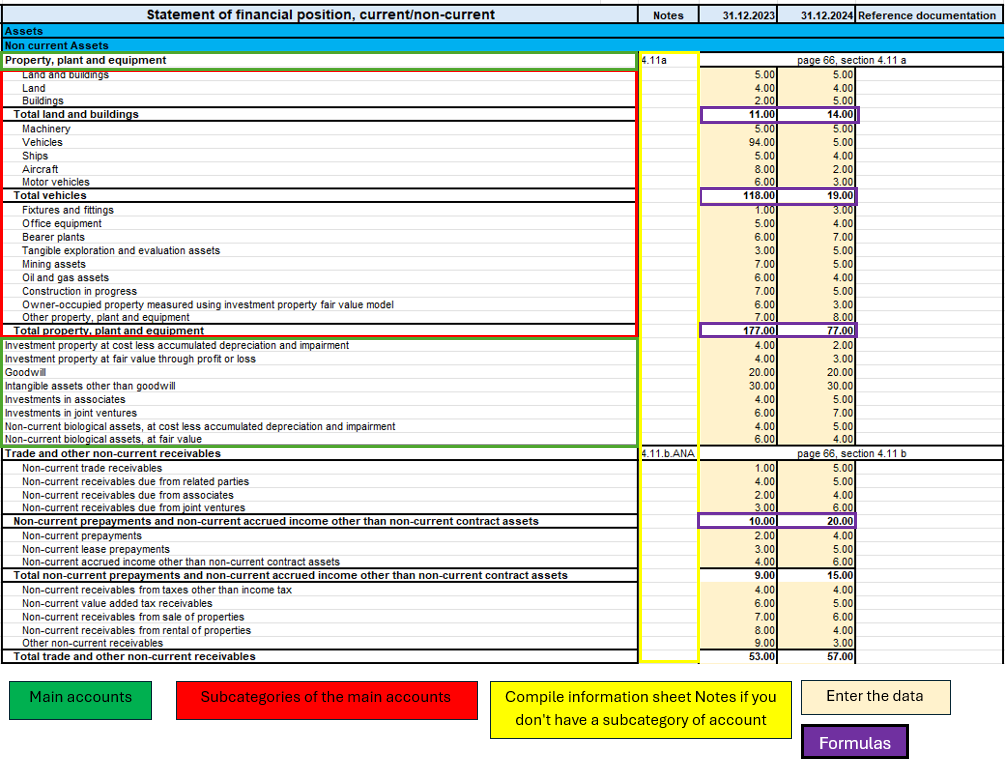
In questa immagine, si possono visualizzare quattro parti essenziali del documento:
- Conti principali.
- Sottocategorie dei conti principali.
- Le note.
- Gli importi da inserire.
- Le formule.
Questa parte, vi é maggiore dettagli soltanto se un conto ha delle note, altrimenti è uguale allo "Statement of financial position". Ciò che richiede attenzione é la verifica di un conto qualora é un conto con le note e non ha sottocategorie di conti, se ci si trova in questa situazione allora significa che il conto richiede un ulteriore descrizione testuale per definire alcune peculiarità nel foglio "Notes of financial statement".
Per i conti invece che hanno le note ma anche le sottocategorie di conto, bisogna compilare soltanto gli importi delle sottocategorie del conto specifico. In questo modo, compilato tutti gli importi delle sottocategorie del conto, le formule applicate alle sottocategorie calcoleranno i subtotali e il totale del conto principale.
Quindi riassumendo il procedimento di compilazione di questo foglio é:
- Inserisco gli importi nei conti principali se non ci sono note a cui fa riferimento.
- Se il conto principale ha note, verifico che abbia le sottocategorie di conti, se non c'è le ha, allora vado nel foglio "Notes of financial statement" e compilo la descrizione testuale.
- Se invece il conto principale ha note e ha le sottocategorie di conti, allora compilo soltanto gli importi delle sottocategorie.
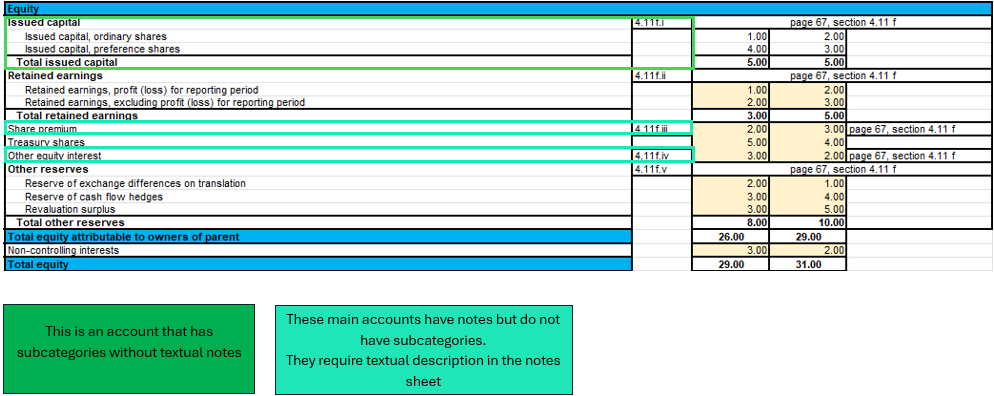
In questa immagine d'esempio nella parte di Equity, viene illustrato un caso in cui un conto sia con note ma senza sottocategorie di conto, che richiede una descrizione testuale nel foglio "Notes of financial statement" e un caso normale in cui ci sono le note con le sottocategorie di conti.
Income statement detailed
Income statement detail si basa sulla stessa logica del Statement of financial detailed, con l'obiettivo di fornire un documento unico per la sua funzione, dettagliato dai conti delle note, senza dover compilare il foglio "Notes of income statement".
Ci sono i conti principali e quando ci sono le note, vengono dettagliati dalle sottocategorie di conti che ne fanno parte.
Modalità d'uso
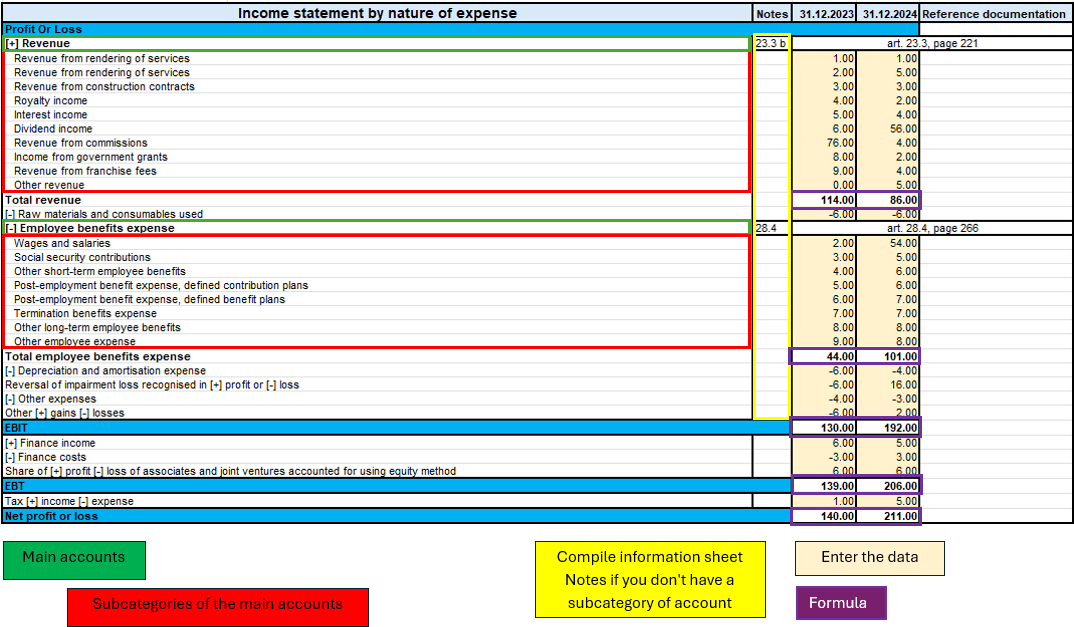
Come illustrato nella figura sopra, ci sono quattro parti uguali al foglio "Statement of financial detailed" con la stessa logica.
L'unica differenza é che non ci sono note di tipo descrittivo, perciò tutti i conti con note sono già con le loro sottocategorie senza che richieda una compilazione ulteriore sul foglio "Notes of income statement".
Pertanto, per riassumere, è essenziale attenersi a questi passaggi:
- Inserire gli importi dei conti principali se non hanno le note.
- Se il conto principale ha delle note, inserire gli importi soltanto nelle sottocategorie di conto.
The Statement of Changes in Equity
Lo Statement of changes in equity riflette i cambiamenti e le variazioni di capitale proprio.
Questa parte permette di approfondire e a dare trasparenza sulle decisioni e sull’effetto delle stesse sul valore di capitale proprio. Inoltre è un utile strumento per investitori e altri stakeholder per comprendere come l’azienda abbia generato e utilizzato il capitale proprio.
Modalità d'uso
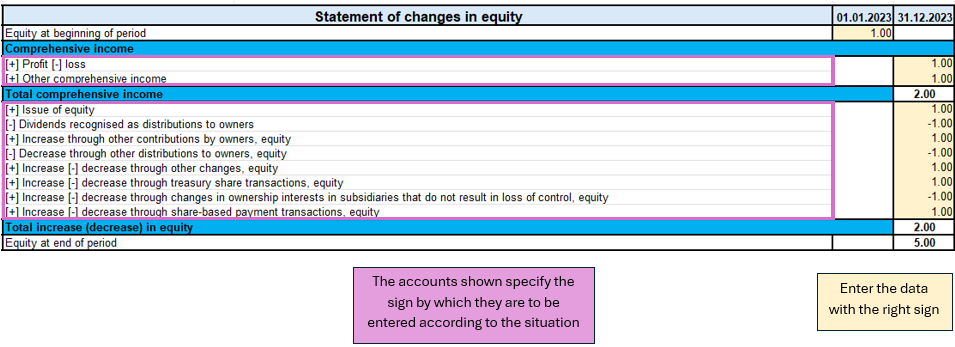
Nel foglio "Statement of changes equity" come mostrato dall'immagine, c'è una parte da porre attenzione.
La prima é la valutazione della variazione della voce di conto, se questa aumenta o diminuisce e successivamente in base all'indicazione del segno (+/-) bisogna scrivere l'importo con il segno corretto.
A differenza di altri documenti, questo non richiede note.
Quindi il processo di compilazione del documento é:
- Valutare la variazione di conto e seguire le indicazioni sul foglio sul segno da assumere nelle varie circostanze (aumento o diminuzione del conto).
- Inserire l'importo con il segno corretto.
Cash flow indirect
Questo documento redige l’entità in quattro parti:
1. Cash flow da attività operative;
2. Cash flow da attività di investimento;
3. Cash flow da attività finanziarie;
4. Cash flow netto.
Il documento è indipendente dagli altri fogli, quindi bisogna fare i propri calcoli per dedurre i vari importi da inserire nelle voci del cash flow.
I conti sono stati ripresi dalla tassonomia dell’IFRS per PMI, in prima parte ci sono gli aggiustamenti del profitto o perdita per poi successivamente calcolare le attività operative.
Le attività di investimento sono caratterizzate dall’acquisto o vendita di attività fisse come attrezzature, immobili, partecipazioni join venture e altro.
I flussi da attività da finanziamento sono legati alle fonti di finanziamento dell’azienda, come leasing, emissioni di azioni, pagamento rimborsi di debiti o proventi da finanziamenti. C'è anche il pagamento dei dividendi agli azionisti.
Nell’ultima parte del cash flow ci sono delle precisazioni da fare. La variazione netta della liquidità viene valutata in due fasi, la prima è calcolata prima dell’effetto della variazione dei tassi di cambio e la seconda dopo tale variazione. Inoltre, come forma di controllo viene anche calcolata la variazione di liquidità, mostrando i cambiamenti del periodo di attività, calcolando la differenza tra il saldo della liquidità iniziale e quella finale.
Modalità d'uso
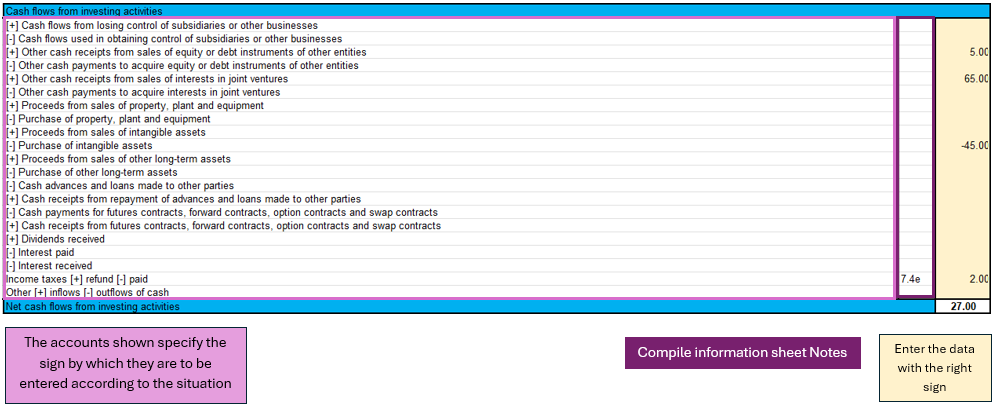
Così come evidenziato dalla figura del Cash flow per le attività di investimento, si possono identificare tre componenti principali:
- I conti principali mostrano il segno a dipendenza della situazione.
- Per alcuni conti é richiesto la compilazione del foglio "Notes of cash flow statement".
- L'inserimento degli importi, richiede attenzione rispetto al segno.
Nel cash flow é richiesto un ragionamento sulle implicazioni dei conti di bilancio e conto economico per concludere che importo inserire nella voce specifica del conto dei flussi, quindi la conclusione a dipendenza di quale conto dei flussi si é analizzato, potrebbe essere un aumento o un decremento di un'attivo, un pagamento per acquisto immobili, il pagamento dei dividendi agli azionisti,...
Non esiste un foglio adibito a questo scopo, l'utente deve ragionare con gli importi a disposizione, inseriti nel bilancio e nel conto economico e arrivare alle proprie conclusioni.
Successivamente, avendo un importo, bisogna distinguere la situazione come indicato nel foglio, per inserire l'importo con il segno corretto.
In ultimo, nell'eventualità che lo richieda compilare la parte di "Notes of cash flow statement" con gli importi specifici del caso.
Notes
Le note sono suddivise per i tre documenti degli IFRS:
1) Note del Financial Statement.
2) Note del Income Statement.
3) Note del Cash Flow.
Come riportato nella parte introduttiva le note servono per completare le informazioni riprese dai documenti finanziari.
Il foglio note contiene quattro parti essenziali: il codice note, il conto di riferimento, importo e note (testo).
Il codice note è la referenza per ogni parte dei documenti che serve a comprendere in quale conto è necessario compilare le note.
Il conto rappresenta il conto ripreso dal documento (Financial Statement, Income Statement, Cash flow) che deve essere dettagliato nelle note.
L'importo è singolare per il conto dettagliato e non è sempre richiesto perché in alcuni casi c'è solo bisogno una descrizione testuale.
Le note come testo sono necessarie qualora ci siano casistiche che richiedono soltanto una descrizione o una personalizzazione più dettagliata per esplicare un conto.
Modalità d'uso
Caso per il Financial Statement
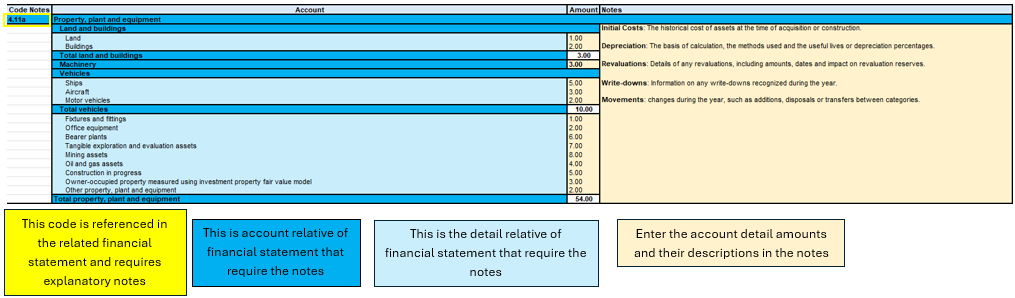
Figure of Excel in the sheet Notes of financial statement
In questa immagine si può osservare quattro componenti principali, il codice di riferimento del conto, il conto, il dettaglio che raggruppa le sottocategorie di conti, gli importi da inserire con le eventuali note testuali.
Il punto di partenza per compilare questo foglio é quindi il financial statement, dove ci sono elencati quali conti abbiano necessità di maggiore dettaglio, per poi passare successivamente al completamento delle informazioni nel foglio delle note.
La parte di inserimento dati riguarda l'importo del conto di dettaglio e l'eventuale testo descrittivo.
Il totale e i subtotali del conto, sono calcolati dalle formule, il totale del conto viene riportato nel foglio principale del financial statement, perciò é fondamentale che se un conto ha necessità di note, venga compilato soltanto nel foglio delle note.
Caso Income Statement
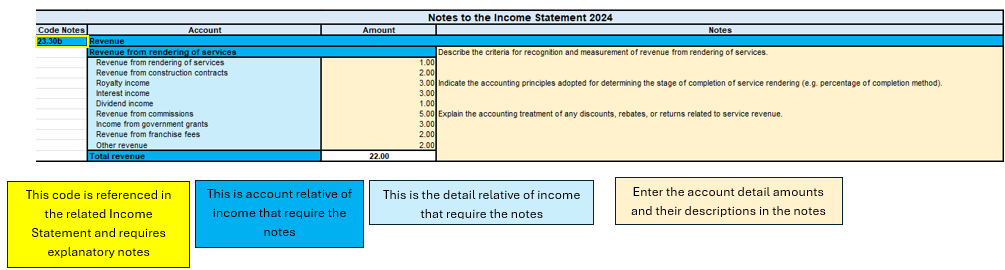
Figure of Excel in the sheet Notes of income statement
Come visto precedentemente, la struttura non cambia per le note degli Income statement. Le parti principali sono sempre le medesime, come anche per le note del cash flow.
Per riassumere quindi in questo processo bisogna:
- A dipendenza di quale foglio si stia compilando, bisogna controllare che il conto analizzato del financial statement, dell'income statement o del cash flow ci sia la nota di riferimento.
- Bisogna compilare tutti i dati e le informazioni necessarie.
- Qualora ci sia un sottoconto delle note non necessario o non usato, si può semplicemente lasciarlo vuoto o inserire l'importo zero.
Obiettivi del file
Il processo della creazione della struttura IFRS per PMI ha preso in analisi la documentazione ufficiale e ricostruito una struttura nel modello Excel, con l’obiettivo di permettere all’utente di seguire la logica di reporting IFRS, inserendo le informazioni principali nelle parti presenti nel file.
Le caratteristiche alla base di tale file è la completezza del documento avendo tutte le parti principali richieste per gli IFRS, l’utilità nel prediligere i modelli più usati e più consoni a più realtà aziendali ed escludere altri modelli più specializzati solo in determinati contesti.
Il risultato finale è di avere una visione finanziaria ed economica sulla situazione aziendale del periodo specifico, in conformità con gli standard IFRS per PMI.
Inoltre, in ottica dei principi degli IFRS per PMI si vuole migliorare la comparabilità dei dati finanziari tra diverse aziende, facilitare l’analisi e l’interpretazione dei risultati finanziari da parte di stakeholder esterni dall’azienda e promuovere l’adozione degli IFRS per PMI dando uno strumento pratico ed accessibile.
Modello Excel gratuito per IFRS-PMI
Mettiamo a disposizione il modello senza alcuna responsabilità, come previsto dai nostri Termini e condizioni d'uso.
Conto dei Flussi e Indici di Bilancio [BETA]
Conto dei Flussi e Indici di Bilancio [BETA]L'estensione è disponibile in italiano, la documentazione è invece scritta in inglese. Guarda English Documentation
Puoi confrontare i dati storici su più anni e i dati di previsione con l'anno in corso.
Introduction
What is exactly the financial statement analysis?
Financial statement analysis is an accounting tool that provides an assessment of a company's economic, financial and asset condition. It is based on the financial statements and reports the data. It contains the profits and losses of a company and therefore serves to derive the general performance of the company.
Why is this activity very important for your SME ?
Until recently there were few SMEs that often used a financial statement analysis as larger companies could use it.
Today, times have changed. Reading the numbers well can make a difference within the strategy and management of an enterprise. Understanding which products it is worth investing in and which jobs can be neglected determines the difference between the growth or decline of a company.
This activity can be a source of interest for various subjects, external or internal to the company. Entities or external individuals can analyse their solvency profile (current or potential lenders), capacity to provide an adequate return on capital (for those who want to buy shares for example) or even just obtain information on the company's situation with respect to competition in the sector.
Through the comparative balance sheet analysis of the various elements available, it is possible to arrive at the following formulation of a "judgement" on the health of the company in all its dimensions:
- Economic
- Asset
- Financial
How it works
The financial statement analysis is based on two fundamental documents for a company:
- The Balance sheet
- The Profit and loss statement
In order to perform a correct analysis, it is always necessary to start from the reclassification of the accounts, which includes 3 phases in particular.
- Group the account items into groups
- Order such groups
- Bringing out intermediate results
The reclassification allows for a slightly cleaner first view of the company's situation and is already useful information can be obtained from it.
Analysis by Indexes
Once the intermediate results have been obtained, it is possible to proceed with the calculation of the indices useful for the analysis. The financial statements analysis by means of indexes is a very powerful tool that allows you to use indicators capable of providing a very concise assessment of one's own situation.
How should the data be interpreted?
Better results in terms of interpretation and evaluation are therefore achieved by analysing a series of balance sheets and studying the trend over time of the significant balance sheet ratios, so as to understand in which management is moving the company (dynamic financial statements analysis).
How do I evaluate them?
- Temporal evolution
- Comparison with average values of the sector
- Comparison with "normal" values i.e. with the benchmark
- Comparison with objectives
Response to results
This is the last activity of the analysis cycle, where the "relay" passes into the hands of those who deal with the Management of the Company, with data that speak clearly, the Manager will have to plan how to proceed using the right Project Management techniques.
The report contain errors?
If you notice incorrect data within the report or find that for some reason the calculated amounts do not match, please follow the steps below:
- Check that the data in your accounts are correct.
- Check that you have set up the groups correctly in the settings dialog.
If the errors persist, contact us via our feedback form and send us an example accounting file (*.ac2), even with little data, but allowing us to reproduce the possible problem and correct it.
Multi-language
The extension is available in the following languages:
- English
- Italian
- French (translation currently not complete)
- German (translation currently not complete)
And will adapt according to the language in which the application is set up. For all other languages, the standard version in English will be displayed.
Save your analysis
You can save the report in the following formats:
- Html
- Excel
- Latex
Settings Dialog
Dialog is accesible:
- By going to the Extensions menu→Cash Flow Statements and financial Ratios →Financial Reports.
- By going to the Extensions menu→Cash Flow Statements and financial Ratios →Settings.
Set up the groups
The first and most important step is to enter the groups or accounts number you are using in your account table.
Once you enter the groups the report and calculations are all done automatically, except for some specific transactions for the Cash Flow Statement.
- Groups must be entered manually
- Groups must be separated by a semi-colon ';'
- Both groups and accounts can be entered
- It is important to make sure that you include elements that exist in your chart of accounts, if are entered groups or accounts that do not exist in your chart of accounts, a message will be displayed on the row of the grouping concerned, returning those elements for which a match was not found in the chart of accounts. Once corrected, you only need to run the dialogue again and the message will disappear.
- By default, the groups within the dialogue refer to the Swiss SME chart of accounts, and it is possible to return to the base scenario by clicking the Restore Defaults button. Beware, however, that in this way the customisations made will be lost, and will be replaced with the default values.
.png?raw=true)
All the necessary elements must be inserted within the different groupings defined in the dialogue (Liquidity, Fixed Asset,Owned base capital,...).
Assets
They show the total employment of a company, so the investments to which the company has allocated
the means found in carrying out its activity.
- Liquidity: Must include groups or accounts that define liquidity in the company, such as cash or bank
- Credits: Must include groups or accounts within which are recorded all the operations
concerning money due to buyers who didn’t paid yet for their purchases - Stocks: Must include groups or accounts with all goods for resale in the ordinary course of business.
- Fixed assets: Must include groups or accounts containing fixed assets elements, as:
- Buildings
- Computer equipment
- Computer software
- Furniture and fixtures
- Intangible assets
- Land
- Leasehold improvements
- Machinery
- Vehicles
Liabilities and Equity
Shows where company's resources come from. In general, the funds at the company's disposal are
classified in a way to distinguish between own funds (which flow into equity) and those from third parties.
- Short-term debt capital: Must include groups or accounts representing the company commitments that must be fulfilled, without any particular cancellation, in the current year.
- Long term debt capital: Must include groups or accounts containing that kind of capital that the company can have at its disposal for several years, on a fixed basis, and that can usually only be withdrawn within a set time limit.
- Own Base capital: Must include groups or accounts those group referring to the company's own capital.
- Reserves and Profits: Must include groups or accounts within which are recorded the amounts to be paid to reserves or designated as profits.
Revenues
Indicates what is produced by the company during a financial year. Whether it is an increase in the value of products or semi-finished products in the course of production or services in progress, revenue from the sale of products or services or the increase in the value of fixed assets thanks to own resources, all these heterogeneous factors add up.
- Sales turnover: Must include groups or accounts within which is recorded what is produced by the company during a financial year. Whether it is an increase in the value of products or semi-finished products in the course of production or services in progress.
Costs
- Costs of Merchandise and services: Must include those groups or accounts in which all costs relating to goods and services consumed during the annual financial year are recorded.
- Personnel Costs: Must include all those accounts referring to a cost due to personnel, such as:
- Salaries
- Social charges
- Severance Pay
- Pension and similar treatment
- Other costs
- Different Costs: Must include all other groups or accounts relating to costs during the operating period.
- Interests: Must include groups or accounts containing the costs of financing sources, such as bank interest payable or interest on loans.
- Depreciation and Adjustments: Must include groups or accounts where are registered possible revaluations and write-downs of equity investments, as well as of financial fixed assets and securities included in current assets that are not equity investments.
- Final Result: The group containing the difference between the costs and the revenues at the end of the year.
Average Number of employees
This information is useful for calculating efficiency ratios, enter the average number of employees in the company and find out information such as the average company revenue per employee.
Printing Preferences
To make the Analysis as close as possible to your needs you can set some preferences, and choose about the details of printing and analysis
.png?raw=true)
Printing Details
- Page header: Include the header in the report, the header is composed with the information retrieved from the properties of the file.
- Logo: Choose whether to include your company logo in the report. for information on how to set up a logo visit this Logo set up page.
- Background color of headers: Choose the colors for the table headings
- Text color of headers: Choose the color for the texts in the table headings
- Report Without colors: Check the box for no colours in the report.
Analysis Details
- Number of previous years: Set the number of previous accounts (years) to be included in the analysis, which will be added to the current year and the Budget (if present and included).If you don't know how to set the previous year to a file, go to “File→File and Accounting Properties→Options Tab.
- Number of decimals: Choose how many numbers after the decimal point you want for the digits in the report, if you don't want to have decimals you only need to insert a zero 0.
- Include Budget: If you are using the Budget table for your financial planning, you have the possibility to include it in the analysis.
- Include Budget to date column: Include the columns showing the values of the budget up to that day, compare the values with those of the year-to-date.
- Include Current year projection column: You can include the projection for the current year. The programme uses the values in the budget table to return what could be the values at the end of the year.
- Current Date: Insert the current date. If no date is entered, the date of the day is taken automatically
- Include DuPont Analysis: Choose whether to include the Dupont Analysis
- Include Control Sums: Choose whether to include the table with the control sums, useful to inform in case of errors on the totals (assets/liabilities, operating result).
- Show the formulas column: Choose whether to show the column with the calculation formulas.
- Show the acronym column: Decide whether or not to show the acronym column, which is useful for identifying the elements used for formulas.
The columns of acronyms and formulas are complementary, that's beacuse the acronym column is useful to uderstand how the formulas are composed. if you dont need these columns, just uncheck the checkbox.
Set the benchmarks
Benchmarking is a method of assessing an organisation's competences based on comparison with the "best
in class", whatever sector it belongs to. So the Benchmark is a key performance indicator on the basis of
which a company assesses its performance with regarding to products, services and business processes.
You can customise these values depending on your company:
- Sector
- Size
- Targets
These values are only representative, which means that the figures you enter are not used in the analysis but are shown as they are. In the report, they are displayed in the Benchmark column, in the indexes tables, so that you can quickly assess the situation.
.png?raw=true)
It's also possible to call the dialog from the opened report and change the parameters. The values of the
analysis will be updated automatically.
Cash Flow Statement
Cash Flow is an analytical tool that helps to visualise the positive and negative changes in liquidity as a result of management, with reference to a given period of time: it is in fact the reconstruction of monetary flows, then the difference between all the monetary income and expenditure of a company.
Cash Flow analysis is not subject to accounting rules and many investors use the data to assess the strength of the company.
Essentially, if the Cash Flow is positive, it shows the financial availability for the company within the reporting period, whereas if the cash flow is negative, it means that more resources have been absorbed than have been received.
Special Cash Flow transactions
The first step to obtain the Cash flow Statement i its to setup the account groups in the settings dialog, Most value needed for preparing the Cash Flow Statement can be calculated based on the changes of the standard account classification. Identifying Disinvestments, Revaluations, transactions and other specific movements effecting the cash flow, would require a restructuring of the account plan. We have therefore opted to identify these values, by adding a special code to the description of a transaction.
It is important that these transactions are made using the recommended account type or group, because the program searches for cashflow amounts in certain groups, so if an entry is made using another account type, there could be an error as the amount may not be found.
If we talk about entering a fixed asset account, the account must belong to one of the groups entered in the fixed assets section of the dialogue. For example, if I disinvest by selling a vehicle and I use the standard chart of accounts for SMEs, I can use the account Vehicles '1530', which is part of the group 150, which in the dialogue is entered under the section 'Tangible Assets' in the fixed assets.
- Disinvestments (#disinvest)
- A disinvestment simply represents the sale of a fixed asset such as a vehicle or machinery. When recording a disinvestment.
- Debit Column: Insert the account where you will collect the money from the sale, such as the post or the bank.
- Credit Column: Insert a fixed asset account that relates to the item sold.
- Knowing the amount of disinvestments, the program is able to calculate in detail the real amount of investments that have been made during the year. For an SME, the number of disinvestments during the accounting period usually remains quite small, whereas investment activities are much more frequent operations, which is why it is very important to find the real amount net of all other movements.
- A disinvestment simply represents the sale of a fixed asset such as a vehicle or machinery. When recording a disinvestment.
- Revaluations of fixed assets (#revaluations)
- Revaluation of a fixed asset is the accounting process of increasing the carrying value of a company's fixed asset or group of fixed assets to account for any major changes in their fair market value.
- Debit Column: Enter the account of the fixed asset item you are revaluing to increase its value.
- Credit Colum: Enter an income account, if you don't have a particular one you can enter it as extraordinary income.
- Revaluation of a fixed asset is the accounting process of increasing the carrying value of a company's fixed asset or group of fixed assets to account for any major changes in their fair market value.
- Devaluations of fixed assets (#devaluations)
- It works in the same way as a revaluation, but instead of increasing the value of the fixed asset it decreases it, which means that the accounting entry is also reversed, i.e. the income becomes a cost.
- Debit Column: Enter a cost account, if you don't have a particular one you can enter it as extraordinary cost.
- Credit Colum: Enter the account of the fixed asset item you are revaluing to increase its value.
- It works in the same way as a revaluation, but instead of increasing the value of the fixed asset it decreases it, which means that the accounting entry is also reversed, i.e. the income becomes a cost.
- Dividends (#dividends)
- Dividends are fees paid to shareholders and usually depend on the profit made. The payment of a dividend must be recorded in a specific liability account, and should appear under short-term liabilities.
- Debit Column: Enter the reported balance sheet Profit / Loss carried forward account.
- Credit Colum: Enter the specific account for dividends.
- Dividends are fees paid to shareholders and usually depend on the profit made. The payment of a dividend must be recorded in a specific liability account, and should appear under short-term liabilities.
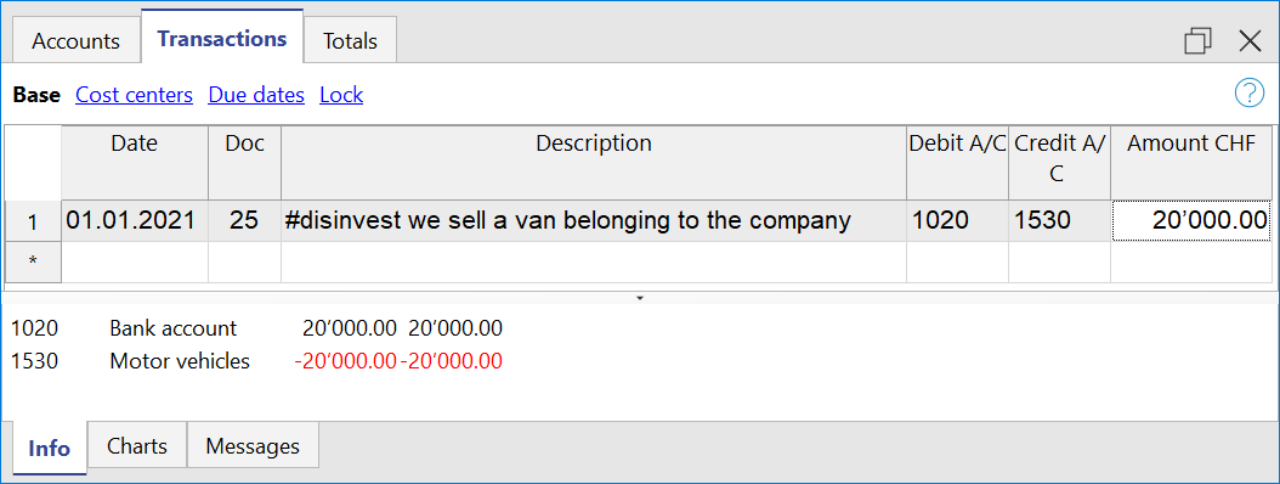
Cashflow Statement
Cash flow is divided into three main components:
- Operating cash flow which originates from the core business operations of a company.
- Cash flow for the company, which is the cash flow available to all investors in the company.
- Cash flow available to shareholders, which only considers the cash flows that are due to the shareholders, resulting from the net of all payments made and received, including from debt holders.
Adding up all the totals you find the amount that corresponds to the change in liquidity for the period, which in turn when added to the value of the liquidity at the opening of the period should give you the current liquidity balance.
If the results do not match, an error message is displayed.
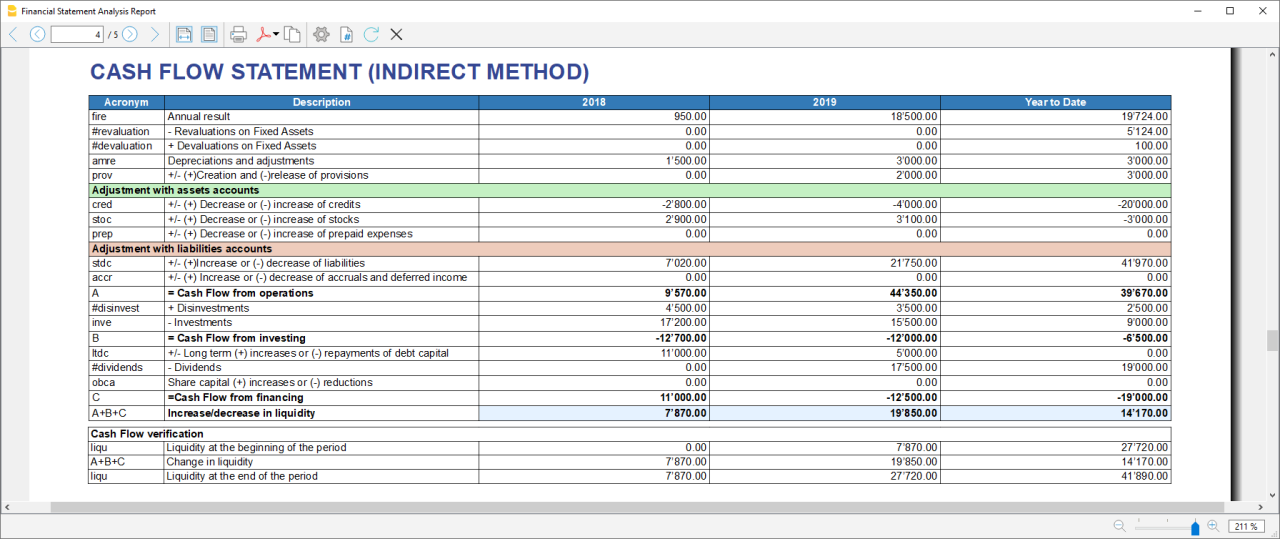
Acronym column
In the acronym column of the cashflow, the reference to the account taken into account in the calculation is entered, or in the case of special entries, the prefix of the entry, so that it is easy to see which item of the balance sheet or income statement a certain movement relates to.
Cash Flow verification
This table shows any differences between the change in cash flow calculated in the cashflow and the actual cash flow in the accounts, which in an optimal situation should match. If there is a difference in one of the years of analysis the amount in question is printed in red on a line below.
Usually, when an error occurs, the first thing to do is to check whether the amounts in the balance sheet and profit and loss statement are correct or whether there are differences between the assets and liabilities, for checking them, control sums are very useful because they immediately show whether there is a difference.
if you realise there is some error but you dont know exactly where, you can check the amounts by comparing the ones in the report with those in the chart of accounts.
The differences are generally due to an error when entering groups in the settings dialog, which can occur in two ways:
- One or more groups were not included
- One or more groups were entered under the wrong heading
In case the balance and profit and loss amounts are correct but the cashflow displays an error, is probably due to the fact that a group has been inserted in the wrong place.
Retained Earnings Statement
This table shows the movements made with the annual profit achieved. Starting from the reported annual profit it adds the profit for the period and adjusts the value by taking into account the payment of dividends and the creation or dissolution of reserves. The last two rows show the total undistributed profit, and the undistributed profit realised in the current year.

This information is somewhat supportive of Cash Flow but since earnings management does not directly affect cash, it is presented in a separate statement.
Record Transactions
It is useful to first record the transfer of the profit for the year from the profit and loss account to the profit shown in the balance sheet as shown in the example image.
In order to record the payment/discharge of reserves and the payment of dividends, it is sufficient to use the specific account of one of the above items and to decrease or increase the profit account shown in the balance sheet. The remaining amount (not allocated to reserves or dividends) then increases the retained earnings.

Cash Flow Ratios
In addition to the ratios already present, those ratios are added just below the Cashflow table and in the Charts
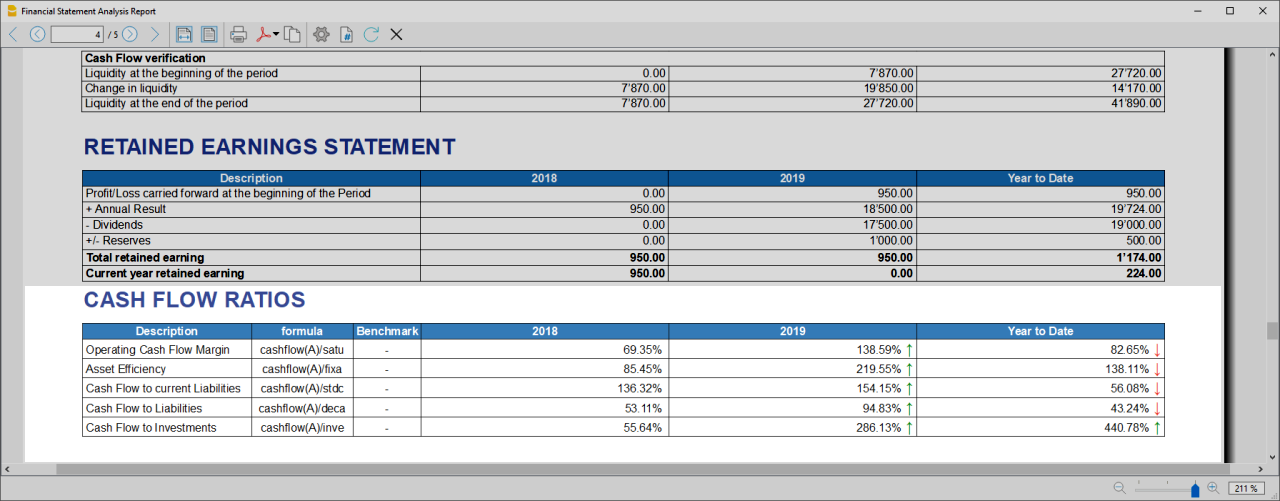
- Cashflow margin: Measures the amount of revenue a firm can convert into operating cash flow. When a firm is thriving, operating cash flow should grow alongside revenue. While profit margins measure a firm's pricing power; a declining cash flow margin also measures the health of customer and supplier relationships.
- Asset Efficiency Ratio: This is a basic ratio to show you how well the company uses its assets to generate cash flow. It’s best used to view the historical trend as well as to compare with competitors.
- Cashflow to current Liabilties: This ratio gives you an idea about the company’s debt management practices.It’s also a better indicator of the company’s ability to pay current liabilities than the current ratio or quick ratio
- Cashflow to Liabilities: Measures the amount of operating cash flow a firm generates on each dollar of total liabilities. Businesses that can't produce operating cash flow to pay off all their liabilities cannot continue to operate indefinitely, making this ratio an important indicator of liquidity as well as solvency
- Cashflow to Investments: Measures the amount a company outlays for capital assets for each dollar of cash dollar it generates from those investments.
Why Is Cash Flow Analysis Important?
Performing cash flow calculations in combination with constant monitoring of the company's cash flows is the winning formula for effective treasury management, and is useful for making the best use of available cash.
Thanks to the ability to generate cash flow and the financial solvency of the company, you gain confidence from banks and suppliers, as it symbolises a certain control over your business: the calculation of cash flow is in fact a way to detect the actual availability of the company, giving the possibility to face unexpected events or to plan consistently the future of projects.
For more information on Cashflow Analysis, please refer to the following page.
Balance Sheet and Profit and Loss Reclassification
Generate the Report by going to the Extensions menu→Cash Flow Statements and financial Ratios →Financial Reports.
The Report contains all the analysis data processed by the extension:
- Reclassified balance sheet
- Reclassified Profit and Loss Statement
- Control Sums table
Reclassified Balance Sheet
The reclassification of accounts allows for the display of a series of values, results and intermediate margins that contain more information than the traditional structure.
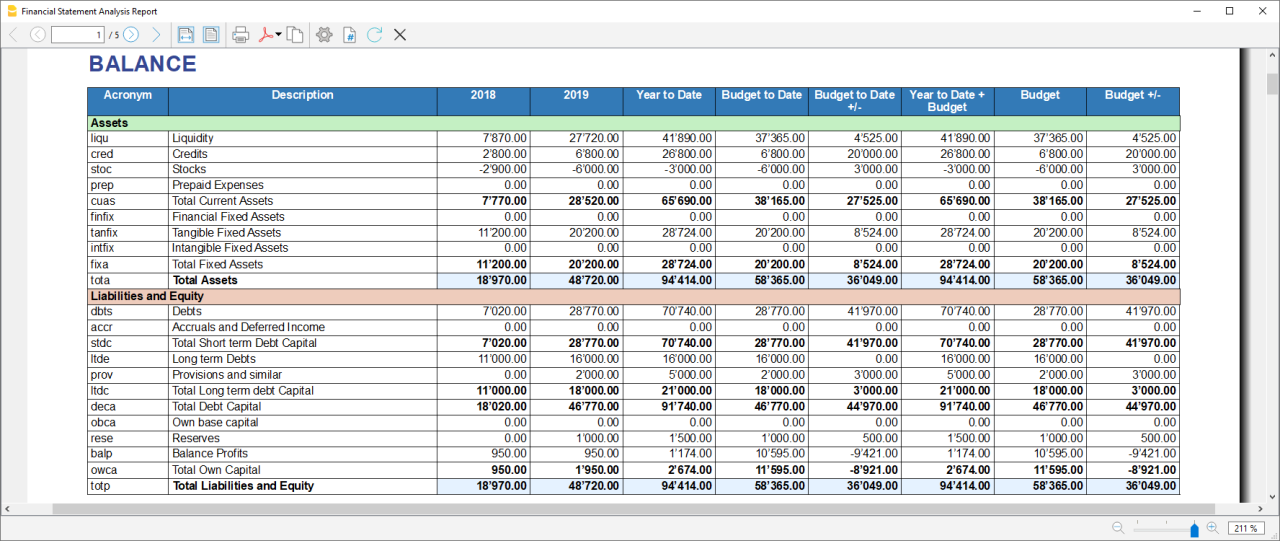
- Current Assets: All the assets of a company that are expected to be sold or used as a result of standard business operations over the next year.
- Fixed Assets: Items, such as property or equipment, a company plans to use over the long-term to help generate income.
- Total Assets: The sum of current assets and fixed assets.
- Debt Capital: Is the capital that a business raises by taking out a loan. It is a loan made to a company, typically as growth capital, and is normally repaid at some future date.
- Own Capital: It is the capital owned by the company.
- Total Liabilites and equity: The sum of Debt Capital and Own Capital.
Reclassified Profit and Loss Statement
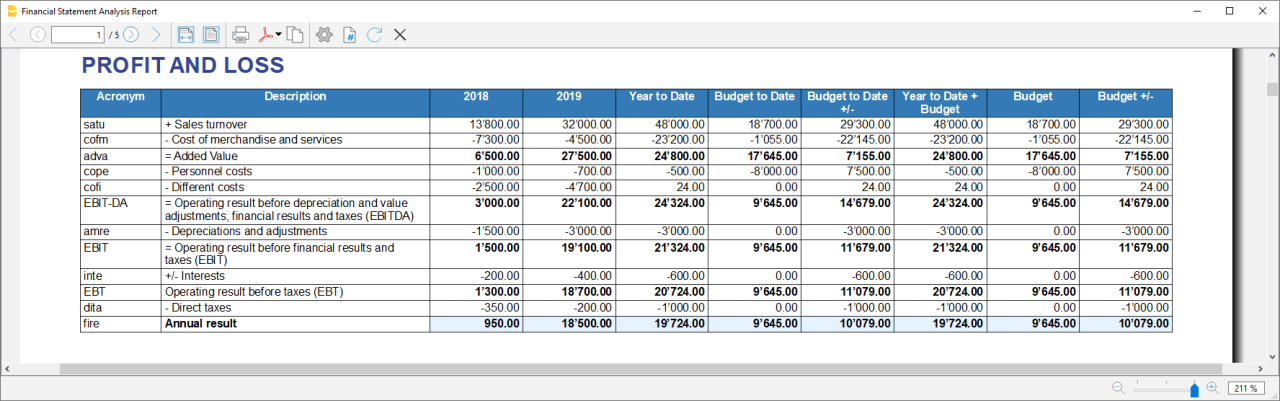
- Added value: The difference between operating costs and operating revenues incurred for resources outside the company, expresses the company's ability to create wealth and then remunerate the various production factors and stakeholders.
- MOL /EBITDA: "Earning Before Interests, Taxes, Depreciation and amortization" is obtained by subtracting from production revenues the costs of production (including internal costs such as personnel costs), without considering provisions and depreciation. As it does not contain economic items without monetary movement, its value assumes very important information for financial investors.
- EBIT :"Earning Before interests and Taxes", helps to understand whether the company is also able to cover the financial charges arising from its financial commitments.
Control Sums
Resumes the totals of the reclassified accounts (Assets, Liabilities and Equity , Annual Result). Checks that the sums calculated in the analysis match the totals in the accounting sheets and that Assets and Labilities and equity match.
- Accounting Total column: Represents the actual total in the accounts.
- Calculated Total column: Represents the total calculated by the program based on the groups entered.
- Difference column: Represents the difference found between the total in the accounts and the calculated total for each year. The value equal to 0, otherwise will be displayed an error message, which means that there may have been an error in entering the accounts/groups .In this case it is useful to check in the dialogue that you have entered the groups correctly.
Financial Ratios
Generate the Report by going to the Extensions menu→Cash Flow Statements and financial Ratios →Financial Reports.
The balance sheet ratios are formulas calculated on financial, economic and asset values. These ratios are derived from the income statement and balance sheet data. Balance sheet indices are important analysis tools that provide essential indications for the entrepreneur's activity.
It is widely used by all professionals who are interested in assessing the soundness of a company for their work.
In fact, banks use the balance sheet indexes to evaluate company loan applications.
the indexes are divided into four main types
- Liquidity ratios:
- Financing ratios
- Profitability ratios
- Efficiency ratios
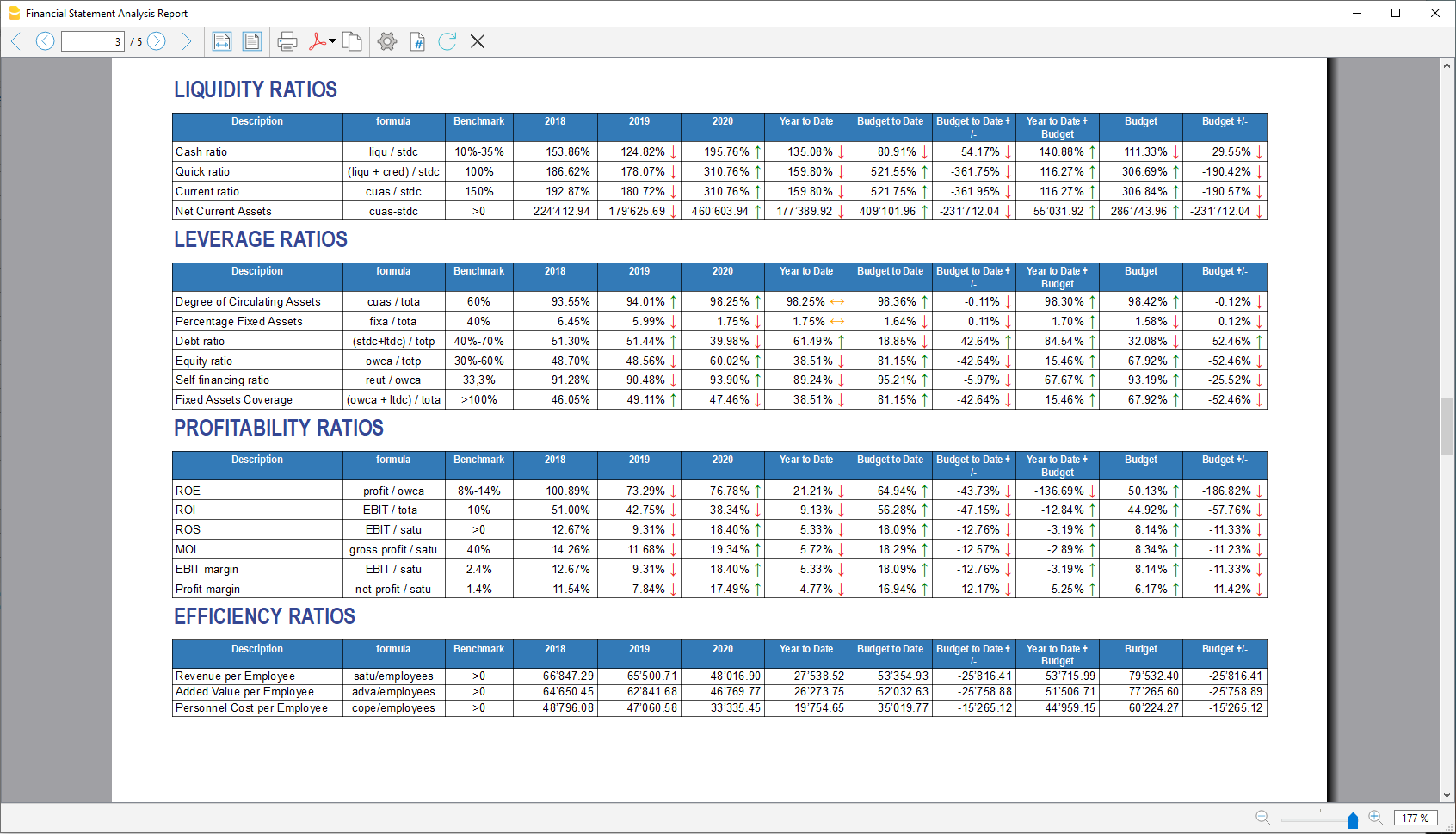
Liquidity ratios
An important class of financial metrics used to determine a debtor's ability to pay off current debt obligations without raising external capital. Liquidity ratios measure a company's ability to pay debt obligations and its margin of safety through the calculation of metrics.
- Cash ratio: Indicates the extent to which the company is able to repay its debts at the end of the term.
- Quick ratio: Indicates the extent to which the company is able to pay its debts when due.
- Current ratio: Indicates the extent to which the company is able to pay its short-term debts without touching fixed assets.
- Net Current Asset: Indicates the part of the current assets free of short-term commitments, which can therefore be used in the activity.
Financing ratios
They look at how much capital comes in the form of debt (loans) or assesses the ability of a company to meet its financial obligations.
- Degree of Circulating Assets: It allows us to understand whether there is a balance within the company's assets, a judgement can only be made if we have the average data for the same line of business.
- Percentage Fixed Assets: It is complementary to the previous one.
- Debt ratio: Indicates the extent to which the company has had to resort to external financing, the judgement depends very much on the branch of activity.
- Equity ratio: Is complementary to the previous one, equity ratio has the advantage of being less expensive.
- Self-Financing ratio: Indicates the extent to which the company has been able to accumulate undistributed profits.
- Fixed Asset coverage: The fixed assets must absolutely be financed from equity or possibly from long term capital, otherwise major repayment problems could occur.
Profitability ratios
Are useful to assess a business's ability to generate earnings relative to its revenue, operating costs, balance sheet assets, or shareholders' equity over time, using data from a specific point in time.
- Return on equity (ROE): By comparing the percentage obtained with the rates commonly applied for other investments, it is possible to understand whether the equity invested by the company gives a sufficient return or not.
- Return on investment (ROI): Identifies the return on invested capital. Basically it serves to understand how much the invested capital returns in terms of income.
- Gross Operating Margin (MOL) :Is a value that measures the profitability of a company. In other words, it measures the ability to make profit margins: Indicates the company's return on sales made.
- EBIT margin: Is the ratio of EBIT to turnover of a company. This ratio provides information on its profitability and helps to compare different companies and sectors.
- Profit margin: It represents what percentage of sales has turned into profits.
Efficiency ratios
Express the degree of efficiency of the company's factors of production, those chosen by us give us an indication of the relationship between the number of employees and the various margins of the profit and loss account. Efficiency indicators are related to profitability indicators, as higher productivity generates an improvement in profitability indicators.
- Revenue per Employee: An increase indicates greater efficiency of the company and a lowering of the break even point. Its increase is certainly an indicator of the good health of the company itself.
- Added Value per Employee: Gives evidence of efficiency in terms of cost reduction (e.g. economies of scale). If the revenue per capita index remains stable and the value added per capita index increases, this is evidence of cost efficiency.
- Personnel Cost per Employee: Highlights the trend in average personnel costs.
Within the tables and also visible the calculation formula of each index.
Dupont Analysis and Altman index Z-Score
Dupont Analysis
The Dupont model is a technique that can be used to analyse the profitability of a company using
traditional performance management tools. To enable this, the model integrates the elements of the Profit
and Loss Account and Balance Sheet.
Altman index Z-Score
The Z-Score is an index of the discriminating analysis used to determine the probability of bankruptcy of a
company within 2 years using statistical techniques.
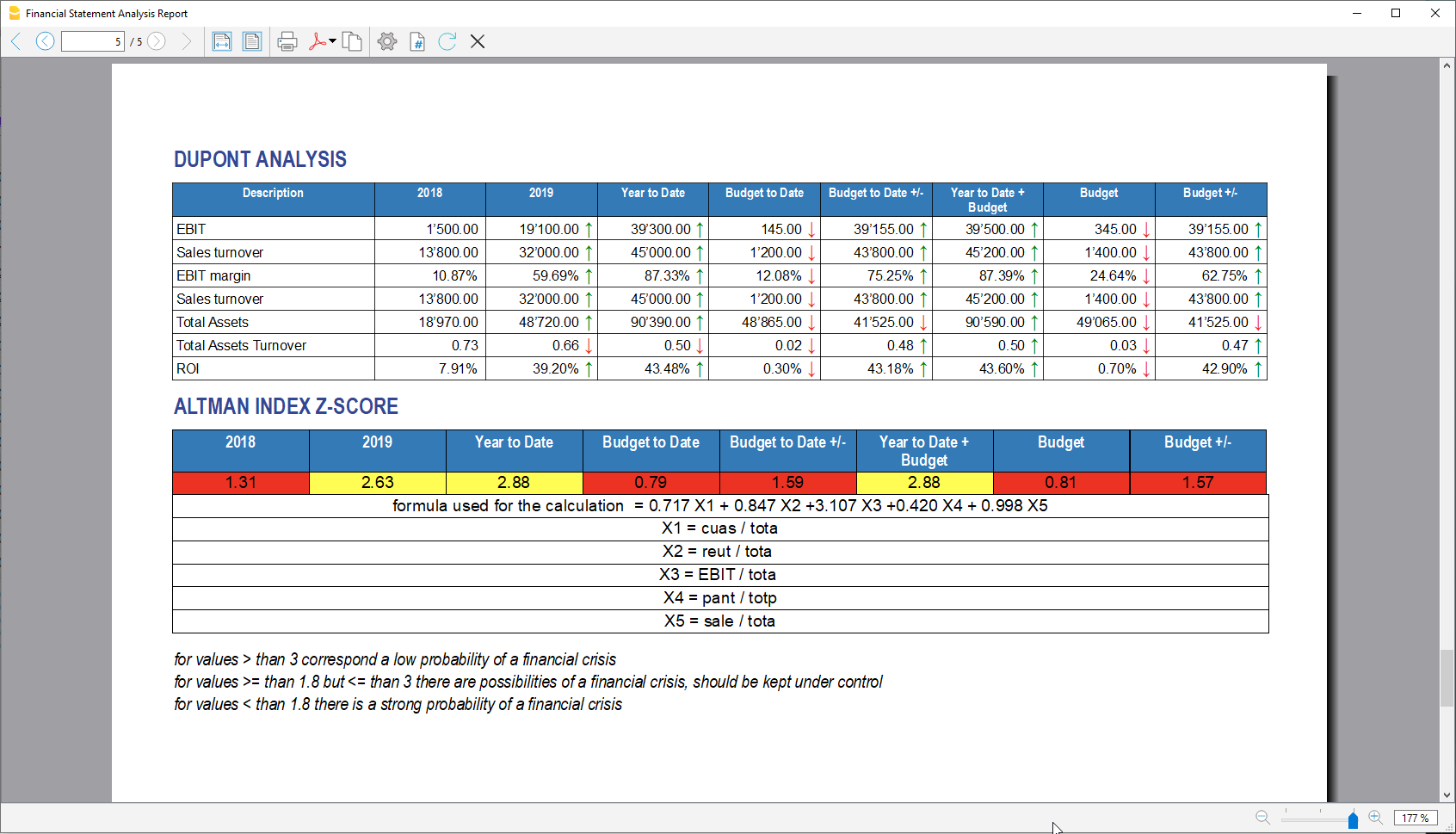
Financial Charts
It’s possible to access to the charts by going to the Extensions menu→Cash Flow Statements and financial Ratios →Financial Charts.
Charts allow you to read the same information as you can find in the report but in a clearer and more
intuitive way. Once the dialogue is open, you can move between the various elements thanks to a drop-down menu.
Ratios charts
- Financing ratios evolution
- Liquidity ratios evolution
- Profitability ratios evolution
- Efficiency ratios evolution
- Cashflow ratios evolution
These charts represent the evolution of the indexes over time. For each type of index there is a bar chart,
within which there is a section that represents the evolution over time of each index for each year included
in the analysis.
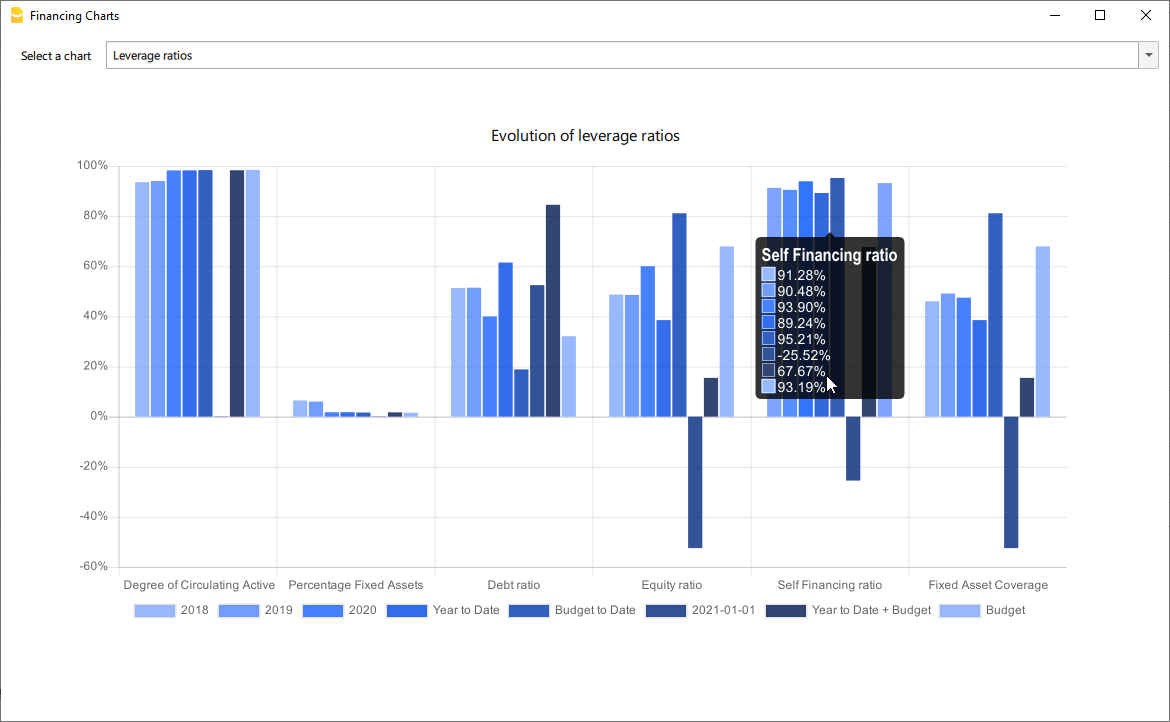
Reclassified Elements charts
- Reclassified asset variation
- Reclassified liabilities and equity variation
These charts show the time evolution of the reclassified assets, and reclassified liabilities, using stacked
chart. It is possible to see how and in what quantity the groups make up the total of assets and liabilities (in
percentage %)
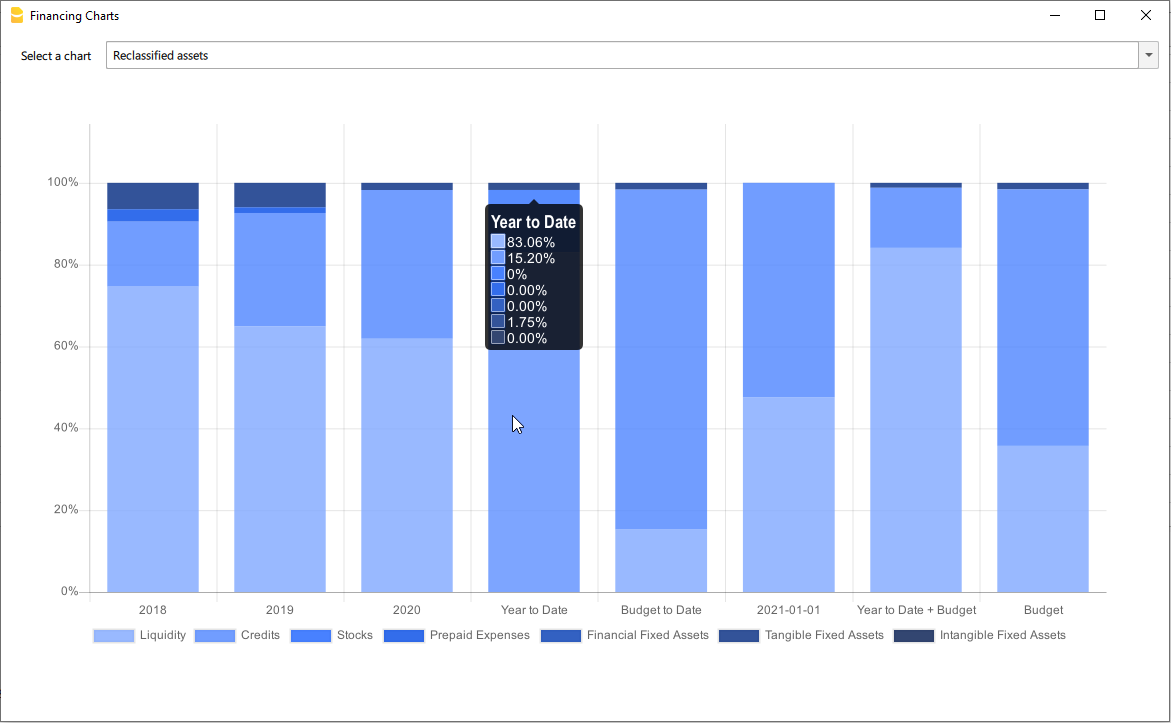
Reclassified profit and loss variation
Shows by using histogram the value of the intermediate totals (EBIT,EBIT-DA,..) of the reclassified profit and loss account ,and their evolution over the time.
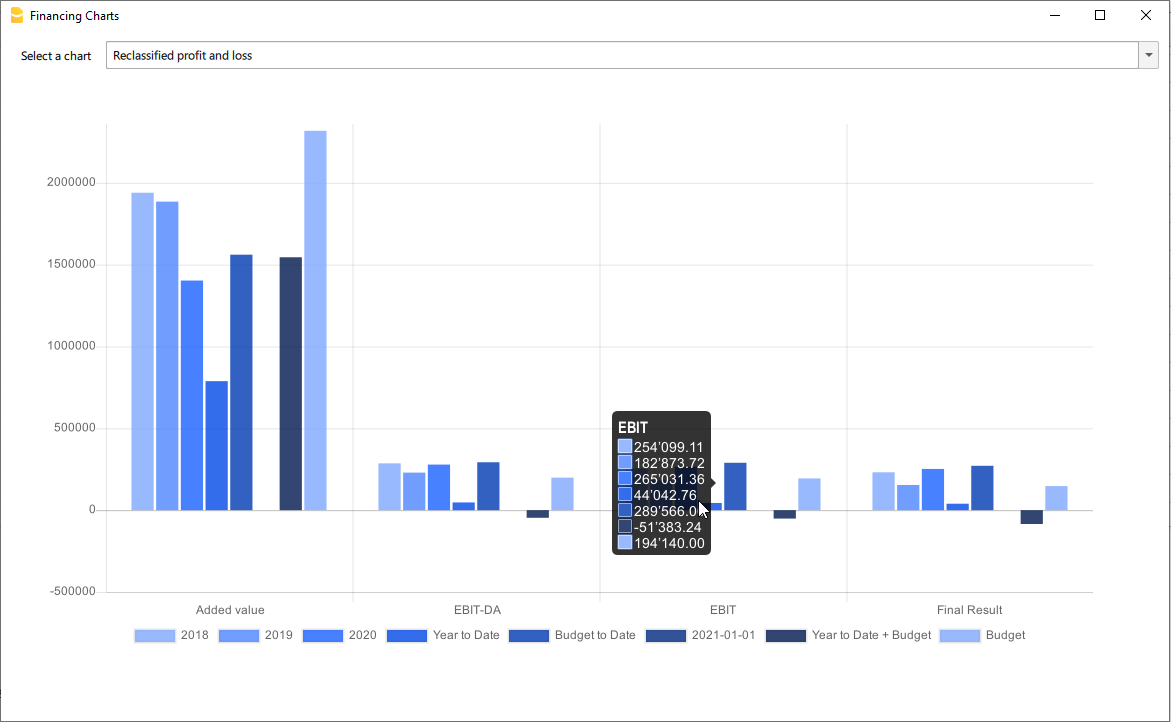
Airbnb, Booking.com, Vrbo and similiar hosting platform templates
Those who have an Airbnb rental business and are looking for a simple and efficient way to manage their finances will find the ideal solution in Banana Accounting Plus templates for several reasons.
With the templates, you can manage and track all expenses and income for all the rooms, apartments or houses you rent without any limits.
Moreover, you can manage the budget for your business in a flexible and personalized way. Whether you have multiple rooms, apartments or houses, you can keep track of specific income and expenses either collectively or divided for each individual rental unit. Additionally, you can set the budget according to irregular or regular deadlines such as monthly, quarterly, semi-annually or annually. This way, you can adapt the budget to your financial and business planning needs.
Through the budget feature in the templates, you can also make financial forecasts for your short-term rental business. You can gain a clear and detailed overview of your future income and plan ahead for all your activities.
Inventory management is another useful and powerful functionality offered by Banana Accounting Plus. You can keep track of all the items relevant to your business, categorizing them by room, apartment or rented house. This way, you will always be aware of what you own and easily manage the purchase or replacement of any necessary assets. With Banana Accounting Plus, you can create all the accounting files you need without limitations.
Regarding the management of income from hosting platforms such as Airbnb, Booking.com, Vrbo and others, the templates provide you with the option to record both the actual income deposited into your bank account and all other rental-related income, especially the commissions paid to the platforms. This information is crucial for tax purposes as it allows you to comply with the rules of the country where you operate your business.
For those who have an Airbnb business and are looking for a simple and efficient way to manage their finances, Banana Accounting Plus templates provide the ideal solution for other several reasons too.
Available templates
There are two templates available for short-term rental hosts on Airbnb, Booking.com, Vrbo or similar platforms.
The completely free template is suitable for those without accounting knowledge who want to manage the finances of their business. The second template is designed for those with double-entry accounting knowledge and who manage a business using multiple assets and possibly different currencies:
- Free template based on Banana Accounting Plus Cash Manager.
- Double-entry and multi-currency template.
All the functionalities and features described in the free template are also included in the double-entry multi-currency template.
In each template, you can easily view some sample accounting entries.
Manage Airbnb reservations
With Banana Accounting Plus templates, you have complete control over your reservations even before they are paid. This allows you to keep track of all bookings in your file, ensuring you are always up to date on availability and key dates. You can input reservations into the system and monitor them, making planning and management of your rental properties easier.
In addition to managing reservations, the templates also allow you to record payment receipts and income. This is particularly useful for monitoring and ensuring compliance with maximum nights allowed regulations in your country. You will have an accurate record of guest stays and corresponding income, providing clear and transparent documentation for regulatory compliance purposes.
Manage Airbnb Experiences
Banana Accounting Plus templates also enables you to manage and track Airbnb experience reservations. If you offer unique experiences such as sailing trips, mountain bike tours, tastings or others, you can record these specific bookings and efficiently monitor them. You will have a comprehensive overview of your Airbnb experience activities, including booking details and corresponding income.
With Banana Accounting Plus templates you simplify the financial management of your Airbnb rental business. You can take advantage of all the features offered and gain a clear and organized view of your finances.
Manage Airbnb business budget and financial forecasts
The Budget table in all Banana Accounting Plus files provides a comprehensive tool for creating your business budget and forecasting future financials.
This feature, always accessible through the Tools > Add/Remove functionalities menu, allows you to generate cash flow statements, liquidity plans and investment plans.
For more advanced needs, you can create budgets using formulas and automatic calculations. Additionally, you can obtain monthly, quarterly and annual financial forecasts as well as projections for multiple years.
Explore the full documentation on budget management and financial forecasting with Banana Accounting Plus.
Manage inventory along with their corresponding receipts
On all files, Banana Accounting Plus allows the display of the Link column in the Transactions table, enabling you to attach supporting documents to each accounting entry.
If needed, there are other predefined columns that you can easily show in your accounting file.
Additionally, with Banana, you can add your custom columns, additional tables, and link them to existing ones. Refer to the documentation on enabling the display of predefined columns and adding columns and new tables to your file.
The ability to add new tables and create custom columns also allows you to integrate the inventory of items in the rooms and apartments you rent into your file and attach relevant documentation, which can be useful, for example, for warranty or insurance purposes.
If you prefer you can create a dedicated new file to create and manage the inventory of your rooms and rented apartments. With all Banana Accounting Plus subscription plans, there are no limits on the number of files you can create and manage.
Handle the accounting recording of the fees you pay to platforms
Using a spreadsheet like Excel or Google Sheets doesn't always allow for proper management of income received from platforms such as Airbnb, Booking.com, Vrbo or similar ones. Often, the income received in your bank account does not include the commissions you need to pay to the platforms.
These platforms deduct the commissions before making payments, but there are countries where you are required to declare the gross income for tax purposes, including the deducted commissions.
With Banana Accounting Plus you can record the gross income you receive, ensuring that everything is accurately accounted for and that your bank balance always matches the actual balance in your account.
Check the example entries in the provided templates pages to see how this accounting record is done.
Free Airbnb template for income and expenses management: ideal also for Booking.com and Vrbo
Free Airbnb template for income and expenses management: ideal also for Booking.com and VrboManage your accommodation on Airbnb, Booking.com, Vrbo or the platforms you use with this free template and keep track of your finances easily and efficiently.
The Banana Accounting Plus template is superior to an Excel spreadsheet or a Google Sheet but avoids potential errors and time loss due to formula management. This way, you have a completely free accounting management template specifically designed for hosts.
With Banana Accounting Plus, unlike Excel or Google spreadsheets, there are no limits on the number of rooms, apartments or houses you can manage, and it allows you to easily track income and expenses for each individual rental property and your entire short-term rental business.

With this template, you can record and monitor all your income and expenses quickly and easily, providing you with a clear and detailed snapshot of your finances and how to optimize expenses. The accounting management template on Banana Accounting Plus offers a simple and effective way to organize and analyze all the financial data that is important for hosts.
Here are some of the key features and benefits of the free accounting management template:
- Easy to use: the template is designed to be intuitive and user-friendly, even for those who are not accounting experts. No technical skills or in-depth knowledge of Excel spreadsheets are required to use it. Banana Accounting also has extensive online documentation in multiple languages readily available.
- Startup budget: create, manage and update the budget of your startup to generate detailed and useful reports and forecasts for the success of the business.
- Income tracking: record all income generated from bookings, including payments from platforms, booking fees and reimbursement of cleaning expenses for rooms, apartments or houses, with all the necessary tracking details.
- Expense management: keep track of all expenses associated with your properties, such as utilities, cleaning, maintenance and supplies. Choose the level of detail you prefer for each expense associated with your rental properties. Add, edit, group and customize expenses you want to monitor without limitations.
- Track rental property information: easily track guest names, rented room, apartment or house, check-in and check-out dates, total nights stayed, number of guests per booking, the source of guests' bookings and payment dates from platforms.
- Automatic calculations: the template performs calculations automatically for you, without the potential errors of Excel or Google Sheet formulas, providing a clear overview of your cash flow, profits and expenses for your entire business or for a single room, apartment or house you manage.
- Detailed reports: generate comprehensive and professional financial reports, including profit and expense statements, balance sheets and more. These reports will help you make informed decisions and have detailed control over your finances.
- Manage hosting platform Experiences: easily and quickly manage the Experiences you offer on Airbnb, Vrbo or other similar platform.
- Customizable: the template can be easily customized to fit your specific needs. You can add custom categories, modify, group and personalize all the details you want to monitor according to your preferences.
- Privacy: it's important to note that the data entered into Banana Accounting is not used for commercial purposes. Your information remains confidential, offline and is not repurposed in any way.
This free template for income and expense accounting management for hosts managing their short-term rental properties simplifies the management of your finances, saves you valuable time, and provides you with a clear and comprehensive overview of your income and expenses professionally.
Banana Accounting is a highly versatile and customizable accounting software that can be used for broader accounting purposes beyond managing hosts on Airbnb, Booking.com, Vrbo and other hosting platforms.
Totally free
This template is based on the Cash Manager feature of Banana Accounting Plus, which can be used for free and without limitations with the free subscription plan.
Create and save the file
You can open and save your new file to start either through Banana Accounting Plus Web or by downloading and installing the software on your computer:
- Download and install Banana Accounting Plus.
- Click on File > New.
- Select Cash Manager.
- Search for the Category Business.
- Select the template "Income and expenses management template for Airbnb or similar platforms".
- Click on Create.
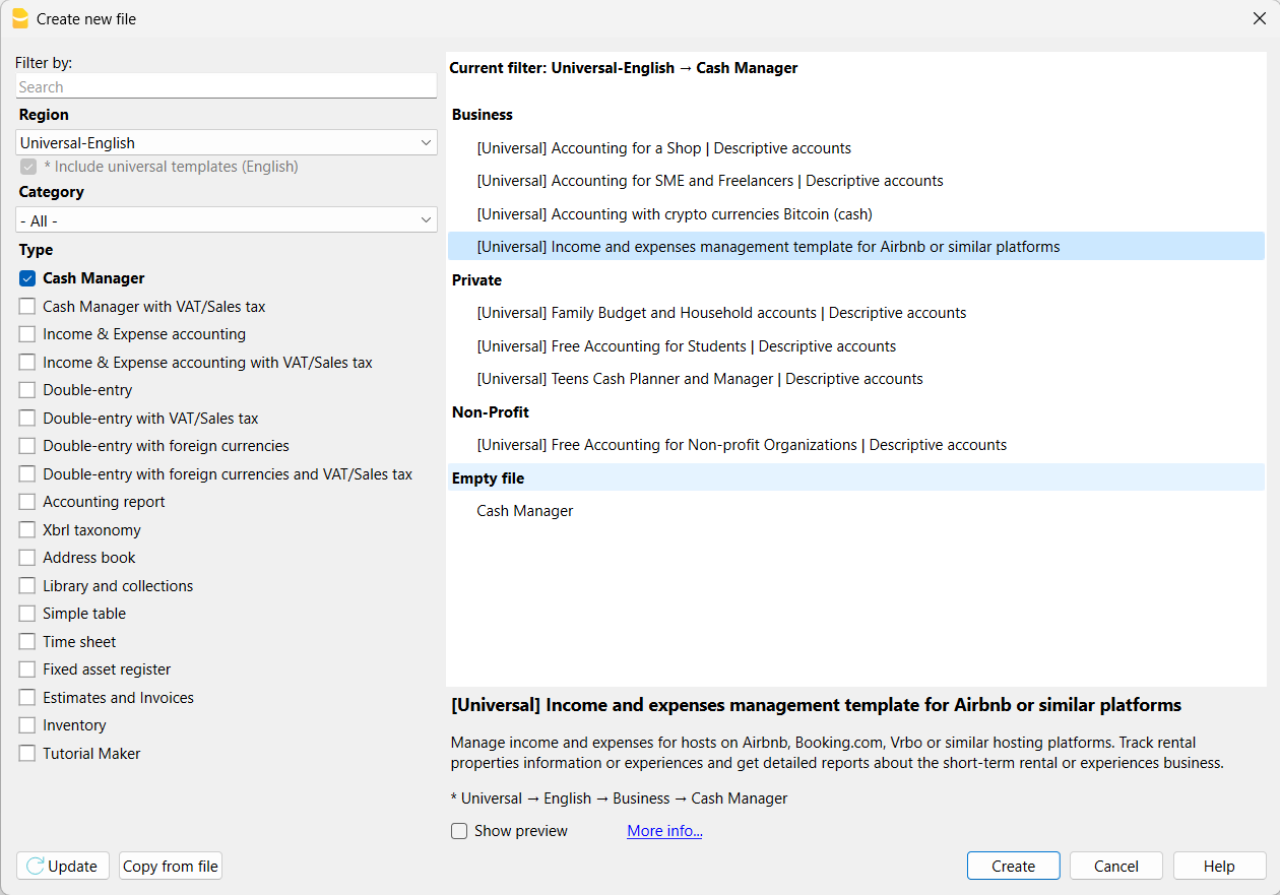
If you click on the text "More info...", you will be directed to this specific documentation page for the template. On this page, you can always find the tutorial file including sample records.
Using the command File > File Properties, set your references, the accounting period with opening, closing dates and the base currency. In the Address section, fill in the fields for the entity managing the rental properties. If necessary, change the base currency of the accounting file in the Accounting section.
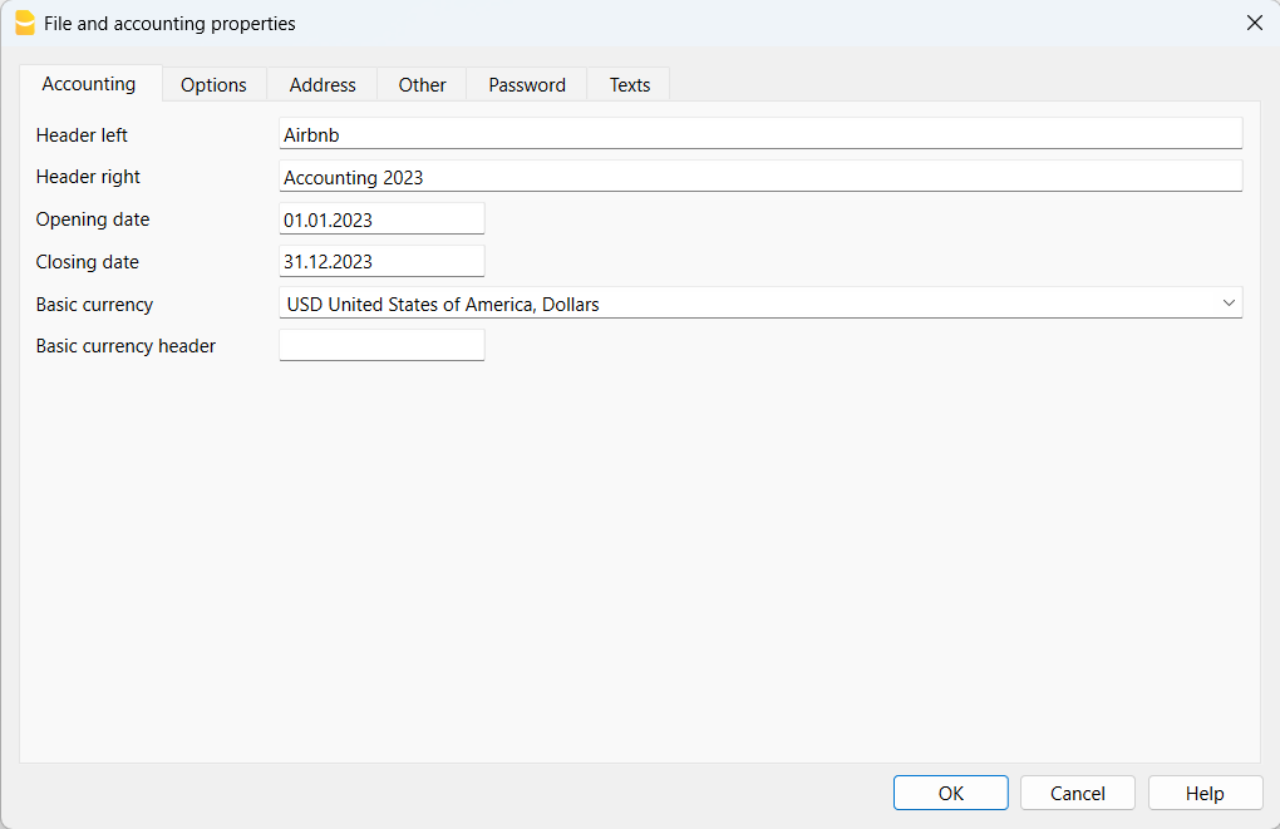
With the command File > Save As, save the file. It is useful to include the name of your business and the year in the file name. For example, "BusinessName-2023.ac2".
Also, refer to the article on organizing accounting files locally, on a network, and in the cloud.
Banana Accounting Plus Web Access
When you have downloaded and saved your new accounting file to open and use it from the web, you can bookmark the following link to access Banana Accounting Plus Web. However, it is recommended to download and install Banana Accounting Plus on the computers where it is needed, because Banana Accounting Plus Web does not yet have all the features available.
Create the budget
With Banana Accounting Plus, you can easily create a startup budget for your new short-term rental business on Airbnb, Booking.com, Vrbo and other platforms, and forecast all the costs you'll need to deal with. Consult all the relevant documentation on how to create a budget with Banana Accounting for detailed information.
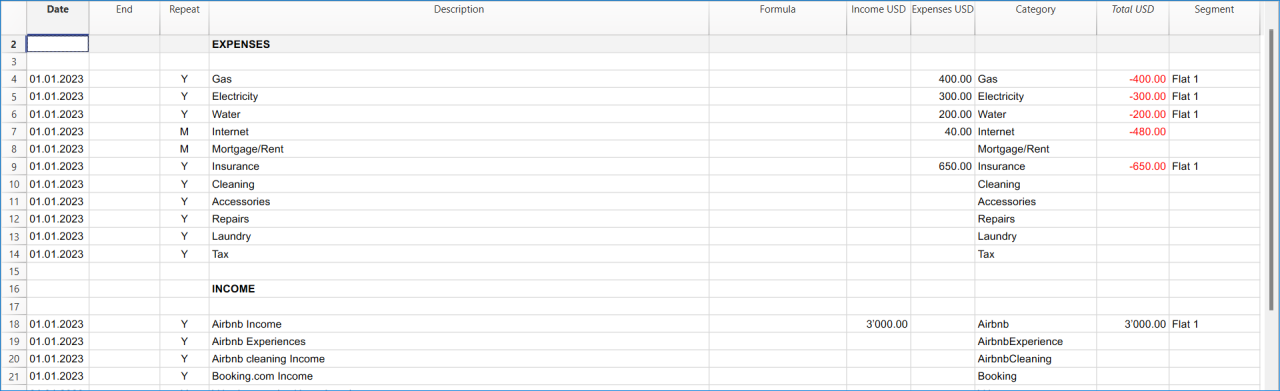
Customize and categorize expenses
If you prefer, you can group similar costs into categories and maintain the detail for each type of expense:
- Properties costs: mortgage payments, repairs and insurance coverage.
- Initial setup expenses: spending on furniture and household utensils.
- Bills: electricity, gas and water expenses.
- Supplies: expenses for items like linens, toiletries and cleaning products.
- Business expenses: costs related to accounting, software and taxes.
- Other costs: payments for cleaners, laundry services and ads.
See how you can easily create accounts groups.
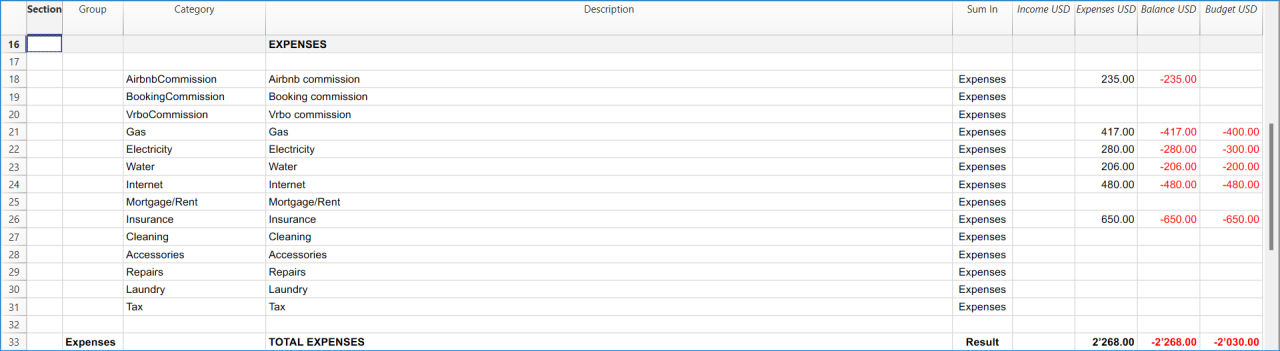
Recording transactions
In the Transactions table, record all transactions in chronological order, including debtor payments and invoice payments, as well as other types of transactions. The recordings can always be sorted and viewed instantly. You can highlight rows, correct any mistakes and copy and paste previously entered transactions.
To expedite data entry, we suggest using the various features of Banana:
- The auto-completion data entry feature automatically retrieves previously entered data.
- The recurring transactions feature (in the Actions menu) allows you to store frequently recurring transactions in a dedicated table.
- You can import data from bank statements, automatically capturing all bank transactions.
- You can link each recording to its corresponding digital document, and with a simple click, you can view the document. Refer to accounting files and digital documents for better document organization.
- Use the sort recordings command to arrange rows in chronological order.
- Use the print/preview command to print or export the journal in PDF format.
Bank transactions import
You can import bank statements, eliminating the need for manual entry.
Additionally, with the Advanced plan, it also allows for easy management of rules to automate accounting according to your specified criteria. This significantly reduces the effort required for accounting management, resulting in unmatched time savings.
Print financial statements or accounting reports
To view and print the financial statements at any time, click on the Report menu > Enhanced financial statements with groups. You can customize them or have an accounting report for a specific period.
Obtain detailed and customizable reports on all expenses and revenues of your business with Airbnb. You can compare them with the budget to always keep track of the performance of your startup.
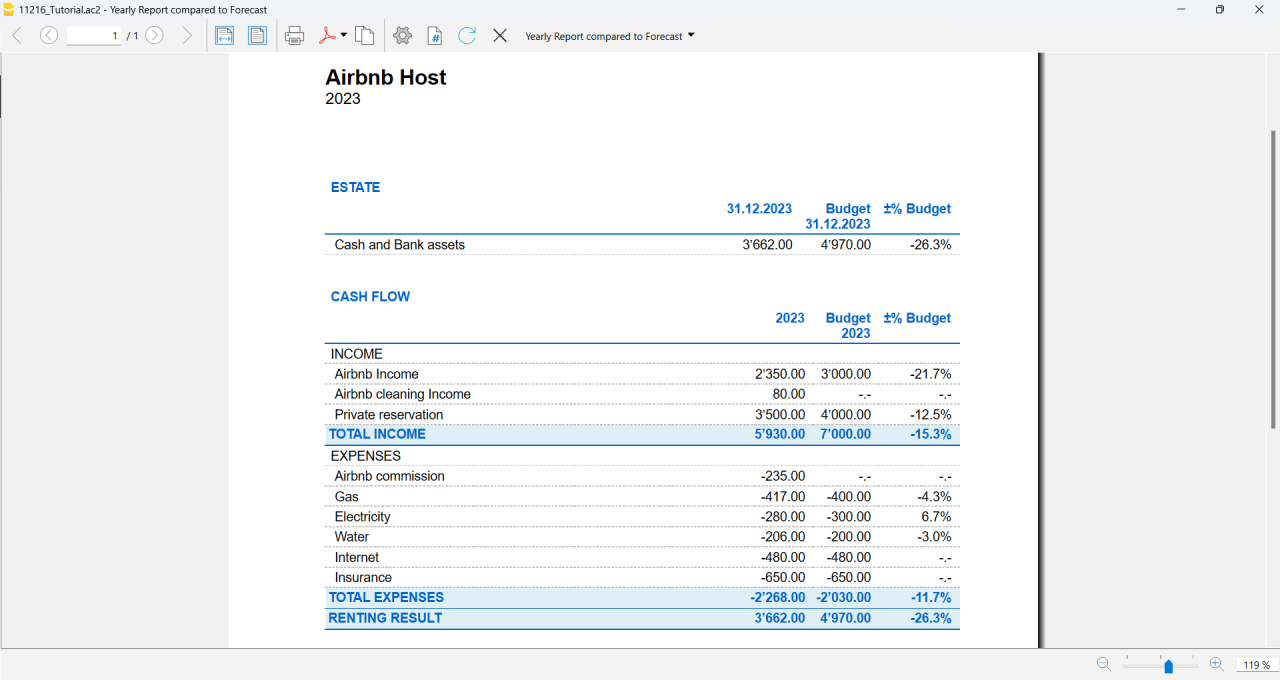
If you manage multiple rooms, apartments or rental properties, you can keep track of expenses and revenues allocated to each individual property you rent. You can also create room-specific budgets and compare the results with the actual expenses and earnings whenever you want.
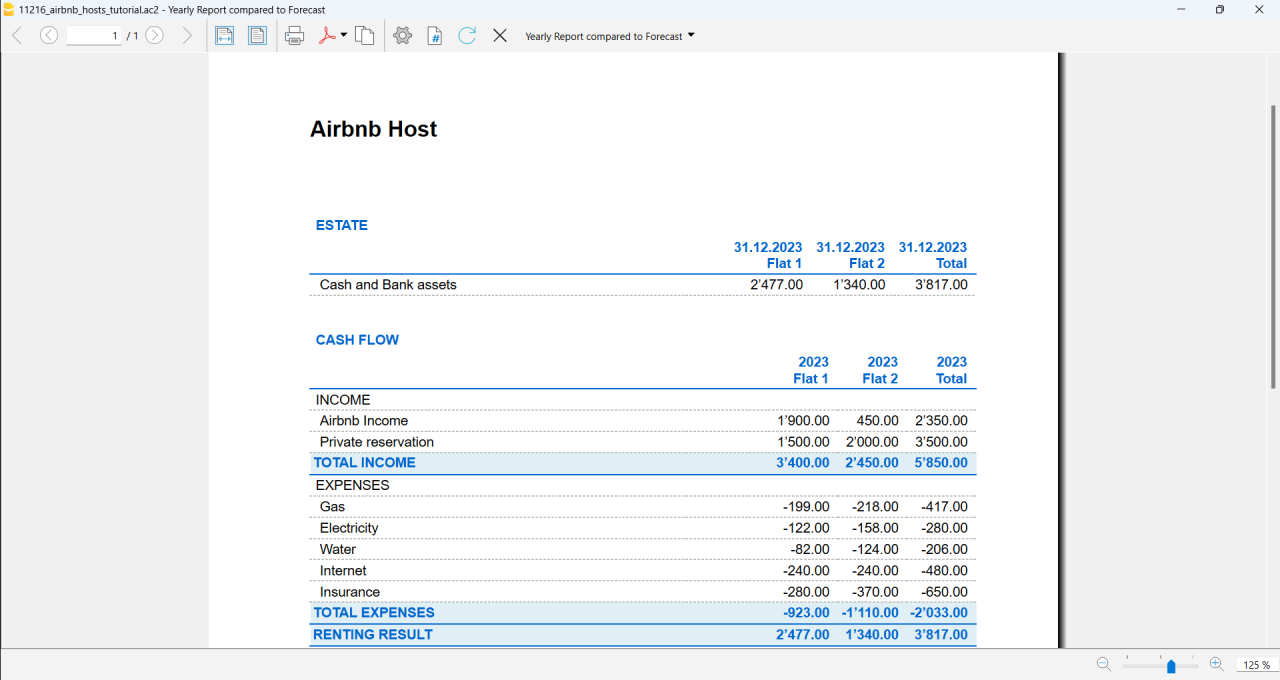
Advanced management
If you want, you can manage your Airbnb business in an advanced and optimized way through the rental management view called Manage Rentals. This allows you to keep track of all the necessary information about the reservations you receive. For those who offer Airbnb Experiences, there is the experiences management view, called Manage Experiences, available to track guest bookings related to experiences.
Navigate between the various available views to keep all the relevant data under control.
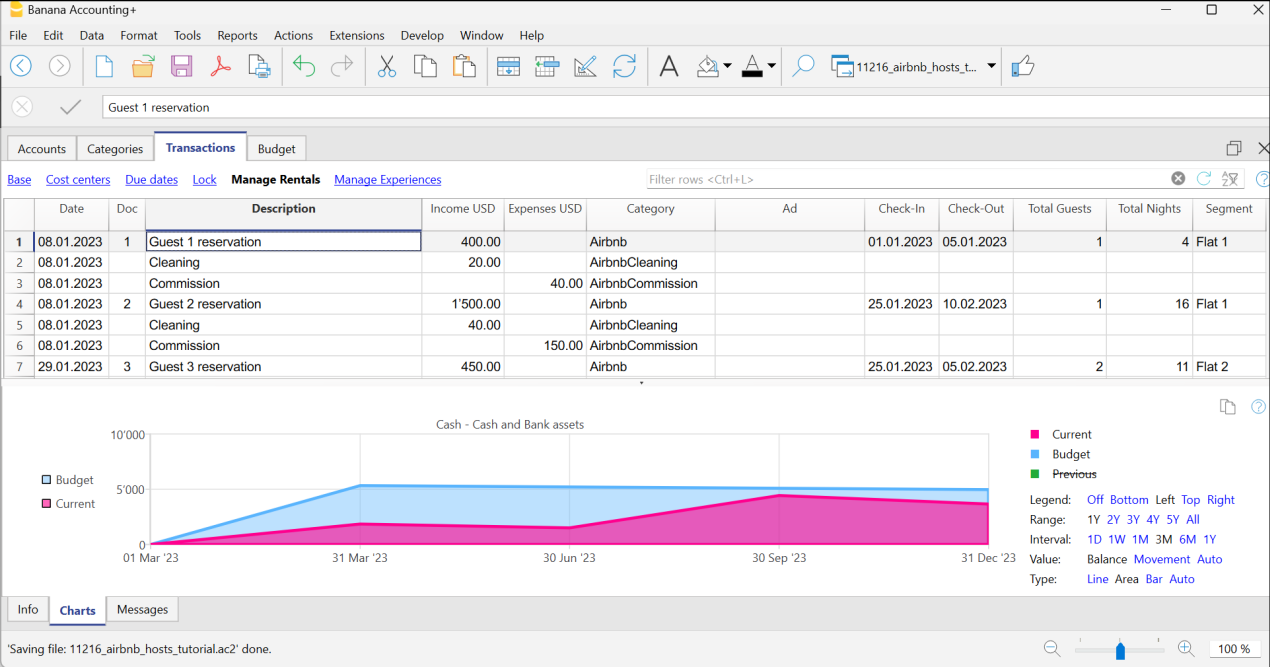
Questions or specific requests
Do you have any questions or specific requests regarding this template for Airbnb hosts or other short-term rental platforms? Please e-mail us.
Sample records for managing income and expenses for Airbnb hosts or other hosting platforms
Here are the sample accounting records for this template.
Recording an Airbnb or other platform revenue transaction
Record revenue from online platforms such as Airbnb, where you receive booking fees, with the preferred breakdown of the collected amounts and platform commissions. If you want, keep track of the ad from which the guest made the reservation, the check-in and check-out dates, the number of guests for the booking, the booked nights, the room or flat rented and the date of payment from the online platform.
To print the receipt to be given to the guest upon arrival, enter the receipt number in the Doc column and use the designated printer extension. You can also attach the receipt to the corresponding revenue record using the Link column.

Recording an expense for your short-term rental business
Record the expenses you incur for your Airbnb business by indicating the date of the expense, a description of the purchase, the amount incurred, the expense category, and the room or flat associated with your monetary outflow. You can always attach your receipts using the Link column.

Airbnb template for multi-currency accounting management
Airbnb template for multi-currency accounting managementThis template is useful for comprehensive and efficient accounting management for Airbnb hosts who need a system that supports double-entry bookkeeping and handles multiple currencies. Banana Accounting Plus provides a wide range of features to track the income and expenses of your short-term rental business.
Banana Accounting Plus is an advanced accounting software that is superior to Excel, yet it is simpler and more cutting-edge, catering to the common needs of Airbnb hosts. The accounting template has been specifically designed to offer a comprehensive and customizable solution for the financial management of your Airbnb properties. It allows you to track expenses, record income, monitor cash flow and much more.
The key features of this accounting template for Airbnb include:
- Asset Management: this template encompasses all the features of the free template for Airbnb, Booking.com, Vrbo and similar hosting platforms and provides an advanced solution for those with greater needs. It allows you to manage unlimited assets compared to the free template.
- Double-Entry Bookkeeping: the template adheres to the fundamental accounting principle of double-entry bookkeeping, ensuring the accuracy and correctness of your financial records.
- Multi-Currency Management: if you manage Airbnb properties using different currencies, Banana Accounting enables you to record and track income and expenses in different currencies, simplifying international financial management.
- Advanced Reporting: the software offers the ability to generate detailed reports on your finances, including profit and loss statements, account statements, balance sheets and detailed budgets. These reports provide you with a comprehensive overview of the performance of your Airbnb properties.
- User-Friendly: the software is designed to be user-friendly, even for those new to double-entry bookkeeping or without extensive accounting experience. The accounting template is intuitive, and the extensive available online documentation guides you step-by-step in managing your finances.
Banana Accounting Plus is intuitive, easy to use and simplifies your accounting management for Airbnb.
Example of a multi-currency income transaction for hosts
Here's how to use the multi-currency feature of Banana Accounting Plus:
- Set the desired currency exchange rate through the Exchange Rates table.
- Perform the accounting entry by entering date, description, bank of the currency received, income account, amount in the currency received and specify the currency received. Banana Accounting Plus will automatically calculate the amount in the main currency used for managing your Airbnb accounting.

Image of the Exchange Rates table

Image of the Transactions table where to record the income received from Airbnb or similar platform.
Accounting templates with crypto currencies
Accounting with crypto currencies Bitcoin (cash)
Accounting with crypto currencies Bitcoin (cash) tizianaIncome & Expense Accounting with crypto currencies Bitcoin
Income & Expense Accounting with crypto currencies Bitcoin tizianaDouble-Entry Accounting with crypto currencies Bitcoin
Double-Entry Accounting with crypto currencies Bitcoin tizianaDouble-Entry Accounting for digital currencies Bitcoin and Ethereum (Base Currency ETH)
Double-Entry Accounting for digital currencies Bitcoin and Ethereum (Base Currency ETH) tizianaDouble-Entry Accounting for digital currencies Bitcoin and Ethereum (Base currency USD)
Double-Entry Accounting for digital currencies Bitcoin and Ethereum (Base currency USD) tizianaEssential Expense Manager PDF report with embedded receipts
Essential Expense Manager PDF report with embedded receiptsImproving how employee expenses are managed is crucial for all businesses.
Whether employees are traveling for work or working from home, keeping track of their expenses and making sure they get reimbursed correctly has become a complex task.
Banana Accounting expense manager functionality to create a PDF dossier is essential and cost-effective for the majority of small and medium-sized businesses. It helps track expenses, improves transparency and makes it smoother for employees to interact with the company's accounting department.
All in one PDF report with embedded receipts
Banana Accounting create a PDF report with embedded receipts. The PDF file includes everything is necessary for reporting, approval and reimbursement.
- The list of expenses with all information necessary and the link to receipt.
- The report of the categorized expenses, for accounting purposes.
- The scanned receipt's files.
PDF file can embed other files. If you don't know just open this example PDF file and click on the link (look the link icons on the left in the image below), so that the receipt document will directly open (some browser don't show the files, better use Adobe Acrobat Reader that is free to use).
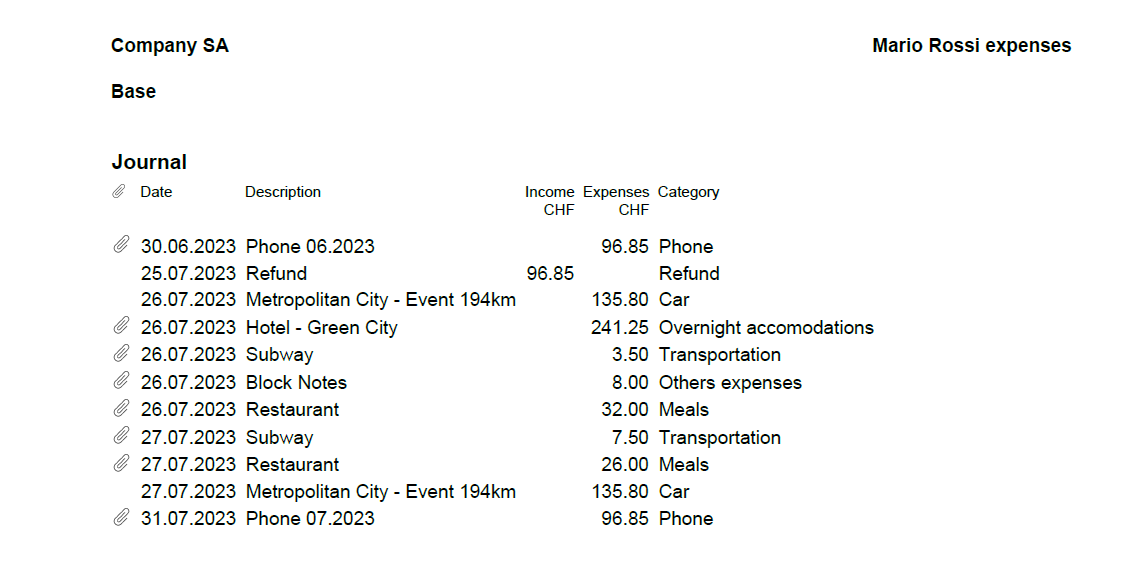
Totally free for up to 70 expense entries
The Banana Accounting template is designed to benefit companies of all sizes. The expense manager template is a software entirely free for up to 70 expense entries, making it a very accessible solution.
How to start
Using this Banana Accounting functionality allows you to obtain your PDF dossier with expenses categorized and embedded in a simple and immediate way:
- Install Banana Accounting
- Open the template file and save to a directory, where you also scan your documents.
- Scan your receipts or invoices (Banana Accounting does not perform the scanning).
- Enter the incurred expenses in the Transaction table and add a Link to the scanned receipt file.
- With File menu > Create Pdf Dossier create the PDF report (check the Include attachments).
- Transmit the file for reimbursement.
Now you'll be ready to send your PDF dossier by email to the accounting department, for approval and reimbursement.
This workflow is essential and cost-effective for the majority of small and medium-sized businesses.
Add the payment methods used by employees
If you wish, you can manage the payment methods used for expenses through the CC3 column.
To enable it, double-click on the column headers in the Transactions table. In the window that opens, on the left, enable the display of the Cc3 column and confirm with the Ok button.
Manage the different payment methods from the Categories table by adding the accounting accounts with a semicolon in front. You can add as many payment methods as you prefer.
Add the quantity columns to manage travel kilometers
To manage travel expenses based on the distance traveled, it could be useful to enable the display of columns related to quantities.
To enable them, double-click on the column headers in the Transactions table. In the window that opens, on the left, enable the display of the columns Quantity, ReferenceUnit, UnitPrice, and confirm with the Ok button.
Remember to enter Unit Price in the Transactions table with a negative sign.
Additional features of the Essential Expense Manager
Easy Expense Logging: the core of this tool is a user-friendly interface. Employees can quickly record their expenses by entering the date, category, amount and payment method. This reduces mistakes and ensures accurate data entry.
Digital Receipts: instead of using paper receipts, the software lets employees attach digital copies of receipts. This prevents losing receipts and keeps expense records secure.
Detailed PDF Reports: the software is great at creating comprehensive expense reports. These reports include all embedded receipts in a single PDF file, which can be easily shared with accountants through email. The reports break down expenses, categories and receipts, promoting transparency.
Customizable Categories: the software lets administrators customize expense categories to fit the company's needs. This ensures that expenses are organized in a way that matches the company's reporting and analysis requirements.
Easy Access: the expense manager can be shared through email, which is helpful for remote employees or those who often travel for work.
Data Privacy: it's important to note that the data entered into Banana Accounting is not used for commercial purposes. Your information remains confidential, offline and is not repurposed in any way.
WooCommerce Products Export-Import [BETA]
WooCommerce Products Export-Import [BETA]WooCommerce extension description
This extension for importing and exporting products sold on WooCommerce online shop simplifies and optimizes the integration between your online store and Banana Accounting software.
The extension either allows the export of products already listed in your inventory from Banana Accounting to your WooCommerce online store, or may become an intuitive and efficient solution to easily allow you to import products directly from your online store into Banana Accounting.
Banana Accounting is superior to Excel, allowing you to swiftly edit product details at any time and it guarantees that the information remains aligned to your online store on WooCommerce.
The Banana Accounting extension offers you the opportunity to export product data already present in your Banana Accounting inventory in a format already prepared for import into WooCommerce. This streamlines the input and/or management of products in your online store, enabling you to maintain coherence and consistency between the two platforms and to begin selling online more seamlessly.
As it is crucial to manage product information accurately and effortlessly in your online store and inventory, this extension allows you to do so in a simple and secure manner. With the export file obtained from the WooCommerce platform, you can easily create your inventory in Banana Accounting or update existing products directly in Banana Accounting to align them with those present on your online store.
Both functions eliminate the need for lengthy and complex manual procedures and reduce the risk of transcription errors, ensuring data accuracy and efficiency.
This solution is suitable for those who want to manage the inventory in a simple way, exporting or importing to WooCommerce whenever they desire. It is not suitable for those looking for a cloud solution that automatically synchronizes warehouse management with WooCommerce.
Banana Accounting key features
Easy: the Banana Accounting software is easy to use and every file can be shared through email, which is helpful for a easy support too.
Privacy: it's important to note that the data entered into Banana Accounting is not used for commercial purposes. Your information remains confidential, offline and is not repurposed in any way.
Beta version
This extension is published in BETA version. We recommend creating a backup copy of the inventory file. Having regular file backups is always useful in any context. This WooCommerce extension require a subscription to Banana Accounting Plus Advanced version.
Primary Key Used
The Id column from Banana's Items table will be exported and used as the primary key for import and it must contain the product's SKU reference of WooCommerce online shop.
Those who already have a warehouse in Banana Accounting can replace the codes in the Id column using the Rename function from Banana's Data menu. This function will automatically replace the Id value even in the Transactions table.
Create/Update products from WooCommerce
The Create/Update products from WooCommerce function will create the products exported from WooCommerce (CSV file format) in the Items table of the inventory in Banana Accounting if they do not exist. If products with the same Id value already exist, it will update the values in the Description, Quantity begin and Unit Price columns in the Items table with the information present in the exported file from WooCommerce.
Export products for WooCommerce
The Export products for WooCommerce function will export data from the Id, Description, Quantity balance and Unit Price columns in the Items table into a CSV file format, ready to be imported into WooCommerce.