Business Templates Switzerland with VAT
Our VAT management templates are included for free in the Banana Accounting Plus program.
The chart of accounts is based on the SME system (Swiss SME chart of accounts - Sterchi, Mattle, Helbing), compliant with the Swiss Code of Obligations (articles 957-963b CO).
VAT Features
All VAT templates include the necessary columns and functions to manage VAT. Calculations and all reports are automated.
To record VAT, simply enter the VAT code in the transaction. The VAT codes table is predefined and updated according to the new 2024 VAT regulations.
At the end of the period, based on transactions with VAT codes, the program calculates the VAT Summary by account, code, and percentage. It generates a paper facsimile of the VAT Report and the XML file for submitting VAT data to the AFC.
For VAT management with the new rates, you can find detailed information on the VAT Management page.
Some features require a subscription to the Advanced plan of Banana Accounting Plus, such as generating the VAT Report facsimile or XML file, using the new Rules, Filter, and Temporary Row Sorting functions. See all features of the Advanced plan.
VAT Accounts in Banana Accounting
The liabilities section includes two specific VAT accounts:
- Account 2201 VAT Report (corresponding to the automatic VAT account). Already configured.
- Account 2200 VAT Due (corresponding to the VAT Treasury account).
However, it is possible to set specific VAT accounts in assets and liabilities, but at the end of the period, various entries are needed to reverse the previous VAT and VAT due into the VAT Treasury account. Therefore, it is recommended to use the default VAT account, **2201 VAT Report**. More details can be found on the page Setting Up VAT Accounts.
Chart of Accounts with VAT on a Cash Basis
The templates for cash-based VAT have customer and supplier sub-ledgers set as Cost and Profit Centers (CC3). VAT is calculated by entering the VAT code at the time of payment and receipt of invoices, with counterpart accounts always being revenue or expense accounts.
Chart of Accounts with VAT on an Accrual Basis
The accrual-based VAT accounting templates have customer and supplier sub-ledgers linked to the balance sheet. All sub-ledger accounts appear in reports and balance sheets. In this case, VAT is calculated by entering the VAT code when issuing an invoice to the customer or receiving an invoice from the supplier.
VAT and Multi-Currency
Among the VAT templates, you can choose models that also manage foreign currencies with VAT.
The chart of accounts includes accounts for exchange rate differences, set in the File > File Properties menu. These templates include the Exchange Rates table, where foreign currencies are set with reference to the base currency, along with exchange rates and opening rates. In the Transactions table, there are columns for viewing amounts in both foreign currency and converted national currency, as well as a column that retrieves the exchange rate entered in the Exchange Rates table.
Company | Cash Manager | VAT
Company | Cash Manager | VATTo manage cash inflows and outflows of a small business. The file can also complement the main accounting file: all cash transactions are recorded separately, and at the end of each quarter (or any chosen period), the totals of categories and accounts are imported into the main accounting file.
Entering VAT codes allows VAT amounts to be automatically recorded in the VAT account.
Create your file
- Open the template with the Banana Accounting Plus WebApp
- Using the command File > File Properties, set the period, your company name, and the base currency (you can create budgets and accounting in any currency).
- Using the command File > Save As, save the file. It is helpful to include the company name and year in the filename. For example, "Cash_Rossi-SA-20xx.ac2".
WARNING: If you close the browser without saving, you will lose the entered data. Always save the file on your computer.
To reopen the saved file, click on File > Open.
Also, see Organizing accounting files locally, on a network, and in the cloud.
More information is available on the following pages:
Cash Manager for professional practice | VAT
Cash Manager for professional practice | VATThe model provides a simple and fast way to manage cash transactions. All data is always well-organized, and for each expense entry, you can attach a PDF receipt, ensuring complete and documented control of expenses.
You can periodically integrate cash data into the accounting file to maintain a complete bookkeeping system, allowing you to generate full VAT reports exclusively within the accounting file.
Automated professional reports provide all the details of income and expenses for each account and category.
Create your file
- Open the template with the Banana Accounting Plus WebApp
- Using the command File > File Properties, set the period, your company name, and the base currency (you can create budgets and bookkeeping in any currency).
- Using the command File > Save As, save the file. It is useful to include the company name and year in the filename. For example, "Cash_Rossi-SA-20xx.ac2".
WARNING: If you close the browser without saving, you will lose the entered data. Always save the file on your computer.
To reopen the saved file, click on File > Open.
Also, see Organizing accounting files locally, on a network, and in the cloud.
More information is available on the following pages:
Income / Expense accounting with descriptive accounts and categories
Income / Expense accounting with descriptive accounts and categories Svjetlana AnticCompany | Income & Expense Accounting | VAT
Company | Income & Expense Accounting | VATThis template, while having a simple and essential setup, still allows you to manage accounting professionally.
- You can customize accounts and categories at any time, adapting them to your specific needs.
- The Accounts and Categories tables provide an immediate overview of the balances for each account and category, allowing you to maintain full control of your financial situation.
- By setting up the customer ledger, you have the possibility to issue invoices to your customers with the added advantage of having them automatically recorded in accounting.
- The VAT Codes table is updated with the new 2024 VAT rates.
- To speed up the entry of transactions, you can use bank data import with Rules: for each imported transaction, you enter a text (Rule) completing all other registration elements (contra account, VAT code, cost center...); in subsequent imports, the program automatically completes the registration whenever it finds the key text in the import entry, significantly reducing work time and minimizing errors.
- If you need to create invoices, simply set up the CC3 profit center in the Accounts table.
Some features require a subscription to the Advanced plan of Banana Accounting Plus, such as generating the facsimile or XML file of the VAT Report, using the new Rules, Filter, and Temporary Sort functions. See all the features of the Advanced plan.
Create your file
- Open the template with the Banana Accounting Plus WebApp
- Using the command File > File Properties, set the period, your company name, and the base currency (you can create budgets and bookkeeping in any currency).
- Using the command File > Save As, save the file. It is useful to include the company name and year in the filename. For example, "Cash_Rossi-SA-20xx.ac2".
WARNING: If you close the browser without saving, you will lose the entered data. Always save the file on your computer.
To reopen the saved file, click on File > Open.
Also, see Organizing accounting files locally, on a network, and in the cloud.
More information is available on the following pages:
Company | Customer/Supplier Ledger
Company | Customer/Supplier LedgerThe tutorial is based on an Income and Expense accounting system, which is very intuitive and easy to manage. You can use the tutorial to explore many features:
- Create and print invoices for your clients
- Check due dates
- Send reminders
- Manage VAT with the new rates from 2024
- Speed up transaction entry with automatic import and the use of Rules
- Print reports, account statements, journal, and other summaries
Some functions require a subscription to the Advanced plan of Banana Accounting Plus, such as generating a facsimile or XML file of the VAT Report, using new features like Rules, Temporary Row Filtering, and Sorting. See all features of the Advanced plan.
Create your file
- Open the template with the Banana Accounting WebApp
- Using the File > File Properties command, set the period, your company name, and the base currency (you can create a budget and manage accounting in any currency you prefer).
- With the File > Save As command, save the file. It is useful to include your studio name and the year in the file name. For example, "Studio-Rossi-SA-20xx.ac2".
WARNING: If you close the browser without saving, you will lose the entered data. Always save the file on your computer.
In our Documentation, you will find explanations on various topics to help you manage your accounting effectively:
- Videos
- Income/Expense
- Accounts
- Categories
- Transactions
- Swiss VAT Management
- Invoicing
- New Year
- Budget Transactions
- Printing
Self-employed professional | Income & Expense Accounting | VAT
Self-employed professional | Income & Expense Accounting | VATThis application technically uses the same mechanism as double-entry accounting but with the advantage that you don't need to know the basics of Debit and Credit, allowing you to manage accounting quickly and easily.
- In the Accounts Table, you will find the accounts to manage your resources (liquidity, equipment, customers...),
- In the Categories Table, you have all income and expenses categorized for each item.
To enter records quickly:
- Import transactions from your e-bank statements, postal accounts, or credit cards.
- Set up Rules to complete imported transactions
- Get reports and professional printouts after each transaction.
If you need to create invoices, simply set up the customer ledger with the CC3, and you will be able to print:
VAT management is simple. Just enter the VAT code for each relevant transaction. The VAT Codes Table is already updated with the new 2024 VAT rates.
Some functions require a subscription to the Advanced plan of Banana Accounting Plus, such as generating the facsimile or XML file of the VAT Report, using new Rules features, Temporary Row Filtering, and Sorting. See all the features of the Advanced plan.
Further details and additional information are available on the following web pages:
Create your file
- Open the template with the Banana Accounting WebApp
- Using the File > File Properties command, set the period, your company name, and the base currency (you can create a budget and manage accounting in any currency you prefer).
- With the File > Save As command, save the file. It is useful to include your studio name and the year in the file name. For example, "Studio-Rossi-SA-20xx.ac2".
WARNING: If you close the browser without saving, you will lose the entered data. Always save the file on your computer.
In our Documentation, you will find explanations on various topics to help you manage your accounting effectively:
- Videos
- Income/Expense
- Accounts
- Categories
- Transactions
- Swiss VAT Management
- Invoicing
- New Year
- Budget Transactions
- Printing
Ristorante | PMI | IVA | Contabilità sull'incassato | con centri di costo
Ristorante | PMI | IVA | Contabilità sull'incassato | con centri di costoIl nostro modello è studiato su misura per le esigenze contabili di ristoranti e bar.
Funzionalità Principali
- Inserimento automatizzato delle registrazioni contabili
- Calcolo e rendicontazione IVA semplificati
- Segnalazione automatica di errori e incongruenze
- Stampe professionali:
Vantaggi di una Contabilità Organizzata
La contabilità non è solo un adempimento fiscale: è uno strumento strategico per ottimizzare risorse, aumentare i profitti e prendere decisioni basate su dati concreti.
Controllo dei Costi
- Identificazione rapida delle spese eccessive
- Riduzione degli sprechi (soprattutto su materie prime).
Maggiore Redditività
- Analisi dei piatti più venduti e più redditizi
- Ottimizzazione del menu e della gestione della cucina.
Decisioni Strategiche Basate sui Dati
- Previsione della stagionalità
- Pianificazione degli investimenti
Crea il tuo File in pochi passi
Vai su File > Proprietà file per impostare:
- Periodo contabile
- Nome del tuo ristorante o bar
- Moneta di base
Salva il file con File > Salva con nome
Includere nome del locale e anno, es. "Ristorante Belvedere 2025.ac2"
Risorse utili
Shop | Income & Expense accounting | VAT net tax rate
Shop | Income & Expense accounting | VAT net tax rate caterinaDoppia: Hotel | PMI | IVA | Contabilità sull'incassato | centri di costo
Doppia: Hotel | PMI | IVA | Contabilità sull'incassato | centri di costoUna buona gestione contabile di un hotel è fondamentale per avere il pieno controllo dei flussi economici, dei reparti e dei costi operativi. Una contabilità chiara e ben organizzata è lo strumento che consente di prendere decisioni strategiche in modo consapevole e tempestivo.
Il piano dei conti è strutturato per soddisfare le esigenze contabili e gestionali specifiche di una struttura alberghiera. Esso consente di classificare e organizzare in modo sistematico tutte le operazioni economico-finanziarie dell'hotel, garantendo una corretta tenuta della contabilità generale e l'elaborazione di report gestionali efficaci.
Automazione e importazione movimenti
Per ottimizzare i tempi di registrazione contabile, è prevista la possibilità di importare i movimenti direttamente dagli estratti conto bancari, postali e delle carte di credito. Ciò riduce gli errori manuali e velocizza il processo di contabilizzazione.
L'utilizzo delle Regole di registrazione automatica durante l'importazione permette di associare automaticamente le contropartite contabili, i codici IVA, i centri di costo e altre informazioni accessorie. Questa funzionalità favorisce l’uniformità delle registrazioni e l’affidabilità dei dati contabili.
Grazie alle funzioni di automazione ci sono vantaggi e benefici non indifferenti:
- Immissione veloce dei dati e più tempo per attività a maggior valore aggiunto
- Riduce il rischio di errori manuali
- Dati sempre aggiornati con visione in tempo reale dello stato finanziario dell’hotel.
Gestione IVA
Il programma gestisce automaticamente l’IVA secondo la normativa svizzera, generando i rendiconti richiesti e i file XML per la trasmissione online. Questo assicura conformità normativa e riduce al minimo il lavoro manuale.
Per utilizzare le estensioni IVA 2024/2025, occorre:
Il Rendiconto IVA Svizzera 2024/2025 viene creato in automatico grazie alle seguenti estensioni, integrate in Banana Contabilità Plus:
Centri di costo e analisi per area operativa
A supporto dell’analisi economica, sono stati definiti appositi centri di costo, che permettono di monitorare la redditività dei singoli reparti o servizi offerti: camere, ristorazione, centro benessere (SPA), eventi, parcheggi, ecc. Ad esempio, è possibile sapere se il centro benessere copre i costi o se il ristorante lavora in perdita, così da intervenire con azioni mirate. Questo consente una valutazione dettagliata delle performance operative e supporta il processo decisionale nella gestione strategica.
Reportistica e bilanci
La reportistica e bilanci in una contabilità alberghiera non sono degli strumenti fiscali, ma dei veri alleati per guidare la gestione, migliorare la redditività e garantire la sostenibilità dell’attività nel tempo.
I bilanci e le principali stampe contabili e fiscali sono completamente automatizzate e vengono generate in modo chiaro e dettagliato. I report includono:
- Stato patrimoniale
- Conto economico
- Centri di costo e profitto
- Rendiconti IVA e liquidazioni periodiche
- Report analitici per gestione e controllo interno
L'automazione delle stampe consente di avere aggiornamenti in tempo reale, migliorando la capacità di monitoraggio e previsione finanziaria.
Revenue-based Accounting Tutorial for Ltd and LLC | SME
Revenue-based Accounting Tutorial for Ltd and LLC | SMEEfficient and customizable accounting management for SMEs
Our accounting template is pre-configured according to the standard framework of the Swiss Code of Obligations, specifically designed to meet the needs of small and medium-sized enterprises (SMEs) with an annual turnover equal to or greater than CHF 500,000.
Flexibility and customization
If you need to customize the chart of accounts, you can easily add new accounts. See our dedicated page on the Complete SME Chart of Accounts, which includes all the accounts and groups specified by the Swiss SME account system (Sterchi, Mattle, Helbing), ensuring perfect integration.
Simplicity and automation
Data entry is fast and intuitive, with an interface similar to Excel. You can import data directly from your bank statements or credit cards, and thanks to the use of Rules, the process becomes fully automated, drastically reducing manual work.
All-round accounting management
Record transactions quickly and automatically, keep balances always updated, and generate professional real-time reports. With our system, you can:
- Create and post invoices simultaneously
- Send reminders easily
- Make cash flow forecasts and manage budgets
- Generate Balance Sheet, Profit and Loss Statement, Account Cards and Journal
- With the VAT extension, send VAT report data online to the FTA (only with Advanced plan).
Some features require a subscription to the Banana Accounting Plus Advanced plan, such as generating the sample or XML file for the VAT report, using the new Rules functions, Filter, and temporary Sort Rows. See all the features of the Advanced plan.
Create your file
- Open the template with Banana Accounting Plus WebApp
- With the File > File Properties command, set the period, your company name, and the base currency (you can do budgeting and accounting in any currency).
- With the File > Save As command, save the file. It is useful to include the company name and year in the file name. For example, "Rossi-SA-20xx.ac2".
WARNING: if you close the browser without saving, you will lose the entered data. Always save the file to your computer.
To reopen the saved file click on File > Open.
Also see Organize accounting files locally, on network and cloud.
Accounts Table
When opening the template, the chart of accounts includes all the accounts to manage your business. You only need to enter:
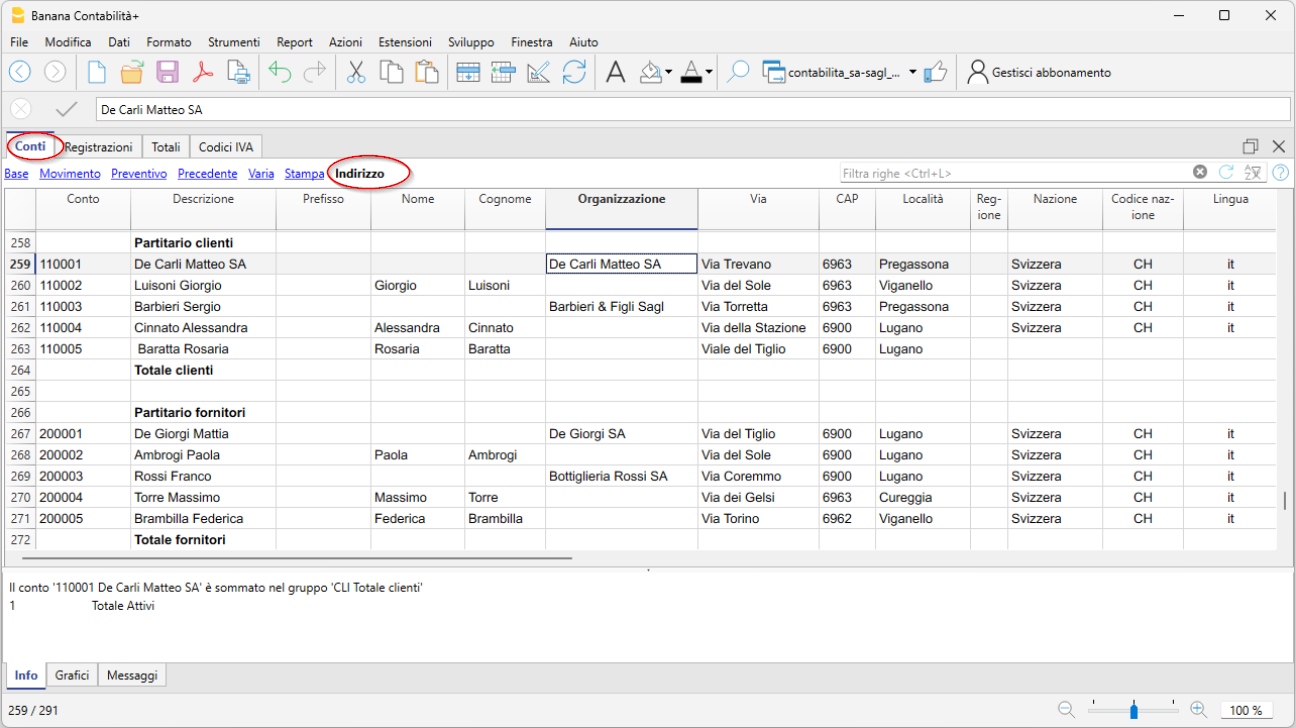
- In the Accounts table, Account column, your Customer and Supplier accounts complete with address, country code, and language.
- In the Accounts table, Opening column, the initial balance for each account (for assets and liabilities)
At year-end closing, the opening balance is carried forward automatically via Actions > Create new year.
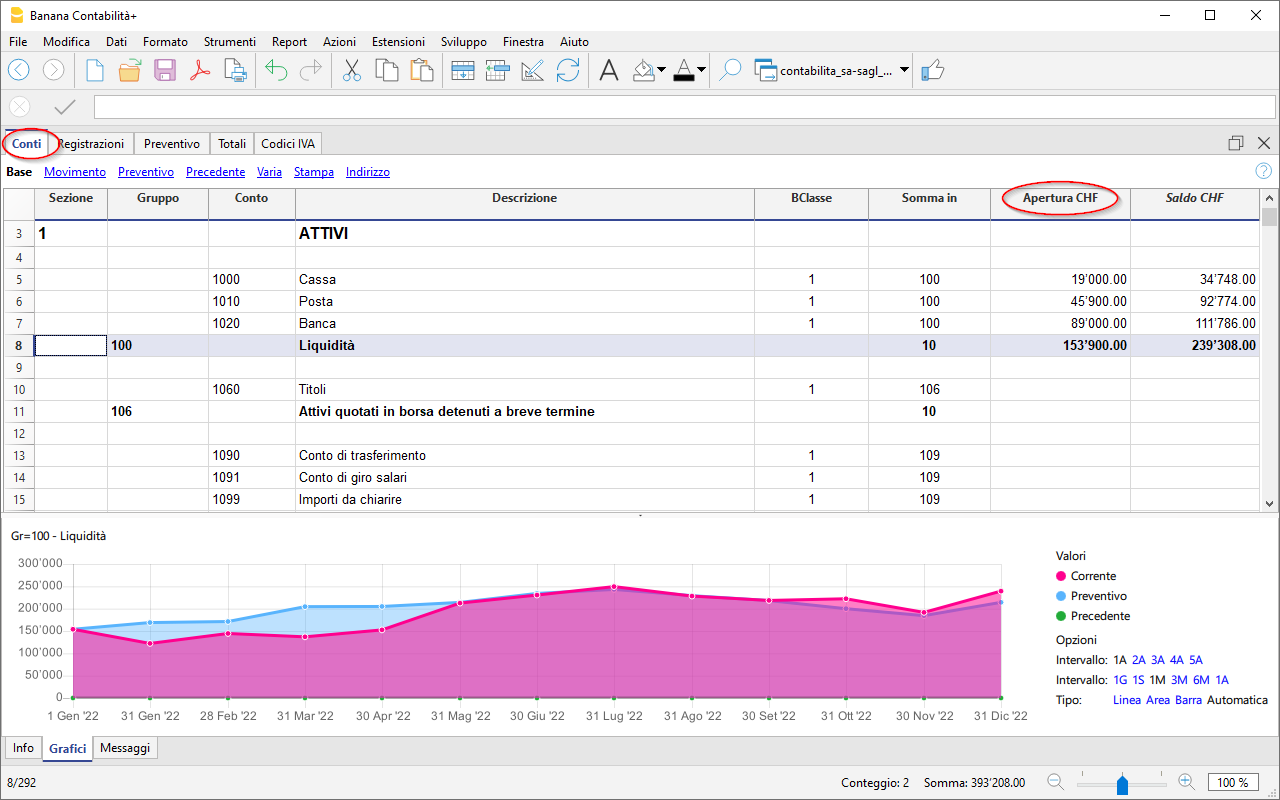
After each transaction, the columns in the Accounts table are updated immediately, giving you a clear and instant view of your financial situation.
The Income Statement has a progressive structure, allowing the profit to be viewed in the following stages:
- Gross operating profit after deducting material and resale goods costs
- Gross operating profit after deducting personnel costs
- Operating result before depreciation, adjustments, financial results, and taxes (EBITDA)
- Operating result before financial results and taxes (EBIT)
- Operating result before taxes (EBT)
- Non-operating result
- Profit or loss before taxes
- Annual profit or loss

Record transactions
In the Transactions table, enter all daily movements. To speed up entry, we recommend using various automation features:
- The Autocomplete data entry feature allows automatic reuse of previously entered data
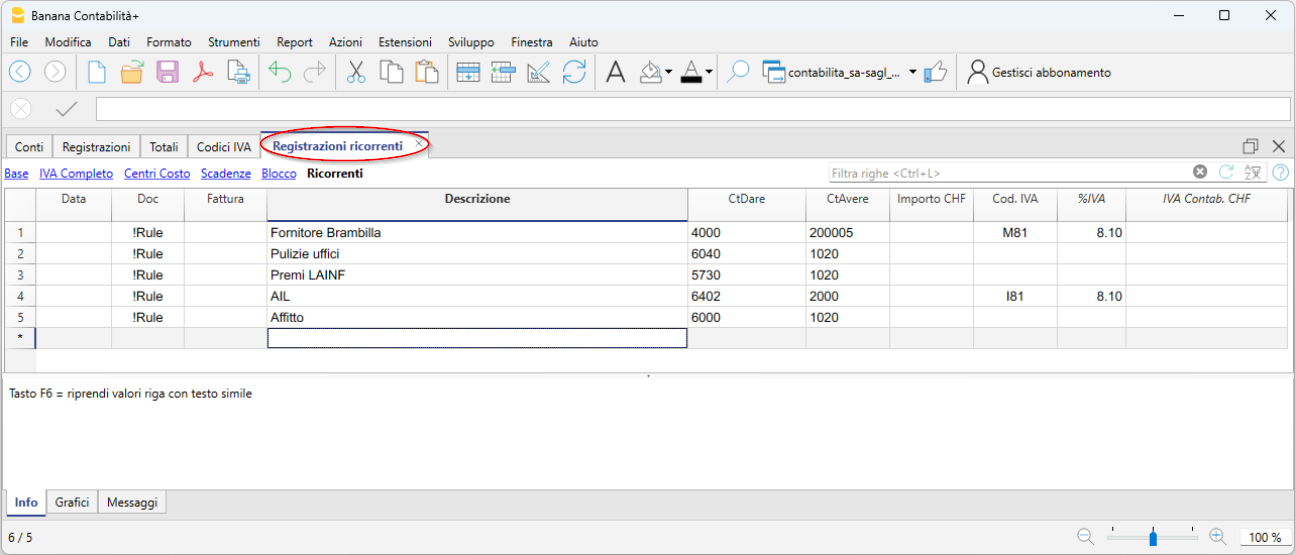
- The Recurring Transactions feature (under the Actions menu) allows you to store repetitive transactions in a dedicated table
- Importing data from the bank statement retrieves all bank transactions automatically. With the Advanced plan you can use Rules, a new feature that provides full automation of transaction entry.
- You can link each transaction to its digital receipt, and with one click, view the document.
See also Accounting files and digital receipts for better organization of your documents. - Use the Sort Transactions by Date command to order rows by progressive date.
- Use the Print/Preview command to print or export the journal in PDF format.
Transactions with VAT
To record VAT transactions, simply enter the VAT code corresponding to the operation (purchase, sale, international transactions, etc.). Calculations are made automatically, with no need to manually post to the VAT account.
In our templates, all VAT codes are pre-set in compliance with the new 2024 VAT rates.
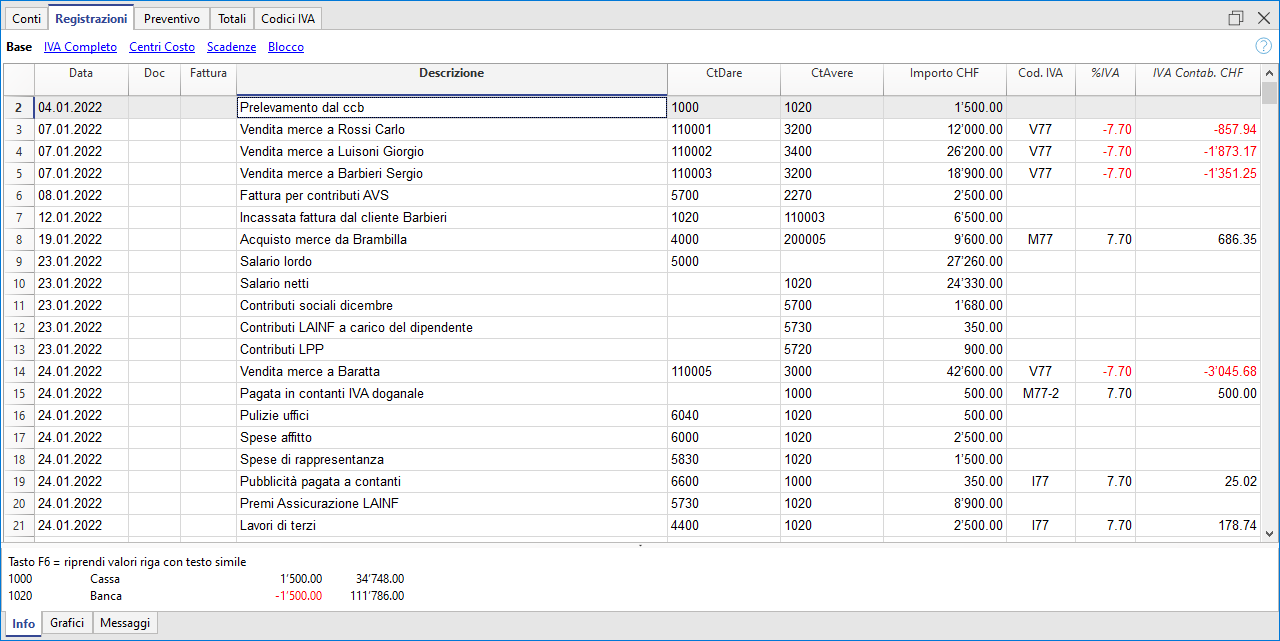
At the end of the period, you can automatically obtain:
- VAT Summary by account, code, percentage for all transactions (Professional and Advanced plans).
- VAT Sample, Effective Method (Advanced plan only)
- VAT Sample, Flat Rate Method (Advanced plan only)
- XML file for electronic data submission (Advanced plan only).
Import transactions from bank statements with Rules (Advanced plan only)
The new Rules feature is the most advanced automation innovation, highly appreciated by our users. This technology simplifies the management of financial transactions imported from bank, postal, and credit card statements using keywords. Each recurring transaction is automatically linked to a keyword, allowing precise assignment of the counterpart, VAT code, costs, and related segments.
Thanks to this system, during subsequent imports, the software quickly recognizes transactions based on the keywords and automatically completes the entry in the Transactions table. This drastically reduces manual entry, significantly speeds up workflow, and minimizes the chance of errors.
Create your invoices
Integrated invoicing in the accounting file allows invoice data to be recorded in the Transactions table. For each new invoice, insert a new transaction row.
The following settings are essential for creating invoices:
- Enter customer addresses (columns in the Address view)
- Set the customer group
- In the Transactions table, it is essential to enter the invoice number,
You can enter simple invoices on a single row or more complex invoices on multiple rows. Additionally, by enabling the Items columns (from the Tools menu), you can specify quantities, unit, and unit price.
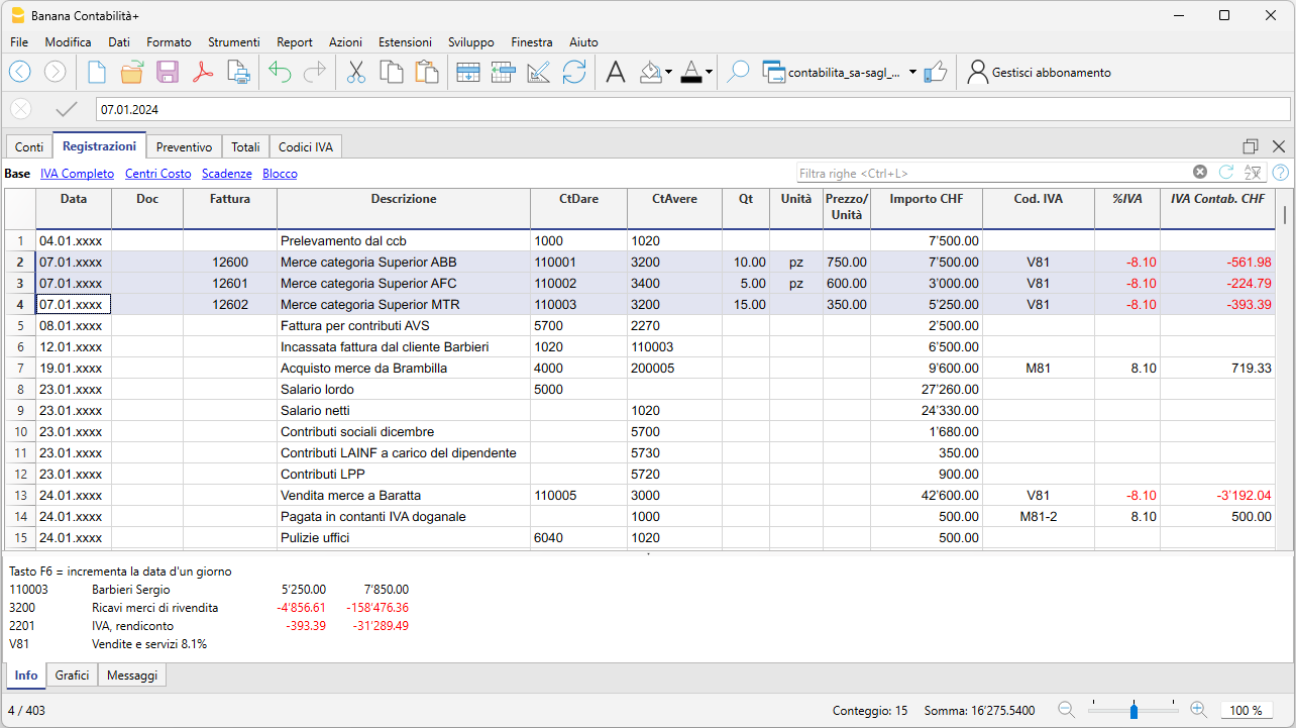
To print the invoice go to Report > Customers > Print Invoice
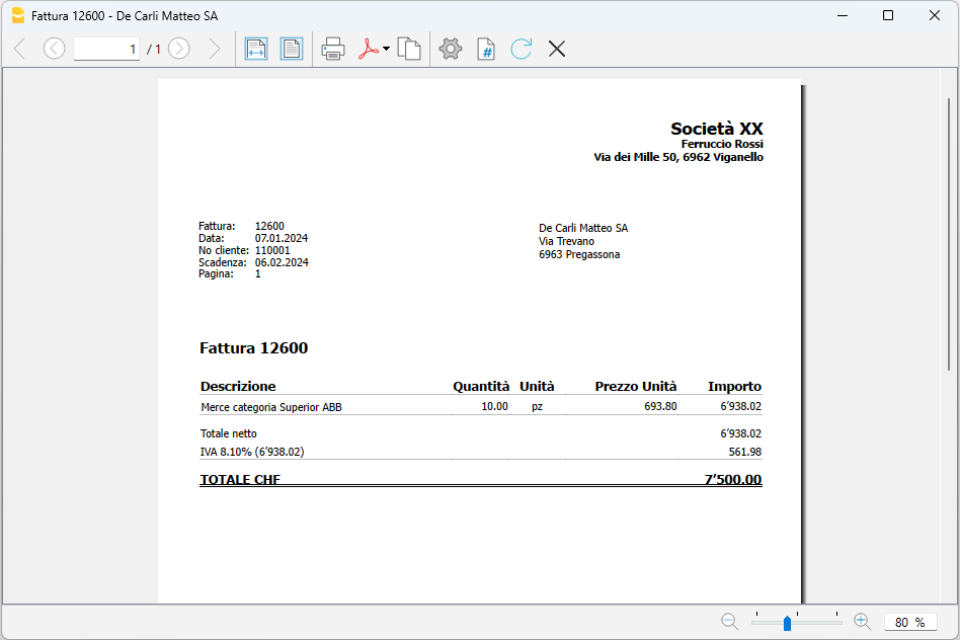
Beautified Balance Sheet with Groups
To view the Balance Sheet, click on the menu Report > Beautified Balance Sheet with Groups. You can customize the report with the columns you want to see, such as including the budget column or having Reports also by period.
Cash Flow: the lifeblood of your business
Cash flow is central to a company’s ability to operate, maintain solvency with suppliers, and generate income. Anticipating cash availability is essential to avoid mistakes, minimize risks, and optimize strategic decisions, helping you reach your goals successfully.
For optimal business management, it is crucial to have forward-looking insights, forecasting cash flow trends, sales, purchases, and future investments. Knowing whether your business will generate income is important, but forecasting cash availability is even more decisive. Without sufficient liquidity, you may be forced to cut expenses or seek financing.
With Banana Accounting, you can easily create both a cash flow forecast and a financial budget—strategic tools that will help you build a successful future for your business.
Discover the advanced forecasting features in our Documentation:
Company | VAT Flat Tax Rate Method | SME
Company | VAT Flat Tax Rate Method | SMECompanies with an annual turnover (including VAT) not exceeding 5.024 million Swiss francs and a VAT liability not exceeding 103,000 Swiss francs per year can opt for the balance rate VAT method, subject to request and approval from the AFC.
More information are available at the Swiss VAT tax report - Flat tax rate method page (available in German, Italian and French only)
In the Banana Accounting Plus template, the chart of accounts and the VAT Codes table include all the necessary settings to manage VAT in Switzerland using the balance rate method.
You can choose how to handle VAT in your transactions:
- Break down VAT in each transaction
Before you start recording transactions, enter your VAT rates in the VAT Codes table and set "YES" in the Gross column. This way, each transaction will include a VAT breakdown, with the VAT amount displayed in the corresponding column. - Calculate balance rate VAT at the end of the period
VAT codes must be entered in the VAT calculation dialog, available in the Banana Accounting Plus extension. Transactions will be recorded with VAT-inclusive amounts, and there will be no breakdown of VAT amounts.
More information is available on the page VAT Report - Net tax Rate / Flat Rate Method.
At the end of the period, the software automatically calculates VAT using the balance rate method and generates a PDF preview of the official VAT report along with an XML file for the electronic submission of VAT data to the AFC.
The program includes many features to work efficiently and achieve professional results.
Some features require a subscription to the Advanced plan of Banana Accounting Plus, such as generating the VAT report template or the XML file, using the new Rules, Filter, and Temporary Sort Rows functions. Check out all the features of the Advanced plan.
Create your file
- Open the template with the Banana Accounting WebApp
- Using the File > File Properties command, set the period, your company name, and the base currency (you can create a budget and manage accounting in any currency you prefer).
- With the File > Save As command, save the file. It is useful to include your studio name and the year in the file name. For example, "Studio-Rossi-SA-20xx.ac2".
WARNING: If you close the browser without saving, you will lose the entered data. Always save the file on your computer.
Further information and insights:
Voorbeeldbestand Facturen in het Dubbel Boekhouden
Voorbeeldbestand Facturen in het Dubbel BoekhoudenDocumentatie
Voor meer informatie over het aanmaken en afdrukken van de facturen, ga naar de pagina: Facturen aanmaken.
Weergave en bewerken van de facturen inbegrepen in het voorbeeldbestand
- Download het programma Banana boekhouding 9 en installeer het programma
- Download het voorbeeldbestand met en open het Banana 9
- In de Transacties-tabel bevinden zich de rijen die de factuur vormen
- Kies het menu Taken - commando Klanten - Facturen afdrukken; klik op OK om een afdrukvoorbeeld van de facturen te bekijken
- Om de verschillende beschikbare afdrukmodellen te proberen, selecteer ze uit de lijst onder Layout in Taken - Klanten - Facturen afdrukken
- Om teksten m.b.t. betalingsdetails of kleuren toe te voegen, steeds vanuit het commando Taken - Klanten - Facturen afdrukken, klik op Andere modellen..., kies het model uit en klik vervolgens op Instellingen...
Sole proprietorship | VAT | SME
Sole proprietorship | VAT | SMETemplate with SME chart of accounts, compliant with the rules established in the Swiss Code of Obligations (Art. 957 and following). Ideal for keeping accounts with an annual turnover of at least CHF 500,000.
The structure of the chart of accounts is in a step format and allows you to view the composition of the operating result also in intermediate stages.
- You can customize the accounts to suit your specific needs.
- By setting up the customer ledger, you have the possibility to issue invoices to your customers with the added benefit of having them automatically recorded in the accounting.
- The VAT Codes table is updated with the new 2024 VAT rates.
- To speed up data entry, you can use the bank statement import function together with Rules: for each imported transaction, enter a keyword (Rule) that completes all other elements of the entry (counter account, VAT code, cost center...). On subsequent imports, the program automatically completes any entry that contains the keyword, significantly reducing workload and minimizing errors.
Many automation features, such as bank statement import using Rules, the VAT return sample form with the new 2024 rates, the XML file for electronic VAT data submission, filtering, and many others, are included exclusively in the Advanced plan of Banana Accounting Plus.
Create your file
- Open the template with the Banana Accounting Plus WebApp
- With the File > File and accounting properties command, set the period, your company name, and base currency (you can do budgeting and accounting in any currency you prefer).
- With the File > Save As command, save the file. It’s helpful to include the company name and year in the file name. For example, "Rossi-SA-20xx.ac2".
WARNING: If you close the browser without saving, you will lose the entered data. Always save the file to your computer.
More information and insights:
In our Documentation you will find all the information and details to manage your accounting effectively:
Einzelunternehmen | KMU | MWST-Abrechnung nach vereinbarten Entgelten
Einzelunternehmen | KMU | MWST-Abrechnung nach vereinbarten Entgelten caterinaEinzelunternehmen | KMU | MWST-Abrechnung nach vereinnahmten Entgelten | mit Kostenstellen
Einzelunternehmen | KMU | MWST-Abrechnung nach vereinnahmten Entgelten | mit Kostenstellen caterinaLegal entities | Accrual-based customer ledger | Double-entry accounting | VAT
Legal entities | Accrual-based customer ledger | Double-entry accounting | VATIdeal template for managing the accounting of an SA or SAGL with VAT and an annual turnover equal to or greater than CHF 500,000. The chart of accounts is structured according to the SME scheme and includes the customer/supplier ledger, suitable for revenue-based accounting.
- In the Accounts table, at the end of the chart of accounts, you will find the customer and supplier ledger set up with accounts linked respectively to assets and liabilities; therefore, the balances will appear in the Balance Sheet.
- All customer and supplier invoices are recorded at the time of issue and receipt.
Create your file
- Open the template with the Banana Accounting Plus WebApp
- With the File > File and accounting properties command, set the period, your company name, and base currency (you can do budgeting and accounting in any currency you like).
- With the File > Save As command, save the file. It’s helpful to include the company name and year in the file name. For example, "Rossi-SA-20xx.ac2".
WARNING: If you close the browser without saving, you will lose the entered data. Always save the file to your computer.
To reopen the saved file, click on File > Open.
With this template you can:
- Create invoices with VAT to send to customers by using the Debit column for the customer account and the Credit column for the revenue account. This way, the invoice is already booked and integrated into your accounting file.
- Record received invoices from suppliers, also using QR code reading, and create payment orders (pain.001). Pain.001 files are XML messages that contain payment details and can be sent to financial institutions that support this format. More info at pain.001 payment orders (available only with Advanced plan – Dev version).
- Import all transactions from bank and postal statements or credit cards using Rules for fully automated entries (only with Advanced plan).
- Manage cost centers or Segments to monitor branches, departments, or profitability of products and services.
- Create budgets and financial forecasts to monitor liquidity and ensure you can meet future commitments; forecast revenues and expenses, and evaluate profitability scenarios for your company.
- Manage VAT according to the latest Swiss regulations.
- Print all the reports you need: Balance Sheets, Journal, Account cards, Open invoices, and much more.
For VAT management with the new rates, you’ll find detailed information on the following web pages: VAT management
Some features require a subscription to the Advanced plan of Banana Accounting Plus, such as generating the sample or XML VAT return, using the new Rules, Filter, and Temporary Sort features. See all the features of the Advanced plan.
Other Resources
Legal entities | Cash principle ledger | Double-entry accounting | VAT
Legal entities | Cash principle ledger | Double-entry accounting | VATIdeal model for managing the accounting of an SA and Sagl with VAT and an annual turnover equal to or exceeding CHF 500,000. The chart of accounts is structured according to the SME framework and includes the customer/supplier ledger, suitable for those managing accounting on a cash basis. It includes all the necessary settings and functions for:
- Creating and printing invoices with the Swiss QR code
- Importing data from bank statements
- Setting up rules to store and automate the completion of transactions imported from bank statements
- Managing VAT according to the new VAT rates
- Handling cost centers, customisable to track specific details for particular accounts
- Creating budgets and financial forecasts
- Printing all the reports you need: balance sheets, journal, account statements, VAT reports, open invoices, and much more
For VAT management with the new rates, you can find detailed information on the VAT management web pages.
Some features require a subscription to the Advanced plan of Banana Accounting Plus, such as generating the VAT report template or XML file, using the new Rules functions, and the temporary Filter and Sort rows feature. Check out all the features of the Advanced plan.
Create your file
- Open the template with the Banana Accounting WebApp
- Using the File > File Properties command, set the period, your company name, and the base currency (you can create a budget and manage accounting in any currency you prefer).
- With the File > Save As command, save the file. It is useful to include your studio name and the year in the file name. For example, "Studio-Rossi-SA-20xx.ac2".
WARNING: If you close the browser without saving, you will lose the entered data. Always save the file on your computer.
In our Documentation, you will find explanations on various topics to help you manage your accounting effectively:
- Videos
- How to get started
- Transactions
- Integrated invoicing
- Reminders
- Estimates and Invoices
- VAT report form - Effective method (in German, French and Italian only)
- VAT report form - Flat rate method (in German, French and Italian only)
- Printouts
Partnerships | Double-entry bookkeeping | VAT
Partnerships | Double-entry bookkeeping | VATIdeal template for a partnership with VAT management. It includes all settings and functions to:
- Import data from bank statements
- Set up Rules to save and automate the completion of transactions imported from bank statements.
- Manage VAT according to the new VAT rates
- Manage cost centers ,customizable to your needs to view specific details of certain accounts.
- Create budgets and financial forecasts
- Create and print invoices with Swiss QR code , just set up the accounts receivable and payable using CC3
- Print all the reports you need : Balance Sheets, Journal, Account Cards, VAT Reports, Open Invoices, and much more.
For VAT management with the new rates, you can find detailed information on the web pages VAT Management .
Some features require a subscription to the Advanced plan of Banana Accounting Plus , such as generating a preview or the XML file for the VAT report, using the new Rules, Filter and Temporary Sort functions. See all the features of the Advanced plan .
Create your file
- Open the template with the Banana Accounting Plus WebApp
- From the menu File > File properties set the period, your company name, and the base currency in any currency you prefer.
- From the menu File > Save as , save the file. It's helpful to include the company name and the year in the file name. For example, "Rossi-SA-20xx.ac2".
- Nella tabella Exchange rates set the foreign currencies always with reference to the base currency and the exchange rates. The opening rates are set only the first time you use Banana Accounting. At the turn of the new year, they are automatically carried forward according to the closing rates entered on 31.12.
WARNING: If you close the browser without saving, you will lose the entered data. Always save the file to your computer.
To reopen the saved file, click on File > Open .
In our Documentation you will find all the information and insights to manage your accounting efficiently:
Persone giuridiche | IVA aliquota saldo
Persone giuridiche | IVA aliquota saldoLe aziende che hanno una cifra d'affari annua (incluso IVA) non superiore a 5,024 milioni di franchi e con l'imposta dovuta non superiore a 103'000 franchi annui possono optare per l'IVA aliquota saldo, dietro richiesta e autorizzazione dall'AFC.
Maggiori informazioni sono disponibili sul sito della Confederazione alla pagina Aliquote saldo e aliquote forfettarie in materia di IVA.
Nel modello di Banana Contabilità Plus, il piano contabile e la tabella Codici IVA hanno tutte le impostazioni per gestire l'IVA in Svizzera con l'aliquota saldo.
Puoi decidere se nelle registrazioni:
- Avere la scomposizione IVA su ogni registrazione
Prima di iniziare a registrare, inserisci le tue aliquote IVA nella tabella Codici IVA e inserisci "SÌ" nella colonna Lordo. Ad ogni registrazione, ci sarà la scomposizione IVA, con l'importo IVA indicato nell'apposita colonna. - Calcolare l'IVA aliquota saldo alla fine del periodo
I Codici IVA devono essere inseriti nel dialogo del calcolo IVA, presente nell'estensione di Banana Contabilità Plus. Le registrazioni verranno registrate con gli importi al lordo IVA e non ci sarà la scomposizione degli importi IVA.
Maggiori informazioni sono disponibili alla pagina Formulario IVA - aliquota saldo/forfetaria.
A fine periodo il programma esegue in automatico il calcolo dell'IVA ad aliquota saldo e crea in PDF il fac-simile del formulario ufficiale e il file Xml per l'inoltro elettronico dei dati IVA all'AFC.
Il programma include tante funzioni per lavorare velocemente e ottenere risultati professionali.
Per alcune funzioni è necessario un abbonamento al piano Advanced di Banana contabilità Plus, come per esempio generare il fac-simile o il file XML del Rendiconto IVA, utilizzare le nuove funzioni delle Regole, Filtro e Ordina righe temporaneo. Guarda tutte le funzioni del piano Advanced.
Crea il tuo file
- Apri il modello con la WebApp di Banana Contabilità Plus
- Con il comando File > Proprietà file imposta il periodo, il nome della tua azienda e la moneta di base (puoi fare il budget e la contabilità in qualsiasi moneta desideri).
- Con il comando File > Salva con nome, salva il file. È utile indicare nel nome del file, il nome della Società e l'anno. Per esempio "Bernasconi-Sagl-20xx.ac2".
ATTENZIONE: se chiudi il browser senza salvare, perderai i dati immessi. Salva sempre il file sul tuo computer.
Altre informazioni e approfondimenti:
Small businesses | Double-entry bookkeeping | SME
Small businesses | Double-entry bookkeeping | SMEThe program includes many features to work quickly and achieve professional results:
- Import data from bank statements
- Create and print invoices with Swiss QR code
- Set up Rules to save and automate the completion of transactions imported from bank statements.
- Manage VAT according to the new VAT rates
- Manage cost centers , customizable to your needs to view specific details of certain accounts.
- Create budgets and financial forecasts
- Print all the reports you need : Bilanci, Giornale, Schede conto, Rendiconti IVA, Fatture aperte e tanto altro ancora.
For VAT management with the new rates, you can find detailed information on the web pages VAT Management
Some features require a subscription to the Advanced plan of Banana Accounting Plus , such as generating a preview or the XML file for the VAT report, and using the new Rules, Filter, and Temporary Sort features. See all the features of the Advanced plan .
Create your file
- Open the template with the Banana Accounting Plus WebApp
- Using the command File > File and accounting properties, set the period, your company name, and the base currency (you can do budgeting and accounting in any currency you like).
- Using the command File > Save as, save the file. It's helpful to include the company name and the year in the file name. For example, "Rossi-SA-20xx.ac2".
WARNING: if you close the browser without saving, you will lose the entered data. Always save the file to your computer.
In our Documentation you will find all the information and insights to manage your accounting efficiently:
Partnerships (general partnerships and limited partnerships) | Double-entry multi-currency accounting | VAT
Partnerships (general partnerships and limited partnerships) | Double-entry multi-currency accounting | VATIdeal template for a partnership. It includes all the columns and features to manage foreign currency accounts and VAT in compliance with the 2024 regulations. Automatic calculations and exchange rate differences.
Create your file
- Open the template with the Banana Accounting Plus WebApp
- From the File > File Properties menu, set the period, your company's name and the base currency in any currency you prefer.
- From the File > Save As menu, save the file. It is helpful to include the company name and year in the file name. For example "Rossi-SA-20xx.ac2".
- In the Exchange Rates table, set up the foreign currencies always with reference to the base currency and the rates. Opening exchange rates are set only the first time you use Banana Accounting. When moving to a new year, these will be automatically carried forward based on the closing exchange rates entered on 31.12.
WARNING: if you close your browser without saving, you will lose all entered data. Always save the file on your computer.
To reopen the saved file, click File > Open.
For VAT management with the new rates, you can find detailed information on the web page VAT Management.
Some features require a subscription to the Advanced plan of Banana Accounting Plus, such as generating the preview or the XML file for the VAT Report, and using the new features for Rules, Filter, and Temporary Row Sorting. See all features of the Advanced plan.
Accounts Table
In the Accounts table, customize the chart of accounts to your needs and add your customer and supplier accounts with all the necessary data, using the columns in the Address view.
The first time you use Banana Accounting, you need to enter the opening balances in the Opening column, which should match the closing balances from the previous year.
In the following year, when you move to the new accounting period, the program will automatically bring forward the closing balances from the previous year into the Opening column.
Project management can also be done using Segments and Cost Centers.
Transactions Table
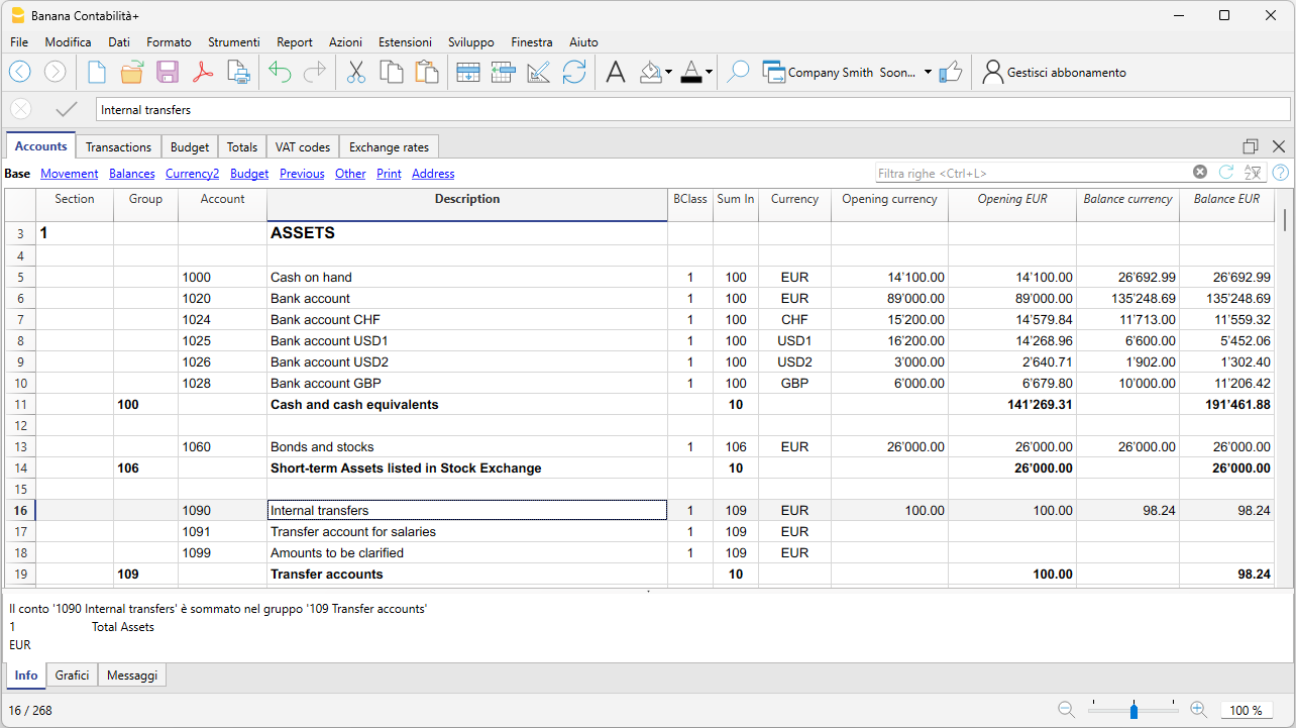
In the Transactions table, daily entries are recorded. For quick data entry, refer to the web pages Text entry, editing and smart fill, and Recurring transactions.
You can make either simple transactions (one debit and one credit on the same row), or compound transactions (multiple debits and/or credits across several rows).
The Transactions table includes specific columns for multi-currency transactions.

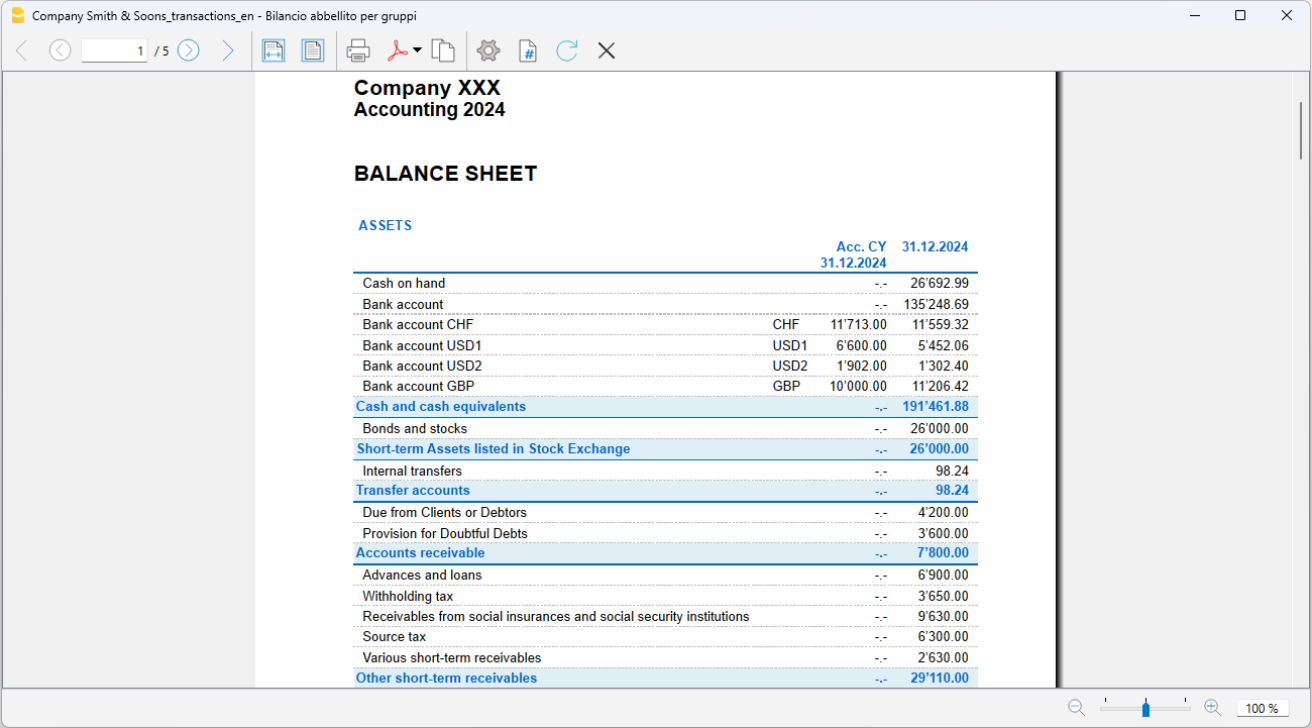
Balance Sheet
The Balance Sheet is generated from the Reports > Enhanced Balance Sheet by Groups menu and can be customized in its presentation. Each layout can be saved through Customizations, allowing you to reuse it as needed (e.g., quarterly, semi-annual balance sheet, audit, etc.).
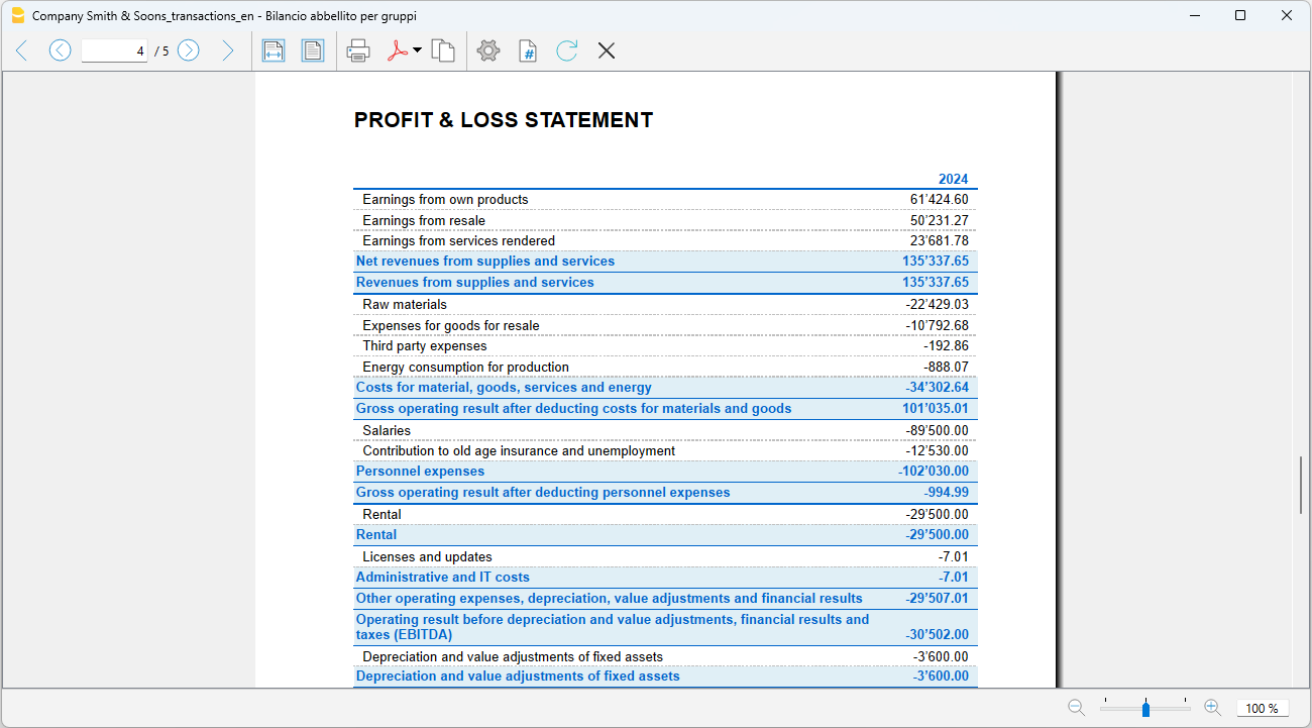
Profit and Loss Statement
The Profit and Loss Statement is generated from the Reports > Enhanced Balance Sheet by Groups menu and can be customized in its presentation. Each layout can be saved through Customizations, allowing you to reuse it as needed (e.g., quarterly, semi-annual balance sheet, audit, etc.).
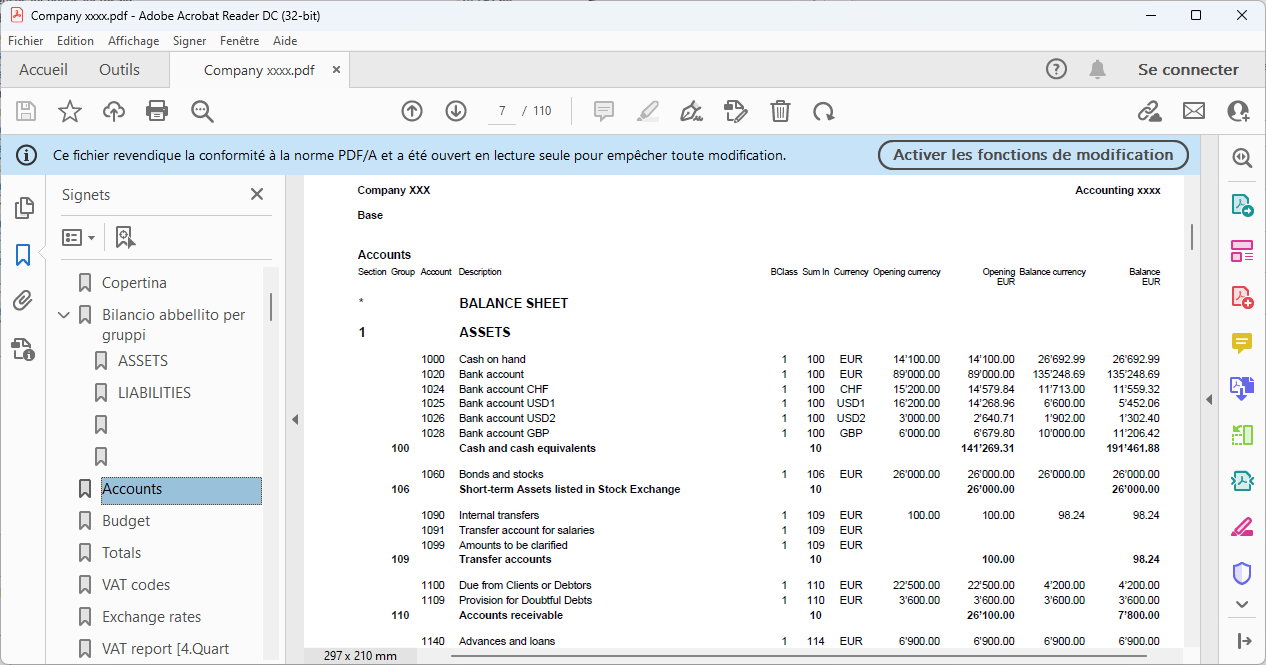
PDF Archive
At the end of the year, or whenever needed, you can archive all your accounting data by creating a PDF file from the File > Create PDF dossier menu.
The PDF dossier can be sent via email to the auditor and reused in case of tax inspections.
Additional Resources
In our Documentation you will find all insights and topics related to multi-currency accounting, in particular:
Sole proprietorship | Double-entry multi-currency accounting | VAT
Sole proprietorship | Double-entry multi-currency accounting | VATThe preconfigured chart of accounts allows you to manage accounting for a turnover of at least 500,000 CHF, in accordance with the rules established in the Swiss Code of Obligations (art. 957 and following). The structure of the chart is in a stepped format, allowing you to view the composition of the operating result even in intermediate stages.
Entirely based on double-entry accounting, you register according to international standards and obtain professional results. Unlimited management of foreign currency accounts.
All the settings and functions are available for:
- Creating and printing invoices with the Swiss QR code
- Importing data from bank statements
- Setting up Rules to store and automate the completion of transactions imported from bank statements.
- Managing VAT according to the new VAT rates
- Managing cost centers, customizable according to your needs to get detailed insights on specific accounts.
- Creating budgets and financial forecasts
- Printing all the reports you need: Balance sheets, Journal, Account cards, VAT statements, open invoices and much more.
For VAT management with the new rates, you can find detailed information on the web page VAT Management
Some features require a subscription to the Advanced plan of Banana Accounting Plus, such as generating the preview or the XML file for the VAT report, and using the new functions like Rules, Filter, and Temporary Row Sort. See all features of the Advanced plan.
Create Your File
- Open the template with the Banana Accounting Plus WebApp
- From the File > File Properties menu, set the period, your company name, and the base currency in any currency you like.
- From the File > Save As menu, save the file. It is useful to include the company name and year in the file name. For example "Rossi-SA-20xx.ac2".
- In the Exchange Rates table, set foreign currencies always with reference to the base currency and exchange rates. Opening rates are set only the first time you use Banana Accounting. When moving to a new year, these will be automatically carried forward based on the closing rates entered on 31.12.
WARNING: If you close your browser without saving, you will lose the data entered. Always save the file on your computer.
In our Documentation you will find all the information and insights to manage your accounting effectively:
Legal entities SA and Sagl | Accrual-based subledger | Double-entry multi-currency accounting | VAT
Legal entities SA and Sagl | Accrual-based subledger | Double-entry multi-currency accounting | VATIdeal template for managing accounting with an annual turnover equal to or greater than CHF 500,000. The chart of accounts is structured according to the SME scheme and includes the customer/supplier subledger, suitable for accrual-based accounting. All the settings and features are available for:
All the settings and features are available for:
- Creating and printing invoices with the Swiss QR code
- Importing data from bank statements
- Setting up Rules to store and automate the completion of imported transactions from bank statements.
- Managing VAT according to the new VAT rates
- Managing cost centers, customizable according to your needs to gain specific insights on selected accounts.
- Creating budgets and financial forecasts
- Printing all the reports you need: Balance sheets, Journal, Account cards, VAT reports, Open invoices, and much more.
Create your file
- Open the template with the Banana Accounting Plus WebApp
- From the File > File Properties menu, set the period, your company name, and the base currency in any currency you prefer.
- From the File > Save As menu, save the file. It's useful to include the company name and year in the file name. For example, "Rossi-SA-20xx.ac2".
- In the Exchange Rates table, set the foreign currencies always in reference to the base currency and exchange rates. Opening rates are only set the first time you use Banana Accounting. When transitioning to a new year, they are automatically carried forward based on the closing rates entered on 31.12.
WARNING: If you close the browser without saving, you will lose the entered data. Always save the file on your computer.
For VAT management with the new rates, detailed information is available on the web page VAT Management.
Some features require a subscription to the Advanced plan of Banana Accounting Plus, such as generating previews or the XML file for the VAT report, using the new features like Rules, Filter, and Temporary Row Sort. See all Advanced plan features.
Resources
In our Documentation you’ll find all the information and insights to manage your accounting efficiently:
Legal entities SA and Sagl | SMEs | Cash-based accounting
Legal entities SA and Sagl | SMEs | Cash-based accountingIdeal template for managing the accounting of an SA or Sagl with VAT and foreign currencies, with an annual turnover equal to or greater than CHF 500,000. The chart of accounts is structured according to the SME scheme and includes the customer/supplier subledger, suitable for cash-based accounting. All the settings and features are available for:
- Creating and printing invoices with the Swiss QR code
- Importing data from bank statements
- Setting up Rules to store and automate the completion of imported transactions from bank statements.
- Managing VAT according to the new VAT rates
- Managing cost centers, customizable according to your needs to gain specific insights into selected accounts.
- Creating budgets and financial forecasts
- Printing all the reports you need: Balance Sheets, Journal, Account Cards, VAT Statements, Open Invoices, and much more.
For VAT management with the new rates, you can find detailed information on the page VAT Management.
Some features require a subscription to the Advanced plan of Banana Accounting Plus, such as generating the invoice preview or the XML file for the VAT Statement, using the new Rules, Filter and Temporary Row Sort features. See all the Advanced plan features.
Create your file
- Open the template with the Banana Accounting Plus WebApp
- From the File > File Properties menu, set the period, your company name and the base currency in any currency you prefer.
- From the File > Save As menu, save the file. It's helpful to include the company name and year in the file name. For example, "Rossi-SA-20xx.ac2".
- In the Exchange Rates table, set foreign currencies with reference to the base currency and the exchange rates. Opening rates are set only the first time you use Banana Accounting. When transitioning to a new year, they are automatically carried forward based on the closing rates entered on 31.12.
WARNING: If you close your browser without saving, you will lose the data entered. Always save the file on your computer.
Company | Double-entry multi-currency accounting | VAT
Company | Double-entry multi-currency accounting | VATTemplate featuring a chart of accounts structure with all the settings and columns for managing accounts in the base currency and any foreign currency, including virtual currencies. Further insights on the various aspects of multi-currency management are available on our pages dedicated to Multi-currency.
For VAT management with the new rates, detailed information is available on the web page VAT Management.
Create your file
- Open the template with the Banana Accounting Plus WebApp.
- Using the File > File Properties command, set the period, your company name, and the base currency (you can do budgeting and accounting in any currency).
- Using the File > Save As command, save the file. It is useful to include the company name and year in the file name. For example, "Rossi-SA-20xx.ac2".
- In the Exchange Rates table, set the foreign currencies always with reference to the base currency and exchange rates. Opening rates are set only the first time Banana Accounting is used. At the turn of the new year, they will be automatically carried forward according to the closing rates entered on 31.12.
WARNING: If you close the browser without saving, you will lose the entered data. Always save the file on your computer.
To reopen the saved file click on File > Open.
All the settings and features are available for:
- Creating and printing invoices with the Swiss QR code
- Importing data from bank statements
- Setting up Rules to store and automate the completion of imported bank transactions.
- Managing VAT according to the new VAT rates
- Managing cost centers, customizable according to your needs to get detailed insights on specific accounts.
- Creating budgets and financial forecasts
- Printing all the reports you need: Balance sheets, Journal, Account cards, VAT reports, Open invoices, and much more.
Some features require a subscription to the Advanced plan of Banana Accounting Plus, such as generating previews or the XML file of the VAT Statement, using the new Rules, Filter, and Temporary Row Sorting functions. See all the features of the Advanced plan.
You can record all possible cases of foreign currency transactions, including transfers and operations that do not involve the base currency.
In our Documentation you will find all insights and topics related to multi-currency accounting, including: