年末结算|复式记账法
会计结算是指在年末编制财务报表之前进行的所有控制、调整和按时间划分的操作。
技术方面和新的一年
在Banana财务会计中,每个会计年度都有自己独立的文件,在技术层面上不存在会计结算的概念:
税务方面
在结束会计核算之前,有必要进行一系列涉及税收的操作。商品账户需要进行调整,折旧的业务需要被输入,应计收入和负债,增值税申报需要被完成,建立盈利或亏损的账户以及还有其它许多验证和检查的工作。
从程序的角度而言,不论收益是高还是低都没有区别。然而,从税务的角度看,却意味着很多。这些方面的事项需要与您的税务顾问或会计进行核对。尤其在您第一次管理会计核算的时候是非常有用的,在您进行结算之前,我们建议您向专家进行咨询,以便了解什么是您所需的。会计师在年初和在纳税申报最后期限之前的时期是非常忙碌的。因此在会计结算的几个月前与您的会计师会面或把会计文件发送给他/她是非常必要的。
检查账务的命令
Banana财务会计软件允许您快速记录并保留待处理的操作,不用中断工作。
点击操作菜单 → 检查账务的命令执行一系列的检查,就像从头开始重新输入数据一样,一旦发现错误或差异,软件就会自动报告。
每当出现差额或报告错误、重要变化 (初始变化、增值税代码) 的时候,建议定期使用检查账务的命令,特别是在关闭会计核算之前。
检查与核实
核查期初余额
- 在账户表中的期初列和余额列中,"差额必须为零 "一行必须没有金额,否则需要发现相关的错误并加以纠正,以平衡初始余额。
请注意:在发生业务的视图中,在借方和贷方列中,有金额是正常的。 - 确保上一年的应收和应付交易都已经结束。
- 检查期初余额是否与已经审计并向税务局申报的前一年的期末余额一致。
- 对于多币种会计,请参见相应的多币种会计期初余额的页面信息。
核对会计余额
第一次检查无疑是为了确保账户余额与现实相符。现金账户余额必须与实际现金状况相符。您的银行、信用卡、贷款或信用账户的余额必须与您对账单上的余额相符。这同样适用于所有其他有延期、增值税、供应商等的账户。
如果有差额,有必要找出原因并完成初始余额或发生业务。
发生业务表中的差额
在发生业务表 (页面底部的信息窗口) 中,检查是否有存在差额的信息提示。除了检查账务命令中的功能外,Banana财务会计+ 还在发生业务表中提供了余额列,它允许您可以检测所有存在差额的行。只需快速向下滚动该列,即可立即识别出所有的会计差额并进行更正,而不会在新年度出现错误。
银行对账单的银行余额和账户余额之间的差额 (余额检查功能)
此操作是会计真实性的基础。我们建议您进行余额检查,#CheckBalance,不仅在会计期末,而且在每个月末定期进行,以避免要逐月进行任何不匹配的余额。
有关核查余额业务的信息请点击查看核查余额业务的页面。
多币种会计核算
如果您使用的是多币种会计核算,也必须设置期末汇率,并记录未实现的汇率收益和损失。关于这一点,请参考:
年末结算的发生业务
在年底,在进入新年之前,有结账的会计操作要做。这些是调整分录、价值调整和与工作人员缴款相关的调整。主要的情况列举如下:
将现金账户的动向导入会计文件
此操作仅在现金帐户与会计分开保存在单独文件中的情况下进行。
导入后,验证主会计文件中现金账户的余额是否与现金文件的余额相符。也可以使用上一段中描述的检查余额功能来完成此验证。
将工资的动向导入会计文件
只有在用特定的会计软件管理薪资,并允许您将发生业务导入Banana财务会计+的文件时,才能进行这一操作。
导入是通过操作菜单 → 导入到账套 → 导入:发生业务的选项进行的。
请记得在12月输入第13个月的工资数据,如果薪资软件没有创建这个业务的话。
保付账户调整
采用权责发生制的公司,如果预见到潜在的损失,必须结算保付账户。
折旧
在12月31日,您必须记录动产和不动产的折旧,并评估那些快速报废的资产可能的加速折旧。
您可以使用我们的折旧资产登记应用程序,它可以自动创建折旧记录,您可以将其记录在您的会计文件中。
库存调整
库存的应用程序允许您按件数和按价值进行精确计数,帮助您更快地确定库存的结算。
记录截至31.12时未结算的客户和供应商的发票
为方便流程,通过客户开发票和供应商开发票的功能,您可以快速检测到12月31日的数值。
私人消费
如果公司里有使用公司的汽车,要用相应的增值税代码来登记自己的消费。
结算和增值税申报
在提交增值税申报之前,我们建议进行以下检查:
- 使用检查账务的命令。如果出现错误和差额,您可以在底部的信息窗口中找到相关的信息。
- 检查发生业务表的余额列是否有差额。
- 检查银行余额是否与银行所发送的余额一致。
- 检查在冲销应付增值税账户(应付给联邦税务局的增值税) 的余额后,增值税账户自动为零。应付增值税的账户必须显示要支付的金额或要收到的抵扣金额。
- 在提交最后一份增值税申报表之前,再次查看其它季度的增值税报表,以检查支付给联邦税务局的金额是否仍然与显示的金额一致。
- 使用增值税报表的命令查看各种报告,并创建一个PDF打印文件,以便将数据存档。在税务审计时将会很有用。
结算预扣税账户
在统计和记录12月份的工资后,根据寄给税务局的报表,记录结算。
对高级管理人员的退款
如果有规定,请将税务机关规定的金额作为一次性报销列入12月工资中。
私人账户结算
检查私人账户的余额。如果企业与所有者 (或与他们关系密切的人) 之间存在借贷关系,应根据贷款协议的条款或根据适用的税务准则记录利息收入或支出。
税收和关税账户结算
核实当年支付的首付是否与当年有关。与往年有关的税款应先入账,以结清相应的搁置金额,然后 (如有超额),应使用“直接税”科目 (资产) 入账。如果准备金余额不足或过多,则差额必须记录为非常费用/收入或与以前期间有关的费用/收入。
AVS/AD/IPG/AD 业务的余额及调整
- 在这一年中,在社保 (AVS) 缴费账户中,通常会记录支付给州级社保 (AVS) 补偿基金的预付款 (借方) 和从雇员工资中扣留的金额 (贷方)。
- 如果在这一年中,支付给雇员的家庭津贴已经记录在一个专门的账户中,例如在 "家庭津贴缴款 "账户中,那么这个账户的余额可以转到社保 (AVS) 缴款账户中,以便与社保 (AVS) 的结账报表进行核对,并记录相应的调整。
社保,退休金等业务的最终余额及调整
随着十二月工资的录入和第十三个月工资的支付,您必须打印工资单,并注明所有工资总额。您必须向员工的保险公司报告保险的总金额,保险公司将决定要支付的任何调整。
将文件发送给会计师进行结算
如果结账和/或审计是由您的受托人进行的,只需将您用Banana 财务会计+ 创建的会计文件通过电子邮件发送,或将数据保存在U盘上。
- 如果您的受托人有Banana财务会计软件,只要通过电子邮件或U盘发送ac2文件即可。您也可以将您的文件和数字文档保存在例如Dropbox上与受托人共享的文件夹中。您将不再需要把沉重的纸质文件拿给受托人。此外,受托人也可以迅速开展工作,而不必在纸质文件中寻找。
- 如果您没有Banana财务会计软件,可以通过文件菜单 → 创建PDF档案的命令来创建PDF格式的会计数据,并通过电子邮件发送。受托人将向您指明所有需要修改和添加的业务,以便正确结束会计期间。
另外,您的受托人可以使用Banana财务会计+ 的免费计划打开您所发送的会计文件,从我们的下载页面下载。如果您的文件中有超过70行的发生业务,您的受托人将不能添加业务或对其进行修改,但仍能看到所有的数据,通过简单地点击账户号码获得每个账户的明细等,并向您提出可能的修正或改进意见。
对发生业务加锁
一旦完成了年末业务和账务检查,我们建议您为发生业务加锁。
- 点击操作菜单 → 锁定发生业务的命令。
发生业务行会被编号,并会获得相关的区块链密码来保证其的安全性。
年终打印
对于会计年度结束时的打印输出,您可以通过单击以下链接找到相关的信息:
PDF档案文件
创建PDF档案的命令允许您将整个会计期间的所有文件 (账户明细、日记账、增值税报表、月报、季报和年报等) 放在同一个PDF文件中。
您可以将会计数据归档,将会计文件和打印件保存为PDF格式。如果有必要,可以在外部磁盘驱动器上做备份。
为审计程序准备的文件
在准备供审查的文件这一页面上,我们发表了一系列关于发送给审计师的文件的说明和建议。完整的文件是使审计师的工作更有效率和速度的良好基础。
利润/亏损的分配
在Banana财务会计软件中,利润或亏损的分配在新年开始时自动进行。有关更多信息,请参阅创建新年的页面。
Year-end closure checklist
On this page you will find a general checklist for those using Banana Accounting Plus, useful for carrying out all the necessary checks to close the accounting year and start the new one.
We also explain how to proceed if, after closing, differences or missing transactions emerge. More information on the page Changes after closing the accounting year.
Use the Temporary Filter for quick checks and corrections
To perform a quick check, especially at year-end, we recommend using the Temporary row filter function, which shows you all the transactions that match a keyword, phrase, account or a group of elements. You can correct or edit the transactions directly in the rows displayed by the Filter, without having to scroll through the entire Transactions table. When you remove the Temporary Filter, the rows return to their original order. More information on the page:
- Temporary row filter (only with Advanced plan).
Accounting check command
With Banana Accounting you can record quickly, even leaving some operations pending without interrupting your workflow.
The Actions > Check accounting command performs multiple checks, as if re-entering the data from scratch, and immediately reports any detected errors or differences.
Use this command regularly, especially in case of differences or error messages, significant changes (initial balances, VAT codes), and especially before closing the accounting.
Check the opening balances
- In the Accounts table, in the Opening and Balance columns, on the row "Difference must be zero" there must be no amount, otherwise you need to find the error and correct it to balance the opening balance sheet.
Note: in the Transactions view, it's normal to have amounts in the Debit and Credit columns. - Make sure that the accrued and deferred accounts from the previous year have been closed.
- Verify that the opening balances match the final balances from the previous year, already reviewed and declared to the tax office.
- For multi-currency accounting, see the page Opening balances in multi-currency accounting.
Check correspondence of account balances
The first check is undoubtedly to ensure that the account balances match reality. The cash account balance must match the actual cash status. The balance of bank accounts, credit cards, loans or assets must match the statement balance. The same applies to all other accounts with reconciliations, VAT, suppliers, etc.
If there is a difference, you must find the cause and update either the opening balance or the transactions.
Differences in the Transactions table
In the Transactions table (Info panel at the bottom), check that there are no reported differences. In addition to using the Check accounting command, with Banana Accounting Plus you can activate the Balance column in the Transactions table. This column detects all the rows where there are differences. You can then quickly scroll through the column to immediately spot and correct discrepancies, avoiding errors in the new year.
Differences between bank statement balances and accounting balances (CheckBalance function)
The #CheckBalance function checks that accounting balances match the bank statement balances. We recommend running this check not only at the end of the accounting period, but every month, to prevent mismatched balances from carrying over incorrectly month after month.
Information about the verification transactions is available on the page Verification balance transactions.
Multi-currency accounting
If you are using multi-currency accounting, you must also set the closing exchange rates and record the unrealized exchange rate gains and losses. More information on the page:
Checks before closing
To ensure the year’s accounting is complete and consistent, it is important that:
- All transactions of the year have been entered (bank, cash, customers, suppliers).
- There are no unbalanced or inconsistent rows.
- VAT transactions are consistent (if applicable).
- The multi-currency accounting includes all currency movements.
- The exchange rate differences in multi-currency accounting have been calculated.
- The Check accounting command has been run and no errors were found.
Year-end operations
- Record depreciations.
- Enter accruals and deferrals.
- Verify cost and revenue allocation.
- Reconcile bank accounts and customer and supplier balances.
More information on the page: Closing accounting transactions.
Exchange rate differences (if multi-currency)
- Update the exchange rate on 12/31 in the Exchange rates table (use the official rate from the Federal Tax Administration).
- Run the command Create exchange rate difference transactions.
Create a custom checklist
Every year, there are many review and closing operations, and from one fiscal year to another, it’s not always easy to remember everything. To avoid omissions, with Banana Accounting Plus you can create a simple table directly in your accounting file to note:
- All information related to the checks.
- The comments and corrections made by the auditor in the previous year, so as not to repeat the same mistakes.
- The list of documents to print.
- The documents to send to the auditor.
- Links to pages or resources you find useful.
More information on the following pages:
Year-end closure accounting transactions
At the end of the fiscal year, before opening the new accounting year, it is necessary to carry out some closing operations. Some transactions are simple and can be done independently, while others require specific technical skills or have tax and social security implications for which it is advisable to consult an accountant or fiduciary.
Preliminary checks
Before closing, make sure that:
- There are no errors using the Check accounting command.
- Bank balances in the accounting match the bank statements.
- Use the #CheckBalance function.
- There are no differences between the Debit and Credit columns in the Transactions table.
- Display the Balance column and check that there are no discrepancies.
- All transactions for the year have been entered.
- The balance of the automatic VAT account has been transferred to the VAT due account.
Open customer and supplier invoices (with cash accounting)
If you use cash accounting, at the end of the year you must record:
- Customer invoices issued but not yet paid.
- Supplier invoices received but not yet paid.
These entries allow you to correctly allocate costs and revenues to the correct fiscal year.
You can use the Open customer invoices and Open supplier invoices functions.
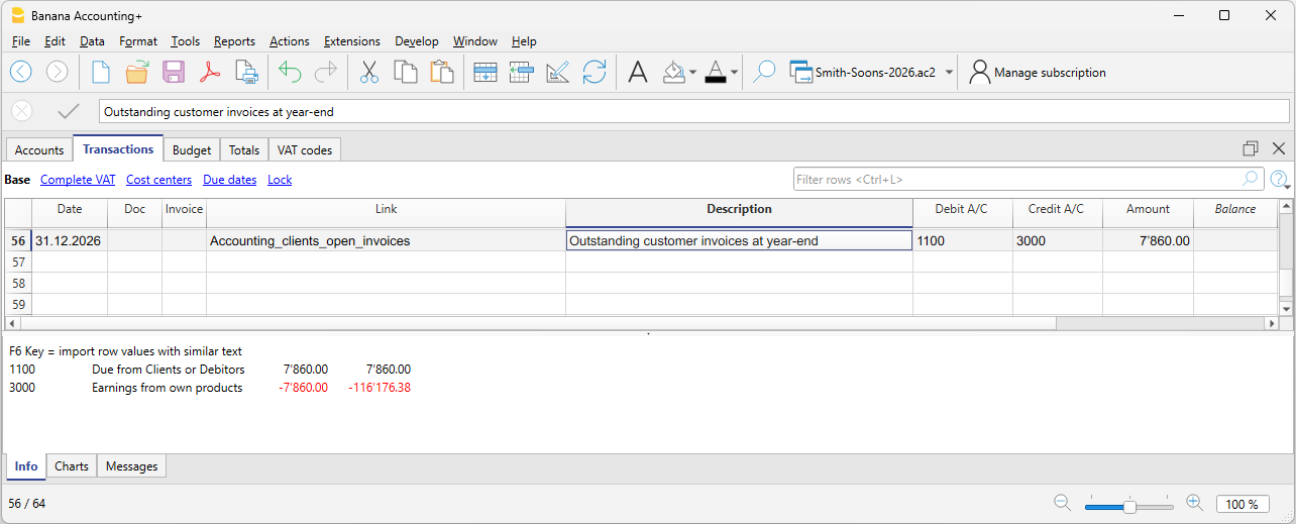
Open customer invoices as of 12/31
If you use cash accounting, at the end of the year you must record customer invoices that have been issued but not yet paid. This closing operation serves to determine the costs and revenues pertaining to the fiscal year. To make the process easier, you can quickly identify the values as of 12/31 using the open invoices by customer functions.
Open supplier invoices as of 12/31
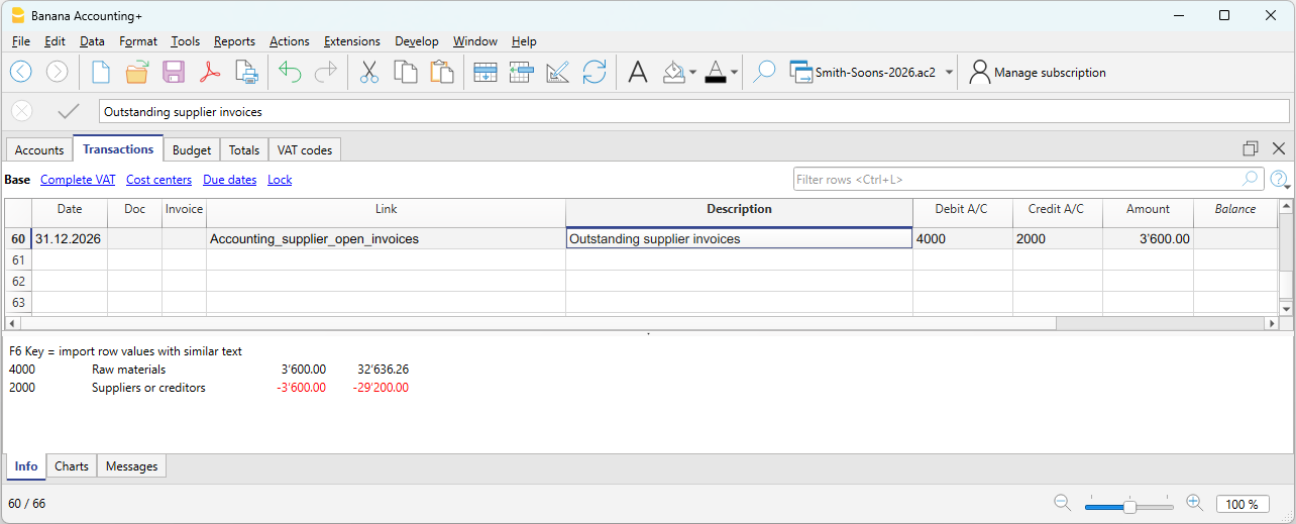
If you use cash accounting, at the end of the year you must record supplier invoices received but not yet paid. This closing operation serves to determine the costs and revenues pertaining to the fiscal year. To make the process easier, you can quickly identify the values as of 12/31 using the open invoices by supplier functions.
Depreciation
At the end of the fiscal year, you must record the depreciation of movable and immovable assets and consider accelerated depreciation for assets subject to rapid obsolescence.
You can use our application Fixed assets register which automatically creates depreciation transactions that you can import into your accounting file. The depreciation transaction varies depending on the method used:
- Direct depreciation: the depreciation is recorded directly in the income statement, using the depreciation account on the debit side and the asset account on the credit side. In the balance sheet, the asset always appears with its residual value.
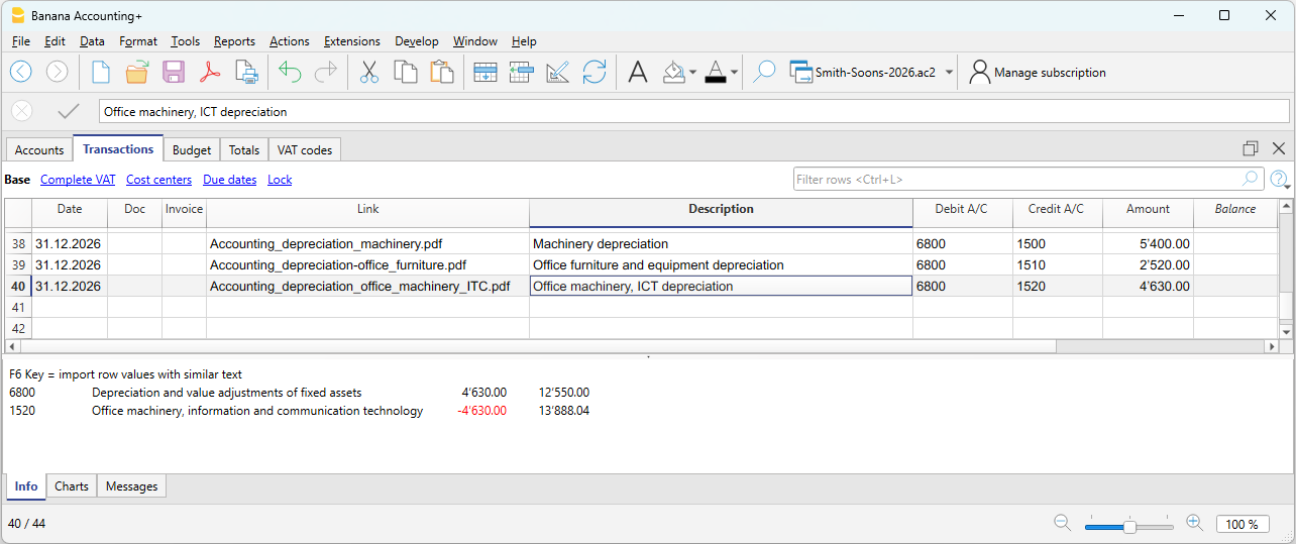
- Indirect depreciation: in this case, the depreciation is recorded not as a reduction of the asset but as an adjustment by posting it to a depreciation fund (reduction of assets).
Inventory adjustment
If you have inventory with goods, or simply a company material inventory, the inventory value at year-end must be adjusted in accounting. During the year, inventory movements are not recorded in the accounting file:
- Incoming and outgoing goods and their respective values are managed and updated in a dedicated inventory file or application.
Our Inventory application makes it easier to manage incoming and outgoing quantities, unit prices and final inventory values, allowing you to quickly determine the adjustment to be recorded at year-end in your accounting.
To calculate the inventory value to report correctly in the Balance Sheet:
- Determine the inventory value.
- Compare the beginning inventory value with the ending value.
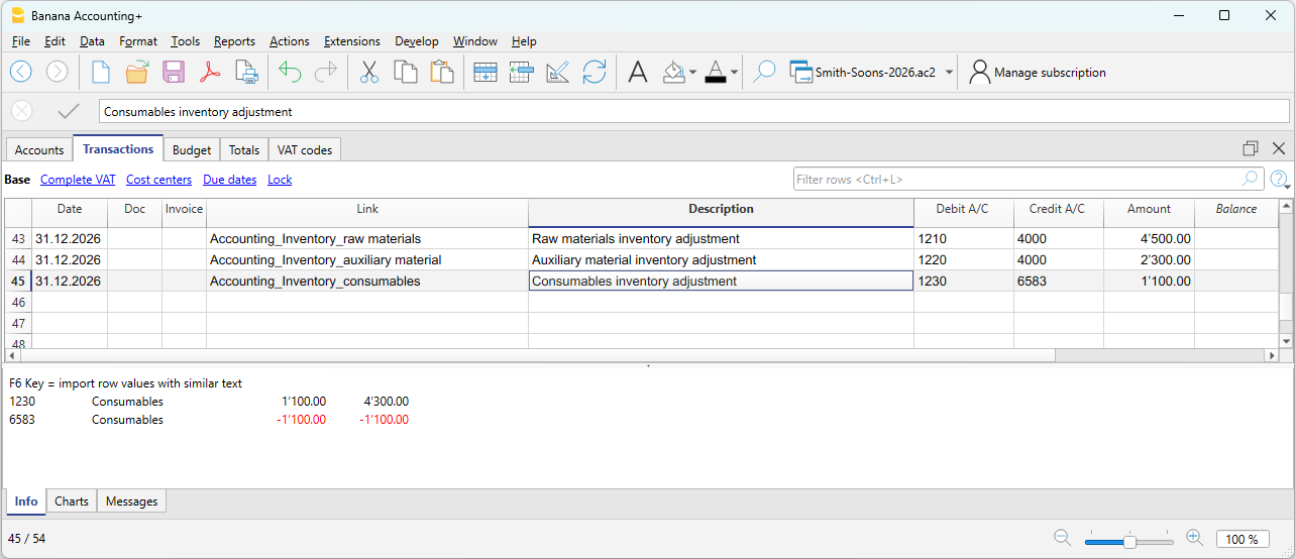
- Record the difference as a change in inventory using the income statement account for goods as the offset.
In our example shown in Banana, there is an assumed increase in inventory compared to the opening value. Therefore, inventory (account 1200) is recorded on the Debit side, while the decrease in cost of goods is recorded on the Credit side.
Private use
Private use occurs when the business owner uses goods or services belonging to the company (goods, materials, vehicles, premises, etc.) for personal purposes.
For tax purposes, it is as if the company sells to the owner and therefore it must be recorded as revenue. If the company is subject to VAT, the transaction is VAT taxable.
In Switzerland, according to the VAT Act (LIVA), private use is taxable because it represents a private use of goods for which the company has previously deducted VAT.
The value to be considered is generally:
- Market value of the used item, or
- Purchase cost if lower.
The applicable VAT rate is the one of the good (e.g. 8.1%).
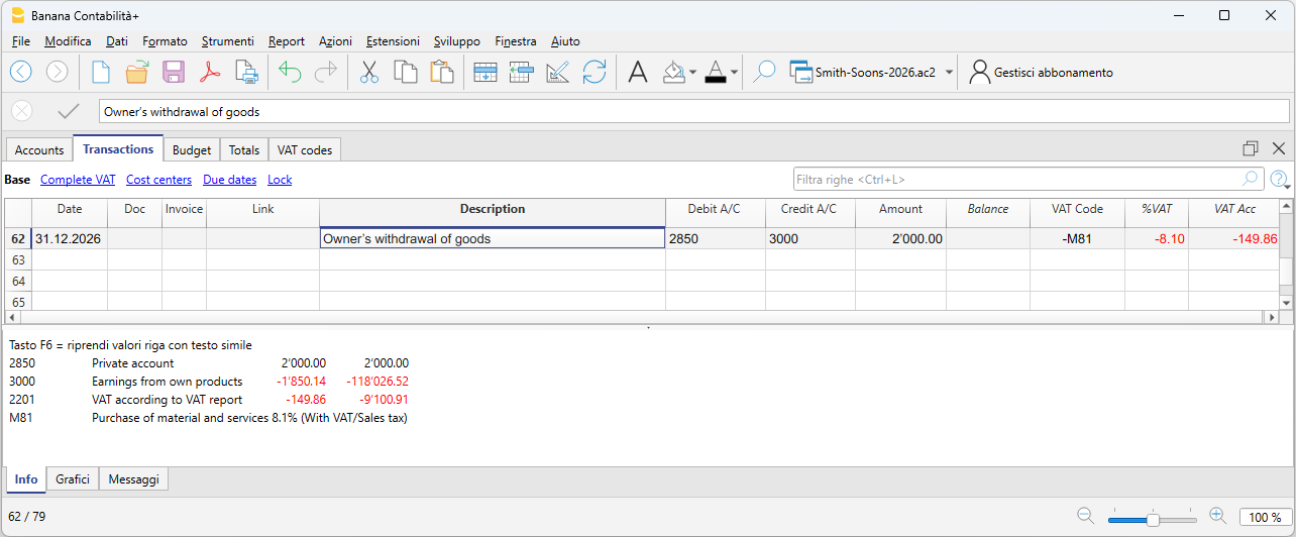
If the owner withdraws goods from the company for personal use:
- Revenue is recorded (as if it were a sale).
- VAT is calculated on the value of the goods.
- Inventory is reduced.
Private use of company vehicles:
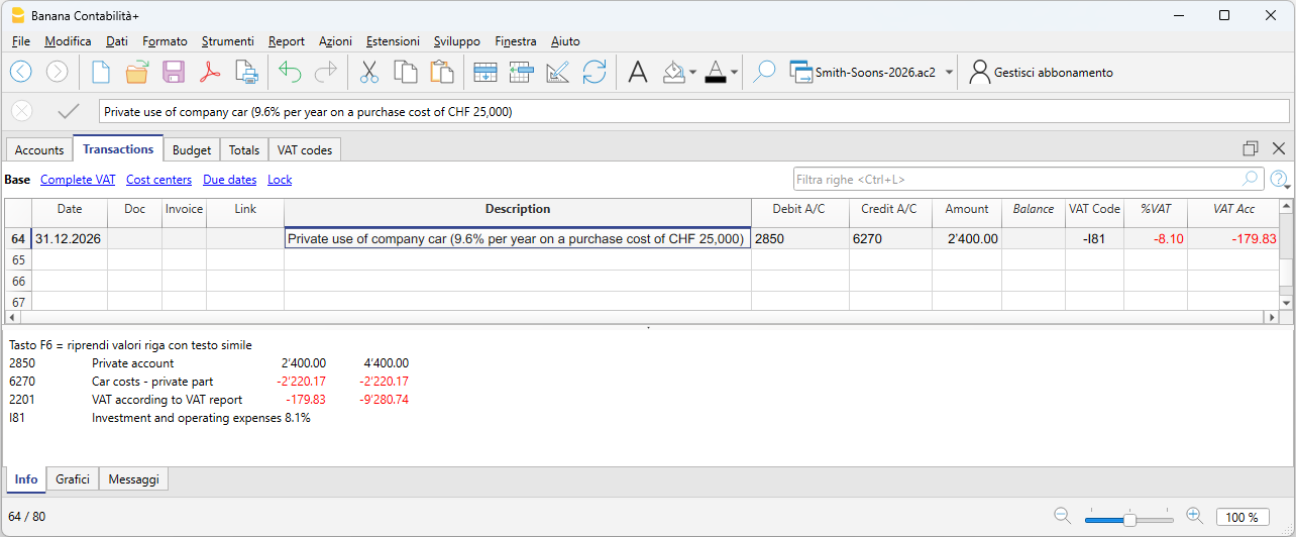
If the owner uses the company car for personal purposes, the private use must be recorded as if it were company revenue. If the company is subject to VAT, the transaction is VAT taxable.
- The amount to be recorded is either a flat rate or calculated according to tax rules (e.g. 9.6% of the purchase price per year).
- Private use is considered revenue.
- VAT must be declared as VAT payable.
- The offset can be:
- a reduction in vehicle costs (6900), or
- a reduction in the asset value (vehicle), often preferred for sole proprietorships.
Adjustment of Taxes and Duties account
The adjustment of taxes and duties is a year-end entry that serves to:
- Record the taxes and duties accrued during the year but not yet paid.
- Adjust previously estimated amounts based on the actual tax assessment.
This ensures the correct cost is recognized for the fiscal year and the related liability to the tax authority is recorded.
It is also necessary to check that the advance payments made during the year refer to the current fiscal year.
Tax payments relating to previous years must be recorded to close the accruals present in the "Direct taxes" (balance sheet) account.
If the accrual balance is insufficient or excessive, the difference must be recorded as an extraordinary cost or revenue, or as a prior period item, depending on the nature of the variation.
Adjustment of the Private account
The private account (usually 2850 / 2860) is used in sole proprietorships or partnerships to record:
- Personal withdrawals by the owner
- Personal deposits by the owner
- Use of company assets for personal purposes (private use)
- Private expenses mistakenly paid by the company
- Year-end adjustments
At the end of the year, this account must be adjusted to reflect the correct balance between the owner and the company.
If the private account is an asset (debit balance) and therefore represents a receivable from the owner to the company, interest could theoretically be recognized.
VAT closing and declaration
For companies subject to VAT, it is important at year-end to check the VAT entries and proceed with the closings correctly. Banana Accounting Plus supports data checking and the preparation of VAT declarations (Advanced plan) for Switzerland, making it easier to manage everything in an orderly and compliant manner. At the end of the year, after proper checks and error corrections, you must:
- Record VAT for the fourth quarter (or the last semester in the case of the flat-rate VAT method).
- You must transfer the balance of the automatic VAT account to the VAT due account.
- Before submitting the final VAT declaration:
- Open the PDF files of the VAT reports previously submitted to the FTA.
- Use the VAT extensions to recalculate the VAT reports for each previous period.
- Verify that the newly calculated VAT reports still match those already submitted.
- Use the VAT Summary command to view various reports and create a PDF printout for data archiving. These documents will be useful in case of a tax audit.
Adjustments for AVS/AI/IPG/AD
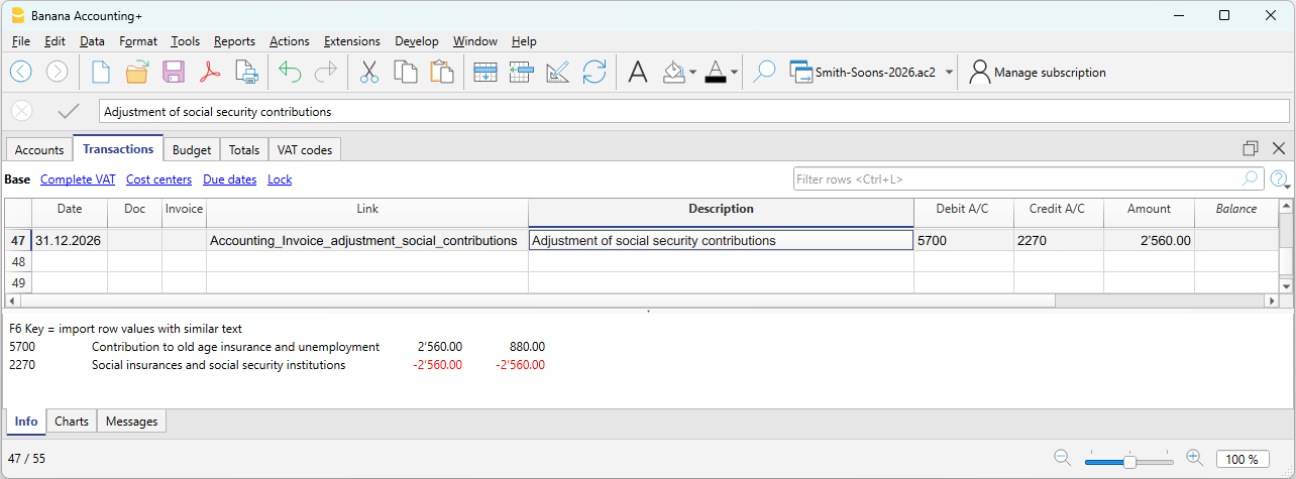
The AVS/AI/IPG/AD contributions are mandatory social security contributions in Switzerland covering pension (AVS), disability (AI), allowances for military service and maternity (IPG), and unemployment (AD).
- During the year, the AVS contributions account usually records advance payments made to the Cantonal AVS Compensation Office (Debit) and the amounts withheld from employee salaries (Credit).
- If during the year the family allowances paid to employees were recorded in a dedicated account, for example in the “Family allowance contributions” account, to reconcile the accounting with the AVS year-end statement and record the corresponding adjustment, you can transfer the balance from this account to the AVS/AD Contributions account.
Accident insurance adjustments (LAINF, supplementary LAINF)
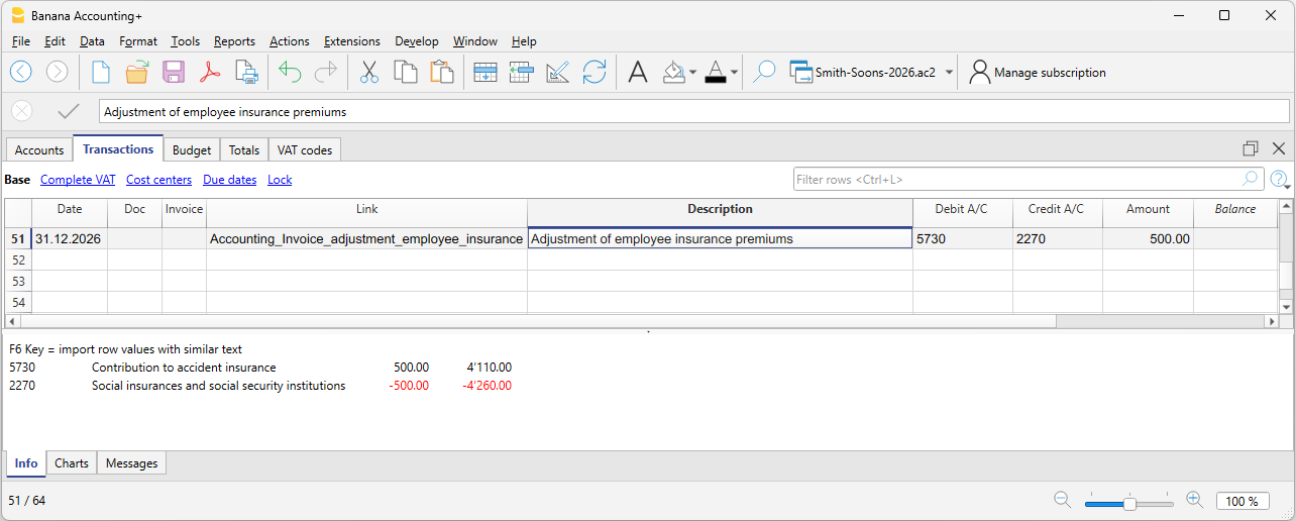
LAINF and supplementary LAINF contributions in Switzerland are mandatory insurance contributions against professional and non-professional accidents (LAINF) and additional coverage provided by the employer (supplementary LAINF).
With the recording of the December salaries and the payment of the thirteenth salaries, you need to print the salary list showing all gross wages. You must report the total AVS gross wages to the employee insurance providers, who will determine any adjustments to be paid.
Pension fund adjustments
The pension fund (or LPP) is the mandatory Swiss occupational pension insurance that complements the AVS pension.
Many second pillar (LPP) pension providers calculate the annual premium based on salary estimates provided by the company before the end of the year. Bonuses are not included. Important changes during the year must be communicated promptly so the insurance can adjust the premium. The company may also decide to pay a higher amount in advance to avoid a deficit due to changes during the year.
At the end of the year, the LPP insurance sends a final statement showing either a payable or receivable balance, depending on whether too much or too little was paid.
In the following example, a balance is assumed to be payable. Therefore, the entry will be made in two accounts: Debit to the LPP Contributions account and Credit to the Liabilities to pension institutions account.
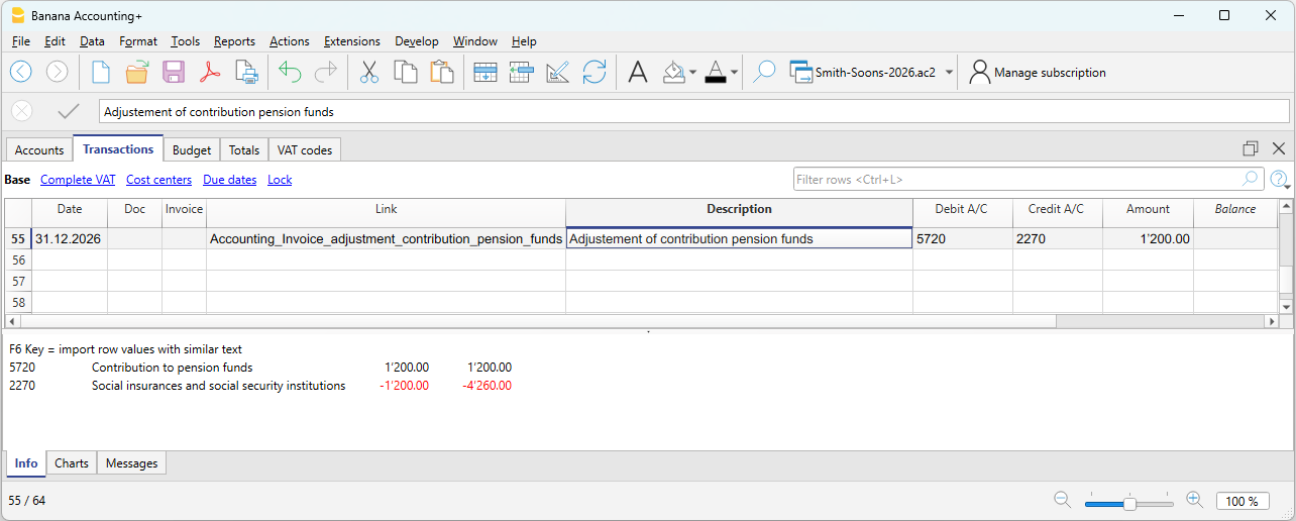
In case of a receivable, the LPP Contributions account is reversed: Debit the Receivables from pension institutions account and Credit the LPP Contributions account (as a decrease).
In the new year, the receivable must be reversed from the LPP Contributions account (for the new year) and the receivable is closed on the Credit side.
Adjustment of the allowance for doubtful accounts (Delcredere)
The allowance for doubtful accounts / Delcredere is a contra asset account associated with receivables. It is used to reduce the value of customer receivables to account for the risk that some may not be collected.
In practice:
- Receivables on the balance sheet are shown at a realistic value.
- The allowance represents an estimate of possible losses.
- It increases the prudence of the balance sheet, as required by the Swiss Code of Obligations.
Debit the expense account "Doubtful accounts" and credit the allowance for doubtful accounts.
Adjustment of withholding tax (IAF)
During the year, the employer withholds the tax at source from the salaries of foreign employees who are not fiscally domiciled in Switzerland. The withheld amounts must be paid to the Tax Office each quarter.
At the end of the year, with the final December report, the declaration for the last quarter’s withholding tax is made. All gross salaries paid are reviewed, and in case of changes or errors, corrections can be made in the final declaration.
Generally, the total amount payable for fourth quarter withholding tax is recorded as a liability as of 12/31 or, if too much was paid, as a receivable. The offset account is always the salaries account (account 5000).
Reimbursements for executive staff
“Executive staff” refers to management figures (CEO, directors, unit heads).
Reimbursements may be for actual expenses incurred by the executive employee on behalf of the company. These are not taxable for the employee and are therefore not subject to AVS, LPP, or withholding tax, provided that they are documented or, in the case of flat-rate allowances, approved through regulations by the FTA.
In this case, they are recorded in accounting as expense reimbursements or personnel expenses.
Accruals and Deferrals in Assets and Liabilities
Accruals and deferrals are year-end adjusting entries used to apply the accrual principle, allocating costs and revenues to the year to which they economically relate, regardless of when the payment is made or received.
Attention
Accruals and deferrals do not concern invoices that are simply unpaid or not yet collected, but adjustments necessary to correctly determine the accrual basis of the financial year.
Difference between accruals and deferrals
At the end of the year, two situations may occur:
- Costs or revenues accrued but not yet recorded → Accruals
- Costs or revenues already recorded but not entirely relating to the current year → Deferrals
Simple rule
- Accruals add what is missing.
- Deferrals postpone what has been recorded in excess.
Accrued income and accrued expenses
Accruals concern costs or revenues already accrued in the financial year, but that will have a financial impact (receipt or payment) in the following year.
They are divided into:
- Accrued income → Revenues to be collected
- Accrued expenses → Costs to be paid
The cost or revenue fully relates to the current year, but has not yet been collected or paid.
Prepaid expenses and deferred income
Deferrals postpone costs and revenues already recorded but relating to the following financial year.
They are divided into:
- Prepaid expenses → postpone part of a cost already recorded
- Deferred income → postpone part of a revenue already recorded.
Accruals and deferrals in the chart of accounts structure of Banana Accounting
Accruals and deferrals are recorded through normal entries in the Transactions table, using specific balance sheet accounts in the chart of accounts.
The accounts are listed in the following subgroups:
Current assets
- 1300 Prepaid expenses (costs paid in advance)
- 1301 Accrued income (revenues to be collected)
Short-term third-party capital
- 2300 Costs to be paid
- 2301 Revenues received in advance
Below we present some examples of accrued income and expenses and prepaid expenses and deferred income created in the Transactions table of Banana Accounting
Accounting method and accruals
- In the Accrual basis method or accrual principle, issued or received invoices are recorded directly in the Customers or Suppliers accounts and appear as open items.
- In the Cash basis method, accruals are necessary at year-end to record costs and revenues accrued but not yet collected or paid.
- In the Hybrid system method, the solution most consistent with the adopted recording method is applied.
Case 1 - Accrued income (Revenues to be collected)
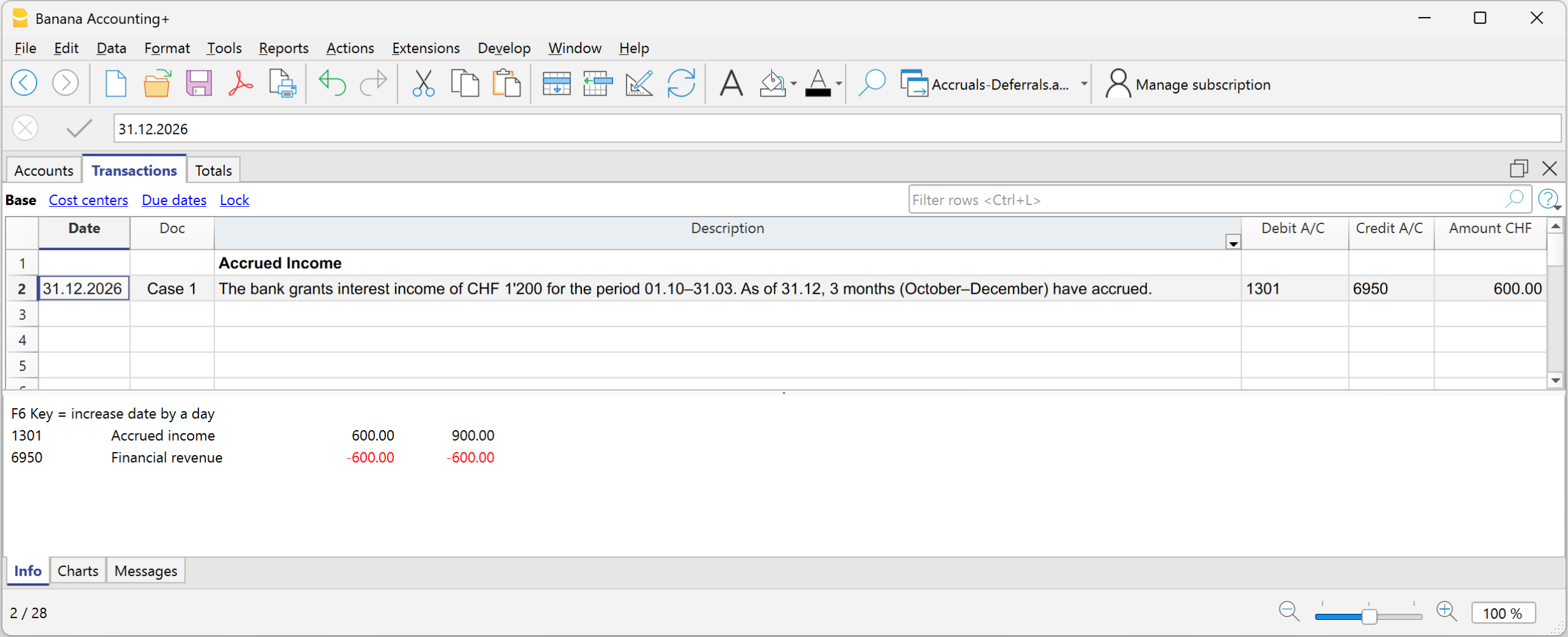
Example: the bank grants interest income of CHF 1’200 for the period 01.10–31.03. As of 31.12, 3 months have accrued (October–December).
Portion relating to the current year:
- 1’200 ÷ 6 months × 3 months = CHF 600
Entry on 31.12
- Debit: 1301 Revenues to be collected CHF 600
- Credit: 6950 Interest income CHF 600
In the Income Statement, CHF 600 is shown for the portion of interest income accrued up to 31.12; in the Balance Sheet, accrued income is shown for interest accrued but not yet collected.
Case 2 - Accrued expense (Costs to be paid)
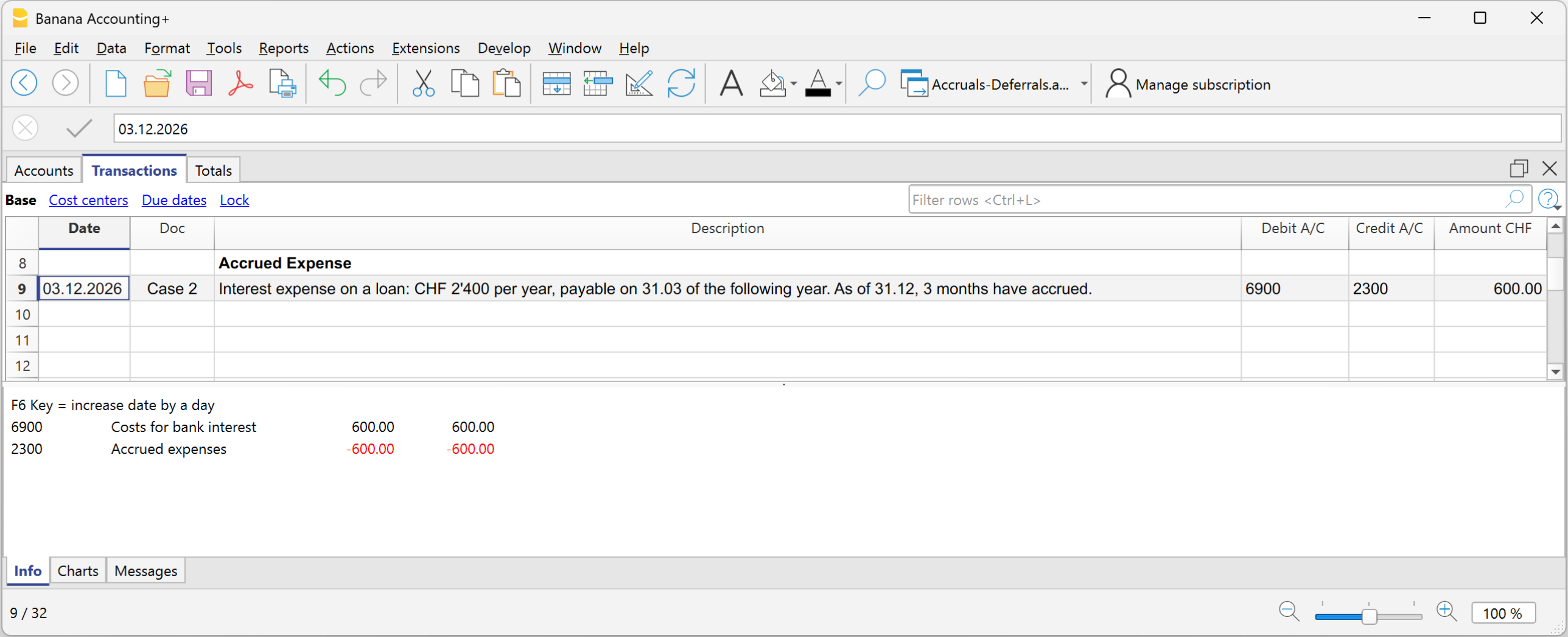
Example: Interest expense on a loan: CHF 2’400 per year, payable on 31.03 of the following year.
As of 31.12, 3 months have accrued.
2’400 ÷ 12 × 3 = CHF 600
Entry on 31.12
- Debit: 6900 Accrued interest expense CHF 600
- Credit: 2300 account Costs to be paid (liability) CHF 600
In the Income Statement, the interest expense accrued up to 31.12 is shown; in the Balance Sheet, the accrued expense is shown for the liability to be paid.
Case 3 - Prepaid expense
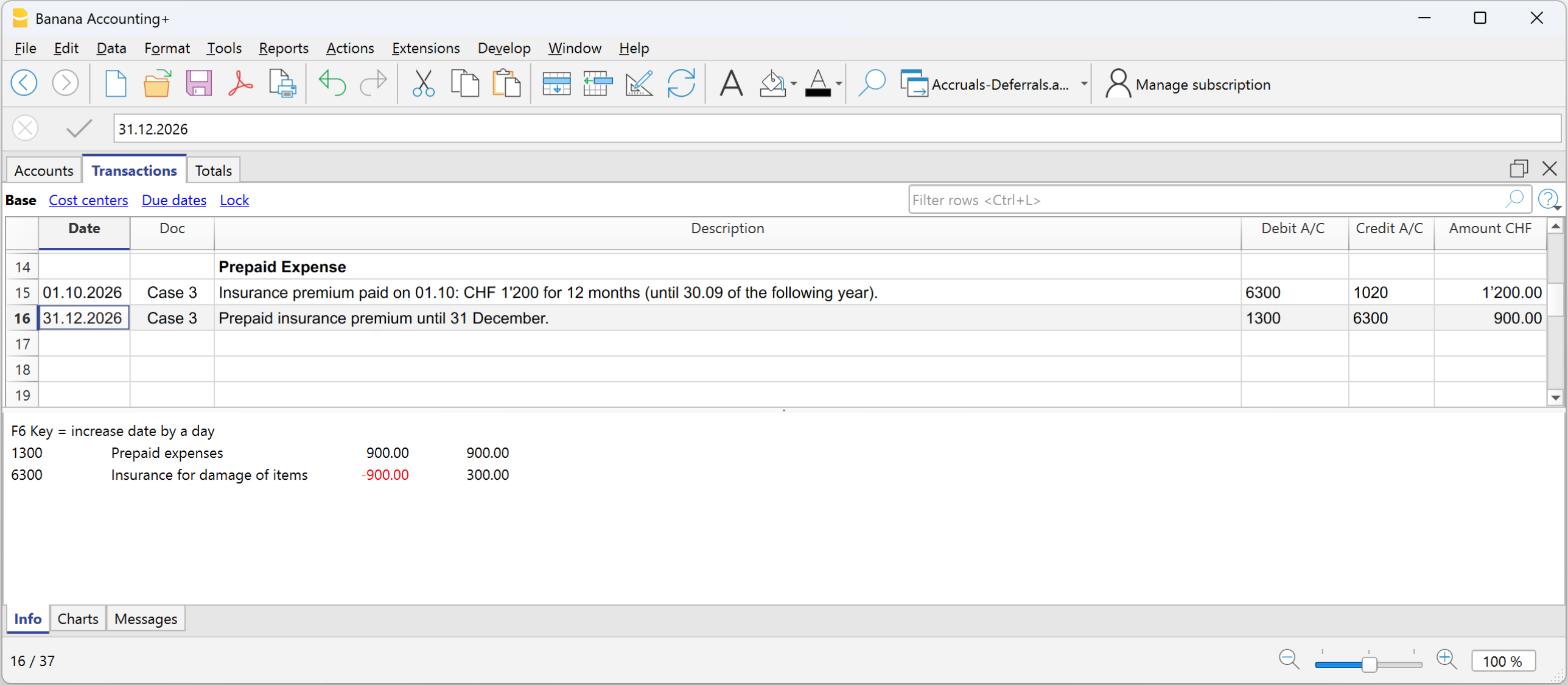
Example - Insurance premium paid of CHF 1’200 for 12 months, for the period from 01.10 to 30.09 of the following financial year:
Period relating to the current year:
October–December = 3 months
Portion relating to the current year:
1’200 ÷ 12 × 3 = CHF 300
Portion relating to the following year:
1’200 − 300 = CHF 900
Entry on 31.12
- Debit: Prepaid expenses CHF 900
- Credit: Insurance CHF 900
In the Income Statement, the cost of CHF 300 remains because a reduction of the insurance premium is recorded for the part paid in advance; in the Balance Sheet, CHF 900 remains because it is the portion of cost relating to the following financial year.
Account card of the Prepaid expense
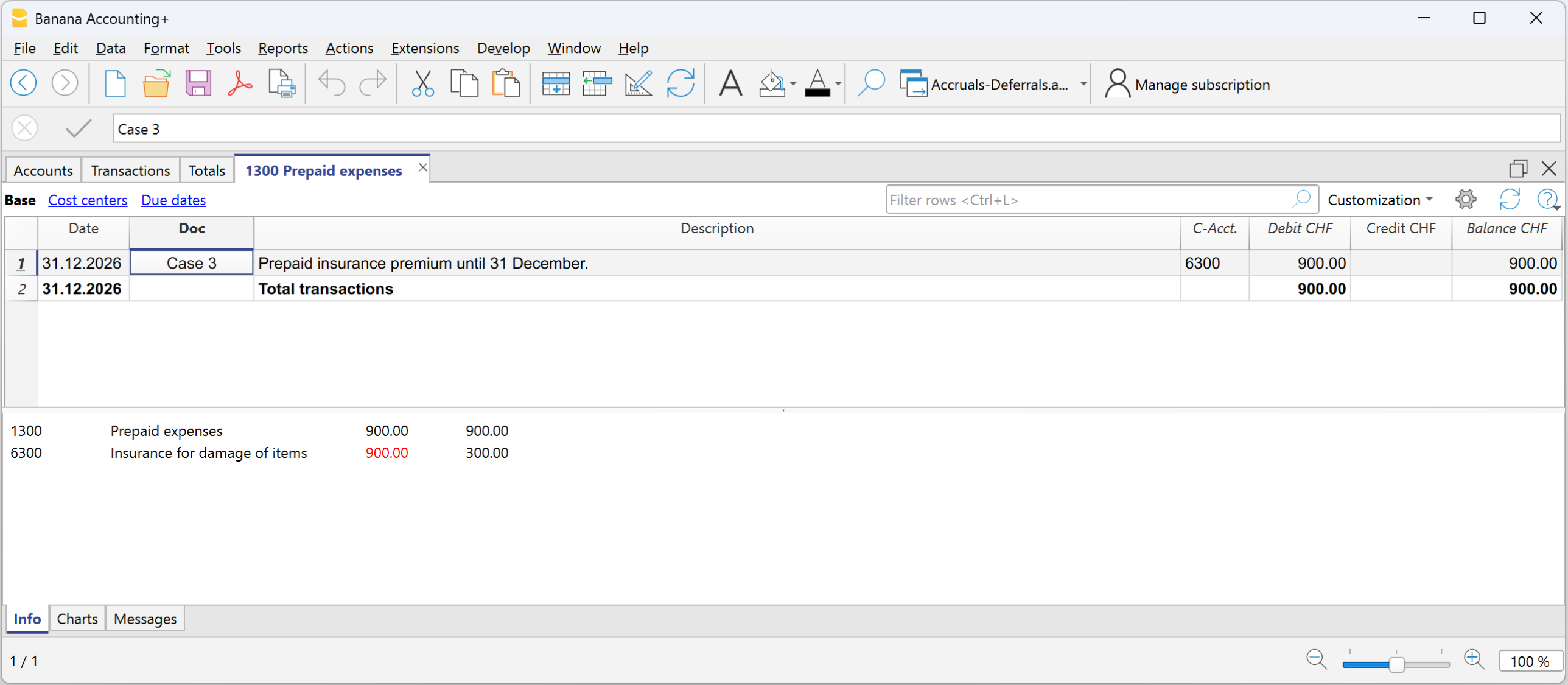
Account card of the Insurance premium expense

Case 4 - Deferred income
Example - Semi-annual rent of CHF 6'000, received in advance on 01.12, for the period from 01.12 to 31.05:
Monthly portion:
6’000 ÷ 6 = 1’000 per month
Portion relating to the current year:
December = CHF 1’000
Portion relating to the following year:
5 months = CHF 5’000
Initial entry:
- Debit: Bank CHF 6’000
- Credit: Rental income CHF 6’000
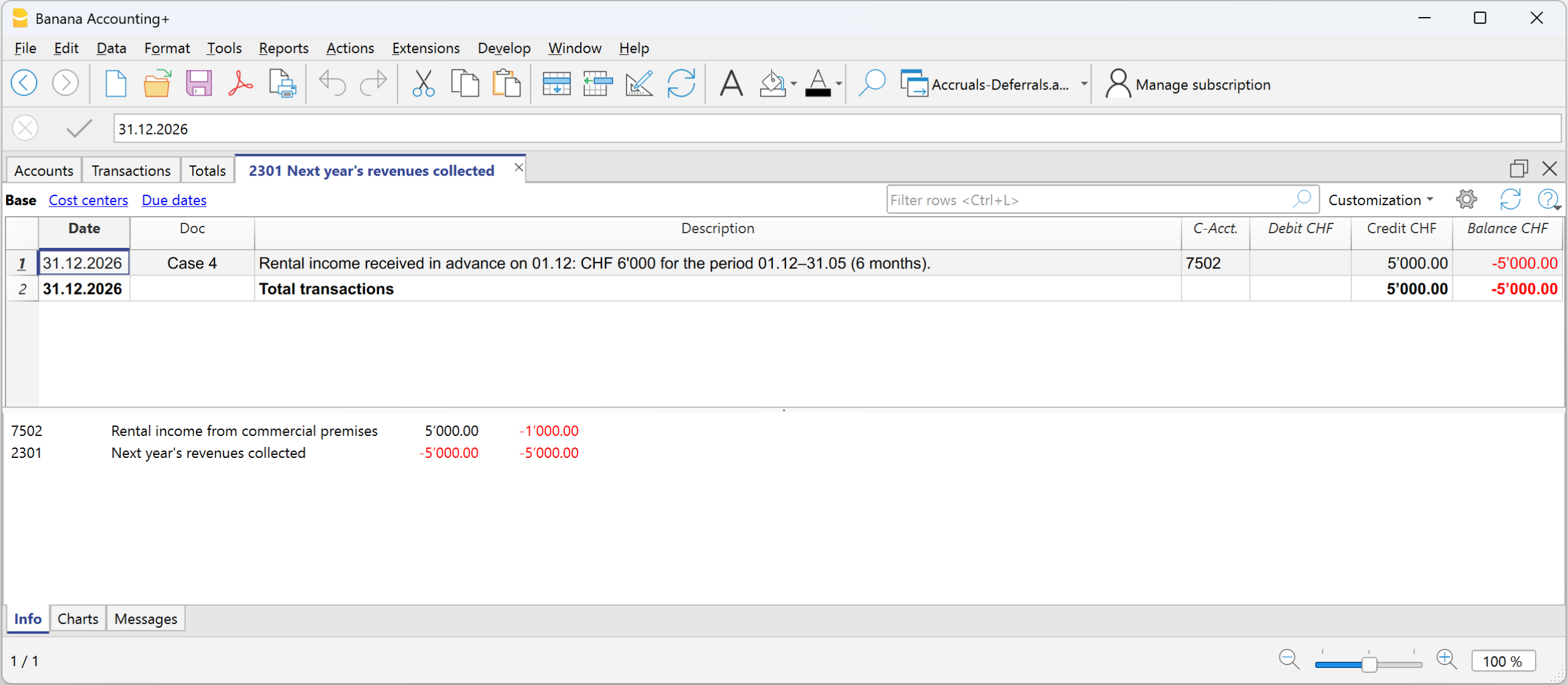
Entry on 31.12
- Debit: Rental income CHF 5’000
- Credit: Deferred income CHF 5’000 (revenues received in advance)
In the Income Statement, the reduction of rental income must be shown for the part relating to the following financial year; in the Balance Sheet, deferred income is shown for the part of revenue received in advance relating to the following financial year and representing a liability towards the customer.
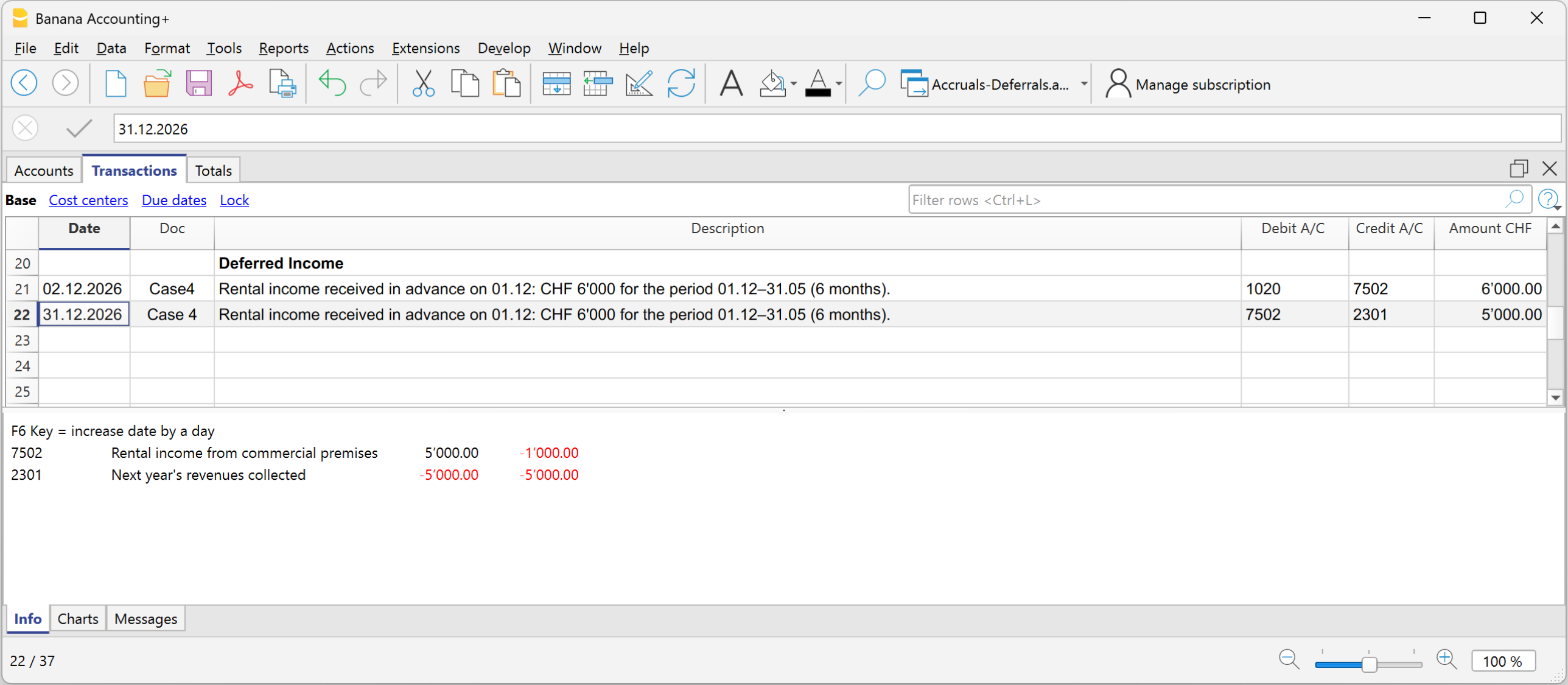
Account card Rental income
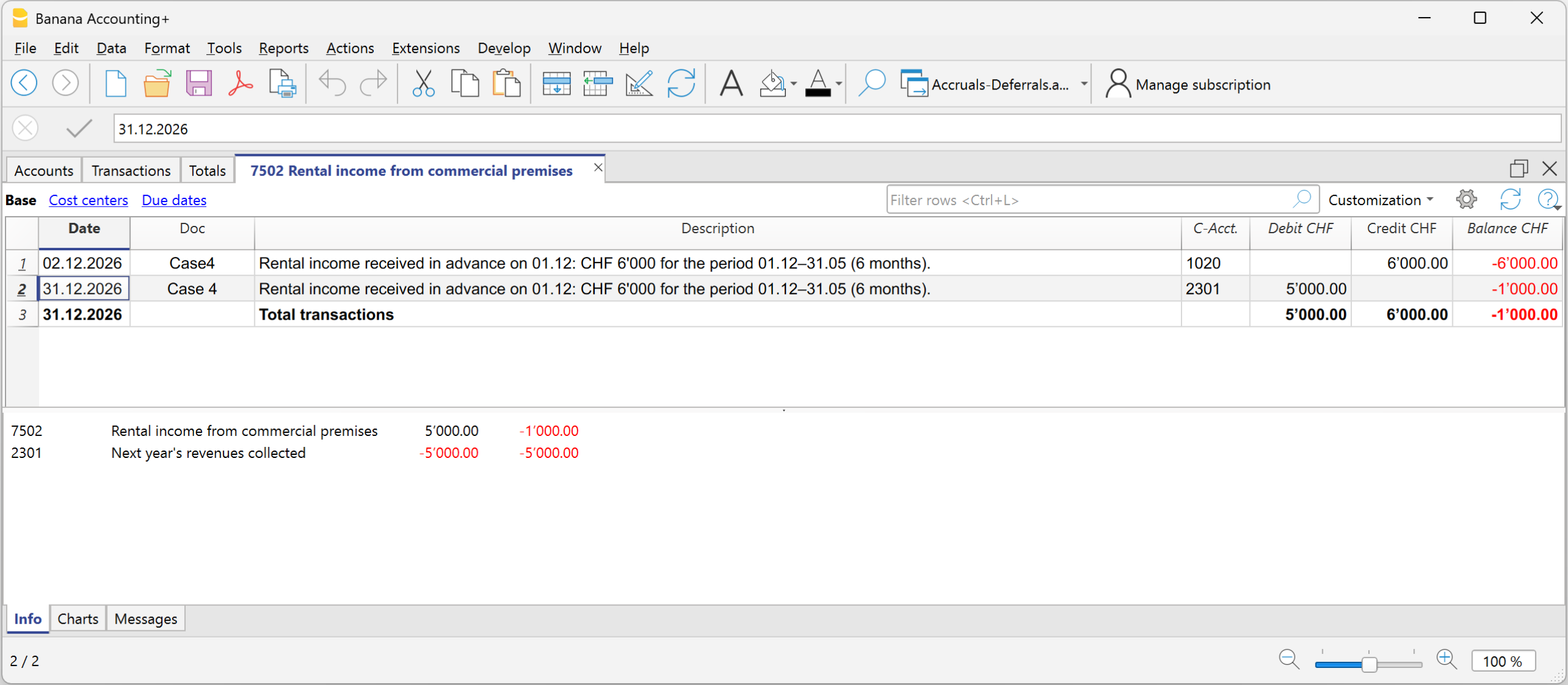
Account card Deferred income for revenues received in advance
Reversal in the following financial year
At the beginning of the new financial year, accrued income and expenses and prepaid expenses and deferred income are reversed.
To reverse, the same accounts that generated the accruals and deferrals are used:
- the accrual and deferral accounts and the cost and revenue accounts are reversed
- or they are offset at the time of payment or collection.
The reversal is necessary to close the accrued income and expenses and prepaid expenses and deferred income accounts.
In summary:
Accruals add what is missing, deferrals postpone what has been recorded in advance.
Carry forward profit/loss for the accounting period
In Banana Accounting, the profit or loss is automatically allocated during the carry forward of opening balances to the new year using the Create New Year command.
In the dialog window, in the Profit/Loss Allocation section, by clicking the down arrow of the first field, all available balance sheet accounts are displayed.
You can select the account or accounts to which the profit or loss will be allocated. The allocation can be made to a maximum of three accounts, using the three available fields.
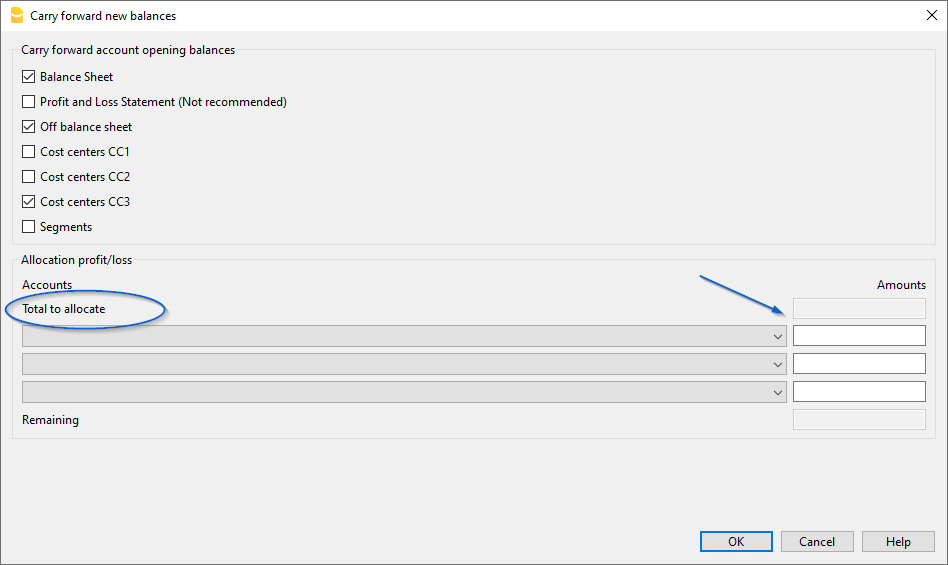
In the field(s) under the Amount column, enter the amount to be allocated for each selected account.
Detailed information about the Create New Year dialog window is available on the documentation page: Carry forward new balances dialog
Profit allocation
In accounting, the recording of profit distribution takes place when the shareholders' meeting or the competent body formally approves the allocation of the profit resulting from the financial statements.
Year-End Closing
At the end of the year, accounts are closed and the profit (or loss) for the year is determined.
- Operating profit = the positive result of operations (revenues > costs).
- The profit is recorded in the Income Statement and carried over to Equity in the Retained Earnings account.
The distribution of profits is the allocation of this result among various items, established by the shareholders' meeting.
Resolution on Profit Allocation
The shareholders' meeting decides how to allocate the profit.
Below we provide some general practice recommendations, but we suggest consulting your trusted professional.
Example of accounts for profit distribution:
- Legal reserve
- Other reserves
- Dividends to shareholders
- Retained earnings
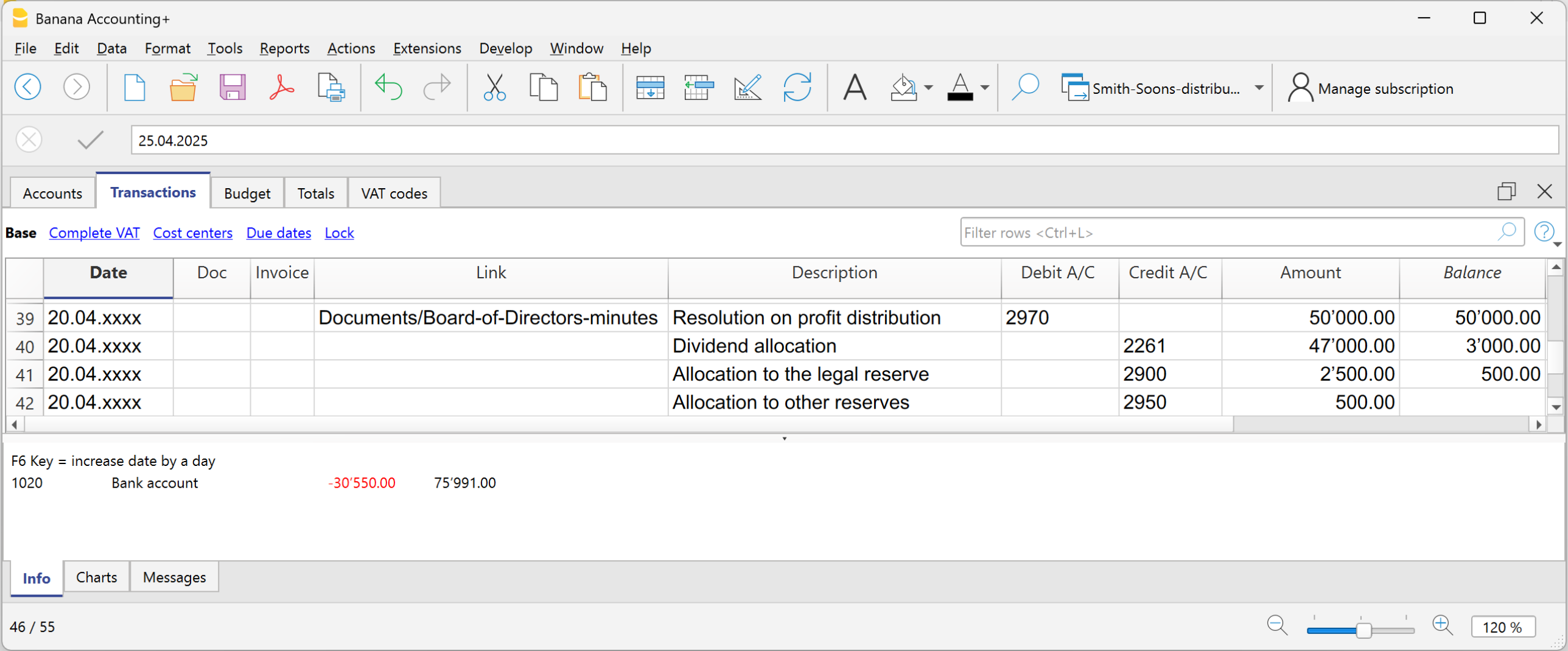
The distribution is not recorded at the time of payment, but on the official decision date (resolution). The payment is only the subsequent phase of settling the debt to the shareholders.
- From the Retained earnings account, the amounts are transferred to the various accounts established by the resolution.
Withholding Tax on Dividends in Switzerland
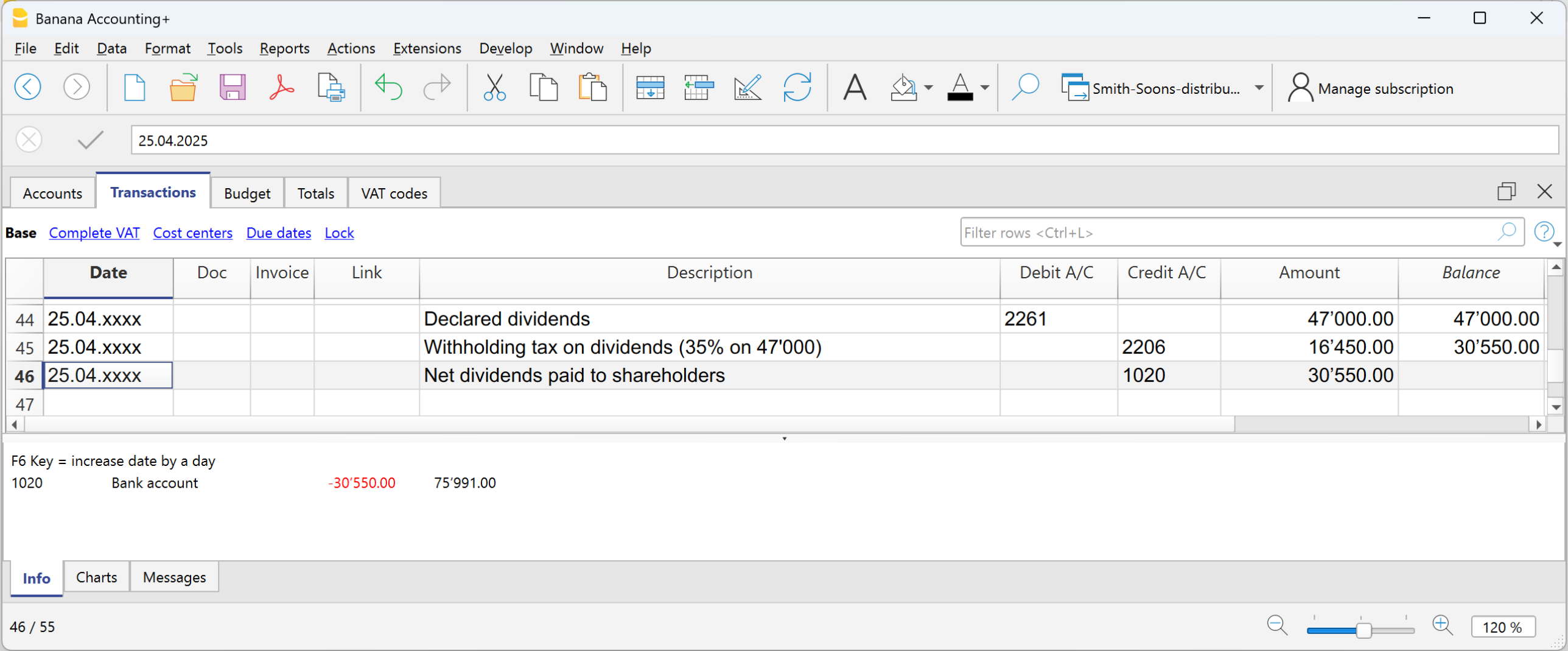
In Switzerland, when a company distributes dividends to its shareholders, it must withhold a tax called “withholding tax” equal to 35% of the distributed amount.
It is called “withholding” because it is collected at the source, meaning immediately, at the time of payment, before the shareholder receives the money.
The withholding tax on dividends is a mandatory 35% tax deduction, which serves two purposes:
- Ensure tax revenue (the State receives the tax immediately).
- Prevent tax evasion (those who do not declare dividends do not recover the withholding).
Dividend Payment
At the time of dividend payment, the company withholds 35% as withholding tax.
The withholding tax must be declared on the official portal and subsequently paid to the Swiss Federal Tax Administration (SFTA).
Refund of Withholding Tax on Dividends
- Shareholders residing in Switzerland can recover the full withholding by filing a tax return (the tax office offsets it against taxes due).
- Shareholders abroad can recover it partially, depending on the double taxation treaties between Switzerland and the country of residence.
准备供审查的文件
在准备把文件寄给审计师之前,建议您参考年末结算页面上的信息。除了有关如何使用程序功能的信息外,还应在财务年度结束之前执行许多检查和验证。
被要求进行审计的公司必须向审计师发送一系列的文件和档案。
年复一年,很容易忘记需要发送给审核员的内容。 因此,建议准备一份清单,其中包括审计员在前几年要求的所有文件,以及要执行的年末结算和调整的操作。
为了促进这项工作,在一年中可以采取几个简单的步骤,使记账员和审计师的工作更容易。我们的建议如下。
- 创建一个文件夹来存储扫描过的文件。
保存本年度会计核算中的所有扫描文件。 - 扫描收据。
- 扫描所有发票,现金单,社会保障和保险缴款等的报表。
数字文件,如发票和收据,可以成为会计档案的一个组成部分。Banana财务会计软件允许您在上下文记录的行中插入数字化的文件。审计员通过点击数字文件的链接,打开文件,可以看到文件的内容,而不需要浪费时间在纸质文件中寻找信息。
发给审计师的PDF打印件
以下是要发送给审计师的关键文件清单。
为雇员提供的报表
- 12月31日发送的社保工资申报单
- 预付款的申报 (已经包括在社保工资申报中)
- 雇员薪资日志
- 雇员工资账户表
- 薪资证书
- 12月31日发出的意外保险声明
- 12月31日发出的意外保险补充声明
- 12月31日发出的疾病津贴声明
银行/邮政账户报表
- 截至12月31日的最终银行和邮政报表
- 截至12月31日的银行对账单,用于支付任何预扣税款
增值税申报
- 每个季度的增值税报表
- 每个季度的增值税申报
最终计算
- 社保
- 意外保险
- 附加意外保险
- 疾病津贴
- 养老基金
- 源头税
官方文件
- 前一年的股东常会议记录。
- 股东特别会议记录。
- 前一年的征税通知。
- 为任何已支付的股息提交给联邦税务局的预扣税款支付令和103表的副本。
- 建筑物保险单的副本。
- 库存明细+截至12月31日的库存估价。
- 应计项目和递延项目的细节。
- 固定资产和折旧的详细情况 (表,明细...)。
- 税收计算。
数据导出
会计法规要求以数字格式向审计师和检查员提供会计数据。
Banana财务会计软件符合这些规定,因为:
- 审计员可以使用Banana财务会计的免费计划来打开会计文件。
- 所有的会计数据都可以在表格中轻松看到。
- 这些数据可以直接复制和粘贴到其它程序中。
- 可以直接从表中导出不同格式的数据。
- 创建pdf文件将所有会计数据以理想的格式导出,以供阅读。
数据展示和导出的扩展程序
有几个扩展程序用于展示和导出特定格式的数据。
- 审计文件报告创建了对审计师有用的报告,可以复制和粘贴到Excel中。
- 标准审计文件 - 用于税收。
根据经合组织准则和某些国家的要求,以XML和其它格式导出数据。 - 如果有特定于您所在国家/地区的扩展程序,请在扩展程序中搜索。
其它有用的信息
以下是其它有用信息的链接,用于优化记账和文件管理:
Documents to be sent to the auditor
Below is a list of documents that are normally requested during an audit. You can use it as a base and customize it according to the needs of your company or the requests of your auditor.
Employee Declarations
- AVS salary declaration and adjustment as of 31.12
- Family allowance declaration (included in the AVS declaration)
- Employee salary journal
- Salary account cards
- Salary certificates
- LAINF and complementary LAINF declarations with adjustment
- Sickness benefit declarations
- LPP statement as of 31.12
- Withholding tax calculations, quarterly and annual
Bank/Post Account Statements and Calculations
- Final statements as of 31.12
- Bank calculations for withholding tax
- Loan statements
- Investment statements
- Copy of form 103 sent to the FTA
VAT Declarations
- Quarterly VAT calculations
- Quarterly VAT declarations
- Turnover – VAT reconciliation
- Any VAT adjustments
Documents for Year-End Closing
- List of open customer and supplier invoices as of 31.12
- Inventory valuation
- Details of accruals and deferrals
- Details of fixed assets and depreciation
Official Documents
- Minutes of ordinary and extraordinary meetings
- Tax ruling from the previous year
- Payment order for withholding tax
- Copies of active contracts (leasing, loans, rental)
- Insurance values of buildings
- Documents for any patents
- Annual reports and appendix to the financial statement
Printouts and Archiving
With Banana Accounting Plus you can automatically generate:
- Account cards
- Journal
- Enhanced balance sheet with groups
- Watch the video tutorial showing how to create and print the enhanced balance sheet with groups.
- Accounting report
- VAT summary
- Year-end PDF printouts
PDF Dossier
The Create PDF dossier command allows you to generate a single file with the entire documentation of the fiscal year.
Archiving
It is good practice to keep:
- the accounting file
- the PDF printouts
- backup copies on an external drive.
Tools and exports useful for the auditor
Banana Accounting Plus allows you to export data in various formats.
- The auditor can use the Free plan to open the accounting file.
- Data can be copied and pasted into other programs.
- Tables can be exported in various formats.
- The Create PDF dossier command generates a complete file ideal for reading.
- Extensions allow specific exports:
- Audit File Reports creates reports that can be useful for the auditor and can be copied and pasted into Excel.
- Standard Audit File - for Tax.
Export of data in XML and other formats according to OECD guidelines and for specific countries. - Search the extensions to see if there are specific extensions for your country.
Other Useful Information
Changes after the end of the financial year
Closing the fiscal year is the moment when you verify that the accounting is complete, consistent, and ready for the next year. Once completed, ideally no further changes should be made. However, it may happen that missing transactions, errors, or unrecorded exchange rate differences are identified.
This page explains when it is necessary to make changes after closing and which tools Banana Accounting offers to do so correctly.
When it is necessary to intervene after closing
The most common situations are:
- Exchange rate differences not recorded in multi-currency accounting.
- Missing transactions entered late.
- Posting errors identified afterwards.
In any case, it is important to document the reason for the intervention and ensure that the changes comply with the fiscal and legal framework.
Adjustments in the following year (recommended procedure)
If you have already reviewed the accounting or submitted the tax return, you should not make changes to a closed year.
In this case, we recommend that you:
- Record the adjustment in the new year.
- Clearly describe the issue in the entry or in an attached document.
- Check the tax impact with your accountant.
Multi-currency case
For unrecorded exchange rate differences in a closed year:
- record the difference in a transition account (e.g. Prior year exchange adjustment)
- create an opening entry to reset the account
- allocate the change to the exchange gain/loss account
This procedure allows you to keep balances correct without retroactively modifying the closed year.
Changes to a closed year
If you have not yet reviewed or submitted the tax return, you can still make corrections directly in the file of the closed year. In this case:
- Proceed with caution, limiting yourself only to essential changes.
- Run the Check accounting command again to verify that the entries are correct and balanced.
- Save and reclose the year.
- Open the new year and run the Update opening balances command to realign the balances.
Useful Banana tools to manage adjustments
Create exchange rate difference entries
Allows you to automatically generate transactions for exchange rate differences as of the closing date, using the rates in the Exchange rates table. This is especially useful if the year has not been definitively closed.
Update opening balances
This command, available from the Actions > Update opening balances menu, transfers the final balances of the previous year into the new fiscal year. Use it whenever you make changes to the closed year or to the chart of accounts, to ensure consistency between years.
Check accounting
This command, available from the Actions > Check accounting menu, performs a complete check of imbalances, posting errors, or inconsistent entries. It is recommended after each change, both in the previous year and in the new one.
Common errors and how to fix them
- Opening balances of the Income Statement reported by mistake
Delete the amounts from the Opening column and run Update opening balances. - Profit or loss for the year not reported correctly
Correct the entry in the previous year and then update the opening balances in the new year. - Imbalances after changes to the previous year
Use Update opening balances and run Check accounting again.
Best practices
- Always run the checks and record all exchange rate differences before creating the new year.
- In case of changes after closing, always document the reasons for the intervention.
- Before making changes to a closed year, consider the legal and tax implications with a professional.
- After each adjustment, use the Update opening balances and Check accounting commands to ensure data consistency.