Algemene hulpmiddelen voor non-profitorganisaties en ngo’s
Banana Boekhouding Plus is professionele boekhoudsoftware die is ontworpen om boekhouden eenvoudig, snel en betrouwbaar te maken. Het is een ideale oplossing voor kleine non-profitorganisaties, verenigingen en organisaties die lokaal of in het buitenland projecten beheren.
Begin met een gebruiksklaar sjabloon, pas het aan uw organisatie aan en houd uw boekhouding meteen onder controle.
Universele sjablonen zijn bestanden die eenvoudig aan elk land kunnen worden aangepast. Voor sjablonen voor verenigingen raden we ook de volgende pagina's aan:
Boekhoudtoepassingen voor non-profitorganisaties
Banana Boekhouding biedt verschillende boekhoudtoepassingen, afhankelijk van de behoeften en de omvang van uw organisatie: Kasboek, Inkomsten & Uitgaven boekhouding, Dubbel boekhouden en Boekhouding met vreemde valuta. Of u nu alleen inkomsten en uitgaven wilt bijhouden of een professionele dubbele boekhouding en projecten in verschillende valuta wilt beheren, u kunt de oplossing kiezen die het beste bij uw organisatie past.
Gebruiksklare sjablonen voor non-profitorganisaties
Begin met een van onze gebruiksklare sjablonen en pas de rekeningen, categorieën en rapporten aan uw organisatie en land aan.
Eenvoudige en flexibele boekhouding
Banana Boekhouding combineert professionele boekhouding met een intuïtieve interface die lijkt op een spreadsheet. U werkt in tabellen, waardoor u uw boekhoudgegevens eenvoudig kunt invoeren, controleren en wijzigen.
- Voer transacties snel in en wijzig ze
- Kopieer en plak gegevens zoals in een spreadsheet
- Controleer transacties automatisch op fouten en verschillen
- Pas het rekeningschema aan uw organisatie aan
- Bekijk op elk moment bijgewerkte saldi en rapporten
Professionele boekhoudrapporten
Uw boekhoudgegevens worden automatisch georganiseerd in professionele rapporten die u met slechts enkele klikken kunt bekijken, afdrukken en aanpassen:
- Proefbalans
- Balans
- Resultatenrekening
- Rekeningkaarten
Beheer projecten, evenementen en leden
Banana Boekhouding biedt handige hulpmiddelen die specifiek geschikt zijn voor verenigingen en non-profitorganisaties. Met Kosten- en Winstcentra kunt u de boekhouding van afzonderlijke projecten en evenementen gescheiden houden en toch alles in hetzelfde boekhoudbestand beheren.
Beheer internationale projecten en meerdere valuta
Banana Boekhouding wordt in meer dan 180 landen gebruikt en is bijzonder geschikt voor non-profitorganisaties die internationaal actief zijn.
U kunt boekhoudbestanden in verschillende talen maken, met meerdere valuta werken en uw rekeningschema en rapporten aanpassen aan lokale vereisten.
Eenvoudig delen en controleren
Wanneer uw boekhouding moet worden gecontroleerd, deelt u eenvoudig uw Banana Boekhouding-bestand en de bijbehorende bewijsstukken met uw auditor of boekhouder.
Zij kunnen het bestand openen met het Free-abonnement, de transacties en bijgevoegde documenten controleren en indien nodig gegevens of rapporten naar Excel exporteren.
Werk offline en behoud de controle over uw gegevens
Banana Boekhouding is niet cloudgebaseerd, zodat u ook kunt werken wanneer er geen internetverbinding beschikbaar is. Dit is vooral handig voor organisaties die op afgelegen locaties werken of projecten ter plaatse beheren.
Uw boekhouding wordt als bestand opgeslagen en u bepaalt zelf waar u uw gegevens opslaat: op uw computer, op uw netwerk of met de cloudopslagoplossing van uw voorkeur.
Gratis beginnen
Download Banana Boekhouding en begin meteen met het Free-abonnement. Er zijn geen persoonlijke gegevens vereist en zelfs uw e-mailadres is optioneel.
Maak uw boekhoudbestand, pas uw rekeningschema aan en voer maximaal 70 transacties in. Wanneer u er klaar voor bent, kunt u overstappen op een betaald abonnement met behoud van al uw bestaande gegevens.
Gebruikt door non-profitorganisaties over de hele wereld
Banana Boekhouding wordt gebruikt door duizenden verenigingen en non-profitorganisaties over de hele wereld, waaronder internationale ngo's die projecten rechtstreeks ter plaatse beheren.
Kies het juiste abonnement
Begin met het Free-abonnement en stap over op een hoger abonnement wanneer u extra functies nodig hebt. Uw boekhoudbestanden blijven volledig compatibel, zodat u verder kunt werken zonder opnieuw te hoeven beginnen.
Noprofit Universal Templates
INPAS Standard Templates
[This page is currently being updated]
INPAS key accounting documents
This page introduces Banana Accounting+ and Excel templates designed to support financial reporting under the International Non-Profit Accounting Standard (INPAS). The templates help prepare the required financial statements, but full compliance also depends on applying all relevant accounting and disclosure requirements.
The NPO is responsible for ensuring that its financial reports comply with all applicable INPAS requirements. Using the template alone does not guarantee compliance.
Statement of Financial Position
The balance sheet is an essential document that provides a detailed view of your organization's financial health, clearly showing assets, liabilities and net worth. Because of the flexibility of the INPAS standard, you can present the financial statements either vertically or horizontally, tailoring them to the specific needs of your nonprofit.
This document can be generated easily using Banana Accounting+ template.
Statement of Income and Expenses
This document shows your organization's income and expenses during a period. Proper management of the income statement is crucial to demonstrate how resources were used to achieve its mission-related objectives.
This document can be generated easily using Banana Accounting+ template.
Statement of Changes in Net Assets
This document is critical to understanding the changes that have occurred in net assets during the fiscal year. The INPAS standard provides a sequence of elements that transparently reflects the changes, making clear the impact of financial activities on the organization's assets.
Statement of Cash Flows
The cash flow statement, which shows cash flows, is essential for monitoring your organization's liquidity and ability to fund its activities. With our INPAS template, you can present this information in a clear and accessible way, improving transparency to donors and board members.
Explanatory notes
Explanatory notes are a mandatory part of INPAS financial statements. They include the basis of preparation, material accounting policies, information about individual funds and their movements, relevant grants and donations, delivery obligations where applicable, and other disclosures required by INPAS.
The notes must also include relevant comparative information for the previous reporting period.
Comparative information and Narrative reporting
INPAS requires comparative financial information for the previous reporting period.
Full INPAS compliance also requires a narrative report describing the NPO's mission, activities, performance and principal risks. The narrative report can be prepared separately, for example in Word, but must be included as part of the NPO's general purpose financial report to declare full INPAS compliance.
During the first two years following transition to INPAS, an NPO may declare compliance with the financial statement requirements only, subject to the transitional provisions.
References
- International Financial Reporting For Non Profit Organisations: https://www.inprf.org
INPAS reporting with segments and cost and profit centres
For a non-profit organisation (NPO), recording a payment is only the beginning. It also needs to know which fund the money belongs to, which project it supports and, when relevant, who provided it. Banana Accounting+ lets you add these details to the same transaction without creating a separate set of ordinary accounts for every fund, project or donor.
This helps an NPO organise the information needed for INPAS fund accounting, the analysis of expenses and fundraising cost disclosures. The software helps collect and analyse information; it does not, by itself, certify an INPAS-compliant financial report.
Segments: a financial view of each fund
Segments divide ordinary accounting transactions into separate reporting dimensions. In the INPAS templates, the first-level segments :Fund A, :Fund B and :Fund C identify restricted funds, while :General identifies the unrestricted General Fund.
These segments are defined in the Accounts table and are added after an ordinary account code in the Transactions table.
The General Fund contains resources that are not subject to restrictions requiring them to be held in a separate restricted fund. Using :General allows the organisation to analyse general activities alongside restricted funds, without creating a separate chart of accounts for each fund.
Where can a segment be entered in double-entry accounting?
A segment may be assigned to the Debit account, the Credit account, or both:
Credit only:
Debit: "Bank"
Credit: "Grants restricted Project 1:Fund A".
The grant income is assigned to Fund A, but the bank asset is not.
Debit only:
Debit: "Bank:Fund A"
Credit: "Grants restricted Project 1".
The bank asset is assigned to Fund A, but the grant income is not.
Both sides:
Debit: "Bank:Fund A"
Credit: "Grants restricted Project 1:Fund A".
Both the asset and the income are assigned to Fund A.
This is generally the more useful approach when a complete financial report by fund is needed.
Important: if the same segment is entered on both sides, its individual segment card can show a zero balance because debit and credit offset one another. This does not mean the fund has no money or no income. Use the report subdivided by segment to examine assets, liabilities, income and expenses separately. A segment used on only one side gives a partial view, not a complete fund balance sheet.
Segments in Income & Expense accounting
In the Transactions table, the segment can be appended to either of these columns:
Account only:
- Account: "Bank:Fund A"
- Category: "Grants restricted Project 1".
This attributes the bank movement to Fund A.
Category only:
- Account: "Bank"
- Category: "Grants restricted Project 1:Fund A".
This attributes the grant income to Fund A, but does not attribute the corresponding bank asset to that fund.
In the INPAS Income & Expense templates, the segment is generally entered in both the Account and Category columns when both positions belong to the same fund. This allows the organisation to track assets, liabilities, income and expenses by fund more completely.
If the segment is added to both Account and Category, the movement can appear twice in the segment card. For this reason, the segment-card total must not be mistaken for the fund balance. In more complex accrual adjustments, the NPO must check the individual account/category positions and reconcile the fund separately. In an Income & Expense transaction, Category can also contain a balance-sheet account, for example when recording a grant advance as a liability.
Cost and profit centres: detailed analysis of projects, activities and donors
Cost and profit centres are independent analytical classifications. Banana has three independent columns, CC1, CC2 and CC3, each of which can contain any number of centres:
- CC1: codes defined with a leading dot, such as ".Campaign 1".
- CC2: codes defined with a leading comma, such as ",Project 1".
- CC3: codes defined with a leading semicolon, such as ";Benjamin Foster".
In the Transactions table, enter the code without its leading dot, comma or semicolon. The INPAS templates use CC2 for projects and CC3 for donors. CC1 remains available for another analytical purpose, such as an event or campaign.
Using positive and negative entries
A cost or profit centre can record positive or negative amounts independently of the ordinary accounting entries. This allows the organisation to add or subtract amounts from a project or donor's analytical balance, depending on the reporting purpose.
- Enter "Project 1" in CC2 to add the transaction amount to that centre.
- Enter "-Project 1" in CC2 to subtract the amount from that centre.
For example, if you want a project centre to show income minus expenses, the INPAS tutorial includes the following transactions:
- A restricted donation of EUR 727 for Project 1, recorded on 10 January 2026: CC2: Project 1 adds EUR 727.
- A project expense of EUR 307, recorded on 12 January 2026: CC2: -Project 1 subtracts EUR 307.
For these two transactions, the analytical centre shows a positive result of EUR 420.
As additional income and expenses are recorded during the year, the project centre is updated automatically. This makes it possible to monitor the financial result of a project without creating separate ordinary accounts for every activity.
You can use the opposite convention if you want to monitor net costs instead. The sign is not automatically determined by whether the ordinary transaction is income or an expense. Apply a consistent convention. In Income & Expense accounting, an optional setting can make cost-centre signs follow categories; enable it only when that matches the intended analysis. A donor centre can similarly record receipts and, with the opposite sign, refunds or corrections.
A cost/profit-centre card is not a complete balance sheet or an automatically generated statutory Income Statement. It shows the movements you assigned to that centre. If you use it exclusively for income and expenses with consistent signs, it gives a useful project-level income-and-expense analysis. If you also assign advances or balance-sheet transfers, the total will not represent the project's operating surplus.
Supporting INPAS expense and fundraising disclosures
Ordinary expense accounts support the required analysis in the Statement of Income and Expenses, while cost/profit centres give an additional operational breakdown. For example, a centre for a fundraising campaign can collect the costs associated with that activity, and a project centre can collect the project's income and expenses. INPAS requires an appropriate expense analysis in the Income Statement; an internal cost-centre card does not replace it.
Under INPAS, fundraising costs may need to be reported by donation and grant fundraising, commercial/trading activities and investment management, including relevant direct, shared and support costs. Banana's accounts and analytical centres help identify the underlying entries, but allocation methods and the required gross disclosures must still be prepared and documented.
One transaction, three dimensions of information
On 10 January 2026, the association receives a restricted donation of EUR 727 from Benjamin Foster for Project 1 within Fund A.
In the Double-entry accounting tutorial, the transaction is recorded as follows:
- Date: 2026-01-10
- Description: Restricted school fund donation month 1
- Debit account: Bank:Fund A
- Credit account: Grants restricted Project 1:Fund A
- Amount: 727.00
- CC2 (project): Project 1
- CC3 (donor): Benjamin Foster
One transaction updates the ordinary accounts, identifies the restricted fund, links the donation to the project and associates the receipt with the donor.
The same principle applies to the unrestricted General Fund using the segment :General.
These dimensions are independent: a project can use more than one fund, and a fund can finance more than one project. This allows an NPO to maintain detailed information without unnecessarily multiplying its ordinary accounting accounts.
Generate donation statements for donors
Banana Accounting+ also helps non-profit organisations simplify donor administration by generating personalised donation statements directly from their accounting records.
With the Donation statement for Associations (Banana+) extension, an NPO can:
- Generate individual donation statements for a selected donor or multiple donors.
- Automatically calculate the total donations received during a selected period.
- Include the details of individual donation transactions.
- Personalise the statements with the organisation's logo, donor information and signature.
- Print or save the statements as PDF documents, which donors may use for tax purposes where permitted by applicable legislation.
Donors must be configured as CC3 cost centres in the accounting file to use this donation statement extension. This is already the structure used in the INPAS templates.
By assigning each donation to the appropriate donor in CC3, the association can reuse the same accounting information for donor tracking, financial analysis and the preparation of donation statements, avoiding duplicate data entry.
The availability of tax deductions and the legal requirements for donation certificates depend on the country and the tax status of the organisation. Banana generates the document but does not determine its fiscal validity.
How to view the results
- Cost/profit-centre card: from Reports > Account/Category cards, select Cost centres to view the movements and analytical balance of a centre. The grouped totals are also visible in the appropriate Accounts or Categories section.
- Segment card: open the segment's account card to inspect the entries carrying that segment. Remember that its net movement may be zero or may include duplicated amounts, depending on how the transaction was classified.
- Report by segment: use Reports > Accounting Report or Enhanced Balance Sheet by Groups, then activate Subdivision by Segment. This is the appropriate way to examine the related assets, liabilities, income and expenses separately.
What Banana helps achieve under INPAS
Banana Accounting+ helps non-profit organisations manage their accounting, monitor restricted funds, analyse projects, track donations and organise the financial information needed for INPAS reporting.
By combining segments, cost and profit centres, standard accounting reports and available extensions, organisations can:
- Maintain detailed accounting records without unnecessarily expanding the chart of accounts.
- Monitor multiple funds, projects and donors within the same accounting file.
- Generate standard financial statements and accounting reports directly in Banana.
- Track fund movements and transfers between funds, providing the information needed for fund reconciliations.
- Analyse project income, expenses and fundraising costs.
- Prepare financial information for INPAS statements and numerical schedules.
- Generate personalised donation statements for donors, including documents that may be used for tax purposes where permitted by applicable legislation.
This integrated approach reduces manual work, avoids repeated data entry and maintains detailed financial information that can be reviewed at any time.
Preparing INPAS-compliant financial statements may require additional reporting tools and adjustments. Full compliance also depends on the correct application of the standard, comparative information, explanatory notes, the Narrative Report and a review of the financial statements by the organisation.
Managing restricted funds and grant advances with Banana Accounting
A restricted fund contains resources that must be used for a specified purpose under the relevant INPAS criteria. A fund is not necessarily a separate bank account, and it is not the same thing as a project or a donor. With Banana Accounting+, you can use segments to identify funds, cost centres to monitor projects and donor centres to track individual contributors, all within the same accounting entries.
This guide uses illustrative examples from the INPAS Banana templates. The amounts are in EUR, and opening balances are assumed to be zero.
First, distinguish a restriction from a delivery obligation
Two donations may both be earmarked for a purpose, but they do not necessarily have the same accounting treatment:
- Restricted donation without a delivery obligation: a donor gives money for a particular purpose, without imposing a qualifying delivery obligation. When the NPO controls the money or has a right to receive it, the donation is generally recognised as income, attributed to the appropriate restricted fund.
- Grant with a delivery obligation: a funding agreement requires the NPO to complete an identifiable, enforceable activity or deliverable. If the money is received before that obligation is fulfilled, the amount is initially recorded as a liability, not grant income. Revenue is recognised when, or as, the obligation is fulfilled.
A restriction on how money may be spent does not automatically create a delivery obligation. The terms of the agreement must be assessed before choosing the entry.
Receiving a restricted donation without delivery obligations
On 10 January 2026, the association receives EUR 727 from Benjamin Foster for Project 1. The donation is restricted to Fund A, but does not include a qualifying delivery obligation.
Double-entry accounting
- Date: 2026-01-10
- Description: Restricted school fund donation month 1
- Debit account: Bank:Fund A
- Credit account: Grants restricted Project 1:Fund A
- Amount: 727.00
- CC2: Project 1
- CC3: Benjamin Foster
Income & Expense accounting
- Date: 2026-01-10
- Description: Restricted school fund donation month 1
- Income: 727.00
- Expenses: leave empty
- Account: Bank:Fund A
- Category: Grants restricted Project 1:Fund A
- CC2: Project 1
- CC3: Benjamin Foster
Result: EUR 727 increases the bank balance and is recognised as income attributable to Fund A.
Paying project expenses
On 12 January 2026, the association pays EUR 307 for school programme expenses.
Double-entry accounting
- Date: 2026-01-12
- Description: School programme expenditure month 1
- Debit account: Expenses Project 1:Fund A
- Credit account: Bank:Fund A
- Amount: 307.00
- CC2: -Project 1
- CC3: leave empty
Income & Expense accounting
- Date: 2026-01-12
- Description: School programme expenditure month 1
- Income: leave empty
- Expenses: 307.00
- Account: Bank:Fund A
- Category: Expenses Project 1:Fund A
- CC2: -Project 1
- CC3: leave empty
Result: considering these first two transactions alone, Fund A has EUR 727 of income and EUR 307 of expenses, producing a surplus of EUR 420. The CC2 analytical centre also shows EUR 420 because income is added and expenses are subtracted.
Receiving an advance with delivery obligations
On 11 February 2026, the association receives an advance of EUR 3,000 attributed to Olivia Reynolds. The funding agreement includes qualifying delivery obligations that have not yet been fulfilled.
Double-entry accounting
- Date: 2026-02-11
- Description: Fund B advance with enforceable delivery obligations
- Debit account: Bank:Fund B
- Credit account: Grant oblig. liability:Fund B
- Amount: 3000.00
- CC2: leave empty
- CC3: Olivia Reynolds
Income & Expense accounting
- Date: 2026-02-11
- Description: Fund B advance with enforceable delivery obligations
- Income: 3000.00
- Expenses: leave empty
- Account: Bank:Fund B
- Category: Grant oblig. liability:Fund B
- CC2: leave empty
- CC3: Olivia Reynolds
Result: the bank balance increases by EUR 3,000 and a corresponding liability is recognised. The advance is not yet grant revenue and does not increase Fund B's net assets.
In the Income & Expense model, Grant oblig. liability is an account defined in the Accounts table. Although it is entered in the Category column, the amount is reported as a liability rather than revenue.
CC2 is deliberately left empty because the project has not yet earned this income.
Recognising revenue after fulfilling delivery obligations
On 27 May 2026, the association achieves a milestone under the grant agreement and recognises EUR 1,200 as revenue.
Double-entry accounting
- Date: 2026-05-27
- Description: Recognition of part of Fund B advance, milestone achieved
- Debit account: Grant oblig. liability:Fund B
- Credit account: Grants restricted Project 2:Fund B
- Amount: 1200.00
- CC2: Project 2
- CC3: leave empty
Income & Expense accounting
- Date: 2026-05-27
- Description: Recognition of part of Fund B advance, milestone achieved
- Income: 1200.00
- Expenses: leave empty
- Account: Grant oblig. liability:Fund B
- Category: Grants restricted Project 2:Fund B
- CC2: Project 2
- CC3: leave empty
Result: EUR 1,200 is transferred from the grant liability to recognised income. No additional money enters the bank. After this transaction, EUR 1,800 of the original advance remains a liability.
The tutorial includes a second milestone of EUR 1,200 on 10 October 2026. After both milestones, the remaining liability relating to this EUR 3,000 advance is EUR 600.
How to interpret the accounting results
Considering only the first four example transactions, and not all other transactions recorded in the annual tutorial:
- Bank: EUR 3,420 (EUR 727 received, less EUR 307 paid, plus EUR 3,000 received in advance).
- Outstanding delivery obligation liability: EUR 1,800 after the first milestone.
- Recognised income: EUR 1,927 (EUR 727 for Fund A and EUR 1,200 for Fund B).
- Expenses: EUR 307 for Project 1.
- Net assets generated by these four transactions: EUR 1,620, consisting of EUR 420 for Fund A and EUR 1,200 for Fund B.
The advance is therefore correctly distinguished from revenue. It increases the bank balance immediately, but affects the reported income only when the related delivery obligations are fulfilled.
Fund transfers, opening balances and reporting
- No fictitious bank payments: moving an amount from unrestricted to restricted net assets is not automatically a movement of cash. Do not record a bank payment just to create a fund balance.
- Transfers must be permitted: INPAS allows transfers between funds only where legally permitted. Describe and reconcile them in the fund movement disclosures.
- General Fund: The INPAS tutorials include a dedicated :General segment for the unrestricted General Fund. This allows general transactions and transfers involving unrestricted resources to be identified separately from restricted funds. INPAS does not require this particular segment code; it is a practical organisational choice within Banana Accounting+.
- Opening balances: opening balances assigned to individual segments may require dedicated segment opening entries or the appropriate carry-forward procedure in Banana.
- Fund reconciliation: for each relevant fund, explain its purpose and reconcile the opening balance, recognised income, expenses, other changes, permitted transfers and closing balance. Do not treat a segment card's total as the net assets of that fund.
INPAS reporting reminder
Fund accounting is covered by INPAS, while revenue from grants and donations with or without delivery obligations is covered by INPAS. Banana provides detailed ledger and reporting tools to prepare this information, but the NPO remains responsible for assessing its grant agreements, allocating transactions correctly, preparing the required statements and completing the explanatory notes.
International Non-Profit Accounting Guidance - INPAS Standard Template
In this article
International Non-Profit Accounting Guidance - INPAS Standard Template
International Non-Profit Accounting Guidance - INPAS Standard Template
The INPAS International standard template for associations provides a comprehensive framework for organizing financial transactions and reporting for associations adhering to international standards.
In Banana WebApp openen
Open Banana Accounting Plus op uw browser zonder enige installatie. Pas het sjabloon aan, voer de transacties in en sla het bestand op uw computer op.
Open template in WebApp Open tutorial in WebAppModel documentatie
[This page is currently being updated]
The INPAS International template for associations provides a comprehensive framework for organizing financial transactions and reporting for associations adhering to international standards.
This chart of accounts template is designed to streamline accounting processes, ensure consistency in financial reporting and facilitate compliance with regulatory requirements. With a user-friendly format and customizable accounts name, associations can efficiently track income, expenses, assets and liabilities, enabling clear and transparent financial management. Whether managing donations, membership dues or program expenditures, this template offers flexibility and adaptability to suit the unique needs of diverse associations while promoting transparency and accountability in financial operations.
The NPO is responsible for ensuring that its financial reports comply with all applicable INPAS requirements. Using the template alone does not guarantee compliance.
Banana Accounting+ provides the accounting information needed to prepare the Statement of Financial Position and the Statement of Income and Expenses.
The Excel template supports the preparation of the remaining financial statements and explanatory notes. The narrative report can be prepared separately, for example in Word, but must be included as part of the NPO's general purpose financial report to declare full INPAS compliance.
Create your file
- Create a new file, starting from this template (Template ID +11255), using one of the methods explained.
- With the command File → File properties, set the period, the association name and the basic currency.
- With the command File → Save as, save the file. Enter the association name and year in the file name.
For example "no-profit-20YY.ac2".
See also Organize accounting files locally, online or in the cloud
Customize the Accounts table
Once you have entered the transactions, you can check the Accounts table. You will have an overview of your assets, liabilities, income and expenses, which allows you to keep your balance under control.
Customize the Accounts table to suit your needs: you can add, delete and edit accounts, groups or descriptions.
Enter Opening Balances
In the Opening column enter the opening balances of the Accounts. Negative asset account amounts are entered with a minus sign in front.
Enter the balances of the previous year
INPAS requires comparative financial information for the previous reporting period.
To enter the previous year's balances in Banana Accounting+, go to the Previous view and enter the amounts in the Previous Year column. Ensure that comparative information is also included in the other required financial statements and related notes.
Enter the Transactions
Register the accounting transactions in the journal. Enter the date, the document number and the description. Enter the destination account into the Debit account column, and the account of origin in the Credit account. Then add the amount.
You can modify the journal at any time.
Manage funds, grants and donations, project and operating expenses
Under INPAS, the NPO must identify its funds and classify them as restricted or unrestricted. Each fund may relate to a specific project or another purpose.
Income, expenses, non-financial assets, non-current liabilities and assets or liabilities relating to delivery obligations must be tracked by fund. Other current assets and liabilities must also be tracked where available without undue cost or effort.

Manage grants and donations in the Income Statement.
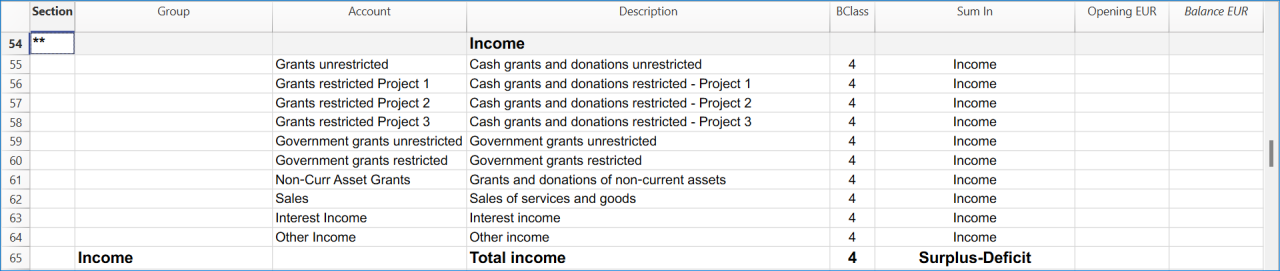
Manage projects expenses and operating expenses in the Income Statement.

Recording transactions by fund
Under INPAS, the organisation must identify and track restricted and unrestricted funds.
In this Banana Accounting+ template, funds are identified using four first-level segments:
- :Fund A, :Fund B and :Fund C for restricted funds.
- :General for the unrestricted General Fund.
Projects are tracked through cost centres CC2, and donors through cost centres CC3.
In the Transactions table, add the fund segment after the relevant account code. In the CC2 and CC3 columns, enter the cost centre name without its leading punctuation.
Receiving a restricted donation without delivery obligations
The organisation receives EUR 727 from Benjamin Foster for Fund A and Project 1:
- Date: 2026-01-10
- Debit account: Bank:Fund A
- Credit account: Grants restricted Project 1:Fund A
- Amount: 727.00
- CC2: Project 1
- CC3: Benjamin Foster
The donation is recognised as income attributed to Fund A because it does not include a qualifying delivery obligation.
Paying project expenses
The organisation pays EUR 307 for school programme costs:
- Date: 2026-01-12
- Debit account: Expenses Project 1:Fund A
- Credit account: Bank:Fund A
- Amount: 307.00
- CC2: -Project 1
- CC3: leave empty
For these two transactions, Fund A records EUR 727 of income and EUR 307 of expenses, resulting in a surplus of EUR 420.
Receiving an advance with delivery obligations
The organisation receives EUR 3,000 in advance for Fund B. The grant agreement includes qualifying delivery obligations that have not yet been fulfilled:
- Date: 2026-02-11
- Debit account: Bank:Fund B
- Credit account: Grant oblig. liability:Fund B
- Amount: 3000.00
- CC2: leave empty
- CC3: Olivia Reynolds
The amount is initially recognised as a liability, not as revenue.
Recognising revenue after fulfilling delivery obligations
When the first milestone is achieved, EUR 1,200 is recognised as grant revenue:
- Date: 2026-05-27
- Debit account: Grant oblig. liability:Fund B
- Credit account: Grants restricted Project 2:Fund B
- Amount: 1200.00
- CC2: Project 2
- CC3: leave empty
The liability decreases and recognised income increases, without a new bank receipt.
Recording unrestricted income in the General Fund
The tutorial includes an unrestricted donation receipt of EUR 25,000:
- Date: 2026-01-02
- Debit account: Bank:General
- Credit account: Grants unrestricted:General
- Amount: 25000.00
- CC2: leave empty
- CC3: Miles Thompson
The segment :General identifies the transaction as belonging to the unrestricted General Fund.
Recording transfers between funds
The tutorial includes a permitted transfer of EUR 900 from the General Fund to Fund A.
The bank allocation is recorded as:
- Date: 2026-04-18
- Debit account: Bank:Fund A
- Credit account: Bank:General
- Amount: 900.00
The corresponding movement between the fund accounts is recorded as:
- Date: 2026-04-18
- Debit account: Unrestricted Funds:General
- Credit account: Restricted Fund A:Fund A
- Amount: 900.00
These entries distinguish the change in the bank's fund attribution from the movement in fund net assets.
The transfer does not represent an external cash flow and does not create additional income or expenses for the association.
A transfer between restricted and unrestricted funds must be permitted under the applicable fund restrictions. An internal decision alone does not necessarily make unrestricted resources legally restricted.
Checking and reporting fund balances
Use the accounting reports subdivided by segment to analyse transactions attributed to each fund. The balance displayed on an individual segment account card is not necessarily the fund's net asset balance: when the same segment appears on both sides of a transaction, its movements can offset each other.
All fund balances in the Statement of Financial Position must be reconciled with opening balances, income, expenses, other changes and permitted transfers. Additional fund information must be disclosed in the notes to the financial statements, as required by INPAS.
A restriction on the use of a donation does not automatically create a liability.
Get the Statement of Financial Position and the Income Statement
At any time of the year you can create your Balance sheet, which is a financial report of your assets, liabilities and equity and the Profit and Loss statement, which includes income and expenses. You will achieve optimal reports because you can always modify the data until they are perfect. You have the possibility to print out your statements or save them in PDF format.
Complete the documentation using the Excel Template
After preparing the Statement of Financial Position and the Statement of Income and Expenses in Banana Accounting+, use the Excel template to complete the additional financial statements and explanatory notes.
The NPO must ensure that all applicable INPAS requirements are met before declaring compliance with the Standard.
Income & Expenses: INPAS Standard Template
In this article
Income & Expenses: INPAS Standard Template
Income & Expenses: INPAS Standard Template
The INPAS International standard Income & Expenses template for associations provides a comprehensive framework for organizing financial transactions and reporting for associations adhering to international standards.
In Banana WebApp openen
Open Banana Accounting Plus op uw browser zonder enige installatie. Pas het sjabloon aan, voer de transacties in en sla het bestand op uw computer op.
Open template in WebApp Open tutorial in WebAppModel documentatie
[This page is currently being updated]
The NPO is responsible for ensuring that its financial reports comply with all applicable INPAS requirements. Using the template alone does not guarantee compliance.
INPAS requires accrual-based financial reporting. When using an Income & Expenses accounting template, the NPO must ensure that all relevant assets, liabilities, receivables, payables, accrued income and expenses are correctly recognised and reported in accordance with INPAS.
Recording transactions by fund
In this template, restricted funds are identified using the segments :Fund A, :Fund B and :Fund C. The unrestricted General Fund is identified using :General.
Projects are tracked through cost centres CC2, and donors through cost centres CC3.
For ordinary receipts and payments, the INPAS Income & Expense tutorial generally adds the fund segment to both the Account and Category columns. This allows the bank or cash movement and the corresponding income, expense or liability to be attributed to the same fund.
For transfers between funds, the Account and Category can contain different fund segments to identify the source and destination. Non-cash accounting adjustments can also use segments on both sides. The balance of an individual segment card must not automatically be interpreted as the net assets of that fund.
Receiving a restricted donation without delivery obligations
The organisation receives EUR 727 from Benjamin Foster for Fund A and Project 1:
- Date: 2026-01-10
- Income: 727.00
- Expenses: leave empty
- Account: Bank:Fund A
- Category: Grants restricted Project 1:Fund A
- CC2: Project 1
- CC3: Benjamin Foster
The donation is recognised as income attributable to Fund A.
Paying project expenses
The organisation pays EUR 307 for Project 1:
- Date: 2026-01-12
- Income: leave empty
- Expenses: 307.00
- Account: Bank:Fund A
- Category: Expenses Project 1:Fund A
- CC2: -Project 1
- CC3: leave empty
Considering these two transactions alone, the project shows a surplus of EUR 420.
Receiving an advance with delivery obligations
The organisation receives EUR 3,000 in advance for Fund B:
- Date: 2026-02-11
- Income: 3000.00
- Expenses: leave empty
- Account: Bank:Fund B
- Category: Grant oblig. liability:Fund B
- CC2: leave empty
- CC3: Olivia Reynolds
In this example, Grant oblig. liability is a balance-sheet account defined in the Accounts table, not an income category.
Although EUR 3,000 is entered in the Income column because money is received, it is recognised as a liability, not as grant revenue.
Recognising revenue after fulfilling delivery obligations
The association recognises EUR 1,200 after completing part of its obligations:
- Date: 2026-05-27
- Income: 1200.00
- Expenses: leave empty
- Account: Grant oblig. liability:Fund B
- Category: Grants restricted Project 2:Fund B
- CC2: Project 2
- CC3: leave empty
This is a non-cash accounting adjustment. It reduces the outstanding liability and recognises revenue without increasing the bank balance.
Recording unrestricted income in the General Fund
The tutorial includes an unrestricted donation receipt of EUR 25,000:
- Date: 2026-01-02
- Income: 25000.00
- Expenses: leave empty
- Account: Bank:General
- Category: Grants unrestricted:General
- CC2: leave empty
- CC3: Miles Thompson
The segment :General assigns the recognised income to the unrestricted General Fund.
Recording transfers between funds
The tutorial includes a permitted reallocation of EUR 900 from the General Fund to Fund A:
- Date: 2026-04-18
- Income: 900.00
- Expenses: leave empty
- Account: Bank:Fund A
- Category: Bank:General
- CC2: leave empty
- CC3: leave empty
This transaction changes the fund attribution of an existing bank balance. It does not represent an external bank receipt, create new revenue or change the association's total cash balance.
Both Account and Category refer to balance-sheet accounts, and the segment is used on each side to identify the source and destination funds.
The association must ensure that transfers between funds are permitted by the applicable restrictions.
Checking fund movements and net assets
Use reports subdivided by segment to analyse the income, expenses and relevant assets and liabilities attributed to individual funds.
The balance shown on an individual segment card is not necessarily the fund's net asset balance. Some transactions affect liabilities instead of income, and transfers or non-cash adjustments may involve two segment-attributed positions.
For example, the EUR 3,000 advance received for Fund B is initially a liability. It does not represent a deficit in the fund's net assets.
The organisation must reconcile opening balances, recognised income, expenses, permitted transfers, other changes and closing balances for each relevant fund.
INPAS requires accrual-based financial reporting. Additional year-end adjustments may be necessary to ensure that the financial statements are complete.
Free INPAS Excel Template
In this article
Free INPAS Excel Template
Free INPAS Excel Template
The INPAS Excel Template helps non-profit organisations prepare financial statements in accordance with the final International Non-Profit Accounting Standard (INPAS 2025). The template supports the preparation of the main financial statements, including the Statement of Financial Position, Statement of Income and Expenses, Statement of Changes in Net Assets, Statement of Cash Flows and Explanatory Notes. It can be used alongside Banana Accounting+, which provides the accounting records, account balances and detailed financial information needed to prepare these reports. The Excel template is designed to simplify financial reporting, improve consistency and support transparent financial management. Using the Excel template does not automatically guarantee INPAS compliance. Each organisation remains responsible for ensuring that its financial statements meet the applicable recognition, measurement, presentation, comparative reporting and disclosure requirements of the final INPAS 2025 standard. Full INPAS compliance also requires the preparation of a Narrative Report and all other applicable disclosures.
Cash Manager Accounting for Non-profit Organizations
In this article
Cash Manager Accounting for Non-profit Organizations
Cash Manager Accounting for Non-profit Organizations
Start FOR FREE the accounting of your association and get immediately the income statement and the balance sheet. This easy and ready-to-use template is ideal for people who have limited accounting knowledge, because you can insert transactions by simply indicating the income/expenses on the account.
In Banana WebApp openen
Open Banana Accounting Plus op uw browser zonder enige installatie. Pas het sjabloon aan, voer de transacties in en sla het bestand op uw computer op.
Open template in WebApp Open tutorial in WebAppModel documentatie
This template has only one Cash account and descriptive income & expense categories, that facilitate data entry. Get the Income Statement and Balance Sheet quickly, manage members and projects.
For more information on solutions for associations go to the Accounting for non-profit organizations page.
Create your File
- Create a new file, starting from this template (Template ID +10936), using one of the methods explained.
- With the command File → File properties, set the period, the company name and the basic currency.
- With the command File → Save as, save the file. Enter the company name and year in the file name.
For example "association-2022.ac2".
See also Organize accounting files locally, online or in the cloud
Enter the Transactions
Register the liquidity transactions in the journal. Enter the date, the document number, the description, the category and the amount.
You can modify the journal at any time.
Click here to learn more about transactions.

Check and customize the Categories table
Once you have entered the transactions, you can check the Categories table. You will have an overview of your income and expenses, which allows you to keep your balance under control.

Get the Profit and Loss Statement
At any time of the year you can create your profit and loss statement, which includes income and expenses. You can also compare your current situation with the budget to understand if and where you are spending excessive amounts of money.

Modelvoorbeeld
Association XX
| Group | Account | Description | Sum In |
|---|---|---|---|
| Cash | Cash | ||
| Group | Category | Description | Sum In |
|---|---|---|---|
| PROFIT/LOSS STATEMENT | |||
| INCOME | |||
| Donations | Donations | 4 | |
| Membership | Membership payments | 4 | |
| Sales | Various Sales | 4 | |
| Other Income | Other income | 4 | |
| 4 | TOTAL INCOME | 00 | |
| EXPENSES | |||
| Office Supplies | Office supplies, printing material, photocopies | 3 | |
| Postal Fees | Postal fees | 3 | |
| Rent | Rent | 3 | |
| Electricity | Elecricity | 3 | |
| Water | Water | 3 | |
| Teleohone and Fax | Telephone and fax | 3 | |
| Internet | Internet | 3 | |
| Publicity | Publicity, flyers, printing | 3 | |
| Cleaning | Cleaning | 3 | |
| Maintenance and repairs | Maintenance and repairs | 3 | |
| Goods and materials | Goods and materials | 3 | |
| Salaries | Personnel expenses | 3 | |
| Social Insurance expenses | Social Insurance expenses | 3 | |
| Vehicle and transport | Vehicle and transport costs | 3 | |
| Refund Volunteers | Refund to volunteers | 3 | |
| Fees and Permits | Fees and other permits | 3 | |
| Unexpected expenses | Unexpected expenses | 3 | |
| Unregistered expenses | Small unregistered expenses | 3 | |
| Other expenses | Other expenses | 3 | |
| 3 | TOTAL EXPENSES | 00 | |
| 00 | RESULT | ||
| COST CENTERS | |||
| Projects | |||
| .PA | Project A | TP | |
| .PB | Project B | TP | |
| .PC | Project C | TP | |
| TP | Total projects | ||
| Members | |||
| ;MA | Montgomery Alexander | TM | |
| ;WB | Weelt Bob | TM | |
| ;JB | Johnson Bill | TM | |
| ;SA | Smith Ada | TM | |
| TM | Total members | ||
Income & Expenses Accounting for Non-profit Organizations
In this article
Income & Expenses Accounting for Non-profit Organizations
Income & Expenses Accounting for Non-profit Organizations
Start FOR FREE the accounting of your association and get immediately the income statement and the balance sheet. This easy and ready-to-use template is ideal for people who have limited accounting knowledge, because you can insert transactions by simply indicating the income/expenses on the account. Your data remains private on your PC and you don't have to make any registration.
In Banana WebApp openen
Open Banana Accounting Plus op uw browser zonder enige installatie. Pas het sjabloon aan, voer de transacties in en sla het bestand op uw computer op.
Open template in WebApp Open tutorial in WebAppModel documentatie
This template presents a synthetic chart of accounts with descriptive accounts that facilitate data entry. Get the Income Statement and Balance Sheet quickly, manage members and projects.
For more information on solutions for associations go to the Accounting for non-profit organizations page.
Create your File
- Create a new file, starting from this template (Template ID +10623), using one of the methods explained.
- With the command File → File properties, set the period, the company name and the basic currency.
- With the command File → Save as, save the file. Enter the company name and year in the file name.
For example "association-2022.ac2".
See also Organize accounting files locally, online or in the cloud
Enter the Transactions
Register the liquidity transactions in the journal. Enter the date, the document number, the description, the account and the amount.
You can modify the journal at any time.
Click here to learn more about transactions.

Check and customize Accounts and Categories
Once you have entered the transactions, you can check the Accounts table and the Categories table. You will have an overview of your assets, liabilities, income and expenses, which allows you to keep your balance under control.

Get the the Profit and Loss Statement and the Balance Sheet
At any time of the year you can create your profit and loss statement, which includes income and expenses. You can also compare your current situation with the budget to understand if and where you are spending excessive amounts of money.
Modelvoorbeeld
Association XX
| Group | Account | Description | Sum In |
|---|---|---|---|
| BALANCE SHEET | |||
| Assets | |||
| Cash | Cash | Assets | |
| Bank | Bank Current Account | Assets | |
| Post | Post Current Account | Assets | |
| Office Forniture | Office Forniture | Assets | |
| Computer and Software | Computer and Software | Assets | |
| Car | Car | Assets | |
| Assets | Total Assets | Net Assets | |
| Liabilities | |||
| Visa | Credit card loan | Total Liabilities | |
| Loan | Bank loan | Total Liabilities | |
| Total Liabilities | Total Liabilities | Net Assets | |
| Net Assets | Net Assets | ||
| COST CENTERS | |||
| Projects | |||
| .PA | Project A | TP | |
| .PB | Project B | TP | |
| .PC | Project C | TP | |
| TP | Total projects | ||
| Members | |||
| ;MA | Montgomery Alexander | TM | |
| ;WB | Weelt Bob | TM | |
| ;JB | Johnson Bill | TM | |
| ;SA | Smith Ada | TM | |
| TM | Total members | ||
| Group | Category | Description | Sum In |
|---|---|---|---|
| PROFIT/LOSS STATEMENT | |||
| INCOME | |||
| Donations | Donations | 4 | |
| Membership | Membership payments | 4 | |
| Sales | Various Sales | 4 | |
| Other Income | Other income | 4 | |
| 4 | TOTAL INCOME | 00 | |
| EXPENSES | |||
| Office Supplies | Office supplies, printing material, photocopies | 3 | |
| Postal Fees | Postal fees | 3 | |
| Rent | Rent | 3 | |
| Electricity | Elecricity | 3 | |
| Water | Water | 3 | |
| Teleohone and Fax | Telephone and fax | 3 | |
| Internet | Internet | 3 | |
| Publicity | Publicity, flyers, printing | 3 | |
| Cleaning | Cleaning | 3 | |
| Maintenance and repairs | Maintenance and repairs | 3 | |
| Goods and materials | Goods and materials | 3 | |
| Salaries | Personnel expenses | 3 | |
| Social Insurance expenses | Social Insurance expenses | 3 | |
| Vehicle and transport | Vehicle and transport costs | 3 | |
| Refund Volunteers | Refund to volunteers | 3 | |
| Fees and Permits | Fees and other permits | 3 | |
| Unexpected expenses | Unexpected expenses | 3 | |
| Unregistered expenses | Small unregistered expenses | 3 | |
| Other expenses | Other expenses | 3 | |
| 3 | TOTAL EXPENSES | 00 | |
| 00 | RESULT | ||
Double-Entry Accounting for Nonprofit Organizations
In this article
Double-Entry Accounting for Nonprofit Organizations
Double-Entry Accounting for Nonprofit Organizations
Start FOR FREE the accounting of your association and get immediately the income statement and the balance sheet. This easy and ready-to-use template is ideal for people who have to do double-entry accounting and need a professional and fast solution. Your data remains private on your PC and you don't need to register.
In Banana WebApp openen
Open Banana Accounting Plus op uw browser zonder enige installatie. Pas het sjabloon aan, voer de transacties in en sla het bestand op uw computer op.
Open template in WebApp Open tutorial in WebAppModel documentatie
This template presents a synthetic chart of accounts with descriptive accounts that facilitate data entry. Get the Income Statement and Balance Sheet quickly, manage members and projects.
For more information on solutions for associations go to the Accounting for non-profit organizations page.
Create your file
- Create a new file, starting from this template (Template ID +10619), using one of the methods explained.
- With the command File → File properties, set the period, the company name and the basic currency.
- With the command File → Save as, save the file. Enter the company name and year in the file name.
For example "association-2022.ac2".
See also Organize accounting files locally, online or in the cloud
Enter the Transactions
Register the accounting transactions in the journal. Enter the date, the document number and the description. Enter the destination account into the Debit account column, and the account of origin in the Credit account. Then add the amount.
You can modify the journal at any time.

Check and customize the Accounts table
Once you have entered the transactions, you can check the Accounts table. You will have an overview of your assets, liabilities, income and expenses, which allows you to keep your balance under control.
Customize the Accounts table to suit your needs: you can add, delete and edit accounts, groups or descriptions.

Enter Opening Balances
In the Opening column enter the opening balances of the Accounts. Negative asset account amounts are entered with a minus sign in front.
Enter the balances of the previous year
If you are creating a new accounting and you want the amounts of the previous year to appear in the statements to be printed, you must insert the values in the appropriate column. Go to the Previous view and in the Previous Year column enter the values.
Get the Profit and Loss Statement and the Balance Sheet
At any time of the year you can create your Balance sheet, which is a financial report of your assets, liabilities and equity and the Profit and Loss statement, which includes income and expenses. You will achieve optimal reports because you can always modify the data until they are perfect. You have the possibility to print out your statements or save them in PDF format.


Modelvoorbeeld
Association XX
| Group | Account | Description | Sum In |
|---|---|---|---|
| BALANCE SHEET | |||
| Assets | |||
| Cash | Cash | Assets | |
| Bank | Bank Current Account | Assets | |
| Post | Post Current Account | Assets | |
| Office Forniture | Office Forniture | Assets | |
| Computer and Software | Computer and Software | Assets | |
| Car | Car | Assets | |
| Assets | Total Assets | 00 | |
| Liabilities | |||
| Suppliers | Suppliers | Total Liabilities | |
| Visa | Credit card loan | Total Liabilities | |
| Loan | Bank loan | Total Liabilities | |
| Start-up Capital | Start-up Capital | Total Liabilities | |
| Brought forward profit or loss | Brought forward profit or loss | Total Liabilities | |
| Profit or loss of the current year | Profit or loss of the current year | Total Liabilities | |
| Total Liabilities | Total Liabilities | 00 | |
| PROFIT/LOSS STATEMENT | |||
| INCOME | |||
| Donations | Donations | 4 | |
| Membership | Membership payments | 4 | |
| Sales | Various Sales | 4 | |
| Other Income | Other income | 4 | |
| 4 | TOTAL INCOME | Result | |
| EXPENSES | |||
| Office Supplies | Office supplies, printing material, photocopies | 3 | |
| Postal Fees | Postal fees | 3 | |
| Rent | Rent | 3 | |
| Electricity | Elecricity | 3 | |
| Water | Water | 3 | |
| Teleohone and Fax | Telephone and fax | 3 | |
| Internet | Internet | 3 | |
| Publicity | Publicity, flyers, printing | 3 | |
| Cleaning | Cleaning | 3 | |
| Maintenance and repairs | Maintenance and repairs | 3 | |
| Goods and materials | Goods and materials | 3 | |
| Salaries | Personnel expenses | 3 | |
| Social Insurance expenses | Social Insurance expenses | 3 | |
| Vehicle and transport | Vehicle and transport costs | 3 | |
| Refund Volunteers | Refund to volunteers | 3 | |
| Fees and Permits | Fees and other permits | 3 | |
| Unexpected expenses | Unexpected expenses | 3 | |
| Unregistered expenses | Small unregistered expenses | 3 | |
| Other expenses | Other expenses | 3 | |
| 3 | TOTAL EXPENSES | Result | |
| Result | RESULT | Profit or loss of the current year | |
| 00 | Difference should be = 0 (blank cell) | ||
| COST CENTERS | |||
| Members | |||
| ;MA | Montgomery Alexander | TM | |
| ;WB | Weelt Bob | TM | |
| ;JB | Johnson Bill | TM | |
| ;SA | Smith Ada | TM | |
| TM | Total members | ||
| SEGMENTS | |||
| Projects | |||
| :Project A | Project A | TP | |
| :Project B | Project B | TP | |
| :Project C | Project C | TP | |
| TP | Total projects |
Multi-Currency Accounting for Nonprofit Organizations
In this article
Multi-Currency Accounting for Nonprofit Organizations
Multi-Currency Accounting for Nonprofit Organizations
Start FOR FREE the accounting of your association and immediately get the income statement and the balance sheet. This easy and ready-to-use template is ideal for people who have to manage accounts in multiple currencies for business relationships with foreign countries or international projects. Your data remains private on your PC and you don't need to register.
In Banana WebApp openen
Open Banana Accounting Plus op uw browser zonder enige installatie. Pas het sjabloon aan, voer de transacties in en sla het bestand op uw computer op.
Open template in WebApp Open tutorial in WebAppModel documentatie
This template presents a brief chart of accounts with descriptive accounts that facilitate data entry. Get the Income Statement and Balance Sheet quickly, manage members and projects.
For more information on solutions for associations go to the Accounting for non-profit organizations page.
Create your file
- Create a new file, starting from this template (Template ID +10621), using one of the methods explained.
- With the command File → File properties, set the period, the company name and the basic currency.
- With the command File → Save as, save the file. Enter the company name and year in the file name.
For example "association-2022.ac2".
See also Organize accounting files locally, online or in the cloud
Enter the Transactions
Register the liquidity transactions in the journal. Enter the date, the document number and the description. Enter the destination account into the Debit Account column, and the account of origin in the Credit Account column. Then add the amount and specify the currency.
You can modify the journal at any time.
Click here to learn more about transactions.

Check and customize the Accounts table
Once you have entered the transactions, you can check the Accounts table. You will have an overview of your assets, liabilities, income and expenses, which allows you to keep your balance under control.

Get the Profit and Loss Statement and the Balance Sheet
At any time of the year you can create your balance sheet, which is a financial report of your assets, liabilities and equity and the profit and loss statement, which includes income and expenses. You can also compare your current situation with the budget to understand if and where you are spending excessive amounts of money.


Modelvoorbeeld
Association XX
Basic Currency: EUR
Double-entry with foreign currencies
| Group | Account | Description | Currency | Sum In |
|---|---|---|---|---|
| BALANCE SHEET | ||||
| Assets | ||||
| Cash | Cash | EUR | Assets | |
| Bank EUR | Bank Current Account EUR | EUR | Assets | |
| Bank USD | Bank Current Account USD | USD | Assets | |
| Bank GBP | Bank Current Account GBP | GBP | Assets | |
| Post | Post Current Account | EUR | Assets | |
| Office Forniture | Office Forniture | EUR | Assets | |
| Computer and Software | Computer and Software | EUR | Assets | |
| Car | Car | EUR | Assets | |
| Assets | Total Assets | 00 | ||
| Liabilities | ||||
| Suppliers | Suppliers | EUR | Total Liabilities | |
| Visa | Credit card loan | EUR | Total Liabilities | |
| Loan | Bank loan | EUR | Total Liabilities | |
| Start-up Capital | Start-up Capital | EUR | Total Liabilities | |
| Brought forward profit or loss | Brought forward profit or loss | EUR | Total Liabilities | |
| Profit or loss of the current year | Profit or loss of the current year | Total Liabilities | ||
| Total Liabilities | Total Liabilities | 00 | ||
| PROFIT/LOSS STATEMENT | ||||
| INCOME | ||||
| Donations | Donations | EUR | 4 | |
| Membership | Membership payments | EUR | 4 | |
| Sales | Various Sales | EUR | 4 | |
| Other Income | Other income | EUR | 4 | |
| Exchange rate profit | Exchange rate profit | EUR | 4 | |
| 4 | TOTAL INCOME | Result | ||
| EXPENSES | ||||
| Office Supplies | Office supplies, printing material, photocopies | EUR | 3 | |
| Postal Fees | Postal fees | EUR | 3 | |
| Rent | Rent | EUR | 3 | |
| Electricity | Elecricity | EUR | 3 | |
| Water | Water | EUR | 3 | |
| Teleohone and Fax | Telephone and fax | EUR | 3 | |
| Internet | Internet | EUR | 3 | |
| Publicity | Publicity, flyers, printing | EUR | 3 | |
| Cleaning | Cleaning | EUR | 3 | |
| Maintenance and repairs | Maintenance and repairs | EUR | 3 | |
| Goods and materials | Goods and materials | EUR | 3 | |
| Salaries | Personnel expenses | EUR | 3 | |
| Social Insurance expenses | Social Insurance expenses | EUR | 3 | |
| Vehicle and transport | Vehicle and transport costs | EUR | 3 | |
| Refund Volunteers | Refund to volunteers | EUR | 3 | |
| Fees and Permits | Fees and other permits | EUR | 3 | |
| Unexpected expenses | Unexpected expenses | EUR | 3 | |
| Unregistered expenses | Small unregistered expenses | EUR | 3 | |
| Other expenses | Other expenses | EUR | 3 | |
| Exchange rate loss | Exchange rate loss | EUR | 3 | |
| 3 | TOTAL EXPENSES | Result | ||
| Result | RESULT | Profit or loss of the current year | ||
| 00 | Difference should be = 0 (blank cell) | |||
| COST CENTERS | ||||
| Members | ||||
| ;MA | Montgomery Alexander | EUR | TM | |
| ;WB | Weelt Bob | EUR | TM | |
| ;JB | Johnson Bill | EUR | TM | |
| ;RJ | Ross Jeremy | EUR | TM | |
| TM | Total members | |||
| SEGMENTS | ||||
| Projects | ||||
| :Project A | Project A | EUR | TP | |
| :Project B | Project B | EUR | TP | |
| :Project C | Project C | EUR | TP | |
| TP | Total projects |
| Ref.Currency | Currency | Text |
|---|---|---|
| EUR | USD | Dollar |
| EUR | GBP | Pound Sterling |
非营利组织
In this article
非营利组织
非营利组织
使用这个简单的模板,以清晰透明的方式开启您的非营利组织或协会的会计管理,适用于任何使用现金账簿方法的人。
In Banana WebApp openen
Open Banana Accounting Plus op uw browser zonder enige installatie. Pas het sjabloon aan, voer de transacties in en sla het bestand op uw computer op.
Open template in WebAppModelvoorbeeld
XX协会
本位币: USD
现金日记账
| 总组 | 账号 | 摘要 | 总和 |
|---|---|---|---|
| 现金 | 现金 | ||
| 总组 | 科目 | 摘要 | 总和 |
|---|---|---|---|
| 经营业绩 | |||
| 收入 | |||
| 多种销售收入 | 多种销售收入 | 4 | |
| 会员的付款收入 | 会员的付款收入 | 4 | |
| 捐款 | 捐款 | 4 | |
| 其它收入 | 其它收入 | 4 | |
| 4 | 总收入 | 00 | |
| 费用 | |||
| 项目 A 的费用 | 项目 A 的费用 | 3 | |
| 项目 B 的费用 | 项目 B 的费用 | 3 | |
| 项目 C 的费用 | 项目 C 的费用 | 3 | |
| 文具,电器,清洁费等 | 文具,电器,清洁费等 | 3 | |
| 邮费 | 邮费 | 3 | |
| 租金,水电费 | 租金,水电费 | 3 | |
| 电话和传真 | 电话和传真 | 3 | |
| 宣传,传单,印刷费 | 宣传,传单,印刷费 | 3 | |
| 退换给志愿者的费用 | 退换给志愿者的费用 | 3 | |
| 费用及其它许可证 | 费用及其它许可证 | 3 | |
| 意外开支 | 意外开支 | 3 | |
| 未注册的小额费用 | 未注册的小额费用 | 3 | |
| 其它费用 | 其它费用 | 3 | |
| 3 | 总费用 | 00 | |
| 00 | 结果 | ||
| 成本和利润中心部门 | |||
| 会员列表 | |||
| ;李萌 | 李萌 | TM | |
| ;王博 | 王博 | TM | |
| ;张明 | 张明 | TM | |
| ;陈丽 | 陈丽 | TM | |
| ;王静 | 王静 | TM | |
| TM | 全部会员 | ||
非营利组织会计
In this article
非营利组织会计
非营利组织会计
使用这个简单的模板,以清晰透明的方式开启您的非营利组织或协会的会计管理,适用于任何使用收益及费用核算方法的人。
In Banana WebApp openen
Open Banana Accounting Plus op uw browser zonder enige installatie. Pas het sjabloon aan, voer de transacties in en sla het bestand op uw computer op.
Open template in WebAppModelvoorbeeld
协会 XX
本位币: USD
收益 & 费用核算
| 总组 | 账号 | 摘要 | 总和 |
|---|---|---|---|
| 资产 | |||
| 1000 | 现金 | 1 | |
| 1010 | 当前邮政储蓄账号 | 1 | |
| 1020 | 当前银行账号 | 1 | |
| 1100 | 客户 | 1 | |
| 1150 | 预付税款 | 1 | |
| 1300 | 暂时性资产 | 1 | |
| 1400 | 办公家具 | 1 | |
| 1500 | 硬件/软件 | 1 | |
| 2000 | 供应商 | 1 | |
| 2050 | 增值税 (根据增值税报告) | 1 | |
| 2060 | 税务局 | 1 | |
| 2100 | 银行贷款 | 1 | |
| 2400 | 长期银行贷款 | 1 | |
| 2700 | 暂时性债务 | 1 | |
| 1 | 总计 | ||
| 成本及利润中心 | |||
| 会员列表 | |||
| ;LM | 李萌 | TM | |
| ;WB | 王博 | TM | |
| ;ZM | 张明 | TM | |
| ;CL | 陈丽 | TM | |
| ;WJ | 王静 | TM | |
| TM | 全部会员 |
| 总组 | 科目 | 摘要 | 总和 |
|---|---|---|---|
| 经营结果 | |||
| 收入 | |||
| 4200 | 多种销售 | 4 | |
| 4400 | 会员费 | 4 | |
| 4500 | 捐款 | 4 | |
| 4 | 总收入 | 00 | |
| 费用 | |||
| 3000 | 项目 A 的费用 | 3 | |
| 3001 | 项目 B 的费用 | 3 | |
| 3002 | 项目 C 的费用 | 3 | |
| 3005 | 购买商品进行转售 | 3 | |
| 3010 | 房租,水电费 | 3 | |
| 3020 | 税 | 3 | |
| 3050 | 保险 | 3 | |
| 3070 | 费用 | 3 | |
| 3080 | 清洁 | 3 | |
| 3090 | 办公用品 | 3 | |
| 3100 | 电话 | 3 | |
| 3110 | 邮费 | 3 | |
| 3130 | 印刷和宣传 | 3 | |
| 3140 | 银行负利率 | 3 | |
| 3150 | 银行和当前账户费用 | 3 | |
| 3160 | 家具摊销费用 | 3 | |
| 3170 | 其它费用 | 3 | |
| 3 | 总费用 | 00 | |
| 00 | 结果 | ||
Religious Entities Universal Templates
Banana Accounting offers a few universal templates available for free for the Religious organizations accounting are the following:
Income & Expense Accounting for a Religious Organization
In this article
Income & Expense Accounting for a Religious Organization
Income & Expense Accounting for a Religious Organization
Ideal template to manage the accounting of a church or a religious organization, simply entering the income and the expenses. The list of donors and fundraising events are managed with a cost center.
In Banana WebApp openen
Open Banana Accounting Plus op uw browser zonder enige installatie. Pas het sjabloon aan, voer de transacties in en sla het bestand op uw computer op.
Open template in WebApp Open tutorial in WebAppModelvoorbeeld
New Life church
Accounting 2022
| Group | Account | Description | Sum In | Gr1 |
|---|---|---|---|---|
| BALANCE SHEET | ||||
| ASSETS | ||||
| Cash | Cash on hand | Total Assets | ||
| Post | Post office current account | Total Assets | ||
| Paypal Account | Paypal Account | Total Assets | ||
| Prepaid Visa Card | Prepaid Visa Card | Total Assets | ||
| Bank | Bank account | Total Assets | ||
| Transitory assets | Transitory assets | Total Assets | ||
| Advanced payments | Various advanced payments | Total Assets | ||
| Deposit rent building | Deposit for rent of building | Total Assets | ||
| Deposit rent offices | Deposit for rent of offices | Total Assets | ||
| Internal transfers | Internal transfers | Total Assets | ||
| Amounts to be clarified | Amounts to be clarified | Total Assets | ||
| Forniture | Furniture, installations, equipment, vehicles | Total Assets | ||
| Computer and software | Computer and Software | Total Assets | ||
| Total Assets | TOTAL ASSETS | Net Estate | 1 | |
| LIABILITIES | ||||
| Suppliers or creditors | Suppliers or Creditors | Total Liabilities | ||
| Due to employees | Due to employees and social security institutions | Total Liabilities | ||
| Transitory liabilities | Transitory liabilities | Total Liabilities | ||
| Total Liabilities | TOTAL LIABILITIES | Net Estate | 1 | |
| Net Estate | NET ESTATE | |||
| SPRING FESTIVAL | ||||
| .PUB | Publicity | SE | ||
| .GUE | Guest speakers | SE | ||
| .MME | Music and Media | SE | ||
| .LEG | Legal Expenses (Permits, etc) | SE | ||
| .REN | Rent Facilities | SE | ||
| .FVA | Food and Various | SE | ||
| SE | Total Spring Festival Expenses | S | ||
| .TIC | Sales of Tickets | ST | ||
| .DSF | Donations Spring Festival | ST | ||
| ST | Total Spring Festival Income | S | ||
| S | Total Spring Festival | |||
| DONORS | ||||
| ;511 | Donor 511 | D | ||
| ;522 | Donor 522 | D | ||
| ;533 | Donor 533 | D | ||
| etc. | ||||
| D | Total Donors | |||
| Group | Category | Description | Sum In | Gr1 |
|---|---|---|---|---|
| REVENUE | Total revenue | |||
| Income from offerings | Income from offerings | Total revenue | ||
| Income from Christmas market | Income from Christmas market for missions work | Total revenue | ||
| Income from books and cd's | Income from books and cd's | Total revenue | ||
| Income from various activities | Income from various activities | Total revenue | ||
| Bank Interests | Bank Interests | Total revenue | ||
| Extraordinary income/expenses | Extraordinary income/expenses | Total revenue | ||
| Total revenue | TOTAL REVENUE | Result | 1 | |
| EXPENSES | ||||
| Personnel Charges | ||||
| Salaries | Salaries | Personnel Charges | ||
| Social security charges | Social security charges | Personnel Charges | ||
| Retirement fund | Retirement fund | Personnel Charges | ||
| Insurances | Insurances | Personnel Charges | ||
| Various costs for personnel | Various costs for personnel | Personnel Charges | ||
| Personnel Charges | Total Personnel Charges | Total Expenses | ||
| General/operational Expenses | ||||
| Rent | Rent for building and offices | General/operational Expenses | ||
| Utilities | Utilities | General/operational Expenses | ||
| Music and media | Expenses for music & media department | General/operational Expenses | ||
| Car and fuel | Car expenses & fuel | General/operational Expenses | ||
| Insurance expenses | Insurance expenses | General/operational Expenses | ||
| Office- and computer supplies | Office- and computer supplies | General/operational Expenses | ||
| Postage and telephone | Postage and telephone | General/operational Expenses | ||
| Offerings to third parties | Offerings and Donations to third parties | General/operational Expenses | ||
| Accountant's charge | Accountant's charge | General/operational Expenses | ||
| Web hosting | Web hosting and software licenses | General/operational Expenses | ||
| Publicity | Publicity | General/operational Expenses | ||
| Representation expenses | Representation expenses | General/operational Expenses | ||
| Room and board guests | Room and board for guests | General/operational Expenses | ||
| Expenses activities | Expenses for various activities | General/operational Expenses | ||
| Material pastoral counseling | Material for pastoral counseling | General/operational Expenses | ||
| Children's- and Youth ministry | Children's- and Youth ministry | General/operational Expenses | ||
| Books and CD's | Books and CD's | General/operational Expenses | ||
| Various expenses and presents | Various expenses and presents | General/operational Expenses | ||
| General/operational Expenses | Total General/operational Expenses | Total Expenses | ||
| Financial Expenses | ||||
| Financial costs | Financial costs | Financial Expenses | ||
| Depreciation | Depreciation Furniture, installations, equipment, vehicles | Financial Expenses | ||
| Depreciation computer | Depreciation Computer and Software | Financial Expenses | ||
| Income Tax | Income Tax | Financial Expenses | ||
| Financial Expenses | Total Financial Expenses | Total Expenses | ||
| Total Expenses | TOTAL EXPENSES | Result | 1 | |
| Result | OPERATING RESULT | |||
Kirchgemeinde | Einnahmen-Ausgaben-Rechnung
In this article
Kirchgemeinde | Einnahmen-Ausgaben-Rechnung
Kirchgemeinde | Einnahmen-Ausgaben-Rechnung
Dieses Modell mit HRM2-Kontenplan basiert auf der Einnahmen-Ausgaben-Rechnung und stellt die gängigen Konten für die Verwaltung der Finanzen einer Kirchgemeinde/Pfarrei (Einnahmen und Ausgaben) bereit. Es ermöglicht die Erstellung einer Erfolgsrechnung und enthält Kostenstellen, mit denen sich die Ausgaben der Kirchgemeinde/Pfarrei und des Oratoriums getrennt ausweisen lassen.
In Banana WebApp openen
Open Banana Accounting Plus op uw browser zonder enige installatie. Pas het sjabloon aan, voer de transacties in en sla het bestand op uw computer op.
Open template in WebAppModel documentatie
Diese Vorlage enthält einen HRM2-Kontenplan mit den typischen Konten und Kategorien für die Buchhaltung einer Kirchgemeinde. Einnahmen und Ausgaben lassen sich einfach erfassen – auch ohne Kenntnisse der doppelten Buchhaltung oder der Unterscheidung zwischen Soll und Haben.
In der Tabelle Konten sind die Bilanzkonten aufgeführt, während die Tabelle Kategorien der Erfassung von Einnahmen und Ausgaben dient.
Die Einnahmen und Ausgaben sind in mehrere Untergruppen gegliedert. Zudem stehen in der Tabelle Kategorien zwei Arten von Kostenstellen zur Verfügung, mit denen sich die Kosten der Kirchgemeinde und des Oratoriums getrennt verwalten lassen.
Konten und Kategorien können individuell angepasst und auf die spezifischen Bedürfnisse Ihrer Buchhaltung zugeschnitten werden.
Für erweiterte Anforderungen empfehlen wir die Vorlage Doppelte Buchhaltung für Kirchgemeinde.
Weitere Details finden Sie in unserer Dokumentation, insbesondere zu folgenden Themen:
Modelvoorbeeld
HRM2-Kontenplan Kirchgemeinde
Basiswährung: CHF
Einnahmen-Ausgaben-Rechnung
| Gruppe | Konto | Beschreibung | Summ. in |
|---|---|---|---|
| BESTAND | |||
| 1000 | Kasse | 1 | |
| 1001 | Postkonto | 1 | |
| 1002.00 | Bankkonto X | 1 | |
| 1050 | Forderungen aus Lieferungen & Leistungen Dritter | 1 | |
| 1051 | Übrige Forderungen | 1 | |
| 1100 | Pfarrkirche | 1 | |
| 1105 | Oratorium | 1 | |
| 1130 | Installationen | 1 | |
| 1135 | Fahrzeuge | 1 | |
| 1140 | Mobiliar | 1 | |
| 1145 | Einrichtungen | 1 | |
| 1150 | Orgel und andere Musikinstrumente | 1 | |
| 2000 | Laufende Verbindlichkeiten aus Lieferungen und Leistungen Dritter | 1 | |
| 2010 | Sonstige Gläubiger | 1 | |
| 2020 | Passive Rechnungsabgrenzung | 1 | |
| 2030 | Rückstellungen für unfertige Leistungen | 1 | |
| 2100 | Eigenkapital | 1 | |
| 2110 | Reservefonds | 1 | |
| 2120 | Sonstige Fonds | 1 | |
| 1 | Total Bestand | ||
| Gruppe | Kategorie | Beschreibung | Summ. in |
|---|---|---|---|
| BETRIEBSERGEBNIS | |||
| Personalkosten | |||
| 3000 | Entlohnung Pfarrer | 30 | |
| 3005 | Hilfspersonal | 30 | |
| 3010 | Sakristan und Hauswart | 30 | |
| 3015 | Reinigungspersonal | 30 | |
| 3020 | Organisten | 30 | |
| 3025 | Katechisten | 30 | |
| 3030 | Verwaltungspersonal | 30 | |
| 3035 | Hausdienst Pfarrer | 30 | |
| 3040 | Sozialversicherungsbeiträge | 30 | |
| 3045 | Sonstige Sozialversicherungsabgaben | 30 | |
| 3058 | Beiträge, Spenden | 30 | |
| 30 | Total Personalkosten | 3 | |
| Liturgie- und Katechesekosten | |||
| 3065 | Sonntagsbroschüren | 31 | |
| 3075 | Lichter und Kerzen | 31 | |
| 3080 | Sonstige Ausgaben für Liturgie | 31 | |
| 3085 | Material-, Ausbildungs- und Gesangsbücher | 31 | |
| 3090 | Katechese | 31 | |
| 3095 | Pfarramtliche Dienste | 31 | |
| 31 | Total Liturgie- und Katechesekosten | 3 | |
| Betriebs- und Verwaltungskosten | |||
| 3210 | Reinigungsarbeiten | 33 | |
| 3215 | Miete | 33 | |
| 3220 | Wartung, Reparaturen, etc. | 33 | |
| 3225 | Versicherungen | 33 | |
| 3230 | Elektrizität, Wasser, Kehrichtabfuhr | 33 | |
| 3235 | Heizöl | 33 | |
| 3240 | Gebäudesteuern | 33 | |
| 3245 | Sonstige Gebäudekosten | 33 | |
| 3300 | Drucksachen, (amtliche) Publikationen, Inserate | 33 | |
| 3305 | Porti (Briefsendungen) | 33 | |
| 3310 | Telefon/Internet | 33 | |
| 3320 | Fotokopierer | 33 | |
| 3325 | Dienstleistungen Dritter | 33 | |
| 3330 | Büromaterial | 33 | |
| 3335 | Juristische Kosten | 33 | |
| 3340 | Sonstige Verwaltungskosten | 33 | |
| 33 | Total Betriebs- und Verwaltungskosten | 3 | |
| Veranstaltungskosten | |||
| 3400 | Kosten für musikalische Veranstaltungskosten | 34 | |
| 3405 | Ausflüge und Reisekosten | 34 | |
| 3410 | Kosten für Lebensmittel, Zutaten + Verbrauchsmat. | 34 | |
| 3415 | Kosten für Reinigungsmittel | 34 | |
| 3420 | Kosten für verschiedene Materialien | 34 | |
| 3425 | Wartungskosten | 34 | |
| 3430 | Lieferwagenkosten | 34 | |
| 34 | Total Veranstaltungskosten | 3 | |
| Rückstellungen | |||
| 3700 | Rückstellungen für Rücklagen | 37 | |
| 3705 | Sonstige Rückstellungen | 37 | |
| 37 | Total Rückstellungen | 3 | |
| Beiträge | |||
| 3800 | Beiträge an Vereine, Organisationen | 38 | |
| 3802 | Beiträge an Jugendarbeit, Vereine und Gruppen | 38 | |
| 3805 | Beiträge an soziale Institutionen | 38 | |
| 3808 | Sonstige Beiträge | 38 | |
| 3809 | Steuern | 38 | |
| 38 | Total Beiträge | 3 | |
| 3 | Total Ausgaben | 00 | |
| Einnahmen | |||
| Einnahmen aus Spenden und Beiträgen | |||
| 4000 | Beiträge von Gemeinden und Gemeindezweckverbänden | 41 | |
| 4004 | Beiträge, Spenden | 41 | |
| 4008 | Beiträge von Kantonen | 41 | |
| 4102 | Beiträge von Privaten | 41 | |
| 4105 | Spenden für erbrachte Dienstleistungen | 41 | |
| 4107 | Beiträge für Sonderarbeiten | 41 | |
| 4119 | Kollekten | 41 | |
| 41 | Total Einnahmen aus Spenden und Beiträgen | 4 | |
| Liegenschaftsertrag | |||
| 4500 | Vermietung von Wohnungen | 45 | |
| 4501 | Vermietung von Parkplätzen | 45 | |
| 4502 | Vermietung von Räumlichkeiten | 45 | |
| 4503 | Vermietung Hauswartswohnung | 45 | |
| 45 | Total Liegenschaftsertrag | 4 | |
| Einnahmen aus Veranstaltungen | |||
| 4610 | Mittagessen | 46 | |
| 4615 | Sonstige Einnahmen | 46 | |
| 46 | Total Einnahmen aus Veranstaltungen | 4 | |
| Finanzertrag | |||
| 4700 | Zinsertrag | 47 | |
| 47 | Total Finanzertrag | 4 | |
| AUSSERORDENTLICHER AUFWAND UND ERTRAG | |||
| Ausserordentlicher Aufwand | |||
| 4800 | Restaurationen | 480 | |
| 4805 | Besondere Eingriffe auf Gebäuden | 480 | |
| 4809 | Eingriffe auf Grundstücken | 480 | |
| 480 | Total ausserordentlicher Aufwand | 48 | |
| Ausserordentlicher Ertrag | |||
| 4810 | Subventionen an Pfarrkirche | 481 | |
| 4830 | Sonstige ausserordentliche Erträge | 481 | |
| 4840 | Auflösung von Rückstellungen | 481 | |
| 481 | Total ausserordentlicher Ertrag | 48 | |
| 48 | Total ausserordentlicher Aufwand und Ertrag | 4 | |
| 4 | Total Einnahmen | 00 | |
| 00 | BETRIEBSERGEBNIS | ||
| KOSTENSTELLEN | |||
| Kosten Kirchengemeinde | |||
| .ELK | Elektrizität | TK | |
| .GAS | Erdgas | TK | |
| .ABG | Abgaben und Gebühren | TK | |
| .VWK | Verwaltungskosten | TK | |
| .UNT | Unterhalt | TK | |
| .REL | Reinigung Lokalitäten | TK | |
| .AL | Übrige Kosten | TK | |
| TK | Total Kirchengemeinde | ||
| Kosten Oratorium | |||
| ,ELK | Elektrizität | TO | |
| ,GAS | Erdgas | TO | |
| ,STA | Steuern und Abgaben | TO | |
| ,VWK | Verwaltungskosten | TO | |
| ,UNT | Unterhalt | TO | |
| ,REL | Reinigung Lokalitäten | TO | |
| ,AL | Übrige Kosten | TO | |
| TO | Total Oratoriumskosten | ||
Double-Entry Accounting for a Religious Organization
In this article
Double-Entry Accounting for a Religious Organization
Double-Entry Accounting for a Religious Organization
Ideal template to manage the double-entry accounting of a church or a religious organization. The list of donors and fundraising events are managed with a cost center.
In Banana WebApp openen
Open Banana Accounting Plus op uw browser zonder enige installatie. Pas het sjabloon aan, voer de transacties in en sla het bestand op uw computer op.
Open template in WebApp Open tutorial in WebAppModelvoorbeeld
New Life church
Accounting 2022
| Group | Account | Description | Sum In | Gr1 |
|---|---|---|---|---|
| BALANCE SHEET | ||||
| ASSETS | ||||
| Cash | Cash on hand | Total Assets | ||
| Post | Post office current account | Total Assets | ||
| Paypal Account | Paypal Account | Total Assets | ||
| Prepaid Visa Card | Prepaid Visa Card | Total Assets | ||
| Bank | Bank account | Total Assets | ||
| Transitory assets | Transitory assets | Total Assets | ||
| Advanced payments | Various advanced payments | Total Assets | ||
| Deposit rent building | Deposit for Rent of Building | Total Assets | ||
| Deposit rent offices | Deposit for Rent of Offices | Total Assets | ||
| Internal transfers | Internal transfers | Total Assets | ||
| Amounts to be clarified | Amounts to be clarified | Total Assets | ||
| Forniture | Furniture, Installations, Equipment, Vehicles | Total Assets | ||
| Computer and software | Computer and Software | Total Assets | ||
| Total Assets | TOTAL ASSETS | 00 | 1 | |
| LIABILITIES | ||||
| Suppliers or Creditor | Suppliers or Creditors | Total Liabilities | ||
| Due to employees and social security institutions | Due to employees and social security institutions | Total Liabilities | ||
| Transitory liabilities | Transitory liabilities | Total Liabilities | ||
| Equity or share capital | Equity or share capital | Total Liabilities | ||
| Profit (Loss) carried forward | Profit (Loss) carried forward | Total Liabilities | ||
| Profit/Loss for the period | Profit/Loss for the period | Total Liabilities | 1 | |
| Total Liabilities | TOTAL LIABILITIES | 00 | 1 | |
| PROFIT & LOSS STATEMENT | ||||
| REVENUE | ||||
| Income from offerings | Income from offerings | Total Revenue | ||
| Income from Christmas market | Income from Christmas market for missions work | Total Revenue | ||
| Income from books and cd's | Income from books and cd's | Total Revenue | ||
| Income from various activities | Income from various activities | Total Revenue | ||
| Bank Interests | Bank Interests | Total Revenue | ||
| Extraordinary income/expenses | Extraordinary income/expenses | Total Revenue | ||
| Total Revenue | TOTAL REVENUE | 02 | 1 | |
| EXPENSES | ||||
| Personnel Charges | ||||
| Salaries | Salaries | Total Personnel Charges | ||
| Social security charges | Social security charges | Total Personnel Charges | ||
| Retirement fund | Retirement fund | Total Personnel Charges | ||
| Insurances | Insurances | Total Personnel Charges | ||
| Various costs for personnel | Various costs for personnel | Total Personnel Charges | ||
| Total Personnel Charges | Total Personnel Charges | Total Expenses | ||
| General/operational Expenses | ||||
| Rent | Rent for building and offices | General/operational Expenses | ||
| Utilities | Utilities | General/operational Expenses | ||
| Music and media | Expenses for music & media department | General/operational Expenses | ||
| Car and fuel | Car expenses & fuel | General/operational Expenses | ||
| Insurance expenses | Insurances | General/operational Expenses | ||
| Office- and computer supplies | Office- and computer supplies | General/operational Expenses | ||
| Postage and telephone | Postage and telephone | General/operational Expenses | ||
| Offerings to third parties | Offerings and Donations to third parties | General/operational Expenses | ||
| Accountant's charge | Accountant's charge | General/operational Expenses | ||
| Web hosting | Web hosting and software licenses | General/operational Expenses | ||
| Publicity | Publicity | General/operational Expenses | ||
| Representation expenses | Representation expenses | General/operational Expenses | ||
| Room and board guests | Room and board for guests | General/operational Expenses | ||
| Expenses activities | Expenses for various activities | General/operational Expenses | ||
| Material pastoral counseling | Material for pastoral counseling | General/operational Expenses | ||
| Children's- and Youth ministry | Children's- and Youth ministry | General/operational Expenses | ||
| Books and CD's | Books and CD's | General/operational Expenses | ||
| Various expenses and presents | Various expenses and presents | General/operational Expenses | ||
| General/operational Expenses | General/operational Expenses | Total Expenses | ||
| Total Financial Expenses | ||||
| Financial costs | Financial costs | Total Financial Expenses | ||
| Depreciation | Depreciation Furniture, Installations, Equipment, Vehicles | Total Financial Expenses | ||
| Depreciation computer | Depreciation Computer and Software | Total Financial Expenses | ||
| Income Tax | Income Tax | Total Financial Expenses | ||
| Total Financial Expenses | Total Financial Expenses | Total Expenses | ||
| Total Expenses | TOTAL EXPENSES | 02 | 1 | |
| 02 | Profit/Loss for Profit & Loss Statement | Profit/Loss for the period | 1 | |
| 00 | Difference should be = 0 (blank cell) | |||
| SPRING FESTIVAL | ||||
| .PUB | Publicity | SE | ||
| .GUE | Guest speakers | SE | ||
| .MME | Music and Media | SE | ||
| .LEG | Legal Expenses (Permits, etc) | SE | ||
| .REN | Rent Facilities | SE | ||
| .FVA | Food and Various | SE | ||
| SE | Total Spring Festival Expenses | S | ||
| .TIC | Sales of Tickets | ST | ||
| .DSF | Donations Spring Festival | ST | ||
| ST | Total Spring Festival Income | S | ||
| S | Total Spring Festival | |||
| DONORS | ||||
| ;511 | Donor 511 | D | ||
| ;522 | Donor 522 | D | ||
| ;533 | Donor 533 | D | ||
| etc. | ||||
| D | Total Donors |
Multi-Currency Accounting for a Religious Organization
In this article
Multi-Currency Accounting for a Religious Organization
Multi-Currency Accounting for a Religious Organization
Ideal template to manage the accounting of a church or a religious organization, even with foreign currency accounts. The list of donors and fundraising events are managed with a cost center.
In Banana WebApp openen
Open Banana Accounting Plus op uw browser zonder enige installatie. Pas het sjabloon aan, voer de transacties in en sla het bestand op uw computer op.
Open template in WebApp Open tutorial in WebAppModelvoorbeeld
New Life church
Accounting 2022
Basic Currency: USD
Double-entry with foreign currencies
| Group | Account | Description | Currency | Sum In | Gr1 |
|---|---|---|---|---|---|
| BALANCE SHEET | |||||
| ASSETS | |||||
| Cash USD | Cash on hand USD | USD | Total Assets | ||
| Cash EUR | Cash on hand EUR | EUR | Total Assets | ||
| Post USD | Post office current account USD | USD | Total Assets | ||
| Paypal Account | Paypal Account | USD | Total Assets | ||
| Prepaid Visa Card | Prepaid Visa Card | USD | Total Assets | ||
| Bank USD | Bank account USD | USD | Total Assets | ||
| Transitory assets | Transitory assets | USD | Total Assets | ||
| Advanced payments | Various advanced payments | USD | Total Assets | ||
| Deposit for Rent of Building | Deposit for Rent of Building | USD | Total Assets | ||
| Deposit for Rent of Offices | Deposit for Rent of Offices | USD | Total Assets | ||
| Internal transfers | Internal transfers | USD | Total Assets | ||
| Amounts to be clarified | Amounts to be clarified | USD | Total Assets | ||
| Furniture, Installations, Equipment, Vehicles | Furniture, Installations, Equipment, Vehicles | USD | Total Assets | ||
| Computer and Software | Computer and Software | USD | Total Assets | ||
| Total Assets | TOTAL ASSETS | 00 | 1 | ||
| LIABILITIES | |||||
| Suppliers or Creditor | Suppliers or Creditors | USD | Total Liabilities | ||
| Due to employees and social security institutions | Due to employees and social security institutions | USD | Total Liabilities | ||
| Transitory liabilities | Transitory liabilities | USD | Total Liabilities | ||
| Equity or share capital | Equity or share capital | USD | Total Liabilities | ||
| Profit (Loss) carried forward | Profit (Loss) carried forward | USD | Total Liabilities | ||
| Profit/Loss for the period | Profit/Loss for the period | Total Liabilities | 1 | ||
| Total Liabilities | TOTAL LIABILITIES | 00 | 1 | ||
| PROFIT & LOSS STATEMENT | |||||
| REVENUE | |||||
| Income from offerings | Income from offerings | USD | Total Revenue | ||
| Income from Christmas market | Income from Christmas market for missions work | USD | Total Revenue | ||
| Income from books and cd's | Income from books and cd's | USD | Total Revenue | ||
| Income from various activities | Income from various activities | USD | Total Revenue | ||
| Bank Interests | Bank Interests | USD | Total Revenue | ||
| Exchange rate gain/loss | Exchange rate gain/loss | USD | Total Revenue | ||
| Extraordinary income/expenses | Extraordinary income/expenses | USD | Total Revenue | ||
| Total Revenue | TOTAL REVENUE | 02 | 1 | ||
| EXPENSES | Total Expenses | ||||
| Personnel Charges | |||||
| Salaries | Salaries | USD | Total Personnel Charges | ||
| Social security charges | Social security charges | USD | Total Personnel Charges | ||
| Retirement fund | Retirement fund | USD | Total Personnel Charges | ||
| Insurances | Insurances | USD | Total Personnel Charges | ||
| Various costs for personnel | Various costs for personnel | USD | Total Personnel Charges | ||
| Total Personnel Charges | Total Personnel Charges | Total Expenses | |||
| General/operational Expenses | |||||
| Rent | Rent for building and offices | USD | General/operational Expenses | ||
| Utilities | Utilities | USD | General/operational Expenses | ||
| Music and media | Expenses for music & media department | USD | General/operational Expenses | ||
| Car and fuel | Car expenses & fuel | USD | General/operational Expenses | ||
| Insurance expenses | Insurances | USD | General/operational Expenses | ||
| Office- and computer supplies | Office- and computer supplies | USD | General/operational Expenses | ||
| Postage and telephone | Postage and telephone | USD | General/operational Expenses | ||
| Offerings to third parties | Offerings and Donations to third parties | USD | General/operational Expenses | ||
| Accountant's charge | Accountant's charge | USD | General/operational Expenses | ||
| Web hosting | Web hosting and software licenses | USD | General/operational Expenses | ||
| Publicity | Publicity | USD | General/operational Expenses | ||
| Representation expenses | Representation expenses | USD | General/operational Expenses | ||
| Room and board guests | Room and board for guests | USD | General/operational Expenses | ||
| Expenses activities | Expenses for various activities | USD | General/operational Expenses | ||
| Material pastoral counseling | Material for pastoral counseling | USD | General/operational Expenses | ||
| Children's- and Youth ministry | Children's- and Youth ministry | USD | General/operational Expenses | ||
| Books and CD's | Books and CD's | USD | General/operational Expenses | ||
| Various expenses and presents | Various expenses and presents | USD | General/operational Expenses | ||
| General/operational Expenses | General/operational Expenses | Total Expenses | |||
| Total Financial Expenses | |||||
| Financial costs | Financial costs | USD | Total Financial Expenses | ||
| Depreciation | Depreciation Furniture, Installations, Equipment, Vehicles | USD | Total Financial Expenses | ||
| Depreciation computer | Depreciation Computer and Software | USD | Total Financial Expenses | ||
| Income Tax | Income Tax | USD | Total Financial Expenses | ||
| Total Financial Expenses | Total Financial Expenses | Total Expenses | |||
| Total Expenses | TOTAL EXPENSES | 02 | 1 | ||
| 02 | Profit/Loss for Profit & Loss Statement | Profit/Loss for the period | 1 | ||
| 00 | Difference should be = 0 (blank cell) | ||||
| SPRING FESTIVAL | |||||
| .PUB | Publicity | USD | SE | ||
| .GUE | Guest speakers | USD | SE | ||
| .MME | Music and Media | USD | SE | ||
| .LEG | Legal Expenses (Permits, etc) | USD | SE | ||
| .REN | Rent Facilities | USD | SE | ||
| .FVA | Food and Various | USD | SE | ||
| SE | Total Spring Festival Expenses | S | |||
| .TIC | Sales of Tickets | USD | ST | ||
| .DSF | Donations Spring Festival | USD | ST | ||
| ST | Total Spring Festival Income | S | |||
| S | Total Spring Festival | ||||
| DONORS | |||||
| ;511 | Donor 511 | USD | D | ||
| ;522 | Donor 522 | USD | D | ||
| ;533 | Donor 533 | USD | D | ||
| etc. | |||||
| D | Total Donors | ||||
| Ref.Currency | Currency | Text |
|---|---|---|
| USD | EUR | Euro |
非营利协会或组织会计
In this article
非营利协会或组织会计
非营利协会或组织会计
使用这个简单的模板,以清晰透明的方式开启您的非营利组织或协会的会计管理,适用于任何使用复式记账方法的人。
In Banana WebApp openen
Open Banana Accounting Plus op uw browser zonder enige installatie. Pas het sjabloon aan, voer de transacties in en sla het bestand op uw computer op.
Open template in WebAppModelvoorbeeld
协会 XX
本位币: USD
复式记账
| 总组 | 账号 | 摘要 | 总和 | 所属组1 |
|---|---|---|---|---|
| 资产负债表 | ||||
| 资产 | ||||
| 1000 | 现金 | 1 | ||
| 1010 | 当前邮政储蓄账号 | 1 | ||
| 1020 | 当前银行账号 | 1 | ||
| 1100 | 客户 | 1 | ||
| 1150 | 预付税款 | 1 | ||
| 1300 | 暂时性资产 | 1 | ||
| 1400 | 办公家具 | 1 | ||
| 1500 | 硬件/软件 | 1 | ||
| 1 | 总资产 | 00 | 1 | |
| 负债及所有者权益 | ||||
| 2000 | 供应商 | 2 | ||
| 2100 | 银行贷款 | 2 | ||
| 2400 | 长期银行贷款 | 2 | ||
| 2700 | 短期负债 | 2 | ||
| 2800 | 启动资金 | 2 | ||
| 2900 | 结转余额 | 2 | ||
| 299 | 本年度的利润或亏损 | 2 | 1 | |
| 2 | 负债及所有者权益总计 | 00 | 1 | |
| 损益表 | ||||
| 收入 | ||||
| 4200 | 多种销售收入 | 4 | ||
| 4400 | 会员费 | 4 | ||
| 4500 | 捐款 | 4 | ||
| 4 | 总收入 | 02 | ||
| 费用 | ||||
| 3000 | 项目 A 的费用 | 3 | ||
| 3001 | 项目 B 的费用 | 3 | ||
| 3002 | 项目 C 的费用 | 3 | ||
| 3005 | 购买商品进行转售 | 3 | ||
| 3010 | 租金,水电费 | 3 | ||
| 3020 | 税 | 3 | ||
| 3050 | 保险 | 3 | ||
| 3070 | 费用 | 3 | ||
| 3080 | 清洁费 | 3 | ||
| 3090 | 办公用品 | 3 | ||
| 3100 | 电话 | 3 | ||
| 3110 | 邮费 | 3 | ||
| 3130 | 印刷和宣传 | 3 | ||
| 3140 | 银行负利率 | 3 | ||
| 3150 | 银行和当前账户费用 | 3 | ||
| 3160 | 家具摊销费用 | 3 | ||
| 3170 | 其它费用 | 3 | ||
| 3 | 总费用 | 02 | 1 | |
| 02 | 损益表中的利润( - )损失(+) | 299 | 1 | |
| 00 | 差额应当 = 0(空白单元格) | |||
| 成本和利润中心 | ||||
| 会员列表 | ||||
| ;LM | 李萌 | TM | 1 | |
| ;WB | 王博 | TM | ||
| ;ZM | 张明 | TM | ||
| ;CL | 陈丽 | TM | ||
| ;WJ | 王静 | TM | ||
| TM | 全部会员 |
Kwitantie voor giften (Banana+)
In this article
Kwitantie voor giften (Banana+)
Kwitantie voor giften (Banana+)
For usage explanations see the English page Donation Statement (Banana Accounting+).
Kwitantie voor giften (Banana 9)
In this article
Kwitantie voor giften (Banana 9)
Kwitantie voor giften (Banana 9)
Met Banana Boekhouding kunt u op een heel eenvoudige manier kwitanties voor giften voor verenigingen maken zonder dat u externe programma's zoals Word nodig heeft.
Een kwitantie voor een gift is een bewijs van een gift die vrijwillig is gedaan aan een vereniging. De vereniging moet een verklaring afgeven waarmee de ontvangst van de gift bevestigd wordt.
Met deze BananaApp kunt u een kwitantie voor een gift aanmaken voor donateurs die u in uw Banana Boekhouding geregistreerd heeft (gebruikmakend van kostenplaats KP3).
Deze BananaApp werkt alleen met de Banana Experimental versie.
Er is een Banana Boekhouding voorbeeldbestand beschikbaar:
Installatie en gebruik van de App
- Installeer de Banana Experimental versie.
- Installeer de BananaApp Kwitantie voor giften voor verenigingen (zie pagina Apps beheren).
- Eenmaal geïnstalleerd is de App zichtbaar en klaar om gebruikt te worden vanuit het menu Apps.
Hoe een kwitantie voor een gift aan te maken
- Voer alle gegevens van de Vereniging in in het tabblad adres van het boekhoudbestand.
- Van het menu Apps kies de Kwitantie voor giften in Nederland app.
- Voer een periode in het dialoogvenster in door het selectierondje voor het hele jaar of het selectierondje voor een periode te kiezen en daarna eventueel de velden aan te passen om de periode precies in te stellen.
- Klik Ok.
Instellingenvenster
Om gegevens in te vullen dubbelklikt u in het veld in de kolom "Waarde".
- Voer rekeningnummer in (leeg = alles afdrukken)
- Voer een enkele rekening in van de donateur (bijvoorbeeld "0002").
- Voer meerdere rekeningen in gescheiden door een "," (bijvoorbeeld. "0001,0002,0005").
- Laat dit veld leeg om de rekeningen van alle donateurs af te drukken.
- Rekeningen met nulsaldo opnemen: dit vakje aanvinken om donateurs-rekeningen op te nemen met een nulsaldo.
- Teksten
- Gebruik standaard teksten: vink het vakje aan om de standaardteksten te gebruiken (alle persoonlijke teksten worden overschreven).
- Titel (facultatief): voer het onderwerp van de brief in.
- Tekst 1 (facultatief): voer de tekst van de eerste alinea in.
- Tekst 2 (facultatief): voer de tekst van de tweede alinea in.
- Tekst 3 (facultatief): voer de tekst van de derde alinea in.
- Tekst 4 (facultatief): voer de tekst van de vierde alinea in.
- Giften detail opnemen: vink het vakje aan om een samenvatting van de giften op te nemen.
Voor alle teksten:
U kunt een of meer worden of zelfs de hele tekst als vetgedrukt markeren.
Om het gewenste woord vetgedrukt te krijgen, voert u het in tussen dubbele sterren (bijvoorbeeld **woord**).
Om de hele tekst vetgedrukt te krijgen voert u twee sterren in aan het begin van de tekst (bijvoorbeeld **tekst...).
Als de volgende waardes (in het Engels) worden ingevoegd in de tekstregels worden deze vervangen door de overeenkomstige waardes uit de gegevens in het boekhoudbestand (bijvoorbeeld <Account> wordt vervangen door 0001):
<Period>: geselecteerde periode
<Account>: rekening van de donateur
<FirstName>: naam van de donateur
<FamilyName>: achternaam van de donateur
<Address>: addres van de donateur
<StartDate>: start datum van de geselecteerde periode
<EndDate>: eind datum van de geselecteerde periode
<Currency>: valuta
<Amount>: totaalbedrag van de giften.
- Handtekening: voer de naam en achternaam in van de persoon die de kwitantie uitgeeft.
- Plaats en datum: voer de plaats en de datum in van uitgifte van de kwitantie.
- Handtekening met afbeelding: vink het vakje aan om een afbeelding voor de handtekening te gebruiken.
- Afbeelding: voer de afbeelding in die gebruikt moet worden.
- documents:<id_name>: om een afbeelding te gebruiken die is opgeslagen in de Tabel Documenten, waar <id_name> de naam aangeeft in de ID kolom van de tabel (bijvoorbeeld "documents:handtekening").
- file:document/<image_name>: om een afbeelding te gebruiken die opgeslagen is buiten Banana, maar wel in dezelfde map als het.ac2 bestand. Geef ook de extensie .png of .jpg aan van de afbeelding (bijvoorbeeld "file:document/handtekening.png").
- Hoogte afbeelding (mm): verander de hoogte van de afbeelding om het formaat ervan te wijzigen. De hoogte is in millimeters.
- Stijl
- Logo: Een logo opnemen in de koptekst. Het logo wordt gedefinieerd via het commando in Menu Bestand → Logo instelling.
- Naam logo: Voer de naam van de te gebruiken logo-compositie in.
De ingevoerde gegevens worden gebruikt om de kwitantie aan te maken. Deze kunt u opslaan en afdrukken.
Voorbeeld van een dialoog:

Voorbeeld van een kwitantie:

非营利协会或组织会计
In this article
非营利协会或组织会计
非营利协会或组织会计
使用这个简单的模板,以清晰透明的方式开启您的非营利组织或协会的会计管理,适用于任何使用复式记账方法并有外币的人。
In Banana WebApp openen
Open Banana Accounting Plus op uw browser zonder enige installatie. Pas het sjabloon aan, voer de transacties in en sla het bestand op uw computer op.
Open template in WebAppModelvoorbeeld
XXX协会
本位币: USD
复式记账含外汇
| 总组 | 账号 | 摘要 | 货币 | 总和 |
|---|---|---|---|---|
| 资产负债表 | ||||
| 资产 | ||||
| 1000 | 现金 | USD | 1 | |
| 1010 | 当前邮政储蓄账号 | USD | 1 | |
| 1020 | 当前银行账号 | USD | 1 | |
| 1025 | 瑞银 | CHF | 1 | |
| 1100 | 客户 | USD | 1 | |
| 1150 | 预付税款 | USD | 1 | |
| 1300 | 暂时性资产 | USD | 1 | |
| 1400 | 办公家具 | USD | 1 | |
| 1500 | 硬件/软件 | USD | 1 | |
| 1 | 总资产 | 00 | ||
| 负债及所有者权益 | ||||
| 2000 | 供应商 | USD | 2 | |
| 2100 | 银行贷款 | USD | 2 | |
| 2400 | 长期银行贷款 | USD | 2 | |
| 2700 | 短期负债 | USD | 2 | |
| 2800 | 启动资金 | USD | 2 | |
| 2900 | 结转余额 | USD | 2 | |
| 290 | 本年度的利润或亏损 | 2 | ||
| 2 | 负债及所有者权益总计 | 00 | ||
| 损益表 | ||||
| 收入 | ||||
| 4200 | 多种销售收入 | USD | 4 | |
| 4400 | 会员费 | USD | 4 | |
| 4500 | 捐款 | USD | 4 | |
| 4600 | 汇率差 | USD | 4 | |
| 4 | 总收入 | 02 | ||
| 费用 | ||||
| 3000 | 项目 A 的费用 | USD | 3 | |
| 3001 | 项目 B 的费用 | USD | 3 | |
| 3002 | 项目 C 的费用 | USD | 3 | |
| 3005 | 购买商品进行转售 | USD | 3 | |
| 3010 | 租金,水电费 | USD | 3 | |
| 3020 | 税 | USD | 3 | |
| 3050 | 保险 | USD | 3 | |
| 3070 | 费用 | USD | 3 | |
| 3080 | 清洁费 | USD | 3 | |
| 3090 | 办公用品 | USD | 3 | |
| 3100 | 电话 | USD | 3 | |
| 3110 | 邮费 | USD | 3 | |
| 3130 | 印刷和宣传 | USD | 3 | |
| 3140 | 银行负利率 | USD | 3 | |
| 3150 | 银行和当前账户费用 | USD | 3 | |
| 3160 | 家具摊销费用 | USD | 3 | |
| 3170 | 其它费用 | USD | 3 | |
| 3 | 总费用 | 02 | ||
| 02 | 损益表中的利润( - )损失(+) | 290 | ||
| 00 | 差额应当 = 0(空白单元格) | |||
| 成本和利润中心 | ||||
| 会员列表 | ||||
| ;LM | 李萌 | USD | TM | |
| ;WB | 王博 | USD | TM | |
| ;ZM | 张明 | USD | TM | |
| ;CL | 陈丽 | USD | TM | |
| ;WJ | 王静 | USD | TM | |
| TM | 全部会员 |
| 基准货币 | 货币 | 文字 |
|---|---|---|
| USD | EUR | 欧元 |
| USD | CHF | 瑞士法郎 |
How the Agile method can help NGO projects
Learn what Agile methodology is and how it can lead to effective and dynamic implementation of projects related to NGOs and international cooperation.
Nowadays, inside an NGO it is common to see project management that follows very defined and rigid models. But what are the effects of the Agile applied in the cooperation field? Banana Accounting offers a complete example on how Agile, slowly integrated in a non-profit project, can simplify its management. As a result, you can also obtain more flexibility, adaptability, and efficiency.
Discover the numerous advantages of Agile integration with us. Our experience with the goal to offer accounting training to all the young students in Congo, shows how Agile can be effective also for NGO projects.
Introduction
Most certainly, you already heard about the Agile methodology, often opposed to rigid project management models. In particular, companies mainly focused on making profits prefer to apply this model. But mostly, start-ups and software development companies cannot renounce to Agile for its numerous advantages.
And what do non-governmental organizations think about an agile project management? Unfortunately, at the moment they seem to lack trust on this innovative method. In addition, the institutions that financially support the projects keep adopting the traditional methodology. As a result, it becomes difficult to obtain some money that is used, as it happens in start-ups, to experiment with method procedures from small to large scale.
Yet Agile methodology could be a solution to simplify international cooperation projects, which usually have complicated management. In fact, they often operate in very difficult contexts, with precarious logistical situations, limited financial resources and in very different cultures and environments. The lack of predictability is similar to the one found in dynamic and innovative fields, such as software development and start-ups. But Agile could be integrated with current NGOs models to lead to a smooth management and greater flexibility.
Agile methodology has been applied since the 1990s, however different non-profits are reticent or not very familiar with this option that could be combined with traditional models without disrupting the current management system, thus leading to a better projects achievements.
With this Agile dossier, we would like to present you a project in which Banana.ch plays a relevant role. Being a company that develops software, we always apply the Agile method in our projects. Thanks to it, we have achieved continuous success. But at one point we asked ourselves:
"What if we apply the same model, little by little, in an industry where rigid models are the norm?".
In 2017, we began a collaboration as technology partners with the Ministry of Education of the Democratic Republic of Congo, with the goal to better the teaching of accounting. This aim was clearly quite different from the ones we usually set. But, even in this case, we decided to use the Agile methodology, with the approval of the client who, although unfamiliar, was open to the possibility for a dynamic management. With the Agile methodology we made progress, overcame several difficulties and obtained important results, despite the difficulties in terms of logistics and available resources. In general, we achieved several goals on the accountants training project, managed by the Ministry of Primary, Secondary and Professional Education of Congo.
The method proved to be very suitable for this cooperation project, which operates in complex situations that require great flexibility and adaptability. The educational project was not stopped by cultural differences, the distance between the various stakeholders, very limited resources, unforeseen events and scarce funding. And that's due, in large part, to the adoption of a methodology that is not very known in the non-profit field. Agile was not imposed and the application was gradual so the commissioner could get familiar without getting wary of this alternative management model. After overcoming the initial wariness, thanks in part to the enthusiasm of the Ministry of Education, we were working with management almost based on Agile.
Our journey into Agile methodology for NGOs and non-profits will start by explaining the principles and history. Then we will move on to the accounting education project in Congo. You will discover together with us how Agile can be the solution for an efficient, flexible and optimal management for projects in the nonprofit sector, this to the benefit of all stakeholders involved, but most importantly to all people who will see an improvement in their lives.
It is good to underline that Agile does not have to be broadly applied to the NGO sector. It can be used to manage certain projects, or alongside traditional models and it certainly doesn't have to disrupt the current cooperation frameworks. However, by using the Agile method here and there, you will slowly discover the advantages and features also for the non-profit sector.
As you will see from our example, gradually opening up to new management possibilities can help you achieve certain goals without huge changes.
We will start our journey into Agile methodology for NGOs and non-profits by explaining the principles and history. Then, we will move on to the accounting education project in Congo. You will discover with us how Agile can be the solution for an efficient, flexible and optimal project management in the non-profit sector, to the benefit of all involved stakeholders, and most importantly for people who will benefit from it.
The agile methodology: birth and characteristics
You can manage projects inside profit and non-profit oriented companies by following different methodologies.
The model we're going to explore in depth originates from the software development industry. The Agile methodology has been developed since the 90s thanks to the Agile movement initiated by a group of computer scientists.
The Agile method contrasts with the Waterfall method, one of the classic project management models. Let’s take a look at a real example of Waterfall: a house construction. As the first step, the architect prepares the detailed drawings. Next, the enterprise will get a quote, plan all work phases and deliver the house, as designed. The planning follows a series of clear steps: it will start with the preparation of the site, continue with the excavation and the creation of the basement and the roof. The interiors will be built and the technical systems, fixtures and fittings will be installed in a well-defined sequence and with a progress status that is predicted with precision. This model, however, has great limits, for example a major change in progress is problematic and leads to a high increase in costs. Moreover, the house will stay the same for years.
This waterfall model was the standard in the field of software development. Until, in 2001, some "anarchist" developers decided to make a big change in the software industry by publishing the Agile Manifesto. Their purpose is to create organizational models "based on people, collaboration, and building communities in which we would like to work."
The foundations of Agile
Currently, the four principles of the Agile methodology are being applied outside of the world of IT. Let's take a look at these values:
- Individuals and interactions over processes and tools
The Agile method encourages direct communication between people, so as to reduce possible misunderstandings. There must be a reduction of steps and obstacles between the different members working on the project. - A satisfactory product over detailed documentation
The main indicator of project success is when the product meets the needs of the client. Documentation of the procedure and steps is relevant, but the product is more important. - Collaboration with clients over contract negotiation
Customers usually know their needs better than the software developer or any other product. Therefore, collaboration is essential to determine the next steps in product development. This point is central to the Agile methodology. - Responding to change over following a plan
Updates and changes are inevitable and encouraged. With each round of feedback, the product will be more responsive to customer needs. You need to be flexible and responsive first, the plan is secondary.
In the Agile method you define a goal, but requirements are stated and implemented step by step. Development occurs in several cycles called "sprints", in which product changes happen quickly. This is obviously in contrast with a project that shows the full solution right away.
Usually projects related to the digital world do not have a predefined sequence and the product is often not physical, so Agile is an ideal method. Initially what matters is a Minimum viable product, which is a first version of the product with minimum requirements. The client then interacts with the developers, provides feedback, reports problems and prioritizes. The final result comes from all the interactions and changes that occur in the different cycles.
A concrete example: website design
Obviously, Agile requires a careful organization of the project. You have to divide it in different phases and find a logical order to implement them. In that way, you can go from the minimum working product to the final product.
To better understand how the methodology works, let's take as an example a company that wants its own website.
- To create an online presence, the firm decides not to ask the website design company to deliver the final product. Instead, following the Agile model, the firm will start by defining its key needs and resources. The choice will probably fall on creating company presentation pages with minimal content.
- In a very short time, the company will have a functional product (i.e. website) and will start collecting data on users.
- These statistics will then be used to determine, in close cooperation with the client, the further development. By assessing the needs, capabilities and resources, it will be possible to define what to achieve in the next "sprint". For example, priority is given to the creation of technical content, or the video presentation, or a online shop or integration with the management system.
- The result may look completely different from what you initially imagined, and the website next improvements will then continue by using Agile.
A methodology that helps all start-ups
The Agile methodology is also very suitable for tackling complex problems, where there isn’t yet a clear final solution. After being applied in the software industry, Agile has become the preferred project management method for start-ups and has also been adopted by large companies to manage projects in very innovative areas.
Start-ups need to be very flexible, so they usually never implement their projects by rigidly fix everything from the beginning. In fact, these young companies proceed step by step, setting up a product prototype to see if the technology works. Then they move on making the MVP to understand if it can meet customer needs. Later, the start-up will improve the product, at some point bring it to market, and so on.
Typically, start-ups work with little resources, so you are constantly checking if you are following the right path and investing in the right places. Thanks to the Agile method, if you don't achieve the expected results or face unexpected problems, it will be quite easy to adapt to a different approach. Experience and results from different project cycles will help set new goals, plan next steps, and decide what investments to make.
Progressive financing
Among its many advantages, Agile uses funding in a way that well adapts to the start-up world, often faced with great variability and unpredictability, always keeping risks to a minimum. An innovative company like a start-up does not receive funding to run the project in one go, but in a series of rounds.
- It starts by funding a prototype. If the prototype meets expectations, then an MVP (Minimum Viable Product) is financed. The solution can now be on the market and the start-up verifies the interest and response of the first customers.
- You move on to the next round, where you improve the product and, through a marketing strategy, expand the customers’ number. The initial amounts are limited and are generally available without special procedures. The idea, its potential and the capabilities of the start-up team are now evaluated. It often happens that the start-up decides to explore products or markets different from the ones initially imagined.
- In the following rounds there is an increase of funding, but only if the previous rounds were successful. If the start-up fails to realize the prototype or the product finds little customer interests, the investments are suspended.
Use of Agile methodology in non-profit organizations
We saw that Agile methodology is effective not only for software development companies, but also for the start-up world and in large companies as well. Two decades after the publication of the Agile Manifesto, this model has led to the success of many companies and has been widely used by all kinds of profit-oriented organizations.
Unfortunately, at the moment Agile is not well known among non-profit organizations. In this context the Agile methodology and also other methodologies that use similar concepts such as Design Thinking can be easily adopted and bring important benefits.
In the context of international cooperation the issue is more complicated, because there are public actors, laws, references and others that are difficult to adapt. There is a strong static nature and in addition, unlike the business environment, communication between the different levels: NGOs, funders, local partners and project beneficiaries, is much more complicated and cannot be easily simplified and sped up. However, there are also attempts to introduce new methodologies in this area, one of which is Adapting Development. Normally, established working standards such as Logical Framework Methodology and Theory of Change are used in the context of cooperation. In order to ensure a successful outcome, it is important to define the phases in as much detail as possible and to set up monitoring and control systems in advance. However, this leads to projects becoming more complex, expensive and less able to adapt to actual circumstances,
In the field of international cooperation, it is unlikely that Agile can supplant existing methods. However, Agile methodology can certainly be very useful as a complement, to manage certain phases of projects. The Agile method could help to:
- Move forward in a progressive way
- Collect feedback constantly
- Plan objectives and approaches in a more informed way
- Cope with problems and unexpected events in a fast and flexible way.
Introducing more dynamism at certain stages of projects would also help improve transparency, communication and trust between the different parties involved.
We now want to present you a well-detailed case of a Banana project created and implemented in collaboration with an NGO.
From "profit projects" to NGOs: the Banana case
Fortunately, over the last few years, the drive to manage "agile" projects has also arisen within some non-profit organizations. They take the experiences of companies that use the Agile methodology as an example, and they noticed that small changes can bring benefits. Even a partial application of the Agile model gives the ability to effectively react to the uncertainty of emergency situations.
Agile methodology could bring numerous benefits to NGOs and more generally, it makes high operational flexibility possible.
- You obtain important feedback on every cycle to adjust the program integrity
- Identify new operating ways that meet humanitarian goals better
- Understand what could be the future developments and respond quickly
- Ability to make mistakes without regret, and learn from them to improve strategy
- Administration and accounting that quickly adapts to change
- Nurture trust among the various stakeholders involved in the project through increased transparency and communication
Among the many Banana.ch projects, we also have a strong example on how the Agile model applies almost perfectly to a project related to non-profit organizations.
In 2017, Banana.ch took part to a project as a technology partner in the Democratic Republic of Congo.
Before explaining the details and developments, we'll start by giving you a context in which Banana.ch had to fit it.
Congo and the education of students in the digital world
The Democratic Republic of Congo (DRC) is a nation with a vast territory located in the center of Africa and it has over 100 million inhabitants. Like other countries in sub-Saharan Africa, the DRC is faced with a large number of difficulties, including logistical, financial and health problems. The population is very young and one of the main challenges is strengthening the educational system and adapt it to digital transformation, so as to reduce the existing technological gap.
In Congo, schools are managed and funded by the counties. On the other hand, the Ministry of Primary, Secondary and Professional Education (MEPST), based in the capital Kinshasa, is responsible for the education coordination in the whole country and is in charge of defining the curricula and teaching materials.
After joining the Organization for the Harmonization of African Business Law (OHADA) in 2012, the RDC adopted the common accounting rules and the Ministry of Education modified the training programs in accordance with the new modalities. Taking into account that most Congolese firms keep or will keep their accounts digitally, the MEPST decided to review the accounting training in professional schools. For this reason, they introduced the use of computers, productivity software (spreadsheets such as Excel, word processors) and accounting programs.
Unfortunately, with the current system it is not possible to solve the digital divide. Currently, students only learn theoretical concepts. This means that once they start working, they have to be trained to use computers and software. Instead, students should receive comprehensive training on some IT tools. This would not only facilitate the access in the working life, but the students themselves could become the promoters of digital modernization in the Congo companies and public agencies.
The Cellules's plan facing a major limitation
In order to solve the digital divide, the Ministry of Education entrusted in 2015 the Cellules des Branches Commerciales of the Direction des Programmes Scolaires et Matériel didactique (also called Cellules) to implement a plan to improve digital skills in more than 4 thousand schools. This project is part of the Ministry's broader strategy to promote digitalization, which also involves the primary, secondary and professional sectors.
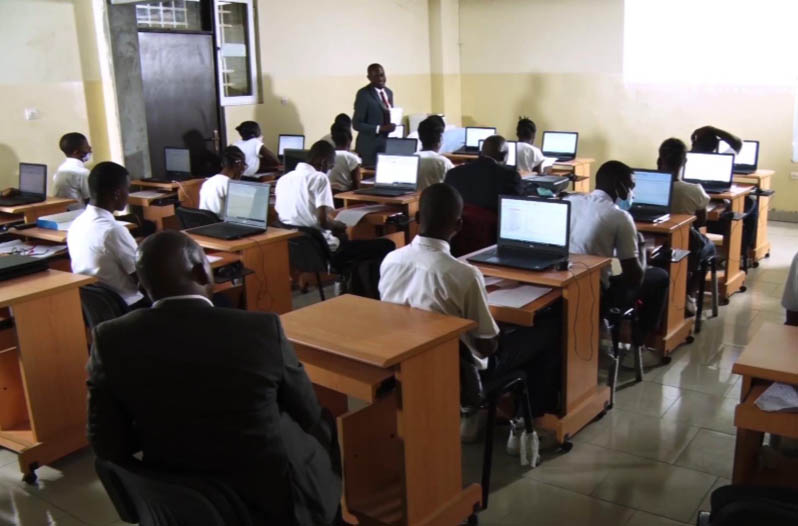
Unfortunately, there was one major limitation: a large number of the schools did not have computer classrooms. In addition, the Government of DRC, as well as its provinces, has limited financial resources, and free education for pupils is already a great challenge. However, it remains essential that schools are equipped with computers, especially if students want to get familiar with certain software.
Accounting in Congo: the OHADA system
Among the various steps of the educational project, the Cellules had to select an accounting software, which complies with OHADA regulations and is also suitable for teaching. Thus, in 2017 they contacted our company Banana Accounting.
Our software caught their attention since it is suitable for small businesses, it is used in several countries and has obtained very important references in the field of accounting. Besides that, Banana software is also available in French, the official language of Congo, and offers a free license for educational purposes. The Cellules realized that Banana Accounting software was well suited for teaching in Congolese schools.
Another essential aspect in the selection was the compatibility with the accounting system, therefore the program must be aligned with chart of accounts and the reporting used by OHADA. This system is used by large companies, has a specific numbering and also includes fixed schemes for the balance sheet presentation, the profit and loss account and the capital flow account. During the preliminary stages, the Cellules requested the collaboration of the Conseil Permanent de Comptabilité au Congo (CPCC). From then on, the Banana's project to train students on our accounting software has begun.
The begin of the project and the first difficulties faced with Agile
In normal situations, we organize meetings between the different stakeholders and the developers. In that way, we can clearly define the project functionalities
But the project with the Cell did not start in a smooth way. Domenico Zucchetti, CEO and founder of Banana.ch traveled to Nairobi (Kenya) for a brief training session, but later on, it was no longer possible to meet in person. Other means of communication were very limited, so it was not easy to efficiently collaborate and carry out the project. Therefore, we proposed the integration of an alternative solution.
Within Banana.ch we have always applied the Agile methodology for any project, it is normal for us to follow a progressive, tackling one problem at a time. We are aware that going step by step, with close interaction between stakeholders is essential to work remotely and with very different cultural and operational contexts. That is why we decided to suggest a new method for the project in Congo, and we convinced the Cellules to apply Agile.
Thanks to the Agile modeling, Banana.ch and the Cellules of the Minister of Education have been able to face the hard project path. Slowly, this methodology was applied to each phase of the project.
Regarding the first phase, that is developing a software that meets OHADA's accounting rules, we solved the various snags thanks to Agile.
- COMMUNICATION
As the main contact, Zucchetti turned to Didier Kinano, the Cellules Director. Directives were typically reported via email and phone calls. In turn, the Banana Accounting CEO explained the Banana functionalities to achieve certain results and then he gave directions to his software development team. - THE FIRST CRITICAL STEPS
Even though there was a good collaboration, the division of tasks was too complex and the communication possibilities were not fully exploited. In addition, we had to face limited work progressions. After numerous iterations, the chart of accounts was finally completed with the corresponding balance sheet printouts and income statement. - THE COMPLEX PHASE
Banana.ch then tackled the most complex part, that is the creation of the capital flow account, with the related revision of the chart of accounts. Mr. Kinano gave instructions and then checked the results’ correctness. - A FLEXIBLE VERIFICATION SYSTEM
Having reliable test is an important element of the Agile methodology. In the case of the project with the Cellules, our developers had difficulties because they were not familiar with the OHADA system and did not know how to test the functionalities. Hence, Kinano had to prepare accounts that were used as tests. This facilitated rapid progression because the developers could avoid regressions, without being in contact all the time. - A NEW DEVELOPER
Banana.ch was also able to make progress at the level of capital flow reporting. Later, we started a collaboration with a developer based in Kinshasa, who received instructions directly from Kinano and turned to Banana.ch for the programming part. - THE LAST STEPS
Finally, Banana.ch was able to realize other reports and to implement the management and printing part of the VAT statement according to the templates required by the local tax authorities.
Agile: winning collaboration for the accounting project in Congo
Using the Agile method to implement the accounting project in Congo turned out to be a winning choice.
Our role was limited to technical assistance for the installation and use of Banana Accounting, as well as the adaptation to the OHADA System. Moreover, not being on site, we had a very limited view of what was going on and we were not particularly familiar with the educational system of Congo. Although we did not have a clear management view (the Ministry was in charge), the Agile method allowed us to achieve goals.
Didier Kinano had become our reference person. The talks were focused on technical aspects, but sometimes we discussed the project in a broader way. Little by little, Domenico Zucchetti got a better view of the various stakeholders, the context in which they operated and their available resources. At one point we could start with the implementation of the new digital accounting system in Congo.
The implementation of the digital accounting system in Congo
As a first step, the Ministry's plan was to provide schools with computers, then install the software and train teachers and students. However, most of the schools did not have computer rooms, and some did not even have electricity!
The available resources were very limited and it was not possible to ask more from the Congo Government, since it was already busy ensuring the free basic education. Support from third parties was also unlikely, so the prospect to have more computers appeared remote. There was a lot of concern on the project realization. But with Zucchetti's suggestion, something began to change:
"The situation didn't seem that bad to me. In fact, the Ministry was in the same situation as many start-ups, where you find very ambitious and transformative ideas, united by great motivation and capacity, but with many obstacles and very limited financial resources. I told that it would probably be very beneficial if the Ministry adopted start-up-like operation modes, that aims to make the most of existing resources."
Unexpectedly, this remark aroused a lot of interest, which is quite uncommon in government departments that have operating modes very different from the start-ups ones. Instead, in the following meetings, the Ministry became open to approach problems in a different way.
One reason for this acceptance of the Agile may lie in the different level of predictability between Europe and Africa. In Europe, the degree of unpredictability is very low and, especially, there is little flexibility in public administration. On the contrary, in Africa, the population and public officials are faced with great unpredictability. Unforeseen difficulties force them to come up with new solutions. In essence, Banana.ch saw that in Congo people are more willing to adopt and use the Agile methodology.
Exploiting available resources for great results
The next step in the project included defining the path implementation through existing resources.
The Democratic Republic of Congo has a large territory, even though most schools did not have appropriate infrastructure, a few of them had computer classrooms. As we could expect, there weren’t the next generation of computers, but they were perfectly suited to install and use Banana Accounting.
We then provided the software in some schools in the capital Kinshasa. The accounting teachers showed great interest and requested training in order to familiarize with Banana Accounting. The Cellules prepared the informative material, being very competent in its role. Thus, in a short time, they set up a 13-day training course, both for the software and for the OHADA system. The teachers who attended the course were very satisfied, so, the Ministry set a plan to train more teachers with the existing resources.
Thanks to the gradual change in methodology towards Agile, the project progressed without major hiccups. We didn’t have to wait for all schools to be equipped with computers. With time, Banana Accounting was installed in several computers and the number of trained teachers was raising too. We then moved on to the phase of teaching to students, with considerable success. Installation and software training expanded to other provinces, always with great interest.
New issues arose regularly, but by applying the Agile methodology, the Ministry was able to solve them shortly. We developed small-scale solutions, making adjustments quickly and then implementing them in other schools. For example, Congo's program involved using handwriting for exams. The Ministry then introduced the option to have exams with computer to schools with suitable classrooms. This experience then served as a basis for solving new or similar problems, improving the system and then introducing it to other schools. The strategy was constantly improved sprint after sprint, reducing unforeseen problems and making the best use of available resources.
From small goals towards a long-term vision
Usually Agile helps achieving short-term results, but it is also extremely effective for a long-term vision.
Keeping in mind that technological development rapidly evolves, we are aware that some solutions can become obsolete in no time. Therefore, it is very important to update the long-term project vision and check whether we are going in the right direction.
In large-scale projects such as the accounting in Congo, one of the most important tasks of the technological partner (Banana.ch) is to find lasting solutions to integrate new technologies. In this case, as seen above, the main problem was the difficulty to equip all Congolese schools with computer classrooms.
How to solve the IT classrooms’ problem
Banana.ch has been providing its software to Swiss schools for many years. However, in Switzerland a shortage of computer rooms is not a problem at all; moreover, all the students of professional schools already have a laptop. So, in Switzerland, schools are adopting the Bring Your Own Device (BYOD) model and are no longer investing in IT classrooms. On the other hand, in Congo the situation is different because the buying power is lower and teachers and students cannot afford a laptop.

Working closely with ministry officials, we came up with an alternative scenario. In the DRC, all teachers and students from professional schools have a cell phone. Thanks to technological advances, we predicted that students will soon have smartphones as well. So, we adapted to their current situation and we have focused on:
- Improvements of Banana Accounting on the mobile operating systems (Android and iOS) until it is almost in line with the desktop version.
- Possibility, also on mobile, to keep the accounting without connecting to the Internet, since in Congo the connections are not always fast and have significant costs.
Keeping accounts on a cell phone is certainly not the ideal solution. But knowing that learners will have a smartphone, we are sure they will keep accounts by using ERP functions (enterprise resource planning software), even without connecting to the Internet. As a result, by the time students find a job, they will already be ready to use accounting software.
We have noticed an increase in the use of the mobile version of Banana.ch in Congo, a sign that the strategy is working.
Adaptation to new technologies: the BYOD model in Congolese schools
At the moment, we see a convergence between the use of mobile and desktop software. The Ministry of Education in Congo presented a new technology available, for now, on high-end smartphones. Teachers can activate the Android Desktop Mode by connecting a monitor and keyboard to the latest generation smartphone. The small device is thus transformed into a real computer.
In the years to come, thanks to technological progress, this feature will certainly be available also for less expensive smartphones. Even Congolese students will have the chance to use a phone that becomes a computer. In that way the BYOD model can be adopted, and we will eliminate the problem of computer classrooms.
This scenario seems more and more realistic, and the Ministry is looking for a new plan to train teachers with the new modalities. In the future, when desktop mode will be possible on smartphones, Ministry officials should be ready to deliver a training that fits this new technology.
The MEPSP has already set up a plan for training several people in the different provinces, who in turn will train teachers on the OHADA accounting system and on the use of Banana Accounting.
With time, the Agile methodology has become integral in the collaboration with the various stakeholders, but we also used it to experiment with new technologies and new interesting solutions. You don’t need to change the current NGO project management system to see results with Agile, but in our case a wide application made the achievement of many objectives a lot easier.
Financing the project in Congo
In the case of the educational project in Congo financing, the Ministry had not a lot of money source. Then there was the COVID pandemic in 2020, which brought the finances of many states, including the DRC, to their knees. We had to find other ways, so we decided to present the project to possible financing entities. Following the Agile method, we develop a documentation and fundraising structure starting with very limited funding, necessary to offer the training and to find new solutions. Then, in later stages, these solutions can eventually be applied on a larger scale. We divided the project for extending the training in new provinces into blocks, making the figures affordable for many foundations and organizations.
| Indicative budget for seminary in the provinces |
| Activities | Cost |
|---|---|
| Accommodation for 2 educators (13 nights) | $ 800 |
| Catering for 2 educators | $ 400 |
| Lunch break for 52 participants (12 days) | $ 6.000 |
| Remuneration 2 educators (14 days) | $ 4.000 |
| Round trip 2 educators | $ 1.500 |
| Total investment for 1 seminary | $ 12.700 |
| Total investment for the 37 provinces | $ 427.000 |
| Fundraising (50% of costs) * | $ 223.500 |
However, we encountered a major limitation: the Agile methodology is not well known in the international cooperation sector, and funding is usually granted for complete projects, with rather complex and bureaucratic decision-making processes.
In our case, all the stakeholders could see that the project managed with Agile was valid and suitable. In fact, the different phases made possible the consolidation of the existing school system. The positive impact of the project is evident because the beneficiaries, or the new generations of students, will be better prepared for their job and will have a greater chance of finding employment.
Despite the results, at the moment we have not yet found support from foreign funding. The amounts required are small, but unfortunately in the cooperation world it is still complicated and expensive to develop funding strategies, since planning is only done with the waterfall method. Contrary to the world of start-ups, there is not yet a predisposition on granting support in a progressive manner, open to the development of new solutions.
A perspective towards widespread use of agile in NGOs
The successful project management of digital accounting in Congo is just one of the examples that show the effectiveness and suitability of Agile in the non-profit area. We are not there yet, but so far we have considerably progressed in a difficult context. This model made possible to make the most from available resources, skills and organizations that are already well structured and widely present in the area.
Agile applied to NGOs opens perspectives that were unthinkable a few years ago. Surely, the integration of this method will be very useful to international cooperation projects, all characterized, more or less, by a high degree of difficulty, variability and unpredictability. Agile can become a project management option, without affecting the currently-used non-profit methodologies.
We hope that this project in which we are involved demonstrated you the high potential of the Agile methodology. NGOs could consider to apply it to improve the effectiveness of interventions and to facilitate the granting of small amounts for humanitarian projects.
With the hope that Agile will be integrated in many non-profit projects, we invite you to reach us if you have any questions on the educational accounting project in Congo or about the use of Agile in the cooperation sector.
References
Helms, B. (2019, 10 settembre). Can the Development Community Adopt Agile?. DAI. https://dai-global-developments.com/articles/can-the-development-community-adopt-agile.
Manifesto for Agile Software Development. (2001). Agile Manifesto. https://agilemanifesto.org/
Modernisation de la formation en comptabilité au Congo RDC. (2020, gennaio). Banana.ch. https://www.banana.ch/fr/formation/comptabilite-rdc.
Terbeche, M., Carrier, M. (2019, 26 marzo). An “Agile Manifesto” for humanitarian and development projects. Groupe URD. https://www.urd.org/en/review-hem/an-agile-manifesto-for-humanitarian-and-development-projects/.
(2018, 2-4 ottobre). Humanitarian Aid on the Move No. 20. [Relazione a convegno]. Groupe URD. Autumn School on Humanitarian Aid. https://www.urd.org/en/review-hem/humanitarian-aid-on-the-move-n20/.
Shafiq, M., & Soratana, K. (2019). Lean and Agile paradigms in humanitarian organizations' logistics and supply chain management. LogForum, 15 (1).
Trish. ( n.d.). Agile for Nonprofits: A Project Management Method. Springly. https://www.springly.org/en-us/blog/agile-method-project-management-method-nonprofit/.