This message is displayed when in the Opening column of the Accounts table, the total of Assets accounts (positive amounts) does not balance with the total of Liabilities (negative amounts). It appears:
- In the Info window of the Accounts table
- When recalculating the accounting
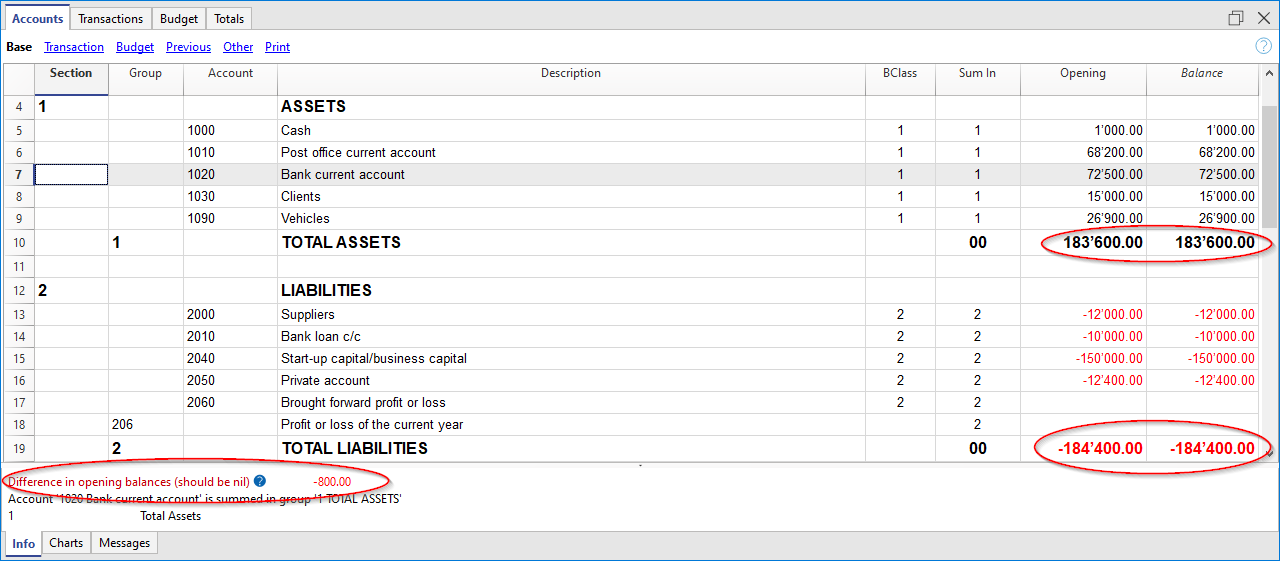
Causes
- When using the program for the first time, liabilities were not entered with a minus sign in front of the amount.
- In the previous year's file, in the Transactions table, there are differences between the Debit and Credit columns.
- The previous year's result was not automatically allocated during the New Year transition.
- In multi-currency accounting, the exchange rate differences have not been calculated.
- When creating the new accounting year, the balances of costs and revenues were carried forward, but they should be zero.
- When manually entering opening balances, the previous year's result was not taken into account. In this case, the difference corresponds to the profit or loss of the previous year.
- When manually allocating the profit to multiple accounts, thousand and decimal separators different from those set in Banana Accounting were used.
Solutions
- In the Accounts table, in the Opening column (Opening currency column in case of multi-currency accounting), enter a minus sign in front of the liabilities amounts.
- In the previous year's file, correct the difference in the Transactions table and update the opening balances again in the new current year file.
- Repeat the Update opening balances command from the Actions menu and, in the active window, select the Profit or Loss from the previous year account, or another account where you want to allocate the profit or loss, depending on the intended destination. More information is available on the Year-end closure and New Year page.
- For multi-currency accounting, consult the lesson Differences in opening balances.
- When opening balances for costs and revenues have been carried forward, two solutions are possible to correct this:
- In the Accounts table, in the Opening column, delete the opening balances of costs and revenues.
- Update the opening balances using the Update opening balances command from the Actions menu; in the Carry forward balances window, deactivate the Income Statement.
- In the Opening column of the desired accounts (for example Retained Earnings, Equity, Reserves....) allocate the result for the year, taking into account the amount already existing.
- When entering amounts for profit allocation, use only decimal separators and not thousand separators.
Alternatively, you can change the thousand and decimal separators in your operating system’s international settings (in the Control Panel). More details are available at the bottom of the Program interface page.
After completing the correction, run the Check Accounting command from the Actions menu.