In questo articolo
I saldi iniziali, o saldi di apertura, rappresentano la situazione dei conti all'inizio dell'anno o del periodo contabile.
Quando utilizzi Banana Contabilità per la prima volta, per creare il bilancio di apertura devi inserire manualmente i saldi iniziali.
Nella Contabilità Multi-moneta, prima di procedere con l'inserimento dei saldi iniziali, è importante effettuare alcune impostazioni fondamentali nella tabella Cambi e nella tabella Conti.
Impostare i cambi di apertura
Nella tabella Cambi imposta le monete estere utilizzate nella contabilità e il relativo cambio di apertura rispetto alla moneta base.
Il cambio di apertura viene inserito manualmente quando inizi a utilizzare Banana Contabilità. Negli anni successivi, quando crei il nuovo anno tramite Azioni > Crea nuovo anno, viene aggiornato automaticamente sulla base del cambio finale del file dell'anno precedente.
Per i cambi di apertura considera inoltre quanto segue:
- il cambio di apertura deve essere indicato nella riga del cambio senza data
- non deve essere modificato, salvo in caso di errori o situazioni particolari
- i cambi di apertura devono corrispondere ai cambi di chiusura dell'anno precedente.
Per maggiori informazioni consulta Differenza saldi iniziali.
Preparare la tabella Conti
Prima di inserire i saldi iniziali, assicurati che nel piano dei conti, nel Conto economico, sia presente il conto utilizzato per Registrare le differenze di cambio.
Il conto deve inoltre essere indicato in File > Proprietà file (Dati base) > Moneta estera.
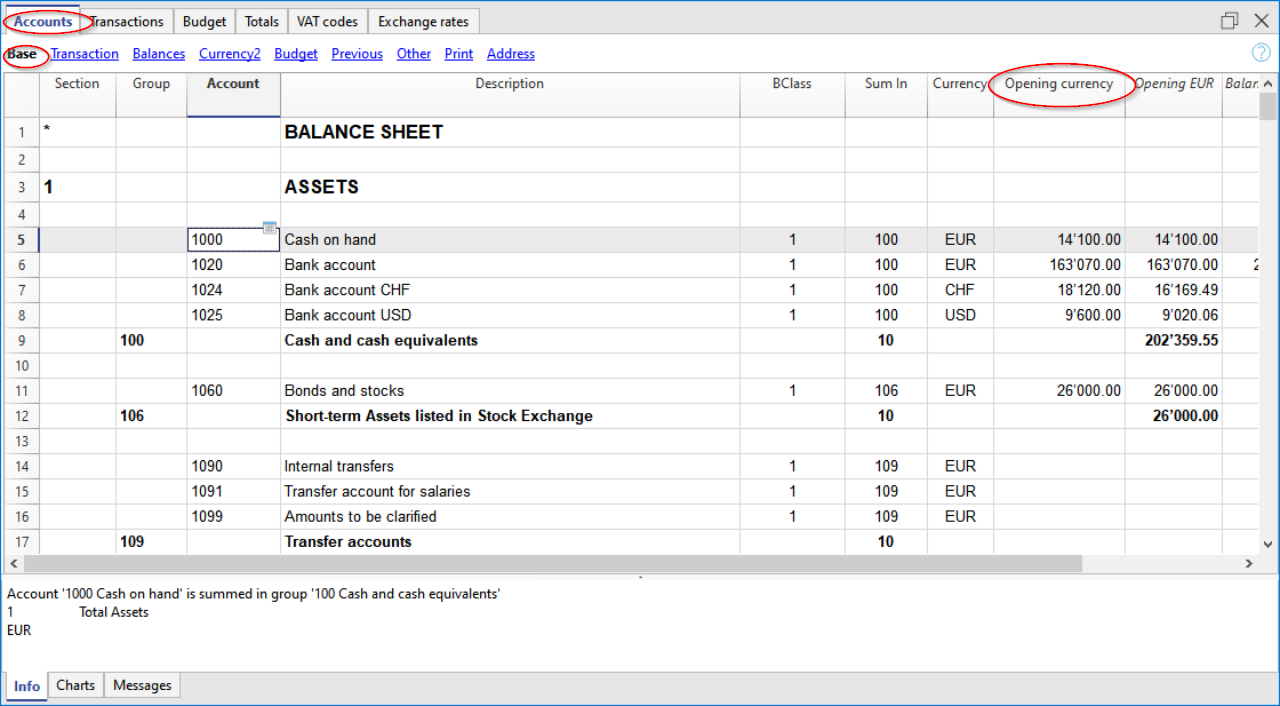
Nella Contabilità Multi-moneta i saldi iniziali devono essere inseriti nella tabella Conti, vista Base, colonna Aper.moneta, sia per i conti nella moneta base sia per quelli in moneta estera.
La colonna Apertura, espressa nella moneta base, è protetta. Banana Contabilità calcola automaticamente il controvalore nella moneta base utilizzando il cambio di apertura indicato nella tabella Cambi.
Inserire i saldi iniziali
Dopo avere impostato i cambi di apertura e verificato il piano dei conti, puoi inserire i saldi iniziali.
- Vai nella tabella Conti, vista Base, colonna Aper.moneta
- Inserisci manualmente i saldi iniziali dei conti Attivi e Passivi
- Inserisci i saldi degli Attivi con importo positivo
- Inserisci i saldi dei Passivi con il segno meno (-) davanti all'importo
- Controlla che il totale degli Attivi corrisponda al totale dei Passivi e che la contabilità sia in quadratura.
Banana Contabilità calcola automaticamente nella colonna Apertura il controvalore nella moneta base dei saldi inseriti nella colonna Aper.moneta.
Se vengono segnalate differenze nei saldi iniziali, verifica gli importi inseriti e i cambi di apertura. Per maggiori informazioni consulta Controllare e correggere i saldi iniziali e Differenza saldi iniziali.
Saldi iniziali Centri di costo
Nella tabella Conti, la colonna Apertura può essere utilizzata anche per inserire i saldi iniziali dei Centri di costo.
Saldi iniziali Segmenti
I saldi iniziali dei Segmenti devono invece essere inseriti mediante registrazioni di apertura nella tabella Registrazioni.
Per maggiori informazioni consulta la pagina Segmenti.
Iniziare con Banana Contabilità durante l'anno
Se inizi a utilizzare Banana Contabilità quando l'anno contabile è già in corso e devi riprendere il lavoro effettuato con un altro programma, puoi procedere in due modi.
Riprendere la contabilità dall'inizio dell'anno
Puoi iniziare la contabilità dall'inizio dell'anno e riprendere anche tutti i movimenti già registrati con il programma precedente.
In questo caso:
- inserisci nella tabella Conti i saldi di apertura all'inizio dell'anno
- inserisci nella tabella Registrazioni i movimenti già contabilizzati con il programma precedente
- prosegui con le nuove registrazioni in Banana Contabilità.
In questo modo disponi di tutti i dettagli contabili dell'anno in un unico file.
Per maggiori informazioni consulta Ripresa dati da altri programmi.
Iniziare dalla data di passaggio a Banana Contabilità
Puoi anche iniziare la contabilità direttamente dalla data in cui passi a Banana Contabilità.
In questo caso devi riprendere nella tabella Conti la situazione contabile esistente a quella data.
Oltre ai saldi di apertura dei conti Attivi e Passivi devi inserire anche:
- i saldi dei Costi, con importi positivi
- i saldi dei Ricavi, con importi negativi.
Il risultato d'esercizio maturato fino alla data del passaggio deve essere indicato nel conto Utile/Perdite riportate:
- in caso di utile, inserisci il saldo iniziale in negativo
- in caso di perdita, inserisci il saldo iniziale in positivo.
Verifica che la somma dei saldi iniziali sia uguale a zero, in modo che Banana Contabilità non segnali differenze.
Da quel momento puoi inserire i nuovi movimenti nella tabella Registrazioni.
Inserire i saldi iniziali come registrazioni di apertura
I saldi iniziali possono essere inseriti anche come registrazioni di apertura nella tabella Registrazioni, sia per tutti i conti di bilancio sia per determinate categorie di conti, come i Segmenti, i cui saldi iniziali devono essere registrati manualmente.
Per ogni registrazione di apertura:
- indica come data la data di inizio della contabilità
- nella colonna TipoDoc inserisci il codice 01
- indica il conto in Dare o in Avere
- inserisci l'importo.
Il totale dei saldi di apertura in Dare deve compensarsi con il totale dei saldi di apertura in Avere.
I saldi di apertura inseriti mediante registrazioni vengono utilizzati nella preparazione dei report.
Se nello stesso file sono presenti saldi iniziali nella colonna Apertura della tabella Conti e vengono inseriti manualmente anche saldi di apertura nella tabella Registrazioni, questi valori vengono sommati automaticamente.
È il caso, ad esempio, dei saldi iniziali dei Segmenti inseriti mediante registrazioni di apertura, che vengono sommati ai valori di apertura già presenti nella tabella Conti.
Utilizzare cambi di apertura diversi
L'inserimento dei saldi iniziali mediante registrazioni può essere utile anche quando è necessario utilizzare cambi di apertura diversi da quelli presenti nella tabella Cambi.
Questa procedura può avere implicazioni contabili e legali. Prima di utilizzarla è quindi necessario comprenderne correttamente gli effetti.
Saldi dell'anno precedente
I saldi dell'anno precedente sono distinti dai saldi iniziali.
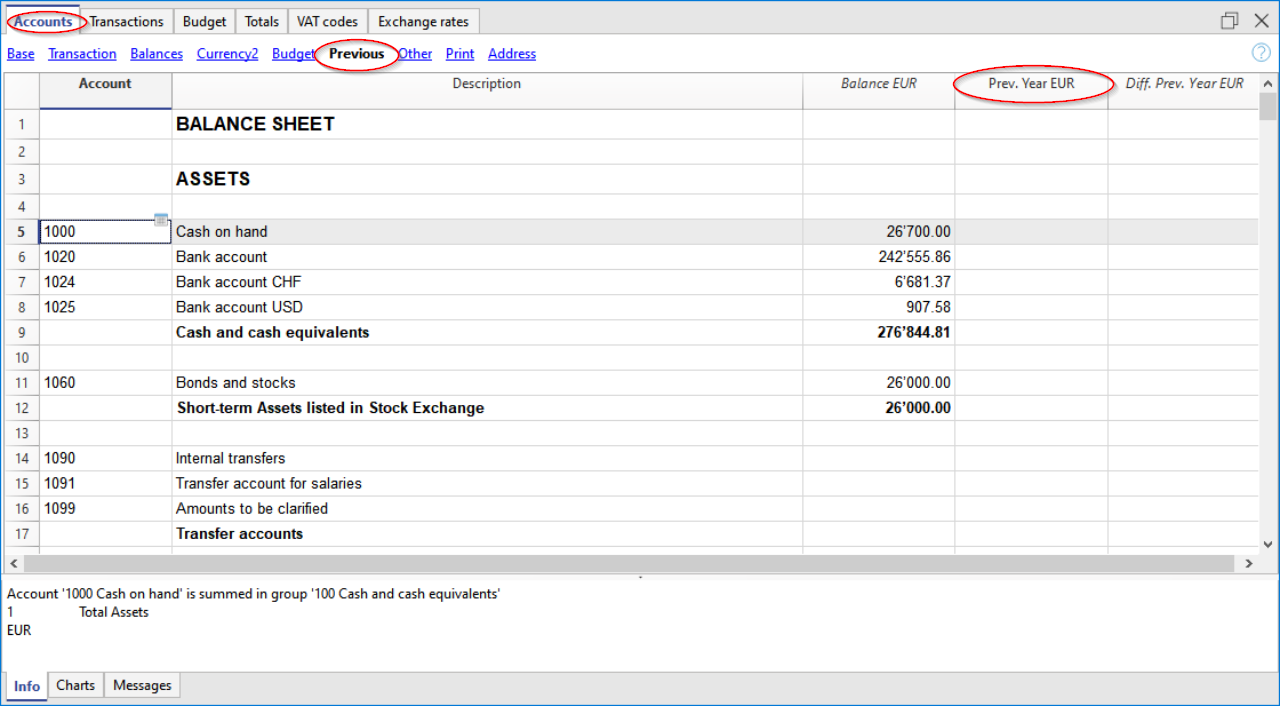
Se inizi una nuova contabilità riprendendo una contabilità esistente e vuoi visualizzare nelle stampe anche i valori dell'anno precedente, devi inserire i saldi finali dell'anno precedente nella tabella Conti, vista Precedente, colonna Anno Precedente.
Inserisci:
- i saldi finali dei conti Attivi
- i saldi finali dei conti Passivi, con il segno meno (-) davanti all'importo
- i saldi finali dei Costi
- i saldi finali dei Ricavi, con il segno meno (-) davanti all'importo.
Questi valori permettono di visualizzare nelle stampe anche i dati dell'anno precedente.