En este artículo
Banana Contabilidad ofrece varios comandos para recalcular los datos y verificar la corrección de la contabilidad. Es buena práctica realizar estas comprobaciones regularmente, especialmente si el programa señala errores o diferencias.
Los principales comandos y funciones para el recálculo y control de la contabilidad son los siguientes:
- Atajos de teclado para iniciar el recálculo de la contabilidad:
- Mayúsculas + F9 (Windows y Mac)
- Cmd + 9 (Mac)
- Menú Acciones > Verificar contabilidad para realizar verificaciones amplias de la contabilidad.
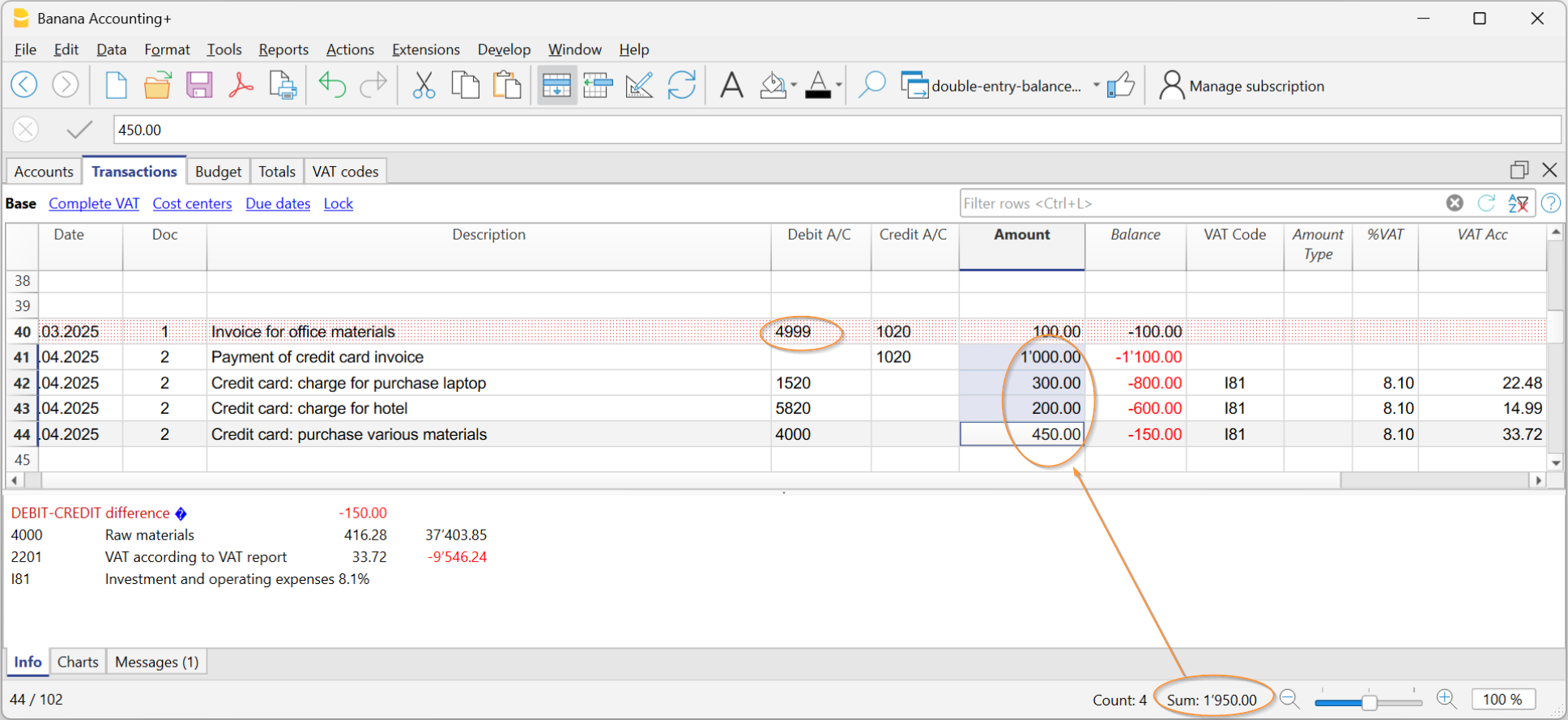
- La Columna Saldo resalta las diferencias en la tabla de Registros entre las columnas Debe y Haber. La columna Saldo puede activarse desde el menú Datos > Configurar las columnas.
Si se detectan errores o diferencias, es recomendable corregirlos antes de continuar con otras operaciones contables.
Recalcular (Mayús + F9) y verificar contabilidad
La combinación Mayúsculas + F9 ejecuta automáticamente las siguientes acciones:
- Verifica la versión del programa en uso e informa sobre la disponibilidad de actualizaciones
(se recomienda usar siempre la última versión). - Reinicia y re-calcula los saldos de las cuentas, centros de coste y segmentos.
- Reescribe todas las operaciones como si se introdujeran nuevamente.
- Señala posibles errores en las siguientes tablas:
- Cuentas
- Transacciones
- Códigos IVA
- Tipos de cambio
- Contabilidad multimoneda
- Actualiza los saldos iniciales.
- Recalcula los saldos según los últimos tipos de cambio introducidos en la tabla de Cambios.
- Contabilidad con IVA
- Recalcula todos los valores de IVA según los códigos utilizados.
- Cash Manager
- Calcula el saldo progresivo en la tabla de Transacciones.
- Recalcula los totales de las tablas de Cuentas y Categorías.
- Cash Manager e Ingresos / Gastos
- Recalcula los totales de las tablas de Cuentas y Categorías.
- Contabilidad con presupuesto
- Actualiza las columnas Diferencia presupuesto y Año anterior en la tabla Cuentas.
Diálogo Verificar contabilidad
El comando Acciones > Verificar contabilidad abre una ventana de diálogo con opciones de verificación avanzadas.
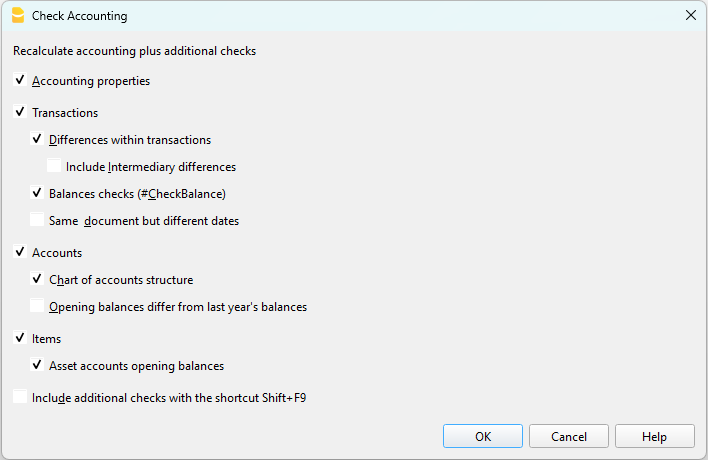
Recalcular contabilidad y ejecutar verificaciones ampliadas
Este es uno de los comandos más importantes para la verificación de la contabilidad, porque:
- recalcula toda la contabilidad,
- ejecuta controles exhaustivos,
- informa sobre posibles errores en la ventana de Mensajes.
También actualiza los textos de las columnas Descripción cuenta y Categorías en la tabla de Registros, si han sido modificados.
Propiedades de datos base
La opción está activada por defecto y comprueba la coherencia de los datos definidos en Archivo > Propiedades archivo (datos base), como por ejemplo:
- fechas de apertura y cierre,
- cuentas de IVA,
- cuentas para diferencias de cambio.
Registros
Diferencias en transacciones
- Verifica posibles diferencias entre el Debe y el Haber (o entre Cuentas y Categorías).
- Las filas afectadas se indican en la ventana de Mensajes.
- El importe total de la diferencia es visible en la ventana de información inferior.
- Las diferencias también se destacan en la Columna Saldo.
Incluir diferencias intermedias
- Verifica que no existan diferencias intermedias en las transacciones múltiples.
- Las diferencias suelen deberse a transacciones incompletas o importes incorrectos.
Saldos de verificación (#CheckBalance)
- Compara el saldo contable con el saldo real (banco o correo) introducido manualmente.
- Se informan las diferencias indicando las cuentas afectadas.
Más información sobre los registros de Check Balance está disponible en la página Registros #CheckBalance.
Mismo documento con fechas diferentes
- Advierte si un mismo número de documento está asociado a fechas diferentes.
- Esta situación puede impedir que el programa determine correctamente la cuenta contrapartida.
Cuentas
Estructura del plan de cuentas
- Verifica que la estructura de los grupos contables sea correcta.
Presencia de diferencias de cambio
- Señala posibles diferencias de cambio aún no registradas.
Los saldos iniciales difieren de los saldos finales del año anterior
- Verifica que los saldos iniciales del nuevo año coincidan con los de cierre del año anterior.
- Las diferencias entre los saldos finales del año anterior y los saldos iniciales del nuevo año se indican como importe total en la ventana de Mensajes.
Artículos
Saldos iniciales de las cuentas de Activos
- Verifica que el valor inicial de los Artículos coincida con el saldo de la cuenta de Activo asociada.
- El control se realiza solo para artículos con cuenta de Activo asignada.
Incluir verificaciones ampliadas con la tecla Mayús + F9
Si la opción Incluir verificaciones ampliadas con la tecla Mayús + F9 está activada, el programa ejecuta automáticamente todas las verificaciones seleccionadas en el diálogo Verificar contabilidad también mediante el atajo de teclado.
Si la opción no está activada, con Mayús + F9 solo se realiza el recálculo de la contabilidad.