In this article
In Banana Accounting Plus the data is entered and displayed in tables. This interface, inspired by Excel and faithful to the centuries-old accounting tradition, is extremely intuitive and productive. In all areas of the program, for the Chart of Accounts, the Transactions, the Budget, the Exchange, the VAT Codes and also to view the Account Cards, the table system used is always the same.
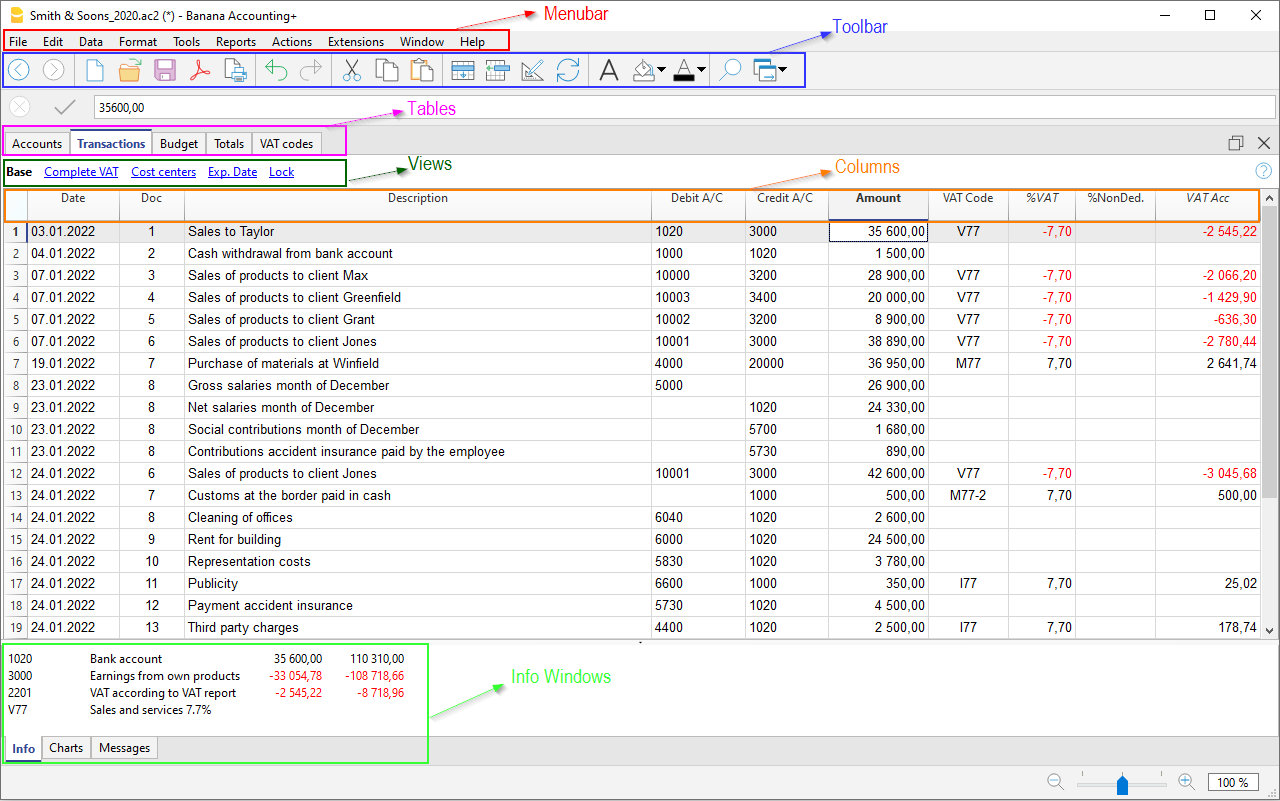
The typical Excel interface gives the user numerous advantages to optimize their work.
Easy data entering
Everything is very intuitive, because you are able immediately to see what you have to do and where to enter the data. You can move around freely to enter, make changes and delete data at any time. During the input, the program also suggests values based on the text you typed in, or you can put it on hold to complete the work later.
Fast data entering
The cells allow instant data entry, which can be copied and pasted to speed up the work even more. With the suggestion of the values to be entered, auto-completion is available, which offers the possibility to choose a value already used previously for example.
Secure data
The user is always sure that the data entered is correct, as he will find tables readily prepared uniquely for data types and with the integrated formulas. In case you enter wrong values, the program will signal the error with a text warning message, so the user understands where he has made a mistake and can immediately correct it.
On-line interface use including heuristic principles
This high productivity and ease of use is the result of a scientific approach to improving user interaction. In the early nineties a group of researchers led by Jackob Nielsen, developed the 10 heuristic rules for the interface design. These principles have become and remain the reference point for the creation of software, websites and apps.
Banana Accounting is the only software that meets all 10 rules and that is why it is easy to use and highly productive. Below these principles and how they are implemented in Banana Accounting are presented.
1. Visibility of system status
“The system should always keep users informed about what is going on, through appropriate feedback within reasonable time.”
- If you add or delete a line, change the format, the color, you will instantly see the result of the operation.
- When you resume accounting, or you are interrupted by the phone, you immediately see what the last recorded entry was.
- The calculations (account balances and others) are updated and visible immediately.
- Multiple windows can be displayed simultaneously.
- The preview window does not block the use of the program, it can be kept open in parallel.
- In the Info window below, you will find additional information about the transaction, account or other on which you are positioned.
- In the Graphs window, you can see the evolution of the account balance on which you are positioned. If the cash drops below zero, you will be able to notice it immediately.
2. Match between system and the real world
“The system should speak the users' language, with words, phrases and concepts familiar to the user, rather than system-oriented terms. Follow real-world conventions, making information appear in a natural and logical order.”
The spreadsheet was created for the world of accounting. It is the native mode of accounting (Cash book, Accounts list).
- Entering data in the table leads to an immediate change in status. Everything is updated immediately accordingly.
- The Transactions table contains all movements, exactly as expressed in the accounting.
- The Accounts table contains and displays the Balance Sheet and the Profit/Loss Statement, with accounts and groups, and the related updated amounts, complete with balances, movements, budgets or discrepancies.
3. User control and freedom
“Users often choose system functions by mistake and will need a clearly marked "emergency exit" to leave the unwanted state without having to go through an extended dialogue. Support undo and redo.”
Within Banana Accounting, the user has full control and freedom:
- You choose the sequence in which you wish to work freely.
- You will never be hindered by the system and can change or suspend your work whenever you need or wish to.
- You can navigate freely within the table and add or change any information.
- You can switch from one table to another.
- You can switch from one file to another.
- Operations can be canceled or restored; you can also decide to not save the file if you notice that the work done does not satisfy you.
- Any dialog and procedure can be interrupted with the Esc key..
- You can protect your data:
- Protect any row from being modified.
- Lock the rows of the Transactions table with blockchain.
It complies with requirements for the accounting data conservation and will prevent ill-intentioned persons from interfering with your accounts, without your knowledge.
- Decide where to save your files.
All accounting data is saved in a file, with a user defined name and can be copied, moved, sent by email, saved to a network or cloud drive, such as is most useful to you.
4. Consistency and standards
“Users should not have to wonder whether different words, situations, or actions mean the same thing. Follow platform conventions.”
Banana Accounting aims to be consistent throughout.
- The mode of use of spreadsheets is kept consistent.
- The interface and the commands conform to Microsoft Excel and Office, reference programs in the administrative field..
Being familiar with that software will put you at ease immediately, the main commands and operating methods are as similar as possible. - In dialogues and other interactions, graphics and logic specific to the operating system in place are used.
- "Compositions" will allow you to save and use setups in a standardized form.
- We aim to maintain continuity from one version to the next. New designs are only put in place if they are considered effective and provide benefits.
5. Error prevention
“Even better than good error messages is a careful design which prevents a problem from occurring in the first place.”
Banana Accounting connects the data structure and the display functions and there is help while inputting rows.
- Columns and Rows will make it clear, which information is to be inserted.
- When in editing mode, the program will propose a list of suggestions, so as to avoid input mistakes.
- In the date column, when only the day is entered, the program will suggest the complete date of month and year based on the previous registration.
- In the document column, the program indicates the following number, regardless of the numbering convention used.
- In the account or code column, existing ones will be displayed and will also allow you to search via entering the description.
- The description column will display texts already used, which can be reused, along with the rest of the transaction.
6. Recognition rather than recall
“Minimize the user's memory load by making objects, actions, and options visible. The user should not have to remember information from one part of the dialogue to another. Instructions for use of the system should be visible or easily retrievable whenever appropriate.”
With Banana Accounting, as with spreadsheets, it is quite clear what should be done by you and how to proceed.
- To add a transaction, an account or a group, a row is added.
- To delete a transaction, an account or a group, the row is deleted.
- To format, change color, copy and paste data, select the zone first and then click the command.
- All commands are visible in the context menu, the top menu or the toolbar.
- Account numbers or other values to be entered are suggested when in modification mode (see previous post).
7. Flexibility and efficiency of use
“Accelerators — unseen by the novice user — may often speed up the interaction for the expert user such that the system can cater to both inexperienced and experienced users. Allow users to tailor frequent actions.”
There are several options for advanced users to work faster:
- You may use Key shortcuts.
- There are contextual commands that automate a certain number of operations (such as reversing debit and credit account allocation).
- You may apply the commands (copy, paste, delete, format) to a whole selected area. Other accounting programs generally allow you to work on one line at a time only.
- Pick up rows of recurring transactions.
- Row settings for recurring transactions.
- "Compositions" to set and save report settings and other commands.
8. Aesthetic and minimalist design
“Dialogues should not contain information which is irrelevant or rarely needed. Every extra unit of information in a dialogue competes with the relevant units of information and diminishes their relative visibility.”
Banana Accounting was and is conceived to generate accounting files that adhere to regulatory requirements and will contain only related necessary data.
- Your accounting can be created with only the required options. Functions such as VAT, multi-currency, cost and profit centers, segments, are not present if not necessary, but can be activated selectively when needed.
- Your spreadsheet can be customised. You may hide columns that you do not need.
- You can create different views of the columns, in order to access them when and how it is most suitable to you.
9. Help users recognize, diagnose, and recover from errors
“Error messages should be expressed in plain language (no codes), precisely indicate the problem, and constructively suggest a solution.”
Banana Accounting has several ways to allow the user to notice any errors or problems:
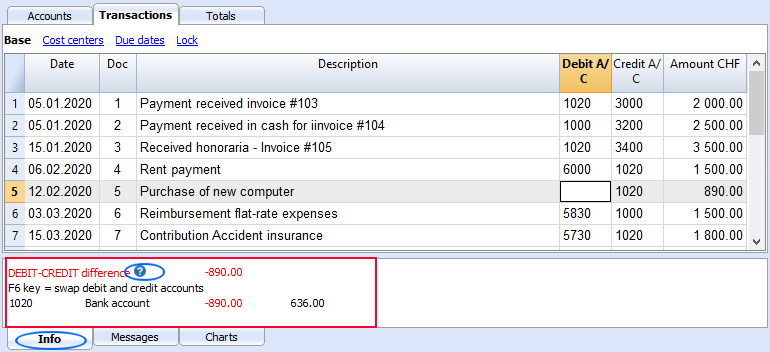
- Error messages, well described, when you enter or effectuate an incorrect operation.
- Errors or warnings are highlighted in color of the row concerned
- Explanation of the error in the Info window.
- "Check Accounting" command, to recalculate and check all data entered and signal any errors or problems.
- Window displaying the list of all messages, allowing you to locate the row in which the error occurred.
10. Help and documentation
“Even though it is better if the system can be used without documentation, it may be necessary to provide help and documentation. Any such information should be easy to search, focused on the user's task, list concrete steps to be carried out, and not be too large."
- Each error message has its dedicated documentation page, reachable at a click, complete with causes, solutions and links to information pages, which will help you solve your problem.
- When you are using the table, the help command will lead you directly to the relative Help page of the application and the data table.
- Each dialogue has a help button that leads to the specific help page.
- There is a complete and very comprehensive documentation, structured according to the logic of the program and with links to all the related topics.
- Beside this documentation, there is an index that will allow you to understand it's structure and to move around it easily.
- Dialogues created through program extensions written in Javascript, also link to specific help pages.