Modelos e Extensões
Index of Banana Accounting Templates and Extensions
This page is the global index of all official Banana Accounting templates and extensions.
Here you find a complete overview, covering different countries and languages.
Templates are ready-to-use accounting files based on structures adapted to local practices. They provide a structured starting point that can be customized to your needs, allowing you to get started right away.
Extensions, on the other hand, add functionalities to Banana Accounting and may vary depending on the country and local requirements.
Templates and extensions for Switzerland
Accounting content adapted to Swiss regulations and practices, available in multiple languages:
- Switzerland (English)
Section with templates and other content in English specifically for businesses, associations, and other organisations in Switzerland. - Switzerland (German)
Section with templates and other content in German specifically for businesses, associations, and other organisations in Switzerland. - Switzerland (French)
Section with templates and other content in French specifically for businesses, associations, and other organisations in Switzerland. - Switzerland (Italian)
Section with templates and other Italian-language content specifically designed for companies, associations, and other organisations in Switzerland.
Templates and extensions for English-speaking countries
Designed for accounting contexts where English is the working language:
- Canada
Section with templates and other content in English specifically for businesses, associations, and other organisations in Canada,. - UK (United Kingdom)
Section with templates and other content in English specifically for businesses, associations, and other organisations in UK. - USA (United States of America)
Section with templates and other content in English specifically for businesses, associations, and other organisations in USA.
Templates and extensions multilingual
Resources that can be used in any country, available in multiple languages:
- Universal
General-purpose templates and related content designed as a neutral starting point, independent of country-specific structures. - Education
Section with templates and related content designed specifically for learning and teaching accounting.
Templates and extensions of other countries in other languages
Country-specific templates and other content in the local language, specifically for businesses, associations, and other organisations, adapted to local requirements:
- Africa (Algeria, Morocco)
- Austria
- Belgium/Wallonia (French language) and Belgium/Wallonia (Dutch language)
- Brazil
- China
- Congo - Democratic Republic of the Congo (DRC)
- Costa Rica
- France
- Germany
- Italy
- Liechtenstein
- Luxembourg
- Mexico
- Nepal
- Netherlands
- Norway
- OHADA (Organization for the Harmonization of Business Law in Africa)
- Portugal
- Saudi Arabia
- Spain
- UAE (United Arab Emirates)
Search all templates and extensions
Use the search tools if you are looking for a specific template or extension, or want to filter results by language, country, or category:
Teste o modelo
Se você já tem Banana Contabilidade
- Baixe o arquivo de modelo desejado e abra-lo em Banana Contabilidade.
- Salve o arquivo com o nome da sua contabilidade (veja Novo arquivo a partir de um modelo da internet)
Se você ainda não instalou o Banana Contabilidade
Você pode testar o modelo de contabilidade, grátis e sem compromisso.
- Baixe e instale o Banana Contabilidade - quando você será solicitado a digitar a chave de licença, pode deixar o espaço em branco. O programa irá trabalhar no modo Starter Edition.
- Baixe do modelo que lhe interessa.
Salve o arquivo baixado com o nome da sua contabilidade (veja Novo arquivo a partir de um modelo da internet) - Agora pode experimentar digitar transações contàbeis, seguindo as explicações do modelo.
No modo Starter Edition, você não pode salvar arquivos com mais de 70 transações ou mais de 25 movimentos de budget.
Modo Starter Edition
Se você ainda não comprou a versão completa do programa, ele vai funcionar no modo Starter Edition:
- Pode experimentar todas as funções sem limites de tempo.
- Se depois você passar para a versão completa (à pagamento), os arquivos que você salvou vão ser mantidos.
- Você não pode salvar arquivos que contêm mais de 70 linhas de transações ou mais de 25 linhas de budget.
Se você adquirir a versão completa, vai receber uma chave de licença que, inserida no programa vai te permitir salvar os arquivos.
Modelos
How to use the templates in the Template Store
You can access the templates from the Banana Accounting Plus Template Store in several ways. The first two options require that you have downloaded and installed Banana Accounting Plus on your computer. Here are the different methods:
- From our Template Store – you can download the selected template and open it with Banana Accounting Plus.
- With the Banana Web App – Banana version that runs in your browser. A very useful mode for testing. You will then need to save the file locally.
- From Banana Accounting Plus – via the File > New menu, which shows the templates available in the Template Store.
Download the template from the Template Store
On each template’s page in the Template Store, you will find detailed information about the contents of the template and several options for opening it:
- Click on the Download template link and save it to your computer. For some files, a Tutorial is available — a template with several example transactions. Tutorials are generally created to show reports, specific printouts, or Banana functions that require a larger data base. In some cases, both the Template and the Tutorial are available.
- Launch Banana and open the file you just downloaded.
If it was saved in the temporary folder, a message will appear indicating that the file is read-only. - Save the file with your own name in the working folder you prefer.
Open the template with the Web App
On each template’s page in the Template Store, you will also find a button to open the template (or tutorial) with the Web App. This is a version of Banana Accounting Plus that runs in your browser. By clicking the Open template with Web App button and waiting a few seconds, Banana Accounting Plus will launch in your browser and then immediately open the template. The Web App is a very useful way to try things out and see what Banana Accounting Plus has to offer, even before purchasing a subscription. You will then need to save the file locally.

Choose and open a template from the program
- Launch Banana Accounting Plus and use the command from the File > New menu.
- Search for the template you are interested in using the various filters.
- When you find it, click on Create.

Search for a template using the Template ID
Each template in the Template Store has its own unique identifier called Template ID, which starts with a plus sign "+", for example: +10685. Another way to open a template in Banana Accounting Plus is as follows:
- Take note of the Template ID of the template you are interested in from our Template Store.
- Launch Banana Accounting Plus and use the command from the File > New menu.
- In the Filter by field, enter the Template ID of your template.
- Click on Create.

Save the template file with your name
Once the file is created from the template, you must save it by giving it a name.
We recommend using your company name and the accounting year as the file name. For example: "company-2025.ac2".
The ".ac2" format is used for Banana Accounting files. We also recommend visiting the pages Managing folders and files and Organizing your work.
Customize the template
We offer templates that are already preset for various needs, but you can always adapt your file. We recommend checking the page Getting started.
Extensões
Busca de extensões
How to install an Extension
The extensions in the Banana Accounting Plus software are additional programs that expand its functionality.
They are available online in our Template Store, but must be installed in Banana Accounting Plus directly from the program via the Extensions > Manage Extensions menu.
For convenience, the same Manage Extensions dialog can also be accessed via several commands:
- Import extensions – from the Actions > Import to accounting menu, click the Manage Extensions button.
- Invoice layout extensions – from the Reports > Customers > Print invoices menu, click the Other layouts... button.
- Reminder layout extensions – from the Reports > Customers > Print reminders menu. Continue through the next two screens to find the Other layouts... button.
Most installed extensions (except import extensions) are shown in the Extensions menu.
File-specific productivity extensions
Extensions are often specific to:
- A certain type of file (accounting, address book)
- A specific property
If the currently opened file does not meet the required conditions, the extension will not appear in the Extensions menu, even if it has been installed correctly.
Extension Settings
Some extensions are designed to configure parameters. These parameters are specific to each file and are used by the related extension. The parameters are shown in the appropriate Settings dialog. For example, for invoice layout extensions, the Settings dialog can be accessed from the Reports > Customers > Print invoices menu, by clicking the Settings... button.
Extension Updates
Once installed, extensions are automatically updated by the program whenever a new version is released.
Using a development version
In the Manage Extensions dialog, it is also possible to try out any development versions that are made available.
Banana Accounting Updates
Make sure you have the latest release of Banana Accounting Plus.
Invoice Layouts
Invoice Layouts
Invoice layouts are extensions of Banana Accounting Plus that manage the printing of invoice data. To print the invoice, you need to choose a layout.
Install the invoice layout extension
In order to use a layout extension for printing the invoice, it must first be installed locally.
- Go to the Extensions menu > Manage Extensions > Invoices
- You can also choose the layout from the Report menu > Customers > Print invoices, button Other layouts...
- Choose the layout you want to use and click the Install button.
Once a layout is installed, it will appear in the Print Invoice dialog and can be selected for printing.
There are some accounting or Offer and Invoice file templates that use predefined layouts already set in the File Properties > Miscellaneous dialog, and they are installed automatically when the file is opened.
Customizing the invoice printout
You can adapt the invoice printout and also create exports in other formats. See the page:
Recommended invoice layout extensions for Banana Accounting Plus
The two invoice layout extensions listed here, CH10 and UNI11, are the most advanced. They allow for greater customization and can only be used in Banana Accounting Plus (they do not work in earlier versions). The two layout extensions have similar features. The CH10 layout additionally allows printing the QR code for Switzerland.
- CH10 layout recommended for invoicing in Switzerland (with or without QR code)
- UNI11 layout recommended for invoicing in other countries
Banana 9 Layouts (no longer current)
- The old layouts for Switzerland from CH01 to CH09 also allowed printing PVR payment slips.
- The old international layouts from UNI01 to UNI08 were similar but without printing the PVR slip.
These layouts are no longer current.
Attention:
The PVR payment slip is no longer accepted in Switzerland as of October 1, 2022 and has been replaced by the QR Code.
Banana 9 layouts CANNOT create the QR code. If you need the QR code, visit the page The Swiss QR Code of Banana Accounting Plus.
List of available layouts
Below you will find the complete list of available layouts, with preview and link to the specific page.
Customise invoice
In Banana Accounting Plus it is possible to completely customise invoice printing by means of:
- Choosing a different printing layout.
- Changing the settings of a layout.
- Programming the layout differently or creating a new layout.
Recommended layouts
The choice of new customisable and programmable layouts is recommended.
- The CH10 layout recommended for invoices within Switzerland (with or without Swiss QR-Code).
- The UNI11 layout recommended for invoices in other countries (same as CH10, but without the QR-Code).
Changing the settings of a layout
Each layout has its own settings page that allows customisation. Some layouts allow you to change the font, colour, include or not include the header.
The Swiss CH10 layout allows you to add the QR-Code.
The layout settings dialogue is displayed :
- Extensions menu → manage extensions → Choose layout and click on Settings.
- Accounting:
- Report menu → Customers → Print Invoices.
- In the Print → Layout dialogue, choose a layout from those installed and click on the Settings button.
- From the Print preview click on Settings icon.
- Estimates and Invoices application:
- Print invoice.
- From the Print preview click on Settings icon.
Logo position and address
On the Logo setup page you will find information on how to position the logo and address of the invoice header.
You can, for example, place the logo on the left and the address on the right and change the size of the logo.
Advanced invoice layout customisations
The Invoice Print Layout is an extension of Banana Accounting Plus which programs the printing of invoices.
- It is a program written in Javascript.
- It takes as input a JSON Invoice object which contains all the invoice data.
- It programs the printing of the different elements.
- The formatting and positioning of the elements is done with CSS styles.
- It provides a dialogue for customising the printout, so that even without programming knowledge, the invoice printout can be adapted.
Customising layouts with programming
CH10 and UNI11 layouts can be customised through specific programming. Printouts can be made that modify the layout to a greater or lesser extent. They require knowledge as a CSS programmer or graphic designer.
- How to change the programming of the CSS styles used for the printout
The positioning of the different print elements is done by means of CSS style sheets. Changing the style sheet elements can vary the presentation. - How to program certain print elements in Javascript
You can add or remove elements and change the assignment of styles.
Creating Your Own Print Layouts
Users with advanced knowledge can also create their own print layouts. See developer documentation:
Electronic invoice: export layout
With the layout system, it is also possible to program the invoice data to be exported in a certain format. See:
Banana Accounting+ Import Extensions
Import extensions are additional programmes that allow you to import data exported by other programs, in their specific formats.
Standard extensions, such as those in the ISO 20022 format, are included with the Professional plan, while extensions specific to certain banking institutions, which must be constantly monitored and updated, are only available with the Advanced plan.
Installing an import extension
In order to use an import extension, it must first be installed locally.
- Go to the Extensions menu > Manage Extensions > Import
The Manage Extensions dialog can also be accessed from the Import into accounting command. - Choose the extension you wish to use and click on Install.
Once the extension has been installed it is displayed in the:
Extension Parameters
In some extensions it is possible to change certain import parameters, which can be accessed via the Settings button.
Importing bank statements
The most frequent use of an import extension is to import bank statements into the accounts.
- Actions menu > Import transactions in accounting
- Choose the Transactions table
- Choose the extension to be used for the import.
- If the extension has not been installed yet, proceed with the installation now.
Request for a new or update Import extensions
If a suitable format for importing data from your bank or other organization does not already exist or is not working, you can ask our developers to create an import extension.
See:
In order to create or update an import extension for a specific file format these steps are necessary:
- Our programmers need to receive:
- An example file of the data to be imported, with some transactions (without sensitive personal information).
- The exact details of the bank, organization or software that generated the file.
- Information on the type of data contained (bank statement, invoice data, salaries, etc.),
- Explanations on the file content type, links to specifications made available by the bank or software producer.
- The date on which the file was generated.
- For files exported from other programs, with data structures that are not immediately understandable, an explanation or examples of the transactions that should be generated in the accounts.
- Evaluation of the request:
- It will depend on the complexity of the development and whether the import may be of interest to other users.
- A share of the development or upgrade costs may be required.
- We will consider whether to proceed with the creation of the file and if so:
- We will use the example file sent to us as a reference and for testing, whereby the content will be publicly available.
- Unless otherwise agreed, the extension will be developed according to the open source method.
- The extension will generally be available for installation to Advanced Plan users.
- There is no guarantee that the extension will be kept constantly up-to-date.
Banks often change their file format without giving prior notice. - Update existing extensions:
- Over time, the formats of .csv files are changed or modified and consequently the corresponding import filters must also be updated.
- The old import filters (Banana 9 or earlier) will be made available to Banana Plus users with the Advanced plan after the update.
- It is possible that some old filters will also work correctly with Banana Plus. In these cases, they can continue to be used without any problems until they need to be updated.
- Updating a filter is done when users tell us that the current version no longer works correctly.
- Old versions remain available but are no longer updated or corrected.
Developing your own import extensions
If you are a programmer you can create your import extensions. Please visit:
The possibility of creating your own extensions is only available with the Advanced plan of Banana Accounting Plus.
Developing a New Import Extensions
Programming a new import extensions
GPT Import Extensions Assistants
Extensions GPTs allow you to expand Banana Accounting’s functionality. We have multiple GPTs to help you with this area:
- GPT - Banana Accounting - CSV Bank Import Extension Assistant
This assistant generates extensions for importing bank transactions from CSV files.
It uses the Parameterizable Extension template and automatically adapts the JavaScript parameters to match the structure of the CSV files you upload in chat. Perfect when you need to import bank transactions from a CSV file with a custom extension.
Developers
If you are a programmer you can create your import extensions. Please visit:
The possibility of creating your own extensions is only available with the Advanced plan of Banana Accounting Plus.
Request for a new or update Import extensions
If a suitable format for importing data from your bank or other organization does not already exist or is not working, you can ask our developers to create an import extension.
See:
In order to create or update an import extension for a specific file format these steps are necessary:
- Our programmers need to receive:
- An example file of the data to be imported, with some transactions (without sensitive personal information).
- The exact details of the bank, organization or software that generated the file.
- Information on the type of data contained (bank statement, invoice data, salaries, etc.),
- Explanations on the file content type, links to specifications made available by the bank or software producer.
- The date on which the file was generated.
- For files exported from other programs, with data structures that are not immediately understandable, an explanation or examples of the transactions that should be generated in the accounts.
- Evaluation of the request:
- It will depend on the complexity of the development and whether the import may be of interest to other users.
- A share of the development or upgrade costs may be required.
- We will consider whether to proceed with the creation of the file and if so:
- We will use the example file sent to us as a reference and for testing, whereby the content will be publicly available.
- Unless otherwise agreed, the extension will be developed according to the open source method.
- The extension will generally be available for installation to Advanced Plan users.
- There is no guarantee that the extension will be kept constantly up-to-date.
Banks often change their file format without giving prior notice. - Update existing extensions:
- Over time, the formats of .csv files are changed or modified and consequently the corresponding import filters must also be updated.
- The old import filters (Banana 9 or earlier) will be made available to Banana Plus users with the Advanced plan after the update.
- It is possible that some old filters will also work correctly with Banana Plus. In these cases, they can continue to be used without any problems until they need to be updated.
- Updating a filter is done when users tell us that the current version no longer works correctly.
- Old versions remain available but are no longer updated or corrected.
Toubleshooting Import Extension
Terms of use and development of Banana Accounting + Extensions
These conditions refer to the creation and use of extensions and templates available in the Banana Accounting Plus Template Store and also visible or installable directly within the program itself.
Terms of Use for Extensions and Templates
The Templates and Extensions available in the Banana Template Store are free of charge.
However, some Extensions can only be used with the Advanced plan of Banana Accounting Plus.
The use of Templates, Extensions, and other material available in the Banana Template Store is subject to the specific licenses and legal conditions of Banana.ch SA, which are considered accepted by the user when accessing the website, viewing the documentation, or downloading/using any content.
Community development
The development of Extensions, templates, and other materials follows a community-based and open-source approach.
What is developed and finalized is made freely available in accordance with the usage licenses applicable to a specific project found at github.com/BananaAccounting.
The Apache 2.0 license usually applies Apache 2.0, but some Extensions may also use libraries that are subject to specific licenses. Users are required to comply with the respective licenses.
The Apache 2.0 license includes the following:
- Possibility to use and distribute the software for any purpose.
- Freedom to modify and adapt the software.
- No guarantee that the application works as expected.
- No liability from the developers for its use, its suitability for a specific purpose, or for any errors or inaccuracies.
The limitation of liability is essential, as it allows users to contribute without assuming responsibility. No one would participate in development or share information if they risked being liable for potential damages. Those who contribute to development and documentation improvements do their best but cannot guarantee the solution will be suitable for a specific context. Moreover, regulations change frequently, so a solution might become outdated.
Therefore, the offering and use are suitable for people who want to verify directly or with their accountant whether what is provided is appropriate for use, regardless of the descriptions and documentation provided.
Requesting new developments
Banana.ch SA has a specific department for support, consulting, and the development of new Extensions and chart of accounts templates.
You can contact us indicating your needs.
- Clearly specify your request:
- The desired outcome.
If it's a printout, it's best to provide an example prepared in Excel or Word. - The accounting file with the data (preferably sample data) that needs to be printed.
- The desired outcome.
- Quotation and contribution to development costs:
- If the development is specific to certain needs, the assumption or contribution to the costs is required.
- Normally, the quote is based on the required development time.
If the application is of interest to the community, part of the development may be covered free of charge by Banana.ch. - The terms of use and license conditions apply.
- Unless otherwise agreed, developments are carried out and made available in accordance with the Apache 2.0 license (Wikipedia explanation).
- What is developed may be made available to the entire community.
- Unless otherwise specified, it is assumed that the latest version of Banana Accounting Plus is being used.
Development of import extensions
If there is no existing format suitable for importing data from your bank or other organization, you can request our developers to create a new import extension. For more information, see the page Creating/updating new import extensions.
Support for third-party developers
Banana.ch supports collaborative development with:
- Free support
- Free development license
- Possible financial support.
If you are a developer interested in working on a project, you can contact Banana.ch, presenting your concept in detail.
Banana Accounting+ Community
The Banana Accounting Plus Community offers experienced users or industry professionals the opportunity to share their own templates and extensions on the Banana Template Store, which are also visible directly within the Banana software.
Visibility for those who share
Offering content to the Banana Community allows you to gain immediate visibility:
You showcase your experience in using Banana Accounting
You enhance the value of your accounting knowledge in a professional context, establishing yourself as an industry expert
You gain recognition for the concrete help provided to other users.
The content of the Template Store is also visible within Banana Accounting Plus and to the tens of thousands of users who use it every day. You can gain additional recognition by joining the partner program.
Become a Banana Partner
When you contribute to the Community, you can also apply to become a Banana Partner. Find out how the partner program works!
Who participates in the Community
- Teachers who share study materials and courses with students.
- Accountants and fiduciaries who provide a specific template to collaborate with clients using Banana.
- Experts in a specific field who want to gain visibility in a niche context.
- Creators of templates for specific uses who want to share their ideas.
- Developers who have added features to Banana and want to gain visibility.
Over more than 35 years of activity, we have learned that the best ideas often come from those who use our software every day. Do you have an idea for a new use of Banana? Contact us by email and we will be happy to help you make it a reality and give it the right visibility.
How to participate
At the moment, the Community is managed manually so that it can remain sufficiently flexible to better understand the needs of all users.
- Do you have an idea to submit to us? Contact us by email.
- Prepare a new template by following our guidelines. We will be happy to provide the support you need.
- Prepare a description and/or instructions for the files you intend to share in the Community.
- Write us an email and attach the files and descriptions.
- After your request is approved, you will receive confirmation that it has been published.
Community Templates
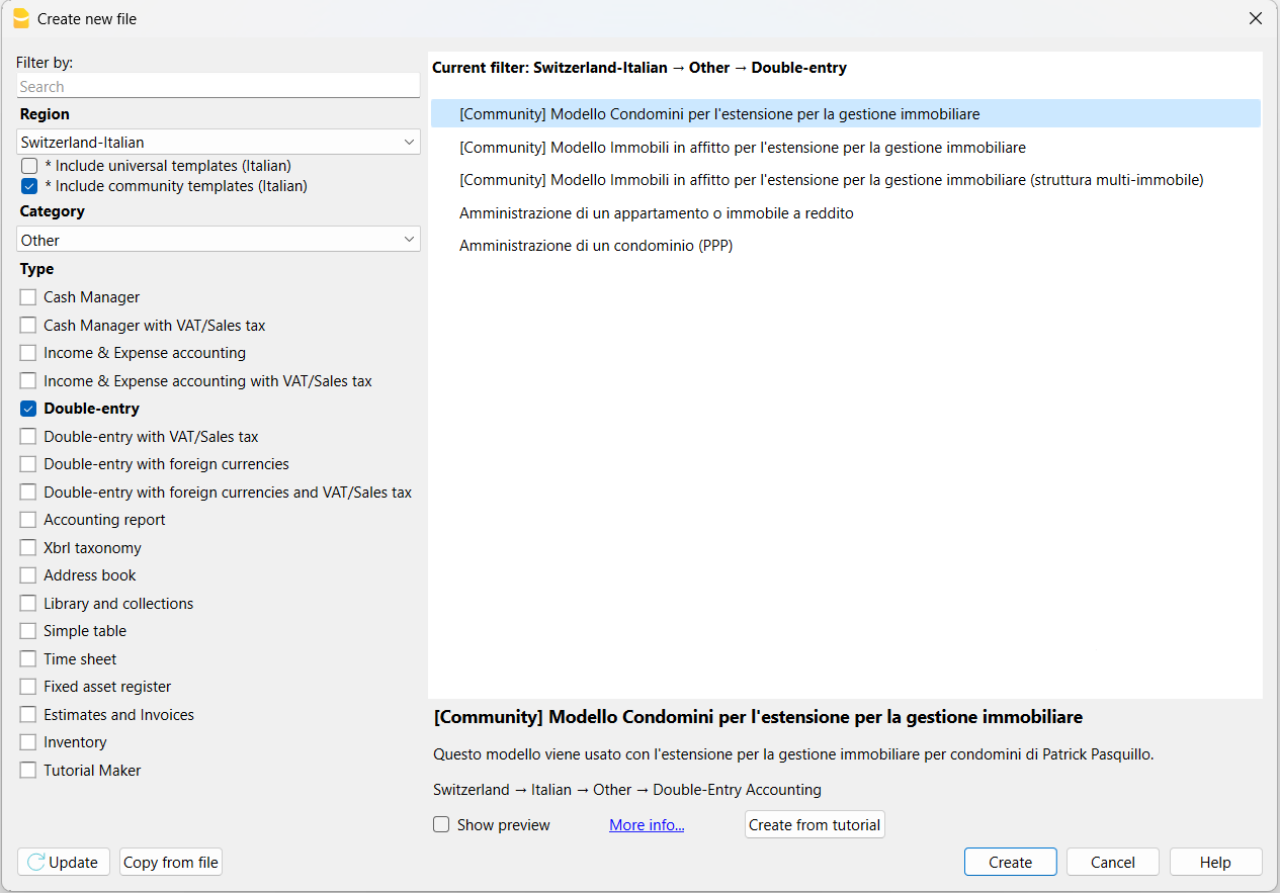
The templates made available in the Community are included in the Banana Template Store and are also visible in the Banana Accounting Plus program from the File > New menu. To see them, make sure you have selected the Include community templates option.
Community Extensions
You can find all the information on the page share your extensions (in English).
How to prepare a template for the Community
Follow the guidelines for preparing templates and, if needed, ask for our support.
When everything is ready, make sure to also send us your authorization to publish the content, by email. See a sample at the bottom of the page.
Guidelines for preparing templates
- Remove initial balances from the double-entry template or the income and expenses template.
- Include sample transactions.
- Anonymize customer and supplier accounts (Customer One, Customer Two, …, Supplier One, Supplier Two, ...).
- Include fictional references in the template headers (e.g., Company SA) and for bank accounts.
- Describe the template from the point of view of a non-expert and, if necessary, instruct the user on how to use it.
- Send us an email and attach the .ac2 file along with the description and/or instructions on how to use it.
We help you create your template
Whatever your idea for a template, we will help you give it the right visibility. We are happy to dedicate our time and resources to assist you in creating and/or preparing the template to publish in the Community. Request our support by email.
Template license
The template can be shared under the Creative Commons 1.0 Universal license, Creative Commons BY 4.0, or Creative Commons BY-SA 4.0.
These types of licenses are used for non-software content and are necessary to ensure the template can be customized and used by other users. They also allow it to be made available to all users online.
- Creative Commons 1.0 Universal: you waive copyright on the template you created and dedicate it to the public domain worldwide.
- Creative Commons BY 4.0: makes the template available with proper attribution, providing a link to the license and indicating if changes were made.
- Creative Commons BY-SA 4.0: makes the template available with proper attribution, providing a link to the license and indicating if changes were made. Any modifications must be shared under the same original license.
Requirements for publication
The only requirement is to have a valid subscription to Banana Accounting Plus. If you also want to become a Banana Partner, you need the Advanced plan.
Sample authorization for publication
Here is the sample email authorization required to publish your content:
"Dear Banana team,
I authorize the sharing of my content under the Creative Commons 1.0 Universal license and the terms and conditions of the Banana Accounting Plus Community.
I attach the necessary files and request their publication.
Best regards."
Sharing extensions with the Community
Follow our guidelines to prepare extensions and don't hesitate to contact us for further support if necessary.
Once you are ready, in addition to the content, please submit by e-mail your authorisation to publish. Please refer to the e-mail template at the bottom of this page required for publication purposes.
What are the extensions
These are extensions of the program's functionalities, for reporting, calculating, exporting, importing, establishing bills and reminders and other. Take a closer look at the Extensions menu.
Extension sharing guidelines
Please make sure that you have:
- Entered the extension attributes for the necessary informations of your extension.
- Inserted descriptive comments within the code.
- Formatted the code visualization.
- Described the extension and its functionality by providing all necessary instructions for its use. Quoted the links to documentation if necessary.
- Sent an e-mail and attached the Javascript files, qrc file, manifest.json file, sbaa extension and the documentation into a zip file.
If your extension only works with a specific template, please refer also to page how to prepare template for sharing. Please also include your template in the zip file.
Helping you share your extensions
Whatever your extension idea is, we help you maximise its visibility. If you wish to participate and publish in our Community, you can choose to have our full support and resources helping you create and/or prepare your extension. Request our support by e-mail.
Extension license
The extensions can be shared with the MIT license, Apache Licence 2.0, GNU GPL v3.0, GNU LGPL v3.0 o GNU AGPL v3.0.
The conditions of this licences require the retention of the copyright and the notice of the licence used.
- MIT License: A short and simple permissive license with conditions only requiring preservation of copyright and license notices. Licensed works, modifications, and larger works may be distributed under different terms and without source code.
- Apache License 2.0: A permissive license whose main conditions require preservation of copyright and license notices. Contributors provide an express grant of patent rights. Licensed works, modifications, and larger works may be distributed under different terms and without source code.
- GNU GPL v3.0: Permissions of this strong copyleft license are conditioned on making available complete source code of licensed works and modifications, which include larger works using a licensed work, under the same license. Copyright and license notices must be preserved. Contributors provide an express grant of patent rights.
- GNU LGPL v3.0: Permissions of this copyleft license are conditioned on making available complete source code of licensed works and modifications under the same license or the GNU GPLv3. Copyright and license notices must be preserved. Contributors provide an express grant of patent rights. However, a larger work using the licensed work through interfaces provided by the licensed work may be distributed under different terms and without source code for the larger work.
- GNU AGPL v3.0: Permissions of this strongest copyleft license are conditioned on making available complete source code of licensed works and modifications, which include larger works using a licensed work, under the same license. Copyright and license notices must be preserved. Contributors provide an express grant of patent rights. When a modified version is used to provide a service over a network, the complete source code of the modified version must be made available.
Publication Requirements
The only requirement is to have a valid subscription to Banana Accounting Plus.
Published extensions on Banana
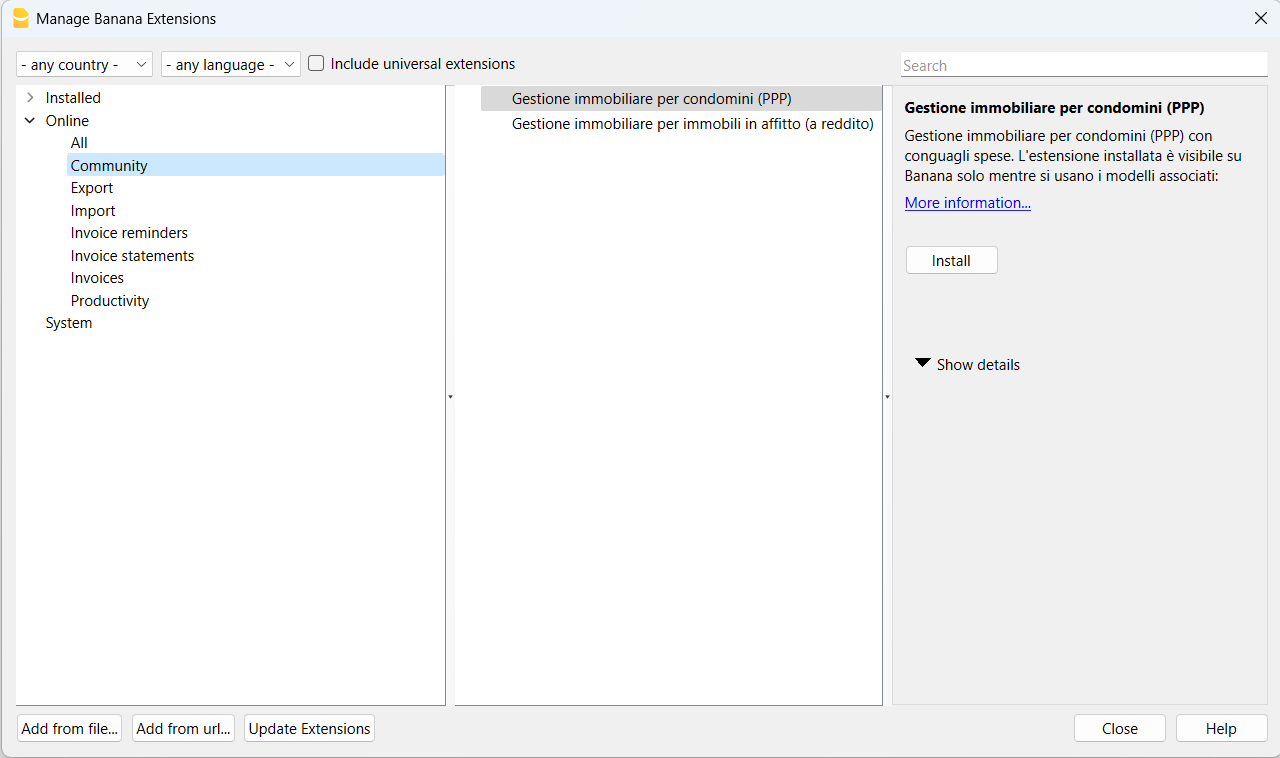
The available Community extensions will be visible from the menu Extensions > Manage Extensions....
In the window that appears, select Online and then the section Community.
Authorisation to publish content
Here is the e-mail permission template needed to publish your content:
"Hello,
I herewith authorise the sharing of my content according to the MIT license and terms and conditions provided by the Banana Accounting Plus Community.
I attach the necessary files requesting their publication.
Best Regards."