In this article
International Non-Profit Accounting Guidance - INPAS Standard Template
The INPAS International standard template for associations provides a comprehensive framework for organizing financial transactions and reporting for associations adhering to international standards.
Open in Banana WebApp
Run Banana Accounting Plus on your browser without any installation. Customize the template, enter the transactions and save the file on your computer.
Open template in WebAppTemplate documentation
[This page is currently being updated]
The INPAS International template for associations provides a comprehensive framework for organizing financial transactions and reporting for associations adhering to international standards.
This chart of accounts template is designed to streamline accounting processes, ensure consistency in financial reporting and facilitate compliance with regulatory requirements. With a user-friendly format and customizable accounts name, associations can efficiently track income, expenses, assets and liabilities, enabling clear and transparent financial management. Whether managing donations, membership dues or program expenditures, this template offers flexibility and adaptability to suit the unique needs of diverse associations while promoting transparency and accountability in financial operations.
This template was originally developed using draft INPAS guidance and should be reviewed against the final 2025 edition of INPAS.
The NPO is responsible for ensuring that its financial reports comply with all applicable INPAS requirements. Using the template alone does not guarantee compliance.
Banana Accounting+ provides the accounting information needed to prepare the Statement of Financial Position and the Statement of Income and Expenses.
The Excel template supports the preparation of the remaining financial statements and explanatory notes. The narrative report can be prepared separately, for example in Word, but must be included as part of the NPO's general purpose financial report to declare full INPAS compliance.
Create your file
- Create a new file, starting from this template (Template ID +11255), using one of the methods explained.
- With the command File → File properties, set the period, the association name and the basic currency.
- With the command File → Save as, save the file. Enter the association name and year in the file name.
For example "no-profit-2024.ac2".
See also Organize accounting files locally, online or in the cloud
Customize the Accounts table
Once you have entered the transactions, you can check the Accounts table. You will have an overview of your assets, liabilities, income and expenses, which allows you to keep your balance under control.
Customize the Accounts table to suit your needs: you can add, delete and edit accounts, groups or descriptions.
Enter Opening Balances
In the Opening column enter the opening balances of the Accounts. Negative asset account amounts are entered with a minus sign in front.
Enter the balances of the previous year
INPAS requires comparative financial information for the previous reporting period.
To enter the previous year's balances in Banana Accounting+, go to the Previous view and enter the amounts in the Previous Year column. Ensure that comparative information is also included in the other required financial statements and related notes.
Enter the Transactions
Register the accounting transactions in the journal. Enter the date, the document number and the description. Enter the destination account into the Debit account column, and the account of origin in the Credit account. Then add the amount.
You can modify the journal at any time.
Manage funds, grants and donations, project and operating expenses
Under INPAS, the NPO must identify its funds and classify them as restricted or unrestricted. Each fund may relate to a specific project or another purpose.
Income, expenses, non-financial assets, non-current liabilities and assets or liabilities relating to delivery obligations must be tracked by fund. Other current assets and liabilities must also be tracked where available without undue cost or effort.

Manage grants and donations in the Income Statement.
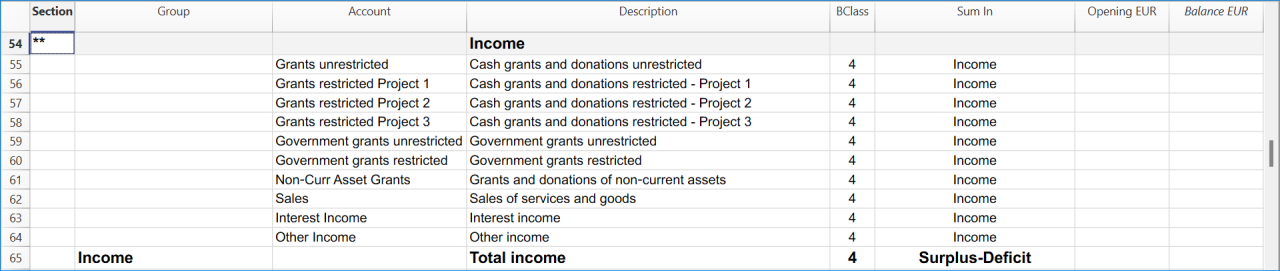
Manage projects expenses and operating expenses in the Income Statement.

Recording transactions by fund
Under INPAS, the organisation must identify and track its funds. In this Banana Accounting+ template, funds are defined as segments (:Fund A, :Fund B, :Fund C), projects are tracked through cost centres CC2, and donors through cost centres CC3.
In the Transactions table, add the fund segment after the account code. In the CC2 and CC3 columns, enter the cost centre name without its leading punctuation.
Receiving a restricted donation without delivery obligations
A donor contributes EUR 1'000 to Fund A for Project 1. The donation has a restriction on its use but no enforceable delivery obligation. It is therefore recognised as revenue when received:
- Date: 2024-01-15
- Description: Fund A restricted donation without delivery obligations
- Debit account: Bank:Fund A
- Credit account: Grants restricted Project 1:Fund A
- Amount: 1000.00
- CC2: Project 1
- CC3: Benjamin Foster
Paying expenses for Fund A
The organisation pays EUR 300 for costs incurred in Project 1:
- Date: 2024-01-22
- Description: Fund A project expense paid by bank
- Debit account: Expenses Project 1:Fund A
- Credit account: Bank: Fund A
- Amount: 300.00
- CC2: -Project 1
The income of EUR 1,000 and the expense of EUR 300 result in a surplus of EUR 700 attributable to Fund A.
Receiving a grant with delivery obligations
The organisation receives EUR 800 in advance for Fund B. The grant agreement contains clearly defined, enforceable and measurable delivery obligations that have not yet been fulfilled:
- Date: 2024-02-05
- Description: Fund B advance subject to enforceable delivery obligation
- Debit account: Bank:Fund B
- Credit account: Grant oblig. liability:Fund B
- Amount: 800.00
- CC2: Project 2
- CC3: Olivia Reynolds
The amount is initially recognised as a liability, not revenue. Revenue is recognised when or as the relevant delivery obligations are fulfilled.
Checking and reporting fund balances
Use the accounting reports subdivided by segment to analyse transactions attributed to each fund. The balance displayed on an individual segment account card is not necessarily the fund's net asset balance: when the same segment appears on both sides of a transaction, its movements can offset each other.
The restricted fund balances in the Statement of Financial Position must be reconciled with opening balances, income, expenses, other changes and permitted transfers. Additional fund information must be disclosed in the notes to the financial statements, as required by INPAS.
A restriction on the use of a donation does not automatically create a liability.
Get the Statement of Financial Position and the Income Statement
At any time of the year you can create your Balance sheet, which is a financial report of your assets, liabilities and equity and the Profit and Loss statement, which includes income and expenses. You will achieve optimal reports because you can always modify the data until they are perfect. You have the possibility to print out your statements or save them in PDF format.
Complete the documentation using the Excel Template
After preparing the Statement of Financial Position and the Statement of Income and Expenses in Banana Accounting+, use the Excel template to complete the additional financial statements and explanatory notes.
The NPO must ensure that all applicable INPAS requirements are met before declaring compliance with the Standard.