The guiding principles of Banana Accounting
When you start looking for accounting software, you are faced with a sea of possibilities: from completely “do-it-yourself” Excel solutions, to complex management systems designed for large companies, to many intermediate options. It is normal to feel a little disoriented.
With Banana Accounting we want to make this choice much simpler and more reassuring.
Our software has been designed to be:
Easy to start with: the table-based interface is simple and easy to understand, similar to an Excel spreadsheet, therefore familiar and immediately intuitive even without advanced accounting knowledge.
Clear and readable: data is always presented in an organized and transparent way, so you always know where you are and how to proceed. See how the program works, so you can understand it and have full control of your activity.
Flexible and adaptable: with a modular software, you can start small and expand the features as your business grows.
Free and without constraints: your data always remains accessible, exportable and editable. If one day you want to switch to other solutions, you will not encounter barriers or limitations.
In other words, Banana Accounting not only simplifies the start of your accounting management, but also accompanies you throughout your growth journey, leaving you the freedom to always choose the best path for you.
Useful links
Table-based interface
In Banana Accounting Plus the data is entered and displayed in tables. This interface, inspired by Excel and faithful to the centuries-old accounting tradition, is extremely intuitive and productive. In all areas of the program, for the Chart of Accounts, the Transactions, the Budget, the Exchange, the VAT Codes and also to view the Account Cards, the table system used is always the same.

The typical Excel interface gives the user numerous advantages to optimize their work.
Easy data entering
Everything is very intuitive, because you are able immediately to see what you have to do and where to enter the data. You can move around freely to enter, make changes and delete data at any time. During the input, the program also suggests values based on the text you typed in, or you can put it on hold to complete the work later.
Fast data entering
The cells allow instant data entry, which can be copied and pasted to speed up the work even more. With the suggestion of the values to be entered, auto-completion is available, which offers the possibility to choose a value already used previously for example.
Secure data
The user is always sure that the data entered is correct, as he will find tables readily prepared uniquely for data types and with the integrated formulas. In case you enter wrong values, the program will signal the error with a text warning message, so the user understands where he has made a mistake and can immediately correct it.
On-line interface use including heuristic principles
This high productivity and ease of use is the result of a scientific approach to improving user interaction. In the early nineties a group of researchers led by Jackob Nielsen, developed the 10 heuristic rules for the interface design. These principles have become and remain the reference point for the creation of software, websites and apps.
Banana Accounting is the only software that meets all 10 rules and that is why it is easy to use and highly productive. Below these principles and how they are implemented in Banana Accounting are presented.
1. Visibility of system status
“The system should always keep users informed about what is going on, through appropriate feedback within reasonable time.”
- If you add or delete a line, change the format, the color, you will instantly see the result of the operation.
- When you resume accounting, or you are interrupted by the phone, you immediately see what the last recorded entry was.
- The calculations (account balances and others) are updated and visible immediately.
- Multiple windows can be displayed simultaneously.
- The preview window does not block the use of the program, it can be kept open in parallel.
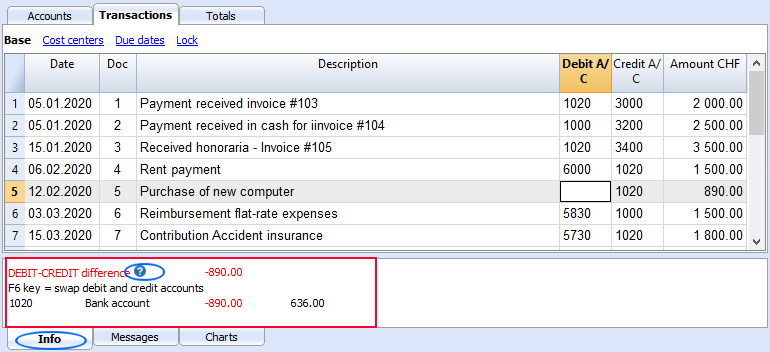
- In the Info window below, you will find additional information about the transaction, account or other on which you are positioned.
- In the Graphs window, you can see the evolution of the account balance on which you are positioned. If the cash drops below zero, you will be able to notice it immediately.
2. Match between system and the real world
“The system should speak the users' language, with words, phrases and concepts familiar to the user, rather than system-oriented terms. Follow real-world conventions, making information appear in a natural and logical order.”
The spreadsheet was created for the world of accounting. It is the native mode of accounting (Cash book, Accounts list).
- Entering data in the table leads to an immediate change in status. Everything is updated immediately accordingly.
- The Transactions table contains all movements, exactly as expressed in the accounting.
- The Accounts table contains and displays the Balance Sheet and the Profit/Loss Statement, with accounts and groups, and the related updated amounts, complete with balances, movements, budgets or discrepancies.
3. User control and freedom
“Users often choose system functions by mistake and will need a clearly marked "emergency exit" to leave the unwanted state without having to go through an extended dialogue. Support undo and redo.”
Within Banana Accounting, the user has full control and freedom:
- You choose the sequence in which you wish to work freely.
- You will never be hindered by the system and can change or suspend your work whenever you need or wish to.
- You can navigate freely within the table and add or change any information.
- You can switch from one table to another.
- You can switch from one file to another.
- Operations can be canceled or restored; you can also decide to not save the file if you notice that the work done does not satisfy you.
- Any dialog and procedure can be interrupted with the Esc key..
- You can protect your data:
- Protect any row from being modified.
- Lock the rows of the Transactions table with blockchain.
It complies with requirements for the accounting data conservation and will prevent ill-intentioned persons from interfering with your accounts, without your knowledge.
- Decide where to save your files.
All accounting data is saved in a file, with a user defined name and can be copied, moved, sent by email, saved to a network or cloud drive, such as is most useful to you.
4. Consistency and standards
“Users should not have to wonder whether different words, situations, or actions mean the same thing. Follow platform conventions.”
Banana Accounting aims to be consistent throughout.
- The mode of use of spreadsheets is kept consistent.
- The interface and the commands conform to Microsoft Excel and Office, reference programs in the administrative field..
Being familiar with that software will put you at ease immediately, the main commands and operating methods are as similar as possible. - In dialogues and other interactions, graphics and logic specific to the operating system in place are used.
- "Compositions" will allow you to save and use setups in a standardized form.
- We aim to maintain continuity from one version to the next. New designs are only put in place if they are considered effective and provide benefits.
5. Error prevention
“Even better than good error messages is a careful design which prevents a problem from occurring in the first place.”
Banana Accounting connects the data structure and the display functions and there is help while inputting rows.
- Columns and Rows will make it clear, which information is to be inserted.
- When in editing mode, the program will propose a list of suggestions, so as to avoid input mistakes.
- In the date column, when only the day is entered, the program will suggest the complete date of month and year based on the previous registration.
- In the document column, the program indicates the following number, regardless of the numbering convention used.
- In the account or code column, existing ones will be displayed and will also allow you to search via entering the description.
- The description column will display texts already used, which can be reused, along with the rest of the transaction.
6. Recognition rather than recall
“Minimize the user's memory load by making objects, actions, and options visible. The user should not have to remember information from one part of the dialogue to another. Instructions for use of the system should be visible or easily retrievable whenever appropriate.”
With Banana Accounting, as with spreadsheets, it is quite clear what should be done by you and how to proceed.
- To add a transaction, an account or a group, a row is added.
- To delete a transaction, an account or a group, the row is deleted.
- To format, change color, copy and paste data, select the zone first and then click the command.
- All commands are visible in the context menu, the top menu or the toolbar.
- Account numbers or other values to be entered are suggested when in modification mode (see previous post).
7. Flexibility and efficiency of use
“Accelerators — unseen by the novice user — may often speed up the interaction for the expert user such that the system can cater to both inexperienced and experienced users. Allow users to tailor frequent actions.”
There are several options for advanced users to work faster:
- You may use Key shortcuts.
- There are contextual commands that automate a certain number of operations (such as reversing debit and credit account allocation).
- You may apply the commands (copy, paste, delete, format) to a whole selected area. Other accounting programs generally allow you to work on one line at a time only.
- Pick up rows of recurring transactions.
- Row settings for recurring transactions.
- "Compositions" to set and save report settings and other commands.
8. Aesthetic and minimalist design
“Dialogues should not contain information which is irrelevant or rarely needed. Every extra unit of information in a dialogue competes with the relevant units of information and diminishes their relative visibility.”
Banana Accounting was and is conceived to generate accounting files that adhere to regulatory requirements and will contain only related necessary data.
- Your accounting can be created with only the required options. Functions such as VAT, multi-currency, cost and profit centers, segments, are not present if not necessary, but can be activated selectively when needed.
- Your spreadsheet can be customised. You may hide columns that you do not need.
- You can create different views of the columns, in order to access them when and how it is most suitable to you.
9. Help users recognize, diagnose, and recover from errors
“Error messages should be expressed in plain language (no codes), precisely indicate the problem, and constructively suggest a solution.”
Banana Accounting has several ways to allow the user to notice any errors or problems:
- Error messages, well described, when you enter or effectuate an incorrect operation.
- Errors or warnings are highlighted in color of the row concerned
- Explanation of the error in the Info window.
- "Check Accounting" command, to recalculate and check all data entered and signal any errors or problems.
- Window displaying the list of all messages, allowing you to locate the row in which the error occurred.
10. Help and documentation
“Even though it is better if the system can be used without documentation, it may be necessary to provide help and documentation. Any such information should be easy to search, focused on the user's task, list concrete steps to be carried out, and not be too large."
- Each error message has its dedicated documentation page, reachable at a click, complete with causes, solutions and links to information pages, which will help you solve your problem.
- When you are using the table, the help command will lead you directly to the relative Help page of the application and the data table.
- Each dialogue has a help button that leads to the specific help page.
- There is a complete and very comprehensive documentation, structured according to the logic of the program and with links to all the related topics.
- Beside this documentation, there is an index that will allow you to understand it's structure and to move around it easily.
- Dialogues created through program extensions written in Javascript, also link to specific help pages.
Accounting software similar to Excel
Over 30% of small companies still use Excel to do simple accounting. Banana Accounting software is an optimal compromise solution between Excel and accounting softwares, because they take from both the most useful and suitable features for accounting. They don't replace Excel, but they enhance and complement it.

Easy, fast and secure data entering
Banana Accounting has the typical Excel interface, which allows you to enter data very quickly and makes the work very intuitive. The user doesn't have to make any complicated setup. The big advantage compared to Excel is that Banana Accounting is ready to use, with the formulas already integrated. When you create a new file you have the table for entering the chart of accounts, for entering the accounting and forecasting transactions, with all the columns already configured.
It is also possible to import bank or credit card transactions, also linking them to digital receipts.
You can modify and cancel transactions at any time. When you have finished and verified the transactions you have the possibility to protect the movements with the blockchain, so that the accounting data complies with regulations.
Financial forecasting and accounting
Banana Accounting allows you to manage financial forecasts (generally made with Excel) and accounting (generally made with accounting softwares). Having "all in one", the management is simpler, faster and you have a more effective control of your business.
Instant results
Banana Accounting is made up of several tables, already linked together. This synergy allows, when entering data, to have automatically the updated results. For example, when you enter transactions, in the Accounts table you can immediately see the new actual or forecast balances. The instant results allow you to have everything under control at any times and to take effective decisions about your financial situation.
Comprehensive and professional reports
Banana Accounting automatically provide several professional accounting reports with accounting data, forecast data or both together. They include for example the balance sheet, income statement, journal, account cards, liquidity plan, invoices and VAT statements.
Planning-Executing-Controlling - integrated method
To carry an activity to it's successful conclusion, you must first of all plan it, then implement and constantly check how it's execution proceeds and make the necessary corrections. This methodology is used for all kinds of project managements as well as in business management for any company, that wishes to expand it's business, needs to rent new space, hire staff, buy equipment, materials and much more. All these activities require planning, implementation plans and constant monitoring of the execution process.

Planning-Executing-Controlling
Planning-Executing-Checking, a method devised by Banana.ch, is unique and innovative because it includes the financial aspects and not only to the economic ones. Every company, that wants to be successful must not only evaluate it's profitability, but also the availability of liquidity and other means of its own to achieve its objectives without incurring the creation of debt.
Banana Accounting is the first program in the world that makes use of this methodology, by integrating all data into one single file based on the same Chart of Accounts, with no need for any additional tools. At the user's choice, the same file may be used, to either prepare the budget, or keep the accounts or to manage both, allowing for a vision of the past, present and future.

Start - Create the file according to your needs
In order to start your work with this innovative method of Banana Accounting, you create the file during the starting phase: choose your type of accounting and a ready set up template that matches the characteristics closest to your requirements.
This will provide you with a tailor-made accounting, including only the functions you need and without any unnecessary complications.

Start - Customize the file
The Chart of Accounts can be adapted to your needs at any time, by changing descriptions, adding or deleting accounts and groups. The mode of use will always be the same, and therefore other Tables can be easily adapted accordingly.

Entering accounting and forecasting movements
Once the file is created, you can choose to keep the Accounts, Budget, or run both. In Banana Accounting everything occurs in the Transactions table, where the movements relating to the operations carried out are entered, and in the Budget table, where the forecasted movements are entered. You are working in real time and may freely copy, paste and correct the data according to your needs. Data integrity is guaranteed thanks to the blockchain system which, if activated, locks recordings with digital seals.
Both the accounting part and the financial budgeting part are based on the double-entry method: for each revenue, expense, investment or other, the destination and source for and of the financial means are indicated.
This innovative approach is much more efficient, because it allows to account for all the events that are expected in the future, both capital and economic ones. Your efficiency will be enhanced towards using other tools, since data are always in line and no longer need to be imported and / or exported.

Bank statements are made available in electronic format, which makes it possible to automate and speed up their insertion in your accounting, via importing data. Most of the information is automatically retrieved and you just have to check that the data has been imported correctly, completing some information.
Instant results
All data are updated instantly. Your entire past, present and future situation is at your disposal at a glance. In the Accounts and Categories tables your account balances, the profit and loss and also the estimate values are displayed. In the info window you will have the updated account balance graphs and also the evolution graphs.
Comparison of data will allow you to understand how the business evolves and what steps you need to take to improve the situation if objectives have not been achieved. If certain expenses or revenues have been incorrectly budgeted, it is possible to modify them in the budgeting to run forecasts that are always updated and in line with the financial and economic reality of the company.

Comprehensive professional reports
The reporting and control phase has also been standardized, making the same reports available for the budgeted data, for the final balance and the combination of both, and it is also possible to compare the evolution of the data for a single month, quarter or year. There are various types of reports for tax and or management purposes that are automatically generated from the data entered.
Management reports

Automation reports

Data can be exported to allow for further analysis with other calculation software, such as Excel.
Banana Accounting equally allows you to program Extensions to automate certain functions or to generate additional reports. Both forecasting and accounting data can be further enhanced in this way.
Modular Custom Accounting
With Banana Accounting, getting started is really easy because you just have to choose the template: when you open it, the accounting is already set up with what you need. Generally, it's enough to slightly adapt the chart of accounts to start entering the transactions right away. Balance sheet, income statement, and many other reports are instantly ready.
The creation of templates designed to meet different types of users is possible only because Banana Accounting is a modular financial management software. This means you can create customized accounting setups by combining components as needed, with a high level of detail.
This major difference from other ERPs on the market allows Banana Accounting, for example, to set up accounting using either the double-entry method or the income and expense method. You can include VAT management, multi-currency, etc.
Start from a predefined template
The predefined templates in Banana Accounting are created by our specialists and designed for specific uses. Banana Accounting includes a wide range of ready-to-use templates, developed for various fields and compliant with the regulations of different countries.
You can view and search the available templates:
- From the File menu > New command
See the list of all templates divided by type of accounting and region. - In the Template Section on the Banana Accounting website.
You can start right away by choosing the template that best suits your needs: you can always adapt it by adding new features or removing those you don't need.
Double-entry or Income/Expense accounting
Like all professional accounting software, Banana Accounting is also based on the double-entry accounting system, which is the global standard and suitable for use in any context.
However, Banana Accounting also offers the option to use Income and Expense accounting, which is more intuitive for those without accounting knowledge. This method replaces the concepts of Debit and Credit with the more familiar terms of Income and Expenses. It is simply a more visual and easier approach, but the internal calculation engine remains the same, allowing you to generate professional reports and results similar to those of double-entry accounting.
Suitable for every need
In Banana Accounting, the data for each fiscal year of an activity is contained in a single file: you can manage an unlimited number of accounting files, each configured for different needs. This way, you can manage business accounting, personal finances, or act as a treasurer for your association. Or, if you're a professional, you can manage the accounts of several clients with a single subscription.
The modularity of Banana Accounting is the key element that makes it extremely easy to use, and that sets it apart from monolithic accounting software, designed only for large companies and packed with mandatory bundled features.
The modularity of the software results in its great flexibility, characterized primarily by the ability to adapt the chart of accounts and the grouping system. You can manage accounting for businesses, non-profit organizations, public entities, individuals, projects, etc.
The software can easily be adapted for use in different countries. When creating an accounting file, you can choose the language, the number of decimal places, and of course the currency.
Multiple application fields
Banana Accounting is a software similar to Excel, designed for individual use, where the user has maximum operational freedom. You can manage as many accounting files as you want, but it is not possible for multiple people to work simultaneously on the same file. Its use is therefore particularly suitable for situations where one or a few people manage the accounting. It is ideal for:
Managing cash book and monitoring cash and bank accounts
Small businesses and entrepreneurial activities
Associations and non-profit organizations
Individuals
Accounting training
Thanks to its modularity and flexibility, it also proves to be a very useful tool for:
Offshore accounting
Management of entities in different jurisdictions, multi-currency and multi-file; allows for maintaining separate and secure accounting records, with customizable reports and no extra costs for each entity.Forensic accounting
Investigative analysis of records and transactions; allows you to import data, verify imbalances, and easily reconstruct flows, with the transparency of the spreadsheet format.Real estate accounting
Management of multiple properties and units; allows you to create separate accounts for each property and obtain immediate reports on profitability, expenses, and condominium statements.Pension fund or financial entity accounting with securities
Monitoring of investments and assets; allows you to manage multi-currency portfolios and value financial instruments with great flexibility.Project accounting
Allows project managers to collect transactions and prepare budgets, with more detail and greater control.Cost and departmental accounting
Allows department managers to collect transactions and prepare budgets with more detail and greater control. The data can then be consolidated into the central system.Small distributed accounting systems integrated into a central system
Branches, local associations, or remote offices; allows local accounts to be managed independently and then easily integrated into consolidated financial statements.
Available components
Banana Accounting offers various modular functions:
- Choice of accounting method, double-entry or income and expense
Simpler for beginners or more formal for those familiar with double-entry. - With or without VAT management
You can work without VAT or activate it and manage registers, rates, and declarations. - With or without multi-currency accounts
Manage multiple currencies in parallel, useful for businesses with foreign clients or suppliers. - Accounting decimals
You can go up to 20 decimals: ideal for cryptocurrencies and minimal currency fractions. - Choice of accounting period
Freely set the fiscal year or custom periods for your business. - Accounting language
Choose the accounting language independently from the interface language. - Add new columns and change table views
Customize tables and views by adding columns, filters, and layouts as needed. - Chart of accounts and grouping setup
Adapt your chart of accounts and structure the groupings as you prefer. - Customizable reports
Generate custom financial statements and reports with configurable filters and settings. - Balance sheet reclassification
Create alternative balance sheet layouts for different financial analyses. - Cost and profit centers
Track expenses and income by projects, departments, or specific activities. - Segments
Add extra levels of analysis to better detail accounts and transactions. - Customer management
Organize deadlines, receivables, and outstanding invoices for each customer. - Supplier management
Monitor payables and payments to your suppliers. - Transactions table with quantities and prices
Link quantities and prices to each transaction, useful for small sales or inventory. - Items table
Manage a list of items with descriptions, prices, and codes, ready for invoicing. - Budget, financial and liquidity planning
Set annual or monthly budgets and compare them with actuals to plan income and expenses and monitor cash flow evolution. - Invoices from transactions
Automatically generate invoices from accounting transactions. - Securities management
Record and monitor investments, stocks, bonds, or other financial instruments. - Certification and transaction locking
Certify and lock transactions to ensure legal data validity. - Extensions
Add extra features (electronic invoicing, reports, printouts) via dedicated extensions.
Different types of components
From a technical point of view, the ability to create customized accounting by choosing its elements is achieved through different technical approaches.
The standard and recommended approach is to start from a predefined template and eventually adapt it.
Of course, it is also possible to start from a completely empty accounting file, but this is rarely done.
Choosing the accounting application
When creating a new accounting file, the first step is to choose the accounting application, among:
- Cash Manager (Cash Book with or without VAT)
- Income / Expense Accounting (with or without VAT)
- Double-entry Accounting (with or without VAT)
- Double-entry Accounting with multi-currency (with or without VAT)
If instead you choose to start from an empty accounting file, you will need to specify:
- The number of decimals for amounts in base and foreign currencies
- The rounding method
- The accounting language
This is a fundamental choice, because these settings cannot be changed later. If the settings of a template are not suitable, or if you want to switch to a different type of accounting, you can use the Tools menu > Convert file to new.
- This command creates a new accounting file with the desired settings.
- All data from the original file is transferred.
However, caution is needed: for example, if you convert an accounting file with VAT to one without VAT, all VAT data will be deleted.
Customizing the chart of accounts
Banana Accounting allows you to customize the chart of accounts by adding numeric or text-based accounts.
Usually, you start from the existing structure and then add the necessary accounts and remove the unnecessary ones. This adjustment can be made at any time.
The Accounts table also includes groups, with a multi-level grouping system that allows you to create any type of balance sheet and income statement structure.
Templates specific to a country usually also include a predefined VAT Codes table, which can also be customized.
The Exchange Rates table can also be customized with the desired currencies.
Using predefined but hidden features
When accounting files are created, there are included features that are normally not visible.
You usually need to make the columns visible using the Data > Columns setup menu command, in order to enter the desired values.
- Cost and profit centers
- Segments
- Notes, Exchange Rate Date columns
- Linking to external documents
- Customer and Supplier management – relevant accounts and groups need to be set in the chart of accounts.
- Invoice printing – Allows printing invoices directly from transaction rows. You must first set up the group and customer accounts.
With the Columns setup command, you can view all the available columns in the table and add new ones to enter additional information.
Possibility to Add New Features
With the Tools > Add/Remove functionalities menu command, you can activate other features. These commands usually add columns or tables already configured for a specific purpose.
- Address columns in the Accounts table
To use accounts also for customers and suppliers, print invoices, or other purposes. - Budget table
For managing financial planning. - Item, quantity, and price columns in transactions
To manage quantities, useful for handling invoices and securities. - Items table
To manage a list of items, useful when issuing invoices.
Also used for integrated securities management. - Simple table
Customizable, useful for managing notes, projects, or others. - Documents table
Allows adding image files (e.g., for logos) or Javascript and CSS files used in extension development or invoice customization.
Extensions
Extensions (or Plug-ins) are Javascript programs that extend the functionality of Banana Accounting.
Extensions are often used together with other customizations. For example, the "Cash Report for ETS" extension requires the chart of accounts to be set with specific groupings. The "Donors" report requires specific cost centers to be used. The Securities Management extension requires the Items table to be present.
Extensions are divided into:
- General extensions – For report creation and input of additional data.
- Data import extensions for accounting – For example, to import bank CSV statements.
- Invoice printing extensions – Scripts for printing invoices.
Extensions must first be installed:
- Extensions available on the Banana Accounting website
From the Extensions menu > Manage extensions command, you can view all the extensions already prepared for different uses.- Extensions usually must be installed manually.
- Some extensions, however, are already linked to specific templates and are installed automatically when the file is opened.
- Extensions are updated automatically when new versions are available.
- Extensions developed directly
- Embedded Extension – The Javascript code is saved within the Documents table.
- Local Extensions – Stored locally.
- Packaged Extensions – Packages that contain a set of features. Generally, the extensions available in the store are packages.
Switching to other accounting software
Banana Accounting is one of the easiest professional accounting software to get started with: an intuitive and flexible tool that adapts to your needs and grows with your business.
But it’s also the kind of software that, should you one day need a more structured solution, allows you to migrate without difficulty. With Banana, you’re never locked in: you can start worry-free and stay free to choose.
Many users gratefully tell us how Banana Accounting helped them start and manage their business in the early years. We are proud to have contributed to the success of so many businesses and individuals, and we’re happy to see them grow and reach even more ambitious goals.
Easy migration from Banana
There are several reasons why switching from Banana Accounting to another program is simple. Here are the main ones:
- Your data always stays with you
With Banana Accounting Plus, all your accounting data belongs to you and remains in your possession at all times. The files for the accounting(s) you manage—both for the current year and all previous years, including receipts and other information—are saved on your local devices or your cloud (OneDrive, iCloud, Google Drive, DropBox, etc.). Even when your Banana Accounting Plus subscription ends, everything remains in your possession, with no special actions needed.
With cloud-based accounting software, the situation is very different: as soon as you stop paying the subscription, you lose access to your data. To comply with data retention obligations, you need to download everything. This makes switching to other solutions much more difficult. - Software always accessible, even after the subscription ends
Thanks to the Free plan of Banana Accounting Plus, available to everyone, you can always open your accounting files and view the chart of accounts, transactions entered, etc. (any printouts will have a watermark). Your access to data is always guaranteed. - Easy export
You can easily transfer data from Banana Accounting Plus to the new software, either by simply copying and pasting from the chart of accounts or transactions, or by exporting the data in various formats, including Excel. - Knowledge that stays with you
Banana Accounting Plus is a professional software that helps you understand the logic of accounting programs, especially double-entry accounting. This makes it much easier to switch to other solutions, since they all follow the same method. - Structured chart of accounts
With Banana Accounting, you can immediately set up a chart of accounts tailored to your company’s accounting and tax needs. If you switch to another solution in the future, you can directly import this structure (if supported), or at least you will already have a clear model of your requirements—an important advantage for making onboarding with the new software faster and easier. - You can start using the other software
With Banana Accounting Plus, you can easily use another software alongside it. You can export the data to test it in the new program while continuing to work in Banana. When you're ready to fully transition, you just need to export the updated data again.
Things to consider when changing software
Switching accounting software always requires some effort and a period of training. Here are some helpful points:
- The right time to transition
You can switch software at any time, but it’s usually easier at the beginning of the year: close the current fiscal year with your current software and start the new year in the chosen one. - Transition period
Plan for a period of overlap. If you transition during the year, continue keeping accounts with your current software until you're sure the new system provides all necessary printouts (financial statements, VAT Report, management control reports). - Check the features
Before switching, check if Banana Accounting already offers what you think is missing—you might avoid migrating altogether. - Move towards double-entry accounting
If you're using Income and Expense accounting and your needs are growing, consider switching to double-entry accounting as a first step. - Don’t take anything for granted
Banana Accounting is flexible and fast—don’t assume other software will have the same functions. Make sure the new program covers both what you’re missing and what you’re used to. Identify the features truly critical to your business and test them before making the final switch.
Fast data entry and validation
In Banana Accounting Plus you will find many features designed to speed up data entry, automate repetitive tasks, and minimize errors.
Each tool is designed to make accounting management simpler, more efficient, and more secure.
The functions are divided into two main categories:
Data entry and editing
Copy, cut and paste
You can copy, cut, and paste data from one cell, row, or table to another, even between Excel and Banana, quickly and safely.
These functions are available in the Edit menu.
Input and shortcut keys
You can speed up data entry using various shortcut keys or by entering a dot "." which performs different functions depending on the column you are in.
Here are the most common ones:
- In the Date column, the dot "." enters today's date.
- In the Time column, the dot "." enters the current time (for example in the Timesheet).
- The F4 key (or Cmd+4 on Apple computers) copies data from the cell above.
You can see the full list from the Help > Shortcut keys menu.
Auto-completion when writing texts, accounts and amounts
Auto-completion automatically suggests texts, accounts or VAT codes previously used. Just type the first characters and confirm with Enter, Tab or F6 to quickly fill in the cell. You can enable or disable the function from the Tools > Program Options > Editor menu.
- Enter key accepts the choice and moves to the next editable cell, either to the right or below, depending on the settings.
- Ctrl + Down Arrow accepts the selected value and moves to the cell below.
- Tab key accepts and moves to the cell on the right.
- Shift + Tab key accepts and moves to the cell on the left.
- F6 key (or Cmd+6 for Mac) accepts the text and executes the associated command (see explanation below).

Note:
To disable auto-completion from the previous year, you need to deactivate the Smart fill with previous year's transactions option from the File menu > File Properties > Options.
Recurring transactions
From the Actions > Recurring Transactions menu you can save transactions that repeat (rent, salaries, subscriptions) and insert them automatically into the Transactions table when needed. It saves time and reduces errors.

Import transactions from bank statements
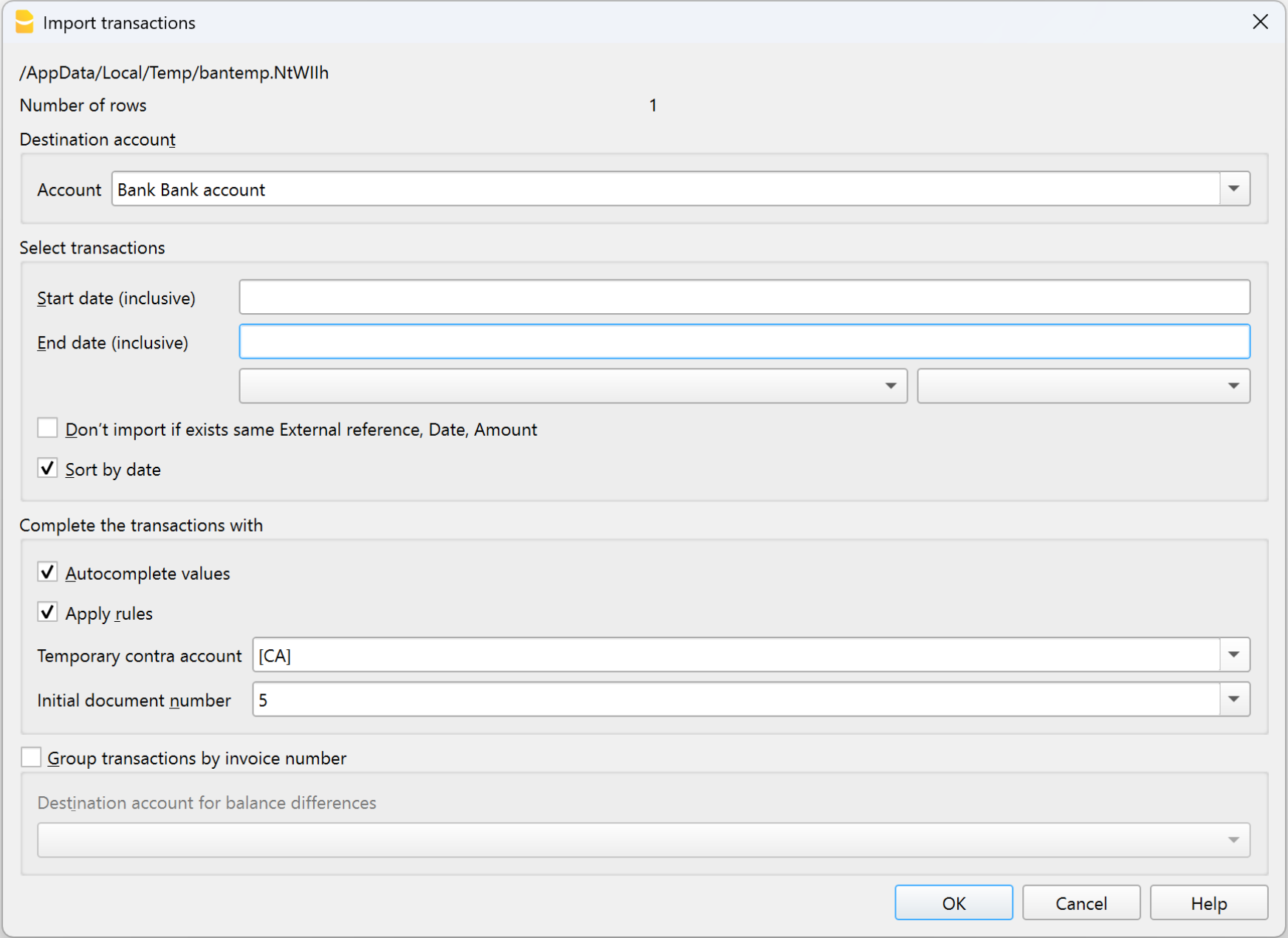
Automatically import your bank, postal, credit card or PayPal transactions into the Transactions table, avoiding manual entry.
- CSV and ISO 20022 (camt.53) formats are supported.
- After importing, just add the account and your accounting is immediately updated.
Completion rules
With Completion rules, you can fully automate the entry of imported transactions. The program recognizes the transaction description and automatically fills in the account, VAT code, and amount. Perfect for those who regularly import statements and want ready-to-go accounting without manual input.
Rules are only available in the Advanced plan.

Integrated calculator
In any Amount-type cell, you can type formulas (e.g. =100*1.07) and press Enter: Banana will automatically calculate the result and insert it into the cell.
A quick way to do immediate calculations without opening external tools.
Copy total
This feature allows you to copy to the clipboard the sum of the selected cells in the Transactions table: just select the amount cells you need, click on “Sum” at the bottom next to Zoom, and paste the result where you need it.

Run command (F6 key)
The F6 key (or Cmd+6 on Mac) performs contextual actions related to the active column, such as:
- recalling a recurring transaction,
- auto-completing a previously used text,
- inserting a progressive number.
You will find all options in the Edit > Run command menu.
Word wrap
If a text is too long, you can view it entirely using Format > Row height auto-adjust, which automatically adjusts the row height to display all content.
Most commonly used functions for checking and detecting errors
Below is a list of the main functions for checking and reporting errors.
Balance column
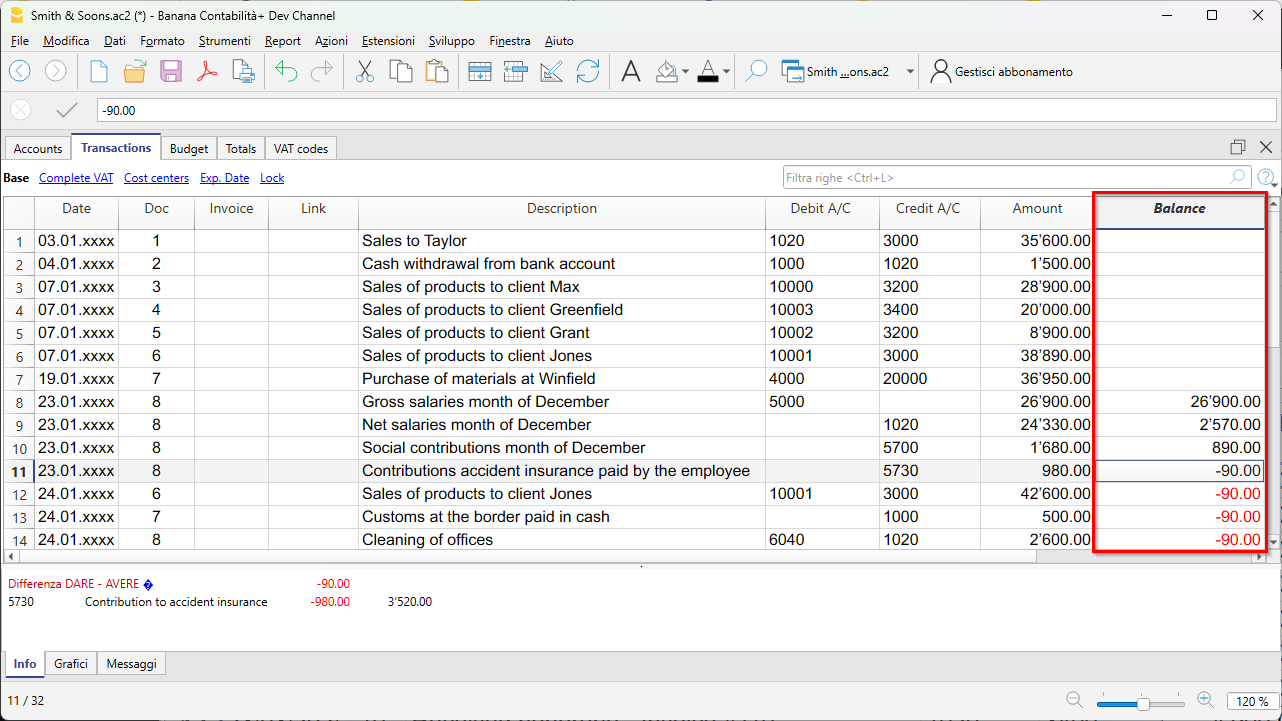
The Balance column, available in the Transactions table, shows the Debit/Credit or Income/Expense balance in real time.
Any differences are immediately highlighted so you can correct them right away.
Check Accounting command
From the Actions > Check Accounting menu, Banana verifies all operations and immediately signals any errors, missing accounts or differences in totals.
It is the ideal tool to use before closing a period, preparing the financial statements or the VAT report.

Totals table
The Totals table provides a concise overview of your business performance, with totals for the main groups.
It is useful for checking the overall balance and verifying the consistency of balances.

Temporary filter and sort rows
The temporary filter and sort functions let you display only the rows you need — for example, a period, an account or a customer — without permanently changing the order of the table. When you remove the filter criteria, the data returns to its original order. Perfect for quickly analyzing and correcting transactions.
