In this article
When securities are recorded in a separate accounting file, the Investment Subledger maintains detailed information about each individual security, including its name, quantity, unit price, book value, market value, and related transactions.
In General Accounting, investments are recorded in a summarized form, usually grouped by investment category. Instead of tracking individual securities, quantities, and prices, General Accounting records the corresponding investment balances, bank transactions, income, expenses, and realized or unrealized gains and losses.
The two accounting files operate independently. Transactions recorded in the Investment Subledger are not automatically transferred to General Accounting. The corresponding amounts must therefore be recorded in both files, and their balances reconciled periodically.
This guide explains how to record purchases, sales, dividends, and year-end valuation adjustments in both accounting files, and how to verify that investment balances and financial results agree.
Match Investment Accounts and Opening Balances
Before recording investment transactions, verify that the opening balances in the investment subledger correspond to those in General Accounting.
In the Investment Subledger
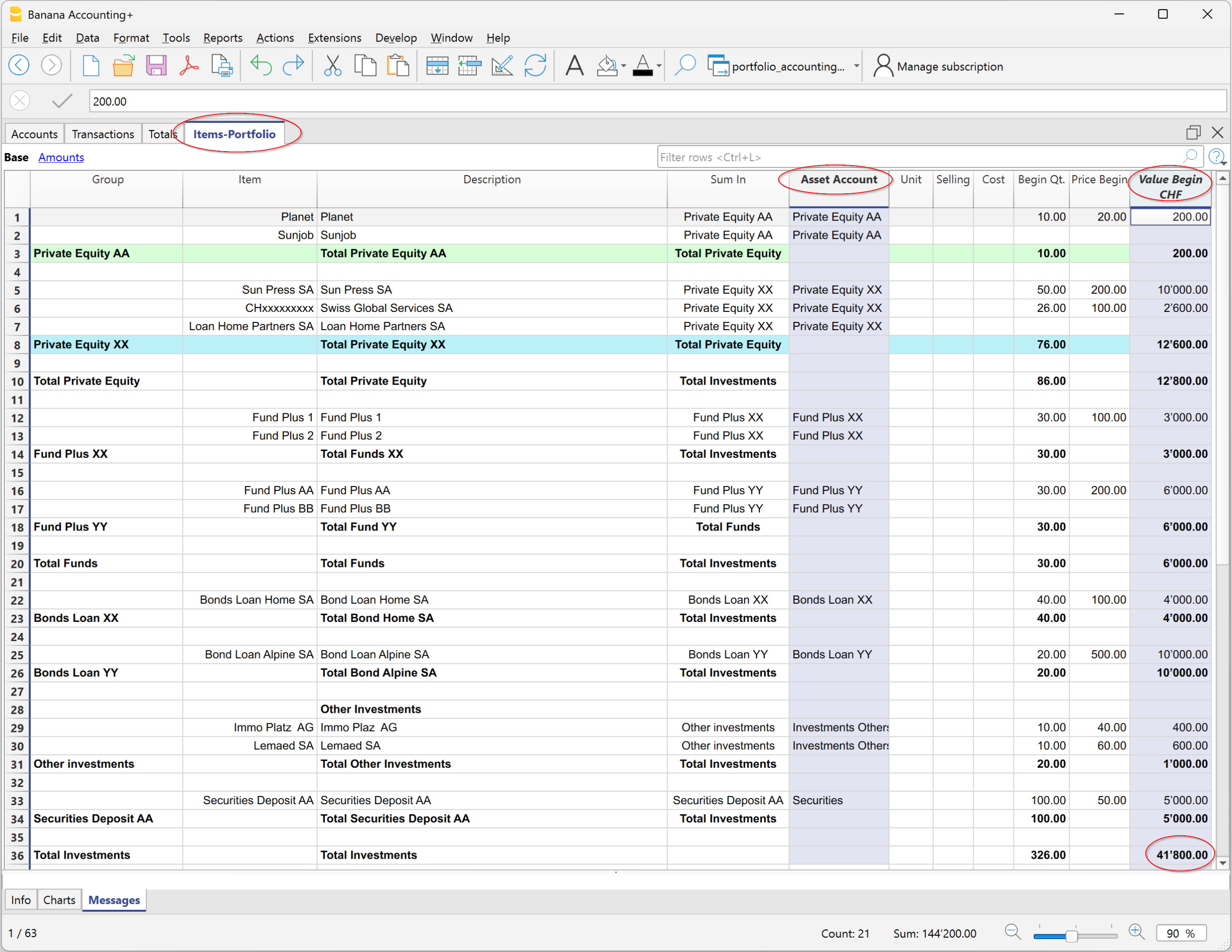
Open the Items – Portfolio table. This table lists all individual securities, organized by investment category.
The Asset Accounts column identifies the account associated with each security, while the Value Begin column shows its opening value.
In General Accounting
Open the Accounts table. Investments are recorded as summarized balances for each investment category, rather than as individual securities.
The Opening column shows the opening balance of each investment account.
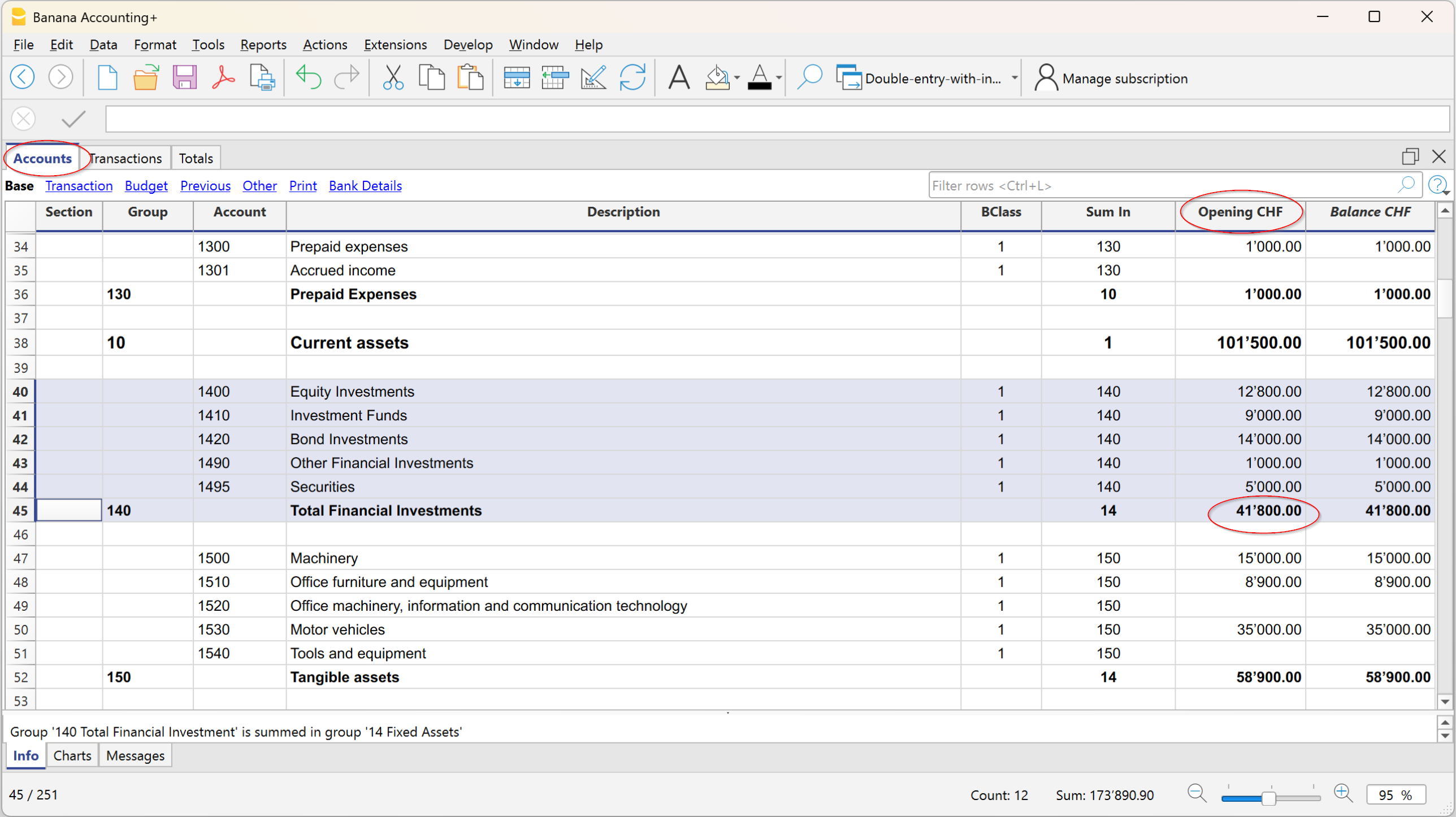
To reconcile the opening balances, add together the Value Begin amounts of all securities assigned to the same Asset Account and compare the total with the corresponding Opening balance in General Accounting.
Several individual securities in the investment subledger may correspond to a single account in General Accounting.
The account numbers and names shown in this example can be adapted to your chart of accounts.
The opening balances for each investment category should agree in both accounting files before proceeding with subsequent transactions.
Record Securities Purchases
Investment purchases are first recorded in Separate Investment Accounting, where each transaction is associated with the corresponding security.
The same transactions are then recorded in General Accounting using the summarized investment accounts.
In the Investment Subledger
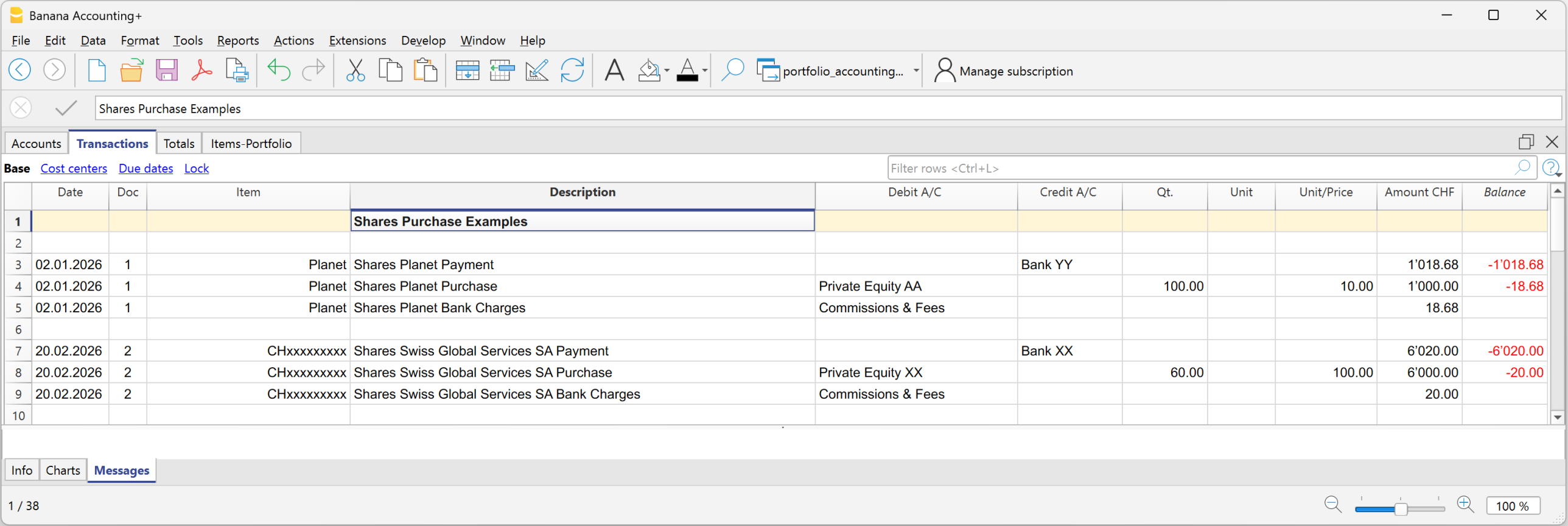
Open the Transactions table and record the purchases of Planet and Swiss Global Services SA shares.
In this example:
- On 2 January 2026, 100 Planet shares are purchased for CHF 1'000.00, with bank charges of CHF 18.68.
- On 20 February 2026, 60 Swiss Global Services SA shares are purchased for CHF 6'000.00, with bank charges of CHF 20.00.
Use the appropriate Item codes to associate the transactions with the individual securities and update their quantities.
In General Accounting
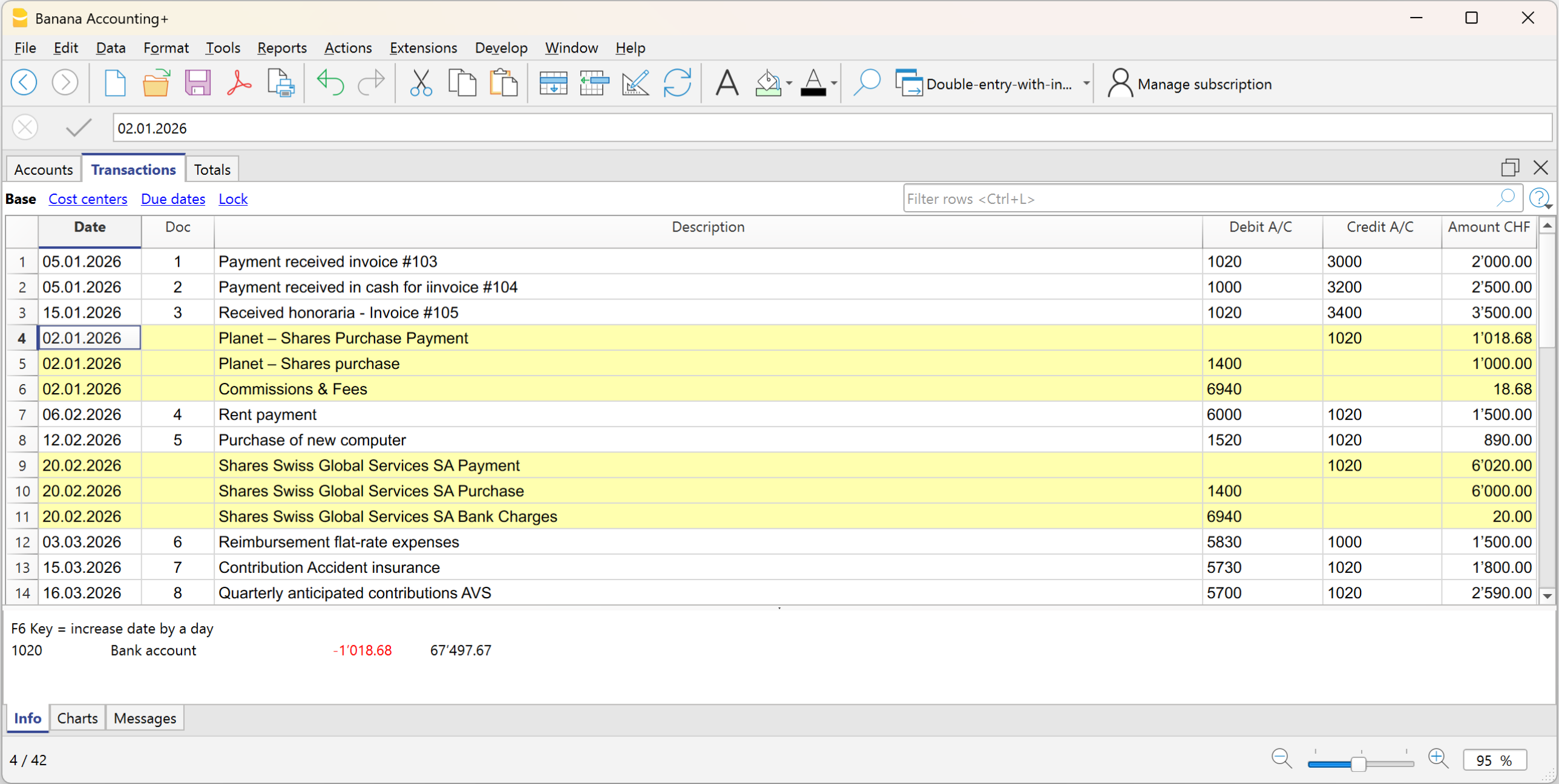
Record the corresponding purchases in the Transactions table.
The investment amounts are recorded in 1400 – Equity Investments, while the bank charges are recorded in 6940 – Commissions & Fees.
The payments are recorded using the corresponding bank accounts.
Unlike the investment subledger, General Accounting does not need to track individual securities or their quantities.
Record Securities Sales and Realized Gains
When securities are sold, the transactions must reflect the sale proceeds, related bank charges, and any realized gains or losses.
In the Investment Subledger
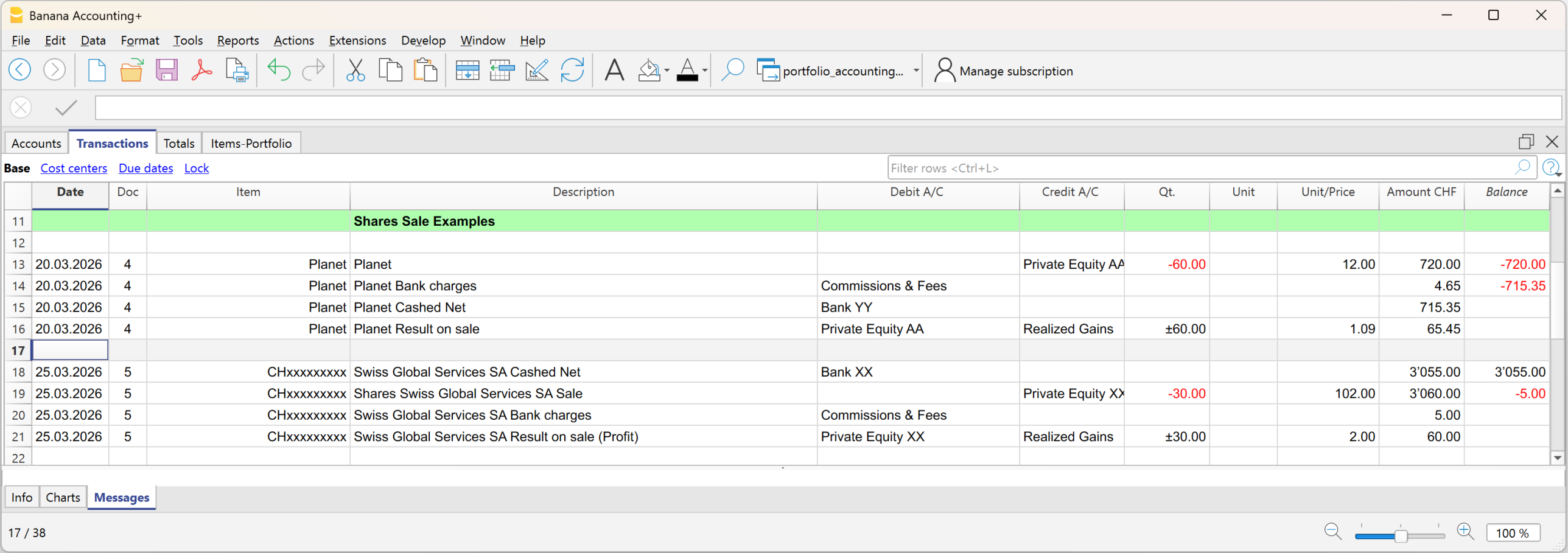
Open the Transactions table and enter the initial sale transaction for each security, recording the amount received.
Then select the corresponding transaction row and use the Calculate Sales Data command of the Investment Accounting extension.
The extension uses the historical investment data to calculate the realized gain or loss based on the book value of the securities sold and their selling price.
Review the calculated result and use Create sales record to generate the additional accounting entries required to complete the sale, including bank charges and realized gains or losses.
For investments denominated in foreign currencies, the extension can also calculate realized exchange rate gains or losses.
In this example:
- On 20 March 2026, 60 Planet shares are sold for CHF 720.00, with bank charges of CHF 4.65 and a realized gain of CHF 65.45.
- On 25 March 2026, 30 Swiss Global Services SA shares are sold for CHF 3'060.00, with bank charges of CHF 5.00 and a realized gain of CHF 60.00.
The transactions are associated with the corresponding securities through their Item codes, allowing Banana Accounting to update the quantities and maintain detailed investment information.
In General Accounting
Record the corresponding sales in the Transactions table.
The transactions affect the following accounts:
- 1400 – Equity Investments, for the book value of the securities sold.
- Bank - for the net sale proceeds.
- 6940 - Commissions & Fees, for bank charges.
- 6993 - Realized Gains on Investments, for realized gains.
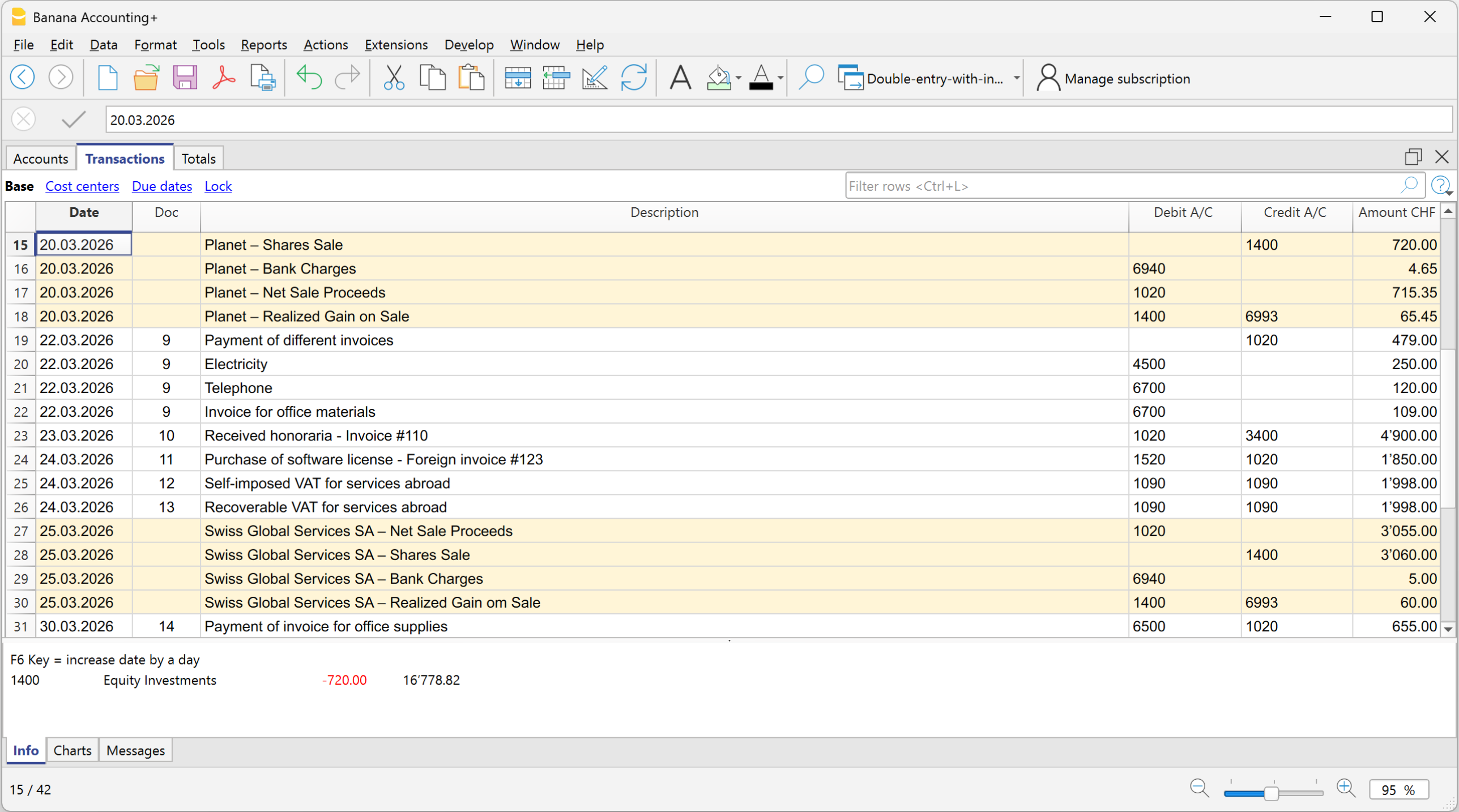
In this example, the realized gains total CHF 125.45, while bank charges for purchases and sales total CHF 48.33.
The resulting net financial income from these transactions is CHF 77.12.
Record Dividend Income
Dividends received from securities are also recorded in both accounting files.
In Separate Investment Accounting
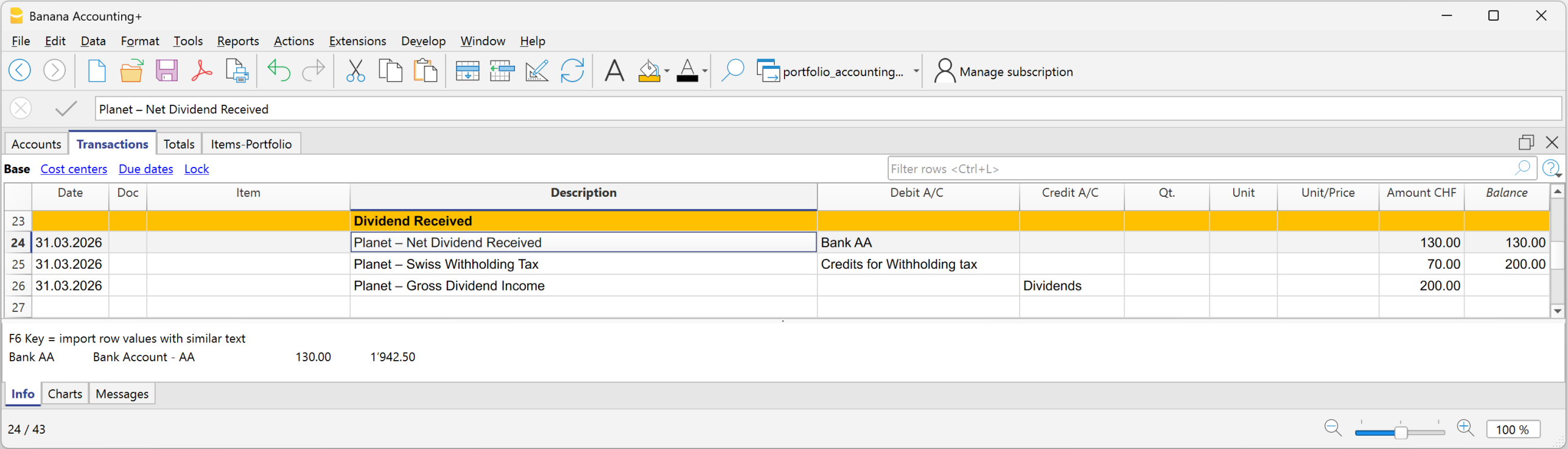
Open the Transactions table and record the dividend received, associating it with the corresponding security.
In this example, Planet distributes a gross dividend of CHF 200.00 on 30 June 2026.
The dividend is subject to Swiss withholding tax of 35%, resulting in:
- Gross dividend income: CHF 200.00
- Withholding tax: CHF 70.00
- Net bank receipt: CHF 130.00.
The withholding tax is recorded as a receivable when recoverable.
In General Accounting
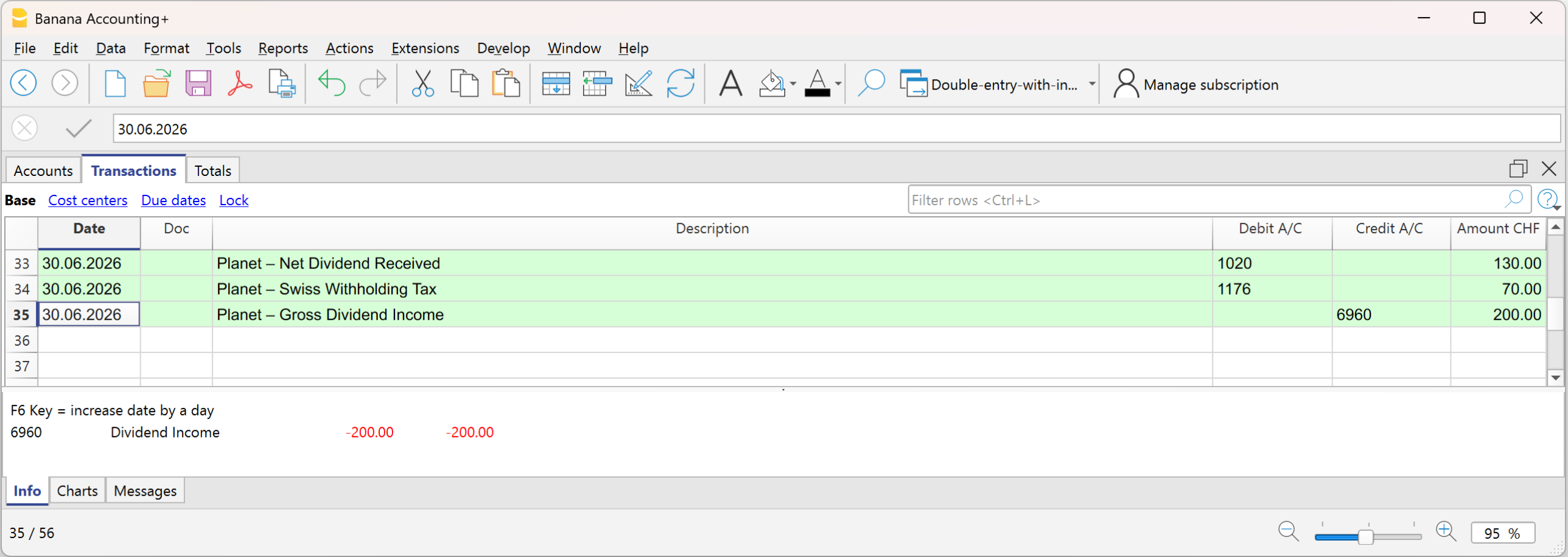
Record the corresponding dividend in the Transactions table using:
- 6960 - Dividend Income, for the gross dividend.
- 1176 - Withholding Tax Receivable, for the recoverable withholding tax.
- Bank - for the net amount received.
Compare Investment Balances
Investment balances should be reconciled periodically to ensure that the amounts recorded in the investment subledger agree with General Accounting.
At the reconciliation date, compare the total book value of the securities assigned to each Asset Account with the balance of the corresponding investment account in General Accounting.
In the Investment Subledger
Review the investment balances for the selected reconciliation date. Individual securities are recorded in detail and can be grouped by investment category and Asset Account.

In General Accounting
Review the corresponding investment accounts and compare their balances with the totals in the investment subledger.
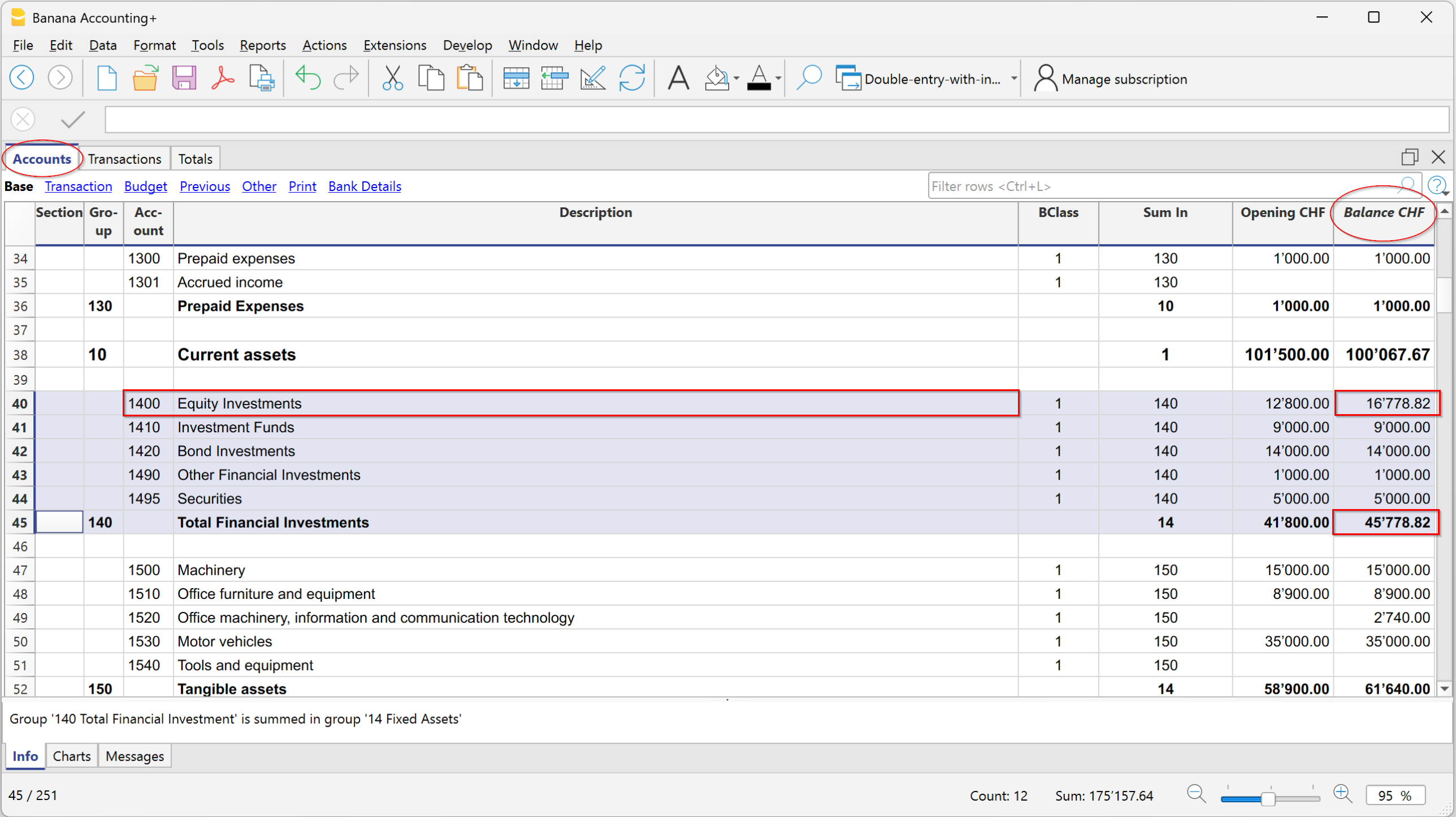
For example, after recording the purchases and sales, the balances at 31 March 2026 are:
- Equity Investments: CHF 16'145.45.
- Total Financial Investments: CHF 45'145.45.
These amounts should agree in both accounting files.
Investment income, expenses, and realized gains or losses should also be checked against the corresponding financial result accounts for the same period.
If the balances agree, no additional reconciliation entry is required.
Reconcile Year-End Valuations
At year-end, review the Book Values and Market Values of the individual securities.
Depending on the applicable accounting rules and valuation policy, adjustments may be necessary to reflect the appropriate closing values.
In the Investment Subledger
At year-end, update the Price Current column in the Items – Portfolio table with the current market prices of the securities.
You can enter the prices manually or use the Update market prices command of the Investment Accounting extension.
Then use the Create adjustment transactions command to automatically calculate the differences between the Book Values and Market Values of the individual securities and generate the corresponding accounting entries.
The extension allows you to preview the adjustments before confirming them. The generated transactions update the Book Values and record the corresponding unrealized gains or losses, without changing the quantities held.
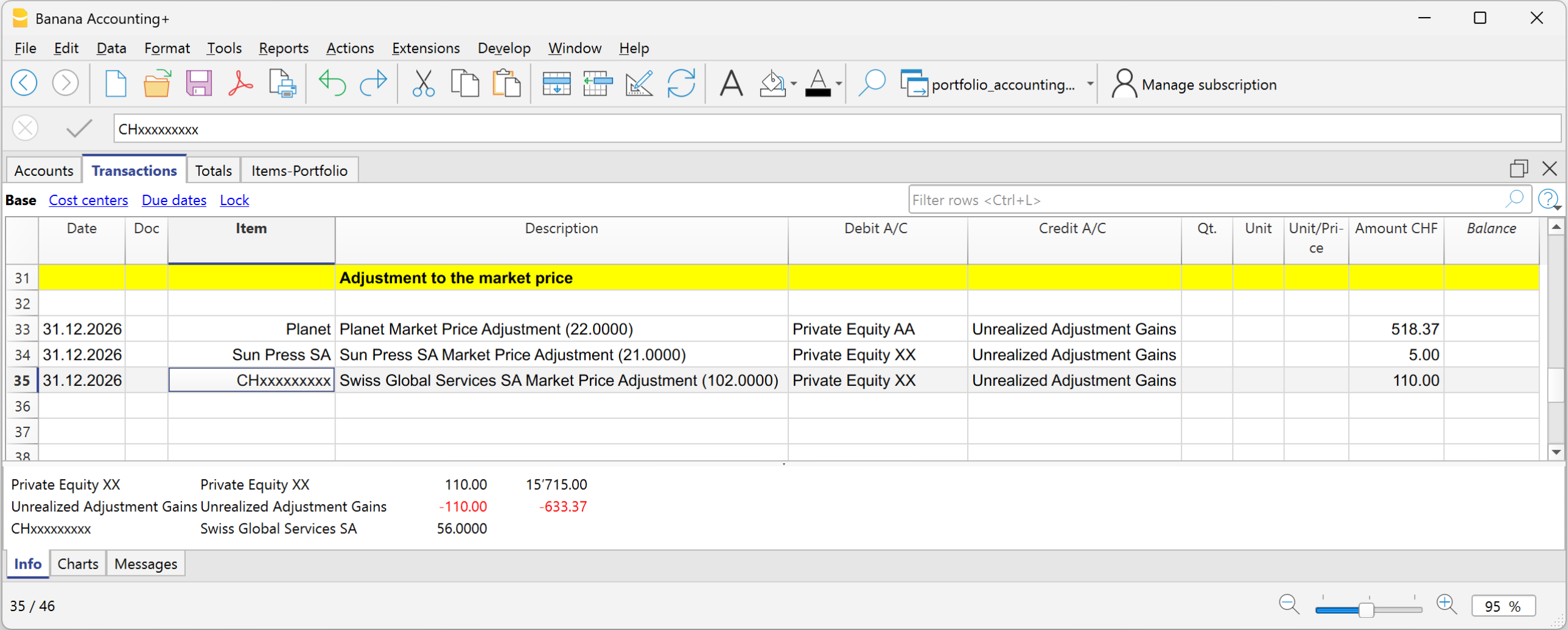
In this example, the adjustments at 31 December 2026 are:
- Planet: CHF 518.37.
- Sun Press SA: CHF 5.00.
- Swiss Global Services SA: CHF 110.00.
The total adjustment is CHF 633.37.
Each adjustment is associated with the corresponding security, maintaining the detailed investment information in the subledger.
In General Accounting
The individual valuation adjustments can be recorded as a single summarized transaction.
On 31 December 2026, record:
- Debit: 1400 – Equity Investments, CHF 633.37.
- Credit: 6994 – Unrealized Adjustment Gains, CHF 633.37.
Description: Year-end Market Value Adjustment – Equity Investments.
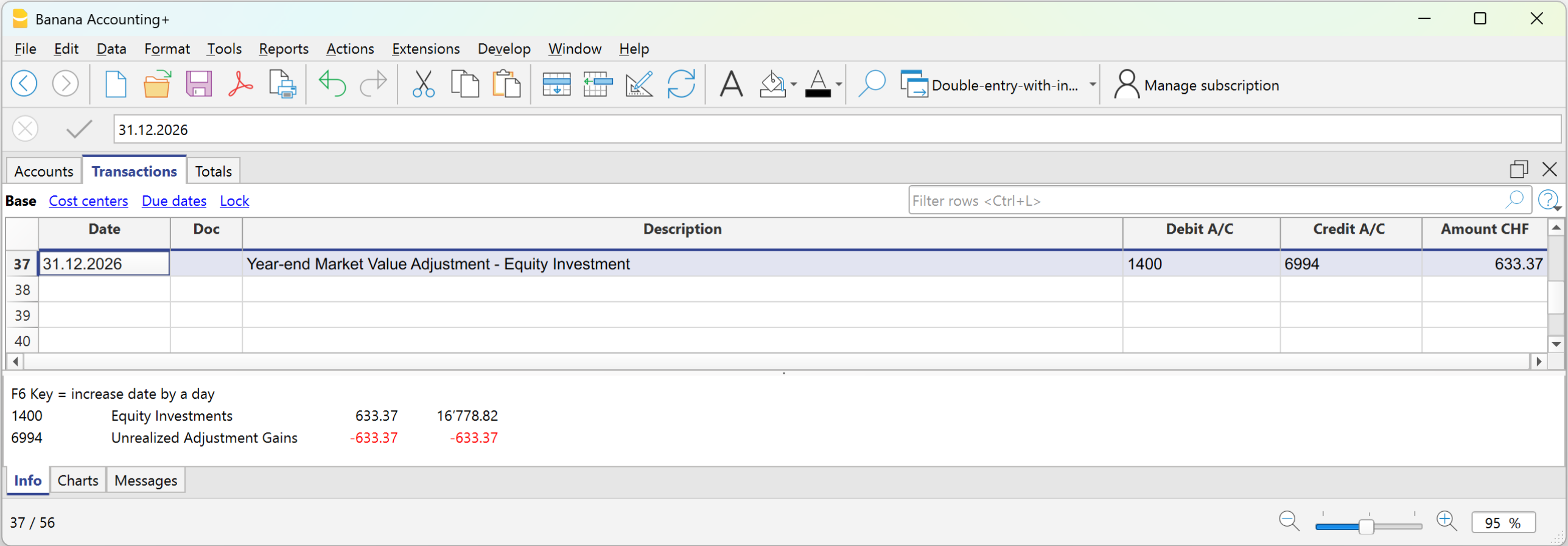
This illustrates an important advantage of using an Investment Subledger: detailed valuations are maintained for individual securities, while General Accounting records the corresponding summarized amount.
Note: The accounting treatment of market value adjustments depends on the applicable accounting standards and valuation rules. An increase in market value does not always permit the recognition of an unrealized gain.
Verify Year-End Balances
After recording all investment transactions and year-end valuation adjustments, perform a final reconciliation as of 31 December 2026.
In the Investment Subledger, use the Check Balances Report command of the Investment Accounting extension to verify that the values of individual securities agree with the balances of their assigned Asset Accounts.
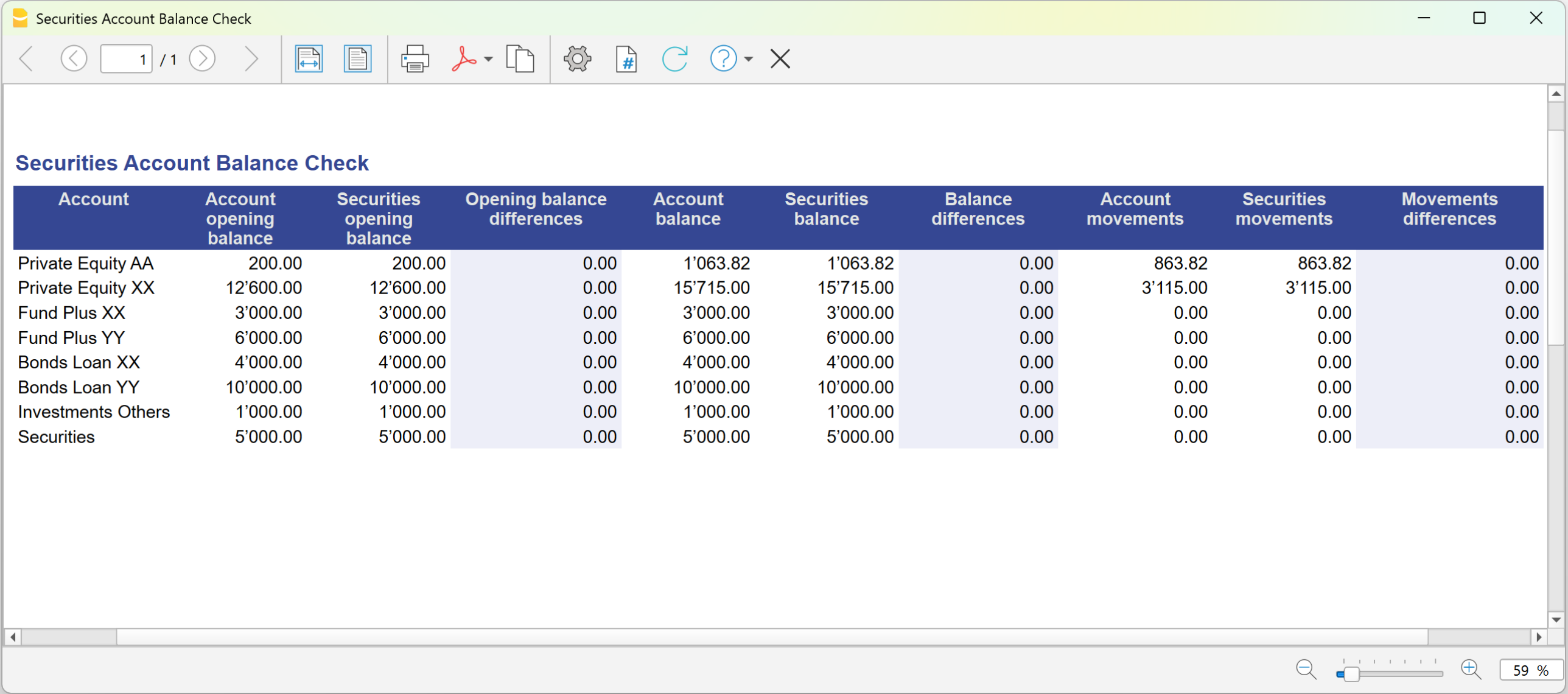
For a more detailed verification, use the Reconciliation Report command of the Investment Accounting extension.
Select the Asset Accounts to be checked. The report generates a separate table for each selected Asset Account, listing the transactions of the securities assigned to it.
At the end of the report, a reconciliation summary shows:
- The opening balance.
- The net change during the period.
- The closing balance.
- Any differences between the Asset Account balance and the balance calculated from the corresponding investment transactions.
Any discrepancies are shown in the Differences fields, with the corresponding amounts highlighted in red.
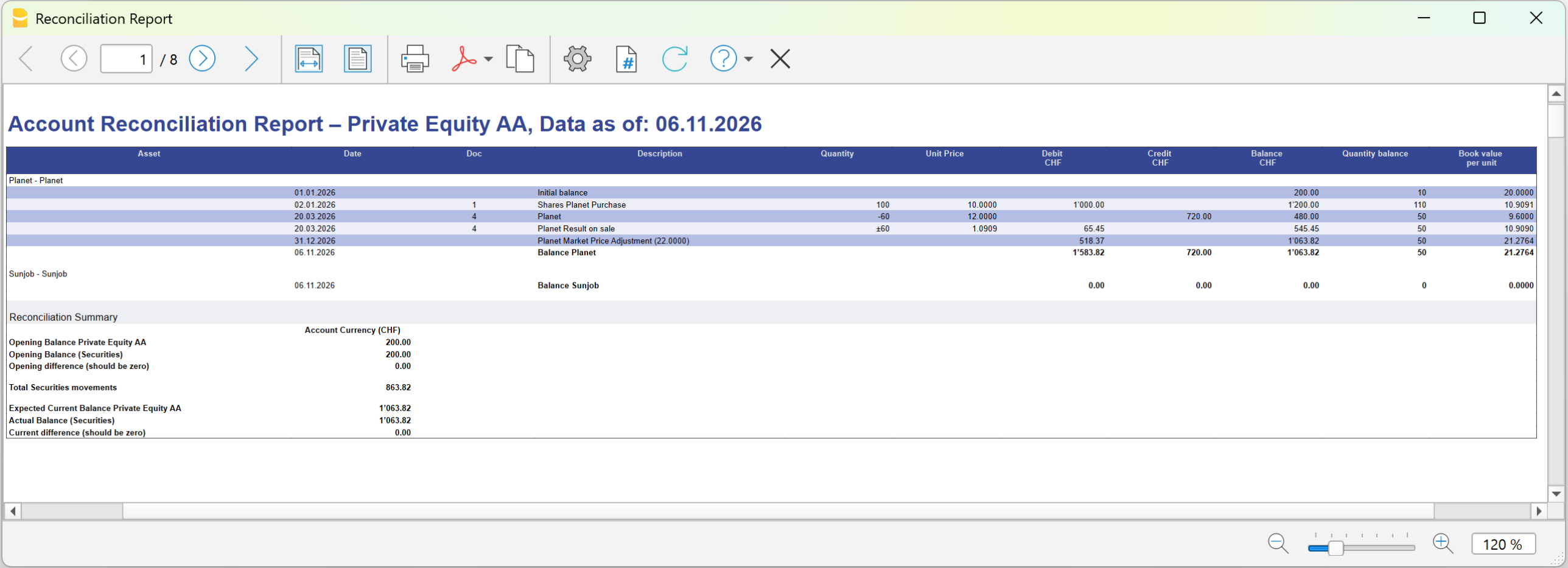
These reports help verify the internal consistency of the Investment Subledger. They do not automatically reconcile it with the separate General Accounting file.
Once the Investment Subledger balances have been verified, compare them with the corresponding accounts in General Accounting.
In this example, the closing balances are:
- Equity Investments: CHF 16'778.82.
- Total Financial Investments: CHF 45'778.82.
These amounts should agree in both accounting files.
Separately, compare the investment-related income, expenses, and gains or losses recorded in General Accounting with the corresponding transactions in the Investment Subledger.
In this example, the financial result includes realized gains of CHF 125.45, dividend income of CHF 200.00, unrealized adjustment gains of CHF 633.37, and commissions and fees of CHF 48.33.
The net financial income of CHF 910.49 relates only to the investment transactions covered in this example. It should not be confused with the overall profit or loss reported in General Accounting, which also includes income and expenses unrelated to investments.
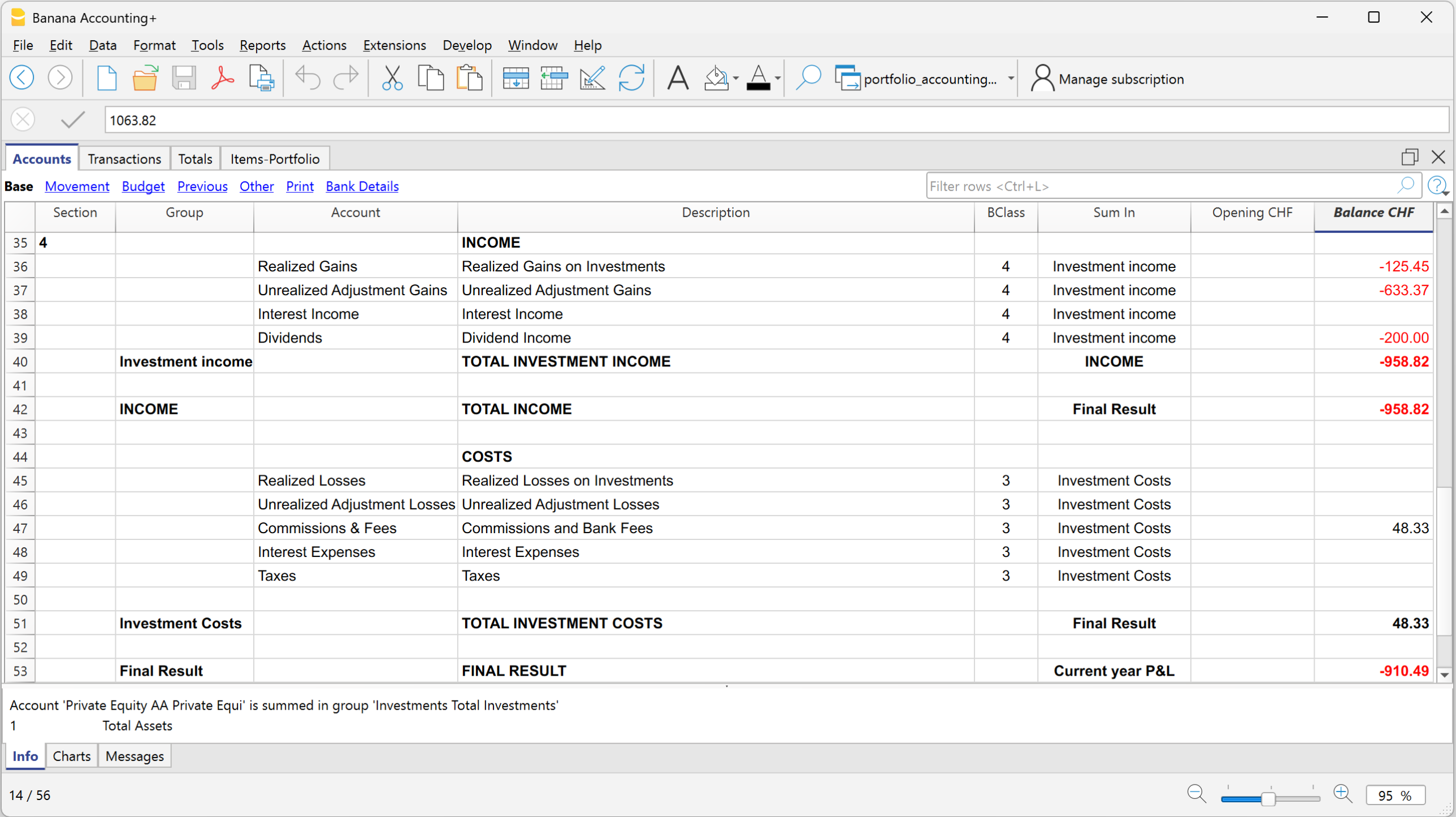
When the investment balances and financial results agree, the reconciliation is complete.
Investigate Any Differences
If the investment balances or financial results do not agree, first identify where the differences occur.
Within the Investment Subledger, examine any discrepancies highlighted by the extension's reports. Check that securities are assigned to the correct Asset Accounts and that their quantities, book values, and transactions have been recorded correctly.
Between the Investment Subledger and General Accounting, check that:
- All relevant transactions have been recorded in both accounting files.
- The correct accounts, amounts, and dates have been used.
- Bank charges, dividends, and realized gains or losses have been recorded consistently.
- The same reconciliation date and accounting currency have been used.
- Year-end valuation adjustments have been reflected correctly in both files.
Correct any missing or incorrect entries in the appropriate accounting file, then repeat the verification.