Banana Boekhouding Templates en Extensies
Index of Banana Accounting Templates and Extensions
This page is the global index of all official Banana Accounting templates and extensions.
Here you find a complete overview, covering different countries and languages.
Templates are ready-to-use accounting files based on structures adapted to local practices. They provide a structured starting point that can be customized to your needs, allowing you to get started right away.
Extensions, on the other hand, add functionalities to Banana Accounting and may vary depending on the country and local requirements.
Templates and extensions for Switzerland
Accounting content adapted to Swiss regulations and practices, available in multiple languages:
- Switzerland (English)
Section with templates and other content in English specifically for businesses, associations, and other organisations in Switzerland. - Switzerland (German)
Section with templates and other content in German specifically for businesses, associations, and other organisations in Switzerland. - Switzerland (French)
Section with templates and other content in French specifically for businesses, associations, and other organisations in Switzerland. - Switzerland (Italian)
Section with templates and other Italian-language content specifically designed for companies, associations, and other organisations in Switzerland.
Templates and extensions for English-speaking countries
Designed for accounting contexts where English is the working language:
- Canada
Section with templates and other content in English specifically for businesses, associations, and other organisations in Canada,. - UK (United Kingdom)
Section with templates and other content in English specifically for businesses, associations, and other organisations in UK. - USA (United States of America)
Section with templates and other content in English specifically for businesses, associations, and other organisations in USA.
Templates and extensions multilingual
Resources that can be used in any country, available in multiple languages:
- Universal
General-purpose templates and related content designed as a neutral starting point, independent of country-specific structures. - Education
Section with templates and related content designed specifically for learning and teaching accounting.
Templates and extensions of other countries in other languages
Country-specific templates and other content in the local language, specifically for businesses, associations, and other organisations, adapted to local requirements:
- Africa (Algeria, Morocco)
- Austria
- Belgium/Wallonia (French language) and Belgium/Wallonia (Dutch language)
- Brazil
- China
- Congo - Democratic Republic of the Congo (DRC)
- Costa Rica
- France
- Germany
- Italy
- Liechtenstein
- Luxembourg
- Mexico
- Nepal
- Netherlands
- Norway
- OHADA (Organization for the Harmonization of Business Law in Africa)
- Portugal
- Saudi Arabia
- Spain
- UAE (United Arab Emirates)
Search all templates and extensions
Use the search tools if you are looking for a specific template or extension, or want to filter results by language, country, or category:
Info over het gebruik van modellen
Wat is een model?
Een model is een gewoon Banana Boekhouding bestand (.ac2 extensie) waarin alles al is ingesteld zodat u meteen kunt beginnen.
Elk boekhoudbestand kan dienen als model maar de modellen die hier aangeboden worden zijn zo ingesteld dat u deze makkelijk kunt aanpassen aan uw wensen.
Het model boekhouding bestand bevat:
- De basis bestandseigenschappen met de valuta en de kopteksten
- Het rekeningschema
- Rekeningen, groepen, subgroepen zijn zo ingesteld dat u de Balans en de Winst & Verlies rekening gelijk af kunt drukken
- mogelijke kostenplaatsen en segmenten
- Voor boekhoudbestanden met BTW zijn de BTW-codes gegroepeerd en ingesteld met de huidige BTW percentages
- In sommige modellen zitten voorbeeldtransacties die verwijderd moeten worden voordat u met uw eigen boekhouding begint.
Hoe een model te openen en gebruiken
Om een modelbestand te openen moet u eerst Banana Boekhouding op uw computer installeren.
Als u Banana Boekhouding al geïnstalleerd hebt
- Download het model bestand dat u wilt gebruiken
- Open Banana Boekhouding en open het gedownloade bestand door het Menu -> Open commando te gebruiken
- Sla het bestand op met een naam voor uw eigen boekhouding (voor meer informatie zie pagina Nieuw bestand van een internet prototype)
Als u Banana Boekhouding nog niet geïnstalleerd hebt
- Download en installeer Banana Boekhouding 9
Voer de licentiecode niet in wanneer daar om gevraagd wordt. Het programma werkt dan in de Starter Editie modus tijdens de tijd dat u het uitprobeert. - Download het model bestand dat u wilt gebruiken
- Koop de licentie
- Als u meer dan 70 transacties wilt invoeren moet u de licentiecode kopen en invoeren in de Banana Boekhouding software (menu Help -> Licentiescodes... beheren commando)
- Blijf doorgaan met uw bestand - eerder ingevoerde gegevens gaan niet verloren.
Personaliseer uw model
- Sla het model bestand op uw computer op in de door uw gekozen map, met uw eigengekozen naam met daarin (doorgaans) het boekhoudjaar.
- Pas het model aan uw wensen aan en begin met invoeren van uw transacties.
- Voer de basisgegevens in (Bestands- en boekhoudingseigenschappen... van het menu Bestand)
- Pas het rekeningschema aan
- Voer uw transacties in
In sommige modellen staan al voorbeeldtransacties in de Transactiestabel; u moet deze eerst verwijderen (commando Rijen verwijderen van het menu Bewerken).
Modellen zoeken
We raden u aan om eerst door alle beschikbare modellen te scrollen voordat u het voor u meest geschikte model kiest.
- Nog niet alle modellen hebben een volledige beschrijving
- De lijst met modellen wordt regelmatig bijgewerkt
Verfijn u modellen zoektocht
- Tekst zoeken
Als u een zoektekst opgeeft worden alle modellen die deze tekst, zowel in de titel als de beschrijving, bevatten getoond - Taal
De taal die is gebruikt om het model aan te maken - Land
- Internationaal
Dit zijn de algemene modellen die in verschillende landen gebruikt kunnen worden (bijvoorbeeld de boekhouding van een project) - Andere landen
Modellen die voor een land gemaakt zijn dat niet in de lijst van landen staat - Land
Modellen die speciaal voor het aangegeven land gemaakt zijn
- Internationaal
- Categorie
- Algemeen
Modellen die niet beperkt zijn tot één van de weergegeven categorieën (bijvoorbeeld de boekhouding van een project) - Anders
Modellen gemaakt voor een categorie die niet in de lijst van categorieën staat - Specifieke categorie
Modellen de specifiek voor de aangegeven categorie gemaakt zijn.
- Algemeen
Search Templates
U kunt ook naar modellen zoeken en deze gebruiken in het programma, menu Bestand -> Nieuw
Hoe een model te gebruiken
Banana Boekhouding installeren
Om het model te openen moet u Banana Boekhouding op uw computer installeren.
Als u dat nog niet hebt gedaan, ga dan als volgt te werk:
- Download en installeer Banana Boekhouding op uw computer.
- Met de gratis versie kunt u elk model uitproberen.
Download het model van onze website
Download het modelbestand naar uw computer door op de link Download model te klikken.
- Start Banana en open het bestand dat u net heeft gedownload.
- Als het bestand in de tijdelijke map is opgeslagen, krijgt u de melding dat het bestand alleen-lezen is.
- Bewerk en sla het bestand op onder een nieuwe naam, in de gewenste map.
Gebruik de Model/Template ID (begint met "+")
- Noteer de Template ID die u kunt vinden op de Template pagina (begint met het "+" teken): +10685
- Start Banana Boekhouding
- Gebruik het menu Bestand → Nieuw.
- In Filteren op voert u de Template ID in: +10685
- Klik op Aanmaken.
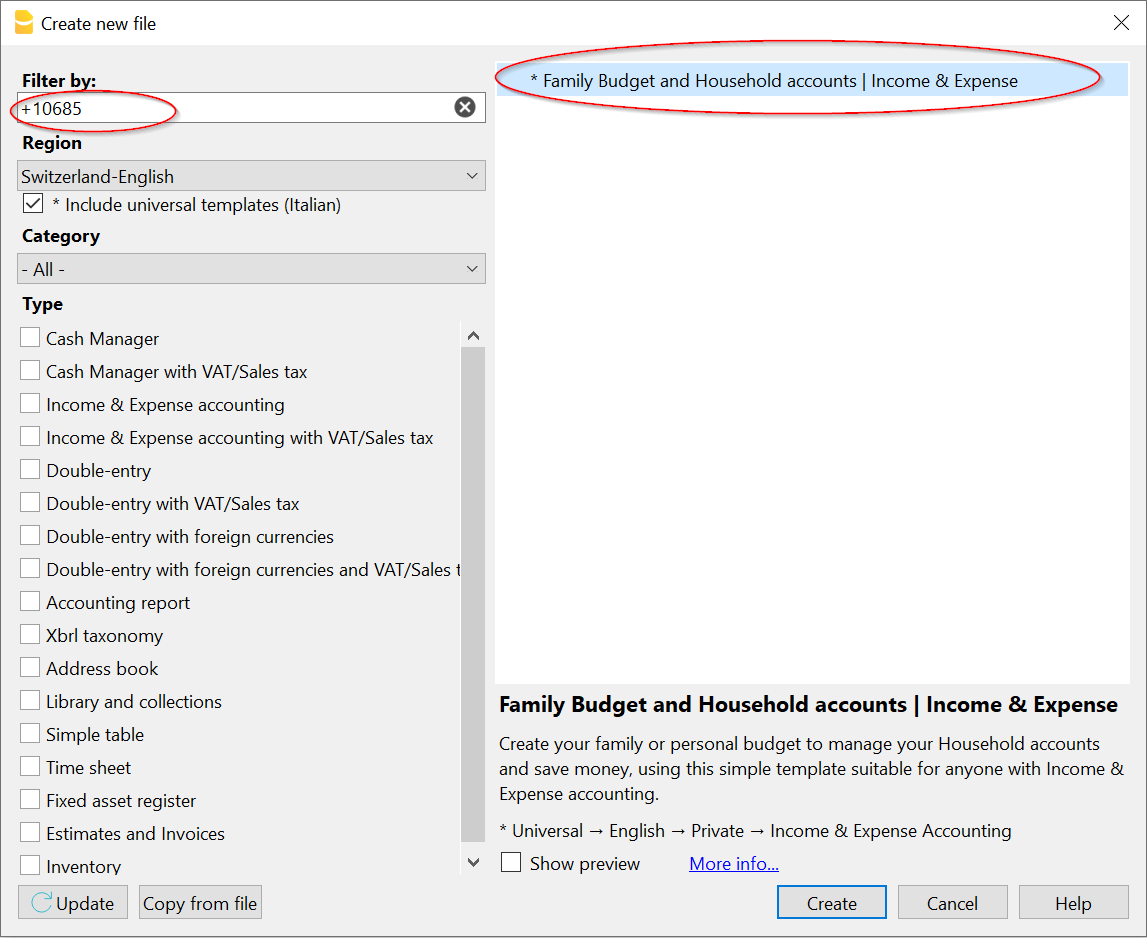
Kies een template binnen Banana Boekhouding
- Gebruik het menu Bestand → Nieuw.
U krijgt de volledige lijst van alle beschikbare templates te zien. Klik op de template die het meest geschikt is voor uw situatie. - Klik op de knop Aanmaken.
- Sla het bestand op uw computer op.
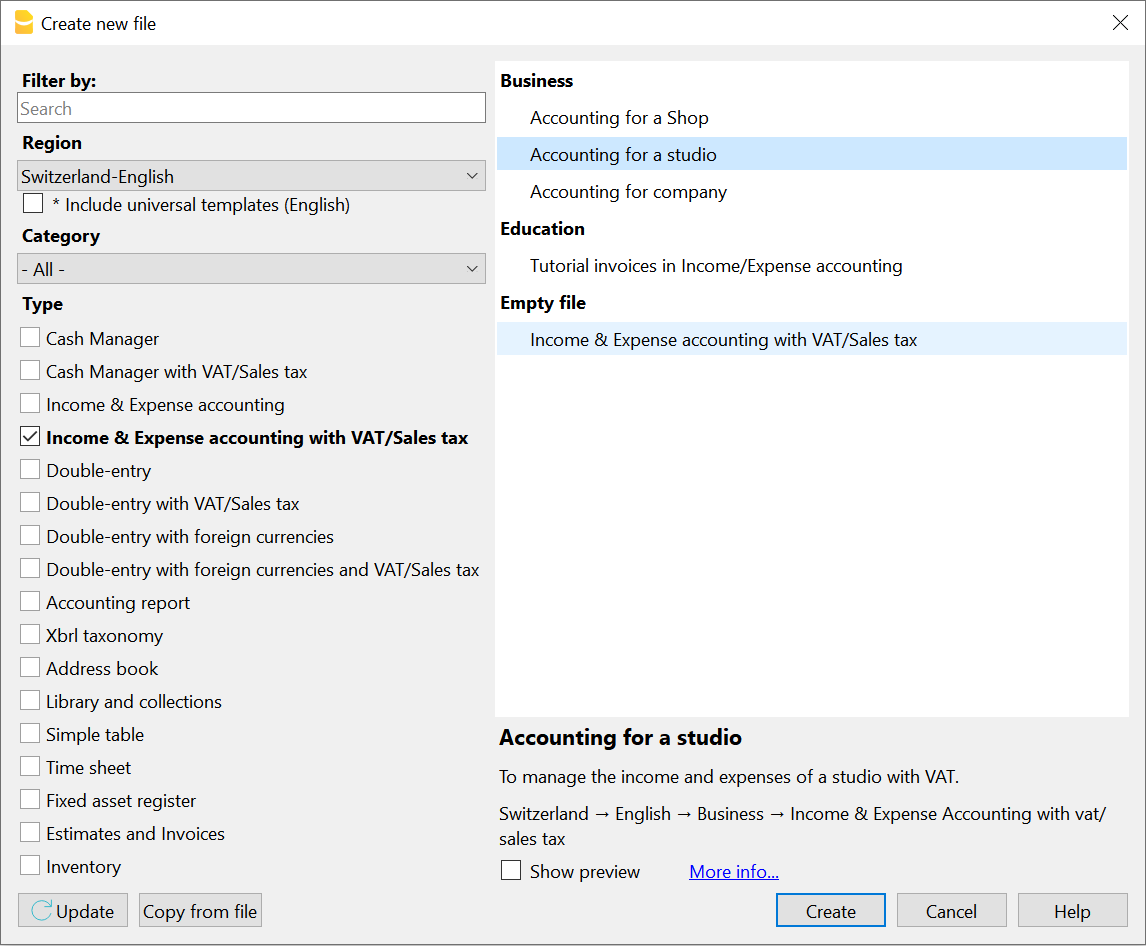
Sla het bestand op met een naam
Zodra het bestand is aangemaakt, moet u het opslaan door het een naam te geven.
Wij raden u aan de naam van uw bedrijf te gebruiken als bestandsnaam en ook het boekjaar te vermelden. Bijvoorbeeld "bedrijf-2022.ac2".
De vermelding ".ac2" is de extensie van het bestand Banana Boekhouding.
Met Banana Boekhouding blijven uw gegevens privé. Tijdens het opslaan kunt u ook de map of de schijf aangeven waar u ze moet opslaan.
Personaliseer uw model
- Sla het model bestand op uw computer op in de door uw gekozen map, met uw eigengekozen naam met daarin (doorgaans) het boekhoudjaar.
- Pas het model aan uw wensen aan en begin met invoeren van uw transacties.
Voor det Dubbel Boekhouden- Voer de Bestandseigenschappen in.
- Pas de Rekeningentabel aan
- Voer uw Transacties in
In sommige modellen staan al voorbeeldtransacties in de Transactiestabel; u moet deze gemakkelijk verwijderen door de rijen te selecteren en op het commando Rijen verwijderen van het menu Bewerken te klikken.
Banana Boekhouding Extensies
Extensies zijn extra programma's die de functionaliteit van Banana Boekhouding Plus uitbreiden.
De online catalogus bevat de extensies die direct in het programma geïnstalleerd kunnen worden.
Binnen het programma vindt u vanuit het menu Extensies → Extensies beheren de lijst met beschikbare extensies. U kunt ook nieuwe extensies installeren.
Soorten extensies
Er zijn diverse soorten extensies, afhankelijk van de functies die ze uitvoeren:
- Productiviteitsextensies
Dit zijn extensies voor BTW declaraties, renteberekeningen, afdrukken of het ophalen van gegevens. - Import extensies
Apps die gebruikt worden om gegevens van het ene formaat (bijvoorbeeld bankafschriften) om te zetten naar het Banana Boekhouding formaat. - Export extensies
Apps die Banana Boekhoudingsgegevens kunnen omzetten naar een specifiek formaat (bijvoorbeeld een XML formaat voor een auditfile).
De gebruiker geeft dan de naam van het bestand op waarin de gegevens worden opgeslagen. - Reportage extensies facturen en betalingsherinneringen
Extensies die gebruikt worden voor de vormgeving van facturen en betalingsherinneringen
Zie voor meer informatie de Developer Documentation (Engelstalig).
Extensie catalogus
Op onze website zijn diverse extensies beschikbaar, geschikt om aan verschillende behoeftes te voldoen.
U kunt u zoekopdracht filteren op:
- De naam van de extensie die u wilt installeren
- De taal van de extensie
- Het land waarvoor de extensie is ontwikkeld:
- Universeel
Voor algemeen gebruik (bijvoorbeeld renteberening) - Andere landen
Specifiek voor landen die niet in de landenlijst voorkomen - Land
Extensies die speciaal voor het aangegeven land is (bijvoorbeeld de Nederlands XML Auditfile).
- Universeel
- Het Type
Extensie bijwerken
Het programma download automatisch de updates van de extensies die de gebruiker heeft geïnstalleerd.
Als u deze automatische updates niet wilt moet u deze mogelijkheid uitschakelen:
- Vanuit het menu Extensies → Extensies beheren... kiest u de al geïnstalleerde extensie door erop te klikken. Vink dan het vakje Automatisch bijwerken uit.
Extensies zoeken
Hoe een extensie te installeren
Extensies kunnen worden geïnstalleerd via het menu Extensies → Extensies beheren...
Het dialoogvenster Extensies beheren is ook toegankelijk via de volgende commando's:
- Import Extensies: Rapporten menu → Naar boekhouding importeren
- Layout Facturen: menu Rapporten → Klanten → Facturen afdrukken
- Layout Betalingsherinneringen: menu Rapporten → Klanten → Betalingsherinneringen afdrukken
Productiviteit extensies specifiek voor een bestand
Extensies kunnen vaak specifiek zijn voor:
- Een bepaald bestandstype (beheer van de boekhouding, adressen)
- Een specifieke bestandseigenschap
Als het bestand niet van het juiste type is, of als het niet de vereiste eigenschap heeft, zal de Extensie niet zichtbaar zijn in het Extensies menu, zelfs niet als deze correct is geïnstalleerd.
Extensie Instellingen
Sommige extensies zijn gemaakt om parameters in te stellen. Deze parameters zijn relatief voor elk bestand en worden gebruikt door de bijbehorende extensie. De parameters worden weergegeven in het dialoogvenster Extensie Instellingen.
Extensie bijwerken
Als een extensie eenmaal is geïnstalleerd wordt deze, telkens wanneer er een nieuwe versie van wordt gereleased, automatisch bijgewerkt door het programma.
Een ontwikkelaars versie gebruiken
In extensies beheren heeft u ook de mogelijkheid om elke ontwikkelaarsversie die beschikbaar wordt gesteld te bekijken.
Bijwerken naar de laatste versie van de Banana Boekhouding
Zorg er eerst voor dat je de laatste versie van het Banana Boekhouding programma hebt gedownload.
Beschikbare modellen
Beschikbare modellen claudiaCustomise invoice
In Banana Accounting Plus it is possible to completely customise invoice printing by means of:
- Choosing a different printing layout.
- Changing the settings of a layout.
- Programming the layout differently or creating a new layout.
Recommended layouts
The choice of new customisable and programmable layouts is recommended.
- The CH10 layout recommended for invoices within Switzerland (with or without Swiss QR-Code).
- The UNI11 layout recommended for invoices in other countries (same as CH10, but without the QR-Code).
Changing the settings of a layout
Each layout has its own settings page that allows customisation. Some layouts allow you to change the font, colour, include or not include the header.
The Swiss CH10 layout allows you to add the QR-Code.
The layout settings dialogue is displayed :
- Extensions menu → manage extensions → Choose layout and click on Settings.
- Accounting:
- Report menu → Customers → Print Invoices.
- In the Print → Layout dialogue, choose a layout from those installed and click on the Settings button.
- From the Print preview click on Settings icon.
- Estimates and Invoices application:
- Print invoice.
- From the Print preview click on Settings icon.
Logo position and address
On the Logo setup page you will find information on how to position the logo and address of the invoice header.
You can, for example, place the logo on the left and the address on the right and change the size of the logo.
Advanced invoice layout customisations
The Invoice Print Layout is an extension of Banana Accounting Plus which programs the printing of invoices.
- It is a program written in Javascript.
- It takes as input a JSON Invoice object which contains all the invoice data.
- It programs the printing of the different elements.
- The formatting and positioning of the elements is done with CSS styles.
- It provides a dialogue for customising the printout, so that even without programming knowledge, the invoice printout can be adapted.
Customising layouts with programming
CH10 and UNI11 layouts can be customised through specific programming. Printouts can be made that modify the layout to a greater or lesser extent. They require knowledge as a CSS programmer or graphic designer.
- How to change the programming of the CSS styles used for the printout
The positioning of the different print elements is done by means of CSS style sheets. Changing the style sheet elements can vary the presentation. - How to program certain print elements in Javascript
You can add or remove elements and change the assignment of styles.
Creating Your Own Print Layouts
Users with advanced knowledge can also create their own print layouts. See developer documentation:
Electronic invoice: export layout
With the layout system, it is also possible to program the invoice data to be exported in a certain format. See:
Banana Accounting+ Import Extensions
Import extensions are additional programmes that allow you to import data exported by other programs, in their specific formats.
Standard extensions, such as those in the ISO 20022 format, are included with the Professional plan, while extensions specific to certain banking institutions, which must be constantly monitored and updated, are only available with the Advanced plan.
Installing an import extension
In order to use an import extension, it must first be installed locally.
- Go to the Extensions menu > Manage Extensions > Import
The Manage Extensions dialog can also be accessed from the Import into accounting command. - Choose the extension you wish to use and click on Install.
Once the extension has been installed it is displayed in the:
Extension Parameters
In some extensions it is possible to change certain import parameters, which can be accessed via the Settings button.
Importing bank statements
The most frequent use of an import extension is to import bank statements into the accounts.
- Actions menu > Import transactions in accounting
- Choose the Transactions table
- Choose the extension to be used for the import.
- If the extension has not been installed yet, proceed with the installation now.
Request for a new or update Import extensions
If a suitable format for importing data from your bank or other organization does not already exist or is not working, you can ask our developers to create an import extension.
See:
In order to create or update an import extension for a specific file format these steps are necessary:
- Our programmers need to receive:
- An example file of the data to be imported, with some transactions (without sensitive personal information).
- The exact details of the bank, organization or software that generated the file.
- Information on the type of data contained (bank statement, invoice data, salaries, etc.),
- Explanations on the file content type, links to specifications made available by the bank or software producer.
- The date on which the file was generated.
- For files exported from other programs, with data structures that are not immediately understandable, an explanation or examples of the transactions that should be generated in the accounts.
- Evaluation of the request:
- It will depend on the complexity of the development and whether the import may be of interest to other users.
- A share of the development or upgrade costs may be required.
- We will consider whether to proceed with the creation of the file and if so:
- We will use the example file sent to us as a reference and for testing, whereby the content will be publicly available.
- Unless otherwise agreed, the extension will be developed according to the open source method.
- The extension will generally be available for installation to Advanced Plan users.
- There is no guarantee that the extension will be kept constantly up-to-date.
Banks often change their file format without giving prior notice. - Update existing extensions:
- Over time, the formats of .csv files are changed or modified and consequently the corresponding import filters must also be updated.
- The old import filters (Banana 9 or earlier) will be made available to Banana Plus users with the Advanced plan after the update.
- It is possible that some old filters will also work correctly with Banana Plus. In these cases, they can continue to be used without any problems until they need to be updated.
- Updating a filter is done when users tell us that the current version no longer works correctly.
- Old versions remain available but are no longer updated or corrected.
Developing your own import extensions
If you are a programmer you can create your import extensions. Please visit:
The possibility of creating your own extensions is only available with the Advanced plan of Banana Accounting Plus.
Developing a New Import Extensions
Programming a new import extensions
GPT Import Extensions Assistants
Extensions GPTs allow you to expand Banana Accounting’s functionality. We have multiple GPTs to help you with this area:
- GPT - Banana Accounting - CSV Bank Import Extension Assistant
This assistant generates extensions for importing bank transactions from CSV files.
It uses the Parameterizable Extension template and automatically adapts the JavaScript parameters to match the structure of the CSV files you upload in chat. Perfect when you need to import bank transactions from a CSV file with a custom extension.
Developers
If you are a programmer you can create your import extensions. Please visit:
The possibility of creating your own extensions is only available with the Advanced plan of Banana Accounting Plus.
Request for a new or update Import extensions
If a suitable format for importing data from your bank or other organization does not already exist or is not working, you can ask our developers to create an import extension.
See:
In order to create or update an import extension for a specific file format these steps are necessary:
- Our programmers need to receive:
- An example file of the data to be imported, with some transactions (without sensitive personal information).
- The exact details of the bank, organization or software that generated the file.
- Information on the type of data contained (bank statement, invoice data, salaries, etc.),
- Explanations on the file content type, links to specifications made available by the bank or software producer.
- The date on which the file was generated.
- For files exported from other programs, with data structures that are not immediately understandable, an explanation or examples of the transactions that should be generated in the accounts.
- Evaluation of the request:
- It will depend on the complexity of the development and whether the import may be of interest to other users.
- A share of the development or upgrade costs may be required.
- We will consider whether to proceed with the creation of the file and if so:
- We will use the example file sent to us as a reference and for testing, whereby the content will be publicly available.
- Unless otherwise agreed, the extension will be developed according to the open source method.
- The extension will generally be available for installation to Advanced Plan users.
- There is no guarantee that the extension will be kept constantly up-to-date.
Banks often change their file format without giving prior notice. - Update existing extensions:
- Over time, the formats of .csv files are changed or modified and consequently the corresponding import filters must also be updated.
- The old import filters (Banana 9 or earlier) will be made available to Banana Plus users with the Advanced plan after the update.
- It is possible that some old filters will also work correctly with Banana Plus. In these cases, they can continue to be used without any problems until they need to be updated.
- Updating a filter is done when users tell us that the current version no longer works correctly.
- Old versions remain available but are no longer updated or corrected.
Toubleshooting Import Extension
Gebruikersvoorwaarden voor het gebruik en het ontwikkelen van Banana Extensies
Gebruikersvoorwaarden voor Banana Extensies en Modellen
De Banana extensies, plug-ins en modellen zijn gratis te gebruiken.
Banana.ch biedt al een grote selectie gratis gereedschappen, en is van plan deze nog verder te verbeteren, dankzij de ontwikkeling door de community.
De gebruikers zelf hebben bijgedragen, en dragen nog steeds bij, aan de creatie en verbetering van de Banana Extensies en modellen.
Hoe meer gebruikers deelnemen aan het ontwikkelen, testen en verbeteren, hoe hoger het aanbod zal zijn dat voor iedereen beschikbaar komt.
Voor het gebruik van enig materiaal en de Banana Extensies zijn de licenties en specifieke wettelijke voorwaarden Banana.ch SA van toepassing, die geacht worden te zijn aanvaard door de gebruikers, vanaf het moment dat zij toegang hebben tot onze site, de documentatie, of vanaf het moment dat zij enig materiaal downloaden of gebruiken.
Ontwikkeling door de community
De ontwikkeling van de Banana Extensies, modellen en ander materiaal wordt uitgevoerd met een community aanpak en een open source modus. Al het ontwikkelde materiaal wordt voor iedereen gratis beschikbaar gesteld, in overeenstemming met de licenties, van toepassing op een specifiek project dat te vinden is op github.com/BananaAccounting .
Als algemene regel geldt de Apache 2.0 licentie, maar sommige Banana Extensies gebruiken ook bibliotheken die onder specifieke licenties vallen. De gebruiker is gebonden aan alle toepasselijke licenties.
In de Apache 2.0 licentie (Engelstalig) staat onder andere ook dat:
- het mogelijk is om de software voor elk doel te gebruiken en distribueren.
- het mogelijk is om de software eigenhandig te bewerken en aan te passen.
- er geen garantie is dat de applicatie zal werken zoals men verwacht.
- de ontwikkelaars niet aansprakelijk zijn voor het gebruik van de software, de betrouwbaarheid ervan voor een bepaald gebruik of voor eventuele fouten of onnauwkeurigheden.
Deze beperking van de aansprakelijkheid is essentieel, omdat het de gebruikers in staat stelt hun eigen bijdrage te leveren, zonder zich zorgen te maken over aansprakelijkheidskwesties. Wie deelneemt aan de software ontwikkeling en verbetering van de documentatie doet zijn best, maar kan niet garanderen dat de oplossing geschikt is voor een specifiek gebruik of een specifieke context. Bovendien verandert de regelgeving vaak en kan een oplossing verouderd en onbruikbaar worden.
Het aangeboden materiaal is derhalve geschikt voor mensen die zelf of met een accountant willen nagaan of hetgeen beschikbaar wordt gesteld voor hen geschikt is, ongeacht de gegeven beschrijvingen en documentatie.
Verzoeken voor nieuwe ontwikkelingen
Banana.ch heeft een specifieke afdeling die zich richt op assistentie, consulting en de ontwikkeling van nieuwe Banana Extensies en boekhoudmodellen.
Neem contact met ons op voor uw specifieke wensen:
- Specificeer:
- het gewenste resultaat.
Als dit een afdruk is geef ons dan een voorbeeld in Excel of Word. - een bestand met boekhoudgegevens (bij voorkeur fictieve en test gegevens) die moeten worden afgedrukt.
- het gewenste resultaat.
- Raming en medefinanciering van de ontwikkelingskosten:
- Als de ontwikkeling specifiek is voor bepaalde wensen, is gehele of gedeeltelijke deelname aan de kosten vereist.
- Gewoonlijk wordt de offerte gebaseerd op de benodigde ontwikkeltijd.
Als de applicatie nuttig zou zijn voor meerdere gebruikers wil Banana.ch de ontwikkeling ervan gedeeltelijk gratis aanbieden. - Onze Gebruiksvoorwaarden en licentie voorwaarden zijn van toepassing
- Tenzij anders overeengekomen worden ontwikkelingen uitgevoerd en beschikbaar gesteld in overeenstemming met de Apache 2.0 licentie (zie wikipedia uitleg).
- De ontwikkelde oplossingen kunnen beschikbaar worden gesteld aan de hele community.
- Tenzij specifiek anders aangegeven, wordt aangenomen dat de laatste versie van de Banana Boekhouding software wordt gebruikt.
Ontwikkeling van een Import extensie
Wanneer er nog geen geschikt formaat voor het importeren van gegevens van uw bank of een andere organisatie bestaat, kunt u onze ontwikkelaars vragen om een import extensie te ontwikkelen.
Onze procedure voor het ontwikkelen of bijwerken van een import extensie voor een specifiek bestandsformaat.
- Evaluatie van het verzoek:
- Op de afhankelijkheid van de complexiteit van de ontwikkeling en de mogelijkheid dat de import extensie invloed heeft voor andere gebruikers.
- Op de noodzaak om bij te dragen in de ontwikkelkosten.
- Om het verzoek te evalueren is het nodig het volgende te sturen:
- Een bijgewerkt voorbeeldbestand met enkele mutaties (zonder privé gegevens).
- De exacte detailgegevens van de bank of organisatie die het bestand heeft gegenereerd.
- De datum waarop het bestand werd aangemaakt.
-
- We evalueren of we doorgaan met de ontwikkeling van de extensie en zo ja:
- We gebruiken het voorbeeldbestand dat naar ons gestuurd is als referentie voor het testen waarbij de inhoud openbaar is.
- Tenzij anders overeengekomen wordt de extensie ontwikkeld volgens de open source methode.
- De extensie zal algemeen beschikbaar zijn voor installatie door houders van het Advanced Plan.
- Er is geen garantie dat de extensie altijd bijgewerkt zal worden.
Het kan gebeuren dat banken formaten veranderen zonder enige kennisgeving.
Ondersteuning van externe ontwikkelaars
Banana.ch SA ondersteunt gezamenlijke ontwikkeling met:
- Gratis assistentie.
- Gratis ontwikkel licentie.
- Mogelijk ook financiële ondersteuning.
Ontwikkelaars die erin geïnteresseerd zijn een project te beginnen worden gevraagd contact op te nemen met Banana.ch en een gedetailleerd concept op te sturen.
Banana Accounting+ Community
The Banana Accounting Plus Community offers experienced users or industry professionals the opportunity to share their own templates and extensions on the Banana Template Store, which are also visible directly within the Banana software.
Visibility for those who share
Offering content to the Banana Community allows you to gain immediate visibility:
You showcase your experience in using Banana Accounting
You enhance the value of your accounting knowledge in a professional context, establishing yourself as an industry expert
You gain recognition for the concrete help provided to other users.
The content of the Template Store is also visible within Banana Accounting Plus and to the tens of thousands of users who use it every day. You can gain additional recognition by joining the partner program.
Become a Banana Partner
When you contribute to the Community, you can also apply to become a Banana Partner. Find out how the partner program works!
Who participates in the Community
- Teachers who share study materials and courses with students.
- Accountants and fiduciaries who provide a specific template to collaborate with clients using Banana.
- Experts in a specific field who want to gain visibility in a niche context.
- Creators of templates for specific uses who want to share their ideas.
- Developers who have added features to Banana and want to gain visibility.
Over more than 35 years of activity, we have learned that the best ideas often come from those who use our software every day. Do you have an idea for a new use of Banana? Contact us by email and we will be happy to help you make it a reality and give it the right visibility.
How to participate
At the moment, the Community is managed manually so that it can remain sufficiently flexible to better understand the needs of all users.
- Do you have an idea to submit to us? Contact us by email.
- Prepare a new template by following our guidelines. We will be happy to provide the support you need.
- Prepare a description and/or instructions for the files you intend to share in the Community.
- Write us an email and attach the files and descriptions.
- After your request is approved, you will receive confirmation that it has been published.
Community Templates
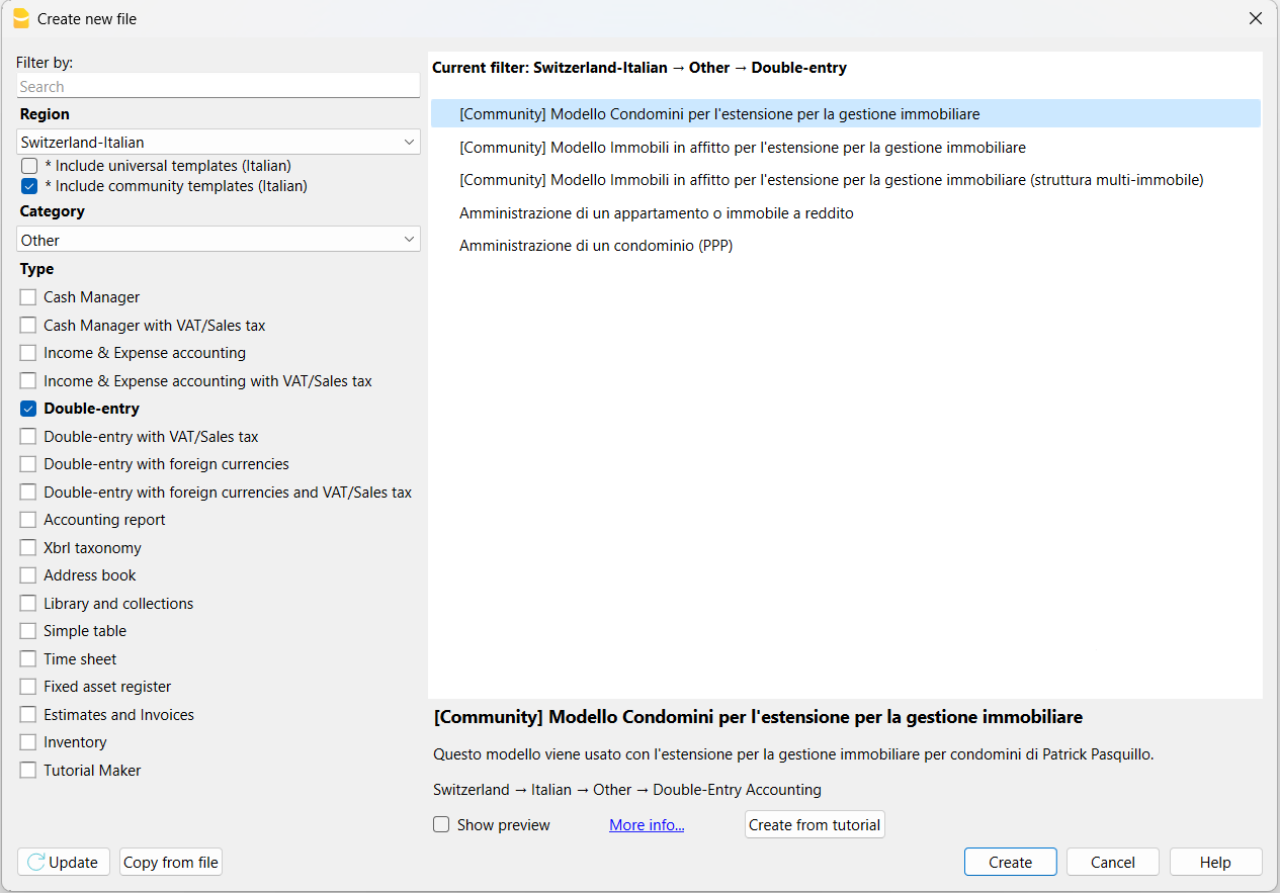
The templates made available in the Community are included in the Banana Template Store and are also visible in the Banana Accounting Plus program from the File > New menu. To see them, make sure you have selected the Include community templates option.
Community Extensions
You can find all the information on the page share your extensions (in English).
How to prepare a template for the Community
Follow the guidelines for preparing templates and, if needed, ask for our support.
When everything is ready, make sure to also send us your authorization to publish the content, by email. See a sample at the bottom of the page.
Guidelines for preparing templates
- Remove initial balances from the double-entry template or the income and expenses template.
- Include sample transactions.
- Anonymize customer and supplier accounts (Customer One, Customer Two, …, Supplier One, Supplier Two, ...).
- Include fictional references in the template headers (e.g., Company SA) and for bank accounts.
- Describe the template from the point of view of a non-expert and, if necessary, instruct the user on how to use it.
- Send us an email and attach the .ac2 file along with the description and/or instructions on how to use it.
We help you create your template
Whatever your idea for a template, we will help you give it the right visibility. We are happy to dedicate our time and resources to assist you in creating and/or preparing the template to publish in the Community. Request our support by email.
Template license
The template can be shared under the Creative Commons 1.0 Universal license, Creative Commons BY 4.0, or Creative Commons BY-SA 4.0.
These types of licenses are used for non-software content and are necessary to ensure the template can be customized and used by other users. They also allow it to be made available to all users online.
- Creative Commons 1.0 Universal: you waive copyright on the template you created and dedicate it to the public domain worldwide.
- Creative Commons BY 4.0: makes the template available with proper attribution, providing a link to the license and indicating if changes were made.
- Creative Commons BY-SA 4.0: makes the template available with proper attribution, providing a link to the license and indicating if changes were made. Any modifications must be shared under the same original license.
Requirements for publication
The only requirement is to have a valid subscription to Banana Accounting Plus. If you also want to become a Banana Partner, you need the Advanced plan.
Sample authorization for publication
Here is the sample email authorization required to publish your content:
"Dear Banana team,
I authorize the sharing of my content under the Creative Commons 1.0 Universal license and the terms and conditions of the Banana Accounting Plus Community.
I attach the necessary files and request their publication.
Best regards."
Sharing extensions with the Community
Follow our guidelines to prepare extensions and don't hesitate to contact us for further support if necessary.
Once you are ready, in addition to the content, please submit by e-mail your authorisation to publish. Please refer to the e-mail template at the bottom of this page required for publication purposes.
What are the extensions
These are extensions of the program's functionalities, for reporting, calculating, exporting, importing, establishing bills and reminders and other. Take a closer look at the Extensions menu.
Extension sharing guidelines
Please make sure that you have:
- Entered the extension attributes for the necessary informations of your extension.
- Inserted descriptive comments within the code.
- Formatted the code visualization.
- Described the extension and its functionality by providing all necessary instructions for its use. Quoted the links to documentation if necessary.
- Sent an e-mail and attached the Javascript files, qrc file, manifest.json file, sbaa extension and the documentation into a zip file.
If your extension only works with a specific template, please refer also to page how to prepare template for sharing. Please also include your template in the zip file.
Helping you share your extensions
Whatever your extension idea is, we help you maximise its visibility. If you wish to participate and publish in our Community, you can choose to have our full support and resources helping you create and/or prepare your extension. Request our support by e-mail.
Extension license
The extensions can be shared with the MIT license, Apache Licence 2.0, GNU GPL v3.0, GNU LGPL v3.0 o GNU AGPL v3.0.
The conditions of this licences require the retention of the copyright and the notice of the licence used.
- MIT License: A short and simple permissive license with conditions only requiring preservation of copyright and license notices. Licensed works, modifications, and larger works may be distributed under different terms and without source code.
- Apache License 2.0: A permissive license whose main conditions require preservation of copyright and license notices. Contributors provide an express grant of patent rights. Licensed works, modifications, and larger works may be distributed under different terms and without source code.
- GNU GPL v3.0: Permissions of this strong copyleft license are conditioned on making available complete source code of licensed works and modifications, which include larger works using a licensed work, under the same license. Copyright and license notices must be preserved. Contributors provide an express grant of patent rights.
- GNU LGPL v3.0: Permissions of this copyleft license are conditioned on making available complete source code of licensed works and modifications under the same license or the GNU GPLv3. Copyright and license notices must be preserved. Contributors provide an express grant of patent rights. However, a larger work using the licensed work through interfaces provided by the licensed work may be distributed under different terms and without source code for the larger work.
- GNU AGPL v3.0: Permissions of this strongest copyleft license are conditioned on making available complete source code of licensed works and modifications, which include larger works using a licensed work, under the same license. Copyright and license notices must be preserved. Contributors provide an express grant of patent rights. When a modified version is used to provide a service over a network, the complete source code of the modified version must be made available.
Publication Requirements
The only requirement is to have a valid subscription to Banana Accounting Plus.
Published extensions on Banana
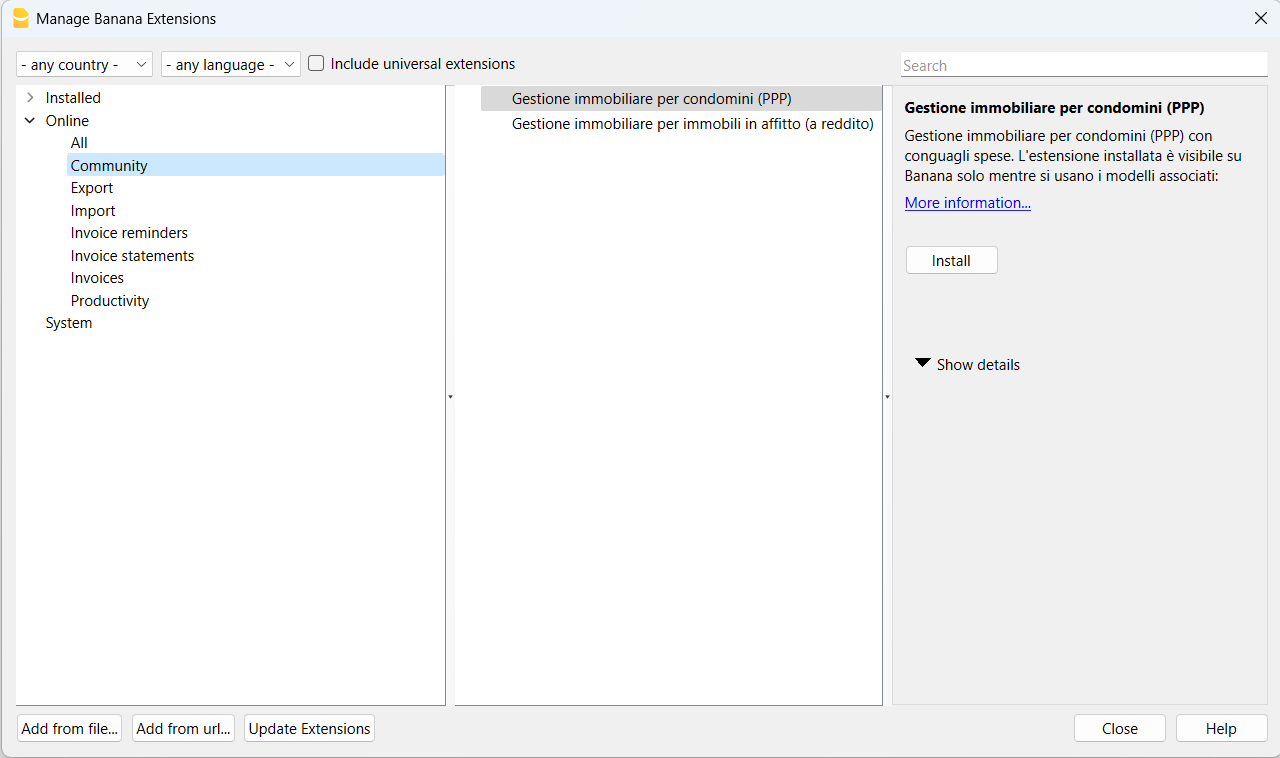
The available Community extensions will be visible from the menu Extensions > Manage Extensions....
In the window that appears, select Online and then the section Community.
Authorisation to publish content
Here is the e-mail permission template needed to publish your content:
"Hello,
I herewith authorise the sharing of my content according to the MIT license and terms and conditions provided by the Banana Accounting Plus Community.
I attach the necessary files requesting their publication.
Best Regards."