In this article
Multi-Currency Double-Entry Personal Wealth Accounting for HNWIs
This ready-to-use template combines multi-currency double-entry accounting with integrated Investment Accounting to provide a comprehensive view of personal and family wealth. It covers financial investments, bank accounts, real estate, other personal assets, liabilities, income and expenses. Applying the same structured accounting principles used by businesses, it enables High-Net-Worth Individuals (HNWIs) and their advisors to monitor their financial position, track income and expenses, and understand how net worth evolves over time.
Open in Banana WebApp
Run Banana Accounting Plus on your browser without any installation. Customize the template, enter the transactions and save the file on your computer.
Open template in WebApp Open tutorial in WebAppTemplate documentation
This ready-to-use template provides a comprehensive double-entry accounting framework for managing the personal wealth of High-Net-Worth Individuals (HNWIs), combining multi-currency accounting with integrated Investment Accounting.
The accounting structure covers the individual's entire wealth, including cash and bank accounts in multiple currencies, financial investments, real estate, vehicles, pension assets, furniture, art collections, receivables, loans, mortgages, and other liabilities.
The Profit & Loss accounts complement the balance sheet by tracking investment income and gains or losses, employment and other income, depreciation, taxes, personal and family expenses, as well as income and expenses related to individual real estate properties.
Just as businesses rely on financial statements to understand their financial position and performance, this template brings the same structured accounting approach to personal wealth management. It provides a comprehensive view of assets, liabilities, income and expenses, helping individuals and their advisors understand how net worth evolves over time.
Chart of Accounts Structure and Customization
The Chart of Accounts uses a hierarchical grouping structure to organize accounts and automatically present subtotals and results at different levels of detail. This makes it easy to obtain both an overall financial overview and detailed information on specific assets, investments, and individual properties.
The Chart of Accounts is designed to be fully customizable. Additional accounts and groups can be created to reflect individual needs and the complexity of the wealth being managed.
For Family Offices managing multiple clients, the accounting structure can be tailored to each individual or family, ensuring that financial reporting reflects their specific assets, activities, and reporting requirements.
Balance Sheet Accounts
The Balance Sheet Accounts provide the accounting structure for managing the individual's assets, liabilities, and equity.
They are organized into the following main categories:
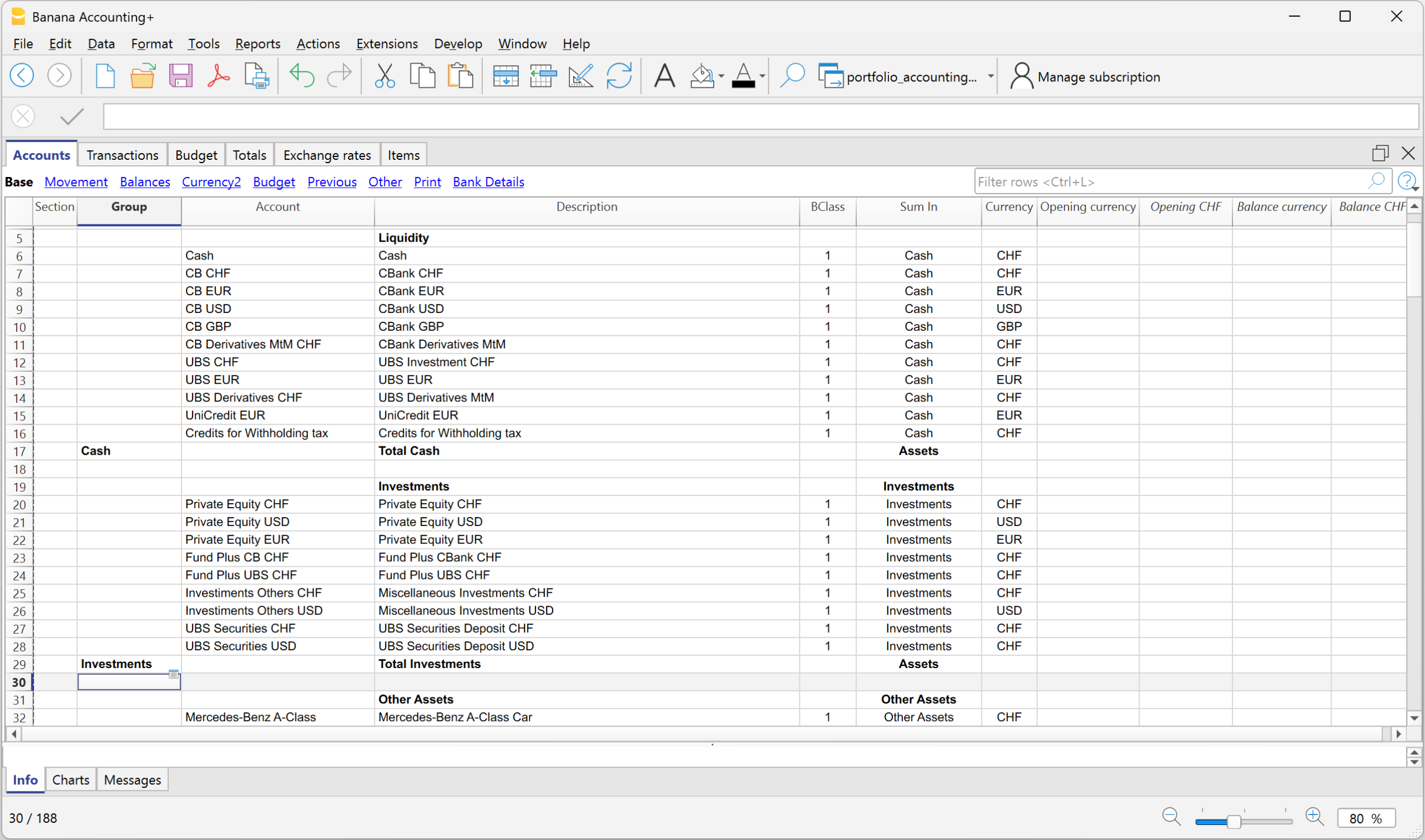
- Liquidity, including cash, bank accounts in different currencies, derivative positions, and withholding tax receivables;
- Investments, with dedicated Investment Balance Sheet Accounts for securities and other financial investments in different currencies;
- Other Assets, including cars, pension assets, furniture and art, and receivables;
- Real Estate Assets, with separate accounts for each owned property;
- Debts, including other debts, loans, and mortgages;
- Equity, including equity and the current year profit or loss.
For Investment Accounting, each security maintained in the Items table is linked through its Asset Account to the corresponding Investment Balance Sheet Account. This makes it possible to maintain detailed information for individual securities while keeping their accounting values fully integrated into the Balance Sheet.
Profit & Loss Accounts
The Profit & Loss Accounts are structured to record the income, costs, and financial results associated with the individual's personal wealth and activities.
They include:
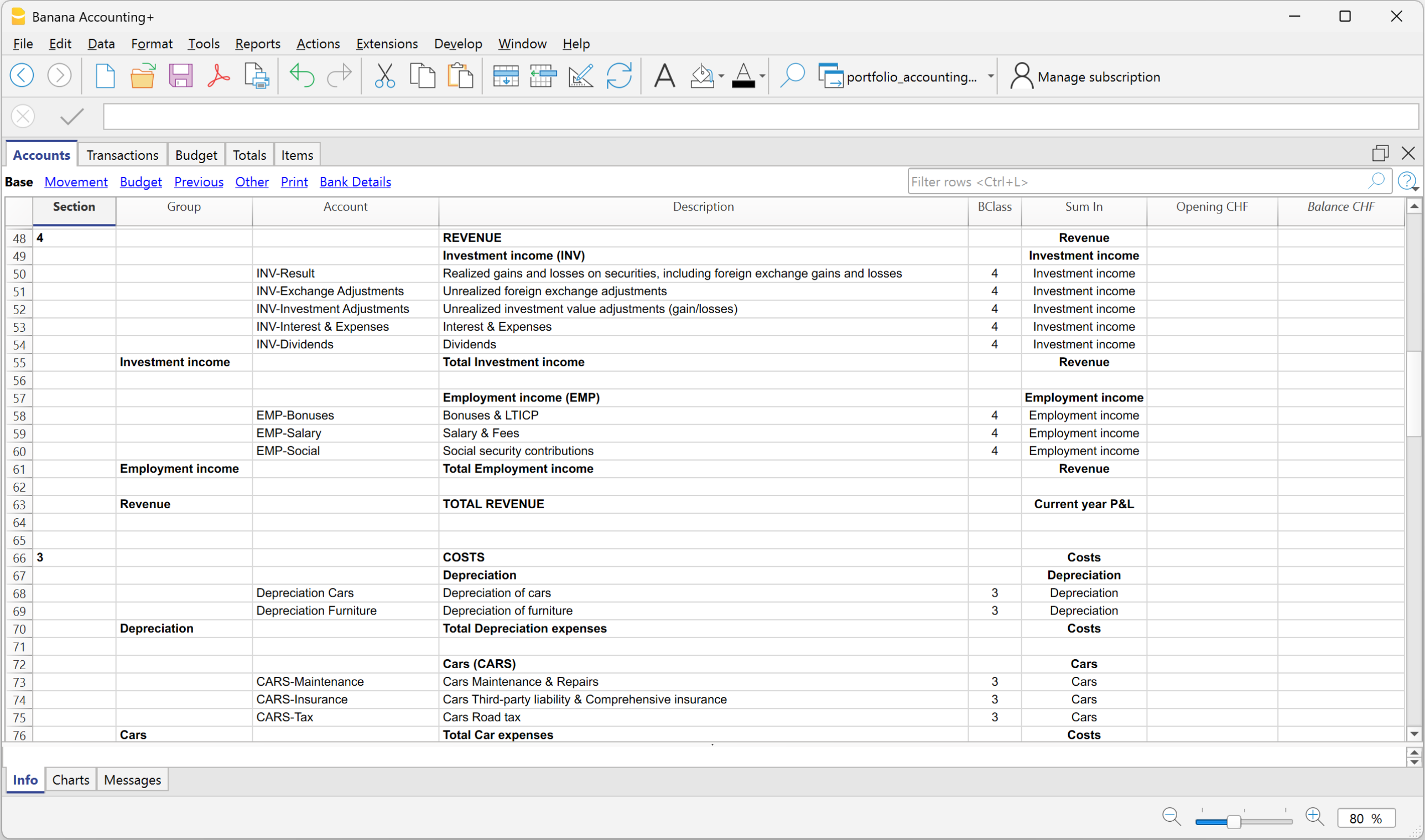
- Investment income and results.
Realized gains and losses on securities, foreign exchange results, unrealized investment and exchange rate adjustments, interest, dividends, and investment-related expenses; - Employment income.
Salary, fees, bonuses, and related social security contributions; - Depreciation.
Depreciation of cars and furniture; - Personal and asset-related costs.
Car expenses, insurance, administration, legal fees, loan interest, taxes, health costs, family costs, and other personal expenses; - Real Estate Revenue and Costs.
Dedicated income and expense accounts are organized and grouped by individual property, covering rental income, other revenues, utilities, insurance, maintenance, condominium fees, and other property-related costs. This structure makes it easy to see the income, expenses, and net result of each property at a glance.
This structure provides a clear overview of the individual's overall financial results, while allowing investment performance and the income, expenses, and profitability of each real estate property to be analyzed separately.
Cost Centers and Segments
The template includes predefined Cost Centers (CC1, CC2, and CC3) and Segments, providing additional flexibility for tracking expenses and analyzing financial information.
Cost Centers are used to track income and expenses related to specific activities, such as trips, vehicles, or personal projects, independently of the main Chart of Accounts. They make it easy to monitor the total costs of each activity, even when expenses are recorded under different accounts.
Segments provide a more structured way to divide accounting information into separate reporting units. They can be used to generate Balance Sheets and Profit & Loss Statements by segment, making it possible to analyze the financial position and results of different activities or components of personal wealth.
Both Cost Centers and Segments can be customized and expanded to meet individual needs, allowing HNWIs, accountants, and Family Offices to adapt the accounting structure to their specific reporting requirements.
Items Table – Investment Portfolio
The Items table contains the list of securities and other financial investments, such as stocks, bonds, ETFs, and investment funds.
Each investment is identified by a unique code (such as an ISIN) and linked to its corresponding Balance Sheet account. The table tracks quantities, currencies, opening values, and current market prices, automatically calculating current quantities and market values.
Investments can be organized into customizable groups, making it easy to view subtotals by asset category.
Together with the Chart of Accounts and the Transactions table, the Items table provides an integrated view of the investment portfolio, combining detailed securities information with double-entry accounting and portfolio valuation.
Exchange Rates Table
The Exchange Rates table contains the currencies used in the accounting system and their exchange rates relative to the base currency.
It allows transactions, account balances, and investments denominated in different currencies to be managed and converted into the base currency.
Exchange rates can be updated to reflect current market values, enabling the calculation of exchange rate differences and the preparation of consolidated financial statements in the base currency.
The table supports both standard currency codes (such as CHF, EUR, and USD) and custom codes, including those used for cryptocurrencies and other digital assets.
Currencies, codes, and exchange rates can be freely customized, providing the flexibility to adapt the accounting system to different countries, currencies, and individual requirements.
Other Resources
Other Banana Accounting templates are available depending on how you want to manage your personal accounting and investments:
- Double-Entry Accounting with Integrated Investment Accounting – for managing personal wealth and investments directly within double-entry accounting when securities are managed in the accounting base currency.
- Multi-Currency Investment Accounting in a Separate File – for keeping detailed multi-currency Investment Accounting in a separate Banana Accounting file that can be used as an investment subledger for your general accounting.