In questo articolo
L'estensione genera e visualizza un report con tre tipi di conteggio:
- Confronto cifra d'affari dichiarata nel rendiconto e registrata in contabilità.
- Cifra d'affari dichiarata nel formulario raggruppata per codice IVA.
- IVA imponibile dichiarata nel formulario.
- Registrazioni dei conti con differenze.
Per generare il report della Riconciliazione IVA:
- Apri il file contabile.
- Dal menu Estensioni seleziona l'estensione Riconciliazione annuale IVA Svizzera > 1. Stampa report.
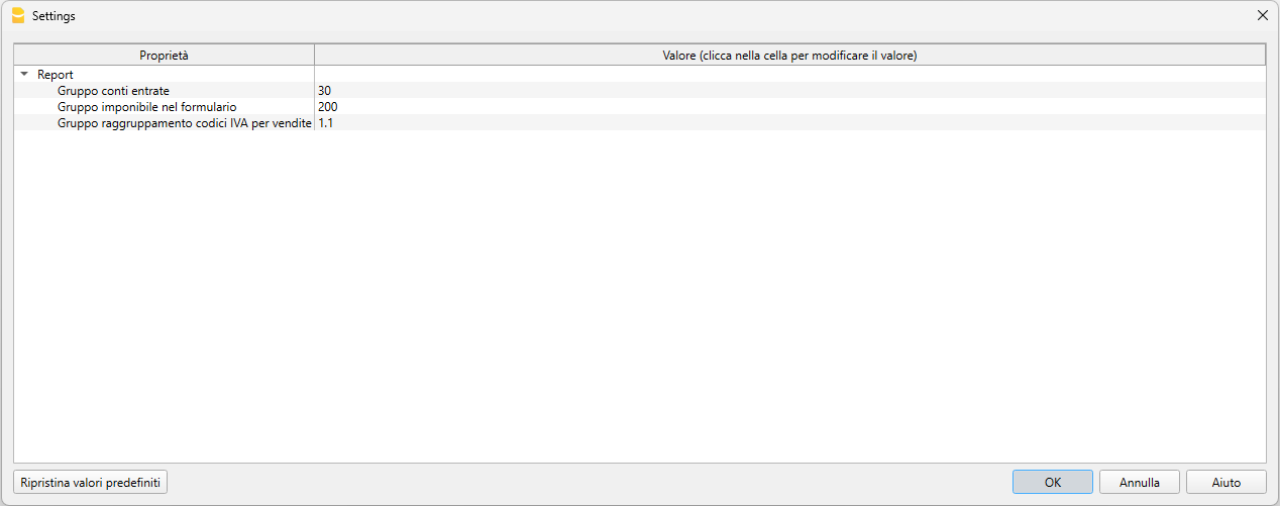
Si aprirà il dialogo delle Impostazioni dell'estensione. Da qui puoi definire le informazioni necessarie per creare il report per la riconciliazione IVA:
- Gruppo conti entrate.
Inserire il gruppo principale dei ricavi che include tutti i conti dei ricavi, definito nel piano dei conti nella tabella Conti o Categorie (per la contabilità Entrate / Uscite e Cash Manager). Per default il valore inserito è 3. Nel nostro esempio il gruppo dei Ricavi è 30.
Se nel tuo piano contabile il gruppo totalizzazione della cifra d'affari è diverso, devi cambiare il valore. - Gruppo imponibile nel formulario.
Inserire il gruppo presente nella colonna Gr1 della tabella Codici IVA che rappresenta il valore della casella 200 del Rendiconto IVA. Il valore per default è 200. - Gruppo raggruppamento codici IVA per vendite.
Inserire il gruppo presente nella colonna Somma in della tabella Codici IVA che totalizza i codici IVA delle vendite. Il valore per default è 1.1. - Confronto tabella Riassunto IVA con cifra d’affari
Per un controllo incrociato tra i risultati dell'estensione e i totali calcolati dalla tabella Riassunto IVA in Banana, la stessa usata per il formulario IVA.
Casella disattivata di default, nelle impostazioni dell’estensione. - IVA registrata al momento del pagamento su conto/gruppo debitori (cash)
Attiva questa opzione se l’IVA viene calcolata secondo il principio dell’incassato e si utilizza un conto debitori. L’estensione considera gli incassi registrati sui conti debitori anziché i ricavi. Le registrazioni sui conti dei ricavi devono essere effettuate al netto dell’IVA, senza codice IVA.
L’IVA viene registrata sul conto debitori al momento dell’incasso. - Conto/Gruppo debitori
Indica il conto o il gruppo dei debitori (clienti) su cui vengono registrati gli incassi. Questo campo deve essere compilato solo se è attiva l’opzione IVA registrata al momento del pagamento su conto/gruppo debitori (cash).
- Gruppo conti entrate.
- Conferma con OK per eseguire l'estensione.
1. Confronto cifra d'affari dichiarata nel rendiconto e registrata in contabilità
Questo conteggio mette a confronto la cifra d'affari dichiarata con la cifra d'affari che risulta nella contabilità e rileva eventuali differenze.
Partendo da questa simulazione nella contabilità dove la cifra d'affari visualizzata è di CHF 5'800.28.

Il report generato con l'estensione presenta delle tabelle suddivise per periodo, incluso anche il periodo complessivo annuale.
In ogni tabella vengono visualizzati tutti i conti che generano la cifra d'affari, inclusi anche i conti con movimenti senza codice IVA.
Ogni tabella è composta dalle seguenti colonne:
- Conto
Elenco dei conti che sono inclusi nella cifra d'affari o con movimentazione IVA (inclusi eventuali conto patrimoniali). - Cifra d'affari con cod. IVA
Ammontare per ogni conto della cifra d'affari, i cui movimenti hanno un codice IVA. - Cifra d'affari senza cod. IVA
Ammontare per ogni conto della cifra d'affari, i cui movimenti non hanno un codice IVA. - Cifra d'affari complessiva
Ammontare complessivo per ogni conto della cifra d'affari, che comprende i movimenti con codice IVA e senza codice IVA. - Netto dichiarato
Importi netti dichiarati nel Rendiconto IVA. - Differenze
Scostamenti tra cifra d’affari in contabilità e quella dichiarata.
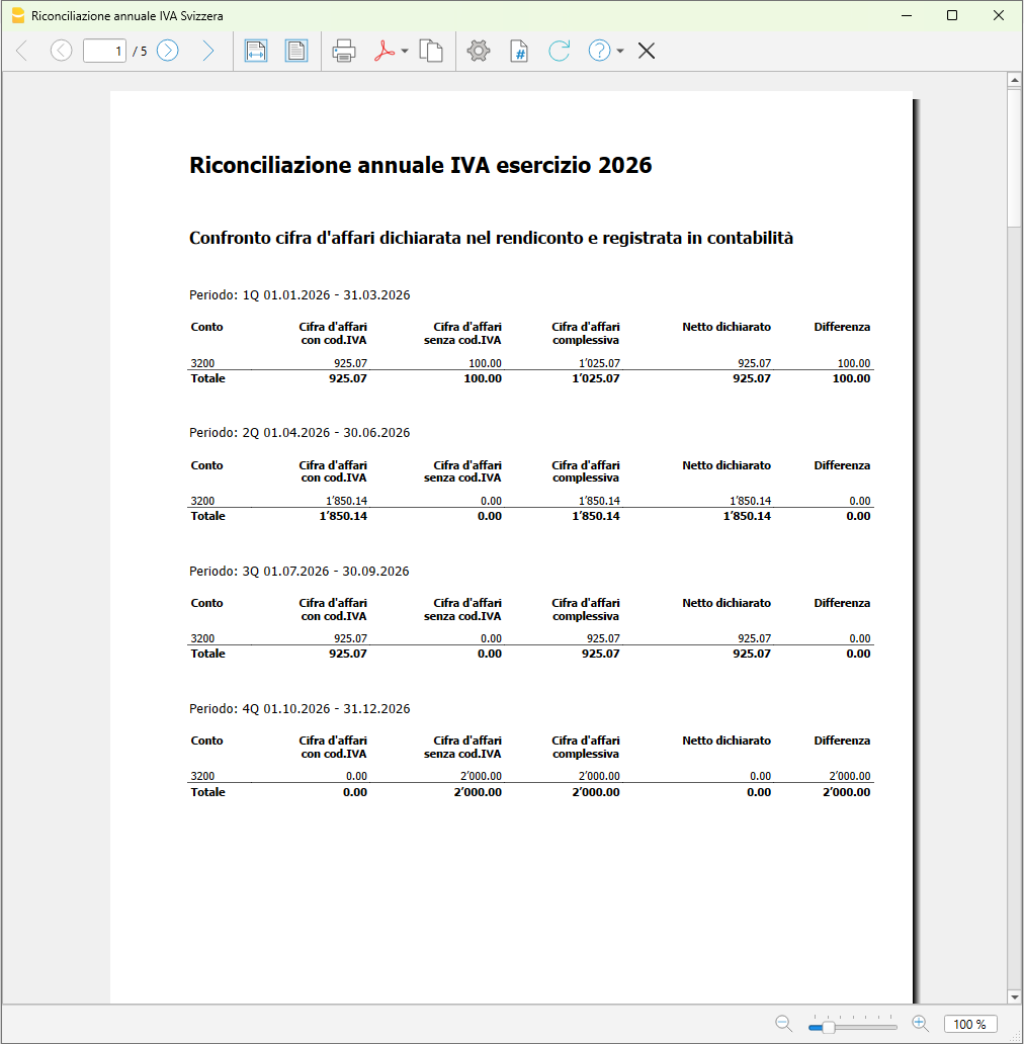
Nell'esempio viene riportato il conteggio del conto 3200 (conto vendite) che rappresenta la cifra d'affari:
- nel primo trimestre (1Q) c'è una differenza di cifra d'affari di CHF 100.00 (colonna Differenza)
- cifra d'affari registrata in contabilità = CHF 1'025.07 (colonna Cifra d'affari complessiva)
- cifra d'affari nella dichiarazione IVA = CHF 925.07 (colonna Netto dichiarato)
- nel quarto trimestre (4Q) c'è una differenza di cifra d'affari di CHF 2'000.00 (colonna Differenza)
- cifra d'affari registrata in contabilità = CHF 2'000.00 (colonna Cifra d'affari complessiva)
- cifra d'affari nella dichiarazione IVA = CHF 0.00 (colonna Netto dichiarato)
- nel periodo annuale complessivo, le differenze di ogni periodo vengo sommate e visualizzate:
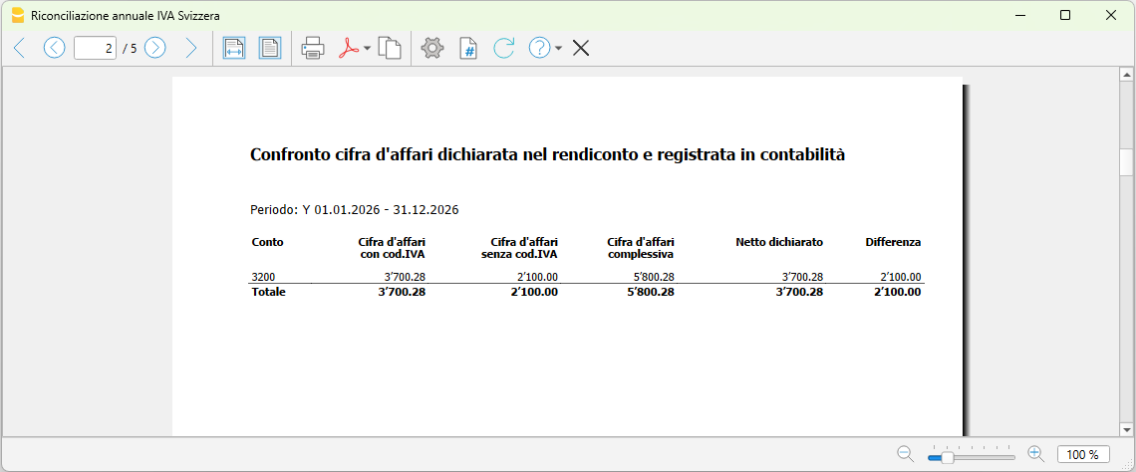
- cifra d'affari registrata in contabilità = CHF 5'800.28 (colonna Cifra d'affari complessiva)
- cifra d'affari nella dichiarazione IVA = CHF 3'700.28 (colonna Netto dichiarato)
- differenza complessiva cifra d'affari = CHF 2'100.00 (colonna Differenza)
2. Cifra d'affari dichiarata nel formulario raggruppata per codice IVA
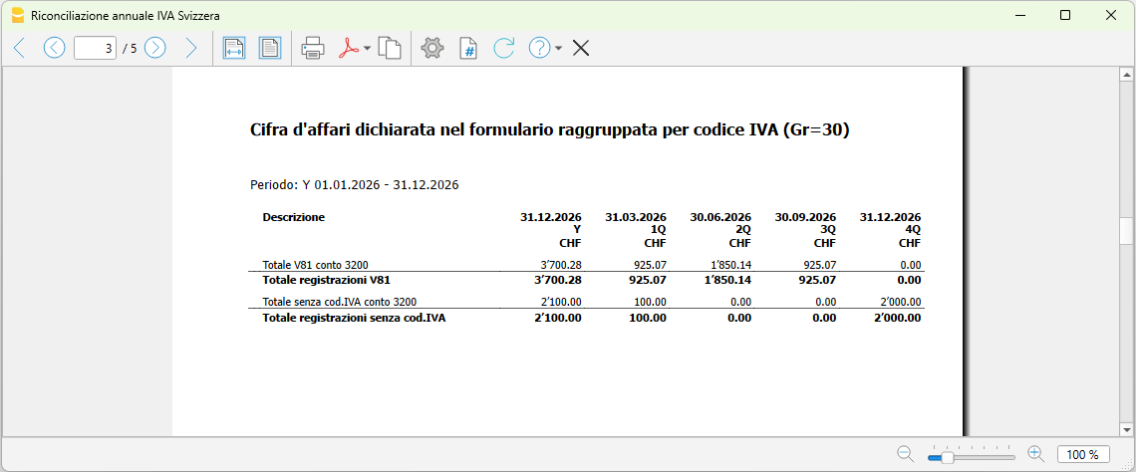
Questo conteggio mette a confronto la cifra d'affari per ciascun codice IVA, relativamente ai conti di ricavo con IVA.
- Descrizione
La descrizione di ogni codice IVA utilizzato nei movimenti della cifra d'affari. - Imponibile Y
Imponibile riferito all'anno. - Imponibile 1Q
Imponibile riferito al primo trimestre. - Imponibile 2Q
Imponibile al secondo trimestre. - Imponibile 3Q
Imponibile al terzo trimestre. - Imponibile 4Q
Imponibile al quarto trimestre.
3. IVA imponibile dichiarata nel formulario
La stampa fornisce un riepilogo degli importi IVA dichiarati all’AFC per ogni trimestre, senza effettuare controlli sulle eventuali differenze.

4. Registrazioni dei conti con differenze
Per ogni conto vengono raggruppate tutte le registrazioni che hanno generato le differenze nei diversi periodi nei Rendiconti IVA.
L’elenco di tutte le registrazioni che hanno generato delle differenze consente di verificare rapidamente la presenza di eventuali errori, ad esempio una registrazione soggetta a IVA priva del relativo codice IVA, oppure di identificare movimenti corretti che, pur avendo un codice IVA, non rientrano nel calcolo della cifra d’affari (come nel caso dell’imposta sugli acquisti o reverse charge).
Le colonne indicate sono le seguenti:
- Riga
Il numero di riga della registrazione nella tabella Registrazioni. - Data
La data della registrazione. - Descrizione
La descrizione della registrazione. Il testo della descrizione viene troncato a 20 caratteri per mantenere la tabella più ordinata e leggibile. - Conto
Il conto con delle differenze della registrazione. - Contropartita
Il conto di contropartita della registrazione. - Dare
L'importo in Dare della registrazione. - Avere
L'importo in Avere della registrazione. - Cod. IVA
Il codice IVA della registrazione. - Tipo importo
Il tipo importo IVA della registrazione. - IVA imponibile
L'importo IVA imponibile della registrazione. - Importo IVA
L'importo IVA della registrazione. - IVA contabile
L'importo IVA contabilizzato della registrazione.
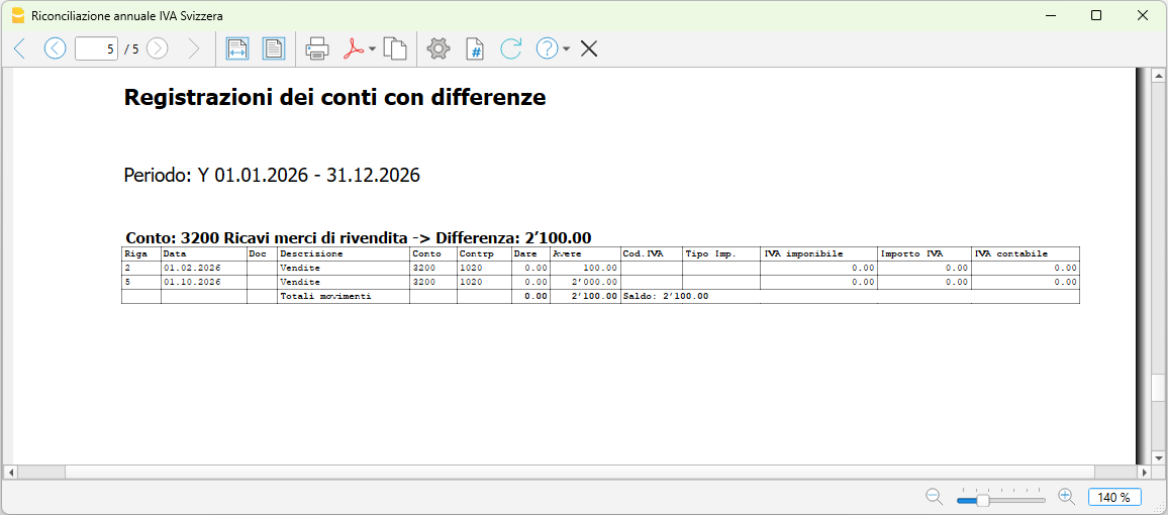
Nell'esempio:
- si vede la differenza tra la cifra d’affari registrata in contabilità (CHF 5'800.28) e quella dichiarata (CHF 3'700.28), pari a CHF 2'100.00.
- Vengono inoltre indicate le registrazioni presenti nella tabella Registrazioni che hanno generato tale differenza.
Andando a controllare nella tabella Registrazioni, alle righe indicate (2 e 5), si nota infatti che le registrazioni sono senza codice IVA pur essendo registrate sul conto vendite 3200 (manca il codice IVA).
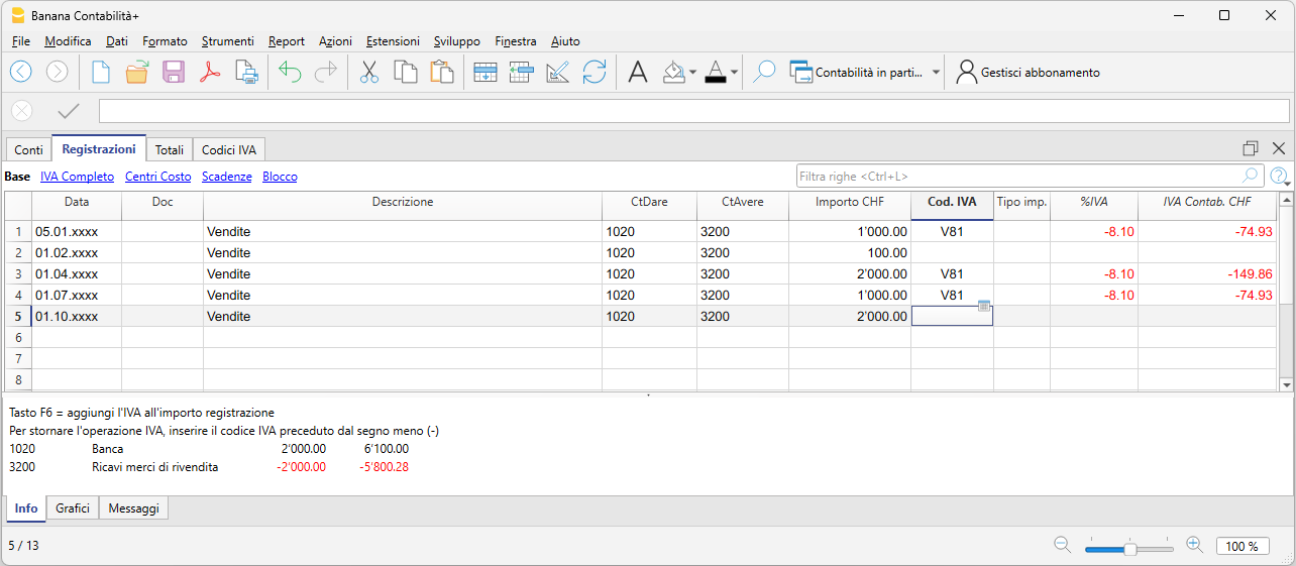
In questi casi, trovato l'errore, si procede a rifare il Rendiconto IVA del trimestre errato con l'estensione Rendiconto IVA e nel portale dell'AFC si inseriscono nuovamente i dati nel Rendiconto di rettifica.