In this article
Multi-Currency Investment Accounting in a Separate File
This predefined template provides a ready-to-use example for managing detailed Investment Accounting in a separate Banana Accounting file, which can be used as an investment subledger for your general accounting. It allows you to manage shares, bonds, and other investments in multiple currencies, keeping track of quantities, prices, Book Values, Market Values, realized and unrealized gains and losses, interest, dividends, and exchange rate differences. The template includes a predefined chart of accounts, an Items table, example transactions for the main investment operations, and an Exchange Rates table for managing investments in foreign currencies.
Open in Banana WebApp
Run Banana Accounting Plus on your browser without any installation. Customize the template, enter the transactions and save the file on your computer.
Open template in WebApp Open tutorial in WebAppTemplate documentation
With Banana Accounting, you can manage securities and financial investments in a separate accounting file, independently of your general accounting software.
This solution is particularly useful if you already use another accounting system or manage your investment portfolio with Excel spreadsheets. The separate file acts as an investment subledger, combining double-entry accounting with detailed portfolio management.
The Investment Accounting extension helps automate several operations, including calculating realized gains and losses on sales, creating adjustments for unrealized gains and losses, updating Market Prices, and calculating exchange rate differences for investments in foreign currencies.
The template uses CHF (Swiss francs) as its default accounting base currency and is suitable for portfolios managed in a single currency. You can change the base currency to suit your needs, preferably before entering transactions. For instructions, see Change the Base Currency.
For more information about how this solution works, see the Separate Investment Accounting (Subledger) documentation.
The Main Accounting File
In the general accounting file, you record all general accounting transactions, including the accounting values related to investments that are required for preparing the financial statements.
The Banana file can be used as an investment subledger: it maintains the details of individual investments and their related transactions, while in the general accounting you can record the required accounting values, including aggregated amounts by account or investment category.
Banana Investment Accounting File
In the Banana Investment Accounting file, you maintain all the details of individual investments, including quantities, prices, Book Values, Market Values, realized and unrealized gains and losses, as well as the related accounting transactions.
The file would replace the Excel files that you usually use to keep track of investments.
The following sections explain how the example file works and how to integrate the resulting accounting data into the general accounting.
Chart of Accounts
The chart of accounts in the example file is intentionally concise and has been created specifically for Investment Accounting and for using the functions provided by the Investment Accounting extension.
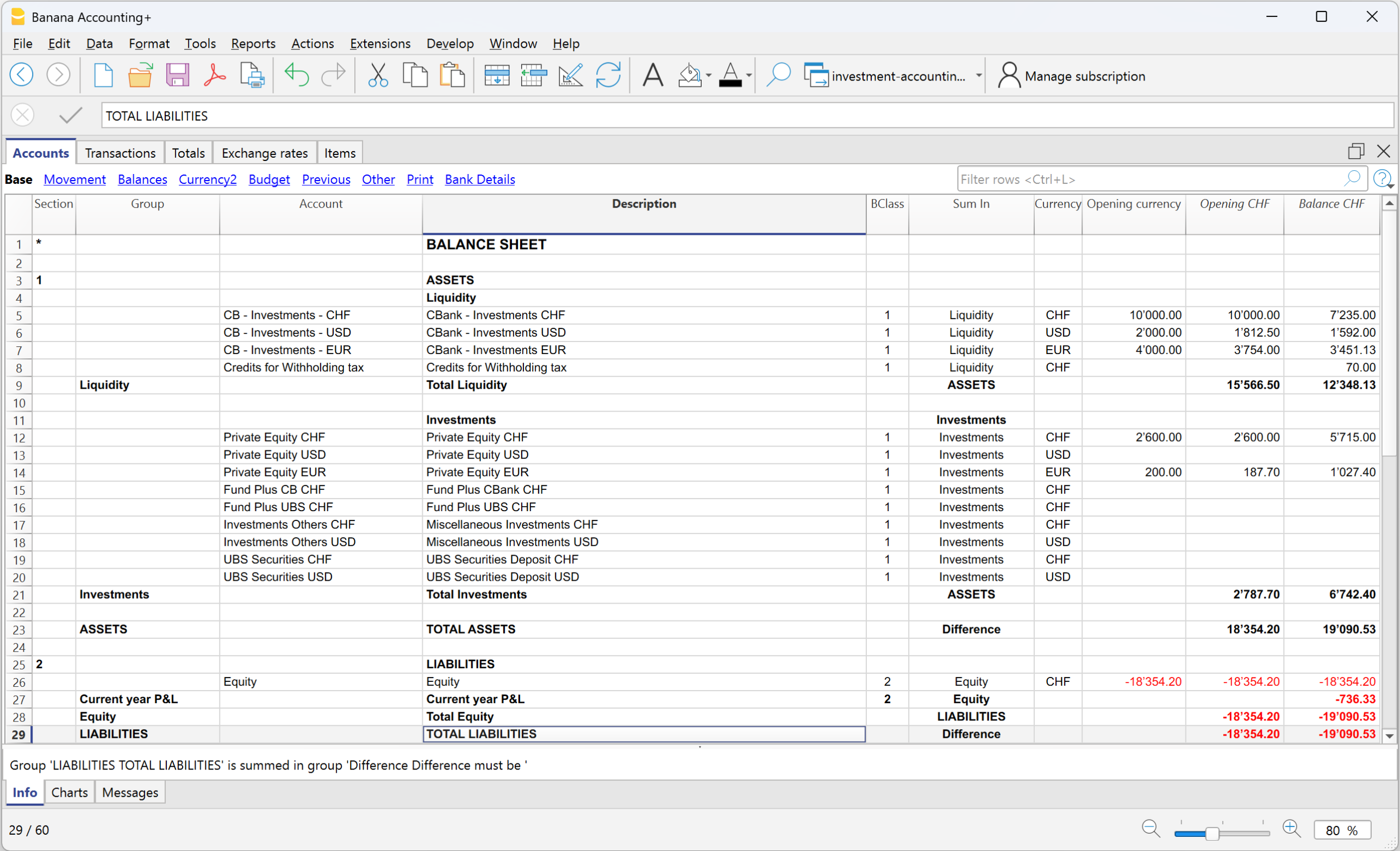
The Accounts table contains only the accounts required to record Investment Accounting transactions and obtain the related Balance Sheet and Profit & Loss statement values.
Balance Sheet
Asset Accounts
The Balance Sheet mainly includes bank accounts, investment accounts, and the withholding tax receivable account required for managing investments.
The example file includes separate accounts by currency to properly manage investments and their related multi-currency transactions.
The bank accounts in the Banana Investment Accounting file are technical accounts used as counterpart accounts for recording cash flows related to investments. Their balances do not necessarily correspond to the balances of the bank accounts in the general accounting, where the cash flows of the entire business are recorded.
Liability and Equity Accounts
These include Equity and the Current Year Profit or Loss required to complete the accounting structure of the file.
Profit & Loss Accounts
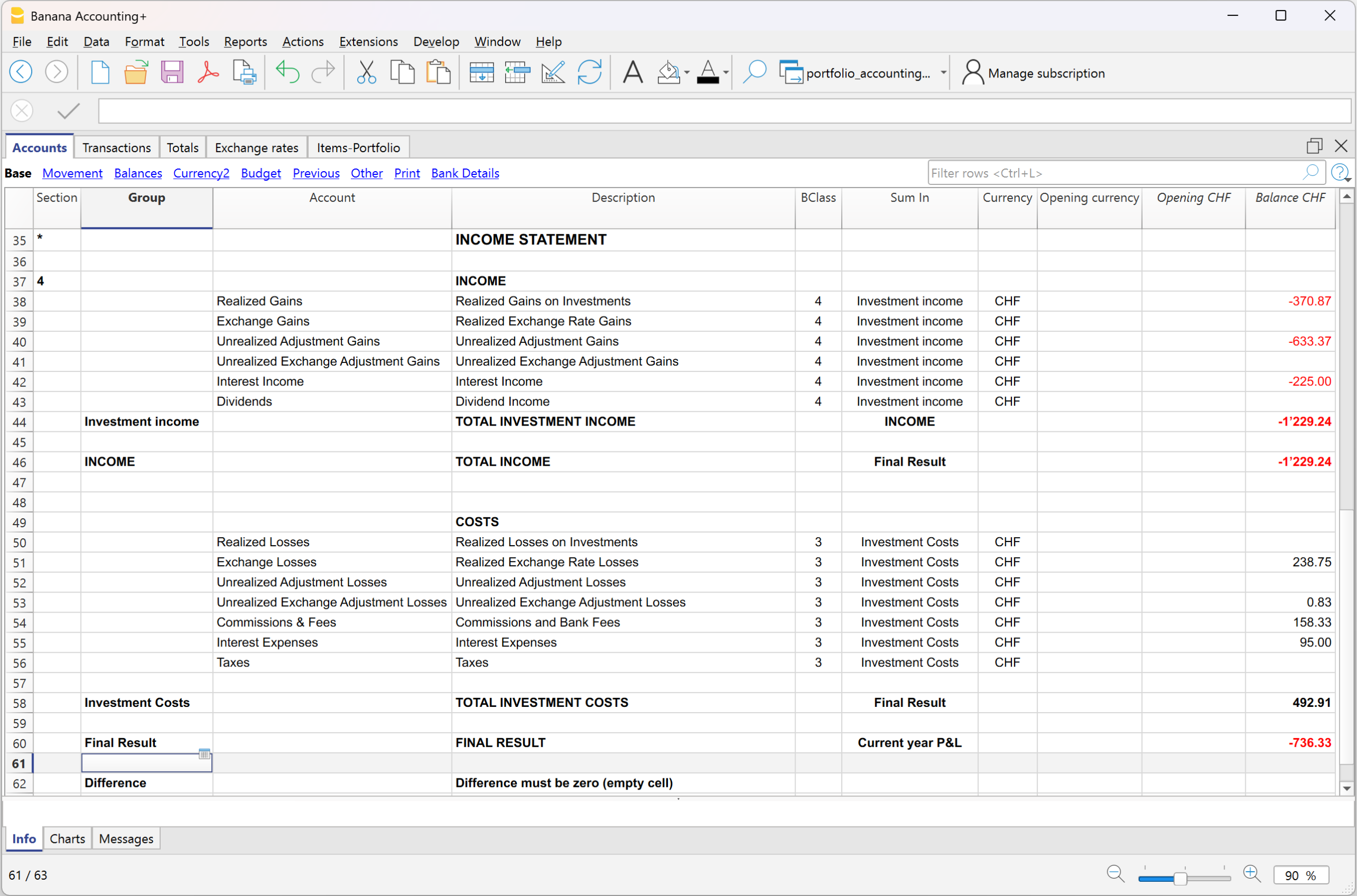
The Profit & Loss statement contains only the accounts required to record the income and expenses arising from investment transactions, such as interest, dividends, commissions and fees, realized gains and losses, unrealized value adjustments, and exchange rate differences.
Opening Balances
The opening balances of the Investment Balance Sheet Accounts are entered in the Accounts table. For each Investment Balance Sheet Account, the opening balance in the Banana file must correspond to the sum of the opening values of the Items linked to the same Asset Account.
Opening balance of the Investment Balance Sheet Account in the Banana file = Sum of the opening values of the linked Items
When the corresponding Investment Balance Sheet Account is also present in the general accounting, the opening balance from the Banana file must be consistent with the opening balance of the corresponding account in the general accounting:
Opening balance of the Investment Balance Sheet Account in the Banana file = Opening balance of the corresponding Investment Balance Sheet Account in the general accounting
Items Table - Portfolio
The details of individual investments are managed in the Items table. For each investment, the table contains information such as the Item identifier, description, Asset Account, Quantity, Unit Price, Book Value, Market Price, and Market Value.
For more information, see the Table Items page.

Transactions
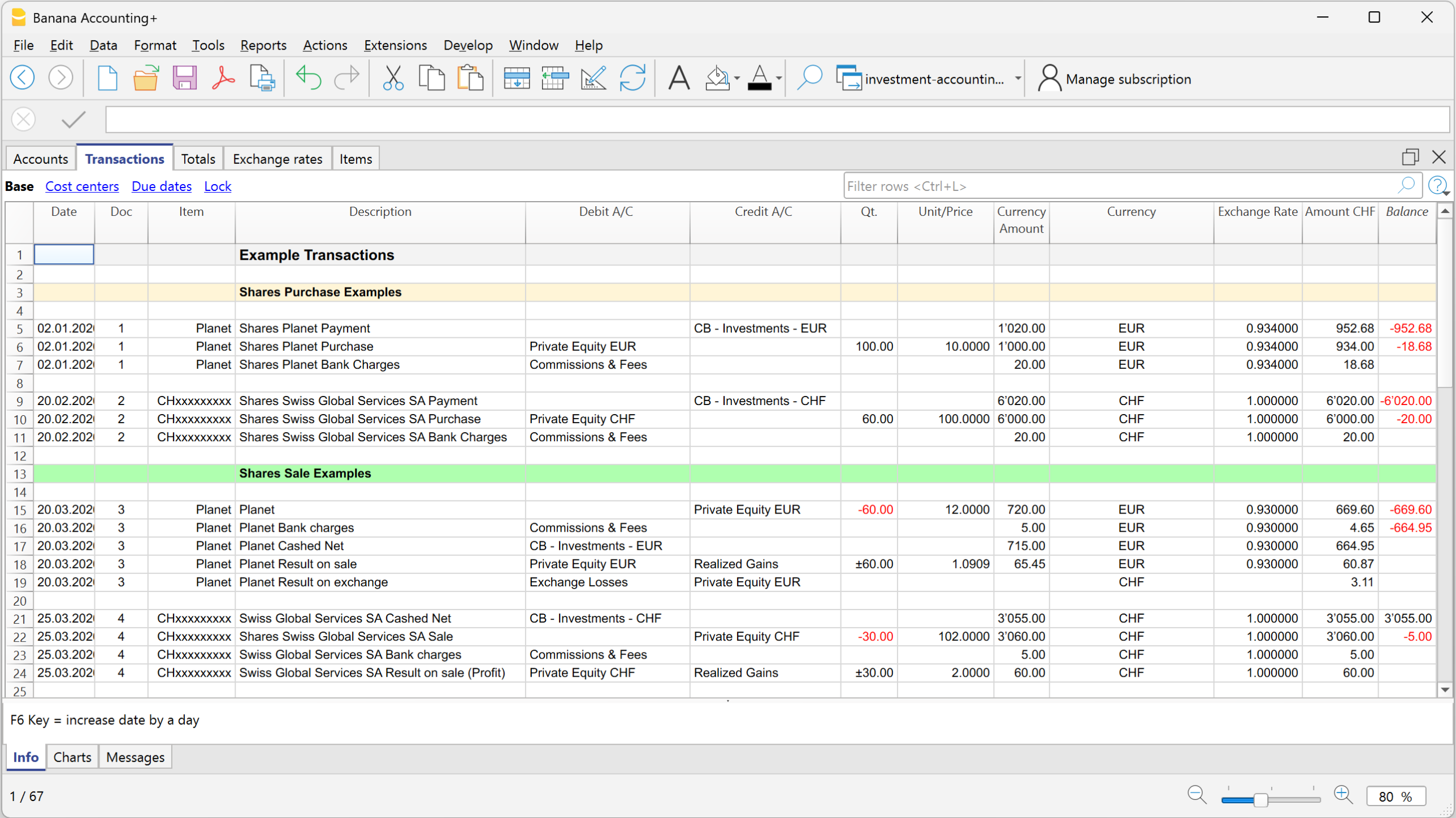
The example file contains transactions covering the main investment operations, including purchases, sales, dividends, interest, commissions and fees, realized gains and losses, value adjustments, and exchange rate differences.
The transactions contain both the standard double-entry accounting information and investment-specific information, such as Item, Quantity, and Unit Price.
For more information, see the Transactions page.
Updating and Reconciling the General Accounting
The Banana Investment Accounting file can be used as an investment subledger for your general accounting. It maintains the details of individual investments and their related transactions, while the required accounting values are recorded in the general accounting.
The transfer of these values is not automatic. You can update the general accounting in two main ways:
- Periodically, by keeping the detailed investment transactions in the Banana Investment Accounting file and transferring the required accounting values to the general accounting at regular intervals or when financial statements need to be prepared. This can be done, for example, at the end of a month, quarter, half-year, or year.
Important: When using periodic updates, it is not sufficient simply to record the difference between the opening and closing balance of an investment account. Purchases, sales, realized gains and losses, income, costs, and any applicable value or exchange rate adjustments must be transferred to the general accounting according to their accounting nature.
The values transferred to the general accounting can be recorded in aggregated form by investment account or category, provided that the required accounting information is maintained and the corresponding balances can be reconciled with the Banana Investment Accounting file.
- Transaction by transaction, by recording the corresponding accounting effects in the general accounting as the investment transactions are recorded in the Banana file.
After the required accounting values have been recorded in the general accounting, the Book Values resulting from the Banana file can be used to verify the corresponding investment account balances:
Book Value from the Banana file = Balance of the corresponding investment account in the general accounting
In this way, the Banana file maintains the detailed information for individual investments and their related transactions, while the general accounting contains the accounting values required for financial reporting.
Integrated Investment Accounting Templates
Other Resources
If you prefer to manage investments directly within your financial accounting instead of using a separate Investment Accounting file, you can use one of the following Banana Accounting templates with integrated Investment Accounting: