Zo begint u met Banana Boekhouding+
Met Banana Boekhouding Plus kunt u in slechts enkele minuten aan de slag, eenvoudig en veilig werken en gebruikmaken van geavanceerde functies wanneer uw onderneming die nodig heeft.
Of u nu de boekhouding van een kleine onderneming, een vereniging of uw persoonlijke boekhouding beheert, er is geen ingewikkelde configuratie of technische kennis nodig: Banana begeleidt u stap voor stap met gebruiksklare en aanpasbare sjablonen die aansluiten bij uw manier van werken en uw behoeften.
Met Banana krijgt uw boekhouding vorm in drie eenvoudige stappen:
En de boekhouding is klaar....
Bekijk de video over boekhouden in 3 stappen: 1'00"

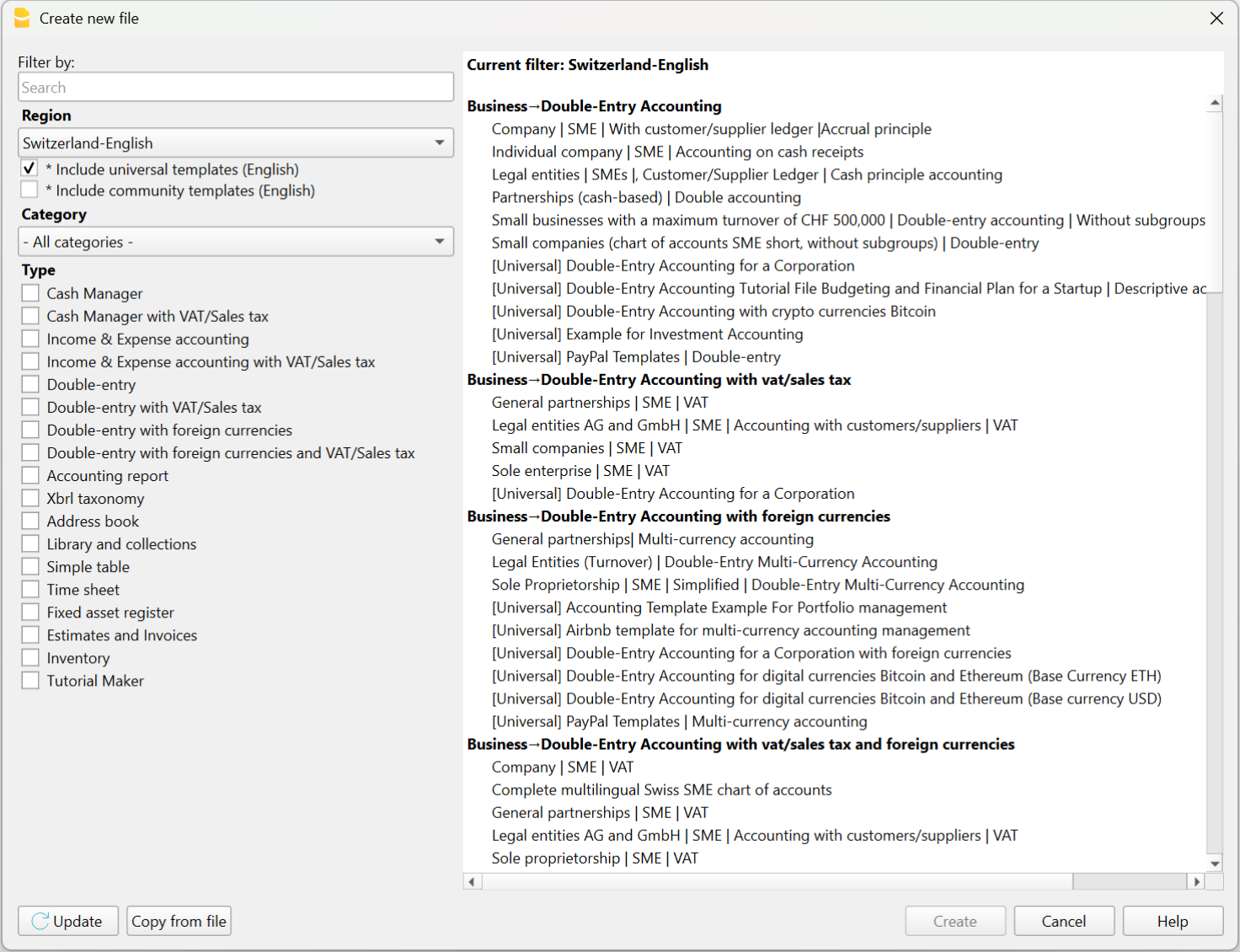
1. Kies het sjabloon dat het beste bij u past
Elk sjabloon van Banana Boekhouding Plus is al ingesteld voor een specifiek type boekhouding, zoals Inkomsten/Uitgaven, Dubbel boekhouden of Vreemde valuta.
Het sjabloon dat u kiest, is dus een complete, gebruiksklare oplossing, met alle functies, uitbreidingen en berekeningen die al voor uw boekhouding zijn ingesteld.
U kunt het sjabloon kiezen en openen:
- vanuit het programma, via het menu Bestand > Nieuw
- vanuit onze Sjablonenwinkel, door het naar uw computer te downloaden of het via de WebApp te openen (rechtstreeks in de browser – nog in testfase).
Door met een sjabloon te beginnen, bespaart u tijd, voorkomt u fouten en beschikt u meteen over een solide basis om mee te starten.
Elk sjabloon kan op elk moment worden uitgebreid met nieuwe functies (btw-beheer, budgettering, kostenplaatsen), zonder dat u uw boekhoudgegevens opnieuw in een nieuw bestand hoeft in te voeren.
2. Pas uw rekeningen aan
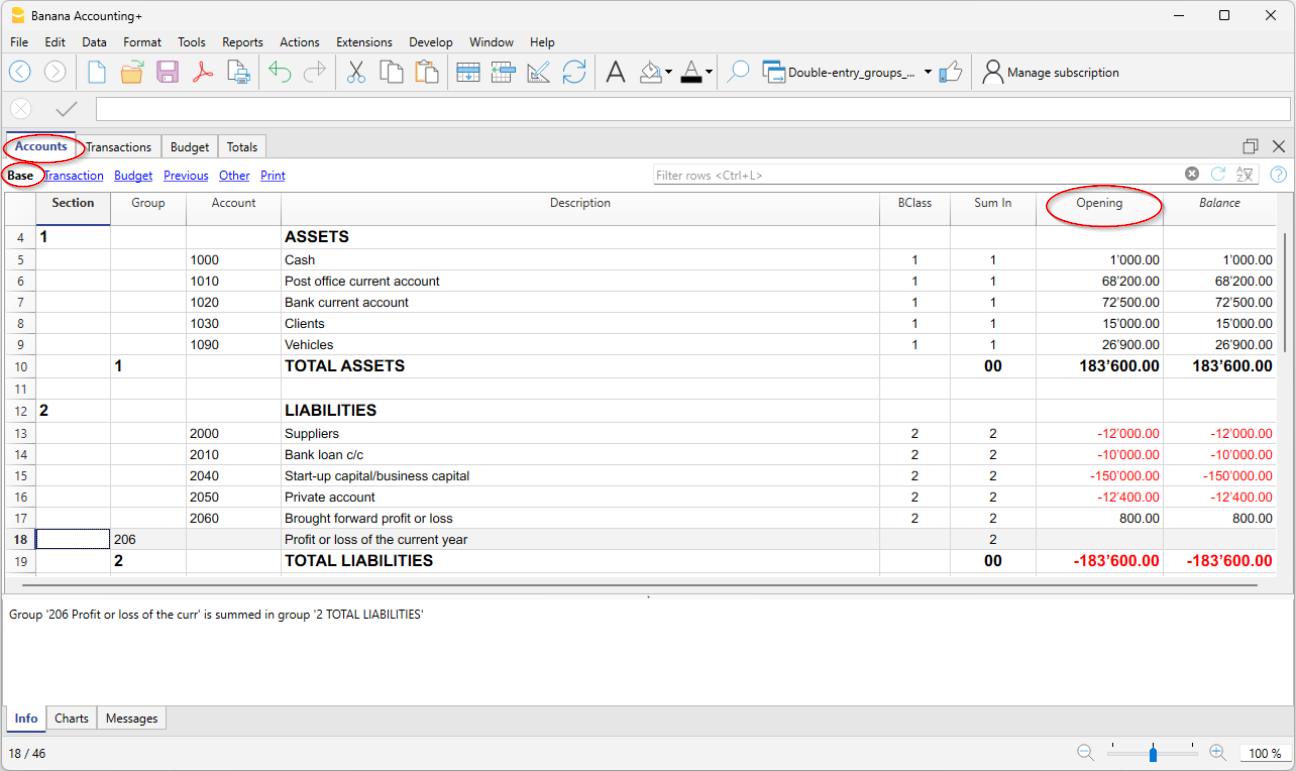
Elk sjabloon van Banana Boekhouding bevat al een vooraf ingestelde Rekeningentabel met de meest gebruikte rekeningen voor dat type boekhouding, maar u kunt deze vrij aanpassen. Alle rekeningen, ook de rekeningen die u toevoegt of wijzigt, verschijnen in de balansen, rapporten en officiële afdrukken. Dit zijn de belangrijkste aanpassingen:
- Voer via het menu Bestand > Bestandseigenschappen (basisgegevens) de naam en gegevens van uw onderneming in.
- In het rekeningstelsel (de tabel Rekeningen):
- Voer in de kolom Beschrijving van de bankrekeningen de namen van uw banken in.
- Voer de rekeningen van uw klanten en leveranciers in met alle gegevens (naam, adres, btw-nummer…)
- Voer in de kolom Opening de beginsaldi van uw rekeningen in.
- Sla het op uw pc of in de cloud op. Het sjabloon is nu uw eigen boekhoudbestand.
Banana Boekhouding Plus is flexibel en modulair: u kunt op elk moment nieuwe functies toevoegen zonder een nieuw bestand te maken of reeds ingevoerde gegevens te verliezen. Zo kan uw boekhouding geleidelijk meegroeien met uw onderneming. U kunt meteen of later, wanneer dat nodig is, het volgende toevoegen:
3. Importeer of voer transacties in
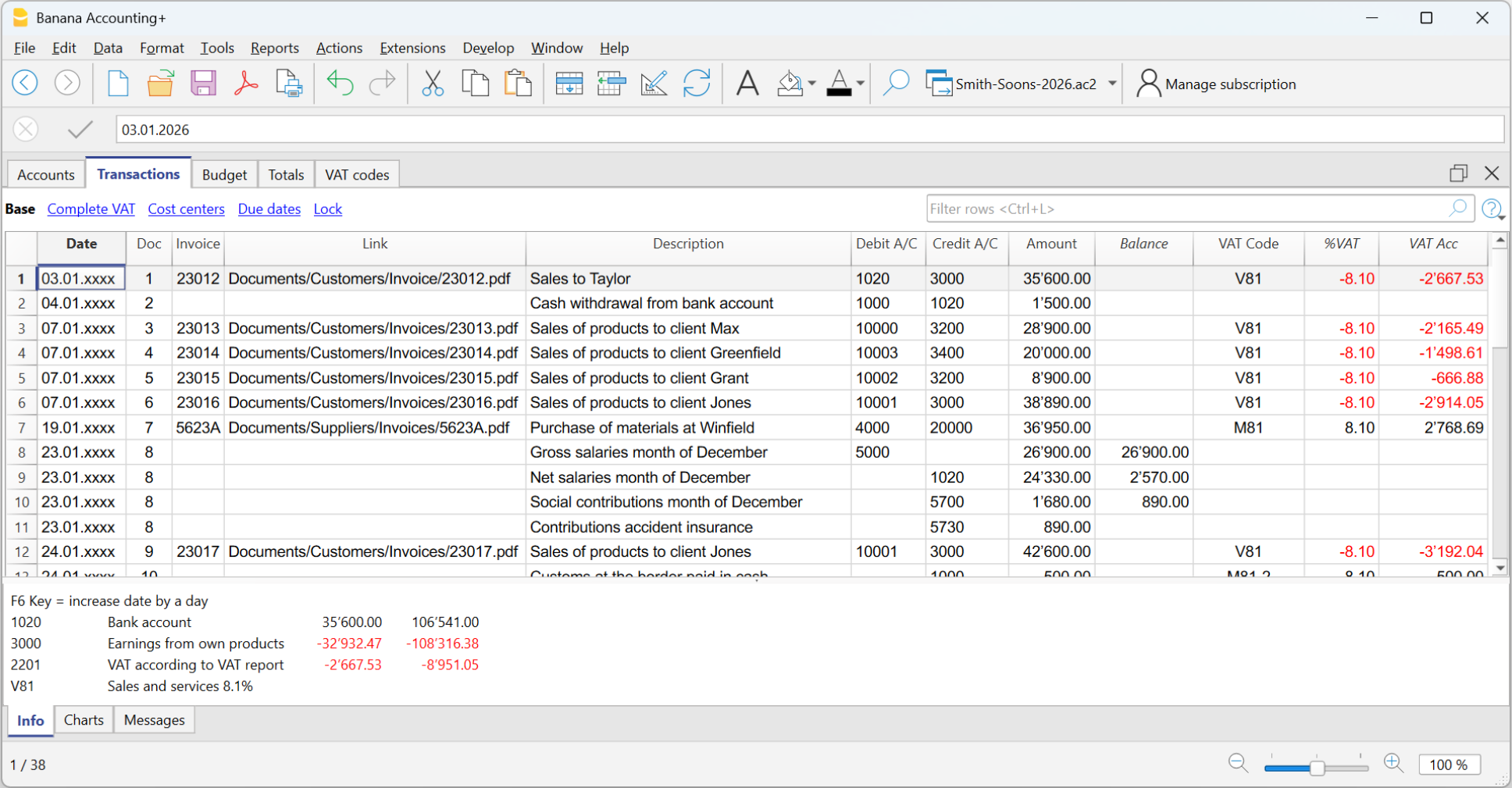
De tabel Transacties vormt het hart van het programma en bevat alle dagelijkse boekingen. Op basis van de gegevens die in de tabel Transacties zijn ingevoerd, werkt het programma automatisch de rekeningsaldi bij en kunt u onmiddellijk alle rapporten genereren die u nodig hebt.
Om transacties snel in te voeren, raden wij aan enkele tijdbesparende functies te gebruiken:
- Importeer transacties van uw bank, postrekening of creditcard.
- Om transacties te importeren, hebt u de gegevens nodig in .csv-formaat (Advanced-plan) of in het standaardformaat ISO 20022 (camt.053, xml, … – Professional-plan).
- Na het importeren hoeft u alleen nog de tegenrekening in de transactieregels aan te vullen.
- Gebruik Regels (Advanced-plan) om transacties automatisch te laten boeken zonder handmatige invoer van de tegenrekening, btw-code of andere gegevens.

En de boekhouding is klaar...
Meer informatie over de modellen die in de verschillende toepassingen worden gebruikt, vindt u op de volgende pagina's:
- Transacties in dubbel boekhouden
- Transacties in boekhouding met vreemde valuta
- Transacties in inkomsten- en uitgavenboekhouding
- Transacties in Kasboek
Banana Boekhouding Plus biedt nog veel meer functies om nog sneller te werken, uw tijd optimaal te benutten en energie te besparen.
Professionele balansen en rapporten
Met Banana Boekhouding Plus kunt u op elk moment actuele rapporten en afdrukken genereren om uw boekhouding te controleren of gegevens extern te presenteren. U hebt toegang tot een ruime keuze aan afdrukken, van facturen tot financiële overzichten. De meest gebruikte zijn:
- Balans → toont activa en passiva, met subgroepen en overzichtelijke totalen.
- Winst- en verliesrekening → toont kosten, opbrengsten en de nettowinst of het nettoverlies.
- Budget → vergelijkt de verwachte waarden met de werkelijke waarden.
- Balans en winst- en verliesrekening met kolommen van het vorige jaar en de bijbehorende verschillen.
Alle afdrukken worden automatisch bijgewerkt op basis van uw boekingen en de functies die u hebt geactiveerd (btw, vreemde valuta, budget).
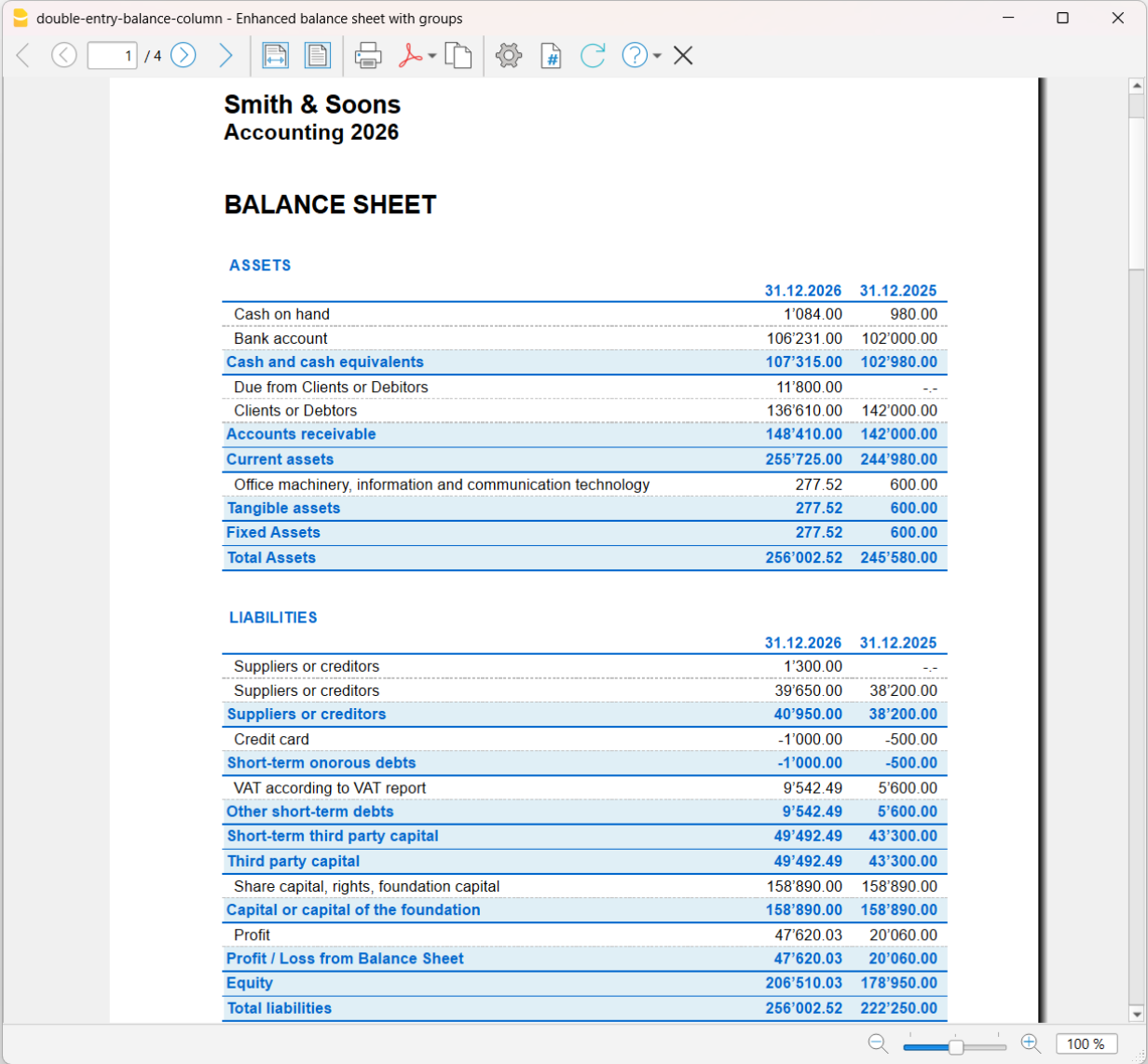
Enkele voorbeelden van afdrukken uit verschillende toepassingen
Balans uit dubbel boekhouden, met de werkelijke waarden van het huidige jaar en het vorige jaar.
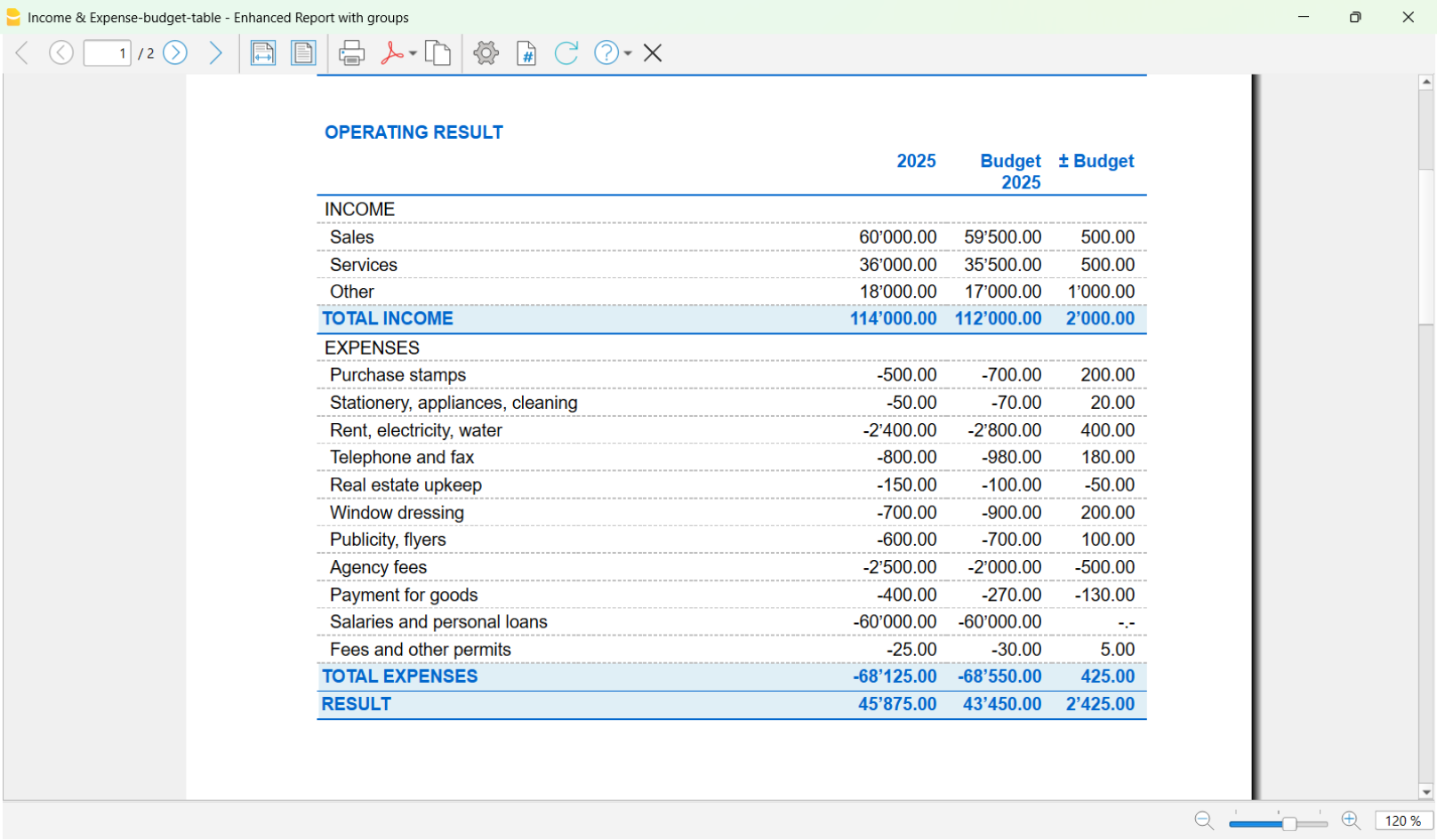
Rapport uit inkomsten- en uitgavenboekhouding, met kolommen voor de werkelijke waarden van het huidige jaar, het budget van het huidige jaar en de verschillen tussen de werkelijke waarden en het budget.
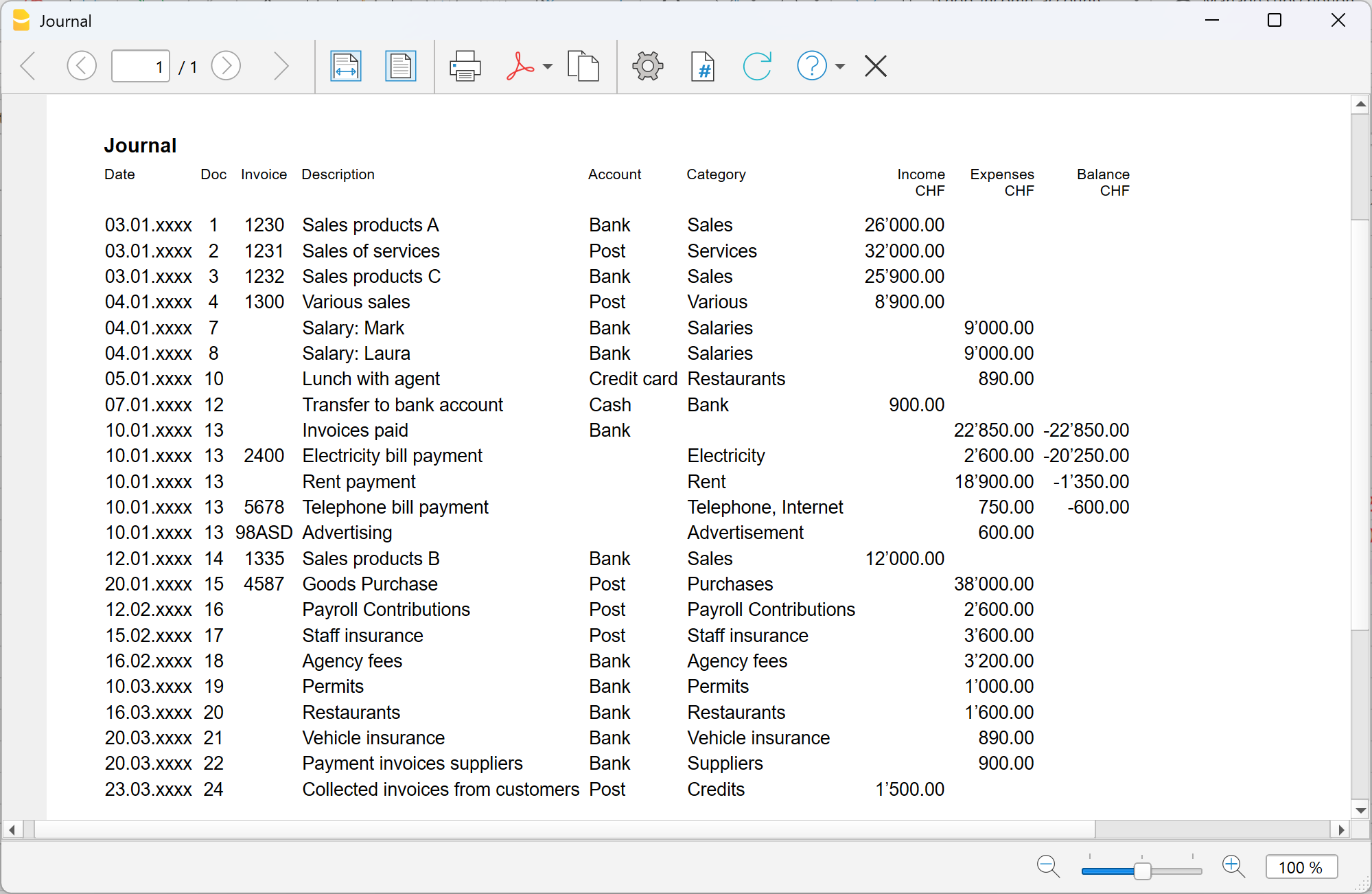
Journaal uit inkomsten- en uitgavenboekhouding.
Ontdek alle functies van Banana Boekhouding Plus...
Choosing the right accounting template
Banana Accounting Plus provides a wide collection of templates that give you a ready-made starting point, which you can customise according to your needs. Choosing the most suitable one allows you to get off to the right start, save time and immediately gain a clear financial overview.
By selecting a template, you create the accounting file in which you will manage your accounting year. The file includes the chart of accounts, the Transactions table, and other tables, depending on the type of accounting and the features you need.
On this page, we refer to the templates for Switzerland and for selected English-speaking countries, as well as to the universal templates available in English that can be adapted to your country. This is only a selection: to see all the templates available in English, see the complete index.
We have grouped together some initial questions to help you quickly identify the template that best suits your needs.
What type of activity do you want to manage?
Banana provides predefined and customisable templates, organised by type of activity, such as personal, non-profit organisation or business. For each category, you can choose from different application types, from Cash Manager and Income & Expense Accounting to Double-entry Accounting, also with VAT or multiple currencies.
- Personal accounting
For managing household accounts and the family budget, health insurance expenses, children's pocket money (it is never too early to start), etc.
See the templates available for individuals: Switzerland | USA | Universal English
- Association, foundation or non-profit organisation
For small associations, or when the accounts are managed by a volunteer without specific experience, Income & Expense Accounting may be sufficient.
Some associations, however, prefer to use Double-entry Accounting.
If the association is subject to VAT, choose a template with VAT; if it also has bank accounts in foreign currencies, choose a Multi-currency Accounting template.- See the templates for associations: Switzerland | USA | Universal English
- Other resources for associations (project management, donation certificate, membership fee management): Switzerland | Universal English
- Business
If you need to manage a business activity, consider these aspects when choosing the template:- What type of business do you have? Choose the template that best suits your business:
- Switzerland: SA and Sagl companies, sole proprietorships, partnerships, small businesses and micro-enterprises.
- Other templates for businesses in English: USA | Canada | Universal English
- Are you subject to VAT?
- Switzerland: you can choose an Income & Expense Accounting template with VAT or a Double-entry Accounting template with VAT. Also check which VAT method applies to your business, either the effective method or the net tax rate method. See the differences between the two systems.
- Do you manage your accounts on an accrual or cash basis? See the difference between the two methods.
- Do you work internationally? Do you have bank accounts in different currencies?
- Switzerland: Multi-currency Double-entry Accounting templates.
- Other templates for businesses in English: USA | Canada | Universal English
- What type of business do you have? Choose the template that best suits your business:
Important note: if you have a business in Switzerland and are subject to VAT, you need the Advanced plan of Banana Accounting Plus to obtain the VAT Report.
- Trustees and accounting professionals
Banana Accounting provides solutions for different types of clients. With a single subscription, you can manage multiple clients and create an unlimited numer of accounting files, allowing to create the most suitable chart of accounts for each one of them. Banana also adapts to different ways of working: you can supervise the accounts managed directly by your clients or manage all their accounting work yourself.
In addition, specific templates are available for areas such as Investment accounting, Forensic accounting (or accounting reconstructions) and Financial planning, allowing you to expand the services and consulting you offer your clients. More information...
Are you already familiar with accounting?
Did you know that with Banana Accounting, in addition to traditional Double-entry Accounting, you can also use Income & Expense Accounting? You can choose the one that best suits you based on your accounting knowledge:
- If you are a beginner: we recommend an Income & Expense Accounting template. These templates use descriptive accounts and categories (that is, words instead of account numbers), making management even more intuitive. You learn as you work, and if necessary, you can always convert your Income & Expense file to a Double-entry Accounting file later (on our website you can also find the theory of double-entry accounting, useful for reviewing the basic concepts).
- If you already have some experience or are an accounting specialist: choose a Double-entry Accounting template. There are double-entry templates with very compact charts of accounts for simpler cases.
The links to the templates above refer, by way of example, to templates for Switzerland.
Do you need to issue invoices?
If you want to issue and manage invoices, also take this requirement into account when choosing the template. With Banana, you can manage invoicing directly in the accounting file using Integrated invoicing, or separately with the Estimates and Invoices application.
Some Double-entry Accounting templates are already set up for integrated invoicing, with a customer ledger and sample transactions that make it easier to manage invoices and related payments.
The Estimates and Invoices application templates, on the other hand, allow you to manage invoicing separately from accounting and are the solution most commonly used together with Income & Expense Accounting.
For more information about invoicing and the two available solutions, see:
Not sure? Get started anyway
If you still have doubts, don't worry. You can start with a simpler template, for example Income & Expense Accounting, and customise it according to your needs. Your choice of template is not final. If necessary, you can also switch to another type of accounting later while keeping the work you have already done. The important thing is to get started.
Next steps
By choosing the template, you have already taken an important first step. Now all you need to do is enter the basic data for your business in the file and make any small adjustments to the template according to your needs. At this point, you are ready to enter the transactions.
Customise the template structure
All Banana templates are fully customisable. For example, you can add or modify accounts, change categories and descriptions, and add or modify VAT codes. You can also make changes after you have started working with the file. Learn more.Import transactions
Once you have chosen and customised the template, you can enter transactions manually or import them directly from your bank.
Tips for choosing a subscription plan
The choice of subscription plan depends on the features you need and how you prefer to work.
Professional plan
If you have only a few transactions, you can enter them manually and, for those that repeat periodically, use Recurring transactions. For importing bank transactions, the Professional plan includes the standard ISO 20022 format.
Advanced plan
If you manage many transactions or want to speed up your work, the Advanced plan offers additional import and automation features. It includes specific import extensions for different banks and credit cards, as well as Rules for the automatic completion of imported transactions, useful, for example, for completing imported transactions that repeat every month. In addition, the Filter allows you to quickly find and modify text, amounts and other data in transactions.
If you start with the Professional plan and later need the additional features included in Advanced, you can upgrade at any time, even during the year, paying only the pro-rata difference.
Other useful resources
In addition to the program, you can find the complete Banana Accounting documentation free of charge on our website. It serves as a manual and guides you through the use of the different features. To find your way around more easily, you can start with these resources:
- Documentation
On the main documentation page, you will find all the available topics. If you are just getting started, also see the User interface page, which presents the main areas of the program and helps you understand the documentation instructions more easily.
- Video tutorials and webinars
Learn how to use Banana Accounting through examples and practical explanations.
- Courses and consultancies
We work with various partners active in the accounting and financial sectors who offer practical courses on using Banana Accounting and consulting services.