In this article
Banana Investment Accounting combines professional double-entry accounting with investment management in a single, integrated solution. Manage shares, bonds, funds, and other financial instruments in multiple currencies, as a full accounting solution or as a sub-ledger of an existing accounting solution.
It brings advanced investment accounting features, typically found only in specialized software, within reach of businesses, accounting professionals, and private investors.
Video Overview
Before reading the documentation we invite you to watch this video.
- ▶ Banana Integrated Investment Accounting Overview (Short Video 3'15")
Information dense overview of the investment accounting features, intended for viewers with a solid background in accounting and finance.
A Unique Tool for Accounting Professionals
An increasing number of companies and individuals hold significant and increasingly complex investment portfolios. For accounting professionals, this creates new opportunities to provide specialized, value-added services.
Banana Investment Accounting makes it possible to manage financial accounting and investments within the same accounting system. By extending traditional accounting services to include investment accounting, professionals can better serve clients with complex financial assets and create opportunities for additional services, including financial reporting, investment monitoring, and advisory support.
Banana Investment Accounting can be particularly useful for:
- Companies holding and managing different types of investments
- Pension funds managing multi-asset investment portfolios
- Family offices managing multi-asset investment portfolios
- Independent accountants providing investment accounting services
- High-Net-Worth Individuals and Ultra-High-Net-Worth Individuals managing complex investment portfolios
- Non-profit organizations managing investments or endowment funds.
The Advantages of Double-Entry Accounting
Many people managing investments still rely on accounting software that does not integrate investment management. As a result, they often need separate spreadsheets to calculate book values, gains and losses, and other investment-related information. This can be time-consuming and makes reconciliation more difficult, especially when investments are held with multiple banks or custodians that provide reports using different formats and valuation methods.
With Banana Investment Accounting, investment transactions are integrated directly into a consistent double-entry accounting system. Investment data and financial accounting remain connected and can be reconciled and verified at any time.
Key advantages include:
- In the Items table, you can define your investments, including shares, bonds, funds, and other financial instruments, together with information such as the investment ID, currency, Asset Account, opening quantity, and prices.
- In the Transactions table you can record purchases, sales, dividends, interest, charges, and other investment transactions, together with the investment ID, amount in transaction currency, exchange rate, quantity, and unit price.
- When an investment is sold, the Investment Accounting extension can calculate the realized gain or loss and, where applicable, the exchange rate gain or loss, and create the related accounting transactions.
- At any time during the year, you can update Market Prices to determine current Market Values and unrealized gains or losses. When required by the applicable accounting treatment, the Investment Accounting extension can create the adjustment transactions needed to align Book Values with Market Values.
- The accounting data is immediately reflected in the Balance Sheet and Profit & Loss statement, providing an up-to-date view of your financial position.
- The detailed investment and accounting data remains available for reconciliation, customized reporting, performance analysis, and tax-related reporting.
- Your accounting data remains under your control: Banana Accounting runs locally on your computer, and you decide where your accounting files are stored.
Integrated Investment Accounting
By integrating investment management directly into double-entry accounting, every investment transaction becomes part of your financial accounting. You can keep track of investments, Book Values, realized and unrealized gains or losses, and exchange rate differences, while maintaining an up-to-date Balance Sheet and Profit & Loss statement.
Each investment is linked to its corresponding Balance Sheet account, while quantities, prices, and other investment-specific information are managed alongside the accounting data. Purchases, sales, income, costs, and valuation adjustments are recorded within the same system, keeping the investment data and the related accounting entries connected.
This integrated approach makes it easier to reconcile investment positions with the corresponding accounting balances and reduces the need for separate spreadsheets or investment records.
Using Investment Accounting in a Separate File
Investment Accounting can also be managed in a separate Banana Accounting file and used as an investment subledger for your main accounting, replacing spreadsheets or other separate investment records.
This approach may be useful when:
- you use another software solution for your financial accounting;
- you want to keep detailed investment data separate from your main financial accounting;
- you want to maintain separate investment accounting and integrate only the required accounting data into your main accounting, for example at the end of the year.
In this way, Banana Investment Accounting can be used either as a fully integrated solution within your financial accounting or as a separate system dedicated to managing and monitoring your investments.
Investment Accounting
Multi-currency investment accounting is one of the most complex areas in accounting.
It combines financial accounting, based on the double-entry method, with the need to track individual investments in a way that resembles inventory management, including quantities, purchase prices, book values, and market values.
- Introduction to Investment and Portfolio Accounting
Professional accountants working in finance are generally familiar with investment accounting and its specific requirements. For those who are less familiar with this specialized area, investment accounting can be challenging. Therefore, we have prepared a theoretical guide that explains the key concepts and challenges, including how to determine the book value of investments and how to calculate realized and unrealized gains and losses, including those arising from exchange rate differences. - How to start
A practical guide that explains the logic and workflow of Banana Investment Accounting. It covers the main steps:- Set up the accounting file and the information required for your investments.
- Record daily investment transactions in chronological order and follow the appropriate workflow to ensure that book values are calculated correctly.
- At the end of the year, update Market Prices and exchange rates and, when required by the applicable accounting treatment, record the corresponding valuation and exchange rate adjustments.
- Banana Investment Accounting can also be used by finance and accounting professors to improve investment accounting education.
Table-based accounting
Banana Accounting uses a table-based interface similar to Excel, where accounting and investment data is entered and displayed in tables. This provides a clear overview of the information and makes it easy to search, select, and modify data.
If you are already familiar with investment accounting, this brief overview will help you understand how Banana Accounting works and whether it fits your needs. You will also find links to more detailed information.
A typical Investment Accounting template or file includes the following elements:
- File properties
- Company names, Currency and Accounting Period.
- Settings specific to Investment accounting.
- Accounts Table
- It contains the chart of accounts and defines how data is grouped for the Balance Sheet and Income Statement.
- This is where you enter the Opening amounts.
- Items Table
- It lists and identifies all investments, such as bonds, shares, and funds.
- The Asset Account column links each Item to its corresponding Investment Balance Sheet Account, a key element of the entire solution.
- Exchange Rate Table
It defines the currency codes and stores both opening and current exchange rates for accurate multi-currency management. - Transactions Table
- It records all investment transactions.
- This is where you enter the double-entry account, amounts, and exchange rate for financial accounting.
- This is where you enter the Item code, quantity, and price required for investment accounting.
- Double-Entry Accounting Reports
The software provides access to all standard accounting reports, such as the Balance Sheet, Income Statement, Account Cards, and more. - Investment Accounting Extensions
You need to install the Investment Accounting Extension, which provides specific functionalities for investment management, including profit and loss calculations, valuation reporting, and other analytical tools tailored to securities accounting.
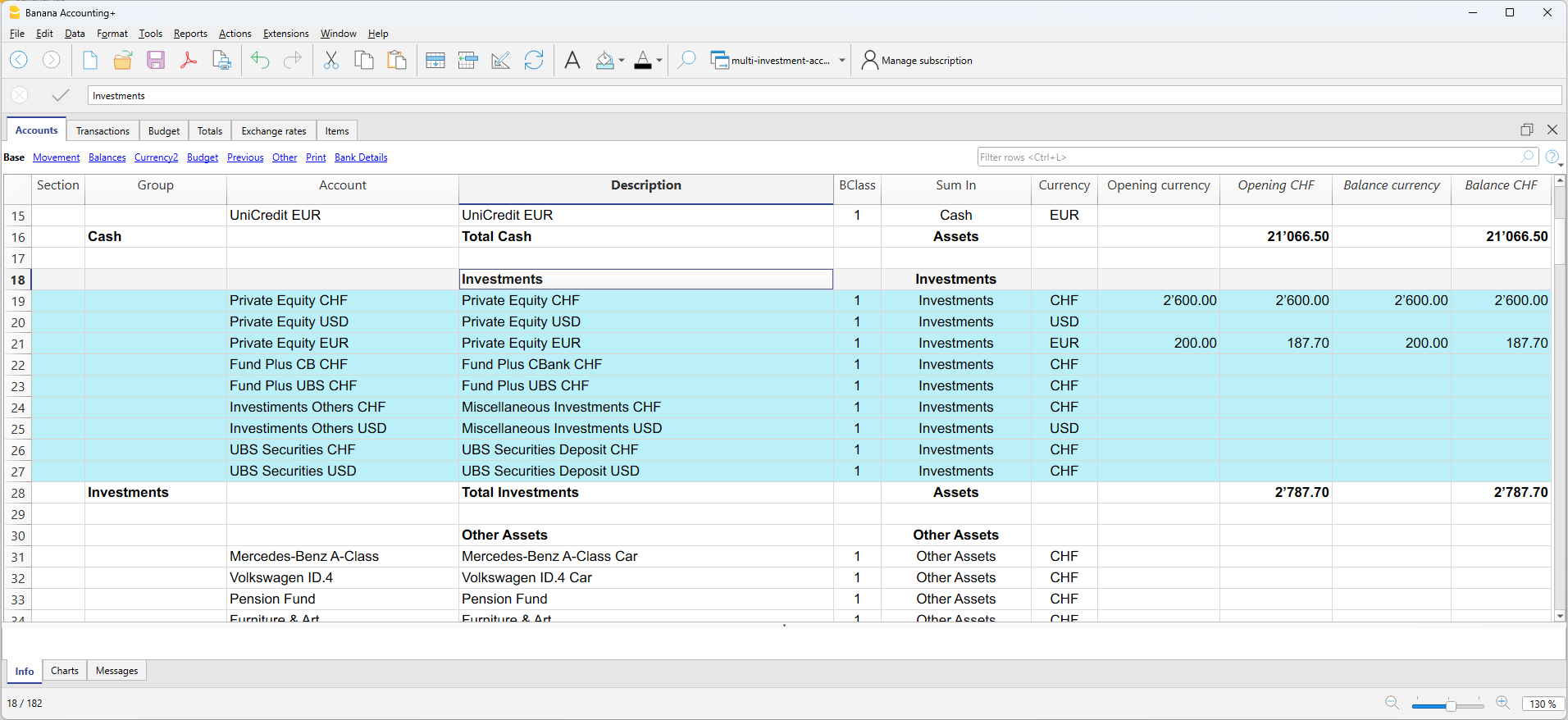
Accounts Table
Within the Accounts table you define all the accounts including the ones necessary for the Investment accounting: Balance Sheet accounts for investments, Profit and Loss Accounts.
- The accounting chart is fully customizable based on your specific needs.
- In the Account table you also enter the opening amounts and you see the current balance.
Items Table with Investments
In the Items table, you enter the information for each investment.
Using the Asset Account, each investment is linked to the corresponding investment account specified in the Accounts table.
You also enter the opening quantity and price.

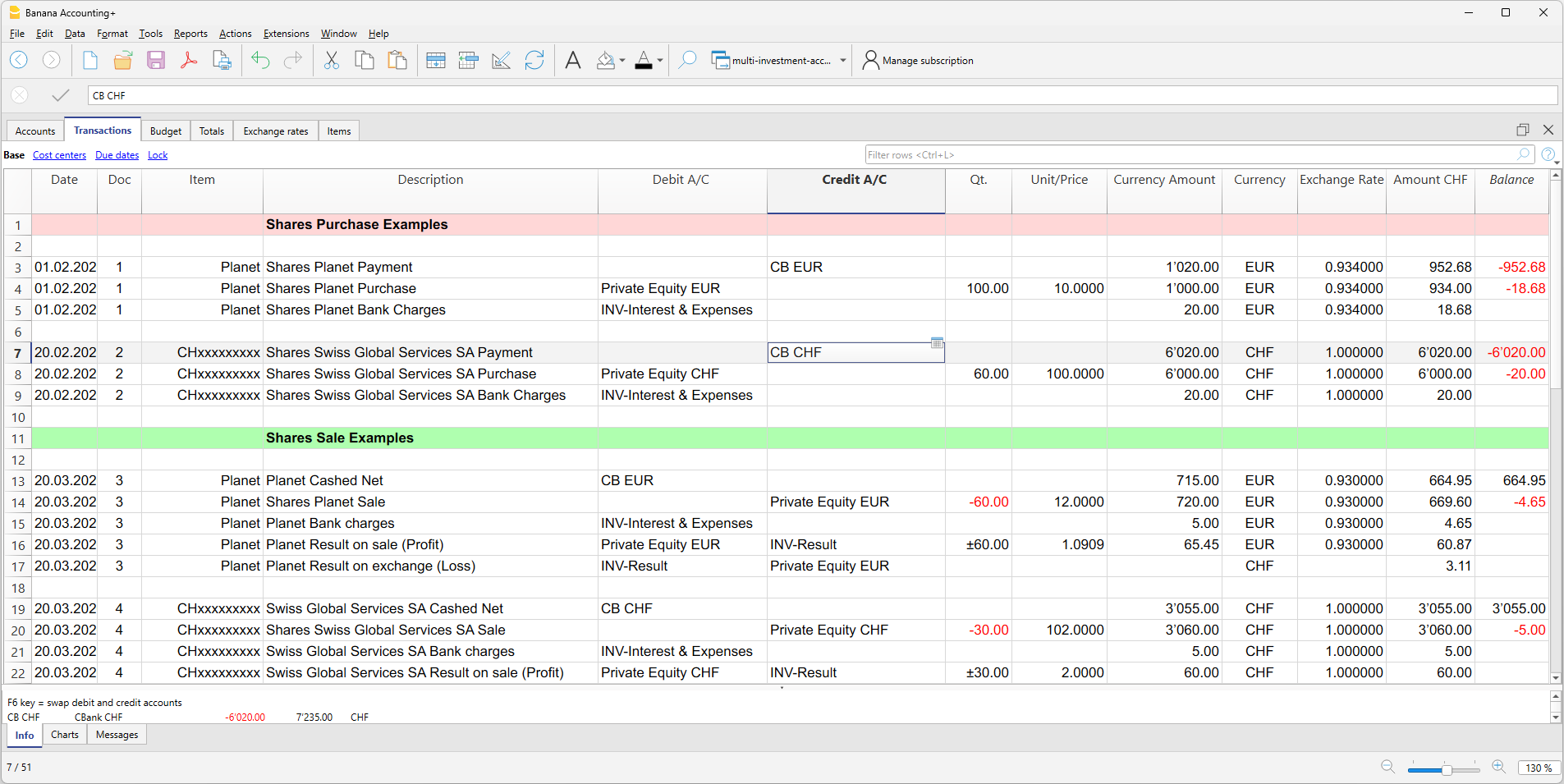
Transactions Table with Investment Details
The Transactions table is the core of the accounting system, where you enter double-entry accounting transactions.
- For investment transactions, you specify the investment ID, quantity, and price.
- You can easily manage all the information in one place, including purchases and sales of investments, realized and unrealized gains or losses on investments, realized and unrealized exchange rate gains or losses, commissions, expenses, and more.
- You can import transactions from bank statements and create rules that automatically complete them.
Balance Sheets & Income Statements
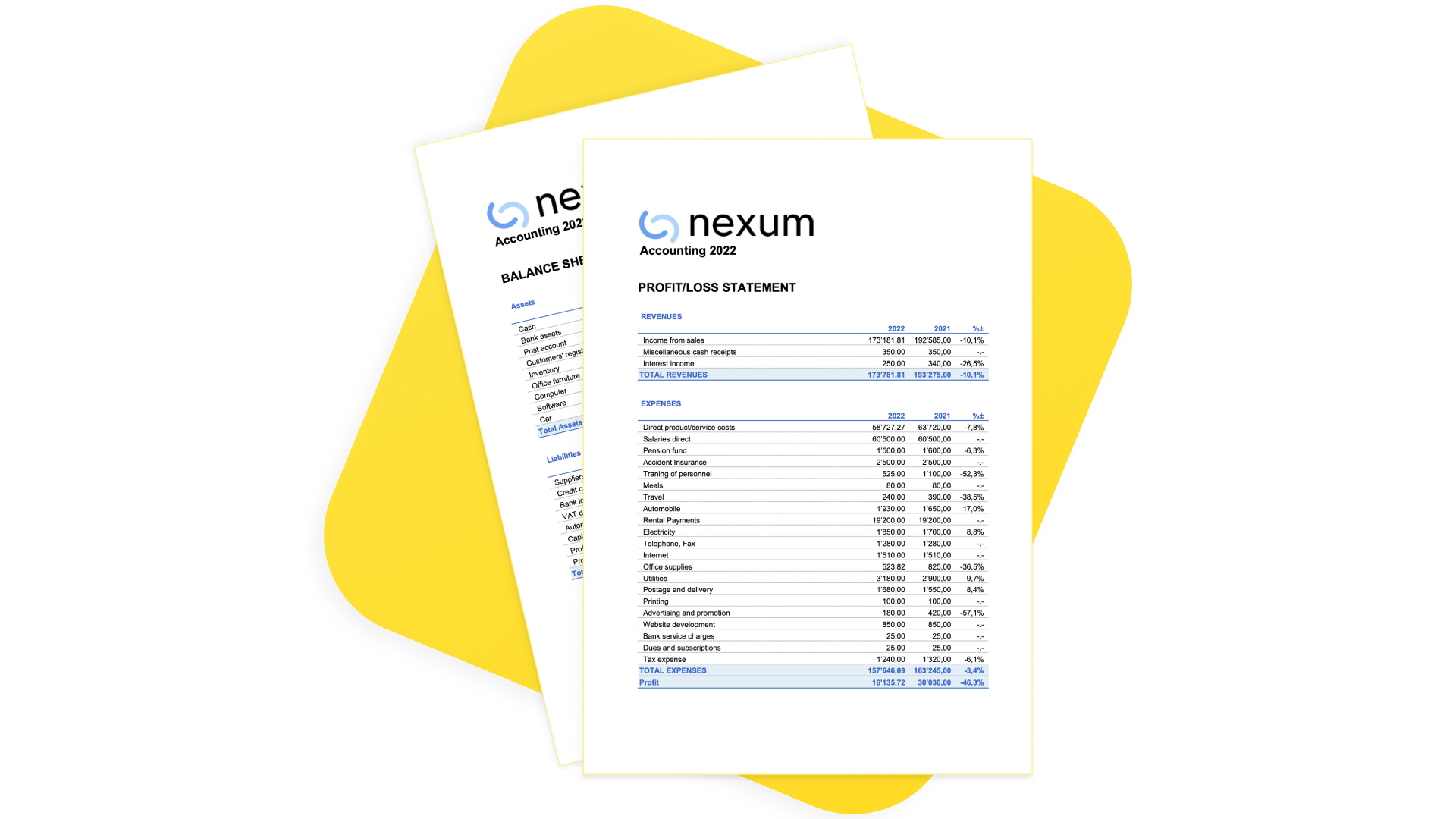
With a predefined, fully customizable chart of accounts and presentation, you can manage the accounting of any type of business, financial corporation, foundation, non-profit organization, or private fortune.
Instantly generate Balance Sheets, Income Statements, and all other double-entry accounting reports ready for auditing.
Investments and Portfolio Reporting
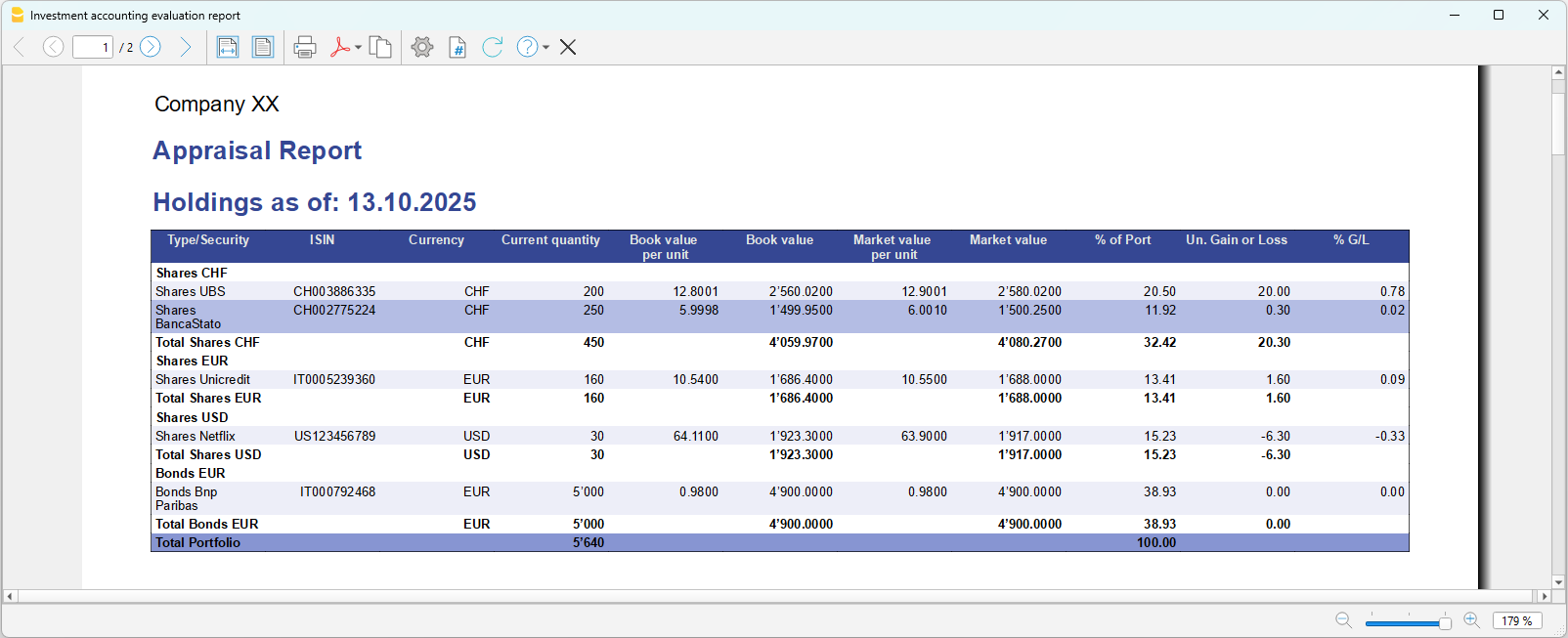
The software provides multiple investment and portfolio reports.
Documentation
Limitations
The current version has some limitations:
- Market prices are not automatically retrieved from financial data providers.
Current prices can be entered manually or imported using the Investment Accounting Extension. - The current account value of each item is available as a report, but it is not displayed in the Items table.
Dedicated Newsletter
Subscribe to our newsletter to stay updated on new features and tips for Investment Accounting in Banana. Interested? Just write to us at info@banana.ch and mention that you’d like to subscribe to the Investment Accounting newsletter.
Is there more you need?
The solution is already used by several customers, but we still consider it to be under development, as we continue to improve it based on user feedback and requests.
We also plan to add the automatic import of investment data (ISIN, quantity, price, commissions) from bank statements.
Please feel free to reach out if you have any specific questions or requests. Given the time invested in development and the high value it provides to customers with specific investment accounting needs, we may offer it through a specific subscription plan in the future.