In this article
With Banana Investment Accounting, you can manage the accounting of your securities portfolio in a dedicated file, separate from your general accounting, while continuing to use Banana Accounting or another software for your general accounting.
Unlike general accounting software, which may require additional applications or Excel spreadsheets to manage investments in detail, Banana Investment Accounting combines double-entry accounting and detailed securities portfolio management in a single dedicated file.
You can record purchases, sales, and other securities transactions, track quantities and prices, and obtain Book Values and Market Values without maintaining separate documents for portfolio management.
By keeping detailed investment accounting in a separate file, you can manage complex securities transactions and portfolio valuations without adding unnecessary detail to your general accounting.
The investment accounting file operates independently of your general accounting. Investment balances and financial results can be periodically reconciled with the corresponding accounts in your general ledger, whether it is maintained in Banana Accounting or another software.
When to Use Separate Investment Accounting
Separate Investment Accounting is particularly useful when:
- You already use Banana Accounting or another accounting software: Maintain detailed investment records in a separate file without changing your general accounting system.
- You want to keep your general accounting simple: Manage complex securities transactions and portfolio valuations separately, recording only the relevant investment balances and financial results in your general ledger.
- You currently track investments in Excel: Replace spreadsheets with a structured investment accounting solution.
- You need detailed securities accounting: Monitor shares, bonds, ETFs, investment funds, and other financial investments.
- You manage multiple entities or portfolios: Maintain a dedicated accounting file for each company, client, or portfolio.
- You want to simplify investment management: Use a focused accounting structure dedicated to your investment activities.
A Simple Alternative to Excel Spreadsheets
Managing investments with spreadsheets often means maintaining separate records for transactions, quantities, purchase prices, and portfolio valuations.
Banana Investment Accounting brings this information together in a single, structured accounting file. Because the file is dedicated exclusively to investments, the chart of accounts can remain small and focused.
Key advantages:
- One integrated file: Keep investment transactions, accounting balances, and portfolio information together.
- Less reliance on Excel: Manage investment quantities, prices, and valuations without separate tracking spreadsheets.
- Double-entry accounting: Maintain consistent records of investment assets, income, expenses, and gains or losses.
- Portfolio overview: Monitor individual securities and organize investments into groups.
- Simple accounting structure: Focus on investment activities without including other general accounting operations.
- Flexible currency management: Choose between single-currency and multi-currency accounting.
Use Banana Accounting Alongside Your Existing Accounting Software
Separate Investment Accounting complements your existing general accounting system rather than replacing it.
Your general accounting software continues to manage the company's financial statements, while Banana Investment Accounting maintains the detailed records of securities and investment transactions.
The two systems have complementary roles:
- General Accounting Software
- Manages the company's overall accounting and financial statements.
- Records investment balances in the Balance Sheet.
- Reports investment income, expenses, and financial results.
- Banana Investment Accounting (Subledger)
- Maintains detailed accounting records for individual securities.
- Tracks quantities, prices, Book Values, and Market Values.
- Records investment transactions and financial results.
- Provides supporting information for reconciliation and reporting.
Reconcile the Investment Subledger with the General Ledger
Banana Investment Accounting maintains detailed records of individual securities, while your general accounting records the corresponding investment balances and financial results.
To keep both accounting systems consistent, investment transactions and financial results must be recorded in the general ledger, and the corresponding balances should be reconciled periodically.
Reconciliation allows you to:
- Compare investment balances between the two accounting files.
- Verify investment income, expenses, and realized or unrealized gains and losses.
- Identify and investigate differences.
- Confirm that year-end valuation adjustments have been correctly reflected in the general ledger.
The two accounting files operate independently. Recording transactions in the general ledger and reconciling balances are separate processes; there is no automatic synchronization.
For practical instructions, see:
How Separate Investment Accounting Works
A separate investment accounting file uses double-entry accounting and integrates three main tables.
These tables use the same investment accounting functionality available in integrated Investment Accounting. In a separate file, however, the accounting structure is dedicated exclusively to investment activities.
Accounts Table
The Accounts Table contains the accounts used to record investment assets, income, expenses, and gains or losses.
The chart of accounts can remain relatively small because it includes only the accounts needed for investment activities.
Items Table – Investment Portfolio View
The Items Table – Investment Portfolio View contains the individual securities and financial investments.
For each investment, you can manage:
- Investment identification and description.
- Quantity or nominal value.
- Beginning and current quantities.
- Investment prices.
- Book Values and Market Values through investment accounting reports.
- Investment groups and portfolio totals.
Book Value represents the investment's carrying amount in the accounting records, while Market Value represents its value based on the market price used for portfolio valuation. These values may differ. For more information, see Theoretical Introduction to Investment and Portfolio Accounting.
The current Book Value of each investment is calculated and displayed in the investment reports rather than directly in the Items Table. For more information about investment valuations and closing adjustments, see Investment Accounting – Closing Balances.
Each investment is linked to its corresponding Balance Sheet account, keeping portfolio information and accounting records connected.

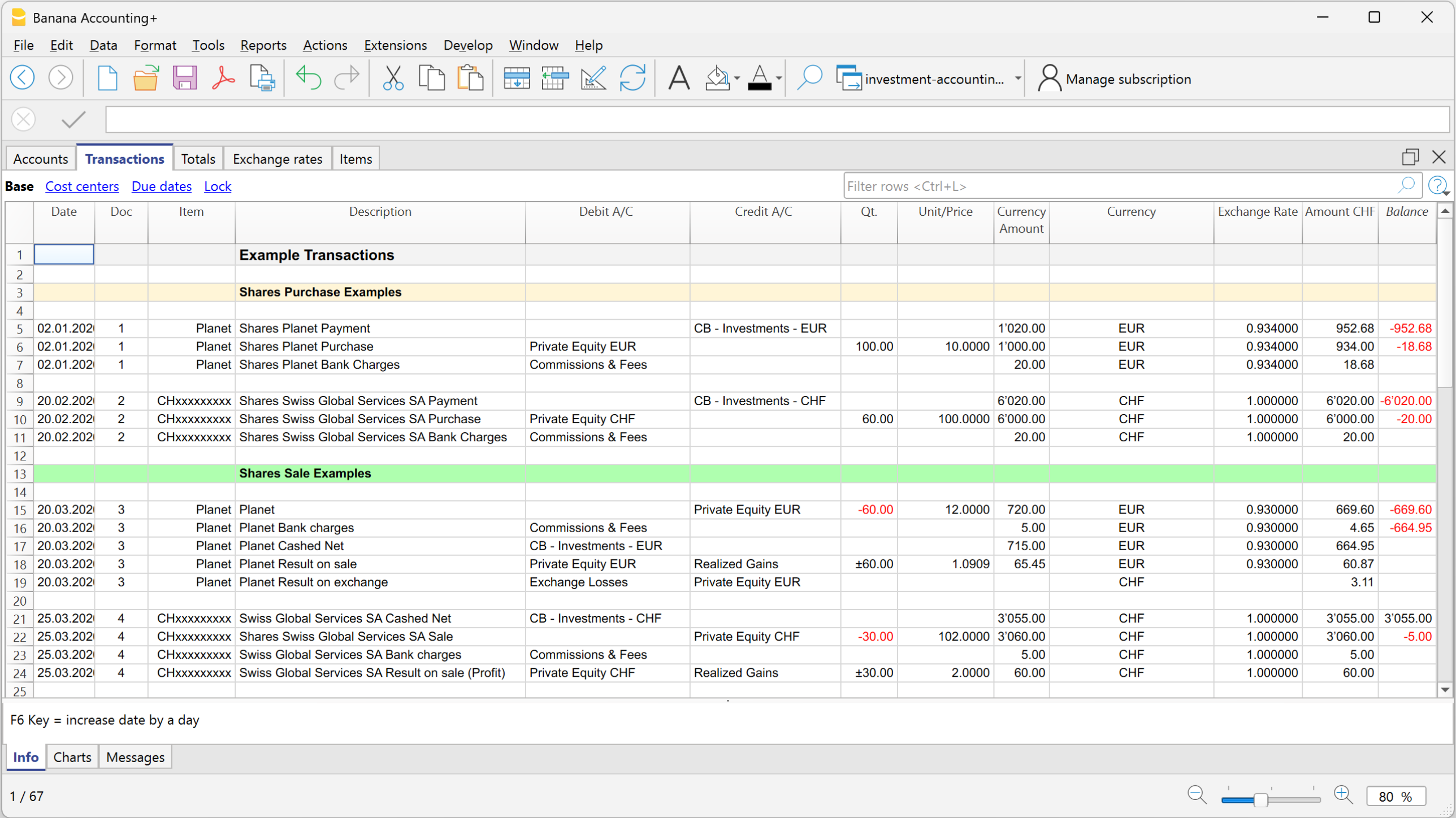
Transactions Table
The Transactions Table contains the double-entry accounting records for investment operations, including:
- Purchases and sales of securities.
- Dividends and interest received.
- Investment fees and expenses.
- Realized gains and losses.
- Valuation adjustments and unrealized gains or losses.
Transactions can be associated with individual investments through their Item codes, allowing investment quantities and accounting records to be managed together.
Single-Currency or Multi-Currency Investment Accounting
Separate Investment Accounting can be managed using either a single-currency or a multi-currency accounting file, depending on the currencies used in your investment portfolio.
Choose the appropriate template to get started:
- Single-Currency Investment Accounting in a Separate File – Suitable for portfolios managed in one accounting currency, such as CHF. Provides a simple structure for recording investment transactions, tracking quantities, and monitoring portfolio valuations.
- Multi-Currency Investment Accounting in a Separate File – Suitable for portfolios containing investments denominated in different currencies, such as CHF, EUR, and USD. Supports foreign-currency transactions and balances, exchange rate differences, and valuations in the accounting base currency.
The templates provide a predefined chart of accounts, investment information, and example transactions that you can adapt to your portfolio.
For step-by-step instructions on setting up your accounting file, see How to Start with Investment Accounting.