In diesem Artikel
The Transactions table is the core of the accounting workflow. It records all investment operations, including purchases, sales, income, expenses, transfers, and valuation adjustments.
By linking accounting entries to the corresponding Item, Banana Investment Accounting keeps the accounting records and the related investment data synchronized.
Before entering investment transactions, you must:
- create the required Investment Balance Sheet Accounts in the Accounts table
- define each investment in the Items table.
This documentation assumes that you are familiar with financial accounting, investment accounting, and the principles used to determine the Book Value and realized gain or loss when an investment is sold.
Recording Investment Transactions
Investment transactions are recorded in the Transactions table and linked to the corresponding Item. This allows Banana Investment Accounting to update the accounting records together with the related investment quantities and Book Values.
The information required depends on the type of investment operation. The sections below explain the general booking requirements, while the specific pages provide detailed instructions and examples for shares, funds, bonds, and other investment operations.
Preparing Transaction Data
Before entering an investment transaction, collect all the information required to complete the accounting entry.
The information is often provided by different sources:
- Bank statement – provides the net amount credited or debited
- Portfolio statement – provides the investment details, including quantity, unit price, currency, and transaction date.
Transactions can be entered manually or imported automatically.
Banana Investment Accounting supports several import methods:
- importing bank statements using Import into Accounting
- copying and pasting data prepared in Excel
- importing data generated by Excel macros
- using customized import extensions for specific banks or portfolio management systems.
Regardless of the import method, every investment transaction must contain the information required to correctly update the related accounting records and investment data.
Transaction Structure
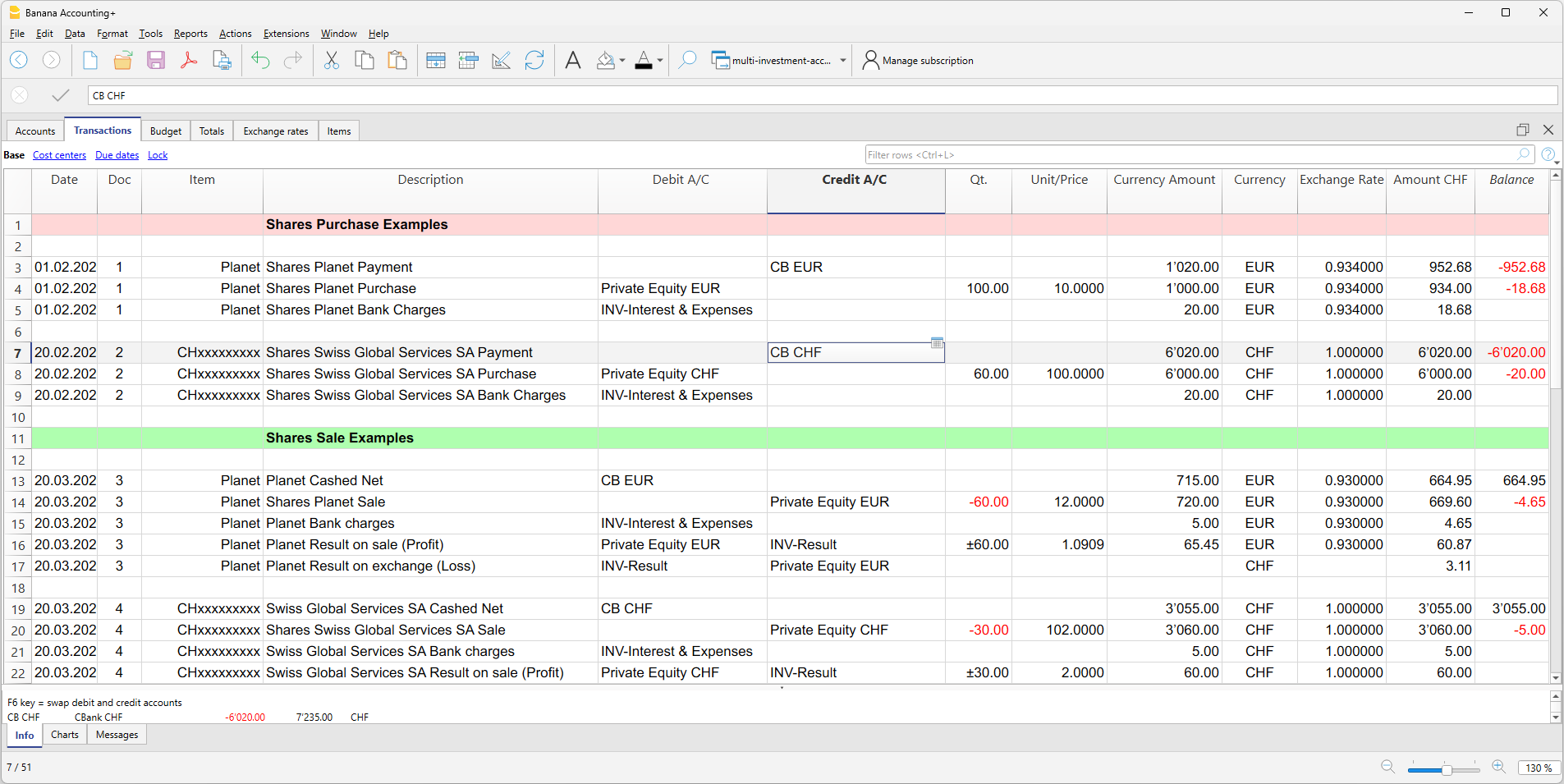
Investment purchases and sales are generally recorded as compound (multi-line) transactions following the principles of double-entry accounting. Each row records one accounting component of the operation, while the same Item is used on all rows related to the investment.
A typical investment transaction may include:
- a row for the bank payment or receipt
- a row for the investment movement, including Quantity and Unit Price and, when applicable, Exchange Rate
- separate rows for commissions, bank charges, taxes, or other transaction costs
- for sales, separate rows for the realized investment gain or loss
- for foreign-currency sales, separate rows for the realized exchange rate gain or loss.
The Item identifies the investment involved in the transaction. Repeating the Item on the related rows allows Banana Investment Accounting to associate revenues, costs, gains, losses, and other accounting entries with the corresponding investment for tracking and reporting purposes.
For sales, the Calculate Sale Data command uses the historical investment data to calculate the realized investment gain or loss and, when applicable, the realized exchange rate gain or loss.
Required booking information
To correctly update both Financial Accounting and Investment Accounting, each investment transaction must include the information required to identify the investment and record the related accounting entries.
The required information depends on the type of transaction. The following information is typically required when recording investment purchases and sales.
Basic Transaction Information
- Date – The transaction date.
- Item – Identifies the investment defined in the Items table. Enter the same Item on all rows related to the investment.
- Description – A short description of the transaction.
Bank Payment or Receipt
This row records the payment for a purchase or the receipt from a sale.
- Debit Account (sale) – Bank account receiving the sale proceeds
- Credit Account (purchase) – Bank account used to pay for the investment
- Amount – Amount credited or debited by the bank for the transaction.
Investment Movement
This row records the purchase or sale of the investment and updates its quantity and the balance of the corresponding Investment Balance Sheet Account.
- Debit Account (purchase) – Investment Balance Sheet Account assigned to the Item in the Items table.
- Credit Account (sale) – Investment Balance Sheet Account assigned to the Item in the Items table.
- Quantity – Positive for purchases and negative for sales.
- Unit Price – Price per unit at which the investment is purchased or sold.
- Exchange Rate – Exchange rate used for the transaction, when applicable.
Banana Investment Accounting uses the Quantity and Unit Price to calculate the transaction amount. In multi-currency accounting, the applicable Exchange Rate is used to convert the amount into the base currency.
Note: The Investment Balance Sheet Account must correspond to the account assigned to the Item in the Items table. If a different account is used, Banana Investment Accounting displays a warning.
Bank Charges and Commissions
Use additional rows to record brokerage fees, bank commissions, taxes, or other transaction costs according to the applicable accounting treatment.
- Debit Account – Expense account for transaction costs recognized as expenses.
Additional Details for Sales Transactions
When an investment is sold, the sale is recorded at the Selling Value. The realized gain or loss adjusts the Investment Balance Sheet Account so that the Book Value attributable to the quantity sold is removed and the remaining balance corresponds to the Book Value of the quantity still held.
The realized gain or loss corresponds to the difference between the Selling Value and the Book Value attributable to the quantity sold.
Realized Gain/Loss = Selling Value − Book Value of Quantity Sold
Book Value of Quantity Sold = Book Price × Quantity Sold
The Book Price used for the calculation is determined according to the MAC-MA method used by Banana Investment Accounting.
These values can be entered manually or calculated using the Calculate Sale Data command.
Realized Gain/Loss on Investment
The realized gain or loss is recorded between the Investment Balance Sheet Account assigned to the Item and the appropriate realized gain or loss account:
- Realized Gain – recorded using the Realized Gain on Investments account.
- Realized Loss – recorded using the Realized Loss on Investments account.
The adjustment ensures that the remaining balance of the Investment Balance Sheet Account corresponds to the Book Value of the quantity still held.
Realized Exchange Rate Gain/Loss
For investments denominated in a foreign currency, an additional adjustment may be required to account for exchange rate differences realized upon sale.
- Realized Exchange Rate Gain – recorded using the appropriate realized exchange rate gain account.
- Realized Exchange Rate Loss – recorded using the appropriate realized exchange rate loss account.
The Investment Balance Sheet Account assigned to the Item is used as the corresponding account for the adjustment.
Transactions that change the Book Value without changing the investment quantity, such as market value adjustments, can be recorded using a neutral quantity or zero quantity, so that the accounting value changes without affecting the Current Quantity. See Adjustment to the Market Price for detailed instructions.
Specific Investment Transactions
The accounting structure and required entries vary depending on the type of investment and transaction. See the following pages for detailed instructions and examples:
- Booking Share Movements – purchases and sales of shares
- Booking Fund Unit Movements – subscriptions, redemptions, distributions, reinvestments, switches, and consolidations
- Booking Bond Movements – purchases, sales, accrued interest, coupons, and withholding tax
- Adjustment to the Market Price – year-end market value adjustments
- Book Rounding Differences – adjustments for rounding differences
- Calculate Sale Data – calculation of realized investment and exchange rate gains or losses on sales.