In this article
For simple interactions with the user you can use the predefined dialogs of the class Banana.Ui. With those dialogs you can ask the user to insert a value, answer a question, or show to the user an information.
For a more complex dialog:
- Install Qt Creator
- Draw the dialog with Qt Creator
- Save the dialog in a .ui file,
- Load the .ui file in the script through the function Banana.Ui.createUi()
All the properties and public slots of the widgets in the dialogs will be accessible from the script.
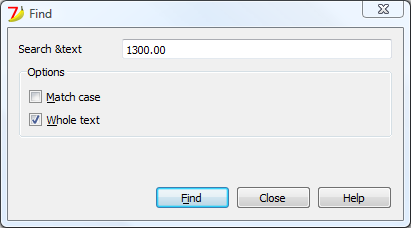
Example: a script to search in the whole accounting a text.
The dialog:
The script file ch.banana.scripts.find.js:
/**
* This example search a text in all the tables of the document,
* and show the matches in the messages pane.
*/
// @id = ch.banana.scripts.find
// @version = 1.2
// @date = 2014-08-29
// @publisher = Banana.ch SA
// @description = Find in whole accounting
// @description.it = Cerca in tutta la contabilità
// @description.de = Suchen in der gesamten Buchhaltung
// @description.fr = Chercher dans toute la comptabilité
// @task = app.command
// @inputdatasource = none
// @timeout = -1

/**
* param values are loaded from Banana.document, edited through dialog and saved to Banana.document
* This array object is like a map (associative array) i.e. "key":"value", see initParam()
* Examples of keys: searchText, wholeText, ...
*/
var param = {};

/** Dialog's functions declaration */
var dialog = Banana.Ui.createUi("ch.banana.scripts.find.ui");

dialog.checkdata = function () {
    var valid = true;

    if (dialog.searchTextLineEdit.text.length <= 0) {
        Banana.Ui.showInformation("Error", "Search text can't be empty");
        valid = false;
    }

    if (valid) {
        dialog.accept();
    }
}

dialog.showHelp = function () {
    Banana.Ui.showHelp("ch.banana.script.find");
}

/** Dialog's events declaration */
dialog.findNextButton.clicked.connect(dialog, "checkdata");
dialog.buttonBox.accepted.connect(dialog, "checkdata");
dialog.buttonBox.rejected.connect(dialog, "close");
dialog.buttonBox.helpRequested.connect(dialog, "showHelp");

/** Main function */
function exec(inData) {

    //calls dialog
    var rtnDialog = true;
    rtnDialog = dialogExec();

    //search text in the whole accounting
    if (rtnDialog && Banana.document) {
        Banana.document.clearMessages();
        searchInTables();
    }
}

/** Show the dialog and set the parameters */
function dialogExec() {

    // Read saved script settings
    initParam();
    if (Banana.document) {
        var data = Banana.document.getScriptSettings();
        if (data.length > 0) {
            param = JSON.parse(data);
        }
    }

    // Text at cursor position
    var cursor = Banana.document.cursor;
    param["searchText"] = Banana.document.value(cursor.table,cursor.row,cursor.column);

    // Set dialog parameters
    dialog.searchTextLineEdit.text = param["searchText"];
    if (param["matchCase"] == "true")
        dialog.groupBox.matchCaseCheckBox.checked = true;
    else
        dialog.groupBox.matchCaseCheckBox.checked = false;
    if (param["wholeText"] == "true")
        dialog.groupBox.wholeTextCheckBox.checked = true;
    else
        dialog.groupBox.wholeTextCheckBox.checked = false;

    Banana.application.progressBar.pause();
    var dlgResult = dialog.exec();
    Banana.application.progressBar.resume();

    if (dlgResult !== 1)
        return false;

    // Read dialog parameters
    param["searchText"] = dialog.searchTextLineEdit.text;
    if (dialog.groupBox.matchCaseCheckBox.checked)
        param["matchCase"] = "true";
    else
        param["matchCase"] = "false";
    if (dialog.groupBox.wholeTextCheckBox.checked)
        param["wholeText"] = "true";
    else
        param["wholeText"] = "false";

    // Save script settings
    var paramString = JSON.stringify(param);
    var value = Banana.document.setScriptSettings(paramString);

    return true;
}

/** Initialize dialog values with default values */
function initParam() {
    param = {
        "searchText": "",
        "matchCase": "false",
        "wholeText": "false"
    };
}

/** Search a text in the accounting's tables */
function searchInTables() {
    var searchText = param["searchText"];
    if (param["matchCase"] === "false")
        searchText = searchText.toLowerCase();
    var tables = Banana.document.tableNames;
    // Tables
    for (var t=0; t < tables.length; t++) {
        var table = Banana.document.table(tables[t]);
        var columns = table.columnNames;
        // Rows
        for (var r=0; r < table.rowCount; r++) {
            // Columns
            for (var c=0; c < columns.length; c++) {
                var textFound = false;
                var text = table.value(r, columns[c]);
                if (param["matchCase"] === "false")
                    text = text.toLowerCase();
                // Find text
                if (param["wholeText"] === "true") {
                    if (text === searchText)
                        textFound = true;
                } else {
                    if (text.indexOf(searchText) >= 0)
                        textFound = true;
                }
                // Show message
                if (textFound) {
                    table.addMessage("Text \"" + param["searchText"] +
                        "\" found in \"" + table.value(r, columns[c]) + "\"", r, columns[c]);
                }
            }
        }
    }
}
The .ui file: ch.banana.scripts.find.ui
<?xml version="1.0" encoding="UTF-8"?> <ui version="4.0"> <class>DlgFind</class> <widget class="QDialog" name="DlgFind"> <property name="geometry"> <rect> <x>0</x> <y>0</y> <width>395</width> <height>192</height> </rect> </property> <property name="windowTitle"> <string>Find</string> </property> <layout class="QVBoxLayout" name="verticalLayout_2"> <item> <layout class="QGridLayout" name="gridLayout"> <property name="horizontalSpacing"> <number>40</number> </property> <item row="0" column="0"> <widget class="QLabel" name="searchTextLabel"> <property name="text"> <string>Search &text</string> </property> </widget> </item> <item row="0" column="1"> <widget class="QLineEdit" name="searchTextLineEdit"/> </item> </layout> </item> <item> <widget class="QGroupBox" name="groupBox"> <property name="title"> <string>Options</string> </property> <property name="flat"> <bool>false</bool> </property> <property name="checkable"> <bool>false</bool> </property> <layout class="QVBoxLayout" name="verticalLayout"> <item> <widget class="QCheckBox" name="matchCaseCheckBox"> <property name="text"> <string>&Match case</string> </property> </widget> </item> <item> <widget class="QCheckBox" name="wholeTextCheckBox"> <property name="text"> <string>&Whole text</string> </property> </widget> </item> </layout> </widget> </item> <item> <spacer name="verticalSpacer"> <property name="orientation"> <enum>Qt::Vertical</enum> </property> <property name="sizeHint" stdset="0"> <size> <width>20</width> <height>15</height> </size> </property> </spacer> </item> <item> <layout class="QHBoxLayout" name="horizontalLayout"> <item> <spacer name="horizontalSpacer"> <property name="orientation"> <enum>Qt::Horizontal</enum> </property> <property name="sizeHint" stdset="0"> <size> <width>80</width> <height>20</height> </size> </property> </spacer> </item> <item> <widget class="QPushButton" name="findNextButton"> <property name="text"> <string>&Find</string> </property> </widget> </item> <item> <widget class="QDialogButtonBox" name="buttonBox"> <property name="sizePolicy"> <sizepolicy hsizetype="Minimum" vsizetype="Fixed"> <horstretch>0</horstretch> <verstretch>0</verstretch> </sizepolicy> </property> <property name="standardButtons"> <set>QDialogButtonBox::Close|QDialogButtonBox::Help</set> </property> </widget> </item> </layout> </item> </layout> </widget> <tabstops> <tabstop>matchCaseCheckBox</tabstop> <tabstop>findNextButton</tabstop> <tabstop>buttonBox</tabstop> </tabstops> <resources/> <connections/> </ui>