In this article
Share purchases and sales are recorded as compound transactions, with separate rows for the different accounting components of the operation. This structure makes it possible to record the investment movement, bank payment or receipt, transaction costs, and any realized gains or losses while keeping the Book Value of the investment up to date.
The Item identifies the share involved in the transaction. Enter the same Item on all rows related to the investment so that Banana Investment Accounting can associate the accounting entries with the corresponding investment.
Purchase of shares
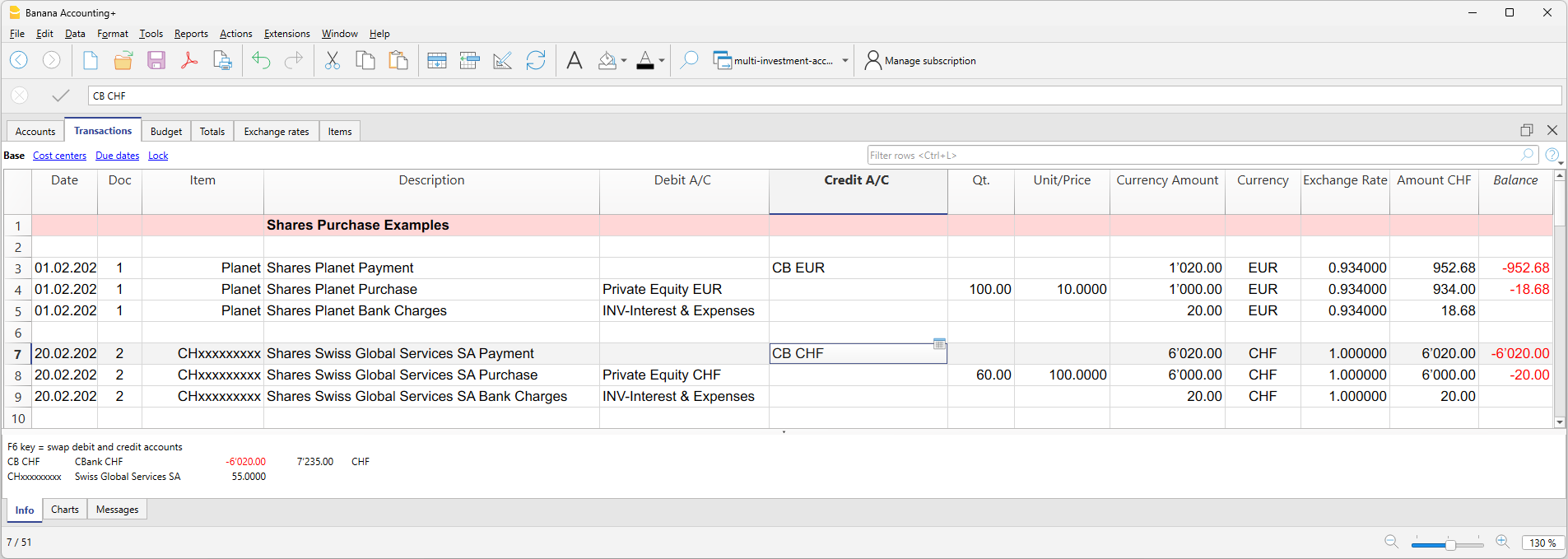
A share purchase is generally recorded using separate rows for the investment purchase, transaction costs, and payment.
- Purchase of shares
- In the Debit Account column, enter the Investment Balance Sheet Account assigned to the Item in the Items table.
- Enter the number of shares purchased in the Quantity column.
- Enter the purchase price per share in the Unit Price column.
- Banana Investment Accounting automatically calculates the corresponding amount.
- Transaction costs
- Enter the appropriate account for bank charges, commissions, or other transaction costs in the Debit Account column, according to the applicable accounting treatment.
- Enter the amount of the transaction costs.
- Payment for shares and transaction costs
- Enter the account used to make the payment, normally the bank account, in the Credit Account column.
- The payment corresponds to the total amount debited by the bank for the purchase, including any transaction costs included in the payment.
Sale of shares
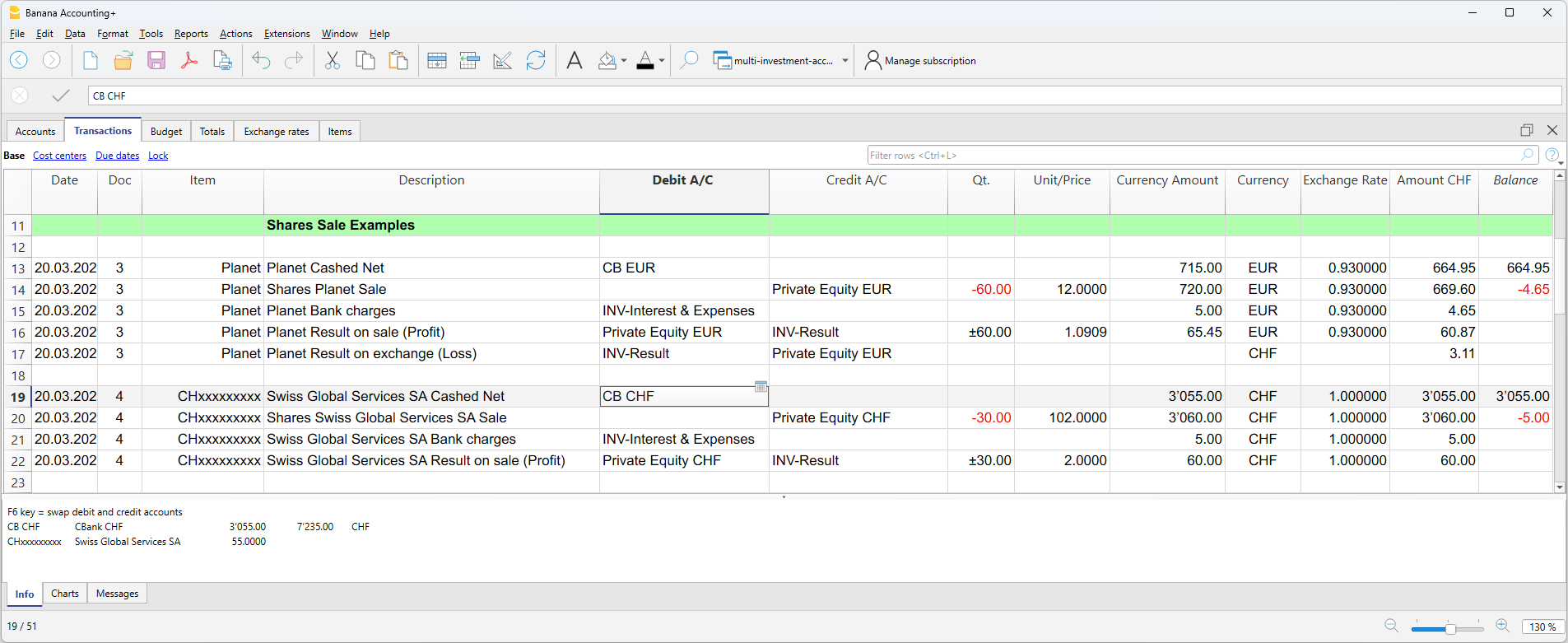
A share sale generally requires additional rows because, in addition to recording the sale and the amount received, the Book Value of the investment must be updated and the realized gain or loss must be recorded.
- Sale of shares
- In the Credit Account column, enter the Investment Balance Sheet Account assigned to the Item in the Items table.
- Enter the number of shares sold as a negative value in the Quantity column.
- Enter the Selling Price per share in the Unit Price column.
- Banana Investment Accounting automatically calculates the corresponding Selling Value before transaction costs.
- Transaction costs
- Enter the appropriate account for bank charges, commissions, or other transaction costs in the Debit Account column, according to the applicable accounting treatment.
- Enter the amount of the transaction costs.
- The Selling Value less transaction costs corresponds to the net amount received, unless other transaction components are present.
- Net amount received
- In the Debit Account column, enter the bank account receiving the sale proceeds.
- Enter the net amount credited by the bank after deducting transaction costs and any other amounts included in the transaction.
- In multi-currency accounting, use a bank account with the same currency as the investment.
- Realized Gain or Loss on Investment
- The realized gain or loss corresponds to the difference between the Selling Value and the Book Value attributable to the shares sold.
- Use the Calculate Sale Data extension to automatically calculate the realized gain or loss based on the historical investment data.
- On the same row, the extension records the sale quantity as a neutral number, allowing the quantity to be used for the calculation without changing the Current Quantity of the investment.
- Record a realized gain using the appropriate realized investment gain account, or a realized loss using the appropriate realized investment loss account. Use the Investment Balance Sheet Account assigned to the Item as the corresponding account.
- Realized Exchange Rate Gain or Loss (multi-currency accounting only)
- When an investment is denominated in a foreign currency, its sale may generate a realized exchange rate gain or loss in addition to the realized gain or loss on the investment.
- The realized exchange rate gain or loss reflects the effect of exchange rate differences on the Book Value of the quantity sold when expressed in the base currency.
- Use the Calculate Sale Data extension to automatically calculate the realized exchange rate gain or loss based on the historical investment data.
- Record a realized exchange rate gain using the appropriate realized exchange rate gain account, or a realized exchange rate loss using the appropriate realized exchange rate loss account. Use the Investment Balance Sheet Account assigned to the Item as the corresponding account.