INPAS Standard Templates
[This page is currently being updated]
INPAS key accounting documents
This page introduces Banana Accounting+ and Excel templates designed to support financial reporting under the International Non-Profit Accounting Standard (INPAS). The templates help prepare the required financial statements, but full compliance also depends on applying all relevant accounting and disclosure requirements.
The NPO is responsible for ensuring that its financial reports comply with all applicable INPAS requirements. Using the template alone does not guarantee compliance.
Statement of Financial Position
The balance sheet is an essential document that provides a detailed view of your organization's financial health, clearly showing assets, liabilities and net worth. Because of the flexibility of the INPAS standard, you can present the financial statements either vertically or horizontally, tailoring them to the specific needs of your nonprofit.
This document can be generated easily using Banana Accounting+ template.
Statement of Income and Expenses
This document shows your organization's income and expenses during a period. Proper management of the income statement is crucial to demonstrate how resources were used to achieve missionary goals.
This document can be generated easily using Banana Accounting+ template.
Statement of Changes in Net Assets
This document is critical to understanding the changes that have occurred in net assets during the fiscal year. The INPAS standard provides a sequence of elements that transparently reflects the changes, making clear the impact of financial activities on the organization's assets.
Statement of Cash Flows
The cash flow statement, which shows cash flows, is essential for monitoring your organization's liquidity and ability to fund its activities. With our INPAS template, you can present this information in a clear and accessible way, improving transparency to donors and board members.
Explanatory notes
Explanatory notes are a mandatory part of INPAS financial statements. They include the basis of preparation, material accounting policies, information about individual funds and their movements, relevant grants and donations, delivery obligations where applicable, and other disclosures required by INPAS.
The notes must also include relevant comparative information for the previous reporting period.
Comparative information and Narrative reporting
INPAS requires comparative financial information for the previous reporting period.
Full INPAS compliance also requires a narrative report describing the NPO's mission, activities, performance and principal risks. The narrative report can be prepared separately, for example in Word, but must be included as part of the NPO's general purpose financial report to declare full INPAS compliance.
During the first two years following transition to INPAS, an NPO may declare compliance with the financial statement requirements only, subject to the transitional provisions.
References
- International Financial Reporting For Non Profit Organisations: https://www.inprf.org
INPAS reporting with segments and cost and profit centres
For a non-profit organisation (NPO), recording a payment is only the beginning. It also needs to know which fund the money belongs to, which project it supports and, when relevant, who provided it. Banana Accounting+ lets you add these details to the same transaction without creating a separate set of ordinary accounts for every fund, project or donor.
This helps an NPO organise the information needed for INPAS fund accounting, the analysis of expenses and fundraising cost disclosures. The software helps collect and analyse information; it does not, by itself, certify an INPAS-compliant financial report.
Segments: a financial view of each fund
Segments divide ordinary accounting transactions into separate reporting dimensions. In the INPAS templates, the first-level segments :Fund A, :Fund B and :Fund C identify restricted funds, while :General identifies the unrestricted General Fund.
These segments are defined in the Accounts table and are added after an ordinary account code in the Transactions table.
The General Fund contains resources that are not subject to restrictions requiring them to be held in a separate restricted fund. Using :General allows the organisation to analyse general activities alongside restricted funds, without creating a separate chart of accounts for each fund.
Where can a segment be entered in double-entry accounting?
A segment may be assigned to the Debit account, the Credit account, or both:
Credit only:
Debit: "Bank"
Credit: "Grants restricted Project 1:Fund A".
The grant income is assigned to Fund A, but the bank asset is not.
Debit only:
Debit: "Bank:Fund A"
Credit: "Grants restricted Project 1".
The bank asset is assigned to Fund A, but the grant income is not.
Both sides:
Debit: "Bank:Fund A"
Credit: "Grants restricted Project 1:Fund A".
Both the asset and the income are assigned to Fund A.
This is generally the more useful approach when a complete financial report by fund is needed.
Important: if the same segment is entered on both sides, its individual segment card can show a zero balance because debit and credit offset one another. This does not mean the fund has no money or no income. Use the report subdivided by segment to examine assets, liabilities, income and expenses separately. A segment used on only one side gives a partial view, not a complete fund balance sheet.
Segments in Income & Expense accounting
In the Transactions table, the segment can be appended to either of these columns:
Account only:
- Account: "Bank:Fund A"
- Category: "Grants restricted Project 1".
This attributes the bank movement to Fund A.
Category only:
- Account: "Bank"
- Category: "Grants restricted Project 1:Fund A".
This attributes the grant income to Fund A. It is the approach used for ordinary income and expense examples in the INPAS Income & Expense template.
If the segment is added to both Account and Category, the movement can appear twice in the segment card. For this reason, the segment-card total must not be mistaken for the fund balance. In more complex accrual adjustments, the NPO must check the individual account/category positions and reconcile the fund separately. In an Income & Expense transaction, Category can also contain a balance-sheet account, for example when recording a grant advance as a liability.
Cost and profit centres: detailed analysis of projects, activities and donors
Cost and profit centres are independent analytical classifications. Banana has three independent columns, CC1, CC2 and CC3, each of which can contain any number of centres:
- CC1: codes defined with a leading dot, such as ".Campaign 1".
- CC2: codes defined with a leading comma, such as ",Project 1".
- CC3: codes defined with a leading semicolon, such as ";Benjamin Foster".
In the Transactions table, enter the code without its leading dot, comma or semicolon. The INPAS templates use CC2 for projects and CC3 for donors. CC1 remains available for another analytical purpose, such as an event or campaign.
Using positive and negative entries
A cost or profit centre can record positive or negative amounts independently of the ordinary accounting entries. This allows the organisation to add or subtract amounts from a project or donor's analytical balance, depending on the reporting purpose.
- Enter "Project 1" in CC2 to add the transaction amount to that centre.
- Enter "-Project 1" in CC2 to subtract the amount from that centre.
For example, if you want a project centre to show income minus expenses, the INPAS tutorial includes the following transactions:
- A restricted donation of EUR 727 for Project 1, recorded on 10 January 2026: CC2: Project 1 adds EUR 727.
- A project expense of EUR 307, recorded on 12 January 2026: CC2: -Project 1 subtracts EUR 307.
For these two transactions, the analytical centre shows a positive result of EUR 420.
As additional income and expenses are recorded during the year, the project centre is updated automatically. This makes it possible to monitor the financial result of a project without creating separate ordinary accounts for every activity.
You can use the opposite convention if you want to monitor net costs instead. The sign is not automatically determined by whether the ordinary transaction is income or an expense. Apply a consistent convention. In Income & Expense accounting, an optional setting can make cost-centre signs follow categories; enable it only when that matches the intended analysis. A donor centre can similarly record receipts and, with the opposite sign, refunds or corrections.
A cost/profit-centre card is not a complete balance sheet or an automatically generated statutory Income Statement. It shows the movements you assigned to that centre. If you use it exclusively for income and expenses with consistent signs, it gives a useful project-level income-and-expense analysis. If you also assign advances or balance-sheet transfers, the total will not represent the project's operating surplus.
Supporting INPAS expense and fundraising disclosures
Ordinary expense accounts support the required analysis in the Statement of Income and Expenses, while cost/profit centres give an additional operational breakdown. For example, a centre for a fundraising campaign can collect the costs associated with that activity, and a project centre can collect the project's income and expenses. INPAS requires an appropriate expense analysis in the Income Statement; an internal cost-centre card does not replace it.
Under INPAS, fundraising costs may need to be reported by donation and grant fundraising, commercial/trading activities and investment management, including relevant direct, shared and support costs. Banana's accounts and analytical centres help identify the underlying entries, but allocation methods and the required gross disclosures must still be prepared and documented.
One transaction, three dimensions of information
On 10 January 2026, the association receives a restricted donation of EUR 727 from Benjamin Foster for Project 1 within Fund A.
In the Double-entry accounting tutorial, the transaction is recorded as follows:
- Date: 2026-01-10
- Description: Restricted school fund donation month 1 [INPAS:C1:without:cash]
- Debit account: Bank:Fund A
- Credit account: Grants restricted Project 1:Fund A
- Amount: 727.00
- CC2 (project): Project 1
- CC3 (donor): Benjamin Foster
One transaction updates the ordinary accounts, identifies the restricted fund, links the donation to the project and associates the receipt with the donor.
The same principle applies to the unrestricted General Fund using the segment :General.
These dimensions are independent: a project can use more than one fund, and a fund can finance more than one project. This allows an NPO to maintain detailed information without unnecessarily multiplying its ordinary accounting accounts.
Generate donation statements for donors
Banana Accounting+ also helps non-profit organisations simplify donor administration by generating personalised donation statements directly from their accounting records.
With the Donation statement for Associations (Banana+) extension, an NPO can:
- Generate individual donation statements for a selected donor or multiple donors.
- Automatically calculate the total donations received during a selected period.
- Include the details of individual donation transactions.
- Personalise the statements with the organisation's logo, donor information and signature.
- Print or save the statements as PDF documents, which donors may use for tax purposes where permitted by applicable legislation.
Donors must be configured as CC3 cost centres in the accounting file to use this donation statement extension. This is already the structure used in the INPAS templates.
By assigning each donation to the appropriate donor in CC3, the association can reuse the same accounting information for donor tracking, financial analysis and the preparation of donation statements, avoiding duplicate data entry.
The availability of tax deductions and the legal requirements for donation certificates depend on the country and the tax status of the organisation. Banana generates the document but does not determine its fiscal validity.
How to view the results
- Cost/profit-centre card: from Reports > Account/Category cards, select Cost centres to view the movements and analytical balance of a centre. The grouped totals are also visible in the appropriate Accounts or Categories section.
- Segment card: open the segment's account card to inspect the entries carrying that segment. Remember that its net movement may be zero or may include duplicated amounts, depending on how the transaction was classified.
- Report by segment: use Reports > Accounting Report or Enhanced Balance Sheet by Groups, then activate Subdivision by Segment. This is the appropriate way to examine the related assets, liabilities, income and expenses separately.
What Banana helps achieve under INPAS
Banana Accounting+ helps non-profit organisations manage their accounting, monitor restricted funds, analyse projects, track donations and organise the financial information needed for INPAS reporting.
By combining segments, cost and profit centres, standard accounting reports and available extensions, organisations can:
- Maintain detailed accounting records without unnecessarily expanding the chart of accounts.
- Monitor multiple funds, projects and donors within the same accounting file.
- Generate standard financial statements and accounting reports directly in Banana.
- Track fund movements and transfers between funds, providing the information needed for fund reconciliations.
- Analyse project income, expenses and fundraising costs.
- Prepare financial information for INPAS statements and numerical schedules.
- Generate personalised donation statements for donors, including documents that may be used for tax purposes where permitted by applicable legislation.
This integrated approach reduces manual work, avoids repeated data entry and maintains detailed financial information that can be reviewed at any time.
Preparing INPAS-compliant financial statements may require additional reporting tools and adjustments. Full compliance also depends on the correct application of the standard, comparative information, explanatory notes, the Narrative Report and a review of the financial statements by the organisation.
Managing restricted funds and grant advances with Banana Accounting
A restricted fund contains resources that must be used for a specified purpose under the relevant INPAS criteria. A fund is not necessarily a separate bank account, and it is not the same thing as a project or a donor. With Banana Accounting+, you can use segments to identify funds, cost centres to monitor projects and donor centres to track individual contributors, all within the same accounting entries.
This guide uses illustrative examples from the INPAS Banana templates. The amounts are in EUR, and opening balances are assumed to be zero.
First, distinguish a restriction from a delivery obligation
Two donations may both be earmarked for a purpose, but they do not necessarily have the same accounting treatment:
- Restricted donation without a delivery obligation: a donor gives money for a particular purpose, without imposing a qualifying delivery obligation. When the NPO controls the money or has a right to receive it, the donation is generally recognised as income, attributed to the appropriate restricted fund.
- Grant with a delivery obligation: a funding agreement requires the NPO to complete an identifiable, enforceable activity or deliverable. If the money is received before that obligation is fulfilled, the amount is initially recorded as a liability, not grant income. Revenue is recognised when, or as, the obligation is fulfilled.
A restriction on how money may be spent does not automatically create a delivery obligation. The terms of the agreement must be assessed before choosing the entry.
Receiving a restricted donation without delivery obligations
On 10 January 2026, the association receives EUR 727 from Benjamin Foster for Project 1. The donation is restricted to Fund A, but does not include a qualifying delivery obligation.
Double-entry accounting
- Date: 2026-01-10
- Description: Restricted school fund donation month 1 [INPAS:C1:without]
- Debit account: Bank A
- Credit account: Grants restricted Project 1 A
- Amount: 727.00
- CC2: Project 1
- CC3: Benjamin Foster
Income & Expense accounting
- Date: 2026-01-10
- Description: Restricted school fund donation month 1 [INPAS:C1:without]
- Income: 727.00
- Expenses: leave empty
- Account: Bank
- Category: Grants restricted Project 1 A
- CC2: Project 1
- CC3: Benjamin Foster
Result: EUR 727 increases the bank balance and is recognised as income attributable to Fund A.
Paying project expenses
On 12 January 2026, the association pays EUR 307 for school programme expenses.
Double-entry accounting
- Date: 2026-01-12
- Description: School programme expenditure month 1
- Debit account: Expenses Project 1 A
- Credit account: Bank A
- Amount: 307.00
- CC2: -Project 1
- CC3: leave empty
Income & Expense accounting
- Date: 2026-01-12
- Description: School programme expenditure month 1
- Income: leave empty
- Expenses: 307.00
- Account: Bank
- Category: Expenses Project 1 A
- CC2: -Project 1
- CC3: leave empty
Result: considering these first two transactions alone, Fund A has EUR 727 of income and EUR 307 of expenses, producing a surplus of EUR 420. The CC2 analytical centre also shows EUR 420 because income is added and expenses are subtracted.
Receiving an advance with delivery obligations
On 11 February 2026, the association receives an advance of EUR 3,000 attributed to Olivia Reynolds. The funding agreement includes qualifying delivery obligations that have not yet been fulfilled.
Double-entry accounting
- Date: 2026-02-11
- Description: Fund B advance with enforceable delivery obligations: NOT income
- Debit account: Bank B
- Credit account: Grant oblig. liability B
- Amount: 3000.00
- CC2: leave empty
- CC3: Olivia Reynolds
Income & Expense accounting
- Date: 2026-02-11
- Description: Fund B advance with enforceable delivery obligations: NOT income
- Income: 3000.00
- Expenses: leave empty
- Account: Bank
- Category: Grant oblig. liability B
- CC2: leave empty
- CC3: Olivia Reynolds
Result: the bank balance increases by EUR 3,000 and a corresponding liability is recognised. The advance is not yet grant revenue and does not increase Fund B's net assets.
In the Income & Expense model, Grant oblig. liability is an account defined in the Accounts table. Although it is entered in the Category column, the amount is reported as a liability rather than revenue.
CC2 is deliberately left empty because the project has not yet earned this income.
Recognising revenue after fulfilling delivery obligations
On 27 May 2026, the association achieves a milestone under the grant agreement and recognises EUR 1,200 as revenue.
Double-entry accounting
- Date: 2026-05-27
- Description: Recognition of part of Fund B advance, milestone achieved [INPAS:C1:with]
- Debit account: Grant oblig. liability B
- Credit account: Grants restricted Project 2 B
- Amount: 1200.00
- CC2: Project 2
- CC3: leave empty
Income & Expense accounting
- Date: 2026-05-27
- Description: Recognition of part of Fund B advance, milestone achieved [INPAS:C1:with]
- Income: 1200.00
- Expenses: leave empty
- Account: Grant oblig. liability B
- Category: Grants restricted Project 2 B
- CC2: Project 2
- CC3: leave empty
Result: EUR 1,200 is transferred from the grant liability to recognised income. No additional money enters the bank. After this transaction, EUR 1,800 of the original advance remains a liability.
The tutorial includes a second milestone of EUR 1,200 on 10 October 2026 (TX240154). After both milestones, the remaining liability relating to this EUR 3,000 advance is EUR 600.
How to interpret the accounting results
Considering only the first four example transactions, and not all other transactions recorded in the annual tutorial:
- Bank: EUR 3,420 (EUR 727 received, less EUR 307 paid, plus EUR 3,000 received in advance).
- Outstanding delivery obligation liability: EUR 1,800 after the first milestone.
- Recognised income: EUR 1,927 (EUR 727 for Fund A and EUR 1,200 for Fund B).
- Expenses: EUR 307 for Project 1.
- Net assets generated by these four transactions: EUR 1,620, consisting of EUR 420 for Fund A and EUR 1,200 for Fund B.
The advance is therefore correctly distinguished from revenue. It increases the bank balance immediately, but affects the reported income only when the related delivery obligations are fulfilled.
Fund transfers, opening balances and reporting
- No fictitious bank payments: moving an amount from unrestricted to restricted net assets is not automatically a movement of cash. Do not record a bank payment just to create a fund balance.
- Transfers must be permitted: INPAS allows transfers between funds only where legally permitted. Describe and reconcile them in the fund movement disclosures.
- General Fund: The INPAS tutorials include a dedicated :General segment for the unrestricted General Fund. This allows general transactions and transfers involving unrestricted resources to be identified separately from restricted funds. INPAS does not require this particular segment code; it is a practical organisational choice within Banana Accounting+.
- Opening balances: opening balances assigned to individual segments may require dedicated segment opening entries or the appropriate carry-forward procedure in Banana.
- Fund reconciliation: for each relevant fund, explain its purpose and reconcile the opening balance, recognised income, expenses, other changes, permitted transfers and closing balance. Do not treat a segment card's total as the net assets of that fund.
INPAS reporting reminder
Fund accounting is covered by INPAS, while revenue from grants and donations with or without delivery obligations is covered by INPAS. Banana provides detailed ledger and reporting tools to prepare this information, but the NPO remains responsible for assessing its grant agreements, allocating transactions correctly, preparing the required statements and completing the explanatory notes.
International Non-Profit Accounting Guidance - INPAS Standard Template
In this article
International Non-Profit Accounting Guidance - INPAS Standard Template
International Non-Profit Accounting Guidance - INPAS Standard Template
The INPAS International standard template for associations provides a comprehensive framework for organizing financial transactions and reporting for associations adhering to international standards.
Open in Banana WebApp
Run Banana Accounting Plus on your browser without any installation. Customize the template, enter the transactions and save the file on your computer.
Open template in WebApp Open tutorial in WebAppTemplate documentation
[This page is currently being updated]
The INPAS International template for associations provides a comprehensive framework for organizing financial transactions and reporting for associations adhering to international standards.
This chart of accounts template is designed to streamline accounting processes, ensure consistency in financial reporting and facilitate compliance with regulatory requirements. With a user-friendly format and customizable accounts name, associations can efficiently track income, expenses, assets and liabilities, enabling clear and transparent financial management. Whether managing donations, membership dues or program expenditures, this template offers flexibility and adaptability to suit the unique needs of diverse associations while promoting transparency and accountability in financial operations.
The NPO is responsible for ensuring that its financial reports comply with all applicable INPAS requirements. Using the template alone does not guarantee compliance.
Banana Accounting+ provides the accounting information needed to prepare the Statement of Financial Position and the Statement of Income and Expenses.
The Excel template supports the preparation of the remaining financial statements and explanatory notes. The narrative report can be prepared separately, for example in Word, but must be included as part of the NPO's general purpose financial report to declare full INPAS compliance.
Create your file
- Create a new file, starting from this template (Template ID +11255), using one of the methods explained.
- With the command File → File properties, set the period, the association name and the basic currency.
- With the command File → Save as, save the file. Enter the association name and year in the file name.
For example "no-profit-2024.ac2".
See also Organize accounting files locally, online or in the cloud
Customize the Accounts table
Once you have entered the transactions, you can check the Accounts table. You will have an overview of your assets, liabilities, income and expenses, which allows you to keep your balance under control.
Customize the Accounts table to suit your needs: you can add, delete and edit accounts, groups or descriptions.
Enter Opening Balances
In the Opening column enter the opening balances of the Accounts. Negative asset account amounts are entered with a minus sign in front.
Enter the balances of the previous year
INPAS requires comparative financial information for the previous reporting period.
To enter the previous year's balances in Banana Accounting+, go to the Previous view and enter the amounts in the Previous Year column. Ensure that comparative information is also included in the other required financial statements and related notes.
Enter the Transactions
Register the accounting transactions in the journal. Enter the date, the document number and the description. Enter the destination account into the Debit account column, and the account of origin in the Credit account. Then add the amount.
You can modify the journal at any time.
Manage funds, grants and donations, project and operating expenses
Under INPAS, the NPO must identify its funds and classify them as restricted or unrestricted. Each fund may relate to a specific project or another purpose.
Income, expenses, non-financial assets, non-current liabilities and assets or liabilities relating to delivery obligations must be tracked by fund. Other current assets and liabilities must also be tracked where available without undue cost or effort.

Manage grants and donations in the Income Statement.
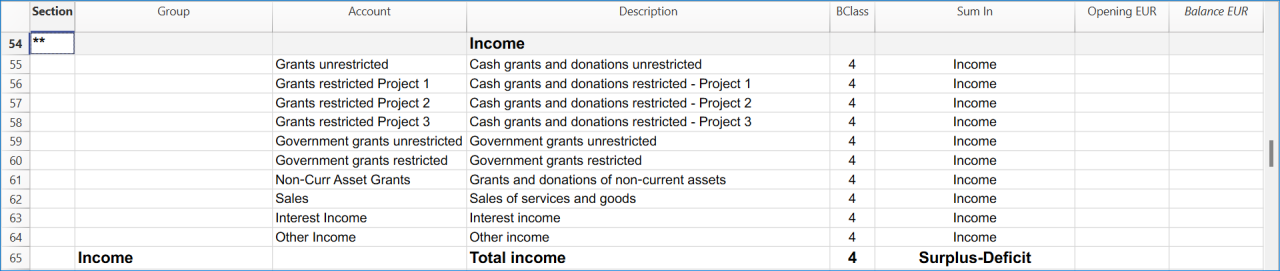
Manage projects expenses and operating expenses in the Income Statement.

Recording transactions by fund
Under INPAS, the organisation must identify and track restricted and unrestricted funds.
In this Banana Accounting+ template, funds are identified using four first-level segments:
- A, B and C for restricted funds.
- for the unrestricted General Fund.
Projects are tracked through cost centres CC2, and donors through cost centres CC3.
In the Transactions table, add the fund segment after the relevant account code. In the CC2 and CC3 columns, enter the cost centre name without its leading punctuation.
Receiving a restricted donation without delivery obligations
The organisation receives EUR 727 from Benjamin Foster for Fund A and Project 1:
- Date: 2026-01-10
- Debit account: Bank A
- Credit account: Grants restricted Project 1 A
- Amount: 727.00
- CC2: Project 1
- CC3: Benjamin Foster
The donation is recognised as income attributed to Fund A because it does not include a qualifying delivery obligation.
Paying project expenses
The organisation pays EUR 307 for school programme costs:
- Date: 2026-01-12
- Debit account: Expenses Project 1 A
- Credit account: Bank A
- Amount: 307.00
- CC2: -Project 1
- CC3: leave empty
For these two transactions, Fund A records EUR 727 of income and EUR 307 of expenses, resulting in a surplus of EUR 420.
Receiving an advance with delivery obligations
The organisation receives EUR 3,000 in advance for Fund B. The grant agreement includes qualifying delivery obligations that have not yet been fulfilled:
- Date: 2026-02-11
- Debit account: Bank B
- Credit account: Grant oblig. liability B
- Amount: 3000.00
- CC2: leave empty
- CC3: Olivia Reynolds
The amount is initially recognised as a liability, not as revenue.
Recognising revenue after fulfilling delivery obligations
When the first milestone is achieved, EUR 1,200 is recognised as grant revenue:
- Date: 2026-05-27
- Debit account: Grant oblig. liability B
- Credit account: Grants restricted Project 2 B
- Amount: 1200.00
- CC2: Project 2
- CC3: leave empty
The liability decreases and recognised income increases, without a new bank receipt.
Recording unrestricted income in the General Fund
The tutorial includes an unrestricted donation receipt of EUR 25,000:
- Date: 2026-01-02
- Debit account: Bank
- Credit account: Grants unrestricted
- Amount: 25000.00
- CC2: leave empty
- CC3: Miles Thompson
The segment identifies the transaction as belonging to the unrestricted General Fund.
Recording transfers between funds
The tutorial includes a permitted transfer of EUR 900 from the General Fund to Fund A.
The bank allocation is recorded as:
- Date: 2026-04-18
- Debit account: Bank A
- Credit account: Bank
- Amount: 900.00
The corresponding movement between the fund accounts is recorded as:
- Date: 2026-04-18
- Debit account: Unrestricted Funds
- Credit account: Restricted Fund A A
- Amount: 900.00
These entries distinguish the change in the bank's fund attribution from the movement in fund net assets.
The transfer does not represent an external cash flow and does not create additional income or expenses for the association.
A transfer between restricted and unrestricted funds must be permitted under the applicable fund restrictions. An internal decision alone does not necessarily make unrestricted resources legally restricted.
Checking and reporting fund balances
Use the accounting reports subdivided by segment to analyse transactions attributed to each fund. The balance displayed on an individual segment account card is not necessarily the fund's net asset balance: when the same segment appears on both sides of a transaction, its movements can offset each other.
The restricted fund balances in the Statement of Financial Position must be reconciled with opening balances, income, expenses, other changes and permitted transfers. Additional fund information must be disclosed in the notes to the financial statements, as required by INPAS.
A restriction on the use of a donation does not automatically create a liability.
Get the Statement of Financial Position and the Income Statement
At any time of the year you can create your Balance sheet, which is a financial report of your assets, liabilities and equity and the Profit and Loss statement, which includes income and expenses. You will achieve optimal reports because you can always modify the data until they are perfect. You have the possibility to print out your statements or save them in PDF format.
Complete the documentation using the Excel Template
After preparing the Statement of Financial Position and the Statement of Income and Expenses in Banana Accounting+, use the Excel template to complete the additional financial statements and explanatory notes.
The NPO must ensure that all applicable INPAS requirements are met before declaring compliance with the Standard.
Income & Expenses: INPAS Standard Template
In this article
Income & Expenses: INPAS Standard Template
Income & Expenses: INPAS Standard Template
The INPAS International standard Income & Expenses template for associations provides a comprehensive framework for organizing financial transactions and reporting for associations adhering to international standards.
Open in Banana WebApp
Run Banana Accounting Plus on your browser without any installation. Customize the template, enter the transactions and save the file on your computer.
Open template in WebApp Open tutorial in WebAppTemplate documentation
[This page is currently being updated]
The NPO is responsible for ensuring that its financial reports comply with all applicable INPAS requirements. Using the template alone does not guarantee compliance.
INPAS requires accrual-based financial reporting. When using an Income & Expenses accounting template, the NPO must ensure that all relevant assets, liabilities, receivables, payables, accrued income and expenses are correctly recognised and reported in accordance with INPAS.
Recording transactions by fund
In this template, restricted funds are identified using the segments :Fund A, :Fund B and :Fund C. The unrestricted General Fund is identified using :General.
Projects are tracked through cost centres CC2, and donors through cost centres CC3.
For ordinary receipts and payments, the tutorial generally adds the fund segment to the code entered in the Category column, while the Account column contains the bank or cash account without a segment.
Internal transfers between funds and non-cash accounting adjustments may require segment codes on both sides. These cases are explained separately below. The balance of an individual segment card must not automatically be interpreted as the net assets of that fund.
Receiving a restricted donation without delivery obligations
The organisation receives EUR 727 from Benjamin Foster for Fund A and Project 1:
- Date: 2026-01-10
- Income: 727.00
- Expenses: leave empty
- Account: Bank
- Category: Grants restricted Project 1 A
- CC2: Project 1
- CC3: Benjamin Foster
The donation is recognised as income attributable to Fund A.
Paying project expenses
The organisation pays EUR 307 for Project 1:
- Date: 2026-01-12
- Income: leave empty
- Expenses: 307.00
- Account: Bank
- Category: Expenses Project 1 A
- CC2: -Project 1
- CC3: leave empty
Considering these two transactions alone, the project shows a surplus of EUR 420.
Receiving an advance with delivery obligations
The organisation receives EUR 3,000 in advance for Fund B:
- Date: 2026-02-11
- Income: 3000.00
- Expenses: leave empty
- Account: Bank
- Category: Grant oblig. liability B
- CC2: leave empty
- CC3: Olivia Reynolds
In this example, Grant oblig. liability is a balance-sheet account defined in the Accounts table, not an income category.
Although EUR 3,000 is entered in the Income column because money is received, it is recognised as a liability, not as grant revenue.
Recognising revenue after fulfilling delivery obligations
The association recognises EUR 1,200 after completing part of its obligations:
- Date: 2026-05-27
- Income: 1200.00
- Expenses: leave empty
- Account: Grant oblig. liability B
- Category: Grants restricted Project 2 B
- CC2: Project 2
- CC3: leave empty
This is a non-cash accounting adjustment. It reduces the outstanding liability and recognises revenue without increasing the bank balance.
Recording unrestricted income in the General Fund
The tutorial includes an unrestricted donation receipt of EUR 25,000:
- Date: 2026-01-02
- Income: 25000.00
- Expenses: leave empty
- Account: Bank
- Category: Grants unrestricted
- CC2: leave empty
- CC3: Miles Thompson
The segment :General assigns the recognised income to the unrestricted General Fund.
Recording transfers between funds
The tutorial includes a permitted reallocation of EUR 900 from the General Fund to Fund A:
- Date: 2026-04-18
- Income: 900.00
- Expenses: leave empty
- Account: Bank A
- Category: Bank
- CC2: leave empty
- CC3: leave empty
This transaction changes the fund attribution of an existing bank balance. It does not represent an external bank receipt, create new revenue or change the association's total cash balance.
Both Account and Category refer to balance-sheet accounts, and the segment is used on each side to identify the source and destination funds.
The association must ensure that transfers between funds are permitted by the applicable restrictions.
Checking fund movements and net assets
Use reports subdivided by segment to analyse the income, expenses and relevant assets and liabilities attributed to individual funds.
The balance shown on an individual segment card is not necessarily the fund's net asset balance. Some transactions affect liabilities instead of income, and transfers or non-cash adjustments may involve two segment-attributed positions.
For example, the EUR 3,000 advance received for Fund B is initially a liability. It does not represent a deficit in the fund's net assets.
The organisation must reconcile opening balances, recognised income, expenses, permitted transfers, other changes and closing balances for each relevant fund.
INPAS requires accrual-based financial reporting. Additional year-end adjustments may be necessary to ensure that the financial statements are complete.
Free INPAS Excel Template
In this article
Free INPAS Excel Template
Free INPAS Excel Template
The INPAS Excel Template helps non-profit organisations prepare financial statements in accordance with the final International Non-Profit Accounting Standard (INPAS 2025). The template supports the preparation of the main financial statements, including the Statement of Financial Position, Statement of Income and Expenses, Statement of Changes in Net Assets, Statement of Cash Flows and Explanatory Notes. It can be used alongside Banana Accounting+, which provides the accounting records, account balances and detailed financial information needed to prepare these reports. The Excel template is designed to simplify financial reporting, improve consistency and support transparent financial management. Using the Excel template does not automatically guarantee INPAS compliance. Each organisation remains responsible for ensuring that its financial statements meet the applicable recognition, measurement, presentation, comparative reporting and disclosure requirements of the final INPAS 2025 standard. Full INPAS compliance also requires the preparation of a Narrative Report and all other applicable disclosures.