United Arab Emirates: Templates and Extensions
The United Arab Emirates Section of the Banana Template Store offers free templates and specific extensions for UAE, designed for different types of users, purposes, and levels of accounting knowledge:
- Templates are files in .ac2 format, with predefined charts of accounts and some sample entries.
- Extensions are small add-ons that expand the program’s functionality with new features and integrations.
Templates are also accessible directly within the Banana Accounting program (menu File > New).
Other countries
- Customizable Universal templates suitable for use in any country.
For small businesses, Non-Profit or private. Available in English and other language, - Search for country's specific template
Ready to use and fully customizable.
United Arab Emirates: Templates Business
Multi currency-accounting template for enterprise in United Arab Emirates
In this article
Multi currency-accounting template for enterprise in United Arab Emirates
Multi currency-accounting template for enterprise in United Arab Emirates
Double entry accounting for the United Arab Emirates.
Open in Banana WebApp
Run Banana Accounting Plus on your browser without any installation. Customize the template, enter the transactions and save the file on your computer.
Open template in WebAppTemplate preview
UAE-Multicurrency-VAT
Basic Currency: AED
Double-entry with foreign currencies
| Group | Account | Description | Currency | Sum In |
|---|---|---|---|---|
| BALANCE SHEET | ||||
| ASSETS | ||||
| 101001 | Trademark | AED | 101NCA | |
| 101NCA | Intangible Non Current Assets | 1NCA | ||
| 102001 | Machineries and appliances | AED | 102NCA | |
| 102005 | Furniture | AED | 102NCA | |
| 102010 | Hardware | AED | 102NCA | |
| 102015 | Software | AED | 102NCA | |
| 102NCA | Tangible Non Current Assets | 1NCA | ||
| 103001 | Security Deposit | AED | 103NCA | |
| 103NCA | Financial Non Current Assets | 1NCA | ||
| 1NCA | Non Current Assets | 1 | ||
| 107001 | Inventory | AED | 107CA | |
| 107CA | Inventory | 1CA | ||
| 10 | Clients | 108CA | ||
| 108001 | Invoices to be issued | AED | 108CA | |
| 108CA | Trade receivables | 1CA | ||
| 109001 | Advance Payment | AED | 109CA | |
| 109005 | Prepaid Rent | AED | 109CA | |
| 109010 | Prepaid License Fee | AED | 109CA | |
| 109015 | Prepaid Insurance | AED | 109CA | |
| 109020 | Rent Security Deposit | AED | 109CA | |
| 109CA | Other Current Assets | 1CA | ||
| 110001 | input VAT on purchases (box 9) | AED | 110CA | |
| 110002 | - Input VAT - adjustment unpaid suppliers older than 6 month (box 9) | AED | 110CA | |
| 110005 | Input VAT - purchase with reverse charge (box 10) | AED | 110CA | |
| 110CA | Tax Receivable | 1CA | ||
| 112001 | Cash | AED | 112CA | |
| 112005 | Bank AED | AED | 112CA | |
| 112010 | Bank EUR | EUR | 112CA | |
| 112015 | Bank USD | USD | 112CA | |
| 112016 | Bank CNY | CNY | 112CA | |
| 112CA | Cash and cash equivalent | 1CA | ||
| 1CA | Current Assets | 1 | ||
| 1 | Total ASSETS | 00 | ||
| LIABILITIES | ||||
| 201001 | Share Capital | AED | 2SE | |
| 201005 | Reseve | AED | 2SE | |
| 201010 | Retained (Profit) or Loss | AED | 2SE | |
| 230 | Profit or loss of the current year | 2 | ||
| 2SE | Shareholders' Equity | 2 | ||
| 205001 | Shareholders' loan - AED | AED | 205NCL | |
| 201002 | Shareholders' loan - EUR | EUR | 205NCL | |
| 205010 | Long term loan | AED | 205NCL | |
| 205NCL | Financial Non Current Liabilities | 2NCL | ||
| 207001 | End of service gratuity | AED | 207NCL | |
| 207NCL | Employee Benefit Provision | 2NCL | ||
| 2NCL | Non Current Liabilities | 2 | ||
| 210001 | Bank Loan | AED | 210CL | |
| 210CL | Financial Current Liabilities | 2CL | ||
| 20 | Suppliers | AED | 211CL | |
| 211005 | Invoices to be received | AED | 211CL | |
| 211CL | Trade payables | 2CL | ||
| 212200A | Automatic VAT | AED | 212CL | |
| 212200 | VAT payable | AED | 212CL | |
| 212201 | Automatic VAT Account | AED | 212CL | |
| 212202 | VAT temporary reverse charge | AED | 212CL | |
| 212CL | Tax liabilities | 2CL | ||
| 213001 | Payables vs personnel | AED | 213CL | |
| 213015 | Accruals AED | AED | 213CL | |
| 213020 | Other current liabilities | AED | 213CL | |
| 213CL | Other Current Liabilities | 2CL | ||
| 2CL | Current Liabilities | 2 | ||
| 2 | Total LIABILITIES & EQUITY | 00 | ||
| PROFIT/LOSS STATEMENT | ||||
| EXPENSES | ||||
| 301001 | Variation of inventories | AED | 301MA | |
| 301005 | Purchase of materials | AED | 301MA | |
| 301015 | Duty and freight | AED | 301MA | |
| 301MA | Material | 3OC | ||
| 302001 | Licenses | AED | 302SE | |
| 302005 | Administrative costs | AED | 302SE | |
| 302010 | Professioanal consultancies | AED | 302SE | |
| 302015 | Legal fee | AED | 302SE | |
| 302020 | Accounting services | AED | 302SE | |
| 302025 | Audit fee | AED | 302SE | |
| 302030 | Utilities | AED | 302SE | |
| 302035 | Maintenance and repairs | AED | 302SE | |
| 302040 | IT services | AED | 302SE | |
| 302045 | Office rent | AED | 302SE | |
| 302050 | Travel expenses | AED | 302SE | |
| 302055 | Marketing expenses | AED | 302SE | |
| 302060 | Insurance | AED | 302SE | |
| 302SE | Services Rental and Lease | 3OC | ||
| 303001 | Salary | AED | 303PE | |
| 303005 | End of service | AED | 303PE | |
| 303010 | Health insurance | AED | 303PE | |
| 303015 | VISA | AED | 303PE | |
| 303020 | Other personnel cost | AED | 303PE | |
| 303PE | Personnel | 3OC | ||
| 304001 | Amort machineries and appliances | AED | 304AM | |
| 304005 | Amort furniture | AED | 304AM | |
| 304010 | Amort hardware | AED | 304AM | |
| 304AM | Amortisation | 3OC | ||
| 305001 | provision for doubtful accounts | AED | 305OT | |
| 305015 | other provision | AED | 305OT | |
| 305020 | Negative adjustments | AED | 305OT | |
| 305OT | Other costs | 3OC | ||
| 3OC | Operating costs | 3 | ||
| 306001 | Bank interest payable | AED | 3FC | |
| 306005 | Foreign currency losses | AED | 3FC | |
| 3FC | Finance Costs | 3 | ||
| 3 | Total EXPENSES | 02 | ||
| REVENUE | ||||
| 401001 | Sales | AED | 401EI | |
| 401EI | External Incomes | 4OI | ||
| 402001 | Services Intragroup | AED | 402II | |
| 402II | Intragroup Incomes | 4OI | ||
| 403001 | Positive adjustments | AED | 403OI | |
| 403005 | Ohter Incomes | AED | 403OI | |
| 403OI | Other Incomes | 4OI | ||
| 4OI | Operating revenues | 4 | ||
| 404001 | Bank interest receivable | AED | 4FI | |
| 404005 | Foreigh currency profit | AED | 4FI | |
| 4FI | Finance Income | 4 | ||
| 4 | Total REVENUE | 02 | ||
| 02 | Profit(-) Loss(+) from Profit & Loss Statement | 230 | ||
| 00 | Difference should be = 0 (blank cell) | |||
| Customers/Debtors | ||||
| 11.001 | Altmann&Sons | AED | 10A | |
| 11.002 | Peter&Co. | AED | 10A | |
| 11.003 | MC | AED | 10A | |
| 11.004 | JDWater | AED | 10A | |
| 11.005 | RossiCostruzioni | AED | 10A | |
| 10A | Total Customers | 10 | ||
| Suppliers/Creditors | ||||
| 20.001 | Smith&Co | AED | 20A | |
| 20.002 | Doe&Sons | AED | 20A | |
| 20.003 | BosiaSoftware | AED | 20A | |
| 20A | Total Suppliers | 20 |
| Ref.Currency | Currency | Text |
|---|---|---|
| AED | EUR | Euro |
| AED | USD | US Dollars |
| AED | CNY | Chinese Yuan |
Multi currency-accounting for enterprise in United Arab Emirates with VAT (account names)
In this article
Multi currency-accounting for enterprise in United Arab Emirates with VAT (account names)
Multi currency-accounting for enterprise in United Arab Emirates with VAT (account names)
Open in Banana WebApp
Run Banana Accounting Plus on your browser without any installation. Customize the template, enter the transactions and save the file on your computer.
Open template in WebAppTemplate preview
Company XX
Basic Currency: AED
Double-entry with foreign currencies and VAT/Sales tax
| Group | Account | Description | Currency | Sum In |
|---|---|---|---|---|
| BALANCE SHEET | ||||
| Assets | ||||
| Cash | Cash | AED | Assets | |
| Bank AED | Bank Account AED | AED | Assets | |
| Bank EUR | Bank Account EUR | EUR | Assets | |
| Bank USD | Bank Account USD | USD | Assets | |
| Customers | Customers' register | Assets | ||
| Inventory | Inventory | AED | Assets | |
| Office furniture | Office furniture | AED | Assets | |
| Computer | Computer | AED | Assets | |
| Software | Software | AED | Assets | |
| Car | Car | AED | Assets | |
| Assets | Total Assets | 00 | ||
| Liabilities | ||||
| Suppliers | Suppliers' register | Liabilities | ||
| Visa | Credit card loan | AED | Liabilities | |
| Loan | Bank loan | AED | Liabilities | |
| VAT due | VAT due | AED | Liabilities | |
| VAT | Automaticly calculated VAT | AED | Liabilities | |
| Capital | Capital | AED | Liabilities | |
| Profit or Loss brought forward | Profit or Loss brought forward | AED | Liabilities | |
| Profit or Loss of the current year | Profit or Loss of the current year | Liabilities | ||
| Liabilities | Total Liabilities | 00 | ||
| PROFIT/LOSS STATEMENT | ||||
| REVENUES | ||||
| Sales | Income from sales | AED | Revenues | |
| Services | Income from services | AED | Revenues | |
| Miscellaneous income | Miscellaneous cash receipts | AED | Revenues | |
| Interest income | Interest income | AED | Revenues | |
| Profit on Foreign Exchange | Profit on Foreign Exchange | AED | Revenues | |
| Revenues | TOTAL REVENUES | Result | ||
| EXPENSES | Expenses | |||
| Product costs | Direct product/service costs | AED | Expenses | |
| Salaries | Salaries direct | AED | Expenses | |
| Pension Fund | Pension fund | AED | Expenses | |
| Advertising | Advertising and promotion | AED | Expenses | |
| Automobile | Automobile/Transportation | AED | Expenses | |
| Bank charges | Bank service charges | AED | Expenses | |
| Interest on Bank Loan | Interest on bank loan | AED | Expenses | |
| Licenses | Business licenses and permits | AED | Expenses | |
| Charity | Charitable contributions | AED | Expenses | |
| Internet | Internet | AED | Expenses | |
| Education | Continuing education | AED | Expenses | |
| Subscriptions | Dues and subscriptions | AED | Expenses | |
| Insurance | Insurance | AED | Expenses | |
| Meals | Meals and entertainment | AED | Expenses | |
| Merchant fees | Merchant account fees | AED | Expenses | |
| Office supplies | Office supplies | AED | Expenses | |
| Postage | Postage and delivery | AED | Expenses | |
| Printing | Printing and reproduction | AED | Expenses | |
| Legal services | Professional and Legal services | AED | Expenses | |
| Rent | Rental payments | AED | Expenses | |
| Electricity | Electricity | AED | Expenses | |
| Subcontractor | Subcontractor | AED | Expenses | |
| Telephone | Telephone, Fax | AED | Expenses | |
| Travel | Travel | AED | Expenses | |
| Utilities | Utilities | AED | Expenses | |
| Website | Website development | AED | Expenses | |
| Other costs | Other costs | AED | Expenses | |
| Interest expense | Interest expense | AED | Expenses | |
| Tax expense | Tax expense | AED | Expenses | |
| Loss on Foreign Exchange | Loss on Foreign Exchange | AED | Expenses | |
| Expenses | TOTAL EXPENSES | Result | ||
| Result | OPERATING RESULT | Profit or Loss of the current year | ||
| 00 | Difference should be = 0 (blank cell) | |||
| CUSTOMERS/SUPPLIERS REGISTER | ||||
| Customers | ||||
| C-RED | Redford Inc | AED | TOTC | |
| C-SMI | John Smith | AED | TOTC | |
| C-BLA | Simon Black | AED | TOTC | |
| TOTC | Total Customers | Customers | ||
| Suppliers | ||||
| S-JOH | Johnson Inc | AED | TOTS | |
| S-MAR | Marble Inc | AED | TOTS | |
| S-TAY | Mary Taylor | AED | TOTS | |
| TOTS | Total Suppliers | Suppliers |
| VAT Code | Description | %VAT |
|---|---|---|
| Output VAT - VAT due | ||
| OSR1 | Sales at 5% standard rate Abu Dhabi (Box 1a) | 5.00 |
| OSR2 | Sales at 5% standard rate Dubai (Box 1b) | 5.00 |
| OSR3 | Sales at 5% standard rate Sharjah (Box 1c) | 5.00 |
| OSR4 | Sales at 5% standard rate Ajman (Box 1d) | 5.00 |
| OSR5 | Sales at 5% standard rate Umm Al Quwain (Box 1e) | 5.00 |
| OSR6 | Sales at 5% standard rate Ras Al Khaimah (Box 1f) | 5.00 |
| OSR7 | Sales at 5% standard rate Fujairah (Box 1g) | 5.00 |
| OSTS | Tax refunds provided to turists | |
| ORCS | Purchase of services with reverse charge - OUTPUT VAT - (Box 3) | 5.00 |
| OZR | Sales Zero Rated (Box 4) | |
| OEX | Sales Exempt (Box 5) | |
| ORCI | Import of goods with reverse charge - OUTPUT VAT calculated by UAE Custom - (Box 6) | 5.00 |
| ORCA | Adjustment values calculated by Custom on import of goods - (Box 7) | 5.00 |
| OOS | Sales Out of Scope | |
| OIG | Sales to registered customers in other GCC implementing state (no UAE VAT) | |
| Input VAT - VAT recoverable | ||
| ISR | Purchases at 5% standard rate (Box 9) | 5.00 |
| IRC | Purchases of goods and services with reverse charge - INPUT VAT - (Box 10) | 5.00 |
| IZR | Purchases Zero Rated | |
| IEX | Purchases Exempt | |
| IOS | Purchases Out of Scope | |
| TOTAL | ||
| : ADJ - adjustements are registered with the same VAT code used for the transactions that needs an adjustment |
| Ref.Currency | Currency | Text |
|---|---|---|
| AED | EUR | Euro |
| AED | USD | US Dollars |
| AED | CNY | Chinese Yuan |
Multi currency-accounting template for enterprise in United Arab Emirates with VAT (account numbers)
In this article
Multi currency-accounting template for enterprise in United Arab Emirates with VAT (account numbers)
Multi currency-accounting template for enterprise in United Arab Emirates with VAT (account numbers)
Double entry accounting for keeping track of the VAT transactions and printing a VAT Report for the United Arab Emirates.
Open in Banana WebApp
Run Banana Accounting Plus on your browser without any installation. Customize the template, enter the transactions and save the file on your computer.
Open template in WebAppTemplate documentation
Information specific for United Arab Emirates:
Accounting template features
The template has been setup in order to let you manage a company in United Arab Emirates:
- Basic Currency is AED (UAE Dirham).
- Multi-currency accounting.
- VAT Table set up for UAE reporting.
Balance Sheet and Profit & Loss
The Accounts table contains all accounts and groups, structured for balance sheet (BS) and the profit & loss statement (PL).
- Customize the accounting plan to exactly your needs by changing description, add or remove accounts and groups.
- Select the View Basic and enter the opening balance available in the column “Opening”.
The following image shows the Account table, Balances view.
- The column “Balance AED” is updated automatically when you change the opening amount or you enter transactions in the Transactions table”.
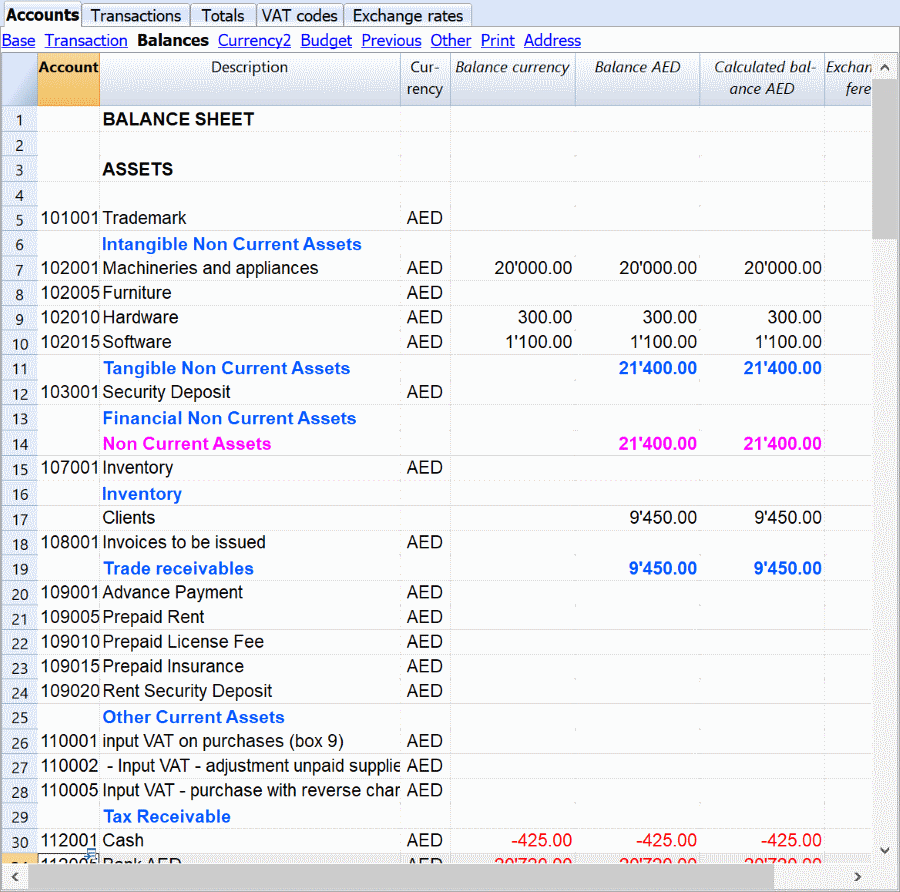
Balance sheet
The balance sheet shows your assets and your liabilities. Banana Accounting includes accounts that are usually utilized by SMEs. Nevertheless, you can customize the accounts. Be careful not to modify the accounts related to the VAT reporting. Those are essential to correctly generate the VAT report needed to fill out the online VAT return form in Saudi Arabia.
Profit & loss statement
The profit & loss statement shows the revenues and the expenses incurred by the company. Banana Accounting included accounts usually used by SMEs. Nevertheless, you can customize the accounts when needed.
Clients/suppliers register
After the P&L statement, there is a section where you can assign accounts to specific customers and suppliers. You will use these accounts to register transactions directly related to specific customers or suppliers. Banana also offers the possibility to print invoices from these transactions.
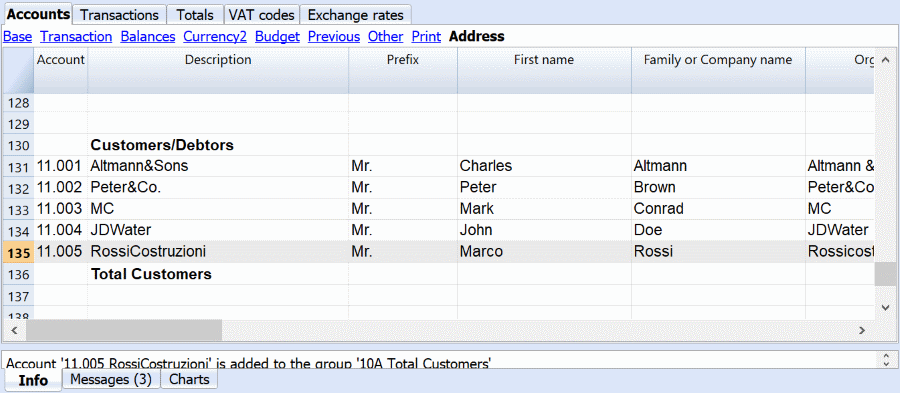
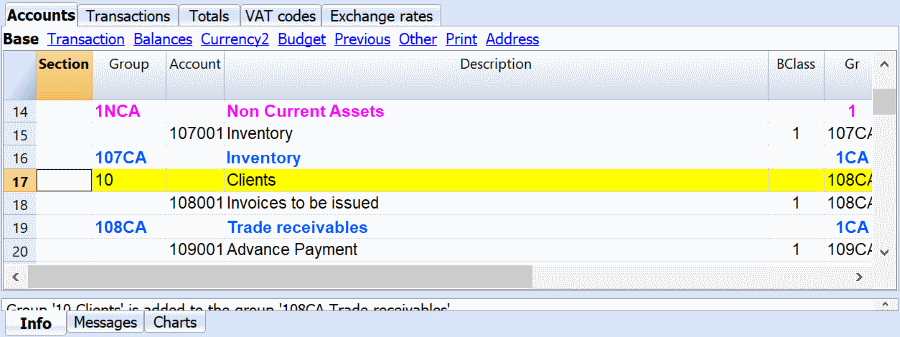
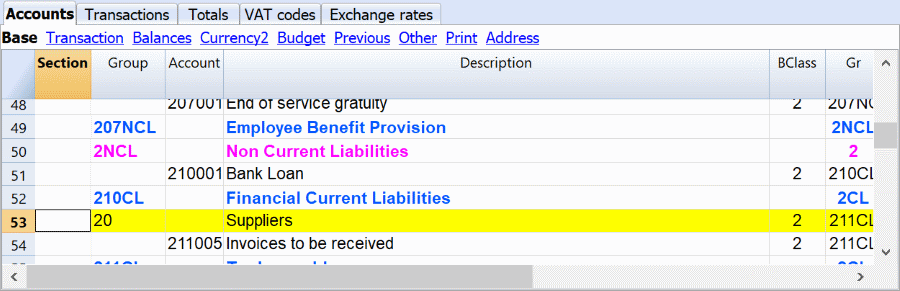
All the accounts in the clients/suppliers register are regrouped under two accounts present in the assets and liabilities.
Double-entry accounting
You will notice that liability and revenue accounts are shown in negative and in red color. This is due to the fact that Banana Accounting fully leans on the concept of double-entry accounting. The principle of “debit and credit” present in the double entry accounting is usually represented in two separate columns. When it appears in a single column, as it happens in the accounts table, it is shown in red and in negative to better distinguish debit accounts from credit accounts.
Template preview
UAE-Multicurrency-VAT
Basic Currency: AED
Double-entry with foreign currencies and VAT/Sales tax
| Group | Account | Description | Currency | Sum In |
|---|---|---|---|---|
| BALANCE SHEET | ||||
| ASSETS | ||||
| 101001 | Trademark | AED | 101NCA | |
| 101NCA | Intangible Non Current Assets | 1NCA | ||
| 102001 | Machineries and appliances | AED | 102NCA | |
| 102005 | Furniture | AED | 102NCA | |
| 102010 | Hardware | AED | 102NCA | |
| 102015 | Software | AED | 102NCA | |
| 102NCA | Tangible Non Current Assets | 1NCA | ||
| 103001 | Security Deposit | AED | 103NCA | |
| 103NCA | Financial Non Current Assets | 1NCA | ||
| 1NCA | Non Current Assets | 1 | ||
| 107001 | Inventory | AED | 107CA | |
| 107CA | Inventory | 1CA | ||
| 10 | Clients | 108CA | ||
| 108001 | Invoices to be issued | AED | 108CA | |
| 108CA | Trade receivables | 1CA | ||
| 109001 | Advance Payment | AED | 109CA | |
| 109005 | Prepaid Rent | AED | 109CA | |
| 109010 | Prepaid License Fee | AED | 109CA | |
| 109015 | Prepaid Insurance | AED | 109CA | |
| 109020 | Rent Security Deposit | AED | 109CA | |
| 109CA | Other Current Assets | 1CA | ||
| 110001 | input VAT on purchases (box 9) | AED | 110CA | |
| 110002 | - Input VAT - adjustment unpaid suppliers older than 6 month (box 9) | AED | 110CA | |
| 110005 | Input VAT - purchase with reverse charge (box 10) | AED | 110CA | |
| 110CA | Tax Receivable | 1CA | ||
| 112001 | Cash | AED | 112CA | |
| 112005 | Bank AED | AED | 112CA | |
| 112010 | Bank EUR | EUR | 112CA | |
| 112015 | Bank USD | USD | 112CA | |
| 112016 | Bank CNY | CNY | 112CA | |
| 112CA | Cash and cash equivalent | 1CA | ||
| 1CA | Current Assets | 1 | ||
| 1 | Total ASSETS | 00 | ||
| LIABILITIES | ||||
| 201001 | Share Capital | AED | 2SE | |
| 201005 | Reseve | AED | 2SE | |
| 201010 | Retained (Profit) or Loss | AED | 2SE | |
| 230 | Profit or loss of the current year | 2 | ||
| 2SE | Shareholders' Equity | 2 | ||
| 205001 | Shareholders' loan - AED | AED | 205NCL | |
| 201002 | Shareholders' loan - EUR | EUR | 205NCL | |
| 205010 | Long term loan | AED | 205NCL | |
| 205NCL | Financial Non Current Liabilities | 2NCL | ||
| 207001 | End of service gratuity | AED | 207NCL | |
| 207NCL | Employee Benefit Provision | 2NCL | ||
| 2NCL | Non Current Liabilities | 2 | ||
| 210001 | Bank Loan | AED | 210CL | |
| 210CL | Financial Current Liabilities | 2CL | ||
| 20 | Suppliers | AED | 211CL | |
| 211005 | Invoices to be received | AED | 211CL | |
| 211CL | Trade payables | 2CL | ||
| 212200A | Automatic VAT | AED | 212CL | |
| 212200 | VAT payable | AED | 212CL | |
| 212201 | Automatic VAT Account | AED | 212CL | |
| 212202 | VAT temporary reverse charge | AED | 212CL | |
| 212CL | Tax liabilities | 2CL | ||
| 213001 | Payables vs personnel | AED | 213CL | |
| 213015 | Accruals AED | AED | 213CL | |
| 213020 | Other current liabilities | AED | 213CL | |
| 213CL | Other Current Liabilities | 2CL | ||
| 2CL | Current Liabilities | 2 | ||
| 2 | Total LIABILITIES & EQUITY | 00 | ||
| PROFIT/LOSS STATEMENT | ||||
| EXPENSES | ||||
| 301001 | Variation of inventories | AED | 301MA | |
| 301005 | Purchase of materials | AED | 301MA | |
| 301015 | Duty and freight | AED | 301MA | |
| 301MA | Material | 3OC | ||
| 302001 | Licenses | AED | 302SE | |
| 302005 | Administrative costs | AED | 302SE | |
| 302010 | Professioanal consultancies | AED | 302SE | |
| 302015 | Legal fee | AED | 302SE | |
| 302020 | Accounting services | AED | 302SE | |
| 302025 | Audit fee | AED | 302SE | |
| 302030 | Utilities | AED | 302SE | |
| 302035 | Maintenance and repairs | AED | 302SE | |
| 302040 | IT services | AED | 302SE | |
| 302045 | Office rent | AED | 302SE | |
| 302050 | Travel expenses | AED | 302SE | |
| 302055 | Marketing expenses | AED | 302SE | |
| 302060 | Insurance | AED | 302SE | |
| 302SE | Services Rental and Lease | 3OC | ||
| 303001 | Salary | AED | 303PE | |
| 303005 | End of service | AED | 303PE | |
| 303010 | Health insurance | AED | 303PE | |
| 303015 | VISA | AED | 303PE | |
| 303020 | Other personnel cost | AED | 303PE | |
| 303PE | Personnel | 3OC | ||
| 304001 | Amort machineries and appliances | AED | 304AM | |
| 304005 | Amort furniture | AED | 304AM | |
| 304010 | Amort hardware | AED | 304AM | |
| 304AM | Amortisation | 3OC | ||
| 305001 | provision for doubtful accounts | AED | 305OT | |
| 305015 | other provision | AED | 305OT | |
| 305020 | Negative adjustments | AED | 305OT | |
| 305OT | Other costs | 3OC | ||
| 3OC | Operating costs | 3 | ||
| 306001 | Bank interest payable | AED | 3FC | |
| 306005 | Foreign currency losses | AED | 3FC | |
| 3FC | Finance Costs | 3 | ||
| 3 | Total EXPENSES | 02 | ||
| REVENUE | ||||
| 401001 | Sales | AED | 401EI | |
| 401EI | External Incomes | 4OI | ||
| 402001 | Services Intragroup | AED | 402II | |
| 402II | Intragroup Incomes | 4OI | ||
| 403001 | Positive adjustments | AED | 403OI | |
| 403005 | Ohter Incomes | AED | 403OI | |
| 403OI | Other Incomes | 4OI | ||
| 4OI | Operating revenues | 4 | ||
| 404001 | Bank interest receivable | AED | 4FI | |
| 404005 | Foreigh currency profit | AED | 4FI | |
| 4FI | Finance Income | 4 | ||
| 4 | Total REVENUE | 02 | ||
| 02 | Profit(-) Loss(+) from Profit & Loss Statement | 230 | ||
| 00 | Difference should be = 0 (blank cell) | |||
| Customers/Debtors | ||||
| 11.001 | Altmann&Sons | AED | 10A | |
| 11.002 | Peter&Co. | AED | 10A | |
| 11.003 | MC | AED | 10A | |
| 11.004 | JDWater | AED | 10A | |
| 11.005 | RossiCostruzioni | AED | 10A | |
| 10A | Total Customers | 10 | ||
| Suppliers/Creditors | ||||
| 20.001 | Smith&Co | AED | 20A | |
| 20.002 | Doe&Sons | AED | 20A | |
| 20.003 | BosiaSoftware | AED | 20A | |
| 20A | Total Suppliers | 20 |
| VAT Code | Description | %VAT |
|---|---|---|
| Output VAT - VAT due | ||
| OSR1 | Sales at 5% standard rate Abu Dhabi (Box 1a) | 5.00 |
| OSR2 | Sales at 5% standard rate Dubai (Box 1b) | 5.00 |
| OSR3 | Sales at 5% standard rate Sharjah (Box 1c) | 5.00 |
| OSR4 | Sales at 5% standard rate Ajman (Box 1d) | 5.00 |
| OSR5 | Sales at 5% standard rate Umm Al Quwain (Box 1e) | 5.00 |
| OSR6 | Sales at 5% standard rate Ras Al Khaimah (Box 1f) | 5.00 |
| OSR7 | Sales at 5% standard rate Fujairah (Box 1g) | 5.00 |
| OSTS | Tax refunds provided to turists | |
| ORCS | Purchase of services with reverse charge - OUTPUT VAT - (Box 3) | 5.00 |
| OZR | Sales Zero Rated (Box 4) | |
| OEX | Sales Exempt (Box 5) | |
| ORCI | Import of goods with reverse charge - OUTPUT VAT calculated by UAE Custom - (Box 6) | 5.00 |
| ORCA | Adjustment values calculated by Custom on import of goods - (Box 7) | 5.00 |
| OOS | Sales Out of Scope | |
| OIG | Sales to registered customers in other GCC implementing state (no UAE VAT) | |
| Input VAT - VAT recoverable | ||
| ISR | Purchases at 5% standard rate (Box 9) | 5.00 |
| IRC | Purchases of goods and services with reverse charge - INPUT VAT - (Box 10) | 5.00 |
| IZR | Purchases Zero Rated | |
| IEX | Purchases Exempt | |
| IOS | Purchases Out of Scope | |
| TOTAL | ||
| : ADJ - adjustements are registered with the same VAT code used for the transactions that needs an adjustment |
| Ref.Currency | Currency | Text |
|---|---|---|
| AED | EUR | Euro |
| AED | USD | US Dollars |
| AED | CNY | Chinese Yuan |
VAT Report Extension for United Arab Emirates
In this article
VAT Report Extension for United Arab Emirates
VAT Report Extension for United Arab Emirates
It prepares a report that is similar to the UAE online VAT return , so you can easily fill it.
New VAT reporting for small business in UAE
Businesses in the United Arab Emirates (UAE) will have to pay VAT on their sales.
A VAT tax is an indirect tax imposed on most of the goods and services commercialized by a business. After collecting the tax, businesses will transfer it to the government. In the UAE, the tax authority in charge is the Federal Tax Authority (FTA).
Every business will have to periodically calculate and report the VAT to the FTA by filling the official online form with all the necessary figures.
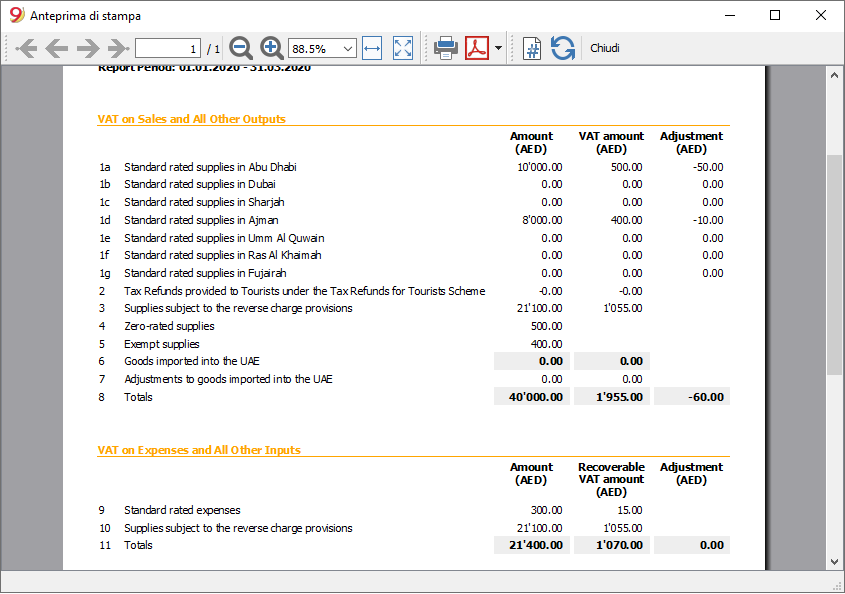
As you can see from the following image, the report is similar to the online VAT form. With all calculated amounts you only need to enter in the form.
Documentation for
The VAT Report for UAE require an accounting file that is correctly setup with accounts and VAT code.
See the following pages for more information:
- Documentation for UAE.
- Template Multi currency-for enterprise in UAE with VAT.
- VAT Table and VAT Codes for UAE
If you don't use the VAT table that is correctly setup, the report will not work as expected. - Transactions for VAT.
Example of transactions.
Open source collaboration
The solution has been developed with an open source concept:
- In 2018 a user of Banana Accounting in UAE has asked us if we could implement an automatic VAT reporting.
- He made available the accounting plan he was using.
- He gave us the link to the tax authority web site with all the information regarding the VAT process.
- Together with our specialist we have worked out the VAT table, with all the necessary VAT codes customized for UAE.
- Banana.ch developers has programmed a report for VAT reporting, that is similar to the filling form.
Updates
We do not have personal on UAE. If there are changes in the tax requirements or forms we kindly invite anyone to inform us.
For any questions or suggestions, please contact us at: contact form.
VAT Table for United Arab Emirates
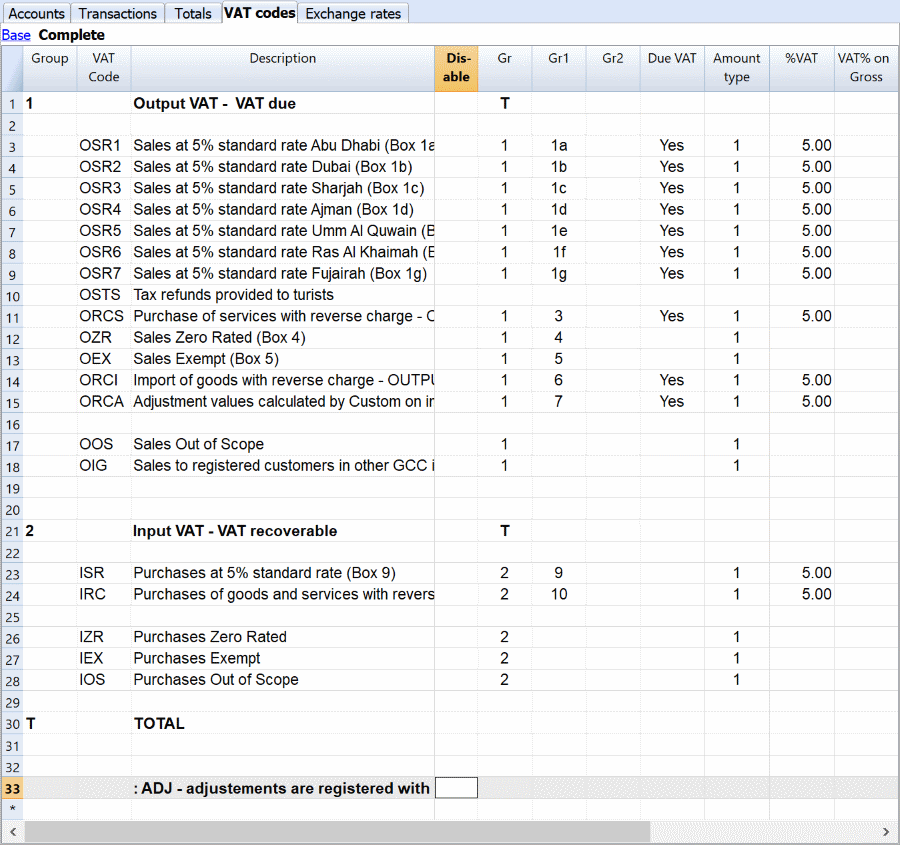
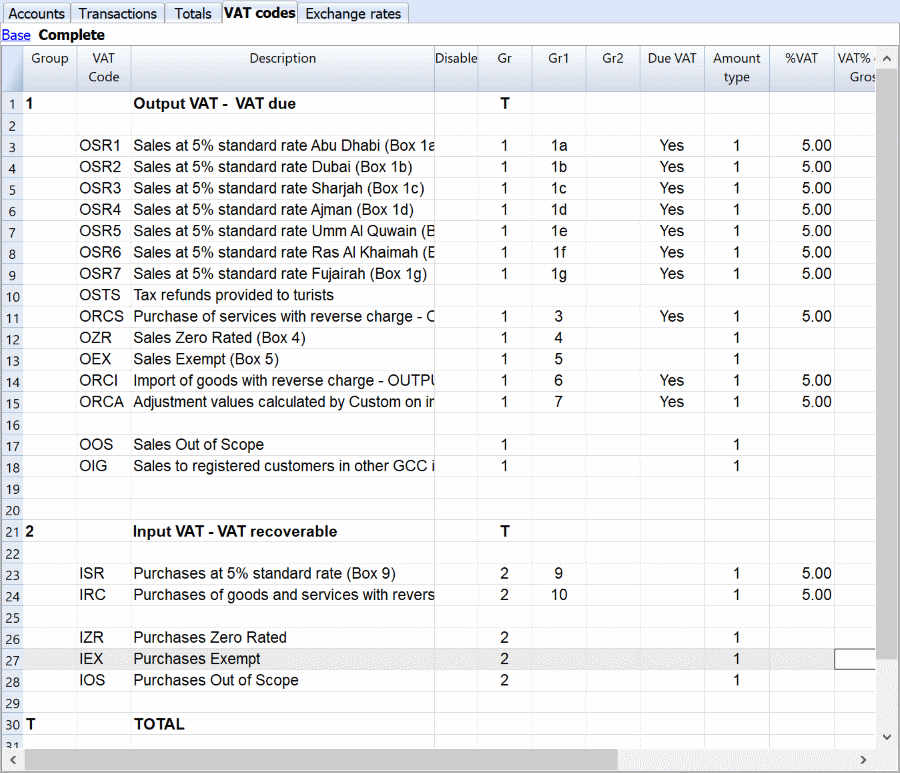
The Vat Table in Banana accounting contains the VAT codes that are setup accordingly the need for UAE, with all the cases you need in order to correctly calculate and report the VAT.
- The VAT Code is the code you will enter in the Transactions table. The program will automatically calculate the VAT and register on the specified account.
- The column “Gr 1” indicate in with box of the form the amount should be totalized. It is used by the Extension to appropriately sum amounts.
If you add a new VAT Code you should also specify the form code. - VAT percentage is 5% or 0%.
In case new percentages are introduced by the fiscal authorities, a new VAT percentage needs to be modified in the VAT table.
VAT due UAE
VAT code that are used for revenues. There are VAT Code for each Emirate.
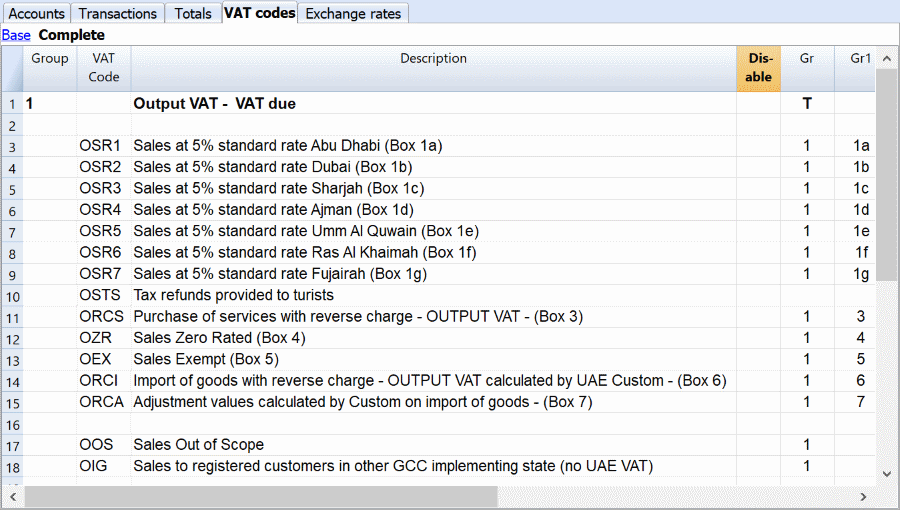
- Sales at 5%: These vat codes include all goods and services subjected at the standard rate of 5%. The FTA requires to separate the sales.
- Tax refunds provided to tourists: this VAT code should be used only by retailers which provide the tax refunds to tourists.
- Reverse charge: this VAT code is used to record entries related to reverse charge mechanisms.
- Sales zero rated: all goods and services sold in the UAE which are subject to a rate of 0%.
- Exempt sales: all goods and services sold in or outside Saudi Arabia which are exempt from the VAT.
- Import of goods: all goods imported in the UAE and declared at customs.
- Sales out of scope: a VAT code for sales outside the scope of the VAT agreement.
- Sales to other GCC implementing states: GCC implementing states are not subject to the VAT agreement.
All the adjustments are registered with the same VAT code used for the transactions that needs an adjustment.
VAT recoverable UAE
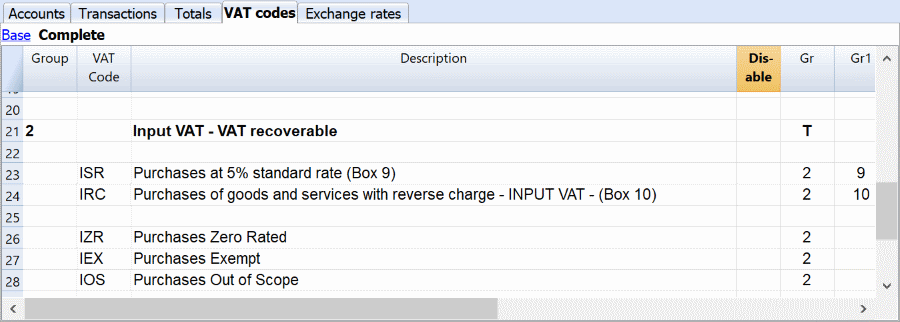
- Purchases at 5% standard rate: VAT code for all the purchases subject to the standard rate of 5%.
- Purchases with reverse charge: VAT codes to recover any VAT paid as output VAT under the reverse charge mechanism.
- Purchases zero rated: All goods and services purchased which are subject to a 0% rate.
- Purchases exempt: All goods and services purchased which are exempted from the VAT.
- Purchases out of scope: a VAT code for purchases outside the scope of the VAT agreement.
All the adjustments are registered with the same VAT code used for the transactions that needs an adjustment.
VAT Transactions for UAE
The Transactions table contains all the transactions carried out by a business.
After having adjusted the accounts, you can start to input the transactions in the software.
In order to insert the transactions correctly, it is essential to know all the different VAT codes for the UAE.

You can find detailed information about the double-entry accounting and about transactions. From the transaction is possible to generate invoices automatically.
Further down the page, you will find specific examples regarding the UAE on how to enter VAT transactions.
Due Transactions VAT Due
All the examples shown are based on the UAE template.
The “Doc” column is used to identify the transactions for the examples.

Sales
This category includes goods and services sold at the standard rate of 5%. The FTA requires a different VAT code depending on which location the sales happens.
- DOC 10 - This is an example for a simple transaction where the company sell panel woods to a customer in Abu Dhabi. The VAT code used is the “OSR1”, it corresponds to a standard rate sale in Abu Dhabi.
Credit note
A credit note is normally issued to correct a mistake. It is usually sent by a seller to a buyer (e.g. the invoice amount was overstated and, therefore, the buyer reduces its amount).
- DOC 101 - This transaction represents a credit note. It is directly related to the DOC 10 transaction.
Reverse charge
The reverse charge is a mechanism which is sometimes used in VAT reporting. Importing services is one of the main causes for utilizing the reverse charge mechanism. In fact, the VAT arising from importing goods can be collected at the border. For services, it is impossible to collect the VAT at the border. Therefore, the reverse charge mechanism must be used because it is necessary to register the related VAT due.
- DOC 30 - This is a transaction where the reverse charge mechanism must be utilized. In this case, the company bought a service and paid it with the bank account. Since the VAT on a service cannot be collected at the border, the company must use the reverse charge to account for both the VAT recoverable and due. As you can see, the journal entries cancel each other, there is not an actual impact on the company. Nevertheless, the tax authority can keep track of the VAT reporting.
- DOC 70 – This transaction shows an example of reverse charge for goods imported. The FTA requires a different VAT code for these kinds of transactions.
Zero-rated sales
Zero-rated goods and services are taxable but at a 0% rate. This regulation exists to allow companies selling 0% supplies to deduct the recoverable VAT and, therefore, get a refund.
- DOC 40 - This transaction involves a zero-rated sale. There are certain products which have a 0% VAT rate. In this case, the product sold is classified as zero-rated.
Exempted sales
Exempted goods and services are not subjected to VAT. When you sell exempt supplies, you do not collect the VAT. A company selling only exempt supplies cannot register for VAT.
- DOC 60 - In this case, the product sold is exempted from the VAT. The main difference from a 0% VAT rate is that with exempted good it is not possible to obtain a VAT refund.
VAT recoverable transactions
All the examples shown are based on the UAE template.
The “Doc” column is used to identify the transactions for the examples.

Purchases
This category includes goods and services purchased at the standard rate of 5%.
- DOC 80 - This transaction represents a standard rate purchase.
Purchase Zero rated
Zero rated goods and services are taxable but at a 0% rate. This regulation exists to allow companies selling 0% supplies to deduct the recoverable VAT and, therefore, get a refund.
- DOC 90 - This is an example of zero rated purchases. In this case, the product purchased by the company belongs to a 0% rate VAT category.
Purchases Exempt
Exempted goods and services are not subjected to VAT. When you buy exempt supplies, you cannot claim a deduction.
- DOC 100 - This transaction represents an exempt purchase. The product purchased is exempted according to the VAT regulations.
Adjustments
All the adjustments made to a transaction must be recorded with the same VAT code used in the transaction that needs an adjustment.
If the adjustment is negative, the “-“ sign must be used when inserting the VAT code.

Create UAE VAT report with Banana
Create UAE VAT report with Banana
Collecting all the necessary VAT information
To fill the online form, you need to calculate the VAT and collect all the information regarding issued and received invoices, VAT imposable and VAT amounts for the different required categories.
By using a specific tool, like Banana Accounting Software (lifetime license costs approximately US$ 135, VAT excluded) the process of collecting and calculating VAT is simplified.
The following image shows that the VAT report prepared by Banana Accounting is the same as the official VAT form. Therefore, all you need to do is to copy the data from the Banana report to the online form.
Further down the page you can find directions on how small businesses can prepare for the VAT and generate the VAT report with Banana Accounting.
Documentation VAT UAE
Here you can find all the documentation needed to successfully implement the VAT reporting.
Installing Banana Accounting
Preparing the VAT report with our accounting software is much easier.
Banana Accounting offers a free trial that allows the recording of up to 70 transactions. To register more transactions, it is necessary to buy the license key. The price is highly competitive as our software is used in many countries and has a large number of users.
Banana Accounting 9 is a universal accounting software which focuses on small businesses. It has an intuitive interface, which is similar to Excel. You will quickly learn how to use it and it will be easy to correct mistakes.
The first step to install the software, is to download it from our website. Here, you will find all the necesary information to successfully install Banana Accounting.
VAT reporting in 3 easy steps
The list below is what you need to do to keep track of the VAT.
- Choose the template that is appropriate for you.
- Adapt the accounting plan to your needs.
- Enter the transactions with the appropriate VAT Code.
When all the necessary information has been entered, you can print the VAT report and all other necessary information.
Choose an accounting template
To start a new accounting for UAE follow these steps:
- Click on “create new…”
- Select “other countries”
- Enter “UAE” in the search box.
After selecting the template, it is possible to start a new accounting with our software.
Introduction to Banana Accounting
Here, you will find all the necessary information on how to start a double-entry accounting with an online template.
After, you will find specific instructions on how to use the Banana Accounting software with a Saudi Arabia template. All the instructions are based on a cash accounting template.
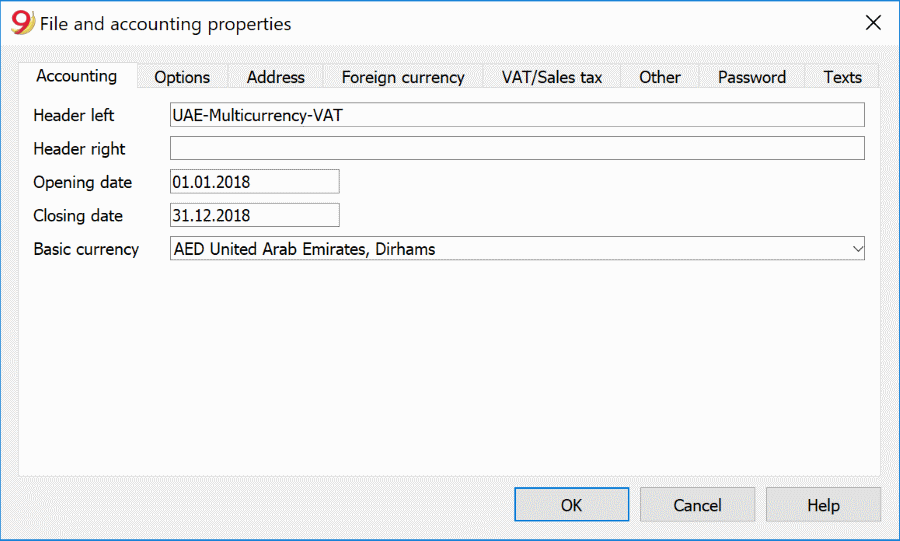
Setting the “file and accounting properties” of the template
This page will open the first time you choose a template, see file and accounting properties.
- Complete the information of the company.
- Complete the Address tab.
- Under VAT number enter your Company Identification Number
Accounts table
In the Accounts table you setup the balance sheet and the profit and loss statement. The template contains a standard set of accounts that you can modify based on your needs.
The opening AED column must be filled with the opening balance of your company at the beginning of the reporting period. The Balance SAR column will show the current balance of a given account. Credit opening amounts need to be entered in negative. Positive and negative amounts should equal zero.
See the Table accounts for additional information on how to enter opening balances, add accounts or groups.
VAT codes table
This table is essential for the VAT reporting. It contains all the necessary codes to successfully calculate the VAT due and the VAT recoverable. Here, you can find detailed information about VAT codes for UAE.
Transactions table
This is the table where all the transactions must be recorded. To successfully generate a VAT report, it is important that each transaction has VAT code associated to it.
The template contains examples of typical transactions that show how to deal with different situations that could arise in VAT reporting.
Here, you can find detailed information about the specific transactions for UAE.
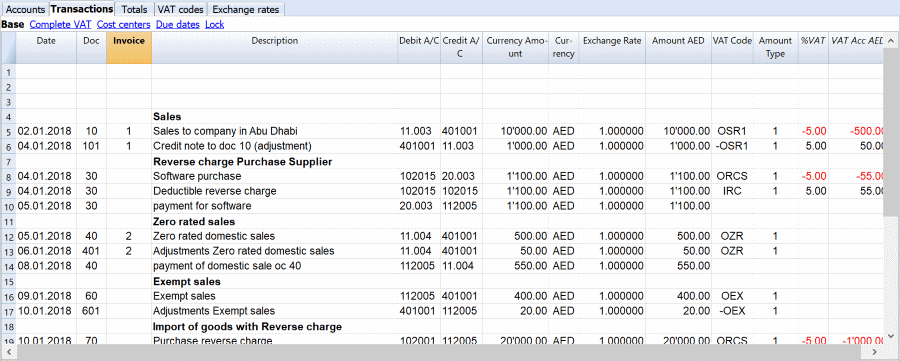
- Date: the date is used by the program to attribute the transaction to a certain time frame. The date should be within the limits of the accounting period defined in the Basic data of the accounting.
- Doc: the number of the voucher which serves as a base for the accounting transaction. When entering transactions, it is advisable to indicate a progressive number on the document, so that the accounting document can be easily traced from the transaction.
- Invoice: it is possible to insert a number to classify the transactions. This way it is possible to automatically generate an invoice for each transaction.
- Description: the text of the transaction. The autocomplete feature proposes the text of an already entered transaction, or one that has been entered in the previous year when the appropriate option was activated.
- Debit A/C: the account that will be charged.
- Credit A/C: the account that will be credited.
- Amount AED: the amount that will be entered unto the debit- and credit account.
- VAT code: for each transaction with VAT you need to enter one of the VAT codes from the VAT codes table.
- Amount type: this is a code that indicates how the software considers the transaction amount:
- 0 (or empty cell) with VAT/sales tax, the transaction amount is VAT included
- 1 = without VAT/Sales tax, the transaction amount is VAT excluded
- 2 = VAT amount, the transaction amount is considered the VAT amount at 100%.
- It is not modifiable.
- %VAT: the program automatically enters the VAT percentage associated with the VAT code you entered.
- Non Ded %: this indicates the non-deductible %:
- When you enter or change the VAT Code, the program uses the Non Ded. % associated to this VAT Code in the VAT Codes table.
- You can manually edit the value.
- VAT Acc AED: this is the VAT amount registered in the VAT account. It is calculated by the program according to the Transaction amount, the Amount type and the non-deductible percentage.
For more detailed information about the Transactions table visit this link.
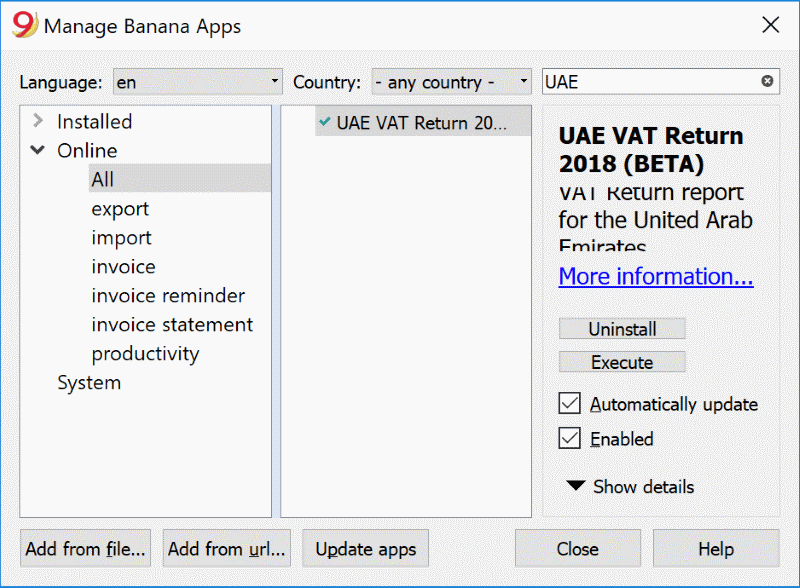
Install the BananaApp “UAE VAT Report”
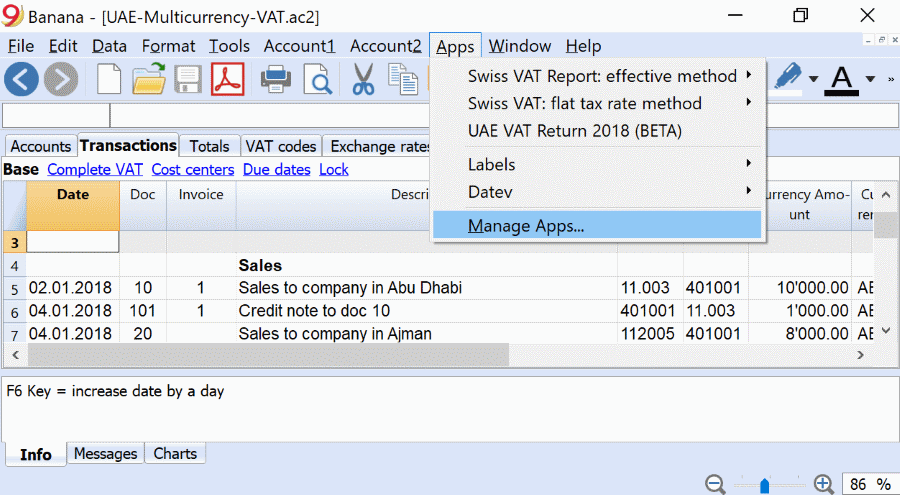
The first time you need to create a VAT report, you have to install the Banana Apps for UAEVAT report.
Follow this procedure :
- Click on "Apps" and select "Manage Apps".
- Search for UAE and click on "install".
Generating a VAT report to submit the VAT return
The FTA established when a company must submit a VAT return. Companies with annual sales below AED 150m must submit it quarterly. Otherwise, it must be submitted monthly.
Before generating the automatic VAT report that will be used to fill in the VAT return form, it is essential to check the accounting.
To check it, go to Account 1 and select "check accounting".
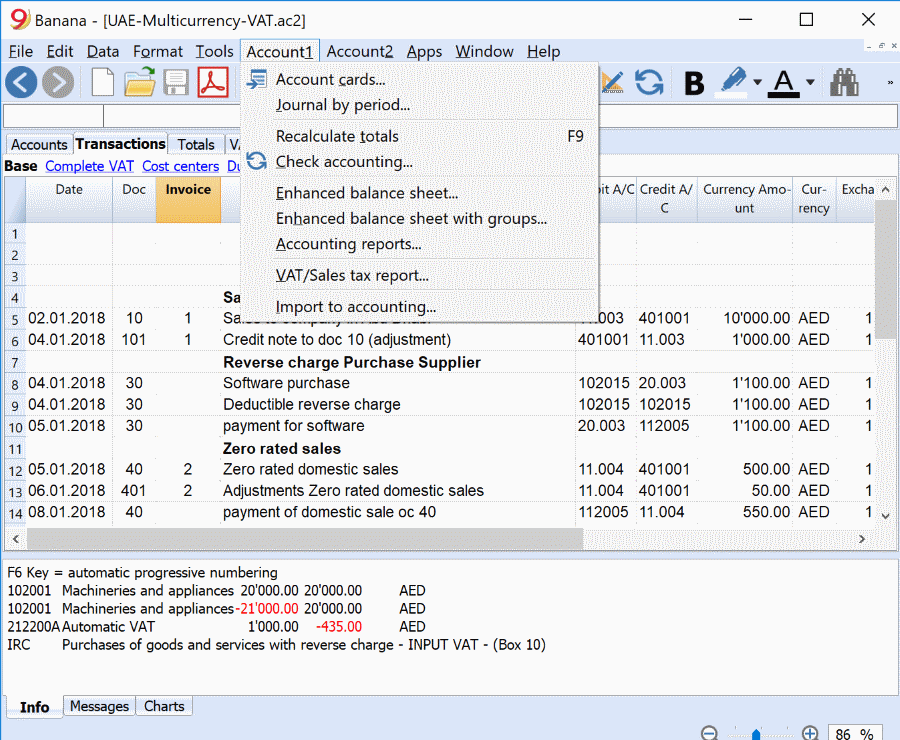
after checking the accounting, you are ready to generate the VAT report.
- Click on the "Apps" Menu
- Click on “UAE: VAT return 2018 (beta)”
This is the result that you will obtain, you will only need to copy the data onto the online form.
Open source collaboration
The solution has been developed with an open source concept. We welcome suggestions and feedbacks, see our web page on github/UAE.
For any questions or suggestions, please contact us at: contact form.
We are looking for collaborators for Arabic translations and creation of invoicing forms.
Other accounting functionalities
Banana Accounting offers several functionalities other than the VAT accounting. Here, you can explore all the functionalities that the software offers.
New features include in Banana Accounting 9 include:
- Invoice management - Automatic generation of invoices,
- Working hours spreadsheet,
- Prints with logo,
- and a lot more!
Check here to discover all the new features.
Documentation United Arab Emirates
More information
For more information, see the documentation.