发生业务表 | 复式记账
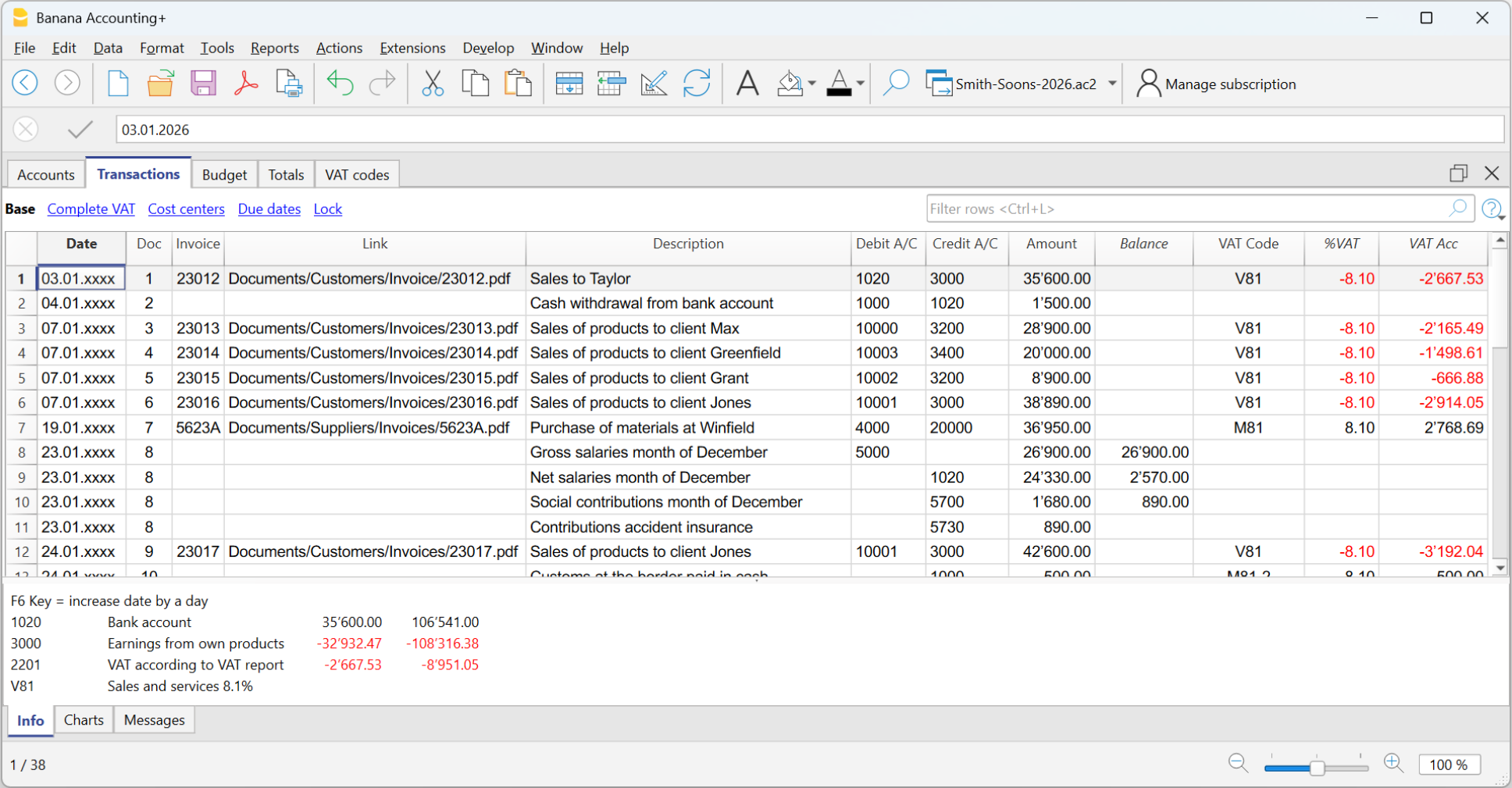
发生业务表是记账的中央枢纽,在其中输入所有对财务和经济有影响的业务。其使用方式与Excel类似。在发生业务表中,可以看到所有的变动,且顺序完美,通过滚动浏览,您可以立即一目了然的看到所有的事件。
可以对所有输入的数据进行修改和更正,从而使您轻松拥有一个完美的会计核算文件。
快速输入
该表类似于Excel,您可以上下滚动并将鼠标放置在任何的单元格中。
有很多功能可以使输入和编辑数据的速度变得非常快。
可以进行以下操作:
- 取消并重做。
- 选择一个或多个单元格并复制/粘贴。
- 单独或批量添加、复制、粘贴和删除行。
- 搜索和替换文本。
- 按日期对行进行排序。
- 自动完成功能会建议所输入的值 (例如账户列表)。
- 使用F6键可以完成该行的数值,并取代同一行的数值。
- 使用F4键恢复上一行的数值。
- 日期是用上一行中的值来完成的。
- 在记账凭证号列中,建议您使用累进的数字 (使用不同的计数器)。
- 在借方或贷方账户列中,您可以通过输入账户的描述来搜索该账户。
- 在金额列中,您可以输入公式,例如“ 30 + 25”,程序将插入结果。
欲了解更多信息,请参见单元格的页面。
导入动向
通过从银行,邮政储蓄或信用卡的对账单中导入发生业务,可以加快发生业务表中的数据输入并避免错误的发生。数据记录与银行对账单上显示的完全相同。
- 除了账户报表,您还可以从其它程序导入数据。
- 程序会自动补充缺失的数值。
- 有几种格式可供导入。
- 您可以从其它程序中复制和粘贴数据。
- 可以完成、修改或删除导入的数据。
- 能够对扩展程序进行编程以导入任何类型的文件。
欲了解更多信息,请参见导入到账套的页面。
多种信息的管理
可以为每个条目行指示很多信息:
- 该日期和文件的数值。
- 文件和协议,或外部参考的渐进编号。
- 通过添加列的方式可提供您所需要的任何附加信息。
- 链接到数字文档文件。
- 添加和删除链接。
- 打开链接并查看内容。
- 增值税管理 (如果在创建文件时选择了带增值税的会计类型):
- 在发生业务中输入增值税代码,程序就会自动计算出增值税。
- 细分增值税并将其过账到指定账户。
- 您可以定义该金额是增值税净额还是毛额。
- 您可以在增值税代码前插入负号"-"来表示是相反的情况。
- 您可以指定一个不可收回的增值税百分比。
- 您可以用附加代码对特殊情况进行编码。
- 成本和利润中心:
- 每个发布行最多有3个成本和利润中心。
- 您可以在成本或利润中心账户前注明"-"号,就可以发布负数。
- 部门:
- 对于每个借方或贷方账户,您最多可以指定10个部门。
- 供应商管理:
- 根据能力 (设置为分类账) 和现金 (设置为成本和利润中心) 进行管理。
- 管理到期日和付款,以拥有未结和已付款发票的报告。
- 客户管理:
- 根据能力 (设置为分类账) 和现金 (设置为成本和利润中心) 进行管理。
- 管理到期日和付款,以拥有未结发票和已收发票的报告。
- 给客户的发票 :
- 用于创建发票的数据输入。
- 客户账户建议。
- 数量和价格 (使列可见)。
- 用于计费或成本控制。
- 自动计算金额。
- 物品数量 (如果选项已被激活)
- 要连接到物品表格。
- 自动计算进出产品的数量。
- 打印发票。
- 指示需要打印发票的更多信息。
账户明细
在发生业务表中,您可以查看任何账户的明细,只需找到相关账户的单元格即可 (在借方或贷方列中),然后单击显示在该单元格右上角的小图标。
当您在查看账户明细的时候,点击相关的行号就可以自动跳转到在发生业务表格内相对应的原始发生业务。
更多关于账户明细的信息可以查看账户/科目明细的页面。
验证数据
输入数值是非常安全的。Banana财务会计软件有自动检测和报告错误的功能。
- 程序会验证输入的数值是否正确。
- 如果借方和贷方列之间存在不平衡,在信息窗口中将以红色表示。
- 您不确定的发生业务可以留到以后再完成。
- 每条错误信息都有相应的帮助页面 (需要网络连接)。
- 在软件下方的信息窗口中,包含以下信息:
- 摘要,动向和使用的账户余额。
- 错误消息提示,并包含直接连至帮助页面的链接。
- 报告借方和贷方的差额。
- 使用#余额检查的功能,通过输入实际的银行余额,您可以立即检查会计中余额的对应关系并避免错误。
- 使用检查账务的命令,该程序将重新检查所有输入的数据,并提醒您注意疏忽和错误。
- 您可以为行着色,更改字体并使它们变为粗体。
- 您可以保护行。
- 使用区块链技术为发生业务加锁。
列的排列
要获得更合适的数据输入,您可以按自己的顺序排列所有的列。
您可以选择:
- 将列向右或向左移动。
- 显示其它列或隐藏不必要的列。
- 添加自己的列
- 保存列的排列 (视图)。
在列设置的页面上提供了更多信息。
发生业务表内的列 - 复式记账
在发生业务表内已经预设了一系列的列和视图。
发生业务表内的列
下面列出的列和前面带 * 的列通常不可视。
要使它们可视,请使用数据菜单中的列设置命令。
日期
程序用来将发生业务归入某一时间段的日期。该日期应在会计基本数据中定义的会计期间范围内。在选项标签中,可以指明是否需要发生业务日期,否则该值也可以留空。
如果有锁定的发生业务,当输入的日期等于或早于锁定的日期时,程序会出现一条错误信息提示。
*文件日
可以输入文件的日期,例如发票的签发日期。
*起息日
银行操作的起息日可以被指示。该值是从电子银行对账单导入的。
记账凭证号
作为会计发生业务基础的凭证编号。在录入会计发生业务时,最好在记账凭证上注明一个连续的编号,以便轻松追踪会计业务的记账凭证。
自动完成功能提出的渐进值和业务代码,之前在经常性业务表内已被定义。
程序提出的下一个文件编码,可以使用 F6 键来继续。
- 如果是数字编号,程序只需增加记账凭证号列中的最高值。
- 字母数字编号:程序增加最后的数字部分,当您希望为现金及银行的变动保持一个单独的编号时是非常有用的:
- 如果先前的记账凭证号已经输入 C-01,并且开始输入 C, 那么程序建议输入 C-02。
- 如果先前的记账凭证号已经输入 B104,并且开始输入 B,那么程序建议输入 B-105。
- 如果先前的记账凭证号已经输入 D10-04,并且开始输入 D,那么程序建议输入 D10-05。
在经常性业务中,您可以设置发生业务组,用一个代码重新加载。
为了添加大量的记账凭证号,您也可以使用Excel。在Excel中创建所需数量的记账凭证编号,然后复制粘贴到Banana财务会计发生业务表的列中。
*议定书文件
一个额外的列,以备发生业务或记账凭证需要其它编号时使用。
自动完成特性提出的渐进值功能和在记账凭证列中的是一样的。它的用途,例如:
- 当有必要给发生业务分配一个不同于记账凭证号的递进编号时。
- 如果发生业务是由其他人使用另一个文件输入的,然后将其导入到会计中。这样就可以同时使用会计的累进编号和原始编号。
*文件类型
包含的代码是程序用于识别一种发生业务的类型。如果您更偏向于使用自己的代码,那么最好增添一个新的列。
- 01 在报告中,此笔业务被视为期初业务,因此没有显示在期间中,而是显示在期初余额之中。
- 从 10 至 19: 客户发票的代码。
- 从 20 至 29:供应商发票的代码。
- 从 30 至 1000:保留为将来使用的代码。
*发票文件
已签发或已支付的发票号码,将与客户和供应商的发票控制功能一起使用。
*原始文件
在记账凭证中出现的参考编号,用于输入,例如,信用支票的数量。
*文件链接到外部参考
作用是输入一个外部文件的链接,通常是会计凭证。
点击单元格上部的小图标,程序就会打开该文件。参见插入、编辑和打开链接。
- 当单元格中插入链接后,会出现一个小图标,点击它就可以打开文档,但前提是它是一个被认为安全的扩展名。
- 另一个小图标允许你插入和编辑链接。
*外部参考
生成该发生业务的程序分配的参考号。这个值可以用来检查某个操作是否被导入两次。
摘要
发生业务的文本。
自动完成功能会建议已输入发生业务的文本,或者如果适当的选项处于活动状态,则输入前一年的发生业务文本。当按 F6 键时,程序会检索前一行的数据,并以相同的描述来完成当前行的列。
如果摘要是以#检查余额开头的,则该发生业务被认为是用于检查余额的业务。
请参考我们的页面检查会计,以了解有关该主题的更多信息。
*附注
可用于添加发生业务的附注。
借方
将被收取的账户。
- 可以在借方帐户列中输入一个部门。通常用 ":" 或 "-" 或 "-" 来分隔。
通过插入部门分隔符,立即移动到下一个部门。 - 如果按Enter键,则输入结束并移动到下一列。
- 自动完成功能建议账户计划的账户和部门。
- 您可以输入一个搜索文本来代替账户。程序会在其中一列中显示出包含文字的账户列表。
*借方账户明细
从会计科目表中检索到的所输入账户的摘要。
贷方
贷方账户。其余信息请参考借方账户下的解释。
*贷方账户明细
从会计科目表中检索到的所输入账户的摘要。
金额
将计入借方和贷方账户的金额。
*余额
余额列显示借方和贷方的总和。因此,只有在几个账户的发生业务中才会显示一个金额。在输入结束时,余额应该为零。如果有一个重复出现的金额,那是因为有一个错误。
增值税列
关于增值税列的信息可以在发生业务表页面的增值税列中找到。
成本中心1
成本中心账户前面要输入 "." ,而不要输入 "." 。
如果首字母前有负号 "-P1" ,则金额为贷方。
*成本中心1 摘要
成本中心的摘要, 可以在账户科目表中检索。
成本中心2
成本中心账户前面要输入 "," ,而不要输入 "," 。
缩写词前有负号 "-P2" ,则金额为贷方。
*成本中心2 摘要
成本中心的摘要, 可以在账户科目表中检索。
成本中心3
成本中心账户前面要输入 ";" ,而不要输入 ";" 。
缩写前有负号 "-P3" ,则金额为贷方。
*成本中心3 摘要
成本中心的摘要, 可以在账户科目表中检索。
*到期日
在此日期之前要支付发票。更多信息请参见客户和供应商页面。
*支付日
与显示到期日的命令结合使用。
当使用客户/供应商发票控制特性来检查付款时,必须为已开具的发票输入一个发生业务,为付款输入另一个发生业务。
*锁号,加锁金额,累计锁,加锁行
更多的信息请访问加锁发生业务页面。
附加列
通过菜单 工具 → 添加/删除功能 → 在分录表中添加项目列,会添加以下列。
更多信息请参阅 分录表中的项目列。
项目编号 (IdItem)
- 来自 项目表 的项目标识符。 如果输入的项目存在于项目表中,程序会自动读取描述、单位、单价、增值税代码和账户。
数量
- 数量与单价相乘可得出总金额(也可以是负数)。
- 如果存在项目表:
- 正值 (+) 将增加项目的数量。
- 负值 (–) 将减少项目的数量。
- 中性值 (±) 仅用于计算总金额,但不会影响项目表中的数量。
中性值通常用于证券管理,用于记录收益或亏损。您可以为单个证券指定收益或亏损的数量和金额,而不会影响可用证券的数量。您可以先输入"+"再输入"-"来插入"±"符号。程序会自动识别这一组合并将其转换为"±"符号。
- 如果输入了数量而单价为空,并且分录中存在金额,程序会自动计算单价。
单位
- 与数量相关的说明,例如:平方米(m²)、吨(t)、件(pcs)。
单价
- 每个单位的价格,与数量相乘可得出总金额(也可以为负数)。
- 可以通过菜单 “工具 > 添加/删除功能” 中的相应命令修改小数位数。
分录金额
- 如果在数量或单价列中输入了数值,分录金额将根据这两列的内容自动计算,并转换为正值。
添加新的列
使用列设置命令,它可以显示,隐藏或移动列的顺序,添加新列,或者指示出在打印中不应该出现的列。
- 在发生业务表中被添加的列也会被添加到经常性业务表中,在账户明细和增值税报告中,不可见。
为了显示在其它表格中的这些列, 请使用列设置的命令。 - 如果一个列的"金额" 类型被添加了,那么被输入的金额将被添加在账户明细中。
视图
当新的会计账户被创建后,以下的视图也会被自动的创建:
- 基本:主要的列被显示。
- 成本中心:CC1,CC2 和 CC3 列被显示。
- 到期日:列的到期日和支付日被显示。
- 加锁: 与加锁功能相关的列被显示。
银行支票
为了输入签发的银行支票,用户需要在负债类中添加一个签发的支票账户。

此时签发的支票用来支付供应商,之后将成为银行当前账户中的借方。

输入发生业务后的签发支票账户明细。

余额检查的发生业务 (#CheckBalance)
Banana财务会计+ 在检查账务的命令中包含有#CheckBalance的功能,用于检查和匹配会计余额。CheckBalance 的中文意思是余额检查。
这种检查对会计核算的的真实性至关重要。除了在会计年度结束时检查余额外,最好是在月末定期进行这种检查,以避免有任何不匹配的余额从一个月结转到另一个月。
进行该检查的步骤如下:
- 记录余额的相关日期。
- 在摘要列中,输入#CheckBalance,然后输入与要检查的余额相对应的金额 (例如,现金的实际余额,银行报表中的银行余额等)。
- 在借方账户中,指出要核实的账户 (银行账户、现金账户、增值税账户或其它要核实的账户)。
- 在金额列中,单元格必须是空的。
通过这个命令,如果余额不匹配,软件会在信息窗口显示余额不匹配的账户。
Registrazioni su conto privato
Il conto privato è un conto finanziario, utilizzato nella contabilità per registrare quelle transazioni che non riguardano direttamente l'azienda, ma il patrimonio personale del titolare. Questo conto tiene traccia dei prelievi e degli apporti del titolare a scopi privati; pertanto serve per tenere separate le finanze aziendali da quelle personali, evitando confusione contabile.
Prelievi dall'azienda del privato/socio
I prelievi personali vengono registrati come diminuzione del patrimonio netto. Se il titolare/socio utilizza fondi aziendali per spese personali, l'importo viene addebitato al conto privato.
Esempio di scrittura contabile per un prelievo in contanti:
- Dare: Conto privato (per il prelievo del titolare/socio)
- Avere: Cassa/Banca (per l'importo prelevato).
Apporti nell'azienda dal privato/socio
Gli apporti personali del titolare (es. aumento di capitale o versamenti per coprire spese) vengono registrati come incremento del patrimonio netto.
Esempio di scrittura contabile per un apporto in contanti:
- Dare: Cassa/Banca (per l'importo versato dal titolare/socio)
- Avere: Conto privato (per l'apporto del titolare/socio).
Utili prelevati
Se il titolare/socio preleva utili maturati:
- Dare: Conto utili a nuovo (o Risultato di esercizio)
- Avere: Conto privato
Saldo del Conto Privato/socio
- Saldo positivo: indica che il titolare ha un credito verso l'azienda.
- Saldo negativo: indica che il titolare ha debito verso l'azienda.
信用卡预付款登记
信用卡预付款
使用信用卡支付首付款时,必须检查在账户表中是否存在信用卡的账户,如果没有,则必须在负债部分中输入该信用卡的账户。
信用卡账户被添加到短期负债的总组或所属组中,如果没有所属组,则必须在负债部分列出。

例如:
有一笔1000美元的款项已经存入了信用卡账户。
- 信用卡账户记入借方
- 在贷方中,我们记录的是存款的银行账户。

登记您的信用卡账单
收到信用卡账单后,您必须记录信用卡上列出的所有费用,并从您的信用卡账户中注销。
例如:
我们收到了一张信用卡发票,总额为790.-瑞士法郎 (详情:购买电脑560.00瑞士法郎,酒店费用150.00瑞士法郎,购买办公设备80.00瑞士法郎) (记账凭证号:25)。
其记录在多行中:
- 在信用卡账单中列出的所有消费都记录在借方列的相关费用中,每行登记一笔费用,
- 在贷方列中登记信用卡账户。
检查信用卡账户余额
当您每次为信用卡存入预付款,并登记了信用卡上列出的所有消费后,您必须检查信用卡余额与登记的信用卡余额是否一致。

登记您的信用卡发生业务
信用卡和现金核算
如果未对信用卡进行任何预付款,并且发票是通过银行全额支付的,则在付款时会记录带有费用记录的信用卡发票。
您需要记录以下几行:
- 在组成发生业务的所有行上为每个变动输入相同的日期和会计凭证号。
- 在借方列中,每行输入一个账户,指的是信用卡交易的成本或投资。
- 输入记录在借方的每笔交易的金额。
- 在贷方列中,输入用于支付发票的银行或邮政储蓄的账户。
- 在金额列中,输入信用卡发票的总金额。
- 如果需要缴纳增值税,请在增值税码列中为每一行输入相对应的增值税代码。

记录所有变动后,只需打开信用卡账户卡,即可查询信用卡余额。
信用卡和营业额核算
如果会计记录以营业额为基础,那么在收到信用卡发票时,所有与信用卡购买有关的成本都会被记录下来:
- 在组成发生业务的所有行上,为每个发生业务输入相同的日期和相同的凭证号码。
- 在借方中,记录了所有与成本有关的账目。每项费用必须记录在一行中。
- 在金额列中,输入记录在借方中的单笔业务金额。
- 在贷方列中,您可以像其它供应商一样登记您的信用卡账户。
- 在金额列中,输入要为信用卡支付的总金额。
- 如果需要缴纳增值税,请在增值税码列中为每一行输入增值税代码。

在支付了信用卡账单时,其记录了:
- 在借方的信用卡账户 (债务已清偿)。
- 在具有用来支付发票的银行或邮政储蓄账户中。
- 已付信用卡的总金额记录为该金额。

从您的信用卡导入对账单数据
Banana 财务会计软件允许将信用卡中的对账单数据导入到主要的会计文件中。
您必须确保账户表包括信用卡账户和用于支付首付的转账账户。
安装您银行的格式
为了能够执行导入,信用卡发卡行提供的数据格式必须与 Banana 会计软件提供的格式兼容。
安装与发卡银行发布的数据格式相关的扩展程序的步骤如下:
- 点击扩展程序菜单 → 管理扩展程序的命令。
- 选择发行信用卡的银行,然后单击安装的按钮。
该格式将出现在导入到套账的对话框中。
导入信用卡的动向
在安装了Banana兼容数据格式的扩展程序后,按以下步骤导入数据:
- 点击操作菜单 → 导入到账套 → 发生业务:
- 选择信用卡发卡银行的格式类型。
- 使用浏览按钮,选择银行提供的文件,然后单击确定进行确认。
-
输入期间并指定转账账户。单击确定进行确认。 所有动向都将导入到发生业务表格中。
- 在每一行中,输入该变动的对应账户。
导入已付定金的信用卡交易
当信用卡上的存款已被记录在会计系统中。在这种情况下,导入信用卡数据后,就会出现存款记录的问题。在这种情况下,信用卡账户上会出现双重交易:
-
信用卡账户作为银行向信用卡付款收费的对应物。
-
从信用卡导入的交易中存在信用卡帐户。
为了避免这种重叠,在导入时使用转移账户。
如何进行导入:
- 点击操作菜单 → 导入到账套 → 发生业务:
- 选择信用卡发卡银行的格式类型。
- 使用浏览按钮,选择银行提供的文件,然后单击确定进行确认。
-
输入期间并指定转账账户。单击确定进行确认。 所有动向都将导入到发生业务表格中。
- 在每一行中,输入该变动的对应账户。
Salary transactions
Companies that have employees must manage salaries, as well as employees’ social security and insurance contributions.
Salaries can be managed in two different ways:
Net salary management is the simplest solution because it provides for:
- recording salaries at the time they are paid
- recording social security and insurance contributions only when advance payments of contributions and employees’ insurance premiums are paid.
Gross salary management is much more complex because transactions must record monthly gross salaries and the social security and insurance contributions deducted from employees’ pay, as well as the withholdings on employees’ salaries.
Net salary transactions
Net salary accounting consists of recording in the accounting only the amounts actually paid to employees. It is a simple and practical method, particularly suitable when payroll processing is carried out using dedicated payroll software or outsourced to a fiduciary firm.
Compared with gross salary accounting, it provides a less detailed view of personnel costs, as it does not separately show the employer's social security contributions and the contributions withheld from employees.
For this reason, the calculation of gross salaries, deductions, and social security contributions is performed by the payroll software or by a fiduciary firm, which submits the required declarations to the relevant authorities. The annual declaration to the AHV Compensation Office is based on the gross payroll, which must be determined from the payroll statements.
What is recorded
With net salary accounting, the following items are normally recorded in the accounting:
- net salaries paid to employees
- advance payments of social security contributions (AHV/IV/EO/ALV), paid monthly or quarterly
- insurance and pension premiums, paid at the beginning of the year or every six months.
- any year-end adjustments.
What is not recorded:
- Gross salary
- Employee deductions
- Liabilities towards social security institutions at the end of the period.
Advantages of net salary accounting
- Simple transactions
- Few accounts to manage
- Faster accounting.
Limitations of net salary accounting
- The gross salary does not appear in the accounting.
- The details of employee salary deductions are not visible.
- Employer and employee contributions are not shown separately.
When to use net salary accounting
Recording salaries on a net basis is recommended when payroll management is handled by payroll software or by a fiduciary firm, and the main purpose of the accounting is to record payments and accounting transactions.
It is particularly suitable when:
- the details of salaries, deductions, and social security contributions are managed outside the accounting
- there is no need to analyse personnel costs separately in the accounting
- you want to keep the accounting simpler and reduce the number of transactions.
Accounts normally used
Only a few accounts are normally required to manage net salaries.
Expense accounts
- 5000 Salaries
- 5700 AHV/IV/EO/ALV Contributions
- 5710 Family allowance fund contributions
- 5720 Mandatory occupational pension contributions
- 5730 Occupational accident insurance premiums
- 5740 Daily sickness allowance insurance
- 5790 Withholding tax
Payment accounts
- 1020 Bank
- Another cash account.
Distinction between the employer's share and the employee's share
With net salary accounting, the accounting records do not directly show the allocation of social security contributions between the employer's share and the share withheld from employees.
Payments made to social security institutions (AHV, occupational pension fund, insurance companies, and other institutions) generally include both shares and are recorded as total amounts. Consequently, it is not possible to identify the employer's share directly from the accounting entries alone.
To determine it, you need to refer to:
- the expense accounts dedicated to social security contributions
- the payroll statements generated by the payroll software.
The accounting correctly records the total personnel cost, while the detailed allocation of contributions is provided by the payroll statements.
Payment of net salaries
When paying employees, the net salary paid is recorded.
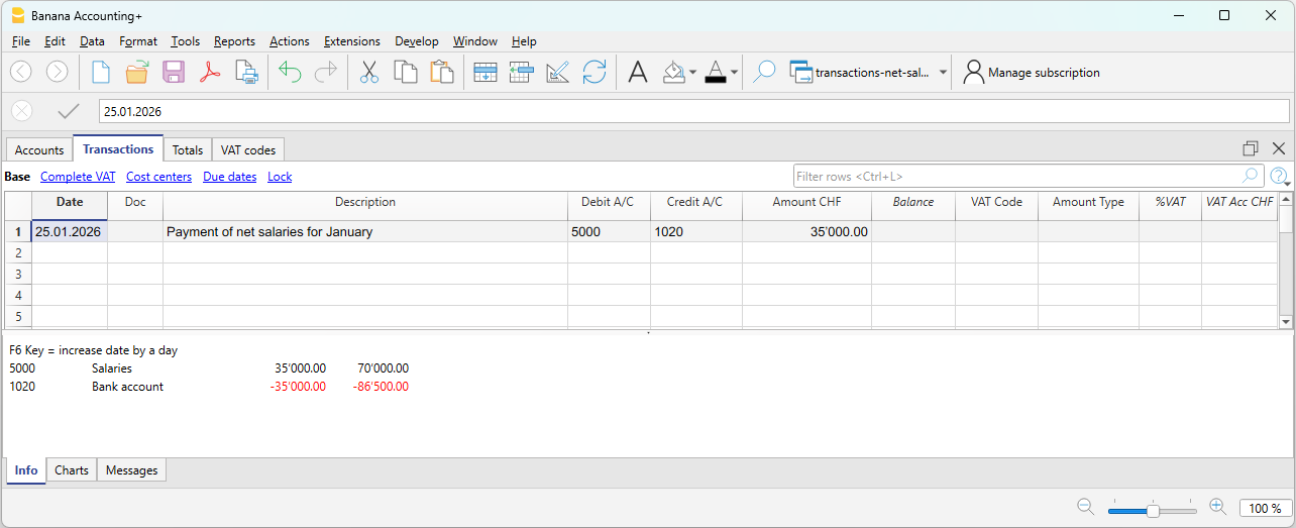
In the Transactions table, record the following each month:
- Date: the salary payment date
- Description: the payment description
- Debit: account 5000 Salaries
- Credit: the Bank account
Periodic payment of social security contributions
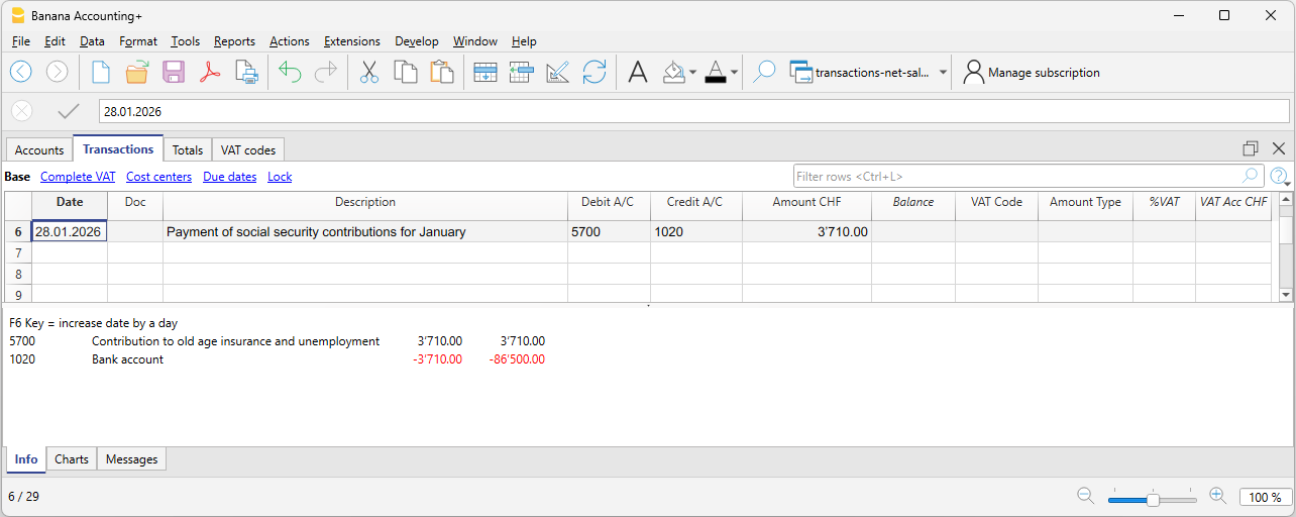
When paying advance social security contributions, record:
- Date: the payment date of the social security contributions
- Description: the payment description
- Debit: account 5700 AHV/IV/EO/ALV Contributions
- Credit: the Bank account
- Amount: enter the amount of the social security contributions (shown on the advance invoice), including both the employer's share and the employee's share.
Annual payment of insurance premiums
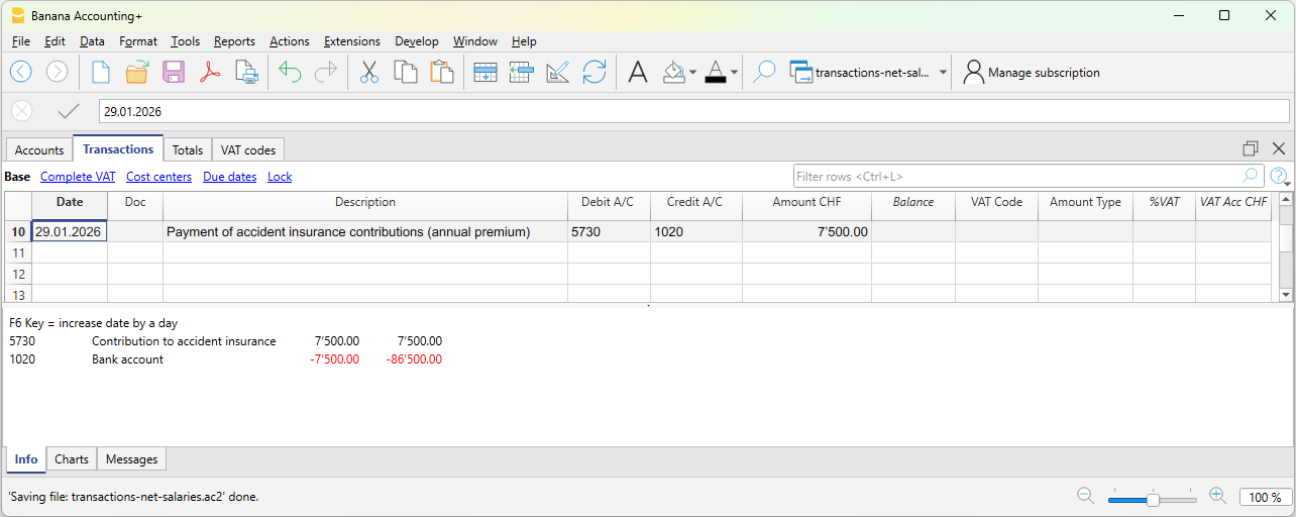
When paying insurance premiums, for example Occupational Accident Insurance or supplementary Occupational Accident Insurance, record the payment to the insurance company.
- Date: the annual insurance premium payment date
- Description: the payment description
- Debit: account 5730 Occupational accident insurance premiums
- Credit: the Bank account
- Amount: enter the amount shown on the invoice. It includes both the employer's share and the employee's share.
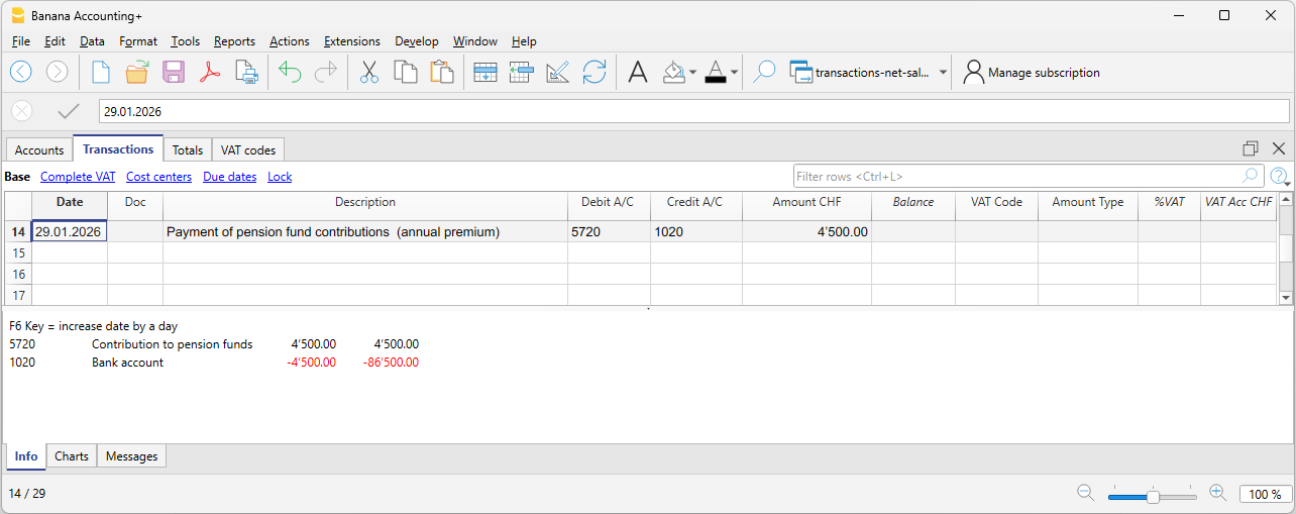
Annual payment of the pension fund premium
When paying the annual occupational pension fund premium:
- Date: the annual pension fund premium payment date
- Description: the payment description
- Debit: account 5720 Mandatory occupational pension contributions
- Credit: the Bank account
- Amount: enter the amount shown on the invoice. It includes both the employer's share and the employee's share.
Payment of the daily sickness allowance insurance premium
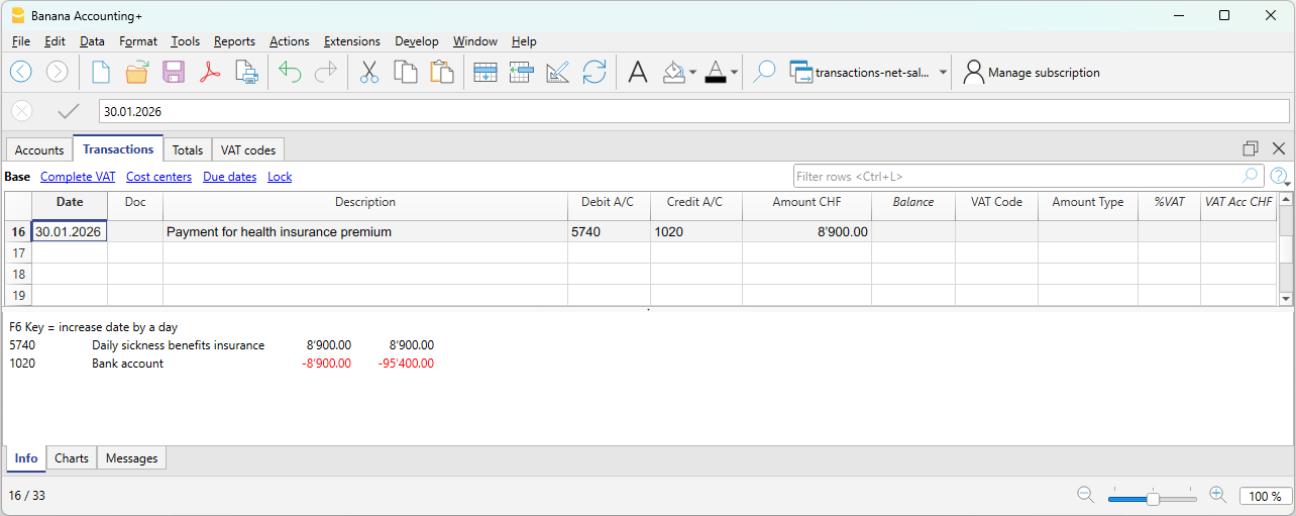
When paying the annual daily sickness allowance insurance premium:
- Date: the payment date of the daily sickness allowance insurance premium
- Description: the payment description
- Debit: account 5740 Daily sickness allowance insurance
- Credit: the Bank account
- Amount: enter the amount shown on the invoice. It includes both the employer's share and the employee's share.
Expense reimbursement included in the net salary paid
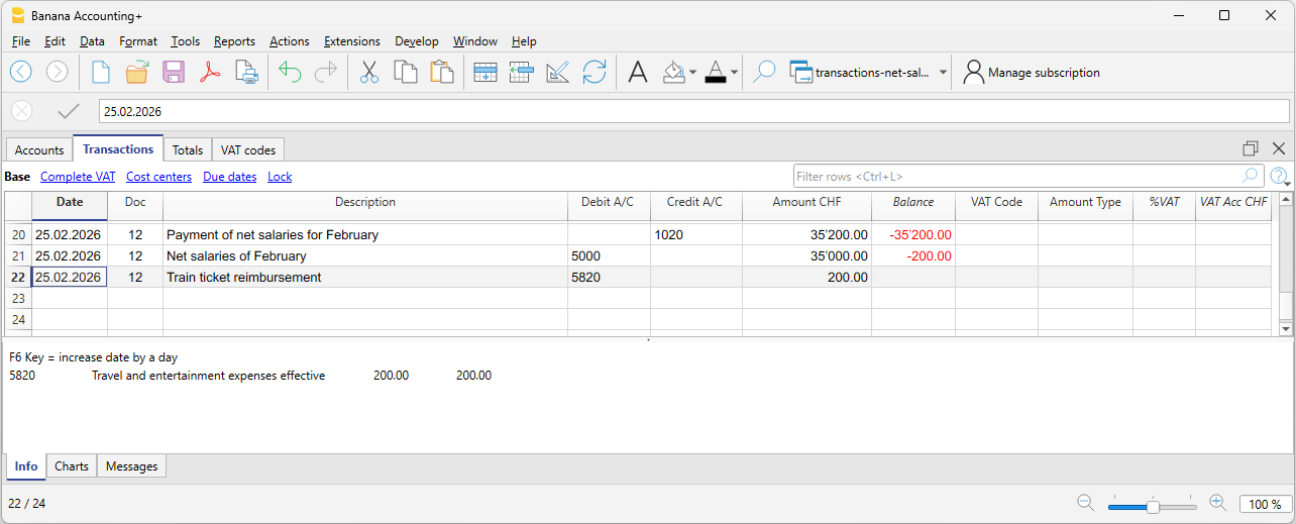
When the net salary paid includes an expense reimbursement, it is advisable to separate the net salary from the expense reimbursement in the accounting records. This ensures that the salary account is not affected by amounts that do not actually represent salary.
Example:
- Net salary: CHF 4'000
- Expense reimbursement: CHF 200
- Total payment through the bank: CHF 4'200
In the accounting entry, the two amounts must be recorded separately. Therefore, the transaction should be entered using three rows:
In the Transactions table:
- First row – total payment through the bank
- Date: the transaction date
- Description: monthly salary payment
- Debit: leave blank
- Credit: the Bank account
- Amount: the total amount paid CHF 4'200
- Second row – monthly net salary
- Date: the transaction date
- Description: monthly salary payment
- Debit: account 5000 Salaries
- Credit: leave blank
- Amount: the net salary paid CHF 4'000
- Third row – expense reimbursement
- Date: the transaction date
- Description: expense reimbursement
- Debit: the Expense reimbursement account (for example, travel expenses)
- Credit: leave blank
- Amount: the expense reimbursement amount CHF 200
Payment of withholding tax
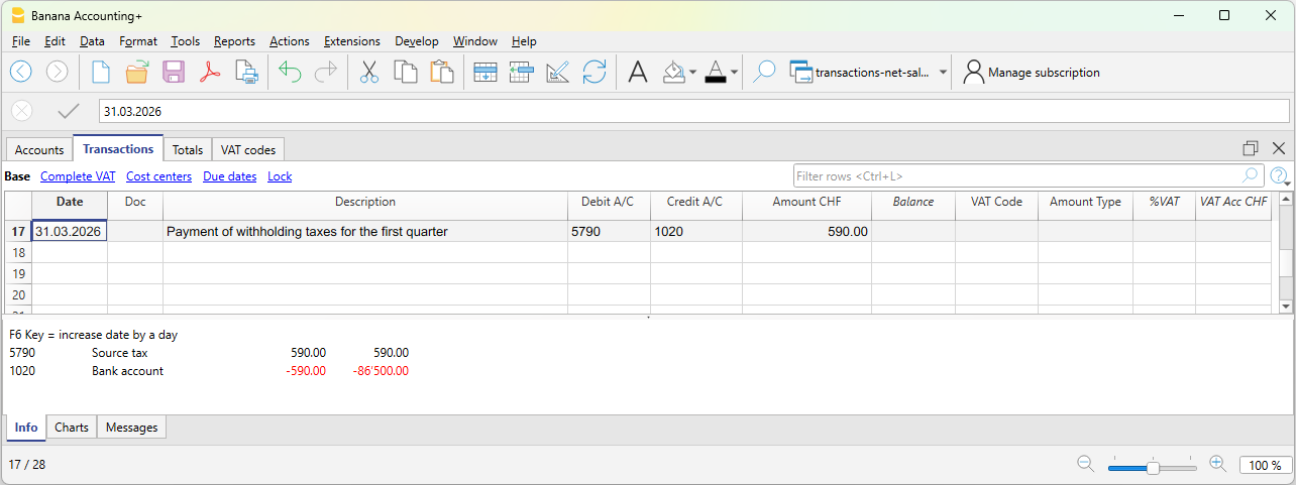
When paying withholding tax at the end of the quarter:
- Date: the withholding tax payment date
- Description: the payment description
- Debit: account 5790 Withholding tax
- Credit: the Bank account
- Amount: enter the amount calculated by the payroll software according to the requirements of the Withholding Tax Office.
Checks and verification
During the year, social security contributions and some insurance premiums are generally paid as advance payments. The actual amount due is determined only when the final statements or the year-end adjustments are issued.
For this reason, when using net salary accounting, it is essential to carry out regular checks and a thorough verification at the end of the financial year.
For more information, see the Net salary reconciliation.
Gross salary transactions
Gross salary management consists of recording in the accounting the entire salary, including all employee salary deductions and social security contributions.
Unlike net management, this method provides a complete view of salary costs and liabilities toward social institutions.
What is recorded
With gross management, the following are recorded monthly:
- the gross salary
- employee deductions (AVS, LPP, withholding tax, etc.)
- employer’s social security contributions
- liabilities toward social security and insurance institutions (if the accounting is kept on an accrual basis)
- the net salary paid
In gross management, the accounting clearly distinguishes between:
- the employee’s share (deducted from the salary),
- the employer’s share.
The accounting principle
Gross management follows the accrual principle:
Salary costs and the related liabilities are recorded in the period in which they arise, regardless of the time of payment.
Difference compared to net management
Unlike net management, which records only actual payments, gross management records all salary components and the related liabilities.
When to use gross management
Gross management is appropriate when:
- A complete and detailed accounting is required
- You want to monitor personnel costs precisely
- Liabilities toward social security and tax authorities must be recorded
- The accounting is used for analysis and reporting
Accounts normally used
Gross management requires a larger number of accounts compared to net management.
Expense accounts
- 5000 Gross salaries
- 5700 Employer social security contributions
- 5710 Family allowance fund contributions
- 5720 Occupational pension contributions (LPP)
- 5730 Accident insurance premiums (LAINF)
- 5740 Daily sickness allowance insurance
Liability accounts
- 2270 Liabilities to social security institutions (AVS/AI/IPG/AD)
- 2272 Pension fund liabilities (LPP)
- 2273 Accident insurance liabilities
- 2274 Collective health insurance liabilities
- 2209 Withholding tax liabilities
- 2371 Liabilities to employees
Payment accounts
- 1020 Bank
- other Cash accounts
Employer’s share of social security and insurance contributions
In gross salary management, the accounts relating to social security contributions and insurance costs make it possible to clearly identify the portion effectively borne by the employer.
In the dedicated account cards (for example AVS, LPP, accident insurance, etc.), the following are recorded:
- in Debit, the total amounts due to the institutions (employer + employee),
- in Credit, the employee’s share deducted from the salary.
The difference between these amounts represents the employer’s share, i.e. the portion borne by the company as its own expense.
This approach makes it possible to:
- clearly distinguish between company costs and amounts withheld from employees,
- have a transparent view of obligations toward social institutions,
- accurately monitor the impact of personnel costs on the company’s results.
Accounting entry of gross salaries
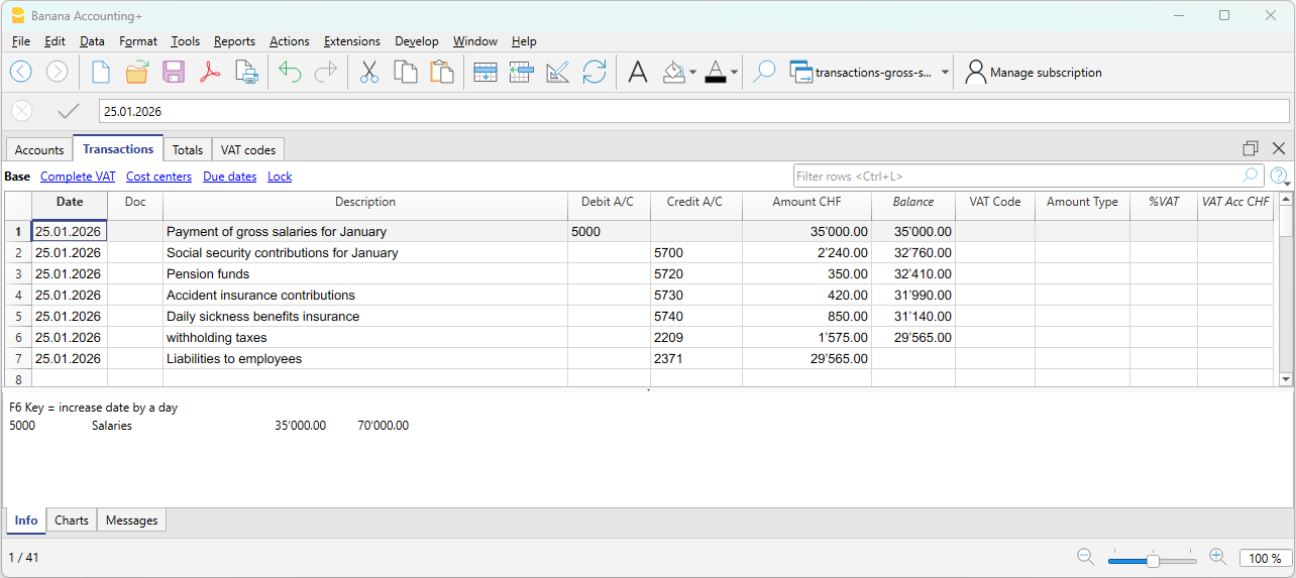
At the end of the payroll period, the gross salary and the related deductions from employees’ pay are recorded. With gross recording, both the salary cost and the deductions and liabilities toward third parties are recognized.
Example:
- 5000 Gross salaries → Debit
- 1181 Family allowances → Debit
- 5700 AVS/AI/IPG/AD Contributions → Credit (employee’s share, deducted from salary)
- 5720 LPP Contributions → Credit (employee’s share, deducted from salary)
- 5730 LAINF Contributions → Credit (employee’s share, deducted from salary)
- 5740 Sickness contributions → Credit (employee’s share, deducted from salary)
- 2209 Withholding tax liabilities → Credit (fully borne by the employee). The withholding tax deducted from the employee’s salary must be fully paid to the Withholding Tax Office and represents a liability for the company.
- 2371 Liabilities to employees → Credit
Payment of the net salary
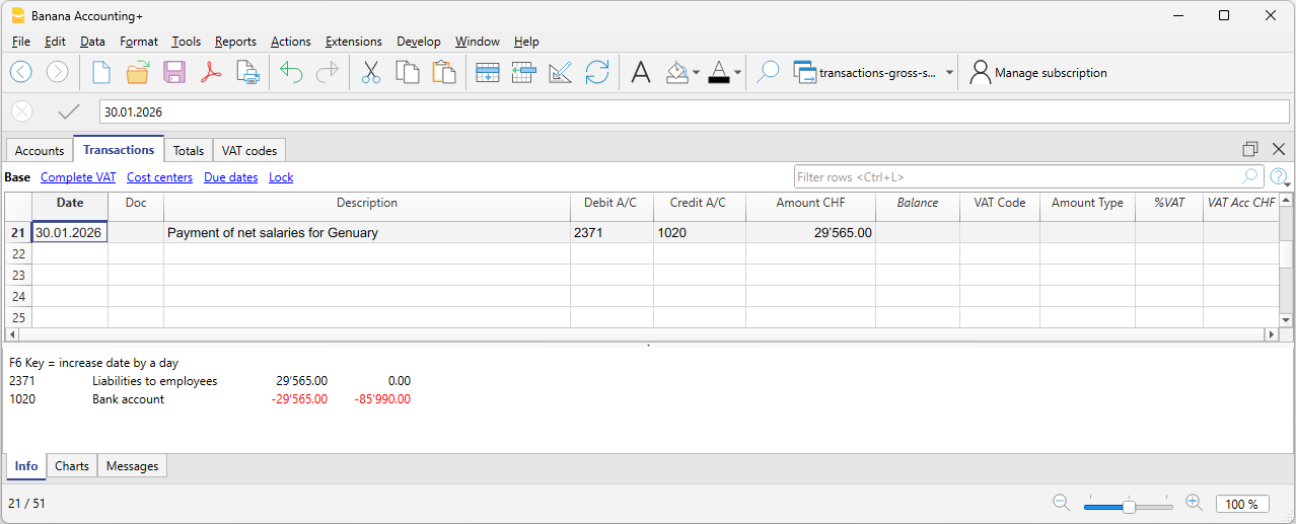
If salaries have been recorded when accrued and the payment takes place later, the payment entry is recorded as follows:
- 2371 Liabilities to employees → Debit
- 1020 Bank → Credit
Recording AVS advances and payment
Monthly or at another regular interval, the employer receives from the cantonal AVS office the advance invoices for AVS contributions to be paid. These amounts also include any allowances advanced in the salary of the employee entitled to them.
The advance invoice includes both the employer’s share and the employee’s share.
Recording the invoice:
On 03.01.2026 we record the invoice for AVS advances:
- 5700 Employer social security contributions → Debit
- 2270 Liabilities to social security institutions (AVS/AI/IPG/AD) → Credit
Payment:
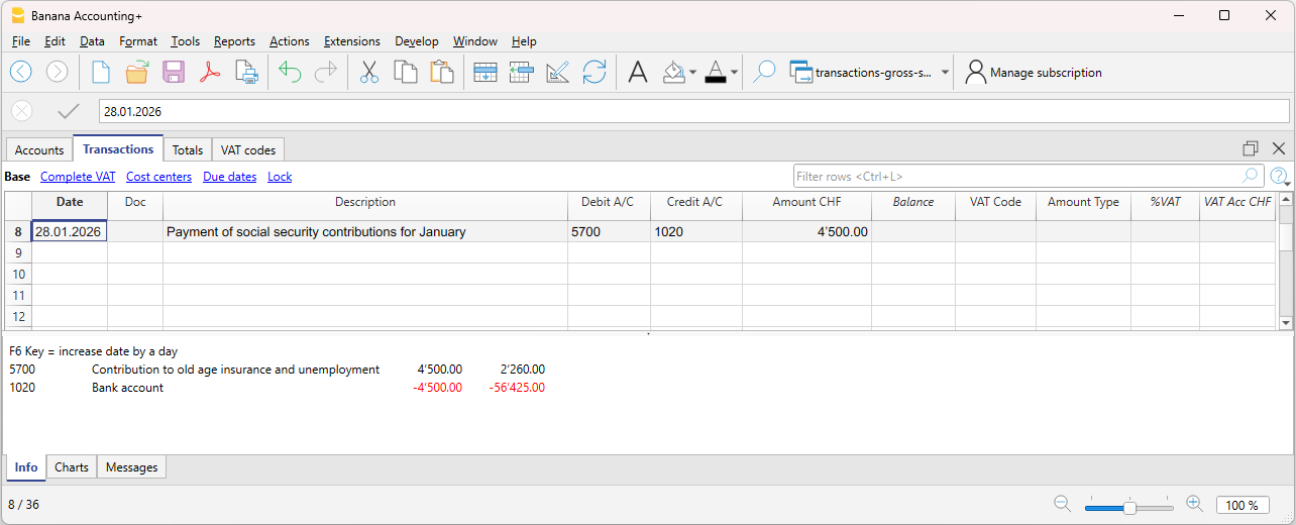
On 30.01.2026 we record the payment of the AVS advances:
The contributions are paid according to the invoice, the amount of which is net of any family allowances or other benefits.
- 2270 Liabilities to social security institutions (AVS/AI/IPG/AD) → Debit
- 1020 Bank → Credit
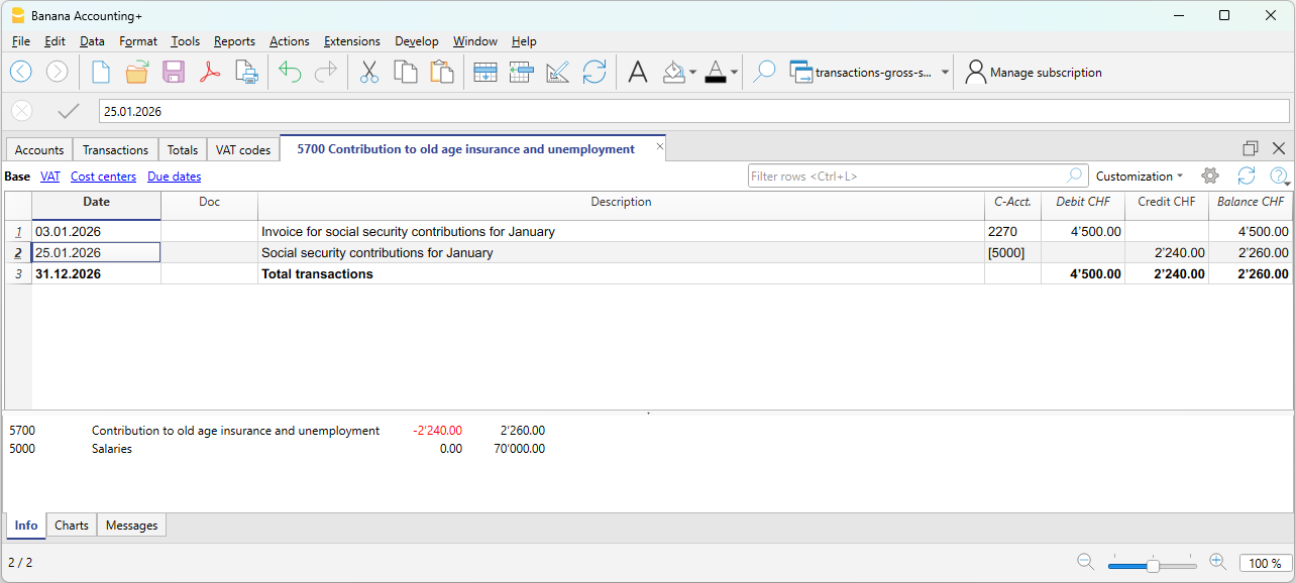
The AVS account plays a central control role:
- in Credit, employees’ salary deductions are recorded
- in Debit, payments to the institution.
The account balance therefore represents the employer’s share.
In the AVS contributions account card (see image), advances paid appear in Debit, while contributions deducted from employees’ salaries appear in Credit. The account balance therefore represents the employer’s share. This presentation makes it easy to verify the correctness of contributions and payments made.
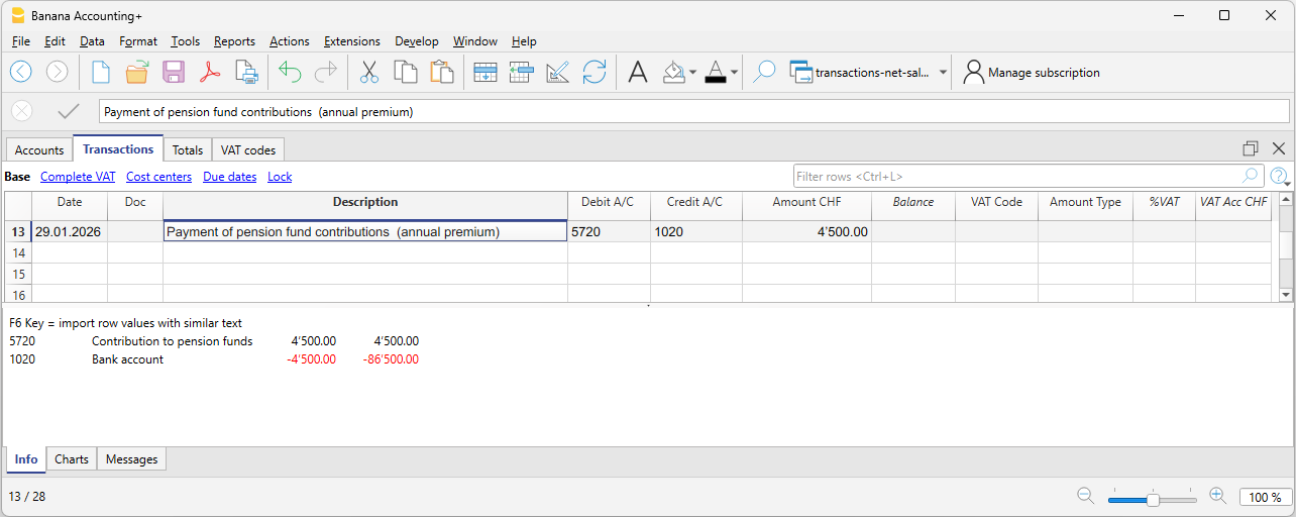
LPP contribution premium and payment
When the annual LPP premium is received, the total cost borne by the employer and the liability toward the LPP insurer are recorded.
When we receive the LPP premium invoice:
- 5720 LPP Contributions → Debit
- 2272 LPP Liabilities → Credit
When we pay the LPP premium invoice:
- 2272 LPP Liabilities → Debit
- 1020 Bank → Credit
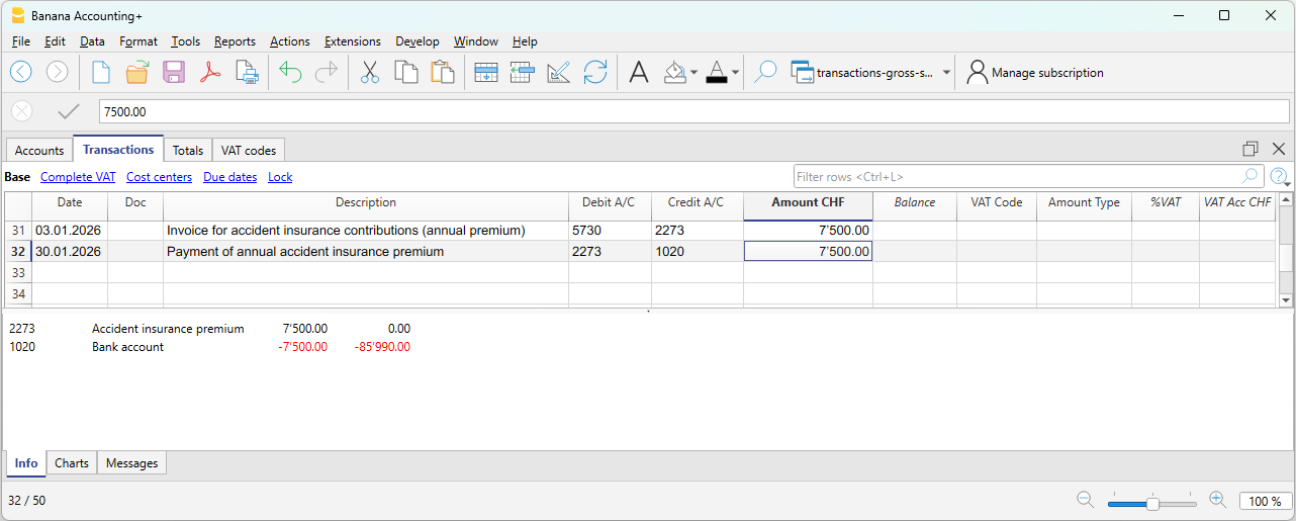
Annual accident insurance premium (LAINF) and payment
When the annual LAINF premium is received, the total cost borne by the employer and the liability toward the LAINF insurance are recorded.
When we receive the LAINF premium invoice:
- 5730 Accident insurance premiums (LAINF) → Debit
- 2273 Accident insurance liabilities → Credit
When we pay the LAINF premium invoice:
- 2273 Accident insurance liabilities → Debit
- 1020 Bank → Credit
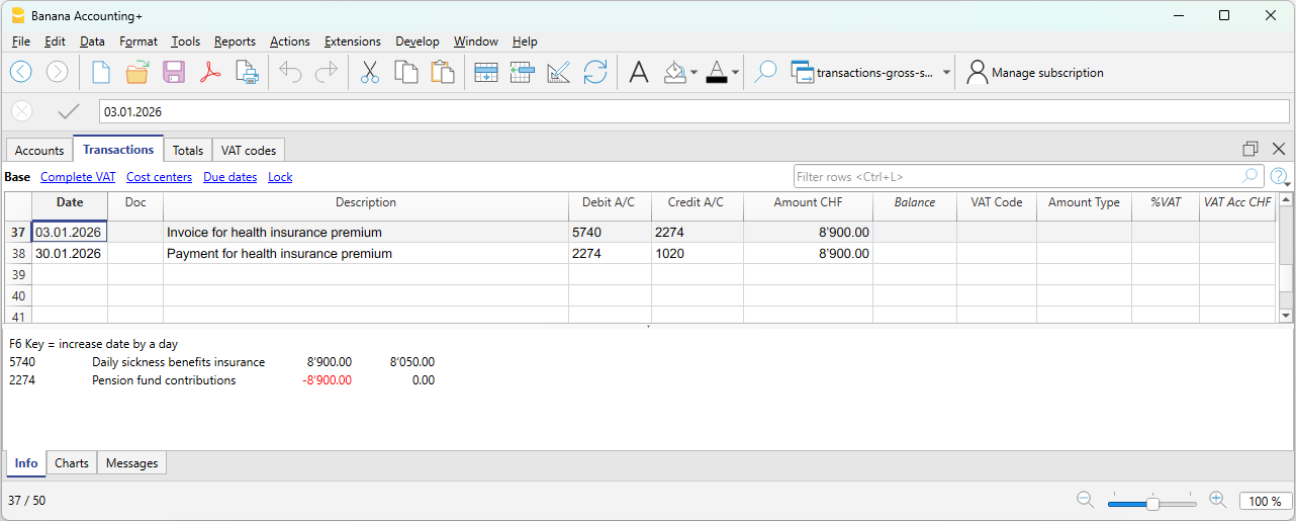
Annual collective health insurance premium (IGM) and payment
When the annual collective health insurance premium is received, the total cost (including both the employer’s and the employee’s share) and the liability toward the health insurance are recorded.
When we receive the health insurance premium invoice:
- 5740 Daily sickness allowance insurance → Debit
- 2274 Health insurance liabilities → Credit
When we pay the health insurance premium invoice:
- 2274 Health insurance liabilities → Debit
- 1020 Bank → Credit
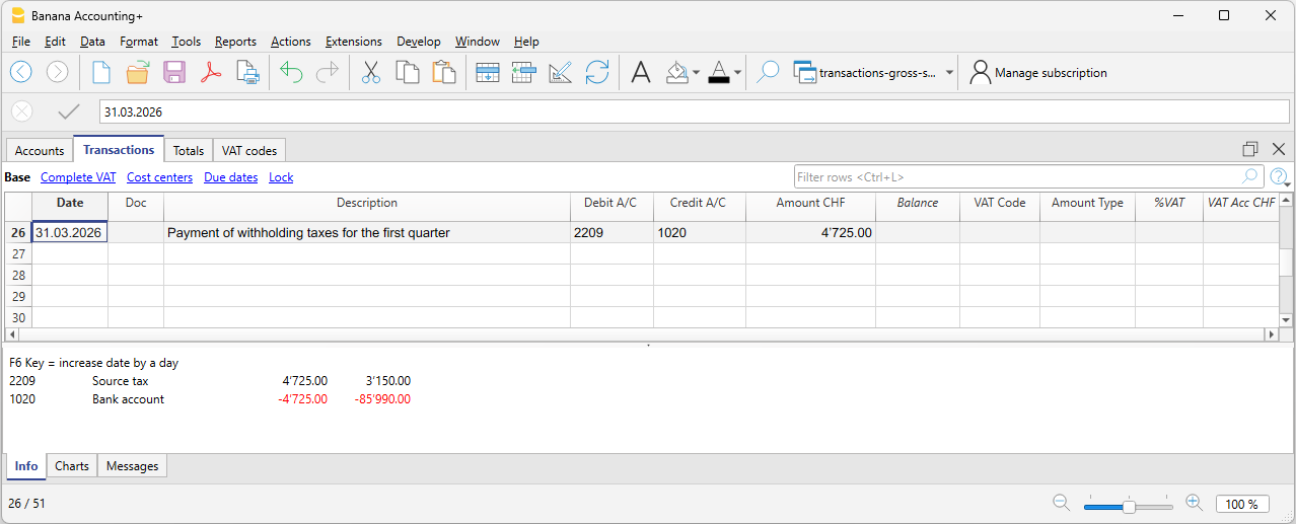
Payment of withholding tax
The withholding tax, deducted from the monthly salaries of employees subject to withholding tax, must be declared and paid by the employer within the prescribed deadlines. It is borne solely by the employee.
- 2209 Withholding tax liabilities → Debit
- 1020 Bank → Credit
Control and verification
It is important to regularly verify:
- the consistency between accounting and payroll calculations
- the balances of liability accounts toward social institutions
- the payments made
During the year, social contributions are often paid as advances.
Following the final statements from the social institutions, any adjustments are recorded to align costs and liabilities with the amounts actually due.
Advantages of gross management
- Complete view of salary costs
- Greater accounting transparency
- Detailed control of deductions and contributions
- Proper representation of liabilities
Limitations of gross management
- Greater complexity
- More accounting transactions
- Requires more accounts and careful management
Salary Reconciliation and Verification of the OASI Declaration
When salary accounting is managed on a net basis, the annual OASI declaration cannot be verified by directly comparing the Salaries account with the final statement issued by the OASI Compensation Office. This is because the Salaries account contains the recorded net amounts, whereas the OASI statement is based on the gross payroll calculated by the payroll management software.
To verify the accuracy of the annual OASI declaration and the other year-end statements, it is therefore necessary to reconstruct the gross payroll and carry out a series of reconciliation checks.
The reconciliation process makes it possible to verify the consistency between:
- the accounting records
- the payroll statements generated by the payroll management software
- the annual OASI declaration
- the final statements issued by the social security institutions.
Reconciliation objectives
The year-end reconciliation has two main objectives:
- to reconstruct the gross payroll and compare it with the gross payroll declared to the OASI Compensation Office;
- to reconcile the OASI contributions by comparing account 5700 OASI Contributions with the final statement issued by the OASI Compensation Office.
Required documents
The following documents are normally required to perform the reconciliation:
- the accounting file
- the payroll statements
- the annual OASI declaration
- the final statement issued by the OASI Compensation Office
- the occupational pension (LPP/BVG) statements
- the insurance statements (OAI, daily sickness allowance insurance, etc.).
Verification of net salaries
The first check is to verify that the amounts paid to employees match those shown in the payroll statements generated by the payroll management software.
The total net salaries recorded in the accounting records must match the net salaries shown in the payroll statements.
It is also necessary to verify that there are no missing or duplicate transactions and that all entries have been recorded in the correct accounting period.
Any differences must be analyzed and corrected before proceeding with the reconciliation of the gross payroll.
Reconstruction of the gross payroll
To compare the accounting records with the OASI statement, the gross payroll must first be reconstructed.
The reconstruction must be carried out using the data from the payroll management software, which provides the details of the deductions applied to each employee.
Start from the net salaries recorded in the accounting records and add only the deductions withheld from employees, such as:
- OASI, DI, IC, and ALV
- occupational pension (LPP/BVG) contributions
- withholding tax
- other salary deductions.
The following must instead be excluded:
- family allowances;
- expense reimbursements;
- other allowances that are not subject to OASI contributions.
Verification of OASI contributions
During the year, OASI contributions are normally paid as advance payments. The actual amount due is determined only by the final statement.
For this reason, the balance of account 5700 OASI Contributions must be compared with the final statement issued by the OASI Compensation Office.
The account balance must include the advance payments made during the year as well as any year-end adjustments. The total must match the contributions shown on the final statement issued by the OASI Compensation Office.
Verification of other social security contributions
The same principle can also be applied to other social security and insurance contributions by comparing the balances of the related accounts with the annual statements issued by the relevant institutions.
In particular, it is advisable to verify:
- occupational pension (LPP/BVG) contributions;
- occupational accident insurance (OAI) premiums;
- daily sickness allowance insurance premiums;
- other recorded social security contributions or insurance premiums.
Any differences relating to these institutions should also be analyzed and reconciled before the financial year is closed.
Year-end checks
At the end of the financial year, the reconciliation should confirm that:
- the gross payroll matches the gross payroll declared to the OASI Compensation Office;
- the recorded contributions match the final statements issued by the institutions;
- all advance payments and any year-end adjustments have been recorded;
- there are no differences between the accounting records, the payroll statements, and the declarations submitted to the social security institutions.
A complete reconciliation makes it possible to identify any differences before submitting the declarations to the social security institutions and ensures consistency between the accounting records, the payroll management software, and the annual statements.
FAQ
Why doesn't the gross payroll in the OASI declaration match the Salaries account?
- Because under net salary accounting, the Salaries account records only the net amounts paid to employees, whereas the OASI declaration is based on the gross payroll.
Why is the balance of the OASI account different from the advance payments made?
- Because advance payments are normally made during the year. The actual amount due is determined only by the final statement.
How is the gross salary determined?
- The gross salary is reconstructed using the payroll statements generated by the payroll management software.
How do you reconstruct the gross salary starting from the net salary?
- Start with the net salary recorded in the accounting records and add the deductions withheld from the employee (OASI/DI/IC/ALV, occupational pension (LPP/BVG) contributions, withholding tax, and other deductions). Family allowances, expense reimbursements, and other allowances that are not subject to OASI contributions must instead be excluded.