Item management integrated into accounting
In the accounting file, a table can be added to manage items and link them to individual transactions via the Item Id (item identifier) that is entered in the Item column.

This feature is very powerful and useful because it allows the following automations:
- To integrate a list of products or an inventory with descriptions, quantities, prices and groupings into the accounting.
- In the Transations table, by entering invoices and simply indicating the Item Id (Item identifier) in the Item column, the description, price and account are taken over.
- In the transaction row, by entering the quantity (positive or negative), the programme automatically updates the existing quantity balance. It thus functions as a small warehouse.
Some extensions, such as those for securities management, make use of this functionality, to manage the list of securities, have an inventory and calculate the accounting profit or loss at the time of sale.
Activate the functionality
The functionality is enabled from the menu Tools menu > Add/remove functionalites.
The options are as follows:
- Add Items table
Adds the Items table in the accounting file. - Add Items table and Items Columns in the Transactions table.
Adds the Items table and Items columns to the Transactions table at the same time.
Items table in the accounting file
The Items table is a kind of mini-warehouse integrated in accounting.
It is used to:
- Manage the list of products, with their prices.
- You can group products into groups.
- In the Transactions table, you enter the item and the programme takes up the description and price.
- If you enter the quantity in the Transactions table, the programme updates the current quantity in the Items table.
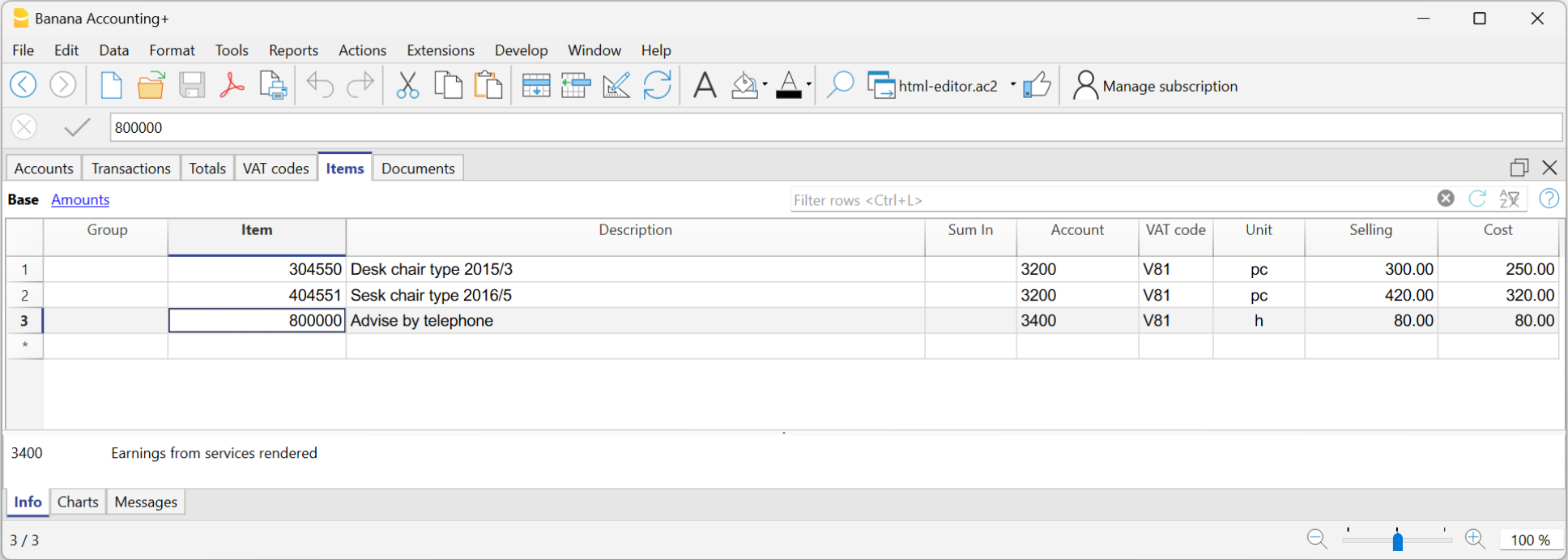
In order to use the Items table, you need to:
- Add the Items table.
- Add the Items columns in the Transactions table.
- Display the Item column in the Transactions table via the Data menu > Columns setup.
The content of the ItemId column must be an item defined in the Items table.
Adding the Items table
The Items table can be added from the Tools menu > Add new functionalities > Add Items table
In the Items table, you can enter items, products, or other items, and it can also be used as a small inventory control tool.
Items table columns
The predefined columns are the following:
- Group: Generates the totals rows.
- Item: Item code.
- Description: Item description.
- Sum in: the group in which to total a set of items.
- Account: account used in the transactions.
- AssetAccount: is the Balance Sheet account indicating where this item is recorded.
It is used to link the double-entry accounting with the inventory accounting of the items.
If the AssetAccount is specified:- The currency of the AssetAccount must be the same as that of the Item.
- The opening balance of the AssetAccount should correspond to the total of the initial values of all items having the same AssetAccount.
- The balance of the AssetAccount should be equal to the total book value of all items having the same AssetAccount.
- AssetType: Defines the type of the Asset. This is an internal program classification used by the investment accounting extension to calculate values; it is not a standard classification and has no reporting purpose. The currently supported values are:
- 1: Stocks, ETFs, funds,...
Investments Measured by Quantity. - 2: Bonds, debt securities,...
Investments Measured by Nominal Value.
- 1: Stocks, ETFs, funds,...
- Currency: Currency to be used (for multi-currency accounting only).
- VATCode: VAT code to be used (for VAT accounting only).
- Unit: an abbreviation to define the type to which the quantity refers.
- Selling: Unit sale price. It is retrieved in the Transactions table when the Item Identifier is entered.
- Cost: Unit cost price, It is a value used for reference only and not used by the program.
- Begin Qt.: initial quantity amount of the item
- Price Begin: the initial unit price of the item. In multi-currency accounting, it is expressed in the item's currency.
- Value Begin Currency: In multi-currency accounting, the initial quantity multiplied by the initial unit price in the item's currency.
- Value Begin: In the base currency.
In multi-currency accounting, it represents the initial value in currency converted at the opening exchange rate specified in the Exchange Rates table. - Current Qt.: current quantity, calculated by program, taking into account Begin Qt. and transactions of Item in Transactions table. The Quantity column of the Transactions table is being used.
- Movement Qt.: the total of the quantity movements. This value is automatically calculated by the program based on the movements entered in the Quantity column of the Transactions table.
- Price current: The current price of the item.
- In multi-currency accounting, it is expressed in the item's currency.
- It must be entered manually by the user or imported from other programs.
- It is also used as the closing value of the accounting, and in securities accounting, it is the value used to calculate any unrealized gain or loss compared to the book value.
- Currency value: Calculated by the program. The current quantity multiplied by the current price in currency.
- Current value: The current value at the current exchange rate indicated in the Exchange Rates table.
The table does not contain columns indicating the average book value or the value calculated based on the LIFO or FIFO methods.
These values are, if needed, calculated by specific extensions, such as the Securities Accounting extension, which calculates the book value based on the transactions.
Items columns in the Transactions table
The Items columns of the Transactions table are used to enter the quantity and price.
- They can be added to the Transactions table from the menu Tools → Add/Remove functionalities → Add Items columns.
- The transaction amount is calculated based on the values entered in the quantity and unit price columns.
- If the Items table is present, the quantity is used as in inventory management, increasing or decreasing the current quantity.
For more information, see:
Columns added in the Transactions table
- ItemId
- It is the item contained in the Items table.
- By default, in the Transactions table the ItemId column is not visible.
Using the command Data → Columns setup, it is possible to make the column visible so that it can be used. - If the Items table is not present, it serves only as a reference.
- Quantity
- A positive value (+) is added to the item's quantity.
- A negative value (–) is subtracted from the item's quantity.
- A neutral value (±) is considered for calculating the transaction amount, but does not affect the quantity in the Items table.
- Together with the Unit price, it is used to calculate the transaction amount.
- If an ItemId is present, the quantity increases (positive values) or decreases (negative values) the quantity in the Items table.
- Neutral values (±123) are used to calculate the transaction amount, but do not modify the quantity in the Items table.
- Unit
An abbreviation indicating what the piece refers to (for example pcs, m, h). - Unit Price
Can be a positive, negative or neutral value.
