In this article
Integrated financial planning for accounting firms
Template designed to create a financial plan for an accounting, fiduciary or tax advisory firm.
In Banana WebApp openen
Open Banana Accounting Plus op uw browser zonder enige installatie. Pas het sjabloon aan, voer de transacties in en sla het bestand op uw computer op.
Open template in WebApp Open tutorial in WebAppModel documentatie
The Detailed Budget allows you to plan the future activities of an accounting firm by entering individual budget transactions in the Budget table.
In this tutorial, you will learn how to plan client revenues, collections and the firm's costs, and how to analyze their impact on the Income statement, Balance Sheet and liquidity.
You will also learn how to compare budget data with actual data to identify variances from what was planned.
Introductory video
To see the system in action, watch our video:
Who this tutorial is for
This tutorial is designed for the financial planning and accounting of:
- accounting firms;
- fiduciaries;
- consultants and accountants.
You can use this method both to plan your firm's activities and to prepare financial plans for your clients, integrating financial advisory services with accounting management.
Planning structure
The financial planning of the accounting firm uses the same chart of accounts as the accounting.
Budget transactions are entered in the Budget table and automatically generate the budget values for the accounts and the related reports.
In particular, the model includes planning for:
- expected revenues from individual clients;
- expected collections;
- the firm's costs;
- the related impact on the Income statement, Balance Sheet and liquidity.
In the Accounts table, the Budget column allows you to directly view the values resulting from the financial plan.
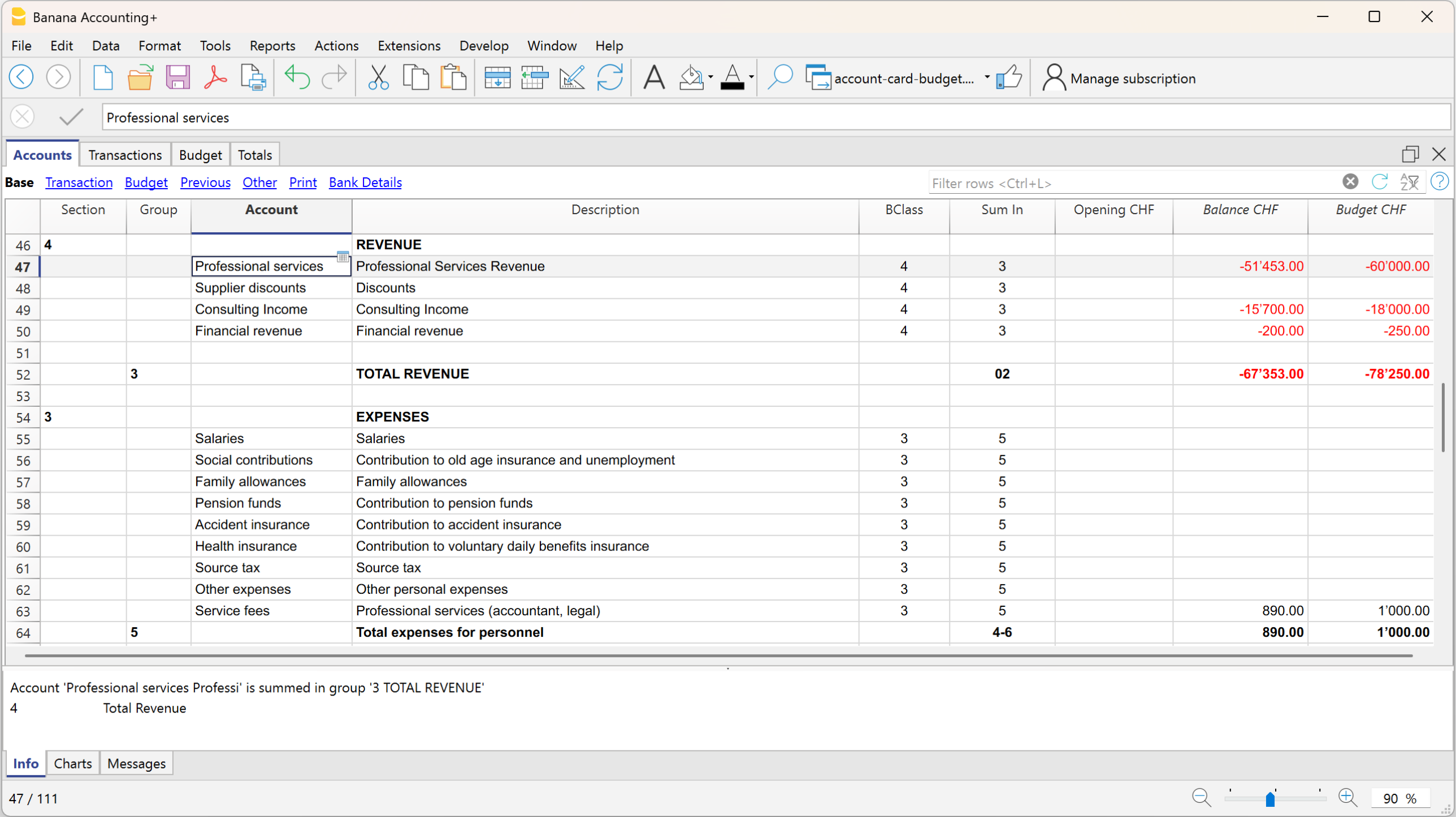
Expenses and Revenue – Proft and loss statement
In the Expenses and Revenue section, the Budget column shows the expected expenses and revenues and the financial result generated by the planned transactions.
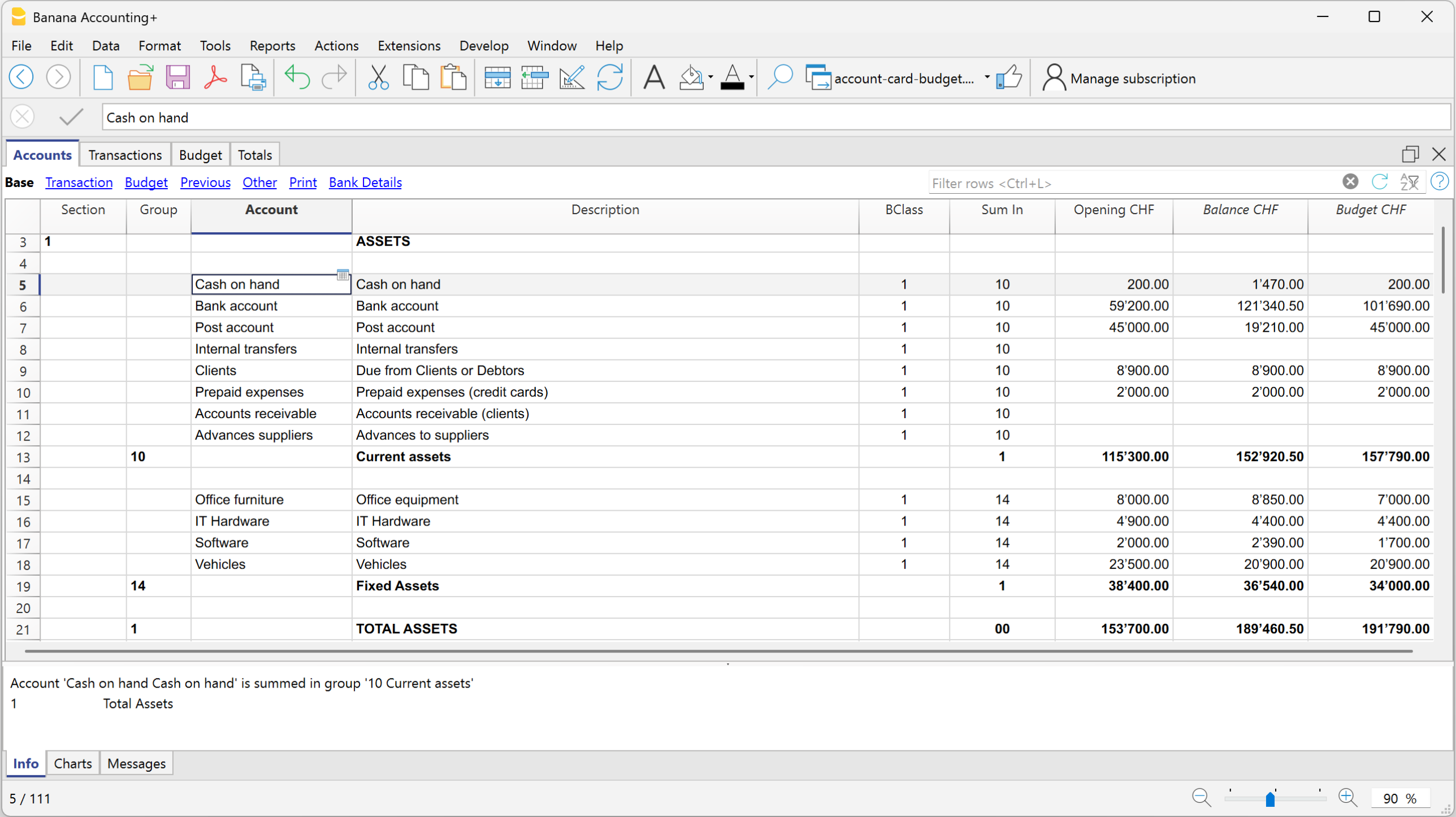
Assets and Liabilities – Balance Sheet
In the Balance Sheet section, the Budget column shows the budget balances of the accounts, including those relating to liquidity and accounts receivable.
Budget table
The Budget table contains the transactions used to build the firm's financial plan.
In this example, the firm's revenues are planned according to the clients and the expected invoicing frequency.
For a financial plan divided according to additional criteria, the tutorial also uses:
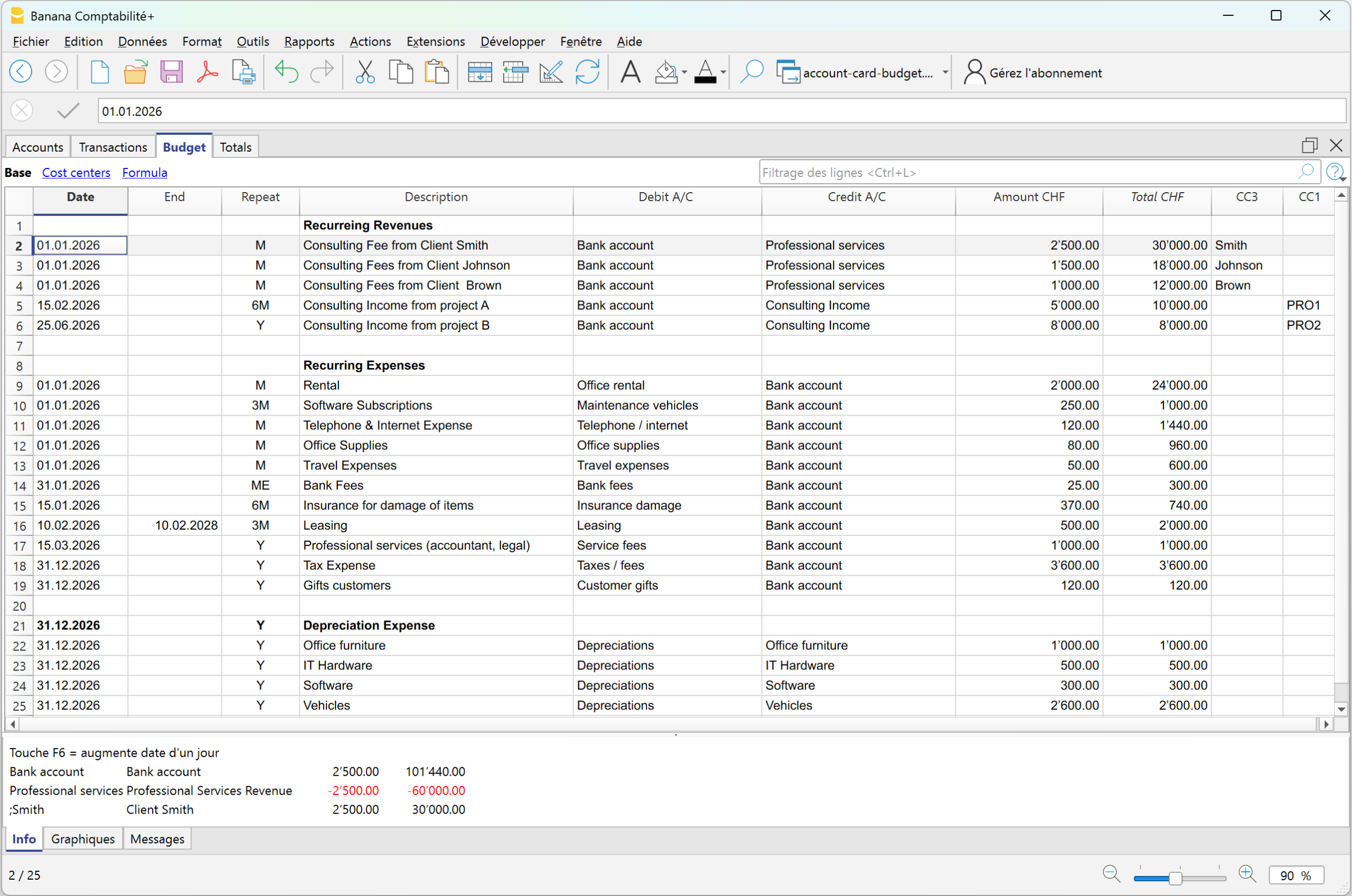
For example, the plan includes:
- monthly revenues from clients such as Smith, Johnson and Brown;
- quarterly revenues from other clients such as Wilson, Carter and Thompson;
- an annual accounting service of CHF 6'800;
- occasional revenues of CHF 5'000 every six months;
- annual interest income of CHF 250.
The Repeat column allows you to define the expected frequency. A single transaction can therefore generate the total annual amount. For example, the monthly fee of CHF 2'500 for client Smith generates expected annual revenues of CHF 30'000.
Cost and profit centers have also been included in the plan to distinguish individual clients and group revenues according to their type, such as monthly, quarterly, annual or occasional revenues.
If necessary, you can also use the VAT Code in budget transactions to forecast the VAT payable to the tax authorities and the liquidity required for the related payment.
For more information about entering transactions, repetitions and other functions, see the Budget table page.
Once the budget transactions have been entered, Banana Accounting automatically performs all calculations: it determines the account balances and the impact on the Income statement, Balance Sheet and liquidity. There is therefore no need to perform calculations or manually transfer values to the reports.
Forecast reports and comparison with actual data
The transactions planned in the Budget table are automatically included in the reports.
By displaying Actual, Budget and Difference in the same report, you can check not only the expected result, but also how the actual business activity is developing compared with the financial plan.
Balance Sheet
The report allows you to compare the actual financial position with the budget and view the related differences.
In this example, total budgeted assets are CHF 196'590, while the actual amount is CHF 189'460.50, resulting in an overall difference of CHF -7'129.50.
The difference is also visible in the individual accounts. For example, the bank account has an actual balance of CHF 121'340.50 compared with the budgeted CHF 106'490, while the postal account has CHF 19'210 compared with the planned CHF 45'000.
The report therefore makes it possible to understand not only whether the overall financial position is in line with the Budget, but also which accounts have contributed to the variances.
The actual profit shown in the Balance Sheet is CHF 34'760.50, compared with a budgeted profit of CHF 42'890, resulting in a variance of CHF -8'129.50.
Profit and loss statement
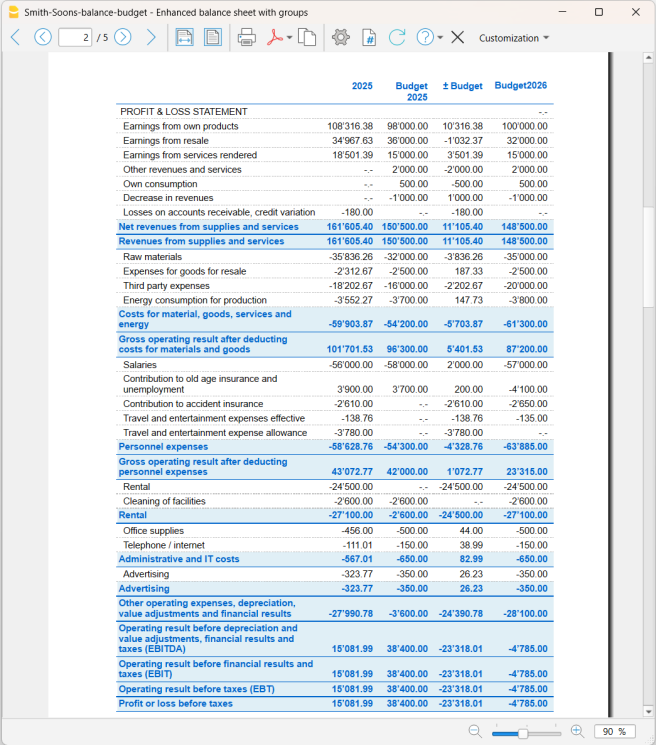
The Profit and loss statement allows you to identify the source of the variance in the result.
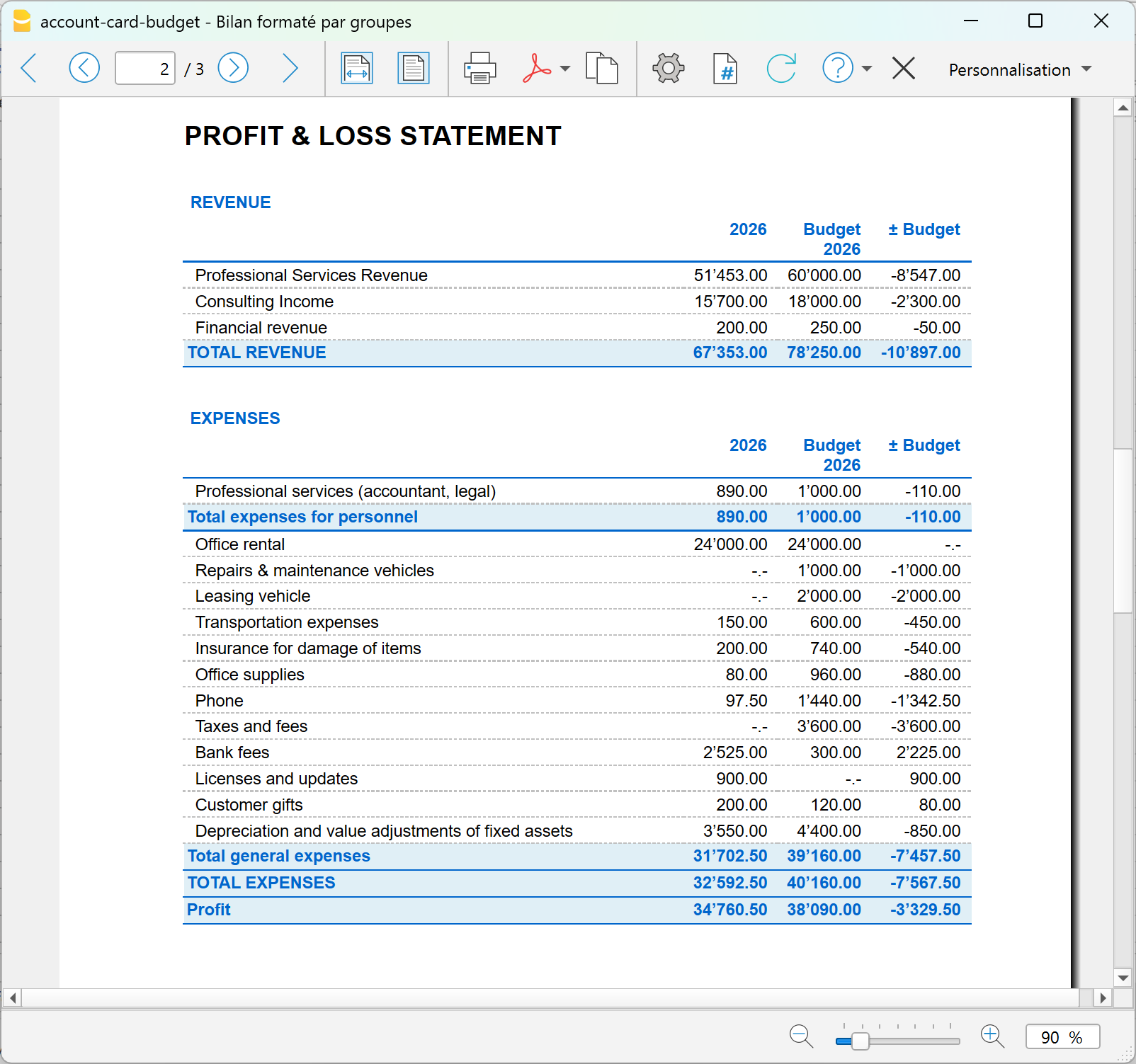
In this example, total revenues of CHF 83'050 were budgeted, while the actual amount is CHF 67'353, resulting in a variance of CHF -15'697.
The difference is almost entirely due to revenues from professional services: CHF 82'000 was budgeted, while CHF 67'153 was actually recorded.
Costs also show differences compared with the plan. General costs amount to CHF 31'702.50, compared with the budgeted CHF 39'160. Costs are therefore CHF 7'457.50 below budget, partially offsetting the lower revenues.
The final result is a profit of CHF 34'760.50, which is CHF 8'129.50 lower than the budgeted CHF 42'890.
Account card: comparison between actual and budget
When a difference appears in a report, you can analyze it down to the individual transactions using the account card.
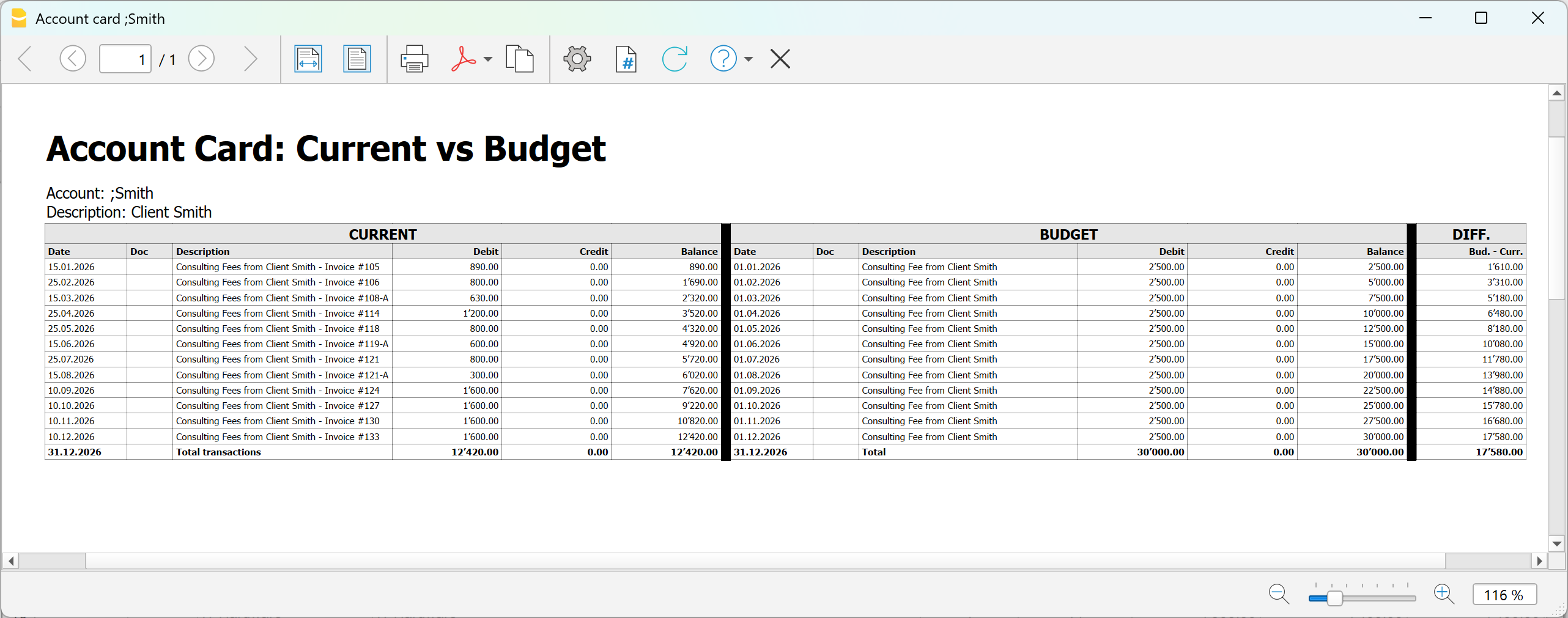
In the example relating to a client, you can directly compare:
- the transactions actually recorded;
- the budget transactions;
- the related differences.
This allows you to check whether the invoices or collections planned for the client actually occurred and identify the transactions that caused the variance.
The same type of analysis can be carried out for accounts, projects, Cost and profit centers and Segments.
For information about installing and using the extension, see Account card: Current vs Budget.
In summary
The Detailed Budget allows you to start from the individual revenues and costs planned for the firm, automatically obtain the expected financial and economic position, and progressively compare it with actual data.
This allows you to identify variances in the reports and, when necessary, analyze them down to the individual transactions.