Modelli contabilità universale senza IVA
商店会计
商店会计 feiSimple Accounting for a Shop
Simple Accounting for a Shop michaelIncome & Expense Accounting for Property Management
Income & Expense Accounting for Property Management michaelIncome & Expense Accounting for a Corporation
Income & Expense Accounting for a Corporation michaelComptabilité multidevise pour PME
Comptabilité multidevise pour PMEModèle idéal pour la gestion de la comptabilité des sociétés anonymes. Le plan comptable est structuré selon le schéma PME et présente les registres clients/fournisseurs. Il y a des comptes en devises étrangères et des centres de coûts.
Comptabilité pour sociétés anonymes
Comptabilité pour sociétés anonymes caterinaComptabilité pour sociétés de personnes morales avec les registres clients/fournisseurs
Comptabilité pour sociétés de personnes morales avec les registres clients/fournisseursModèle idéal pour la gestion de la comptabilité des sociétés anonymes. Le plan comptable est structuré conformément au régime des PME. Il y a des centres de coûts.
Comptabilité pour sociétés de personnes morales avec les registres clients/fournisseurs
Comptabilité pour sociétés de personnes morales avec les registres clients/fournisseursModèle idéal pour la gestion de la comptabilité de personnes morales. Le plan comptable est structuré conformément au régime des PME. Il y a des centres de coûts et la gestion des clients et fournisseurs.
Comptabilité pour Entreprise jusqu'à 500'000 CHF chiffre d'affaires
Comptabilité pour Entreprise jusqu'à 500'000 CHF chiffre d'affairesPlan comptable structuré pour gérer une entreprise dont le chiffre d'affaires annuel n'excède pas 500'000 CHF. Avec TVA et des centres de coûts.
公司会计 (含中英文报表)
公司会计 (含中英文报表) feiComptabilité pour Entreprises Individuelles
Comptabilité pour Entreprises IndividuellesPour gérer les comptes d'une petite entreprise individuelle. Le plan comptable est structuré avec des groupes et sousgroupes et centres de coût.
Comptabilité pour Entreprises individuelles
Comptabilité pour Entreprises individuellesPour gérer les comptes d'une petite entreprise individuelle avec TVA et centres de coût.
Double-Entry Accounting for a Corporation
Double-Entry Accounting for a Corporation michaelContabilità e registro entrate e uscite di yacht, barche, crociere con budget e piano della liquidità
Contabilità e registro entrate e uscite di yacht, barche, crociere con budget e piano della liquidità michaelContabilità/Preventivo Ristorante | Entrate / Uscite
Contabilità/Preventivo Ristorante | Entrate / Uscite
Come fare il preventivo per un ristorante
In tutte le attività è fondamentale prendere con tranquillità le decisioni sulla situazione economica e finanziaria durante l'anno, soprattutto con la possibilità di intervenire in anticipo prima che sia troppo tardi. Per questo motivo Banana Contabilità ha previsto nei propri modelli la funzionalità "Preventivo", nel quale poter creare il budget del proprio ristorante.
Vogliamo aiutarti passo dopo passo con la stesura del preventivo e, per fare ciò, devi solamente seguire le indicazioni riportate qui di seguito. È facile e veloce, così potrai subito concentrarti a gestire la tua attività e occuparti dei clienti!
1. Inserisci le Entrate
Devi fare riferimento alle entrate certe, ma per avere un'idea puoi basarti sulle entrate dell'anno precedente.
Principalmente le entrate comprendono:
- Vendite cibo
- Vendite bevande
Nel caso di un ristorante è molto utile dividere le vendite di cibo e bevande per mese, in quanto possono variare molto in base alle festività e al periodo durante l'anno. Ovviamente potrai liberamente personalizzare le voci delle vendite, ad esempio renderle più dettagliate per le tipologie di cibo e bevande.
Inoltre ci possono essere anche entrate non legate all'attività principale:
- Rendite immobiliari
- Interessi attivi bancari e postali
Per le indicazioni su come inserire tecnicamente i dati del preventivo nel programma Banana Contabilità puoi consultare la pagina Tabella preventivo.

2. Inserisci le uscite fisse e variabili
Devi elencare tutte le spese che prevedi di avere durante l'anno. Anche in questo caso puoi basarti sulle spese dell'anno precedente e riflettere su eventuali variazioni e modificare gli importi.
Le principale spese possono essere:
- Acquisti di merce o materie prime (cibo e bevande)
- Stipendi
- Attrezzature
- Contributi previdenziali
- Assicurazioni del personale
- Assicurazioni macchine e cose
- Affitto o ipoteca ed interessi
- Imposte e tasse
- Luce, acqua e gas
- Spese telefoniche e internet
- Pulizia
- Pubblicità
Anche per quanto riguarda le spese di cibo e bevande è molto utile dividerle per mese.

3. Controlla le entrate e le uscite
Dopo aver stilato tutte le entrate e le uscite è il momento di confrontarle, per scoprire se si riesce a raggiungere l'obiettivo principale del guadagno.
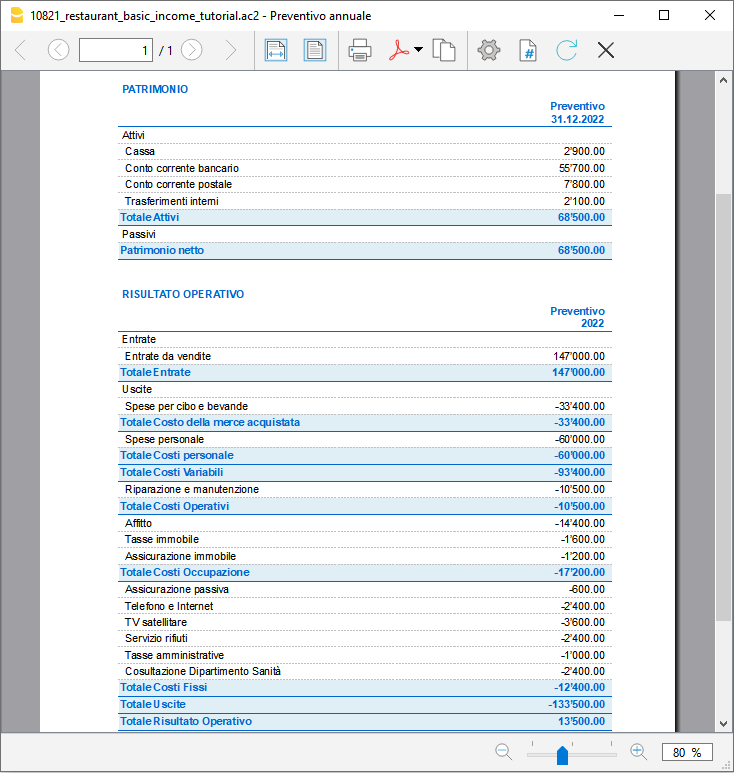
Per fare il confronto bisogna avere il report del Preventivo: se stai usando il nostro modello di Banana Contabilità, basta che vai in Report > Rendiconto abbellito con gruppi, e scegli un preventivo che desideri (di solito quello più utile in questo caso è il preventivo annuale).
Controllando il Preventivo potrai verificare a quanto ammonteranno la liquidità, i debiti e il totale patrimonio, in base alle spese ed entrate preventivate.
Avendo un quadro generale delle spese e delle entrate, potrai accorgerti se hai sopravvalutato o sottovalutato alcune spese o entrate.
Se ti trovi con una probabile perdita, è meglio pensare già da subito dove poter risparmiare, valutando le varie spese che hai elencato e modificando gli importi.
4. La verifica a fine anno con il consuntivo
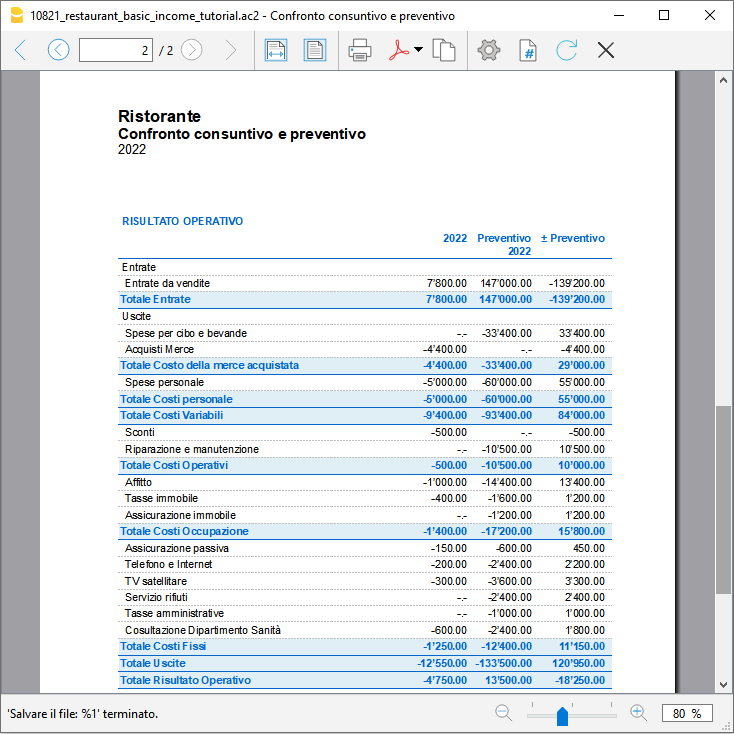
A fine anno quando avrai finito di registrare tutti i movimenti potrai preparare un report, che ti farà vedere gli importi di tutti i conti del consuntivo e confrontarli con quelli preventivati. Potrai verificare con certezza se il tuo preventivo preparato a inizio anno è risultato attendibile e se sei riuscito a guadagnare quanto previsto a inizio anno.
Per avere il confronto del consuntivo con il preventivo vai nel menu Report, clicca su Rendiconto abbellito con gruppi e scegli Confronto consuntivo e preventivo.
Se dovesse variare di molto, potrai controllare su quali entrate o uscite ti sei sbagliato e correggere gli importi nel preventivo del nuovo anno.
Double-Entry Accounting for a Corporation with foreign currencies
Double-Entry Accounting for a Corporation with foreign currencies michaelPayPal Templates | Double-entry
PayPal Templates | Double-entryPayPal import transaction
Banana has an import filter that allows you to directly import the PayPal transactions data in your accounting file.
The attached files are predefined with the accounts so that you can start immediately using it.
There are two template example files you can download and open in Banana:
Files suitable for
These template files are especially suitable in case you have only one PayPal preferred currency.
The imported transactions will automatically be imported to the currency account, so that you can separately see all transactions.
If in PayPal you keep balances in different currencies, it will be more suitable to use a PayPal accounting in Multicurrency.
Even if you use another accounting software, you will find that is very efficient to keep a separate accounting in Banana and keep your PayPal accounting in it. Instead of recording all transactions in your accounting solution, you can keep a separated accounting in Banana and once a month or when needed, only record the summary movement for the period in your accounting solution .
Further adapting the file
The file can easily be adapted to suit your needs.
Adding new accounts and new currencies
-
In the Accounts table, add new accounts for other currencies or for different Income or Expense types.
Changing to another Basic currency
This file can easily be converted into one with another Basic currency.
- Change the Basic currency in the File properties.
Add VAT/Sales Tax, change language or convert into another type
Use Convert to new file to add more options or change the accounting file settings.
Contabilità Ristorante (Multi-Moneta)
Contabilità Ristorante (Multi-Moneta)Come fare il preventivo per un ristorante
Segui passo per passo la nostra guida alla pagina Come fare il preventivo per un ristorante che ti insegna come creare e gestire un budget familiare.
PayPal Templates | Multi-currency accounting
PayPal Templates | Multi-currency accountingPayPal import transactions
Banana has an import filter that allows you to directly import the PayPal transaction data into your accounting files.
The attached files are predefined with the accounts so that you can immediately start using it.
There are two template example files that you can download and open in Banana:
- Multi currency accounting with EUR as a Basic Currency
- Multi currency accounting with USD as a Basic Currency
Files suitable for
These example files are especially suitable in case you have PayPal transactions in different currencies and especially if you have set up your PayPal account to use and keep different currencies (see also PayPal template for Double-entry accounting) .
The imported transactions will automatically be imported to the currency account, so that you can see all transactions separately and have a balance in the currency.
Even if you use another accounting software, you will find that is very efficient to keep a separate accounting in Banana and keep your PayPal accounting in it. Instead of recording all transctions in your accounting solution, you can keep a separated accounting in Banana and once a month or when needed, only record the summary movement for the period in your accounting solution .
Further adapting the file
The file can easily be adapted to suit your needs.
Adding new accounts and new currencies
-
In the Accounts table, add new accounts for other currencies or for different Income or Expense types.
-
Add new currencies in the Exchange rates Table
Changing to another basic currency
This file can easily be converted into one with another Basic Currency
- Change the Basic currency in the Accounting properties.
- Adapt the Exchange Rates table with the appropriate currencies and exchange rates.
- In the Accounts table, change the currency for the accounts that need to be in Basic currency.
Add VAT/Sales Tax, change language or convert into another type
Use the Convert to new file command to add more options or change the accounting file settings.