Organising work
With almost 35 years of experience in close contact with our users, we can say with certainty that a proper initial set-up of administrative and accounting work is crucial. Dedicating time to organisation right from the start avoids later reorganisations, thereby optimising the workflow.
On the pages listed below, we offer some practical tips on how to manage the collection of documents, the division into filing cabinets and the file storage structure:
Basic documents
Optimal organisation of one's documents is a fundamental element of any business. You will find important tips on the page Different kinds of documents. In the following, we focus on the basic company documents that continue to be valid and should therefore be retained for an unlimited period of time.
Here are a few examples:
- Contracts for the leasing or leasing of an object or real estate property.
- Leasing contracts.
- Documents for opening a bank account.
- Insurance contracts.
- Contract with telephone, gas, electricity companies.
- Marketing agreements.
- Subscription to an internet service.
- Contract for hiring an employee.
- Contract for the purchase of an fixed (land) or movable (car) property
Rules for keeping
In principle, basic documents must be kept for ten years following the end of the contract, unless the law provides for a different deadline.
A rental contract must therefore be kept for the entire period of validity of the contract. When the contract has expired, because the object is no longer rented or because it has been replaced by another contract, the document must be filed for the storage time set by law.
The terms set by law or contract
The filing of documents serves to prove the existence or non-existence of an obligation or is required by law:
- Obligation to keep books and accounting documents. Usually 10 years.
- Warranty term. Deadline within which it is necessary to report and request the settlement of defects. To request the assertion of defects.
- Prescription period. The maximum time that the law provides for a legal action. For example, the deadline for requesting payment of an unrecovered invoice from the court.
- Obligations arising from special regulations. Specific provisions are applicable in the banking or notary sector, for instance.
Keeping of documents with unlimited retention
The documents must be filed and kept with care in rooms suitable for the purpose.
- They must not be in premises that can not guarantee conservation.
- For important documents it is useful to keep copies, perhaps in digital format.
"Basic documents" filing folder
- Use a filing folder for "Basic Documents".
It is also possible to use special boxes for filing. It is important that the documents are easily available.- If you have many basic documents it is useful to separate them according to the counterparty (name of the tenant, insurance company) or by type (insurance, banking contracts).
- Insert the original contract in the appropriate section.
- More folders
- Contracts and other rental documents. For real estate.
- Contracts or documents relating to the hiring of staff.
- You can also start with just one classifier and then you can add more.
Replacement of documents
If a contract is replaced it is still necessary to keep the previous contract. The document is indispensable in case there is a subsequent dispute, there is a revision or you need to prove the expense to the tax authorities.
For archived basic documents it is useful to keep a filing cabinet (or archive box).
- These documents will rarely be consulted.
Indicate on the label documents archived from the year 20XX, or rental contracts or archived personnel files
- Place documents in order of archiving date.
- When the vault is full, write up to the year 20XX on the label.
- Create a new label.
Documents with historical value
It can be interesting to keep track of some historical elements for the company, or which are useful for getting ideas.
Create a folder of historical documents from the outset.
- The first lease
- The first invoice you made
- The photos of the opening of the store
- The DVD with the first promotional video
- The photo of the first prototype
- A copy of the sales flyers
Document storage in safety deposit boxes
Important documents, which are of great value for the company and are indispensable for proving a credit, should be kept in safety deposit boxes.
Access to the safety deposit box takes time, so it is helpful to keep a copy of the documents near you, so that you can easily consult the contents.
Proceed as follows:
- Make a copy before storing the document in the safety deposit box.
- Place the copy in the Base Documents, with a note stating that the original document is in the safe.
- Keep a list with important documents in the safe.
Digital preservation
Digitization of paper documents
It is also useful to keep copies of the Basic Documents in digital format.
You can easily make copies and store them in multiple places.
You have to check on a case-by-case basis whether it is possible to replace a paper document with a digital copy. Before throwing away the paper original you must check that the scanned document has the same validity and what procedures are to be followed.
Different kinds of documents
At the basis of the accounting, there are the accounting documents and receipts. The type of one's organizing with regard to the accounting, depends on the size of the activity and the amount of documents. The way one organizes things has to be adapted to what is needed.
We are listing down below an indication of possibilities that have proven to be very useful.
Tips for optimal organisation
It is important to distinguish and organize specifically the different types of documents.
- Basic documents : contracts for rent, telephone subscriptions, statutes, insurance contracts and everything that gets signed only once and is valid for several years. These documents need to be kept in a separate folder or binder, containing just this type of documents. For some of these very important documents (like receipts for down payments, etc.) it may be useful to make a photocopy and keep the original in a safe or a safe place. Don't make holes in important documents, but put them in transparent plastic folders. This binder is the basis of your activity/company and you need to handle it carefully.
- Documents related to employees: Contracts, insurances related to personnel, and other; it is useful to keep these in a separate binder.
If there are lots of documents, we advise you to use one binder per theme. - VAT Declarations: it is good to keep a special binder with the different declarations that you present at a regular basis (quarterly, by semester or yearly). For your VAT inscription or other general documents, it is better to keep them together with the basic documents.
- Accounting receipts and documents of the year: these are receipts, invoices or other items that are related to an expense or a receipt. These have to be kept separately, year by year. For every year you will have a binder with these kinds of documents.
Accounting documents
A good day- to-day order is needed in order to enter the accounting transactions and to control the situation of the company, such as the cash flow, the totals of debtors and creditors, etc.
- All accounting documents (receipts, invoices, tickets) usually have to be kept for a minimum of ten years.
- Classify and put the accounting documents in order by date, together with the related bank statements for the payment or the receipt.
- The bank statements need to be kept together with the accounting documents.
- Write a progressive number on the accounting documents (statements and others). With this number, that should be inserted in the Doc column, you can locate the accounting document, with the accounting as a starting point.
- At the end of the year, print a copy of the journal and keep it together with the accounting documents.
- Usually a new binder is being used for each year for the accounting documents.
Two types of accounting management
In accounting, there are two criteria for recording accounting transactions:
- Accounting on collected: invoices are only recorded at the time of payment (suppliers) and collection (customers).
- Accounting on turnover: invoices are recorded at the time received (supplier invoices) and issued (customer invoices).
In Switzerland small businesses that are not subject to VAT may account by either method, whereas businesses subject to VAT must choose a criterion that must be authorized by the Berne VAT Office. In some cases the VAT Office may impose the criterion to be used. When a certain criterion is authorised, it is not possible to change it unless an express request is made to the competent authorities.
Accounting on collected
Costs and revenues are only recorded when the invoices are paid and collected.
- Separate the issued invoices and those for which you have received the payment.
- Verify regularly the invoices on hold for which payment still needs to be received. As soon as the due date for the payment has passed, it is useful to send a payment reminder. Don't let too much time pass by, make sure you receive the payment for unpaid invoices. This takes time, but is it important.
- Once these invoices are paid, put them together with the normal accounting documents.
Accounting on turnover
Costs and revenues are recorded when invoices are issued to customers or invoices are received from suppliers.
See also: Clients/Suppliers Registers
- Separate the issued invoices and those for which you have received the payment.
- Verify regularly the invoices on hold for which payment still needs to be received.
As soon as the due date for the payment has passed, it is useful to send a payment reminder.
Don't let too much time pass by, make sure you receive the payment for unpaid invoices. This takes time, but is it important. - When you enter the issuing of the invoice in the accounting, make note of the registration on the invoice. On the transaction row, use the Invoice column to insert the invoice number.
- Once the are invoices are paid, move them over to the "paid" section, and enter them in the accounting.
When you have entered them, into the accounting, make note of the accounting transaction on the invoice (for example with a "checked" sign)
Transactions / frequency
- It is good to regularly enter the transactions in the accounting (daily, weekly, monthly).
- We strongly advise you to not neglect entering the accounting transactions, so that you always have updated information and can evaluate the progress of your activity.
- By going over the different expenses account numbers, you can easily have an overview of the different expenses that you made.
- The accounting is not just done for the tax authority.
How to manage digital documents
With Banana Accounting Plus you can manage supporting documents (invoices, receipts, bank statements and other documents) in digital format, reducing or eliminating the use of paper.
Each row of the Transactions table can contain a link to a PDF file. With a simple click you can immediately view the associated document.
In this way:
- transactions and supporting documents remain linked
- document searches are faster
- control and auditing are simplified
How to organize the accounting file and attachments
To ensure that document links work correctly, the Banana accounting file (.ac2) and the digital documents must be saved in the same storage environment (all locally or all in the cloud) and be located in the same main folder.
You can organize the documents in two ways:
- Case 1 – Attachments saved directly in the main folder
The digital attachments and the accounting file are located directly in the main folder.
- Case 2 – Attachments saved in a subfolder of the main folder
The digital attachments (supporting documents) are saved in a subfolder (for example "Attachments" or "Documents") of the main folder that contains the accounting file.
We recommend this second solution, as it keeps the accounting file separate from the attached documents and makes the archive more organized and easier to consult.
Advantages of relative links
When documents (e.g. PDF supporting documents) are saved in the same main folder as the accounting file (directly or in a subfolder), Banana Accounting Plus uses relative links. This allows document links to remain valid even:
- when using synchronization systems (for example Dropbox or similar services)
- when the file path differs from one computer to another.
Archive organization
It is advisable to create a separate folder for each accounting year.
Inside the yearly folder you can create a subfolder dedicated to attachments and, if necessary, additional subfolders to organize documents, for example:
- customer invoices
- supplier invoices
- credit cards
- foreign invoices
The important thing is to maintain a logical and consistent structure that reflects the organization of your accounting and allows you to easily retrieve documents even years later.
Example of digital archive organization

Save in the Documents folder all the digital supporting documents that you receive or that you scan during the year.
Advice on file naming
Always use the same criteria when naming files. A recommended format is:
- year-month-day + counterparty + document type
Examples:
- 2024-01-15-TIM-invoice.pdf
- 2024-01-31-Rossi Marco-invoice.pdf.
It is preferable to use the date of the supporting document.
With this method:
- documents are automatically sorted in chronological order
- searching is easier
- the archive remains consistent over time.
Systematic naming is just as important as the folder structure.
Linking the document to the transaction
When entering a transaction, link it to the related digital document using the DocLink column.
To view the PDF:
Position yourself on the relevant transaction row.

- Click the open icon in the Doc.Link column.
Summary
To correctly organize digital supporting documents in Banana Accounting Plus:
- create a clear and stable folder structure
- save documents in the subfolder dedicated to the accounting year
- use a consistent file naming system (year-month-day + counterparty + document type)
- link each PDF to the related transaction using the Doc.Link column
Systematic management of digital documents improves organization, facilitates searching and makes accounting more verifiable over time.
Organise accounting files locally, online or in the cloud
To efficiently manage accounting files and documents, simplifying their search, sharing, and storage, it is essential to create an organized folder structure for saving files.
- Organize folders into a hierarchical structure, where main folders represent general categories or starting topics (e.g., Accounting), and subfolders represent more specific categories
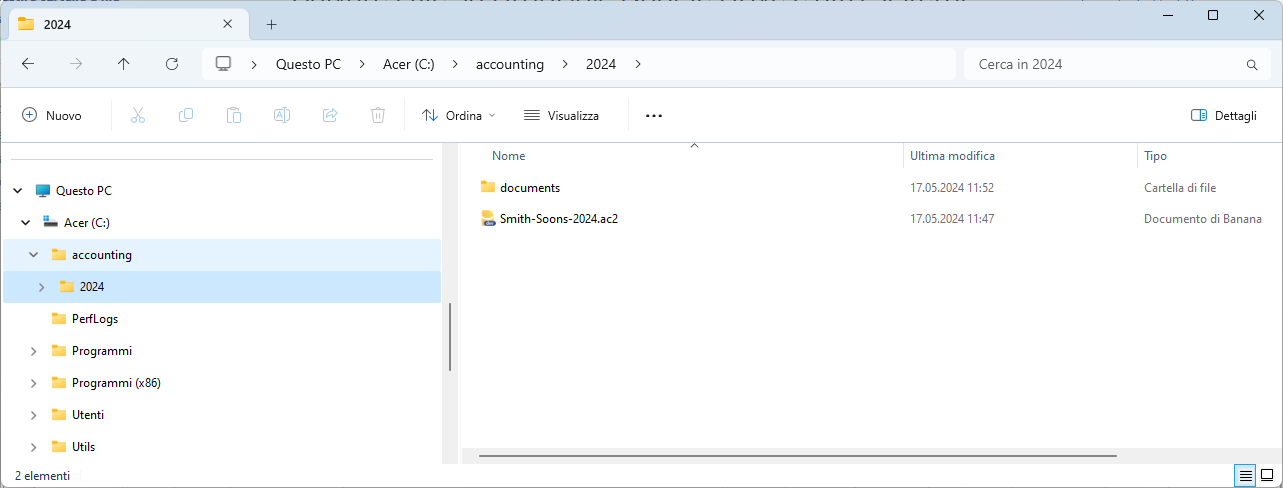
(e.g., Smith Company Accounting > Smith 2024 Accounting > Documents). - Assign clear and descriptive names to folders so that their content can be easily understood without having to open them.
- Perform regular backups of accounting files and important documents to ensure long-term data security and availability.
- Share files securely only with authorized individuals, and ensure that access permissions are properly configured.
Which folders to create
The definition and organization of folders for saving files largely depend on your personal needs and the type of work you do. However, here are some general tips:
- Accounting folder: start by creating a main folder dedicated to accounting.
- Year xxxx folder: within the Accounting folder, create a subfolder for each fiscal year. It’s helpful to name these folders with the corresponding year (e.g., "2024").
- Save the accounting file within the year xxxx folder for the current year.
- Documents folder: within the year xxxx folder, create a subfolder for documents. You can name it Documents, where you store all attachments and supporting documents that need to be included in the accounting files.
In the Documents folder, you can create subfolders for better file organization. For example, you can create a Credit Cards subfolder to store credit card invoices and supporting documents or a Foreign Invoices subfolder for all invoices received from abroad.
- Year xxxx folder: within the Accounting folder, create a subfolder for each fiscal year. It’s helpful to name these folders with the corresponding year (e.g., "2024").
- Managing multiple entities: if you manage accounting for different companies or entities, create a separate folder for each of them. This will help keep files and documents related to each entity separate. Follow the same folder organization model for each company, with separate folders for each year and a dedicated folder for documents.
Saving accounting files
When saving a new file, give it a meaningful name that includes the name of the company or your business (e.g., Smith & Sons Ltd). This makes it easier to locate and identify files within the target folder.
You can save accounting files anywhere you like. You can choose a local folder on your computer, a shared network drive within your company, or a Cloud service. To follow our suggested logic, save the accounting file on the local disk within the year-specific subfolder.
Using the command from the File menu > Save or Save As, data is saved, and existing disk data is replaced with the new one.
- The destination and file name are specified when saving for the first time or using the Save As command (from the File menu).
- If you manage multiple sets of accounts, we recommend creating a separate folder for each entity and each fiscal year.
- Each file can be protected by a password.
File format of Banana Accounting Plus
Files created with Banana Accounting have the *.ac2 extension, regardless of the operating system used.
- The "ac2" file format is specific to Banana. When saved, all data is compacted and stored as a single block.
- .ac2 files are compatible across different operating systems (Windows, Mac, and Linux).
You can save a file in Windows, open and edit it in Mac, and then reopen it in Linux or Windows. - The file can be sent as an email attachment, edited on other systems, or sent back to the sender.
- Files are entirely distinct from the Banana Accounting Plus program, which has the ".exe" extension for Windows.
- Installation files have the ".dmg" extension for Mac and ".deb, .rpm, .run, or .tgz" for Linux.
Auto-saving
Banana Accounting Plus automatically saves your work in a temporary file. When you save or exit the program normally, the temporary file is deleted. However, if the computer shuts down unexpectedly, you can recover the data through this file.
When the program is reopened after a crash and detects that the auto-save (temporary) file has not been deleted, it displays an Auto-Save Recovery dialog asking the user if they want to recover the file.
In the Program Options, you can specify how often Banana Accounting Plus should perform auto-saves.
Backup copies
We recommend regularly creating backup copies of your accounting files and all important business documents. You can choose from the following options:
- Cloud backup: use cloud backup services such as Google Drive, Dropbox, Amazon S3, Microsoft Azure, or others.
- On-premise backup: use backup software installed on your servers or storage devices.
- Hybrid backup: combine both options, keeping a copy of the data locally and on the Cloud for increased security.
Set up a regular backup schedule, ensuring that all critical data is included in the backups, and comply with privacy and data protection regulations.
Regularly monitor the status of the backups to ensure they are performed correctly and that the data remains intact. Store backup copies in secure and diverse locations to protect them from catastrophic events such as fires, floods, or theft.
Saving files on Dropbox, Google Drive, and other Cloud systems
Banana Accounting Plus is a program installed on your computer that works locally, but it also allows you to save files on the Cloud and synchronize changes every time you work locally.
Viewing changes
The Android version of Banana Accounting Plus works directly with the Dropbox server. If changes are made on the PC, it usually takes a few seconds for them to appear on the server and, consequently, in the Banana Accounting Plus file.
To ensure that the file is correctly synchronized with the server on your computer, the file should be marked with a green checkmark.
If you do not see the synchronization symbols (green, red, blue), you should update the Dropbox application installed on your PC.
Another way to check the synchronization status from your PC is to click the Dropbox icon on the taskbar:

Additionally, on Android, synchronization does not occur while the application is in use. Therefore, you need to close and reopen it.
File opening methods
To open an accounting file, you need to start Banana Accounting Plus, and you have two options:
- Select the Open command from the File menu.
- Use the corresponding icon on the toolbar to access files quickly and intuitively.
The data present on the disk is what has been saved and stored in memory. It can be opened and modified.
- Accounting files can be opened if they are stored on the local computer or accessible through a network drive.
If they were shared via email, they must first be moved to a folder on the computer. - Only one person can open the file for editing at a time.
If you make changes to a protected or already-in-use file, you will need to save them under a different file name. - If the file is password-protected, a password entry dialog will appear.
When the previous year is password-protected, and you want to execute the command for Enhanced Balance Sheet with Groups, the program will prompt you to enter the password for the previous year. Alternatively, you can follow the suggestions provided in the notes on the page password entry dialog. - The program warns that the file is opened in read-only mode under the following conditions:
- The file is on a non-writable medium (CD-ROM).
- The file is located in a temporary non-writable folder.
- The file is write-protected, or the user does not have the necessary permissions to modify it.
- The file is already opened by another user.
- The file has already been opened by the same user or in another session.
Searching for accounting files *.ac2
If you cannot remember the folder where the accounting files are stored, you can use Windows Explorer or Finder on Mac to search for them.
Searching for accounting files on Windows computers
Banana Accounting files have the ".ac2" extension. The search functionality may vary depending on the version of Windows.
- Windows 10: Click the Search icon and enter ac2 or the initial part of the file name, then click on the Documents arrow.
- In File Explorer, enter the "*.ac2" extension or the name of your accounting file, and let Windows search for it.
- When using Banana Accounting Plus, click the File > Open menu, enter the "*.ac2" extension in the search box at the top right of the dialog window, and click the Search the entire computer icon or select the folder where you want to search for the file.
Searching for accounting files on Mac computers
- In Banana Accounting Plus, in the Open dialog, go to File > Open, and in the Search box (top right), enter ac2 or a keyword from the file name. Use the icons to choose where to search (entire computer or selected folders).
- Open Finder and enter ac2 or the initial part or a keyword of the file name in the search box.
- Right-click on the Finder icon, click Search, and then enter ac2 or the file name.
Copying or moving files
Banana Accounting Plus can save files on any drive recognized by the operating system, such as a writable disk.
From non-writable drives (CD or DVD), Banana Accounting can only read files. *.ac2 files can be moved:
- From one folder to another
- Use Windows Explorer or Finder on Mac to locate the folder where the files are saved.
- Copy and move them to the new destination folder (once pasted, they can be deleted from the previous folder if necessary).
- From one computer to another
- Save the files on a memory stick and then transfer them to the new computer:
- Open the file to be saved.
- From the File > Save As menu, choose the destination as the memory stick drive.
- The copy can also be made by launching Explorer and dragging the accounting file to the memory stick drive.
- Alternatively, send them as email attachments and save them on the new computer.
- Save the files on a memory stick and then transfer them to the new computer:
Deleting or renaming files
Banana Accounting Plus does not have a built-in function to delete or rename files. To do so, use the appropriate function in the operating system (Windows Explorer or Finder on Mac).
Multiple users working on the same file
Banana Accounting Plus functions similarly to Excel: only one person can work on the same file at a time. Ensure that no other users are working on the same file simultaneously.
If you are working on a Windows local network and another user is already using the file, you will receive a message indicating that the file is available in read-only mode.
For other operating systems, there are no such messages, so users must be cautious when multiple people are working on the same file.
If two people simultaneously work on the same file, the user who saves their changes last will overwrite the previous data.
Banana Accounting Plus cannot detect if files are opened and edited simultaneously on multiple computers. As a result, one person could accidentally delete data or another person could add new data. Only the last saved version of the file will be kept. Therefore, caution is needed to avoid simultaneous editing.
Linking digital files
Each accounting entry can be linked to a digital accounting document.
- Save the supporting documents of the year in a subfolder for the current year. This way, the program creates relative links that will work even when files are synchronized across different computers.
- Save permanent documents (e.g., insurance policies, rental contracts) in a separate folder.
Working on a local network
If your company uses a local network, you can create the folder structure on the network so that it is accessible to multiple users.
On a local network, you can usually set access permissions to limit the number of people who can access accounting data.
Working with Cloud systems
If you use Cloud systems such as Dropbox, iCloud, OneDrive, Google Drive, or similar services, a folder containing synchronized data will be created on your computer.
To work on multiple computers, simply create a subfolder in the synchronized data folder containing the company's data, following the previously indicated structure.
Sharing data with your accountant
Cloud systems also allow you to share data with others. Create the folder structure as indicated above within the main synchronized folder. Use Dropbox's share command to share the folder with your accountant so they can view and edit your files.
Save your Banana files also on the Cloud
Many software today operate in the Cloud, requiring the creation of an account and the use of login credentials, without local installations. Data is accessible from multiple devices, but this also means that all data and documents are stored on the service provider's servers (e.g., Dropbox, iCloud, OneDrive, GoogleDrive).
- The advantages of the Cloud for private Banana users
- The advantages of the Cloud for companies or associations using Banana
- The advantages of the Cloud for fiduciaries and accountants
Banana Accounting Plus works with your Cloud
Banana Accounting Plus does not have its own Cloud, but allows you to work with yours! Since accounting data are particularly sensitive we believe that you should be able to choose where you save them. They belong exclusively to you. Our company has no access to your data.
In Banana Accounting, usually each accounting year constitutes a separate file, in .ac2 format.
With Banana Accounting Plus you can choose where to save your data: locally, on external devices, on Cloud systems to share them with others.
In Banana Accounting, saving your files to the Cloud is just one of many options, a free choice.
The advantages of the Cloud for private Banana users
For private users, saving their accounting files and digital receipts in the Cloud can be a great advantage: they are accessible from any of our devices, from home, from the office, from the phone.
For example, your mobile can be a good support to immediately scan all receipts or receipts (which are otherwise easily lost) and save them directly to the folder on the Cloud from which they can then be taken back and inserted as a link in the accounting file.
Save your Banana files on the Cloud
With Banana Accounting Plus you can keep your accounting files on the Cloud using any Cloud data management system. Total freedom of choice, without any additional cost.
- You can choose the Cloud service you prefer:
- Dropbox, Apple iCloud, Microsoft OneDrive, GoogleDrive or any other public service. Most of these offer a free basic service with limited storage, and then provide additional paid services. If you already have an active Cloud service, you won’t incur any additional costs.
- Your own private Cloud .
- If you already have an active Cloud service, you won't have additional charges in order to work.
- Your accounting data will always be accessible.
- Even if the subscription to Banana Accounting Plus expires, your data will always remain in your possession and be accessible.
- With the Free plan of Banana Accounting Plus you can always read and print the contents of the files.
- You can keep copies on any support or computer, in order to comply with the requirements of the law for keeping and archiving accounting data.
- You can store and share any type of file:
- Accounting files
- Receipt files or other documents that you link to transaction rows.
- Other Excel, Word, letter, photo or other files that are related to accounting.
- You can share data with others:
- Use the sharing features of your Cloud provider.
- You can have multiple people accessing the data.
- You can assign permissions, read only or write.
- Data can be accessed directly from the web.
- You can keep the accounts even if you don't have an active internet connection.
The limitation you have with Banana is that only one person at a time can modify the same accounting file. If more than one person saves the modifications there is a conflict that can result in data loss. It is therefore an ideal solution for individuals or small teams.
Set up Cloud data management service
To set up the Cloud service you have to follow the instructions given by your provider. As a rule, the procedure is as follows:
- Create the account through the cloud service.
- Install the cloud data access program on your computer.
- You will be asked for the data to access your Cloud account.
- This program will create a local folder.
- In this folder the program will synchronize the data with the Cloud system.
- When you make changes locally they will be automatically replicated to the Cloud or other devices you are connected to.
- If you don't have a Cloud connection you can still work on your files. When you reconnect, the program will re-synchronise your files.
- The Cloud system allows you to specify which folders and files to sync automatically.
- You can access the files both from your computer and from mobile devices.
- Install the Banana Accounting Plus software on your computer.
- In the local folder of the Cloud service:
- Create the folder for your company or accounting.
- When you create a new accounting file, save it under the folder you have created.
- Create sub-folders to better organise your accounting data.
- Your data will then be automatically synchronized in the Cloud.
- You can create other folders for other companies or organizations.
- Create the folder for your company or accounting.
The advantages of the Cloud for companies or associations using Banana
In addition to the benefits reserved for individuals of access from multiple devices and ease of scanning receipts, firms and associations can use Cloud services to share with others the folders where they keep their accounting files and receipts.
Share your data folder with others
All Cloud systems offer the ability to share data with others, a feature that can be useful for a small business or association. To share data with others, the procedure is as follows:
- Create an account with the Cloud service you use (this is usually free).
- Go to the folder you want to share.
- With the sharing functionality indicate the email of the user to whom access should be granted.
- You can share with as many people as you wish.
- You can assign access permissions (read only, write).
- All subfolders will also be shared automatically.
- With the sharing functionality indicate the email of the user to whom access should be granted.
- The user can access the data:
- Via the web interface
- By installing the data synchronization client on your computer
- The data will be synchronized between the different users.
Warning: two people cannot edit the same file at the same time. If you delete a file from the Cloud, it will also be deleted from all other devices that share that folder via Cloud.
The advantages of the Cloud for fiduciaries and accountants
Fiduciaries and accountants often use Banana Accounting Plus because it allows them to easily share data with clients. It is also kept as the firm's secondary accounting software. In recent years, thanks to the widespread use of the Cloud, Banana Accounting Plus has offered interesting opportunities to acquire new clients.
If you're an accountant and collaborate with your client on bookkeeping, Cloud systems can help you make the process very easy. You generally have two options:
- The client has its own Cloud service and then shares the data with you.
- You have a Cloud system on which you save client data and share the folder with the client.
Important information regarding the use of a cloud:
- The Cloud service is an independent program from Banana Accounting. Banana.ch Ltd. does not take responsibility nor can it offer support related to the use of the Cloud.
- It is recommended to have a Cloud with a business account to have sufficient space, all sharing features, and other advanced features.
- To ensure full compatibility between computers, in general, it is recommended to:
- Choose a Windows Cloud service like Microsoft OneDrive if you are operating on Windows.
- Choose an Apple Cloud service like Apple iCloud if you are operating on Mac.
- In the case of mixed operating systems, as a last resort, it is always possible to share files through encrypted file transfer services like Swisstransfer.
- Only one person can work on a file at a time.
- It might be necessary to manage the permissions granted to those with whom the files are shared.
Manage multiple companies and share data with clients
If you manage more than one company, it is better to organize the folders to facilitate sharing with others. Here we suggest you a possible organization of data, you can obviously choose the structure that you think more suitable.
- In the local folder of your Cloud system create separate folders for each of your customers.
- For each customer create two sub-folders:
- Internal
Where you can save the data you don't want to share. - Shared-[CompanyName]
- Save here the files that you want to share with your customer.
- Also indicate the company name, so your customer can recognize it
- Internal
- Share the Shared folder with your client, using the system provided by the Cloud service.
Important: Data backup service
Working with a data synchronization system is like working with a network system. When a user deletes a file or folder from their local computer, automatically the file or folder is also deleted from the Cloud . Similarly, if someone overwrites the data, the previous data is lost.
Therefore, it is important that you have a backup service:
- Check for how long your Cloud provider keeps copies of your deleted data. The duration may vary depending on the plan you choose.
- The system can also help you guard against hardware defects or ransomware attacks.
- It can be useful to have a local backup system, which also saves your data to disk.
- A system that prevents data deletion, with simple commands, is preferable.
Other useful resources
Accounting methods
When it comes to accounting, one of the first concepts to clarify is the accounting method. An accounting method determines when a transaction enters the accounts and in which period it affects the results.
It doesn't change what you do in reality, but how and when you represent it in the numbers.
If you issue an invoice today and get paid in two months, the accounting method decides whether that income counts today or in two months.
The difference is not theoretical: it changes the revenue, it changes the result.
Why different accounting methods exist
Businesses don’t all operate the same way. Some collect payments immediately, others work based on invoices, some have a few clients, others have hundreds. That’s why there isn’t a single method that works for everyone.
Some methods prioritize operational simplicity, others focus on economic accuracy. Choosing the right method is about finding the right balance between these two aspects. There is no absolute “right” method.
There is the method best suited to your business, your way of working, and the obligations you must comply with.
What changes when you choose an accounting method
Choosing an accounting method means deciding when:
- a sale becomes revenue
- a cost affects the result
- a receivable or payable appears on the balance sheet
With some methods, accounting follows the cash movements. With others, it follows the economic maturity of the transactions. This directly affects how you read the numbers and how you make decisions.
The main accounting methods
In practice, the most common approaches are three:
- The cash method (or on received payments) is the simplest: you record income and expenses only when you receive or pay money. It’s immediate, intuitive, and very cash-oriented.
- The accrual method (or on invoiced amounts) focuses instead on the economic substance: income and expenses are recorded when they accrue, even if no money has changed hands yet. It’s more accurate, but requires more work.
- The cash-accrual method (or hybrid system) is an intermediate approach. During the year, you work simply by following payments and receipts. At the end of the period, you complete the accounts with the entries needed to produce an accurate balance sheet.
How to understand which method is right for you
The choice of accounting method mainly depends on how you actually work. If you collect payments immediately and prefer simplicity, the cash method may be sufficient. If you work with invoices, deadlines, and significant receivables, you need a more complete view.
In many cases, especially for SMEs and professionals, the best solution is to start simply and complete the accounts only when necessary. This is where the hybrid approach becomes particularly effective.
Of course, tax regulations also come into play, which vary from country to country and must always be taken into account.
Accounting methods in Banana Accounting
Banana Accounting doesn’t force you to choose a method once and for all, but allows you to work flexibly and adapt accounting to your business.
You can start with a simple method, based on payments, and later add the necessary entries to get a complete view. The software doesn’t decide for you: it enables you to work effectively, whatever method you choose.
In Banana Accounting, you can manage your accounting using the various supported methods: cash, accrual, cash-accrual (hybrid system). The revenue depends on the adopted accounting method, but the basic logic remains unchanged.
Revenue can:
- follow the invoice issuance
when using the accrual method - follow the payment
when using the cash method - be aligned at the end of the period
when using the cash-accrual method
In all cases:
Revenue is determined by the transactions recorded in the income accounts.
In summary
- An accounting method helps give meaning to the numbers.
- It helps you understand when a transaction really matters and how to interpret the results.
- Understanding this concept is the first step to using accounting consciously, and not just to fulfill a requirement.
Accrual basis method
Turnover represents the total revenue generated from a company’s core business activities over a specific period. In simple terms:
- it is the value of goods sold
- and/or services rendered
Turnover does not measure profit, only the volume of activity carried out.
Who the revenue-based method is for
The revenue-based method, grounded in the accrual principle, is suitable for structured companies and businesses with many clients and suppliers who need a complete and time-comparable economic view, including receivables and payables. It is also required for all businesses with an annual turnover over CHF 500,000 (in Switzerland).
This approach is typical of accrual accounting, used to produce complete financial statements during the year.
What is included in turnover
Turnover includes:
- sales of goods
- services provided
- revenue linked to the company’s main business activity
Turnover does not include:
- collected VAT
- financial income
- extraordinary income
- grants or compensation not related to sales
Turnover is therefore an economic figure, not a financial one.
Turnover, revenue, and profit: differences
It’s important to distinguish between some commonly confused terms.
- Turnover
Measures how much you have sold. - Revenue
May also include income other than core sales. - Profit (or loss)
Is the difference between revenue and expenses.
High turnover does not automatically guarantee a profit.
How turnover is calculated
Using the accrual method, turnover is based on sales that have accrued during the period, regardless of whether they have been paid.
In practice:
- a sale counts towards turnover when the right to revenue arises
- even if the customer hasn’t paid yet
This results in turnover that is:
- economically complete
- comparable over time
- independent from payment timing
Turnover and VAT
With the turnover-based method, VAT is declared at the time the invoice is issued, regardless of whether the customer has paid or not.
- This is the standard method used by most businesses and generally required under Swiss VAT practice.
Turnover is not the same as VAT:
- Collected VAT is not revenue
- It is an amount collected on behalf of the tax authority
VAT rules depend on each country’s legislation.
Why turnover is an important figure
Turnover is used to:
- assess the size of the business
- compare different periods
- define tax and administrative thresholds
- analyze sales trends
make strategic decisions
However, it is not sufficient on its own:
- it says nothing about costs
- it does not measure profitability
- it does not indicate available liquidity
Turnover in Banana Accounting: role of invoices
In Banana, turnover is determined by revenue entries, which come from the recording of customer invoices (not from bank transactions themselves).
Bank movements serve to settle receipts, not to define turnover — except when using the cash method.
- In Banana Accounting, turnover is determined through the posting of customer invoices, meaning transactions that generate revenue.
- Turnover is not a manually entered value and does not depend directly on the bank account, but on the entries in the revenue accounts.
When you post a customer invoice in Banana:
- revenue is recorded
- the revenue contributes to the turnover of the period
- VAT is handled separately
- the customer receivable is recorded (if required by the method)
Turnover is therefore generated at the moment the invoice is recorded, not when payment is received.
In summary
In Banana Accounting, turnover:
- comes from the posting of customer invoices
- is determined by revenue accounts
- may follow payment or invoice issuance, depending on the accounting method
- is independent of the bank account, except in the cash method
This setup makes turnover clear, verifiable, and consistent.
Cash basis method
The cash method is an accounting method in which income and expenses are recorded only when an actual receipt or payment occurs.
In other words:
- income exists when the money comes in
- an expense exists when the money goes out
- Issued or received invoices are not recorded until they are paid.
This method directly reflects the actual liquidity of the business.
Who the cash method is suitable for
The cash method is particularly suitable for:
- Micro-enterprises
- Self-employed workers
- Professionals
- Businesses with few clients and suppliers
- Businesses with fast payments
- Those who want to mainly monitor liquidity
How the cash method works in practice
With the cash method, accounting mainly follows the bank account (or cash register):
- You receive a payment → you record income
- You pay an expense → you record a cost
- If there is no cash movement → there is no entry
During the year:
- there are no receivables from clients
- there are no payables to suppliers
- the economic result coincides with the cash flow
What it shows well
- Available liquidity
- How much you have actually received
- How much you have actually paid
- The business’s ability to sustain outflows
It is particularly useful for daily monitoring of the financial situation.
What it does not show
- Invoices issued but not yet received
- Invoices received but not yet paid
- Revenues and costs that have accrued but are not yet settled
The cash method does not provide a complete view of the economic situation, but gives a very clear picture of the financial situation.
Advantages of the cash method
The cash method is appreciated for its operational simplicity. The main advantages are:
- Easy to manage
You only record what has been paid or received. - Immediate control of liquidity
You always know how much money is actually available. - Less administrative work
You don’t need to record all invoices during the year. - Aligned with digital payments
Bank transfers, cards, and electronic payments become the basis of accounting.
Limitations of the cash method
The cash method also has structural limitations, which are important to understand.
The main ones are:
- No view of receivables and payables
You don’t see how much you have to receive or pay in the future. - Partial economic result
Revenues and expenses are tied to payments, not to their accrual. - Limited comparability over time
The result can vary greatly depending on the timing of receipts and payments.
For this reason, the cash method alone is not always sufficient for economic analysis or formal financial statements.
To obtain a clearer view of the costs and revenues attributable to the financial year at the end of the accounting period, accruals and deferrals may be necessary in order to comply with the accrual principle.
- For more information, see Accruals and Deferrals in Assets and Liabilities.
It is less suitable for:
- structured companies
- businesses with many receivables and payables
- companies that need to present full financial statements during the year
The cash method in Banana Accounting
With Banana Accounting, the cash method is easy to apply because the program naturally works based on bank transactions.
With Banana you can:
- Import transactions from your e-banking
- Automatically record receipts and payments
- Keep the balance sheet and income statement constantly updated
- Monitor liquidity in real time
During the year you work lightly, without having to record every invoice.
Tax aspects of cash-based accounting
Cash-based accounting is allowed only under specific tax requirements.
In Switzerland:
- it is reserved for companies with annual turnover below 5 million Swiss francs
- authorization from the FTA is required
- the request must be made at the start of the activity or later
Tax rules on the use of the cash method vary by country, especially regarding VAT. It is always advisable to consult local regulations or official tax guides.
In summary
The cash method is:
- simple
- immediate
- liquidity-oriented
It is ideal for getting started and managing day-to-day operations, but it shows its limits when a complete economic view is needed.
With Banana Accounting, you can use the cash method today and easily switch to a more complete approach when needed.
Accrual–cash basis (hybrid system)
Managing accounting can seem complex, especially for those who want to focus on daily operations without getting lost in invoices and transactions. The Accrual–Cash method is an accounting approach commonly used by small businesses and professionals who record on a cash basis, but at year-end must include outstanding invoices to and from clients and suppliers.
The Accrual–Cash method is a hybrid accounting system that combines the cash principle during the year with the integration of open invoices at year-end, following the accrual principle.
With this method:
- Revenue and expenses are recorded when cash is received or paid (cash basis)
- At year-end, to determine the actual revenues and expenses, outstanding invoices from clients and suppliers are recorded, or, if necessary, through accruals and deferrals.
More information:
The Accrual–Cash method therefore represents an intermediate solution between the accrual method and the cash method, allowing for a clear view of the financial situation without the complexity of full accrual accounting.
Who it's for
This is a solution designed for those who want to work simply during the year, but obtain a year-end balance sheet that complies with the accrual principle. The Accrual–Cash method is particularly suitable for:
- freelancers
- artisans and small businesses
- service providers
- businesses that receive many invoices from suppliers
- businesses that issue few invoices and collect payments at a later time
- entities applying VAT on a cash basis (based on actual receipts and payments)
When it is not recommended
This method is not suitable for:
- entities applying VAT based on invoicing (at the time of issuing or receiving an invoice)
- companies that must keep full accrual-based accounting
- businesses with more complex accounting obligations
- situations requiring an official accrual-based financial statement
Why choose this method
With digital payment systems, most transactions today go through the bank. By importing bank transactions, the accounting is almost ready. There is no need to manually enter every invoice anymore.
This brings real advantages: less time spent on data entry, reduced risk of errors, and above all, the ability to always have an up-to-date overview of your liquidity. And for SMEs, liquidity is not a minor detail—it’s a key element in managing the business.
The accrual–cash method meets these needs:
- Time savings – no need to record each invoice when it’s issued or received
- Greater simplicity – less bureaucracy and complexity
- Always up-to-date data – thanks to imported bank transactions
- Liquidity control – the most important figure for managing actual inflows and outflows
Limitations of the accrual–cash system (and how to manage them)
Like any method, the accrual–cash approach has its limitations. During the year, the financial result mainly reflects receipts and payments; outstanding invoices are recorded at year-end to complete the financial statements. This means the economic picture may be partial.
Here are the main limitations:
- Receivables and payables are not visible during the year – open invoices appear only at the end of the period
- Partial view of accrued revenue/expenses – only those already paid are visible
- More work at year-end – additional entries are required (open invoices, accruals, deferrals, depreciation)
- Not suitable for all companies – highly structured businesses may prefer full accrual accounting
With Banana, these limitations are easily managed — you can add invoices and adjustments at any time, gradually transitioning to full double-entry accounting.
How Banana simplifies the accrual–cash method
With Banana Accounting, you can manage the Accrual–Cash method by working primarily with imported bank transactions throughout the year, which are then completed using automatic rules. Outstanding invoices and period-end adjustments can be recorded when needed, to produce an accrual-compliant balance sheet.
- Import your bank transactions
- Download the file from your e-banking (ISO 20022, CSV, MT940, etc.)
- Import your bank transactions into Banana.
- Apply automatic rules
- Define rules to classify transactions (counterpart, VAT code, cost center)
- On the next import, Banana will automatically complete the transactions.
- Monitor your accounts in real time
- Balance sheet, cash flow, margins, and VAT are always up to date with the latest import
- Manage open invoices at year-end
- Unpaid customer invoices → Customers to Revenue
- Unpaid supplier invoices → Expenses to Suppliers
- Typical adjustments → accruals, deferrals, depreciation, exchange rate differences
- Generate an accrual-compliant balance sheet, ready for banks, shareholders, and tax authorities.
An advantage also for fiduciaries and accountants
The accrual–cash system is also valuable for professionals managing clients’ accounts. They no longer have to wait for the client to send every invoice — accounting can be built starting from bank transactions, avoiding work overloads and drastically reducing time spent. When needed, they can complete the accounts with year-end adjustments. This approach allows handling more mandates in less time and offering more efficient services.
- Less manual work – no need to enter every client invoice as soon as it is issued or received
- Ready-to-use accounting – start directly from imported bank transactions
- More clients managed – saved time can be dedicated to consulting and analysis
- Professional financial statements – at year-end, add the necessary transactions to obtain complete accounts
With Banana, fiduciaries can provide faster and more efficient services, increasing the value delivered to clients.
Accounting methods and VAT in Switzerland
In Switzerland, regarding VAT (MWST/TVA), depending on when VAT becomes due:
- Accrual method – VAT is due when you issue an invoice to the customer or receive one from the supplier
- Cash method – VAT is due when you collect a payment from the customer or make a payment to the supplier
- Accrual–Cash method – VAT becomes due at the time of collection or payment, as in the cash system
Summary
- If you use the accrual method – VAT is recorded when the invoice is issued
- If you use the cash method – VAT is recorded only when the payment is actually received
In Switzerland, both cash and accrual accounting methods are allowed for VAT declarations, provided the conditions for using the cash method are met (typically annual turnover below CHF 5 million).
- More information on how VAT works in Switzerland.
A hybrid system for Switzerland and abroad
Here is a brief list of real-world examples from those who use, recommend, or promote a hybrid approach to accounting both in Switzerland and internationally:
- Banana.ch – VAT on collection and year-end accruals and deferrals
Explains the hybrid method as an optimal practice for those using cash-based accounting but integrating outstanding items at year-end for a complete balance sheet. - Raiffeisen – Digital accounting with e-banking and AbaNinja (German, French and Italian only)
Demonstrates how, by importing bank transactions, payments can be automatically linked to invoices, avoiding duplicate entries and maintaining control over outstanding invoices. - FiscoOggi (Italy) – Cash regime for small enterprises (Italian only)
The Italian regime for small businesses is actually a hybrid system: accounting is kept on a cash basis, but with year-end adjustments for inventory, depreciation, open invoices, etc. - HMRC UK – Expanding the cash basis for the self-employed (PDF)
Article explaining UK government measures to expand cash-basis eligibility while allowing for the carry-forward of profits and losses like under the accrual method. - IRS (USA) – Publication 538: Accounting Methods
In the United States, the hybrid method is legal and widespread: it allows using the cash basis for current transactions and accrual accounting for managing inventory, liabilities, accruals, etc.
Conclusion
At school we are taught that the cash and accrual principles are clearly distinct. But the reality of modern SMEs calls for a flexible, automated, and accurate system.
Banana Accounting Plus is the tool that combines the operational simplicity of the cash principle with the accounting completeness of the accrual principle.
Banana Accounting provides predefined templates for cash-based accounting, with the option to integrate receivables and payables based on the accrual principle.
Which accounting method to choose
The choice of accounting method affects how you monitor your business throughout the year. Some methods prioritize simplicity and liquidity, while others offer a more complete economic overview, including receivables and payables.
The table below helps you understand, based on your operating situation and legal requirements, which method is most suitable: the cash basis method, the hybrid accrual–cash method, or the accrual basis method (revenue-based accounting).
| If this is your situation… | Recommended method |
|---|---|
| You want a simple system based on cash in and out | Cash basis method |
| You mainly want to monitor your liquidity | Cash basis or hybrid cash–accrual method |
| You want to work simply during the year and add invoices at year-end | Hybrid cash–accrual method |
| You want a complete economic overview, including receivables and payables | Accrual basis method |
| You must prepare full financial statements during the year | Accrual basis method |
| In Switzerland, you exceed CHF 500,000 in annual turnover* | Accrual basis method (mandatory) |
* For sole proprietorships and partnerships. Legal entities are always required to use full accrual accounting.