Banana会计模板和扩展
Index of Banana Accounting Templates and Extensions
This page is the global index of all official Banana Accounting templates and extensions.
Here you find a complete overview, covering different countries and languages.
Templates are ready-to-use accounting files based on structures adapted to local practices. They provide a structured starting point that can be customized to your needs, allowing you to get started right away.
Extensions, on the other hand, add functionalities to Banana Accounting and may vary depending on the country and local requirements.
Templates and extensions for Switzerland
Accounting content adapted to Swiss regulations and practices, available in multiple languages:
- Switzerland (English)
Section with templates and other content in English specifically for businesses, associations, and other organisations in Switzerland. - Switzerland (German)
Section with templates and other content in German specifically for businesses, associations, and other organisations in Switzerland. - Switzerland (French)
Section with templates and other content in French specifically for businesses, associations, and other organisations in Switzerland. - Switzerland (Italian)
Section with templates and other Italian-language content specifically designed for companies, associations, and other organisations in Switzerland.
Templates and extensions for English-speaking countries
Designed for accounting contexts where English is the working language:
- Canada
Section with templates and other content in English specifically for businesses, associations, and other organisations in Canada,. - UK (United Kingdom)
Section with templates and other content in English specifically for businesses, associations, and other organisations in UK. - USA (United States of America)
Section with templates and other content in English specifically for businesses, associations, and other organisations in USA.
Templates and extensions multilingual
Resources that can be used in any country, available in multiple languages:
- Universal
General-purpose templates and related content designed as a neutral starting point, independent of country-specific structures. - Education
Section with templates and related content designed specifically for learning and teaching accounting.
Templates and extensions of other countries in other languages
Country-specific templates and other content in the local language, specifically for businesses, associations, and other organisations, adapted to local requirements:
- Africa (Algeria, Morocco)
- Austria
- Belgium/Wallonia (French language) and Belgium/Wallonia (Dutch language)
- Brazil
- China
- Congo - Democratic Republic of the Congo (DRC)
- Costa Rica
- France
- Germany
- Italy
- Liechtenstein
- Luxembourg
- Mexico
- Nepal
- Netherlands
- Norway
- OHADA (Organization for the Harmonization of Business Law in Africa)
- Portugal
- Saudi Arabia
- Spain
- UAE (United Arab Emirates)
Search all templates and extensions
Use the search tools if you are looking for a specific template or extension, or want to filter results by language, country, or category:
示例及模板信息
什么是模板?
模板指的是正常的 Banana财务会计文件 (以.ac2 为扩展名的文件),用户可以直接使用模板文件进行工作,因为在模板文件中是已经做好的例子,用户只需根据自己的要求进行修改即可。
任何会计文件都可作为模板被使用,但我们为您提供的模板是为不同类型的公司量身定制的。
会计模板文件内包含:
- 在文件和账户属性内关于记账本位币和标题等的基本设置。
- 会计科目表
- 账户,组,总组,所属组等已设置,便于您要用于资产负债表和损益表的打印。
- 部分模板已经设置了成本中心和分部。
- 对于包含增值税的会计文件,增值税代码已被分组,并且设置了当前的增值税率。
- 在模板文件中,您需要用自己公司的业务来代替示例中的。
如何打开及使用模板文件
您首先需要在电脑上安装Banana财务会计软件,然后便可打开及使用我们为您提供的模板文件。
如果您已经安装了Banana财务会计软件
- 下载您需要使用的模板文件
- 打开 Banana财务会计软件,并使用文件菜单内的->打开命令打开已经下载好的文件
- 保存这个文件并按您的会计名称给它命名(更多的信息请参照使用网上的模板创建新的文件)
如果您还没有安装Banana财务会计软件
- 下载并安装Banana财务会计软件8
如果您没有购买许可证密钥,软件将在精简版本的模式下(最多可输入70笔的业务)运行。在这种情况下,您可以不填写许可证密钥一栏的信息。 - 下载您想要使用的模板文件。
- 购买许可证密钥
- 如果需要输入多于70笔的业务,则需要购买许可证密钥, 然后点击帮助菜单中管理许可密钥的命令来输入许可证密钥。
-
继续使用您的文件 - 以前输入的数据将不会丢失。
客制化您的模板
- 把模板文件保存在电脑上的文件夹中,您可以对其重新命名,并包含会计文件的年份。
- 根据所需调整模板内的数据,输入您公司或个人的业务。
- 输入会计文件中所需的基本数据 (点击文件菜单内的文件和账户属性命令)
- 调整您的会计文件
- 输入您的业务
您需要删除模板文件中的会计业务来输入您实际的业务数据 (使用编辑菜单内的删除行命令)。
搜索模板
我们建议您在选择一个最适合您的模板之前,向下滚动查看所有可用的模板。
- 并非所有的模板都有完整的说明。
- 我们会定期更新及完善模板。
细化模板搜索
- 搜索文字
如果您输入了一个搜索的关键词,搜索的结果会显示出所有在文本标题内或内容中包含该关键词的模板。 - 语言
用于创建模板的语言。 - 国家
- 国际
这些是可以使用在不用国家的通用模板(例如项目的会计管理)。 - 其它国家
为不包含在国家列表中的国家创建新的模板 - 国家
为指定的国家专门创建的模板。
- 国际
- 分类
- 通用
不限于所列类别之一的模板(例如项目的会计管理)。 - 其它
为不包含在类别列表中的类别创建一个新的模板。 - 特定类别
为指定的类别专门创建的模板。
- 通用
全球本地化的会计模板
如何从模板开始做账
安装Banana财务会计软件
要打开模板,您首先需要在电脑上安装Banana财务会计软件。
如果您还没有下载,请按照以下步骤操作:
- 在电脑上下载并安装Banana财务会计软件。
- 免费试用版本,您可以尝试所有的功能。
从网站下载模板
在模板页面,点击下载链接,然后将其保存在您的电脑中。
- 打开Banana财务会计软件,并在软件中打开您刚才下载的模板文件。
- 如果您已将其保存在临时文件夹中,系统会自动提示,指出该文件是只读文件。
- 使用新的名称将文件另存为,保存在所需的文件夹中。
使用模板编号(以“+”开始)
例如,您想要在模板页面上找到模板编号 (以“+”号开头的) 为+10685 的模板,您可以按下列步骤进行操作:
- 打开Banana财务会计软件
- 点击文件菜单→新建命令
- 在过滤方式中,输入模板编号:+10685
- 点击创建按钮
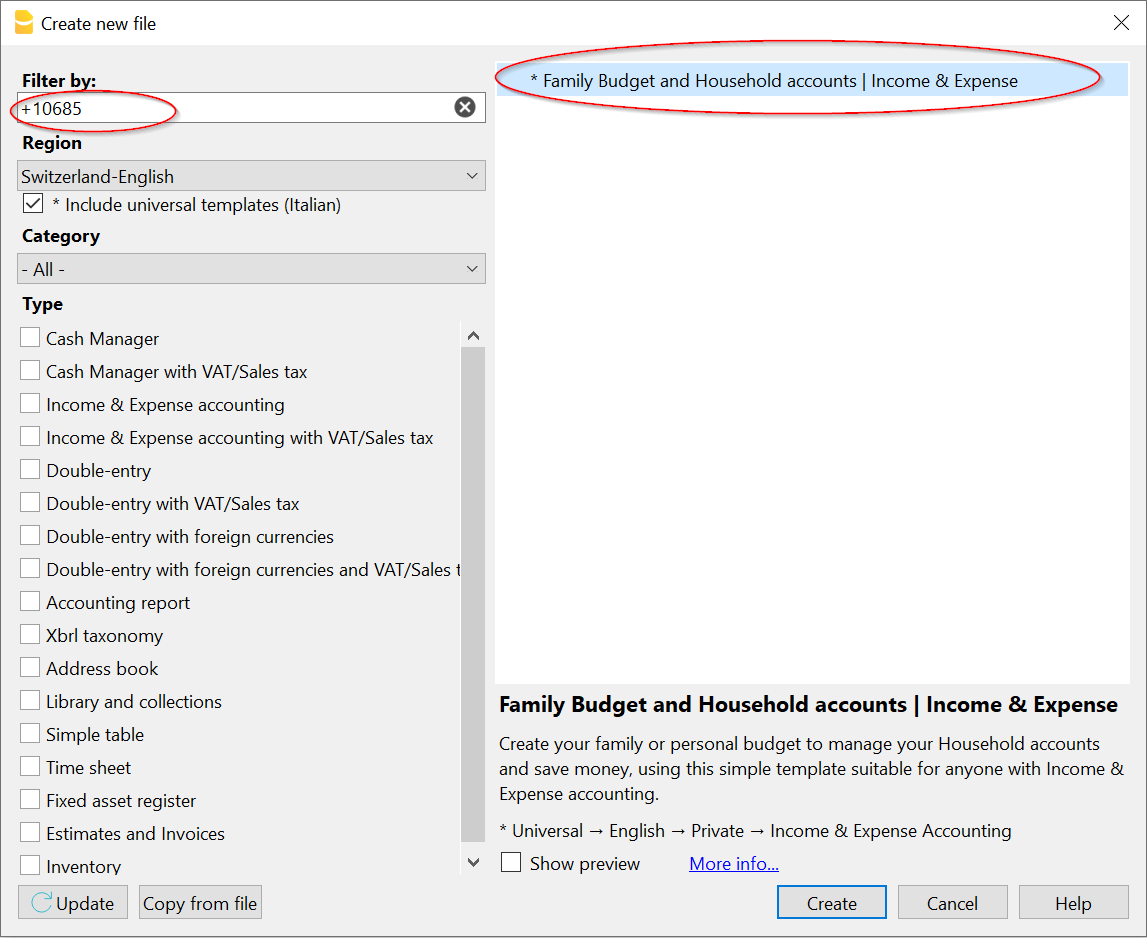
在 Banana财务会计软件中选择一个模板
- 点击文件菜单→新建命令
您便可以看到所有模板的完整列表。选择最适合您的进行编辑。 - 单击创建按钮。
- 将文件以新的名称另存为,保存到您的电脑中。
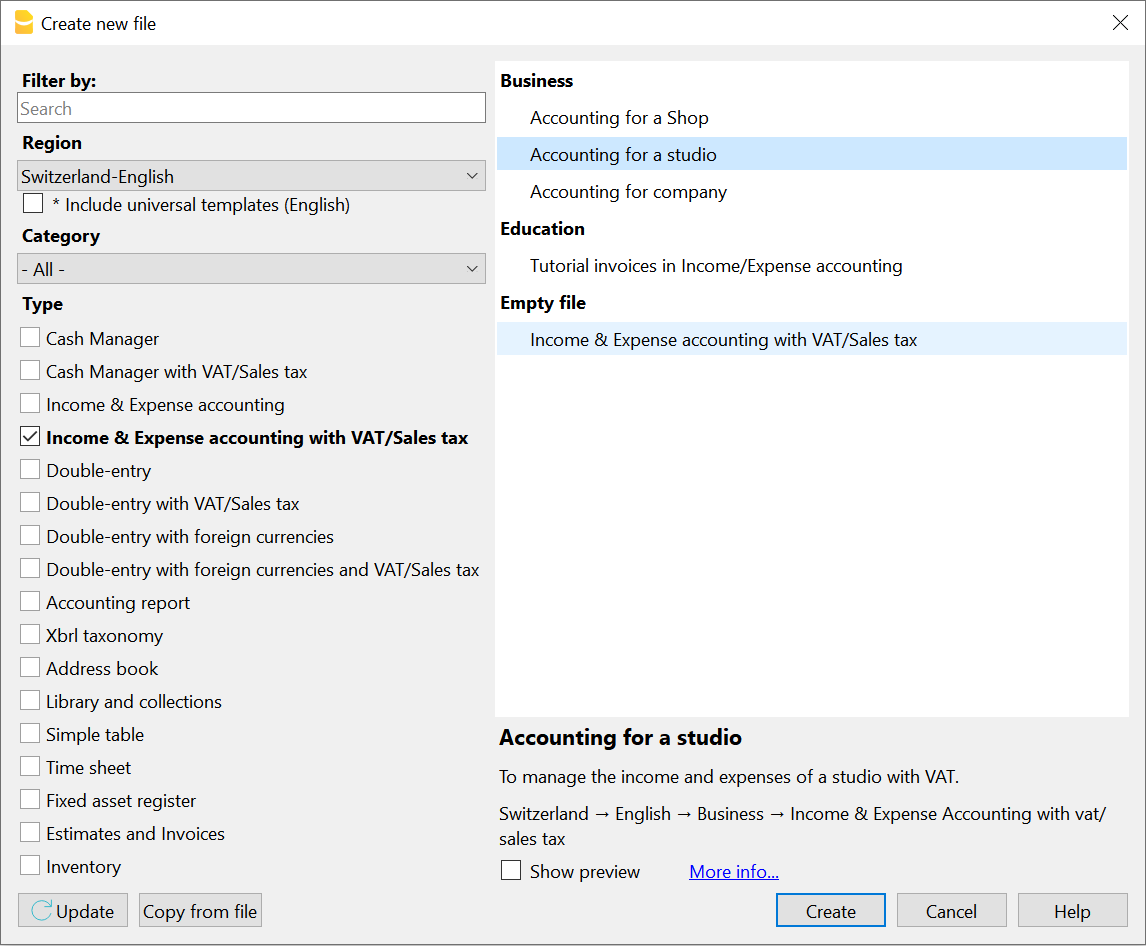
用新名称来另存文件
在您创建及编辑会计账套后,需要为文件命名并另存在您所指定的文件夹中。
我们建议使用您公司的名称作为文件名,并指出会计年份。 例如“ XXX公司-2022.ac2”。
“ .ac2”是Banana财务会计文件的扩展名。
使用Banana财务会计软件做账,可最大限度的保持会计数据的私密性。在保存文件的时候,您可以指定文件夹或磁盘来进行保存。
自定义文件
- 使用公司名称和年份将会计文件保存在电脑上所需的路径中。
- 根据您的需要开始自定义会计文件。
对于复式记账会计
扩展程序
扩展程序是 Banana财务会计+的附加程序功能。
在线目录包含可以直接在软件中安装的扩展程序
在软件中,在扩展程序菜单 → 管理扩展程序...的命令中可以看到扩展程序的列表,或者可以安装新的扩展程序。
扩展程序的类型
取决于其执行的功能,有好几种的 Banana扩展程序。
- 实用型的扩展程序
这些是用于增值税申报、利息计算、打印或数据提取的扩展程序。 - 导入的扩展程序
它们用于将数据从特定格式 (例如账户报表) 转换为Banana财务会计软件的格式。 - 导出的扩展程序
它们允许您将Banana财务会计软件中的数据转化为特定的格式 (如审计文件)。
最后,用户必须指明保存导出数据的文件的名称。 - 报告的扩展程序
用于发票和提醒的式样。
欲了解更详细的信息,请参阅开发人员的页面。
扩展程序的目录
在网站上有几个已经准备好的扩展程序,可以满足不同的需求。.
可以通过设置来过滤您的搜索:
- 您要安装的扩展程序名称。
- 扩展程序的语言。
- 为之开发的国家:
- 全球
它们的用途不是专门针对一个具体国家的 (例如,利息的计算)。 - 其它国家
指的是不包括在列表中的国家。 - 国家
指的是在列表中的国家 (例如,奥地利的增值税打印)。
- 全球
- 不同的类型。
更新扩展程序
软件会自动下载用户已安装的扩展程序的更新。
如果您不希望自动更新扩展程序,必须禁用这个选项:
- 点击扩展程序菜单 → 管理扩展程序...,选择已安装的扩展程序并取消对自动更新选项的勾选。
搜索扩展程序
您还可以通过点击文件菜单内的新建命令, 在程序中搜索及使用模板。
安装扩展程序
点击扩展程序菜单内的管理扩展程序命令。
通过下列命令中,也可以到达管理扩展命令的窗口:
- 导入的扩展程序:操作菜单 → 导入到账套
- 发票式样:报表菜单 → 客户 → 打印发票
- 发票提醒的式样:报表菜单 → 客户 → 打印提示
具体到文件的实用性扩展程序
扩展程序通常可以特定于:
- 一个特定的文件类型 (会计管理, 地址)。
- 一个特定的文件属性。
如果该文件的类型不正确,或者没有必需的文件属性,即使正确安装了扩展程序,该扩展程序的名称也不会显示在扩展程序菜单中。
设置扩展程序
一些扩展名的创建是为了设定设置。这些设置是相对于每个文件而言的,并被相关的扩展所使用。这些设置显示在扩展程序设置的对话框中。
更新扩展程序
一旦安装,只要有新的版本发布,扩展程序就会自动更新。
使用开发版本
在管理扩展程序中,您还可以预览任何可用的开发版本。
更新至最新的Banana财务会计软件版本
首先,请确保已下载Banana财务会计软件的最新版本。
发票风格
发票风格点击扩展程序菜单 → 管理扩展程序命令 → 发票,在其中可以看到可用的样式列表,从中选择安装您所需的。
在Banana+ 中可以使用 Banana 9 中所有的发票样式,以及所有专门为Banana+创建的发票样式,这些样式有更多客制化的可能性。我们向您强烈推荐:
- 面向瑞士所有用户的CH10样式 (英文) (有无二维码的发票均可)
- 为所有来自其它国家的用户提供的UNI11样式
订阅了高级计划的用户还可以创建自己的发票样式 (详见开发者文档)。
自定义发票
在Banana财务会计+ 中,可以通过以下方式完全定制发票的打印:
- 选择一个不同的打印式样。
- 改变一个式样的设置。
- 以不同的方式对发票式样进行编程或创建一个新的式样。
推荐的发票式样
建议选择新的可定制和可编程的式样。
- 适用于瑞士所有用户的CH10发票式样 (无论有无瑞士的二维码)。
- 查看如何定制CH10的式样。
- 适用于国际用户的UN11发票式样 (与CH10相同,但没有二维码)。
改变发票式样的设置
每个式样都有自己的设置页面,可以进行定制。有些发票式样允许您改变字体、颜色,包括或不包括标题。
瑞士CH10式样允许您添加二维码。
显示式样的设置对话框:
- 扩展程序菜单 → 管理扩展程序 → 选择发票的式样,然后点击进行安装。
- 在会计文件中:
- 点击报表菜单 → 客户 → 打印发票。
- 在打印发票的对话框中 → 选择所需的发票版式,然后点击设置的选项。
- 或者从打印预览中点击设置的图标。
- 在预估和发票的应用功能中:
- 点击发票菜单 → 打印发票的命令,然后点击设置的选项。
- 或者从打印预览中点击设置的图标。
商标(Logo)的位置和地址
在设置Logo/商标的页面,您将找到有关如何定位发票抬头的商标和地址的信息。
例如,您可以将商标放在左侧,将地址放在右侧,并更改商标的大小。
Advanced invoice layout customisations
The Invoice Print Layout is an extension of Banana Accounting Plus which programs the printing of invoices.
- It is a program written in Javascript.
- It takes as input a JSON Invoice object which contains all the invoice data.
- It programs the printing of the different elements.
- The formatting and positioning of the elements is done with CSS styles.
- It provides a dialogue for customising the printout, so that even without programming knowledge, the invoice printout can be adapted.
Customising layouts with programming
CH10 and UNI11 layouts can be customised through specific programming. Printouts can be made that modify the layout to a greater or lesser extent. They require knowledge as a CSS programmer or graphic designer.
- How to change the programming of the CSS styles used for the printout
The positioning of the different print elements is done by means of CSS style sheets. Changing the style sheet elements can vary the presentation. - How to program certain print elements in Javascript
You can add or remove elements and change the assignment of styles.
Creating Your Own Print Layouts
Users with advanced knowledge can also create their own print layouts. See developer documentation:
Electronic invoice: export layout
With the layout system, it is also possible to program the invoice data to be exported in a certain format. See:
导入的扩展程序
导入扩展程序是额外的功能,允许您以特定格式导入其它程序导出的数据:
安装导入的扩展程序
为了使用导入的扩展程序,必须首先进行本地安装。
- 点击扩展程序菜单 → 管理扩展程序 → 导入
- 您还可以从导入到账套的命令查看管理扩展程序的对话框。
- 选择您想要使用的扩展程序,并点击安装。
一旦安装了扩展程序,它将显示在:
自定义扩展程序
安装扩展程序后,您可以通过设置按钮访问自定义的功能。
导入银行对账单
最常见的用途是将银行对账单导入会计账套。
- 点击操作菜单 → 导入到账套的命令。
- 从下拉菜单中,选择导入发生业务。
- 选择用于导入的扩展程序
- 如果尚未安装,请先安装扩展程序。
创建和更新CSV导入扩展程序
如果从您的银行或其它组织导入数据的合适格式尚不存在,您可以要求我们的开发人员创建一个导入的扩展程序。也请参见以下英文的页面。
为了创建或更新特定文件格式的导入扩展程序,需要执行以下步骤:
- 我们的程序员需要:
- 要导入的数据的示例文件,有一些动向 (没有个人的私人信息)。
- 生成文件的银行、组织或软件的确切详细信息。
- 关于所含数据类型的信息 (银行报表、发票数据、工资等)。
- 关于文件内容类型的解释,或由银行或软件制造商提供的规格链接。
- 文件生成的日期。
- 对于从其它程序导出的文件,具有无法立即理解的数据结构,应解释或举例说明应在账户中生成的发生业务。
- 对请求的评估:
- 这将取决于开发的复杂性以及其他用户是否对该导入感兴趣。
- 可能需要分摊开发或升级成本。
- 我们将考虑是否继续创建文件,如果是:
- 我们将使用发送给我们的示例文件作为参考和测试,其中内容将公开可用。
- 除非另有约定,本扩展程序将按照开源方式进行开发。
- 该扩展程序通常可供高级计划用户安装。
- 不能保证扩展程序会一直保持最新的状态。
银行经常在不事先通知的情况下更改文件格式。 - 已更新的现有的扩展程序:
- 随着时间的推移,.csv 文件的格式会发生变化或修改,因此相应的导入过滤器也必须更新。
- 旧的导入过滤器 (Banana 9 或更早版本) 将在更新后提供给拥有 Banana财务会计+ 高级计划的用户。
- 一些旧过滤器也可能与 Banana财务会计+ 一起正常工作。 在这些情况下,它们可以继续使用而不会出现任何问题,直到需要更新。
- 当用户告诉我们当前版本不再正常工作时,更新过滤器就完成了。
- 旧版本仍然可用,但不再更新或更正。
开发您自己的导入扩展程序
如果您是程序员,您可以创建符合您具体需求的导入扩展程序。详情见:
Developing a New Import Extensions
Programming a new import extensions
GPT Import Extensions Assistants
Extensions GPTs allow you to expand Banana Accounting’s functionality. We have multiple GPTs to help you with this area:
- GPT - Banana Accounting - CSV Bank Import Extension Assistant
This assistant generates extensions for importing bank transactions from CSV files.
It uses the Parameterizable Extension template and automatically adapts the JavaScript parameters to match the structure of the CSV files you upload in chat. Perfect when you need to import bank transactions from a CSV file with a custom extension.
Developers
If you are a programmer you can create your import extensions. Please visit:
The possibility of creating your own extensions is only available with the Advanced plan of Banana Accounting Plus.
Request for a new or update Import extensions
If a suitable format for importing data from your bank or other organization does not already exist or is not working, you can ask our developers to create an import extension.
See:
In order to create or update an import extension for a specific file format these steps are necessary:
- Our programmers need to receive:
- An example file of the data to be imported, with some transactions (without sensitive personal information).
- The exact details of the bank, organization or software that generated the file.
- Information on the type of data contained (bank statement, invoice data, salaries, etc.),
- Explanations on the file content type, links to specifications made available by the bank or software producer.
- The date on which the file was generated.
- For files exported from other programs, with data structures that are not immediately understandable, an explanation or examples of the transactions that should be generated in the accounts.
- Evaluation of the request:
- It will depend on the complexity of the development and whether the import may be of interest to other users.
- A share of the development or upgrade costs may be required.
- We will consider whether to proceed with the creation of the file and if so:
- We will use the example file sent to us as a reference and for testing, whereby the content will be publicly available.
- Unless otherwise agreed, the extension will be developed according to the open source method.
- The extension will generally be available for installation to Advanced Plan users.
- There is no guarantee that the extension will be kept constantly up-to-date.
Banks often change their file format without giving prior notice. - Update existing extensions:
- Over time, the formats of .csv files are changed or modified and consequently the corresponding import filters must also be updated.
- The old import filters (Banana 9 or earlier) will be made available to Banana Plus users with the Advanced plan after the update.
- It is possible that some old filters will also work correctly with Banana Plus. In these cases, they can continue to be used without any problems until they need to be updated.
- Updating a filter is done when users tell us that the current version no longer works correctly.
- Old versions remain available but are no longer updated or corrected.
Toubleshooting Import Extension
使用条款及Banana扩展程序的开发
Banana扩展程序及模板的使用条款
Banana扩展程序,插件及模板是我们免费为您提供的资源。
随着社区的发展,Banana.ch公司正在为大众提供大量免费的工具,并打算对其进行进一步的改进。
用户也做出了贡献,并且仍在为Banana扩展程序和模板的创建和改进做出贡献。
参与开发,测试和改进的用户越多,我们提供给所有客户的优惠就越高。
对于任何材料和Banana扩展程序的使用,均适用于 Banana.ch SA公司的法律声明及用户许可协议,并且从用户访问我们的网站,文档或下载及使用任何资料之时起,均被用户接受。
社区发展
Banana 扩展程序,模板和任何其它材料的开发通过社区方法和开放资源的模式进行。 所有开发的材料都免费提供给所有人,适用于github.com/BananaAccounting上的特定项目。
通常来说,适用于Apache 2.0许可证,但某些Banana扩展程序也使用受特定许可证约束的文库。用户必须遵守所有适用的许可证。
除其它事项外,Apache 2.0还指出:
- 出于任何目的使用和经销软件是可能的
- 自由编辑和修改软件是可能的
- 不能保证该应用程序将按预期运行
- 对于开发人员,软件的使用方式,特定用途的可靠性,任何错误或不准确性,开发商不承担任何责任
责任限制是必不可少的,因为其可使用户无需担心责任即可做出自己的贡献。参与文档开发和改进的人可尽力而为,但不能确保该解决方案适合于特定的用途或环境。此外,法规经常更改,因此解决方案可能会过时且不适用。
因此,所提供的材料适用于愿意直接核对,或与会计人员核对的人群,无论提供的描述和文档如何,所提供的材料都适合他们。
进行新开发的要求
Banana.ch公司有一个专门的分支部门,专注于协助,咨询支持以及对新的Banana扩展程序和模板的开发。
请与我们联系,说明您的要求。
- 请清楚的写出您的需求:
- 所需的结果。
如果是打印输出,请向我们提供Excel或Word的示例。 - 需被打印的,含数据的文件 (最好是虚构和测试数据)。
- 所需的结果。
- 对于研发的需求:
- 通常,估算是基于所需的开发时间。
如果该应用程序可能对多个用户有用,Banana.ch公司愿意部分免费提供这些研发。 - 适用于我们的条款与条件,以及用户许可协议。
- 除非另有协议,否则将根据Apache 2.0许可协议进行开发并使其可用 (请参阅Wikipedia的说明)。
- 研发的解决方案可提供给所有社区。
- 通常,估算是基于所需的开发时间。
- 除非另有特别说明,否则我们将假设您使用的是最新版本的Banana财务会计软件。
导入扩展程序的开发
如果从您的银行或其它组织导入数据的合适格式尚不存在,可以询问我们的开发人员是否可以创建一个导入的扩展程序。
因为我们可以为一个特定的文件格式创建或更新一个导入的扩展程序。
- 对请求进行评估:
- 取决于开发的复杂性,以及其他用户是否会对其有兴趣。
- 可能需要分担开发或更新的费用。
- 为了评估该请求,您需要发送:
- 拥有动向的已更新的示例文件 (不含个人的隐私信息)。
- 产生该文件的银行或相关组织的细节。
- 生成该文件的日期。
-
- 我们将评估是否继续创建该文件,如果是的话:
- 我们将使用发送给我们的示例文件作为参考并进行测试,据此内容将被公开。
- 除非另有约定,该扩展程序将按照开放源码的方法进行开发。
- 该扩展程序一般将提供给购买了高级计划的用户进行安装。
- 我们不保证该扩展程序会不断地更新。
银行会经常改变格式而不给予任何通知。
对第三方开发商的支持
Banana.ch SA公司支持共享开发:
- 免费协助
- 免费开发许可证
- 可能的财务支持
有兴趣启动项目的开发人员请联系Banana.ch,提交详细的项目概念。
Banana Accounting+ Community
The Banana Accounting Plus Community offers experienced users or industry professionals the opportunity to share their own templates and extensions on the Banana Template Store, which are also visible directly within the Banana software.
Visibility for those who share
Offering content to the Banana Community allows you to gain immediate visibility:
You showcase your experience in using Banana Accounting
You enhance the value of your accounting knowledge in a professional context, establishing yourself as an industry expert
You gain recognition for the concrete help provided to other users.
The content of the Template Store is also visible within Banana Accounting Plus and to the tens of thousands of users who use it every day. You can gain additional recognition by joining the partner program.
Become a Banana Partner
When you contribute to the Community, you can also apply to become a Banana Partner. Find out how the partner program works!
Who participates in the Community
- Teachers who share study materials and courses with students.
- Accountants and fiduciaries who provide a specific template to collaborate with clients using Banana.
- Experts in a specific field who want to gain visibility in a niche context.
- Creators of templates for specific uses who want to share their ideas.
- Developers who have added features to Banana and want to gain visibility.
Over more than 35 years of activity, we have learned that the best ideas often come from those who use our software every day. Do you have an idea for a new use of Banana? Contact us by email and we will be happy to help you make it a reality and give it the right visibility.
How to participate
At the moment, the Community is managed manually so that it can remain sufficiently flexible to better understand the needs of all users.
- Do you have an idea to submit to us? Contact us by email.
- Prepare a new template by following our guidelines. We will be happy to provide the support you need.
- Prepare a description and/or instructions for the files you intend to share in the Community.
- Write us an email and attach the files and descriptions.
- After your request is approved, you will receive confirmation that it has been published.
Community Templates
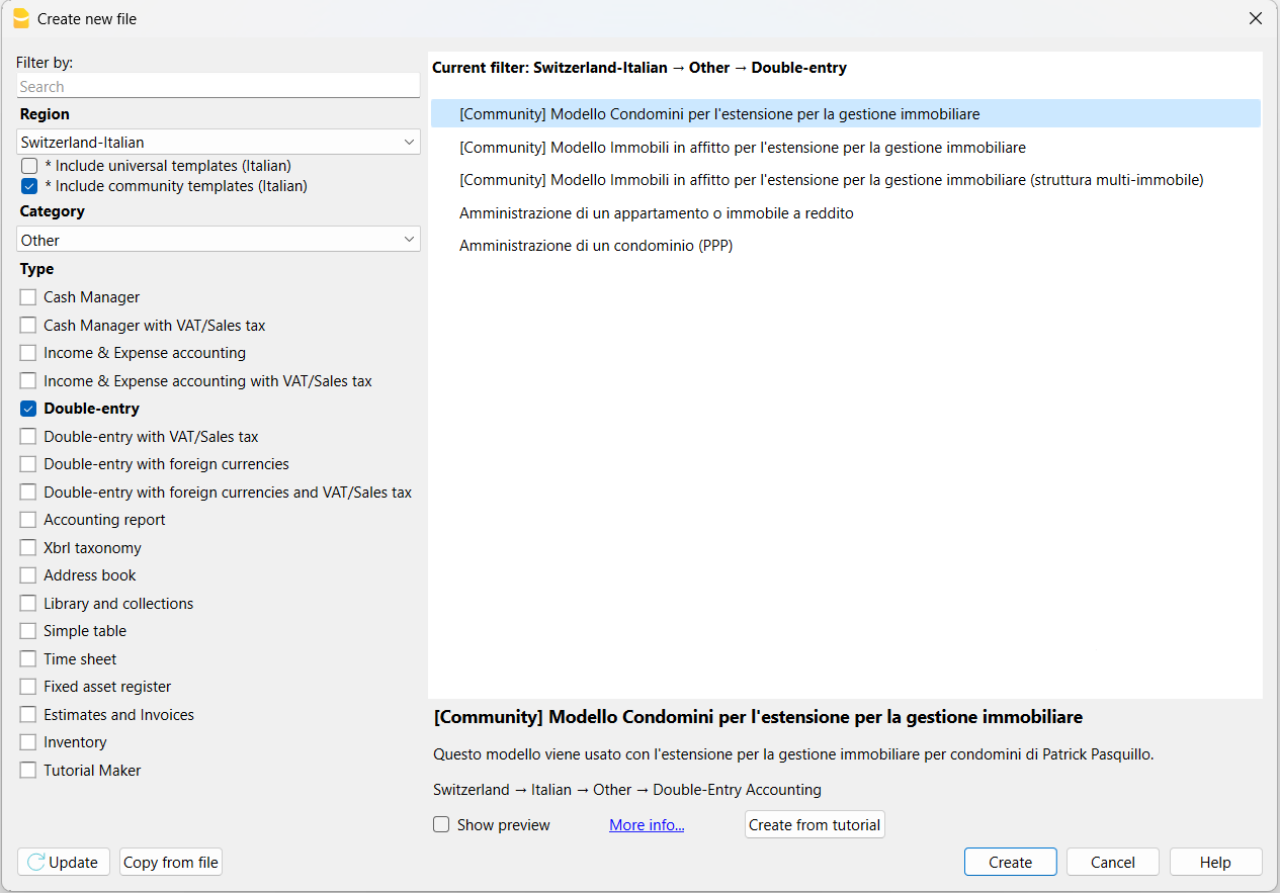
The templates made available in the Community are included in the Banana Template Store and are also visible in the Banana Accounting Plus program from the File > New menu. To see them, make sure you have selected the Include community templates option.
Community Extensions
You can find all the information on the page share your extensions (in English).
How to prepare a template for the Community
Follow the guidelines for preparing templates and, if needed, ask for our support.
When everything is ready, make sure to also send us your authorization to publish the content, by email. See a sample at the bottom of the page.
Guidelines for preparing templates
- Remove initial balances from the double-entry template or the income and expenses template.
- Include sample transactions.
- Anonymize customer and supplier accounts (Customer One, Customer Two, …, Supplier One, Supplier Two, ...).
- Include fictional references in the template headers (e.g., Company SA) and for bank accounts.
- Describe the template from the point of view of a non-expert and, if necessary, instruct the user on how to use it.
- Send us an email and attach the .ac2 file along with the description and/or instructions on how to use it.
We help you create your template
Whatever your idea for a template, we will help you give it the right visibility. We are happy to dedicate our time and resources to assist you in creating and/or preparing the template to publish in the Community. Request our support by email.
Template license
The template can be shared under the Creative Commons 1.0 Universal license, Creative Commons BY 4.0, or Creative Commons BY-SA 4.0.
These types of licenses are used for non-software content and are necessary to ensure the template can be customized and used by other users. They also allow it to be made available to all users online.
- Creative Commons 1.0 Universal: you waive copyright on the template you created and dedicate it to the public domain worldwide.
- Creative Commons BY 4.0: makes the template available with proper attribution, providing a link to the license and indicating if changes were made.
- Creative Commons BY-SA 4.0: makes the template available with proper attribution, providing a link to the license and indicating if changes were made. Any modifications must be shared under the same original license.
Requirements for publication
The only requirement is to have a valid subscription to Banana Accounting Plus. If you also want to become a Banana Partner, you need the Advanced plan.
Sample authorization for publication
Here is the sample email authorization required to publish your content:
"Dear Banana team,
I authorize the sharing of my content under the Creative Commons 1.0 Universal license and the terms and conditions of the Banana Accounting Plus Community.
I attach the necessary files and request their publication.
Best regards."
Sharing extensions with the Community
Follow our guidelines to prepare extensions and don't hesitate to contact us for further support if necessary.
Once you are ready, in addition to the content, please submit by e-mail your authorisation to publish. Please refer to the e-mail template at the bottom of this page required for publication purposes.
What are the extensions
These are extensions of the program's functionalities, for reporting, calculating, exporting, importing, establishing bills and reminders and other. Take a closer look at the Extensions menu.
Extension sharing guidelines
Please make sure that you have:
- Entered the extension attributes for the necessary informations of your extension.
- Inserted descriptive comments within the code.
- Formatted the code visualization.
- Described the extension and its functionality by providing all necessary instructions for its use. Quoted the links to documentation if necessary.
- Sent an e-mail and attached the Javascript files, qrc file, manifest.json file, sbaa extension and the documentation into a zip file.
If your extension only works with a specific template, please refer also to page how to prepare template for sharing. Please also include your template in the zip file.
Helping you share your extensions
Whatever your extension idea is, we help you maximise its visibility. If you wish to participate and publish in our Community, you can choose to have our full support and resources helping you create and/or prepare your extension. Request our support by e-mail.
Extension license
The extensions can be shared with the MIT license, Apache Licence 2.0, GNU GPL v3.0, GNU LGPL v3.0 o GNU AGPL v3.0.
The conditions of this licences require the retention of the copyright and the notice of the licence used.
- MIT License: A short and simple permissive license with conditions only requiring preservation of copyright and license notices. Licensed works, modifications, and larger works may be distributed under different terms and without source code.
- Apache License 2.0: A permissive license whose main conditions require preservation of copyright and license notices. Contributors provide an express grant of patent rights. Licensed works, modifications, and larger works may be distributed under different terms and without source code.
- GNU GPL v3.0: Permissions of this strong copyleft license are conditioned on making available complete source code of licensed works and modifications, which include larger works using a licensed work, under the same license. Copyright and license notices must be preserved. Contributors provide an express grant of patent rights.
- GNU LGPL v3.0: Permissions of this copyleft license are conditioned on making available complete source code of licensed works and modifications under the same license or the GNU GPLv3. Copyright and license notices must be preserved. Contributors provide an express grant of patent rights. However, a larger work using the licensed work through interfaces provided by the licensed work may be distributed under different terms and without source code for the larger work.
- GNU AGPL v3.0: Permissions of this strongest copyleft license are conditioned on making available complete source code of licensed works and modifications, which include larger works using a licensed work, under the same license. Copyright and license notices must be preserved. Contributors provide an express grant of patent rights. When a modified version is used to provide a service over a network, the complete source code of the modified version must be made available.
Publication Requirements
The only requirement is to have a valid subscription to Banana Accounting Plus.
Published extensions on Banana
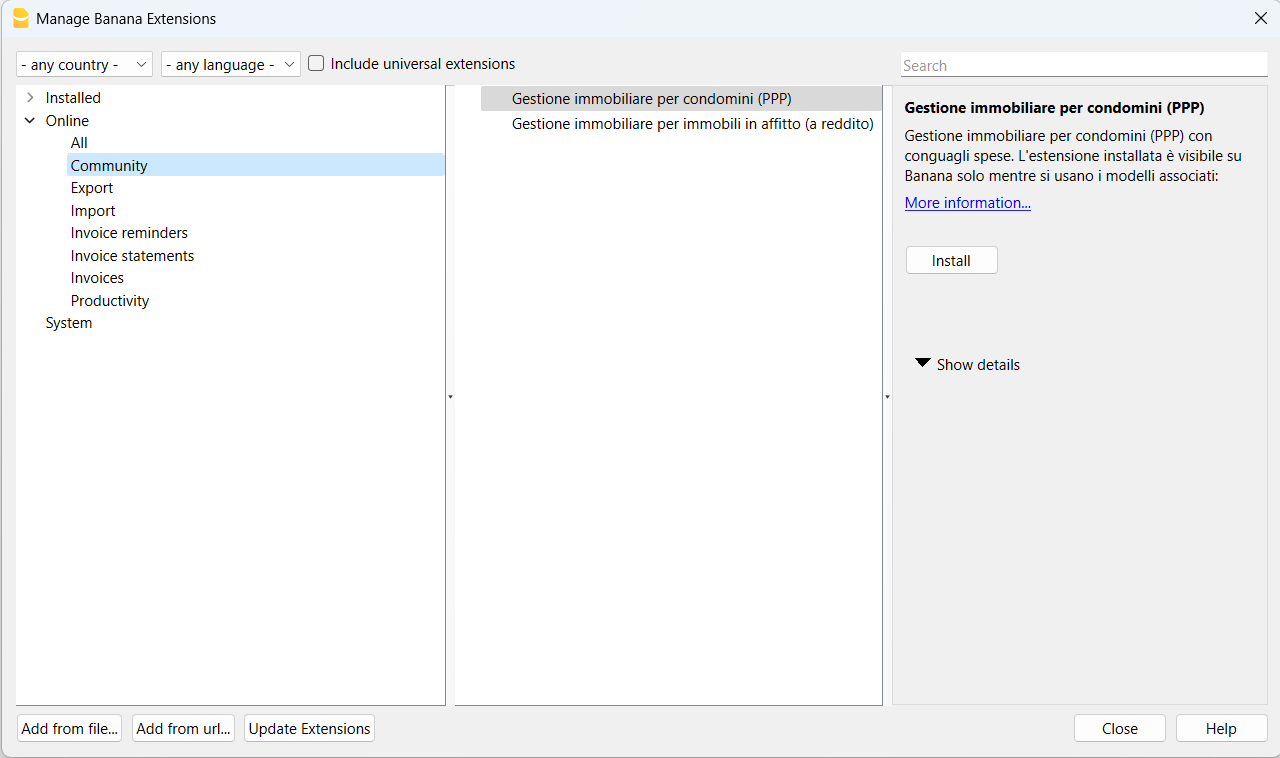
The available Community extensions will be visible from the menu Extensions > Manage Extensions....
In the window that appears, select Online and then the section Community.
Authorisation to publish content
Here is the e-mail permission template needed to publish your content:
"Hello,
I herewith authorise the sharing of my content according to the MIT license and terms and conditions provided by the Banana Accounting Plus Community.
I attach the necessary files requesting their publication.
Best Regards."