Transactions| Double entry accounting multicurrency
Types of Multi-Currency Transactions
With the multi-currency accounting application, it is also possible to record transactions involving accounts in foreign currencies. In the Transactions table, in addition to transactions in the base currency, foreign currency transactions are also entered: all the transaction elements are specified, including the amount and the account in foreign currency, and the exchange rate applied to the transaction. The amount in the base currency is calculated automatically based on the entered exchange rate.
All amounts, both in base currency and foreign currency, must always be entered in the 'Amount' column.
For information regarding exchange rates, multipliers, and historical rates, refer to the page Exchange rates table.

Note: in the transaction examples, the base currency is Euro.
Each transaction has two accounts (debit and credit). The program allows only one foreign currency per transaction row. The following direct combinations are possible:
- Transaction between two base currency accounts with amount in base currency (in the image, transaction no. 1 in column Doc 1)
The currency of both debit and credit accounts is the base currency. - Transaction between two base currency accounts with amount in foreign currency (Doc 2)
The debit and credit accounts are in base currency, but the currency code (currency column) and amount entered in the transaction row are in a foreign currency.
To enter the foreign currency, manually change the default base currency code.
This is used when traveling abroad and exchanging money to pay in local currency. In this case, there is no specific account in the accounting.
For balance calculation (as both are in base currency), only the base currency amount column is used. - Transaction between a foreign currency account and a base currency account (Doc 3)
The currency must match the foreign currency account.
To calculate the foreign currency account balance, the program uses the foreign currency amount, and for the base currency balance, it uses the base currency amount. - Transaction between two accounts with the same foreign currency (Doc 4)
The currency must match the accounts used (USD1 and USD2). To update the exchange rate, position on the Currency cell and press F6. - Transaction with two accounts that have different foreign currencies (Doc 5)
For example, the bank performs a currency exchange between two foreign currencies.
In this case, the transaction must be entered in two rows (with the same date).
The base currency amount must be identical. It's advisable to use a realistic exchange rate to avoid large exchange rate differences.
To ensure that the base currency amounts on both rows are the same, manually enter the base currency amount and let the program calculate the exchange rate. - Exchange rate difference transactions (Doc 6)
The purpose of this transaction is to realign the base currency balance with the foreign currency equivalent at the current exchange rate.
Only the base currency amount related to the exchange difference is recorded on the account.
These are automatically generated with the Calculate exchange rate differences command.- For exchange gains, the program automatically enters the revalued account as debit and the exchange gains account as credit, taken from File Properties, Basic Data, or from the account indicated in the Exchange differences column of the Other view (in the Accounts table) – defined for one or more specific accounts.
- For losses, the program automatically enters the revalued account as credit and the exchange losses account as debit, taken from File Properties, Basic Data (menu File), or from the account indicated in the Exchange differences column of the Other view (defined for one or more specific accounts).
- The foreign currency amount is left blank
- The currency code is the base currency
- In the base currency amount column, the revaluation amount (gain or loss) is indicated
Setting the Exchange Rate
The accountant decides which exchange rate to use for each transaction. Generally, the following rules apply:
- For regular operations, use the exchange rate of the day.
- For currency buying and selling operations, use the rates provided by the exchange office or the bank.
In the program, first enter the amount in foreign currency and then the amount in base currency; the program will calculate the exchange rate. The rate provided by the bank may be slightly different as banks often round rates to a few decimal places. - If you carry out multiple transactions at the same rate, it is helpful to update the exchange rate in the Exchange Rates table so that the program can use it automatically.
- For foreign operations subject to VAT, the national authority may prescribe a standard exchange rate. In this case, enter this rate in the Exchange Rate column of the transaction.
- For the purchase of real estate or investments, use the historical exchange rate. In this case, you need to create a currency code (e.g. USD2) with the historical rate in the Exchange Rates table, which will not fluctuate.
You can create currency codes for all desired historical rates.
Transactions with VAT
In a multi-currency accounting with VAT, to correctly record transactions without error messages, it is essential that the VAT account and the account from which VAT is deducted are in base currency. It is not possible to apply a VAT code to an account in foreign currency.
To record transactions with VAT that involve foreign currency accounts as counterparties, you must use two transaction rows:
- First, record the purchase amount on an intermediate account in base currency and apply the appropriate VAT code.
The base currency amount must be calculated using the exchange rate in accordance with tax authority regulations. - In a second row, clear the intermediate account and use the foreign currency account as the counterparty.
The amount used for this transaction, both in base and foreign currency, must be net of VAT.
You must use the same exchange rate as in the previous transaction.
In the example, the base currency is EUR. A domestic purchase is assumed, but payment is made from a foreign currency account (USD).

Transactions with VAT and Foreign Currency
In transactions involving foreign currency accounts, VAT can be recorded using the gross amount (Amount Type 0, VAT included).
If net values are entered (Amount Type 1, VAT excluded), the program displays an error because calculating the gross value would often be incorrect due to rounding differences in VAT and exchange rate.
In these cases, it is recommended to enter the gross amount. See also Explanation about the error.
Automation During Entry of Multi-Currency Transactions
When entering a new transaction, the data in the previously mentioned columns must be completed.
If certain values in the transaction row are changed, the program completes the transaction with default values. If these values do not meet your needs, they must be modified directly in the transaction row.
Modifying the values in the Exchange Rates table has no effect on transactions already entered. So, if you change the exchange rate in the Exchange Rates table, it will not affect existing transactions.
- When entering the foreign currency amount and either the Debit or Credit account is already filled, and there are no other values, the program behaves as follows:
- the currency code is taken from the account used, giving priority to the non-base currency account;
- the exchange rate is taken from the Exchange Rates table based on the following logic:
- the historical rate with the date equal to or earlier than the transaction date is used
- if no historical rate is found, the rate from the exchange rates row without a date is used
- the multiplier defined in the Exchange Rates table is used, or 1 if it's the base currency.
- the base currency amount is calculated.
- When the foreign currency amount is modified (and other values already exist), the program:
- recalculates the base currency amount using the existing exchange rate
- If the currency code is modified, the program:
- retrieves the exchange rate and multiplier and recalculates the base currency amount (as above).
- If the exchange rate is modified, the program:
- calculates the base currency amount using the entered exchange rate.
- If the base currency amount is modified, the program:
- recalculates the exchange rate.
Info Window
In the info window, the program shows:
- Any differences between the total debit and total credit in base currency.
- Information about using the F6 key.
For the accounts related to the transaction row you are on, the program always displays the following in the Info window:
- account number
- account description
- transaction amount in base currency
- current account balance in base currency
- account currency code
- transaction amount in account currency (if not in base currency)
- current account balance in account currency (if not in base currency)
Opening Balance Transactions
For multi-currency accounting, when entering opening balances in the Accounts table, the program converts the amount into base currency using the opening exchange rate defined in the Exchange Rates table, Opening Exchange Rate column.
To use historical rates for opening balances, you can create another currency code or create entries in the Transactions table with the opening balances. This way, different exchange rates can be used for the accounts.
- Enter a transaction for each account with an opening balance (Assets and Liabilities), indicating the start date of the accounting and the debit or credit account.
- In the DocType column, enter the value "01" to indicate it is an opening balance.
- In Banana Accounting's calculations and printouts, this amount will be treated as an opening balance.
- However, the transaction does not update the opening balance column in the Accounts table.
Points to consider when using opening transactions:
- To avoid revaluation of accounts at the current exchange rate, enter "0;0" in the Exchange Rate Difference Accounts column in the Accounts table for accounts that should not be revalued.
- The program allows entering opening balances either in the Accounts table or as opening transactions (Assets and Liabilities) in the Transactions table.
In both cases, the amounts are included in the calculations, and if it’s the same account, they are summed.
It is not recommended to use both methods simultaneously to avoid errors and hard-to-find differences. - Opening transactions must be entered manually.
Any debit and credit differences will be shown as a difference in the transactions.
Useful Tips
- By pressing the F6 key while on the Amount column, the program rewrites all values using the logic explained above, as if no values existed. This function is useful when changing the Debit or Credit account.
- If there is a transaction with a single base currency account (in compound transactions) and the Currency column has been changed to a foreign currency, to update the exchange rate, position on the Currency cell and press F6.
- Smart fill for the Exchange Rates column
The program suggests various rates, taking them from the Exchange Rates table or from rates previously used in transactions.
Importing Data from Previous Versions
In version 4 or earlier, the absence of a currency code in the Transactions table was interpreted as base currency.
In version 7, each transaction must have its own currency code. Therefore, when upgrading from version 4 to version 7, you must complete the transactions that lack a currency code. To do this, you need to add a new Currency column to the Transactions table by executing the Arrange Columns command from the Data menu.
Wisselkoersafwijkingen
Transacties aanmaken voor wisselkoersverschillen
Zie voor de theorie pagina Herwaarderingen en wisselkoersverschillen (Engelstalig) .
- De wisselkoersverschillen transacties zijn voor het in evenwicht brengen van het saldo van de vreemde valuta rekening met het saldo dat berekend is in basisvaluta. In essentie is het een kwestie van aanpassing van de bedragen in de basisvaluta rekening houdend met wisselkoersverlies of -winst als gevolg van variatie in de wisselkoersen.
- Als deze wisselkoersverschillen niet worden geboekt kunnen er verschillen in de beginsaldi van het volgende jaar ontstaan.
- De wisselkoersverschillen kunnen worden berekend aan het eind van de jaarafsluiting of gedurende de boekhoudperiode (bijvoorbeeld aan het eind van een kwartaal). In dit geval kunnen de historische wisselkoersen nuttig zijn omdat u daarmee verschillende wisselkoersen kunt hebben op specifieke data.
- Het programma berekent het wisselkoersverschil op basis van de saldi op de gespecificeerde datum. Het is daardoor mogelijk het wisselkoersverschil te berekenen op een specifieke datum, zelfs als u boekingen na die datum gedaan heeft.
- Zie voor meer uitleg de pagina Wisselkoersafwijkingen niet geboekt.
- Wisselkoersverschillen worden niet berekent op de rekeningen die tot de winst en verliesrekening behoren.
Wisselkoerswinsten/-verliezen, die voortvloeien uit wisselkoersverschillen, zijn financiële en geen exploitatieposten en worden derhalve niet opgenomen in de bepaling van het bedrijfsresultaat of de winst- en verliesrekening.
Dialoogvenster Transactie aanmaken voor wisselkoersafwijking...
Het commando Transactie aanmaken voor wisselkoersafwijking... van het menu Acties berekent de herwaarderingen voor vreemde valuta rekeningen.
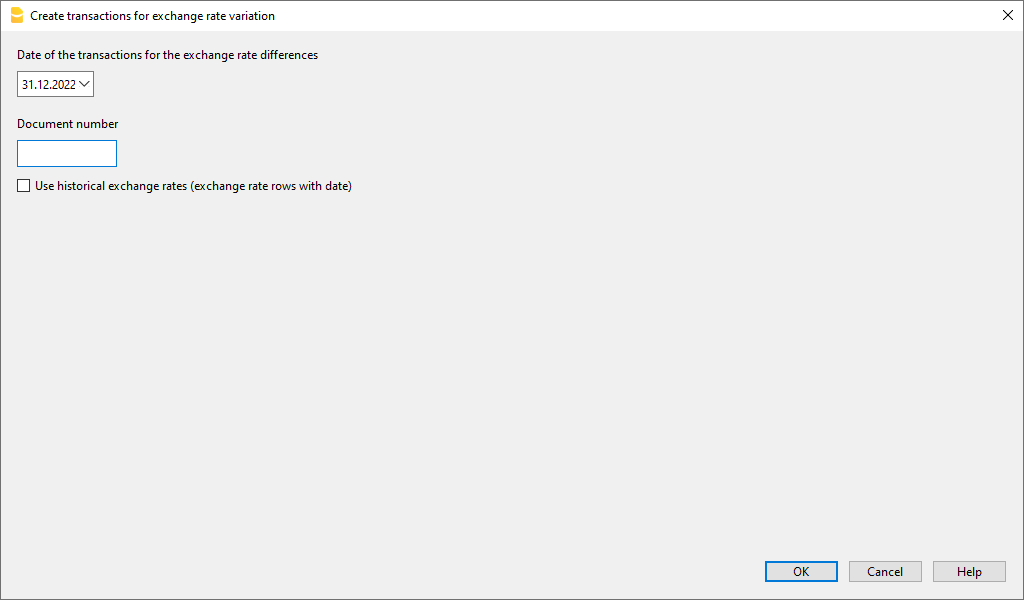
Datum van de transacties voor de wisselkoersafwijkingen
Het programma is in staat het wisselkoersverschil te berekenen op een datum zelfs als er boekingen na die datum zijn.
- Voer de datum in die uw wisselkoersafwijkingen transacties moeten hebben.
- Het programma stelt de einddatum van de maand voor waarin de laatste transactie is ingevoerd.
- Als er transacties zijn voor wisselkoersafwijkingen met dezelfde datum vraagt het programma of deze vervangen moeten worden. Het programma beschouwt de transacties voor wisselkoersafwijkingen als bestaand als deze dezelfde datum, doc, beschrijving, rekenigen en valuta hebben en als er geen bedrag staat in de rekening valuta.
Documentnummer
Voer het documentnummer in dat uw wisselkoersafwijking transacties moeten hebben.
Historische wisselkoersen gebruiken (wisselkoers rijen met datum)
- Gebruik als deze optie niet geactiveerd is
- Als er in uw wisselkoerstabel geen historische wisselkoersen (wisselkoersen met een datum) zijn is deze optie niet geactiveerd.
- Het programma gebruikt de wisselkoers van de rijen zonder datum in uw wisselkoerstabel.
- Als u historische wisselkoersen gebruikt voor de jaarafsluiting moet u erop letten dat de gebruikte wisselkoers dezelfde is als de huidige.
- Gebruik als deze optie geactiveerd is
- Het programma geeft de datum van de wisselkoers, gevonden in de wisselkoerstabel, die gebruikt wordt om het wisselkoersverschil te berekenen.
Dit wordt de wisselkoers met een datum gelijk aan of eerder dan de aangegeven datum. - We raden aan deze optie niet te activeren bij het berekenen van wisselkoersverschillen bij de jaarafsluiting.
- Bij het boeken van wisselkoersverschillen bij de jaarafsluiting moet de historische wisselkoers hetzelfde zijn als de huidige wisselkoers, anders krijgt u een foutmelding dat de wisselkoersverschillen niet bere
- Het programma geeft de datum van de wisselkoers, gevonden in de wisselkoerstabel, die gebruikt wordt om het wisselkoersverschil te berekenen.
Waardes die gebruikt worden om de transacties aan te maken
Voor meer informatie verwijzen we naar onze pagina Vreemde valuta transacties.
Bedrag van de transactie
- Transacties voor de wisselkoersafwijkingen worden alleen aangemaakt voor de rekeningen in vreemde valuta die een afwijkend saldo hebben in basisvaluta vergeleken met het berekende saldo op een specifieke datum.
- Voor het bedrag in basisvaluta wordt het verschil tussen rekeningsaldo in basisvaluta en het rekeningsaldo in vreemde valuta, omgerekend naar basisvaluta, gebruikt.
Rekeningsaldo
Voor de berekening van de wisselkoersafwijkingen worden de saldi in de rekeningvaluta en in basisvaluta, op de gespecificeerde datum, gebruikt.
Wisselkoerswinst en wisselkoersverlies rekeningen
Als wisselkoerswinst en -verlies rekeningen worden gebruikt, in de volgende volgorde:
- De rekeningen ingevoerd in de specifieke kolom van het rekeningschema met vreemde valuta.
- De wisselkoers winst & verlies rekeningen aangegeven in de Bestands- en boekhoudingseigenschappen.
Positie van de ingevoerde rijen
Wanneer u zich in de Transactietabel bevindt terwijl u dit commando uitvoert worden de rijen ingevoegd op de positie van de cursor.
Anders worden ze ingevoegd aan het eind van de transactietabel of op de positie van bestaande transacties in het geval dat ze deze vervangen.
Voordat u het commando gebruikt
- Zorg ervoor dat de Wisselkoers winst en verlies rekening worden aangegeven via Bestands- en boekhoudingseigenschappen... van het menu Bestand, sectie Vreemde Valuta. Het is ook mogelijk dezelfde rekening voor zowel wisselkoers winsten als wisselkoers verliezen aan te geven.
- Zorg ervoor dat de rekeningen in vreemde valuta worden bijgewerkt en dat de saldi in vreemde valuta van deze rekeningen (bijvoorbeeld bankrekeningen) overeenkomen met de saldi aangegeven door de bank.
- Werk de huidige wisselkoersen van de Wisselkoerstabel bij.
U moet de slotkoersen of die van een periode-einde aangeven in de rijen zonder een datum in de Wisselkoers kolom (verander niet de begin wisselkoers in de K.Opening kolom). Om de Wisselkoersafwijkingen te berekenen gebruikt het programma de wisselkoersen van de rijen zonder een datum. Als deze laatste er niet zijn geeft het programma een foutmelding.
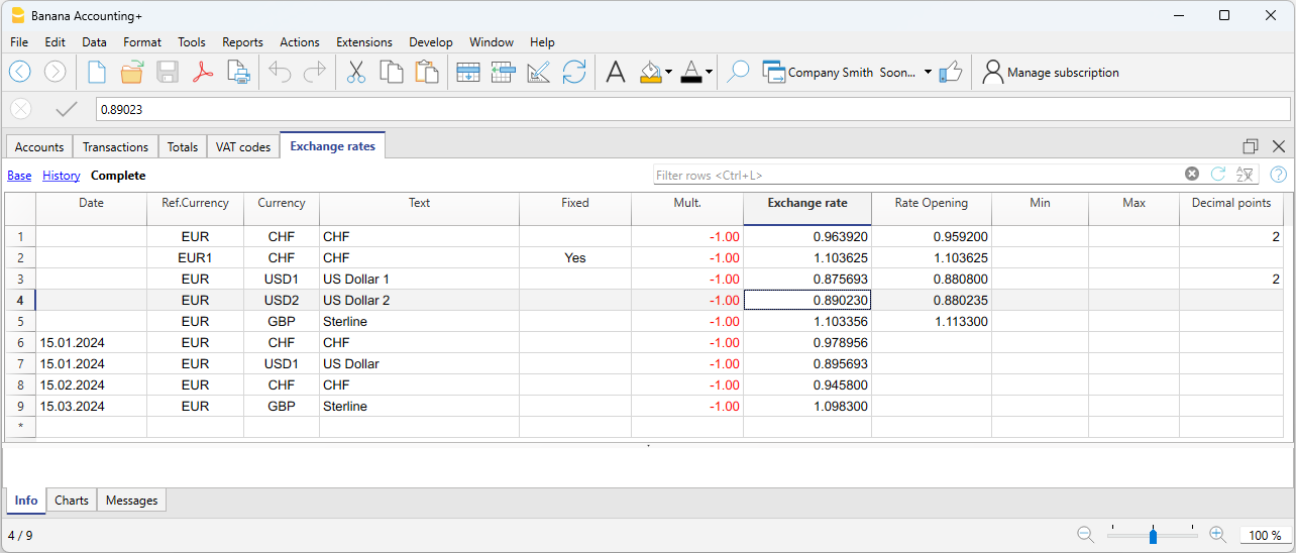
Wisselkoersen voor het Nieuwe Jaar
Om de Beginsaldi van het Nieuwe Jaar in basisvaluta exact te laten overeenkomen met de Eindsaldi van het voorafgaande jaar moeten de Openingskoersen van het Nieuwe Jaar, aangegeven in de Wisselkoerstabel, hetzelfde zijn als die worden gebruikt voor het afsluiten van de boekhouding, dus:
- De slotkoersen moeten worden aangegeven in de Wisselkoers kolom van de rijen zonder een datum;
- De openingskoersen moeten worden aangegeven in de K.Opening kolommen van de rijen zonder een datum.
De procedure om een nieuw jaar aan te maken of om de beginsaldi bij te werken kopieert de sluitingssaldi (Wisselkoers kolom, rijen zonder een datum) van het vorige jaar in de openingskoersen (Wisselkoerstabel, K.Opening kolom, rijen zonder een datum) van het bestand van het nieuwe jaar.
Wisselkoersverschillen bij kostenplaatsen
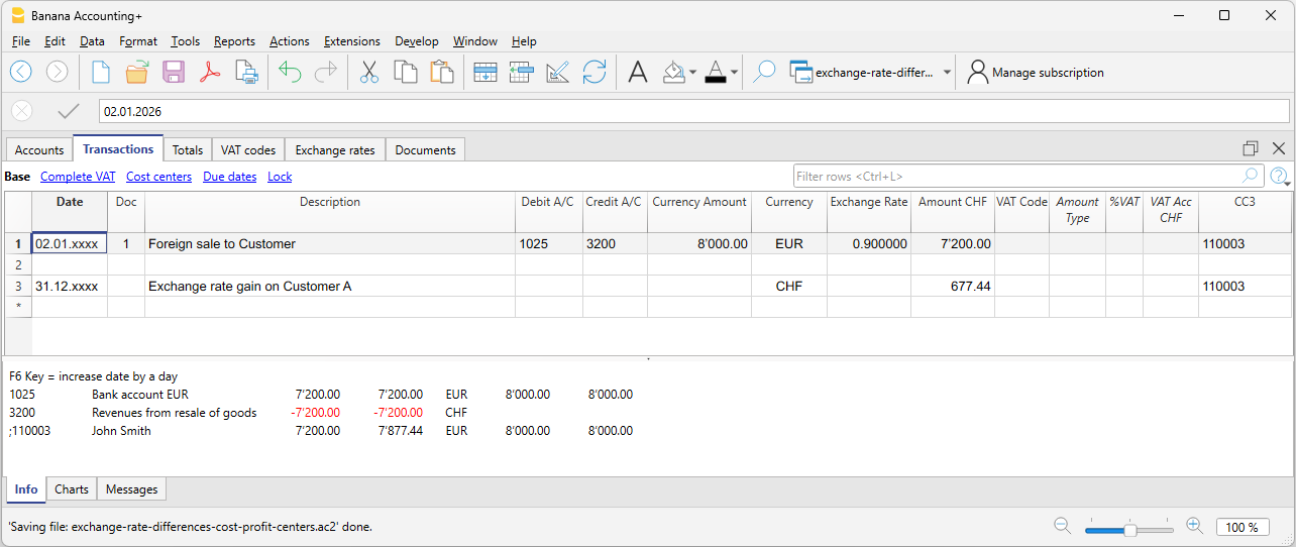
Het commando Transacties aanmaken voor wisselkoersverschillen... neemt geen wisselkoersverschillen mee die aanwezig zijn in kostenplaatsen in valuta anders dan de valuta van de boekhouding. Deze verschillen moeten handmatig worden geboekt aan het eind van het jaar. De transacties moeten alleen het bedrag in de valuta van de boekhouding weergeven; geef dit bedrag eerst aan, en daarna de betrokken kostenplaats en zijn valuta. Als de valuta wordt ingevoerd wordt het bedrag in de valuta van de boekhouding verwijderd en moet dan opnieuw worden ingevoerd.