Customizable Accounting Solution
Banana Accounting Plus is highly customizable professional accounting software that can be adapted to your organization, country and specific accounting needs.
Start from a ready-to-use template and customize the chart of accounts, reports, VAT settings, currencies and other elements to create the accounting solution that works best for you.
Customize your accounting
Banana Accounting gives you the flexibility to organize your accounting according to your own requirements.
- Create a chart of accounts with your preferred numbering and structure
- Choose your language, currency and local settings
- Define account groups, Cost Centers and Segments
- Add custom columns to accounts and transactions
- Define VAT or sales tax codes that automatically calculate VAT amounts
- Customize your Balance Sheet and Income Statement
- Manage multiple currencies and exchange rates
- Create your own extensions for printing, importing or exporting data with specific criteria
Start from a template and make it yours
The easiest way to create your customized accounting solution is to start from an existing template that is close to your needs and adapt it.
Once your accounting file is configured, you can save it and reuse it as the basis for other accounting files.
Although not recommended, you can also create a new accounting file from scratch and Creating a new template.
It is also possible to create an instance file in the XBRL format that is specific to a country.
Need help? We are here to help
Our accounting team has a broad international experience and is available to help you create the best solution for you.
- We have customers in more the 120 countries.
- We work in different languages.
- We have experience with many accounting and fiscal systems.
Adapt your accounting to different countries
Banana Accounting is designed to work with different languages, currencies and accounting systems. You can adapt the chart of accounts, VAT or sales tax settings and financial reports according to local requirements.
This flexibility makes Banana Accounting particularly useful for organizations working internationally or managing accounting in different countries.
Extend Banana Accounting with Extensions
Banana Extensions allow you to add specific functions and automate tasks according to your needs.
Extensions can be used to:
- Create customized accounting and financial reports
- Prepare reports according to specific tax or regulatory requirements
- Import data from banks or other systems
- Export accounting data in specific formats
- Check accounting data according to specific rules
- Create calculations, charts and other customized outputs
Build the solution that works for you
From a simple customized chart of accounts to advanced reporting, data import and automation, Banana Accounting can grow and adapt to your requirements.
You can start with a standard template and progressively customize your accounting as your needs evolve.
Start for free
Download Banana Accounting and start immediately with the Free plan. No personal information is required, and even your email address is optional.
Create your accounting file, explore the customization options and upgrade to a paid plan whenever you need additional features.
Case guide
Banana Accounting is a versatile accounting software. It can be used for different purposes.
When accounting is mandated by law
Business
- Required to do double entry accounting
Double entry accounting, with/without VAT or with/without multicurrency- Small companies (10 or more employees).
- Micro companies (1-9 employees).
- Companies or other organization with no employees.
Financial and Holding companies, Foundations, Asset management, Trusts.
- Required to report Revenue and Expenses.
- Small companies with revenue less then a specified amount
- Self employed individuals.
- VAT reporting
Certified public accountants (CPA)
Do accounting for other companies.
CPA doing accounting for small businesses usually prefer to use Double entry accounting.
Not for profit organizations
- Small non profit organization.
Income and expense accounting or double entry accounting. - Entities with institutional and commercial activities.
Double entry accounting. - International NGO
Double entry accounting with multi-currency.
Public sectors
- Small public entities.
Double entry accounting
Private and family accounting
- Private and Family accounting.
Income and Expense accounting. - Private and Family accounting with international investments.
Double entry accounting.
Auxiliary/ internal accounting
Not the main accounting
- Cash and liquidity management.
Income and Expense accounting.- Simple cash manager.
- Liquidity manager.
Companies that have a person that keep track of cash and banks.
- Project and Department accounting.
Income and Expense accounting.- Internal projects within larger organizations.
- Distributed accounting solutions
Keep local accounting, integrated in the ERP system. - Construction accounting.
Double entry or Income and Expense accounting.- Owners that build a property and keep track of the investment and progress.
- Contractors or architects that have responsibility of the construction’s project.
- Property management accounting.
Income and Expense accounting or Income and Expenses accounting.- Owner that mange a rented property.
- Condominiums.
- Professionals that manage properties for others.
Education
Banana Accounting is used as a tool to learn and exercise Double Entry Accounting.
- Basic accounting in low grade school.
- Introduction to accounting.
Show how the accounting works, with possibility. - Accounting training.
Students enter transactions (exercises on double entry accounting). - Accounting for a virtual company..
Budgeting and financial planning
Use the financial planning functionalities of Banana Accounting.
- Budgeting.
- Financial plan for a startup.
- Retirement planning.
Utilities products
Assets management
- Companies
Books catalog and loan management
- Small libraries
- Companies / legal practice
- Private
Address book
- Simple address management
- Google contacts editor
- Special adess management (Elenco patrizi)
Time sheet
- Employees for time tracking
- Companies for their employees
Future: project managment
Create a new template file
The first step is to create a new accounting file (File new) by choosing the more suitable type and language.
- It is suitable to start by choosing a predefined template that looks like the one you desire. You can then change everything you want.
- In the following examples we assume you use the double entry accounting system for a company.
- Once you have created a file you save it by giving it a name. This file can be used for your accounting or serve as a template for other companies.
Accounting in a language not available
You can create an accounting file that is in the desired language, even if your the software is not available in the local language.
- Create a new template, using a template in another language that is similar to you needs.
- Translate the accounting plan
Translate adapt the Description in the accounting plan as needed. - Translate the column headers.
- Menu Data -> Column settings.
- For each column change the header.
Create an accounting file with different settings
If the template setting are not suitable for you:
- Tools -> Convert to new file command, you will create a copy of the file
- Choose the file type
- Set the language, decimals rounding that is more suitable.
The Accounting properties
You insert the name of the company, the opening and closing date of the accounting year.
You can chose the accounting currency. If a currency is not on the list type the new currency code.
The accounting plan
Your country will probably have its own accounting numbering and grouping.
You will have to write or copy and paste the data in the Accounts table.
- Sections will define the main separations in the accounting.
- Balance sheet
- Income Statements
- Cost Centers
- Segments
- Account (Account number)
Is where you put the account number. - Group is where you insert the group number.
- Gr is where you insert the Group code where this Account or group should be totalized.
When creating a new accounting structure keep in mind:
- Add the accounts you will need. Don’t create a huge accounting plan in case you do not really need it.
Users can always add new accounts. - Keep the grouping simple, so that you have the groping required for your country.
The grouping usually also conforms to the country specific requirements. - For tax purposes you will probably need also a different grouping scheme that is different from the normal one that you use for Balance sheet or Income presentation:
- Use the column Gr1, Gr2, to assign to each account a different grouping scheme.
You will use then use the external report or create a BananaApps that will use the number to group different accounts together. - If you have a strict accounting numbering scheme, you can also create BananaApps that groups account based on specific number.
- Use the column Gr1, Gr2, to assign to each account a different grouping scheme.
- In case you need specific report for other need consider creating a BananaApps or an Excel sheet that takes the data from the accounting file.
Cost centers and segments
Consider using Cost Centers and Segments for more detailed reporting. If you do not have this specific need, you can add later.
In Banana you can define up to
- 3 types of cost centers, with an unlimited number of cost centers for each type.
- 10 levels of segments, with an unlimited number of segments for each type.
You can use the cost centers and segments while booking.
You specify the transaction code for the transaction. Cost centers are very flexible, and they are usually used for:
- Project income and expenses management
- Taking note of special transactions
- Have a parallel accounting scheme (for example large international NGO)
With the debit and credit account they have their internal accounting.
With the cost centers they have the transactions recorded by the donors accounting scheme. At any time they have reports for internal use or to presents to the donors.
You specify the segment in the transaction when you enter the account. You can have a segment that is different for account debit and credit. Consider using for managing:
- Branches, Organisations, Departments
- Different types of businesses
Vat Code
In the Accounts table you can setup all the VAT or sales tax percentage you will need. Basically there are two types of VAT Codes:
- VAT Due.
- VAT recoverable.
You can setup codes for all the percentages and purposes you will need.
Your country will have a specific reporting. With BananaApps you can create a printout that is a facsimile of the state form, with the amounts already grouped and summed as needed.
Use the column Gr1 or Gr2 to enter the number of the Tax form, were the VAT Code should be grouped. If a VAT code needs to be grouped in more than one place, separate the form number with a semicolon “;”.
The advantage of using Vat Code is that you can configure the accounting so that only useing the appropiate VAT code it is possible to extract the data necessary for the VAT reporting. You can have just one account where all the vat plus or minus is recorded. The accounting plan remain very simple and can focus on the company's need.
There are other approaches. For example in Germany the Datev accounting plan use the accounts as a base for the VAT reporting. For each specific VAT cases there must be a corresponding account. . The disadvantage of this approach is that there are accounts with special meaning (for example automatic accounts) with predefined VAT percentage and rules that are not visible for the users. This kind of accounting are more difficult to use unless you know exactly the purpose. With the VAT code the VAT complexity is resolved in the VAT table.
You will therefore have a choice to create an accounting plan, that is based on the need of a company and use the VAT code functionality for reporting, or mantain each VAT transaction separated for each case and have many VAT Accounts in the accounting plan.
Exchange rate table
If you have chosen the multi-currency option in the Exchange rate table you will setup the currency you will use.
Once you have declared a currency you can use it for an account.
Composition Balance sheet and Income statements
You can create predefined printouts of Balance Sheets and Income statements by creating a new composition.
It could be interesting to create predefined composition for:
- End of year report
- Trial balance
- Actual vs. Budget
- Columns with amount by Quarter
- Columns with amount by Segments
Create template documentation for the banana web site
Each template provided by Banana.ch has a page description under www.banana.ch/apps.
Required field
Title
Should be composed of the accounting type and the purpose of the template.
It is the text that will be displayed on google (think of Search Engine Optimisation).
- "Double entry accounting for small company in Switzerland, with VAT".
- "Double entry accounting for small company, with VAT and multi currency".
- "Double entry accounting for an international NGO".
File Url
The full url of the file.
- "https://github.com/BananaAccounting/Switzerland/raw/master/templates/english/double_entry_accounting/en_de_sme_company.ac2"
Short Description
It is displayed on the index, together with the Title.
A text that specify the purpose of the template. Be as expressive as possible.
Description
The Description is used to describe the template, show how to use it. The text should be also prepared for beeing indexed by the search engine.
It should contain reference to the possible user and other information that help make a good rank on google or bing (SEO).
- The first 2 lines of the text.
Are the one displayed in the google search. So they should summarize the use of the template well. - Following text .
Can be long as necessary with:- Use cases.
- Table description
- Content description
- Images
- Testimonials
- Reference to other documentation (Tax documents, business web site, ...)
Other field
- Language
The language of the page. - ac2 file type
Select the file type - ac2 category
Select the category.- Education means for educational purpose.
- ac2 country
Select the country.- If the country is not on the list select Other.
- If the template is for general use, not related to one country, select Universal.
- ac2 language
Select the language of the template.- If the language is not on the list select Other.
- ac2 publisher
Select the publisher. Banana.ch or other.
Setup the Accounts table
In the following we will explain what need to be considered when creating a new accounting tabble for a specific country.
- Creating the account structure and grouping specific country.
- Creating the country specific reports or export files, using the functionalities offered by the Banana API .
Documentation
- Accounts table documentation including table accounts columns.
Examples files
- The examples files are available on github/General/CaseStudies.
- File "scalar_income.ac2" is used in the following as an example of scalar accounting plan.
Using an existing accounting system
Usually countries have accounting system that include:
- Accounts numbering
- Accounts description
- Accounts grouping and totalisation
The country or sector specific accounting system is usually focused on helping prepare the Balance Sheet and Income & Exanses report.
Based on this accounting system it is also necessary to generate report that summirize the accounts for specific tax purposes, in case that the tax autorities require a report that is different from the Balance structure.
Accounts table
In Banana accounts and grouping are specified in the accounts table.
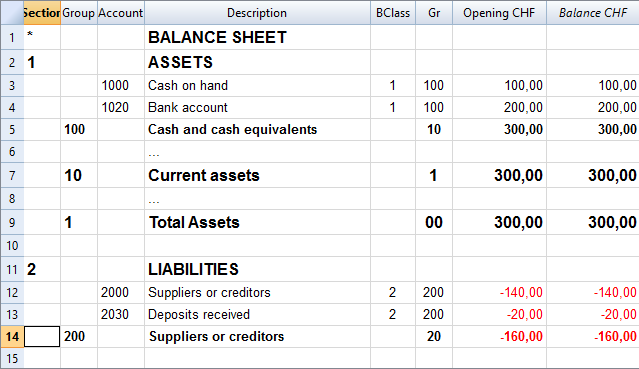
Banana allow to adapt to different county or sector specific requirement, but at the first moment the Banana grouping system look confusing, for the fact that there are different columns that contains similar information.
Accounts, groups and sections
There are three different type of line in the account table.
- Account.
Lines that have an account number in the column account.
Accounts can be normal account, cost center or segmente - Group
Lines that have a group number in the column group. - Section
Line the have a section number in the column section.
A line in the account table can is either an Account, Group or Section. It cannot be both, so if there are on the same line an account, group or section there is an error.
In the above example there are lines for Section, group and accounts.
Here is the meaning
- Accounts.
Are used for recording transactions. - Group
Are used to create sums. - Sections
Are used to separate different part of the report.
Summing and creating totals
In Banana you can create sum by using the combination of:
- Groups columns.
You enter the group number and the line become a group. - Gr
I where you enter the group on where this line should be totalized.
Accounts and Groups can have a Gr.
In the example above.
- The accounts 1000 and 1020 is totilized on the group 100.
- The group 100 is totilized on the group 10.
- The group 10 is totilized on the group 1
- The group 1 is totlized on the group 00.
By creating the group line and specifingin in the Gr whe the each line is grouped you create a wole totalisation.
Total debit = Total credit
Computer represent debit amount in positive and credit amounts in negative therefore we should totalize all accounts and groups in a final group that, if the accounting is correct, should have the amount to zero.
At the end of the grouping we will have a group named "Difference should be zero (null)" that in the above accountng example has the number 00.
Basically in the double entry accountiong system the totalisations is done in this way.
- Group Income and expenses (example group E7)
Is the sum of all Revenue and Costs accounts.
The Profit or Loss of the year that is further totalized in the Equity as the current year result. - Group Assets (example group 2)
Include all Assets accounts
Asset are totalized on the group Difference should zero. - Liabilities and Equity (example group 2).
Is the sum of all the Liabilities and Equity accouns, plus the Profit and loss of the current year from the total group of income and expenses.
Liabilities and Equity on the group Difference should zero. - Difference should be = 0 (example group 00)
Is the end sum of all accounts and the Balance should be null if the accounting is correnct.
The BClass column
In Banana each column has a (Banana class number) that indicate if the account belong to:
- 1 Total Assets
- 2 Total Liabilities
- 3 Total Expenses
- 4 Total Revenue
- 5 Total off balance sheet: Assets
- 6 Total off balance sheet: Liabilities
- 7 Total class 7
- 8 Total class 8
- 9 Total class 9
The BClass is somewhat a redundant information, but unfortunalty is also necessary in order to let Banana if the accounting is correct.
The BClass is also some time confusing for the fact that the country specific accounting system have normally class number that are not the same as the BClass in banana.
The Section column
Is also sometime redundant information, but unfortunatly is necessary in order to have the possibility to customize Balance sheet and other repors.
Grouping for the Balance
- Assets
You need to create a Total Assets group and intermediary groups (like fixed assets) so that up grouping the accounts specific to the Assets. - Liabilities (Third party capital and Equity)
Has subgroups for- Third party capital (Liabilities in anglo saxan terminology)
- Equity
Grouping for Income statemant
It groups all the accounts belonging to the Income statement. At the end there should be a group "Loss (+) por Profit (-).
There are two fundamentally different system to present the Income statement. One that sum separately the Revenue and the Costs and another one (scalar system) where the the Profit and Loss is calculated by starting from the revenues and obtainings intermediary results.
Revenue and Cost separated
There are two groups that are summed in the Loss and Profit
- Total Revenue
- Total Income
Scalar system
- (E1) Gross operating
Sum of all accounts for Revenue and Productions cost - (E2) Gross operating result after deducting personnel expenses
Sum of Gross operating group (E1) and the accounts Personel costs. - (E3) Operating result before depreciation and value adjustments, financial results and taxes (EBITDA)
Sum of E2 and the operating cost - (E4) Operating result before financial results and taxes (EBIT)
Sum of E3 and the depreciation - (E5) Operating result before taxes (EBT)
Sum of E4 and Financial costs - (E6) Profit or loss before taxes
Sum of E6 and extraordinary costs - (E7) Annual profit or loss
Sum of E6 and the tax - In this form it is necessary to create intermediary groups for.
Create a tutorial file with examples
When you create a new template file for beginners it is also suitable to create a tutorial file with example of opening balances, accounting and budget transactions.
The examples will depend on the specific purpose of the template, but it may be helpful to follow a similar approach and give an overview of the most used Transactions and Budget cases.
Opening Balances
Fill the column opening balances with amounts for the Assets, Liabilities and Equity.
Use simple rounded amounts.
Examples Of Accounting Transactions
Give examples of different Transactions type, without repeating too much the same case.
When it make sense, use the following sequence:
- Simple Transactions (direct Debit and Credit):
- Revenue Income going to the bank or the Cash.
- Equity capital going to the Bank.
- Loan going to the Bank.
- Expense payed with the Cash or Bank.
- Purchase of Material payed with Bank.
- Transfer from Bank to Cash.
- Transfer from Cash To Bank.
- Partial Repayment of a Loan.
- Transactions with multiple accounts:
- Bank income split on multiple Sales or Service account.
- Bank payment with multiple Costs.
- Transactions with VAT (When applicable):
- Sales.
- Purchase.
- Customers
- Issue of an invoice.
- Receive payment of an open invoice.
- Issue of Credit note.
- Suppliers
- Bill received.
- Bill payment.
- Receive a Credit note.
- End of year Transactions
- Depreciation of Material.
- Interest income.
- Interest on Loan.
- Active accruals.
- Passive accruals.
- Cost Centers
- Segments
Budget Transactions
- Not recurring revenues and expenses (no repetition code)
- Income as Equity advance.
- One time Sale.
- One time expense.
- One time payment with Bank with multiple costs.
- Buying of Assets (Material).
- Monthly recurring revenues and expenses (Repetition M)
The most part of Income and Expenses are made on a monthly base.- Revenues from sales
- All other Expenses.
- Quarter recurring revenues and expenses (Repetition 3M)
- Interest income.
- Interest on Loan.
- Semester recurring revenues and expenses (Repetition 6M)
- End of Year (Repetition Y)
- Depreciation.
- Loan repayment.
- Eventually an example of a Loan payment split on Interest and Repayment.
Setup the VAT table for a specific country
Use more languages
Banana Accounting software lets you setup the accounting file to use different languages.
- Create the accounting file with a main language.
- Add another language by adding the columns for the description in the other language.
You can add as many languages you need. - Customize the printout.
Program language
Every user can select and change the program language any time. Changing the program language will have no effect on the accounting data and accounting setup.
Adding columns for a different language
You can use the command Add column to create a supplementary column for the description in second language, in the table accounting, VAT table or Transaction's table. Use the language name (for example German, Chinese, etc.) as column name.
In the supplementary columns you will enter the description in the language.
You can add a new View for each language (German, Chinese, etc). You can customize the view to see only the description in one language or in more language at the same time.
People wiil be able to work on their language. .
Enhanced Balance sheet with in different languages
In the Enhanced Balance sheet you can choose witch column to use as description.
Under Columns select Add and choose the column you want to show.
You can create a Customization to save the setting for the printout. This way you can create printout for each language.
BananaApps
With BananaApps you can program a report to adapt to your necessity.
Local Extensions
Extensions for Accounting and VAT reporting
Following we list some developments, for the complete list goto to the Banana Apps search page.
- Austria
- China
- Template for SME companies
- China Small companies Balance Sheet and Profit and Loss reports
- Germany
- VAT Summary Reporting with XML file for uploading on the Elster portal.
- Italy
- Accounting plan and reporting for Non profit organisations
Accounting plan and reports required by the regional and national authorities.
Project developed together with the Centro Servizi Volontariato, Padova - VAT Italia
- Quarterly VAT reporting in XML format for upload.
- XML file with customers and suppliers invoice datafor uploading on the Autority web site.
- Accounting plan and reporting for Non profit organisations
- Netherland
- Audit file (accounting data is exported in XML as required by the NL tax autoryties)
- Switzerland - Ticino
- Curatele Accounting plan and required report
Project Istituti Sociali Città di Lugano - Patriziati
Project based on specificaction of the Sezioni Enti Locali Cantone Ticino.
- Curatele Accounting plan and required report
File Templates
See the Templates section.
Multi-Site Accounting
Distributed companies and organisations have operations in different places.
- In the same country.
- In different countries.
They need to setup an accounting organisation that allows to have:
- An acounting control for each entity (country or project)
- Have a consolidated accounting.
Data from the different accounting files need to be grouped together.
Multi-Site accounting
The Banana Accounting software is used by thousands of organisations and projects as a distributed accounting system.
Banana.ch has been a world pioneer in using blockchain technology, which faciltates the creation of a distributed accounting system.
Examples are:
- Entities that keep track of accounting transactions in different places and integrate the data in one central accounting.
- Projects accounting, with specific and detailed reporting, not available on the central system.
- A Non-profit organization that has projects worldwide, lets each project keep their accounting, and the data are integrated in the central accounting system (See Helvetas - Blockchain decentralized accounting).
- A large public organization that uses SAP, lets some organizations keep their accounting with Banana. (See Example of Kanton Basel City - German).
- Companies with different branches, that operate in different countries, with different currencies and accounting setup.
When multi-site, distributed accounting makes sense
Organizations tend to centralize their accounting system, so that all data reside in one system only.
Cloud computing makes it easier for organizations to share a centralized system. But distributed accounting still is the best choice:
- Connections are slow or costly.
- Using the central system is difficult:
- Require specifically trained personal
- Have high license costs.
- It is not flexible.
- Have a different workflow.
- Local accountings have specific needs, and customizing the central system would be too difficult and costly:
- different accounting plans and requirements
- different legal requirements
- different currencies.
- Accounting documents are kept at the branch level.
- Branches need a lot of flexibility but at the same time you do want to limit data access.
- The different branches have few interactions.
- There is no need to have all the detail-information in a central system.
In these cases it makes sense to have people in the branches use Banana Accounting.
Setting up the distributed accounting system
Organizations that use a distributed accounting system will then need to integrate the data in a central system, in order to have financial statements that include all branches and projects.
The data integration process must consider:
- With what frequency the data need to be integrated (monthly, quarterly, yearly, ...).
- The detail-transactions that need to be integrated in the central system.
- Whether only summary data are being integrated in the main system.
- How the data will be made available to the center.
Integrating all transactions into the central system
The requirements for working this way are:
- The distributed accounting and the central accounting use the same account numbers, same currency.
- In this case the integration process is done by importing the transactions from the branch into the central system.
- In Banana you have a central accounting system and use the import function.
- The distributed accounting and the central accounting have different account numbers or currencies
- The transactions must be converted to a format that is suitable for importing.
You can create a BananaApps that exports the data from the Banana Accounting file into the requested format's data. - Currency conversion.
You need to define at what rate the amounts from one currency are converted to the other currency. - If you use Banana for the central and distributed accounting see
- Import transactions
- Import file (this function also allows to convert account numbers).
- The transactions must be converted to a format that is suitable for importing.
Integrating only the summary data into the central system
This approach facilitates the integration process and is particularly adequate when:
- The central accounting system differs from the local one.
- Local accountings use different settings (currency, accounting plan), making the integration complex.
- There is no need to have detailed transactional information in the central system.
Detailed information can easily be accessed with the Banana accounting file. - There are large quantities of data and integrating it makes managing the central system more complex and costly.
Therefore, in the central system only the summary data are integrated:
- The period of the data that should be integrated (monthly, quarter, year) are defined
- Defined is whether the integration is done at the accounting level or at the group level (see below).
- Each branch accounting prints a summary of transactions (see BananaApps Trial Balance with blockchain) that includes:
- accounts or group number
- total debit and credit for the period.
- these amounts are registered unto the central accounting:
- Manually (directly from the report)
- With the import function. In this case the data should be exported from Banana Accounting.
Using blockchain lock function
If you use a distributed accounting system, it is important that, once you have integrated the data into the central system, the local data are not changed. In case the local data have been changed you will have difficulty in reconciling the different systems. The situation will get complicated if you have many accounting files.
The branch cannot be prevented to modify the file, for the fact that they have the file on their local system.
The only way to make sure that the data have not been changed, is to use a blockchain security mechanism embedded in Banana and named Lock transaction:
Each branch, at the end of each period, is required to:
- Check that the progressive lock of the previous period is the same as the one that has been printed.
- Lock the accounting for the period.
- Print the lock report, sign it and send it to the headquarters, together with the accounting file.
Once the accounting has been locked, the branch, should:
- Continue to work on the same file.
- Do not unlock or change the locked transactions.
The headquarter should:
- Keep note of the progrLock and number when they integrate the data.
- Keep a copy of the file that has been integrated previously.
The best is to put in a directory with the date or have a date in the file name. - When they receive the file, check that the lockProgressive of the last period is the same.
- If is not the same require the branch to fix the problem.
- do not proceed with the data integration.
- Use the BananaApps Compare two files to see the differences.
- In this case, it will be worth it to return the previous file, so that they can start from this and add the new transactions.
- If it is the same
- Proceed with the integration.
- Keep note of the last LockProgr and LockNumber.
- If is not the same require the branch to fix the problem.
Structuring the accounting plan to facilitate the data integration
Keep the same account numbers
If you need to use in the branch the same accounts number that you use in the central system, the best way is to use the same accounts number in the branch accounting file.
Using different account numbers
This is necessary in case local accounting should use a different accounting plan (local rules) or a more detailed accounting.
There are different options:
Add a column to the accounting plan for the central accounting number, so that each account will also have a corresponding central account number:
- The account column will use a local account number.
- In the columns Central account you enter for each account the number of the account used in the central system.
- Different accounts can have the same central account number.
Use a grouping schema where the groups in the accounting table corresponds to the account number of the central accounting (see Helvetas example)
- Each group in the accounting plan will correspond to an account number in the central accounting.
- In the accounts table you will have the groups totals corresponding to the accounts in the central accounting.
- You will end up having a lot of groups.
- This approach is useful if the local accounting needs to create many local accounts. For examples many bank accounts.
Multiple levels
If your organization is complex it may make sense to have different level of integration (see Helvetas example) with different approaches:
- Each country integrates the data of the local projects, by importing all transactions in one file.
- The summary data of each country is then integrated in the central accounting system.
Cash Manager
If the local project only has one account to manage, it make sense to set up a Cash Manager
- Create a Cash Manager file in which the branch keeps track of it's expenses.
- Use the import Cash Manager function to integrate the data in the main Banana Accounting file.