Transactions with different VAT codes
New Swiss VAT rates 2024
New VAT rates go into effect on 01.01.2024. Choose Banana Accounting Plus Advanced plan for a smooth transition.
Key benefits
- Automatically import the new rates into the VAT Codes table.
- Receive the VAT Statement in paper facsimile format or as an XML file ready for upload to AFC.
- Dramatically reduce your work time with advanced built-in features.
With Banana Accounting 9
- You CANNOT automatically import new 2024 VAT Codes; you can enter them manually.
- You CANNOT create the VAT Statement , but you can get the VAT Report from the Account1 menu command.
Choose Banana Accounting Plus - Advanced plan - get 1 month free!
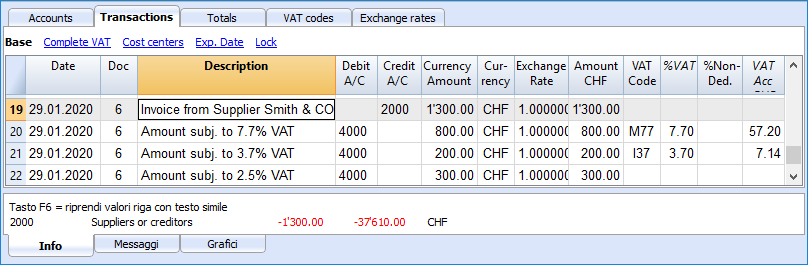
When the total amount of an invoice is composed by several amounts with different VAT percentages, you need to register as follows:
- each amount with a specific VAT percentage needs to be entered on a different row with its own VAT code (enter the gross amount)
- once you finish the multiple registration, check that the sum of the differents amount and the VAT amounts correspond to the invoice total.
Here is an example:
VAT EXEMPTION
If in your invoice you also have some items VAT exempt, you need to operate as above, choosing the VAT exempt code from the VAT Codes table.