Setting up the Time Sheet file
Create a new Time sheet using a preset template, as follows:
- Menu File → New.
- Select your Region/Language.
- Select Category → All or Other.
- Filter for the Time sheet via search, or check in Type →Time sheet. The program will display the available templates.
- Select the template you require in the right hand section.
- Double-click on the template name or click on the Create button. The program will open the selected file directly.
- Save your file with a name.

Set up your data via the File → File properties and accounting properties... :
- File properties - Timesheet, to set up period and name.
- File properties - Start, to set up working hours and festive day.
File properties - Time Sheet
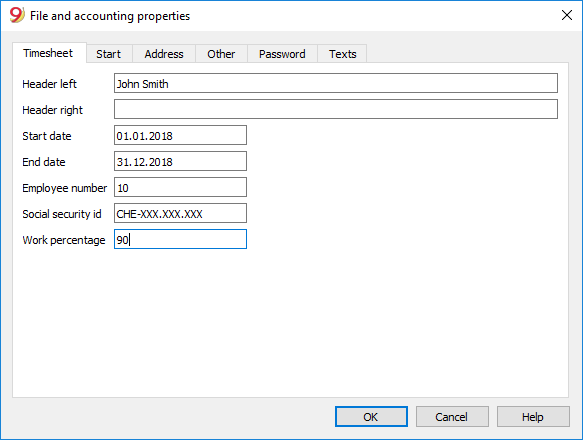
Set up your data from the File menu -> File and accounting properties ... -> Timesheet tab.
Enter into the Timesheet tab:
- Name and Surname,
- Start and End date for the current year
- Work percentage and other data, if applicable.
File properties - Start
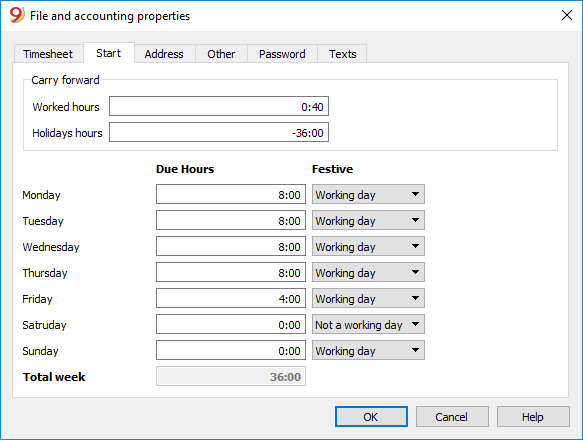
Set up your data from the File menu -> File and accounting properties ... -> Start tab.
In the Start section, you can set the initial data for working hours and holidays.
Hours are considered to be hours and minutes.
By entering the amount preceded by the "<" o ">" sign, the program considers it a decimal value and converts it into hours and minutes.
"<8.2" is converted to "8:12".
Carry forward
Initial values of the period or previous year are carried forward:
- Worked hours
Enter the balance of hours of the previous period or year (for example, extra hours worked but not yet paid or not yet used as vacation time).
These hours are taken into account in the Journal table, Carry forward row. - Holidays hours
Input hours of unused holidays of the previous year.
These hours are taken into account in the Journal table, Carry forward row, Holiday column.
Due hours and weekly festive days.
Input your weekly values.
- Due hours
Enter the working hours for the days of the week.
In the example we are presenting, this is a flexible working time, referring to part-time work.- The program calculatesthe total number of hours per week.
- The predetermined working hours are automatically recorded in the Journal table, Due column.
- If you want to reach a precise number of hours per week, adjust the time for the different days until you reach the desired total.
- Festive
Define for yourself the day considered to be a working day, not a working day or a festive day.
If a day is generally considered to be a "festive day", but on which you are required to work, you must enter "working day".
The value is reported in the Journal table, Festive column.