INPAS reporting with segments and cost and profit centres
For a non-profit organisation (NPO), recording a payment is only the beginning. It also needs to know which fund the money belongs to, which project it supports and, when relevant, who provided it. Banana Accounting lets you add these details to the same transaction without creating a separate set of ordinary accounts for every fund, project or donor.
This helps an NPO organise the information needed for INPAS fund accounting, the analysis of expenses and fundraising cost disclosures. The software helps collect and analyse information. It does not, by itself, certify an INPAS-compliant financial report.
Segments: manage accounting by fund
INPAS requires non-profit organisations to distinguish between restricted and unrestricted funds.
With Banana Accounting, segments help you track each fund separately, without creating a different chart of accounts or accounting file for every fund.
A segment is simply a code added after an account to identify the fund to which the amount belongs.
The INPAS templates provided by Banana Accounting include:
- :Fund A, :Fund B and :Fund C: restricted funds used for specific purposes.
- :General: the unrestricted General Fund, used for resources without those restrictions.
You can add as many additional funds as needed.
Segments are defined in the Accounts table.
How to use segments
In the Transactions table, add the segment after the relevant account code.
For example, an organisation receives a restricted donation of EUR 727 for Fund A.
Double-entry accounting

- Debit account: Bank:Fund A
- Credit account: Grants restricted Project 1:Fund A
- Amount: 727.00
Income & Expense accounting

- Account: Bank:Fund A
- Category: Grants restricted Project 1:Fund A
- Income: 727.00
In both cases, Banana identifies the bank amount and the donation income as belonging to Fund A.
Practical rule: For ordinary transactions, add the same segment to both accounts when both amounts belong to the same fund. This helps you track the fund's assets, liabilities, income and expenses.
When transferring amounts between different funds, use the appropriate segment for each side of the transaction.
Segments do not require separate bank accounts. They simply help organise accounting information by fund.
How to view financial reports by fund
To view the financial information for each fund, use Reports > Accounting Report or Enhanced Balance Sheet by Groups, and activate Subdivision by Segment.
Important: The total displayed in an individual segment card does not necessarily represent the fund's balance. Depending on how transactions are recorded, amounts may cancel each other out or appear twice. Use reports subdivided by segment to examine the different accounting positions and reconcile each fund's balance.
Cost and profit centres: track projects, activities and donors
While segments help you identify which fund a transaction belongs to, cost and profit centres help you monitor individual projects, activities and donors.
For example, an association may want to know how much money it received for a project, how much it spent and who made the donations.
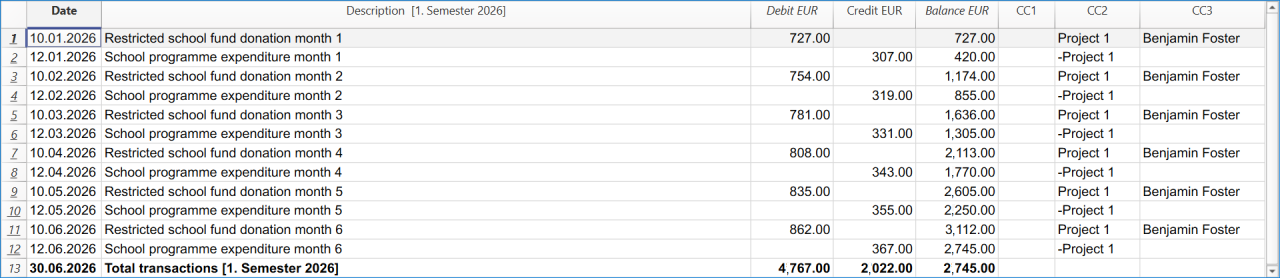
With Banana Accounting, you can track this information directly in your accounting transactions, without creating separate accounts or accounting files for each project or donor.
How to use cost and profit centres
Banana provides three independent columns for cost and profit centres:
- CC1 – Activities or campaigns: for example .Campaign 1.
- CC2 – Projects: for example ,Project 1.
- CC3 – Donors: for example ;Benjamin Foster.
Each column can contain as many cost centres as needed. However, only one cost centre per column can be assigned to a single transaction. The same transaction can include up to three cost centres, one in each column (CC1, CC2 and CC3). The INPAS templates use CC2 for projects and CC3 for donors, while CC1 remains available for other activities.
Centres are defined in the Accounts or Categories table using their corresponding prefix (dot, comma or semicolon).
In the Transactions table, simply enter the centre name without the prefix. For example, enter Project 1 in CC2 and Benjamin Foster in CC3.
You can use segments and cost and profit centres together in the same transaction to identify the fund, project and donor.
Track project income and expenses
Cost and profit centres can track income, expenses or both. You decide whether each transaction adds to or subtracts from the centre's total.
For example, an association receives a donation of EUR 727 for Project 1 and later spends EUR 307 on the same project.
Recording the donation:
- Amount: EUR 727
- CC2: Project 1 (adds EUR 727)
Recording the expense:

- Amount: EUR 307
- CC2: -Project 1 (subtracts EUR 307)
The centre automatically calculates the result: EUR 727 income − EUR 307 expenses = EUR 420 net result for Project 1.
As you record additional transactions, the project's total is updated automatically. This allows you to monitor its financial activity throughout the year.
The minus sign before the centre name determines whether the amount is subtracted from the centre's total. It does not change the ordinary accounting entry.
The same principle can be used to track donations by donor in CC3, including refunds or corrections.
In Income & Expense accounting, an optional setting can make cost-centre signs follow the categories. Use this setting only when it matches the way you want to calculate the totals.
Understanding cost and profit centre totals
A cost or profit centre shows only the transactions assigned to it. It provides an additional analysis without changing the ordinary accounting records.
When used consistently for project income and expenses, it helps you understand how much a project has received, spent and retained.
However, if the centre also includes advances, transfers or other balance-sheet movements, its total does not necessarily represent the project's operating result.
Cost and profit centres are useful for monitoring activities but do not replace the financial statements required by INPAS.
Supporting INPAS expense and fundraising disclosures
Ordinary expense accounts support the required analysis in the Statement of Income and Expenses, while cost/profit centres give an additional operational breakdown. For example, a centre for a fundraising campaign can collect the costs associated with that activity, and a project centre can collect the project's income and expenses. INPAS requires an appropriate expense analysis in the Income Statement; an internal cost-centre card does not replace it.
Under INPAS, fundraising costs may need to be reported by donation and grant fundraising, commercial/trading activities and investment management, including relevant direct, shared and support costs. Banana's accounts and analytical centres help identify the underlying entries, but allocation methods and the required gross disclosures must still be prepared and documented.
One transaction, three dimensions of information
On 10 January 2026, the association receives a restricted donation of EUR 727 from Benjamin Foster for Project 1 within Fund A.
In the Double-entry accounting tutorial, the transaction is recorded as follows:
- Date: 2026-01-10
- Description: Restricted school fund donation month 1
- Debit account: Bank:Fund A
- Credit account: Grants restricted Project 1:Fund A
- Amount: 727.00
- CC2 (project): Project 1
- CC3 (donor): Benjamin Foster
One transaction updates the ordinary accounts, identifies the restricted fund, links the donation to the project and associates the receipt with the donor.
The same principle applies to the unrestricted General Fund using the segment :General.
These dimensions are independent: a project can use more than one fund, and a fund can finance more than one project. This allows an NPO to maintain detailed information without unnecessarily multiplying its ordinary accounting accounts.
Generate donation statements for donors
Banana Accounting also helps non-profit organisations simplify donor administration by generating personalised donation statements directly from their accounting records.
With the Donation statement for Associations (Banana+) extension, an NPO can:
- Generate individual donation statements for a selected donor or multiple donors.
- Automatically calculate the total donations received during a selected period.
- Include the details of individual donation transactions.
- Personalise the statements with the organisation's logo, donor information and signature.
- Print or save the statements as PDF documents, which donors may use for tax purposes where permitted by applicable legislation.
Donors must be configured as CC3 cost centres in the accounting file to use this donation statement extension. This is already the structure used in the INPAS templates.
By assigning each donation to the appropriate donor in CC3, the association can reuse the same accounting information for donor tracking, financial analysis and the preparation of donation statements, avoiding duplicate data entry.
Before issuing donation statements, review the transactions assigned to each donor in CC3. Grant advances and other transactions may require separate treatment depending on their nature and the applicable tax rules.
The availability of tax deductions and the legal requirements for donation certificates depend on the country and the tax status of the organisation. Banana generates the document but does not determine its fiscal validity.
How to view the results
- Cost/profit-centre card: from Reports > Account/Category cards, select Cost centres to view the movements and analytical balance of a centre. The grouped totals are also visible in the appropriate Accounts or Categories section.
- Segment card: open the segment's account card to inspect the entries carrying that segment. Remember that its net movement may be zero or may include duplicated amounts, depending on how the transaction was classified.
- Report by segment: use Reports > Accounting Report or Enhanced Balance Sheet by Groups, then activate Subdivision by Segment. This is the appropriate way to examine the related assets, liabilities, income and expenses separately.
What Banana helps achieve under INPAS
Banana Accounting helps non-profit organisations simplify their daily accounting and organise the financial information needed for INPAS reporting.
With Banana, organisations can:
- Manage funds: track restricted and unrestricted funds, including movements and transfers between them.
- Monitor projects: analyse income, expenses and fundraising costs using cost and profit centres.
- Track donations: manage individual donors and generate personalised donation statements using an available extension.
- Generate financial reports: prepare the Statement of Financial Position and Statement of Income and Expenses, and collect information for additional INPAS statements and explanatory notes.
By keeping all accounting information in one file, Banana reduces manual work, avoids duplicate data entry and makes financial information easier to review.
Banana Accounting supports INPAS reporting but does not automatically guarantee compliance. Each organisation remains responsible for applying the standard correctly and completing the required financial statements, comparative information, explanatory notes and Narrative Report.