Separate Investment Accounting (Subledger)
With Banana Investment Accounting, you can manage the accounting of your securities portfolio in a dedicated file, separate from your general accounting, while continuing to use Banana Accounting or another software for your general accounting.
Unlike general accounting software, which may require additional applications or Excel spreadsheets to manage investments in detail, Banana Investment Accounting combines double-entry accounting and detailed securities portfolio management in a single dedicated file.
You can record purchases, sales, and other securities transactions, track quantities and prices, and obtain Book Values and Market Values without maintaining separate documents for portfolio management.
By keeping detailed investment accounting in a separate file, you can manage complex securities transactions and portfolio valuations without adding unnecessary detail to your general accounting.
The investment accounting file operates independently of your general accounting. Investment balances and financial results can be periodically reconciled with the corresponding accounts in your general ledger, whether it is maintained in Banana Accounting or another software.
When to Use Separate Investment Accounting
Separate Investment Accounting is particularly useful when:
- You already use Banana Accounting or another accounting software: Maintain detailed investment records in a separate file without changing your general accounting system.
- You want to keep your general accounting simple: Manage complex securities transactions and portfolio valuations separately, recording only the relevant investment balances and financial results in your general ledger.
- You currently track investments in Excel: Replace spreadsheets with a structured investment accounting solution.
- You need detailed investment accounting: Monitor shares, bonds, ETFs, investment funds, and other financial investments.
- You manage multiple entities or portfolios: Maintain a dedicated accounting file for each company, client, or portfolio.
- You want to simplify investment management: Use a focused accounting structure dedicated to your investment activities.
A Simple Alternative to Excel Spreadsheets
Managing investments with spreadsheets often means maintaining separate records for transactions, quantities, purchase prices, and portfolio valuations.
Banana Investment Accounting brings this information together in a single, structured accounting file. Because the file is dedicated exclusively to investments, the chart of accounts can remain small and focused.
Key advantages:
- One integrated file: Keep investment transactions, accounting balances, and portfolio information together.
- Less reliance on Excel: Manage investment quantities, prices, and valuations without separate tracking spreadsheets.
- Double-entry accounting: Maintain consistent records of investment assets, income, expenses, and gains or losses.
- Portfolio overview: Monitor individual securities and organize investments into groups.
- Simple accounting structure: Focus on investment activities without including other general accounting operations.
- Flexible currency management: Choose between single-currency and multi-currency accounting.
Use Banana Accounting Alongside Your Existing Accounting Software
Separate Investment Accounting complements your existing general accounting system rather than replacing it.
Your general accounting software continues to manage the company's financial statements, while Banana Investment Accounting maintains the detailed records of securities and investment transactions.
The two systems have complementary roles:
- General Accounting Software
- Manages the company's overall accounting and financial statements.
- Records investment balances in the Balance Sheet.
- Reports investment income, expenses, and financial results.
- Banana Investment Accounting (Subledger)
- Maintains detailed accounting records for individual securities.
- Tracks quantities, prices, Book Values, and Market Values.
- Records investment transactions and financial results.
- Provides supporting information for reconciliation and reporting.
Reconcile the Investment Subledger with the General Ledger
Banana Investment Accounting maintains detailed records of individual securities, while your general accounting records the corresponding investment balances and financial results.
To keep both accounting systems consistent, investment transactions and financial results must be recorded in the general ledger, and the corresponding balances should be reconciled periodically.
Reconciliation allows you to:
- Compare investment balances between the two accounting files.
- Verify investment income, expenses, and realized or unrealized gains and losses.
- Identify and investigate differences.
- Confirm that year-end valuation adjustments have been correctly reflected in the general ledger.
The two accounting files operate independently. Recording transactions in the general ledger and reconciling balances are separate processes; there is no automatic synchronization.
For practical instructions, see:
How Separate Investment Accounting Works
A separate investment accounting file uses double-entry accounting and integrates three main tables.
These tables use the same investment accounting functionality available in integrated Investment Accounting. In a separate file, however, the accounting structure is dedicated exclusively to investment activities.
Accounts Table
The Accounts Table contains the accounts used to record investment assets, income, expenses, and gains or losses.
The chart of accounts can remain relatively small because it includes only the accounts needed for investment activities.
Items Table – Investment Portfolio View
The Items Table – Investment Portfolio View contains the individual securities and financial investments.
For each investment, you can manage:
- Investment identification and description.
- Quantity or nominal value.
- Beginning and current quantities.
- Investment prices.
- Book Values and Market Values through investment accounting reports.
- Investment groups and portfolio totals.
Book Value represents the investment's carrying amount in the accounting records, while Market Value represents its value based on the market price used for portfolio valuation. These values may differ. For more information, see Theoretical Introduction to Investment and Portfolio Accounting.
The current Book Value of each investment is calculated and displayed in the investment reports rather than directly in the Items Table. For more information about investment valuations and closing adjustments, see Investment Accounting – Closing Balances.
Each investment is linked to its corresponding Balance Sheet account, keeping portfolio information and accounting records connected.

Transactions Table
The Transactions Table contains the double-entry accounting records for investment operations, including:
- Purchases and sales of securities.
- Dividends and interest received.
- Investment fees and expenses.
- Realized gains and losses.
- Valuation adjustments and unrealized gains or losses.
Transactions can be associated with individual investments through their Item codes, allowing investment quantities and accounting records to be managed together.
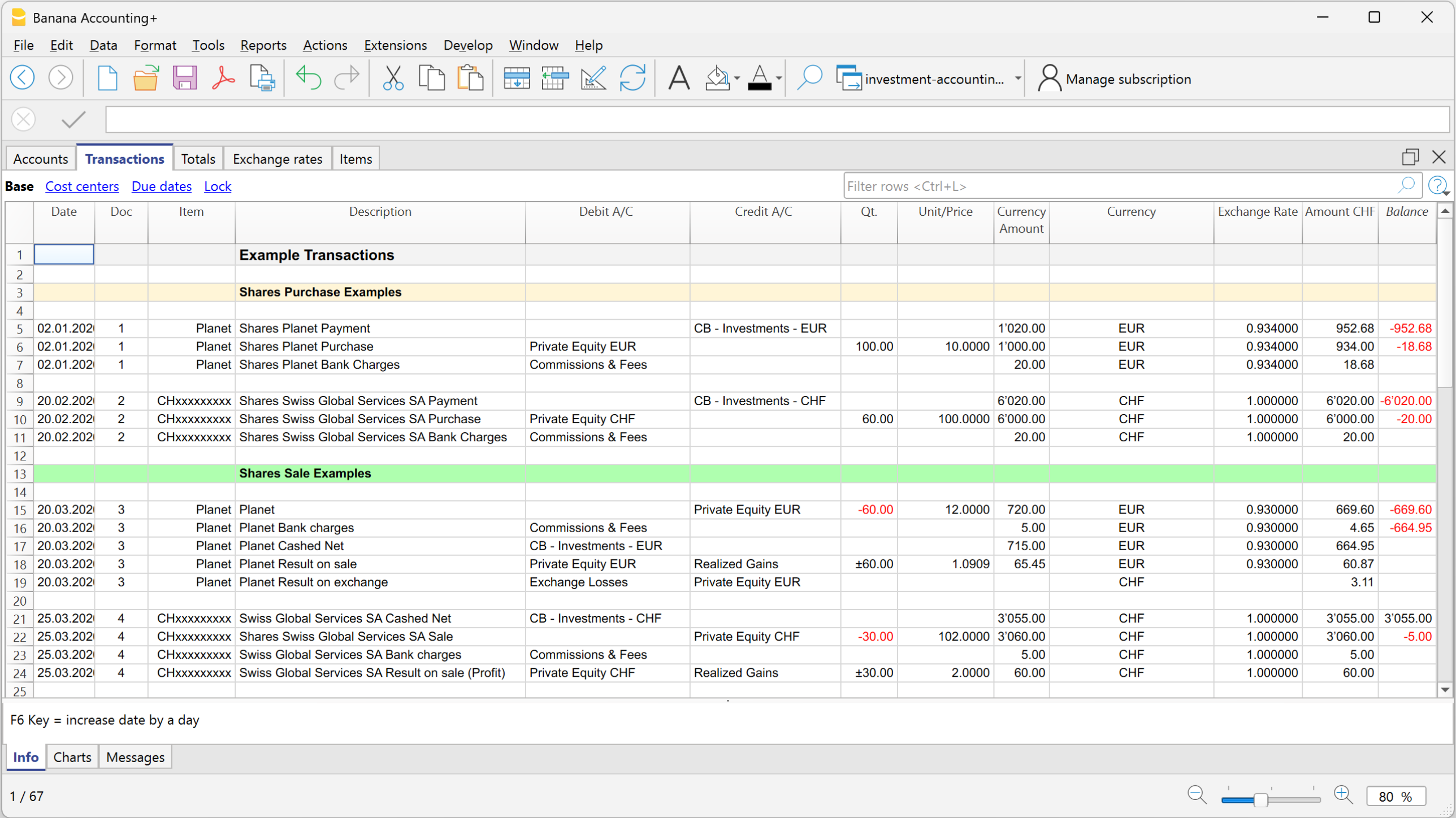
Single-Currency or Multi-Currency Investment Accounting
Separate Investment Accounting can be managed using either a single-currency or a multi-currency accounting file, depending on the currencies used in your investment portfolio.
Choose the appropriate template to get started:
- Single-Currency Investment Accounting in a Separate File – Suitable for portfolios managed in one accounting currency, such as CHF. Provides a simple structure for recording investment transactions, tracking quantities, and monitoring portfolio valuations.
- Multi-Currency Investment Accounting in a Separate File – Suitable for portfolios containing investments denominated in different currencies, such as CHF, EUR, and USD. Supports foreign-currency transactions and balances, exchange rate differences, and valuations in the accounting base currency.
The templates provide a predefined chart of accounts, investment information, and example transactions that you can adapt to your portfolio.
For step-by-step instructions on setting up your accounting file, see How to Start with Investment Accounting.
Reconcile Investment Accounting with General Accounting
When securities are recorded in a separate accounting file, the Investment Subledger maintains detailed information about each individual security, including its name, quantity, unit price, book value, market value, and related transactions.
In General Accounting, investments are recorded in a summarized form, usually grouped by investment category. Instead of tracking individual securities, quantities, and prices, General Accounting records the corresponding investment balances, bank transactions, income, expenses, and realized or unrealized gains and losses.
The two accounting files operate independently. Transactions recorded in the Investment Subledger are not automatically transferred to General Accounting. The corresponding amounts must therefore be recorded in both files, and their balances reconciled periodically.
This guide explains how to record purchases, sales, dividends, and year-end valuation adjustments in both accounting files, and how to verify that investment balances and financial results agree.
Match Investment Accounts and Opening Balances
Before recording investment transactions, verify that the opening balances in the investment subledger correspond to those in General Accounting.
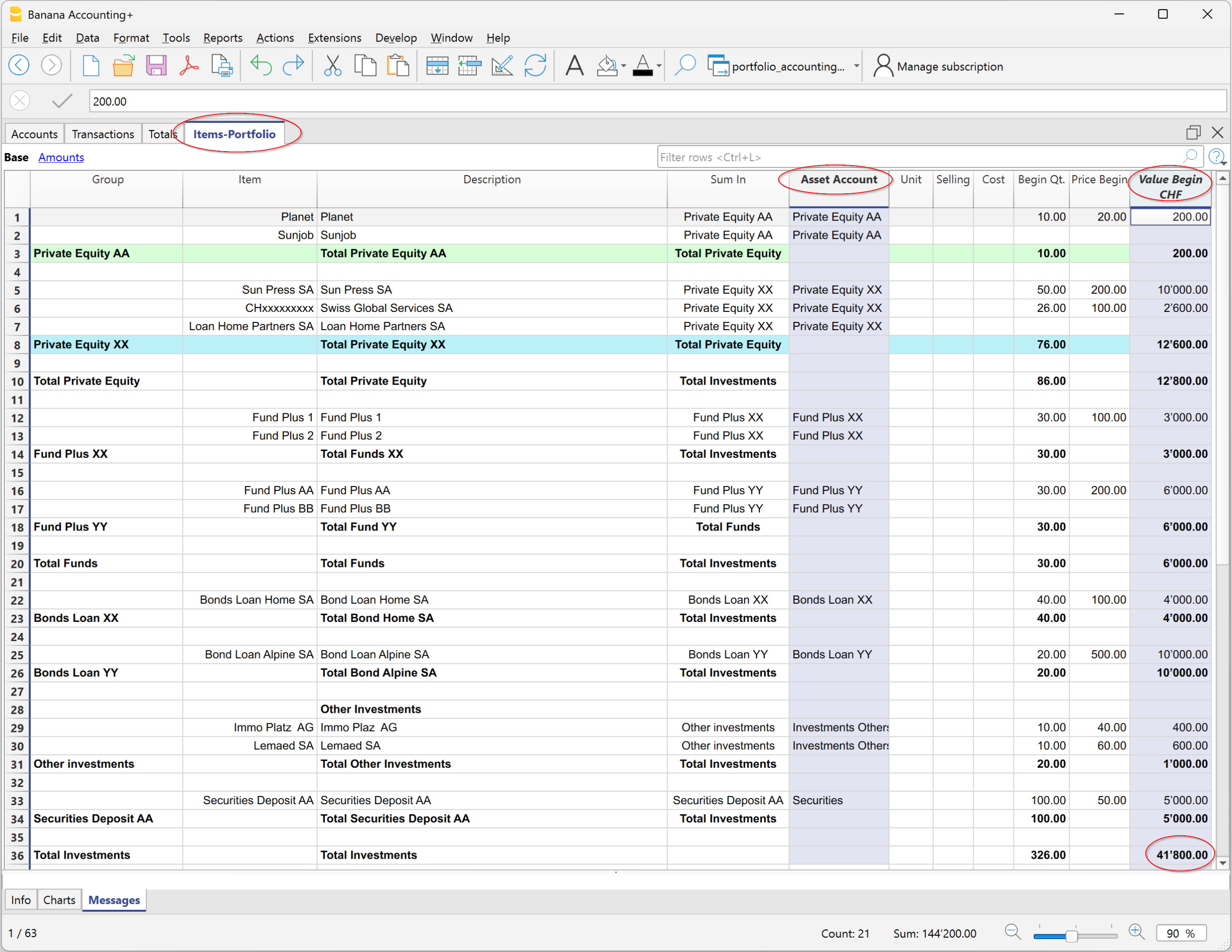
In the Investment Subledger
Open the Items-Portfolio table. This table lists all individual securities, organized by investment category.
The Asset Accounts column identifies the account associated with each security, while the Value Begin column shows its opening value.
In General Accounting
Open the Accounts table. Investments are recorded as summarized balances for each investment category, rather than as individual securities.
The Opening column shows the opening balance of each investment account.
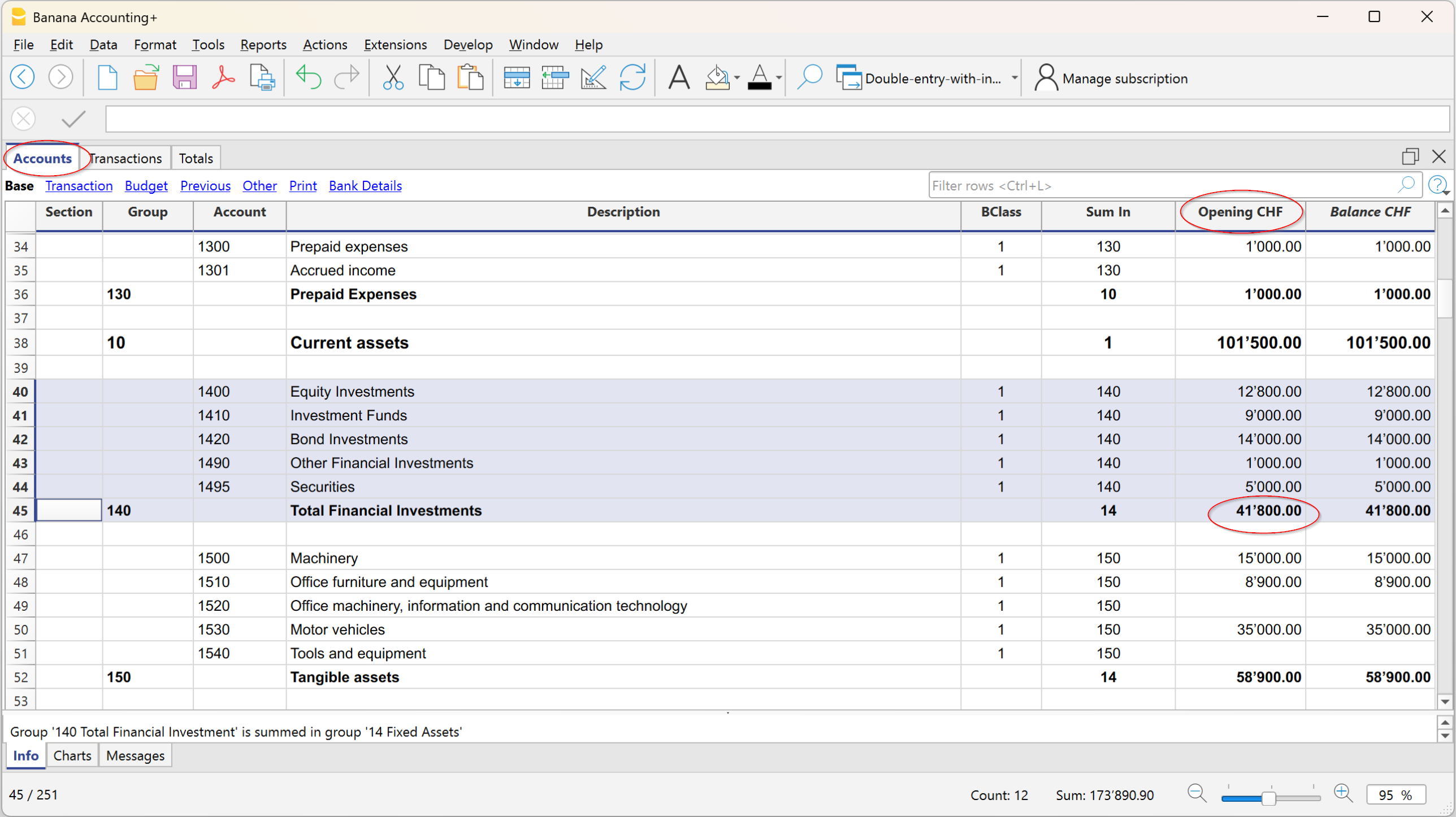
To reconcile the opening balances, add together the Value Begin amounts of all securities assigned to the same Asset Account and compare the total with the corresponding Opening balance in General Accounting.
Several individual securities in the investment subledger may correspond to a single account in General Accounting.
The account numbers and names shown in this example can be adapted to your chart of accounts.
The opening balances for each investment category should agree in both accounting files before proceeding with subsequent transactions.
Record Securities Purchases
Investment purchases are first recorded in Separate Investment Accounting, where each transaction is associated with the corresponding security.
The same transactions are then recorded in General Accounting using the summarized investment accounts.
In the Investment Subledger
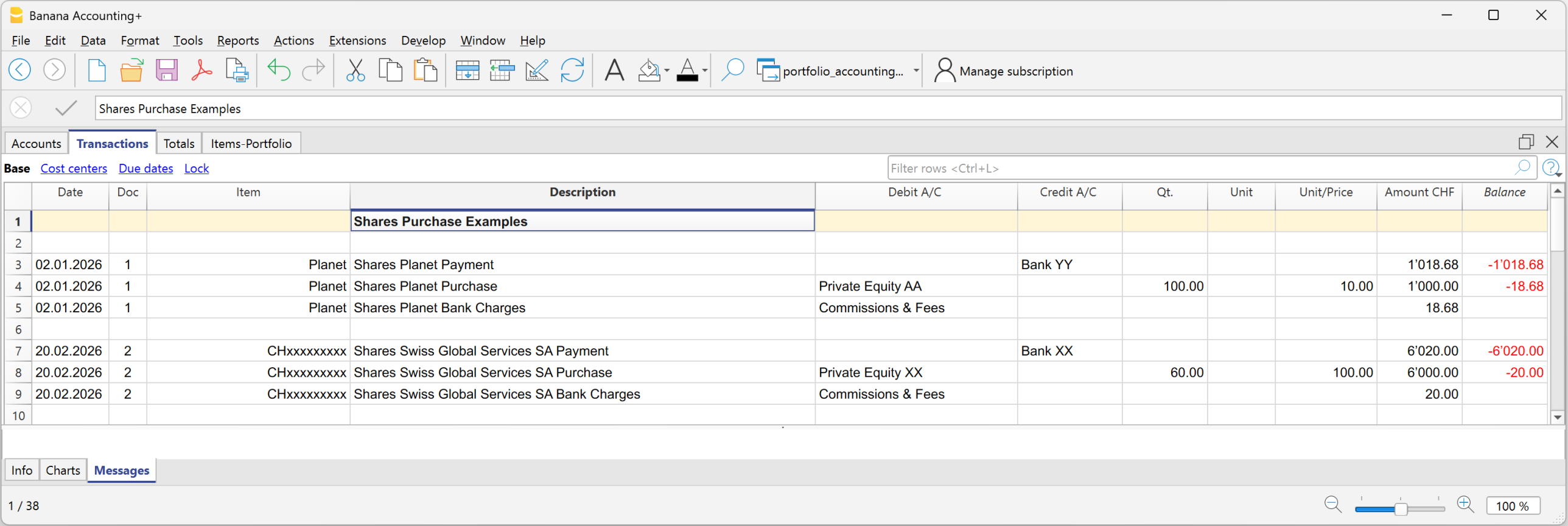
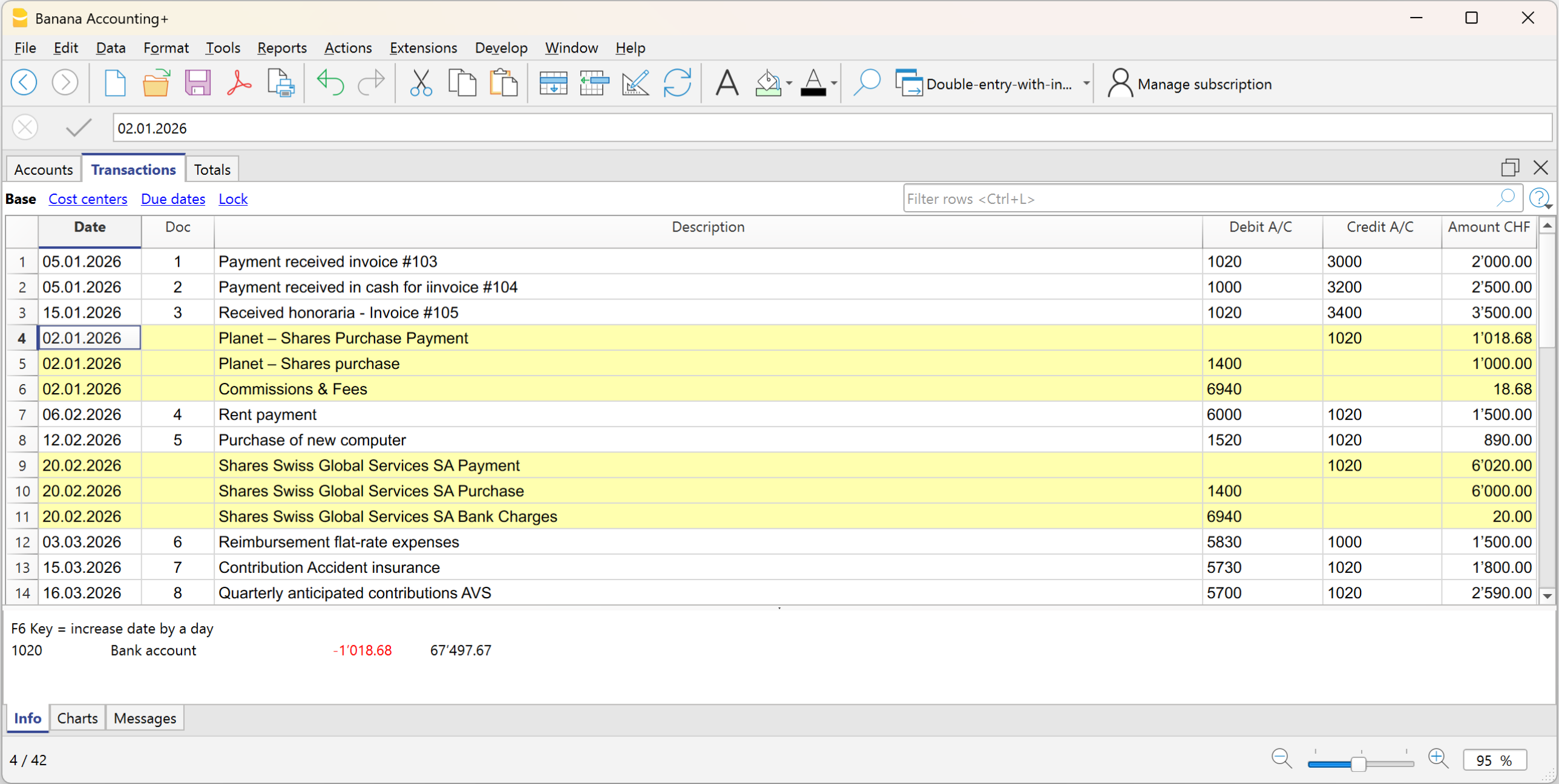
Open the Transactions table and record the purchases of Planet and Swiss Global Services SA shares.
In this example:
- On 2 January 2026, 100 Planet shares are purchased for CHF 1'000.00, with bank charges of CHF 18.68.
- On 20 February 2026, 60 Swiss Global Services SA shares are purchased for CHF 6'000.00, with bank charges of CHF 20.00.
Use the appropriate Item codes to associate the transactions with the individual securities and update their quantities.
In General Accounting
In General Accounting, purchases of different securities can be summarized in a single accounting entry when they affect the same accounts. In this example, the purchases of Planet and Swiss Global Services SA shares are recorded in account 1400 Equity Investments, while the related commissions are recorded in account 6940 Commissions & Fees.
The Investment Subledger maintains the detailed transactions for each security, while General Accounting records the corresponding amounts in the relevant accounts.
Record Securities Sales and Realized Gains
When securities are sold, the transactions must reflect the sale proceeds, related bank charges, and any realized gains or losses.
In the Investment Subledger
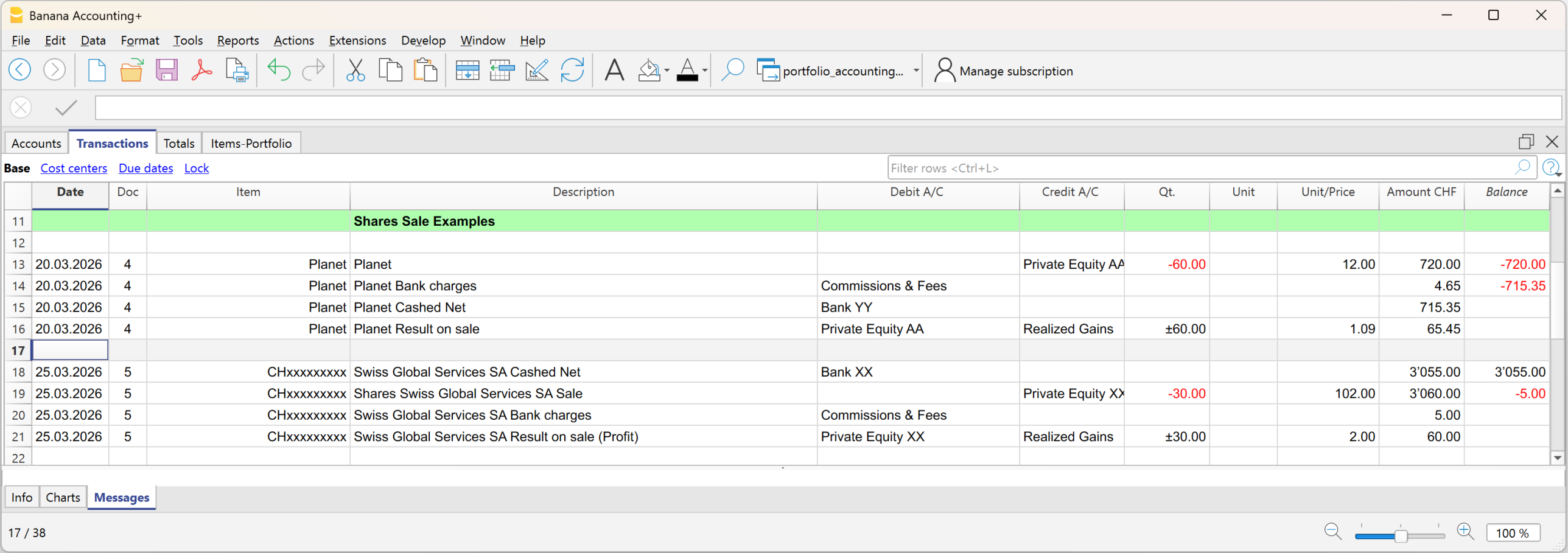
Open the Transactions table and enter the initial sale transaction for each security, recording the amount received.
Then select the corresponding transaction row and use the Calculate Sales Data command of the Investment Accounting extension.
The extension uses the historical investment data to calculate the realized gain or loss based on the book value of the securities sold and their selling price.
Review the calculated result and use Create sales record to generate the additional accounting entries required to complete the sale, including bank charges and realized gains or losses.
For investments denominated in foreign currencies, the extension can also calculate realized exchange rate gains or losses.
In this example:
- On 20 March 2026, 60 Planet shares are sold for CHF 720.00, with bank charges of CHF 4.65 and a realized gain of CHF 65.45.
- On 25 March 2026, 30 Swiss Global Services SA shares are sold for CHF 3'060.00, with bank charges of CHF 5.00 and a realized gain of CHF 60.00.
The transactions are associated with the corresponding securities through their Item codes, allowing Banana Accounting to update the quantities and maintain detailed investment information.
In General Accounting
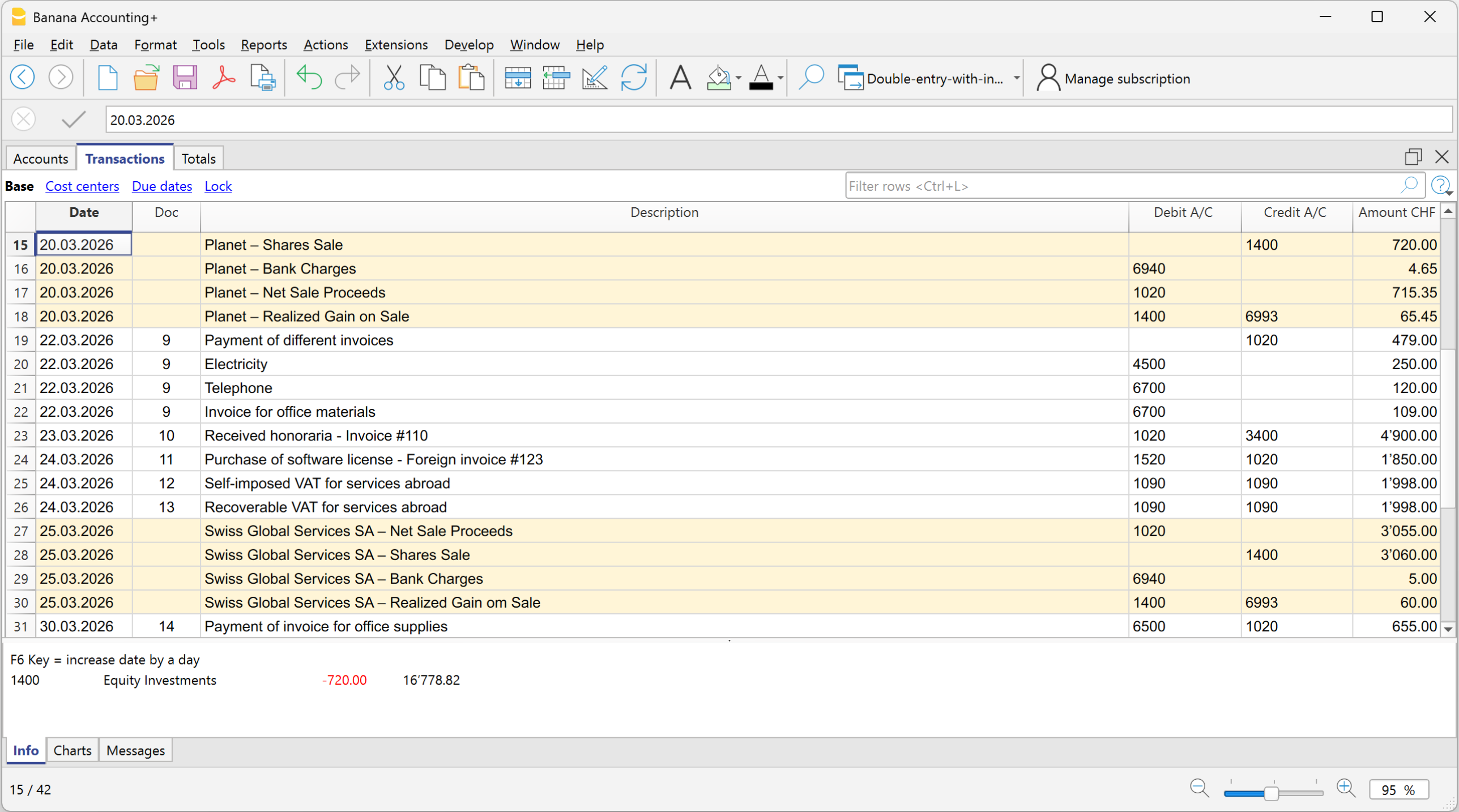
Record the corresponding sales in the Transactions table.
The transactions affect the following accounts:
- 1400 Equity Investments, for the book value of the securities sold.
- Bank for the net sale proceeds.
- 6940 Commissions & Fees, for bank charges.
- 6993 Realized Gains on Investments, for realized gains.
Record Dividend Income
Dividends received from securities are also recorded in both accounting files.
In Separate Investment Accounting
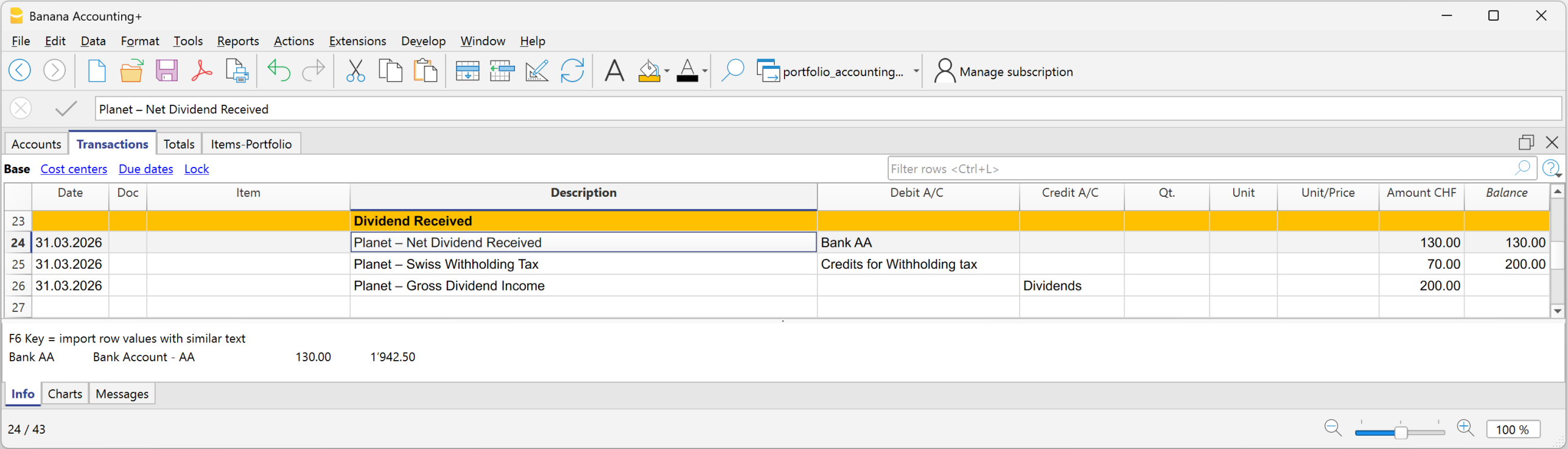
Open the Transactions table and record the dividend received, associating it with the corresponding security.
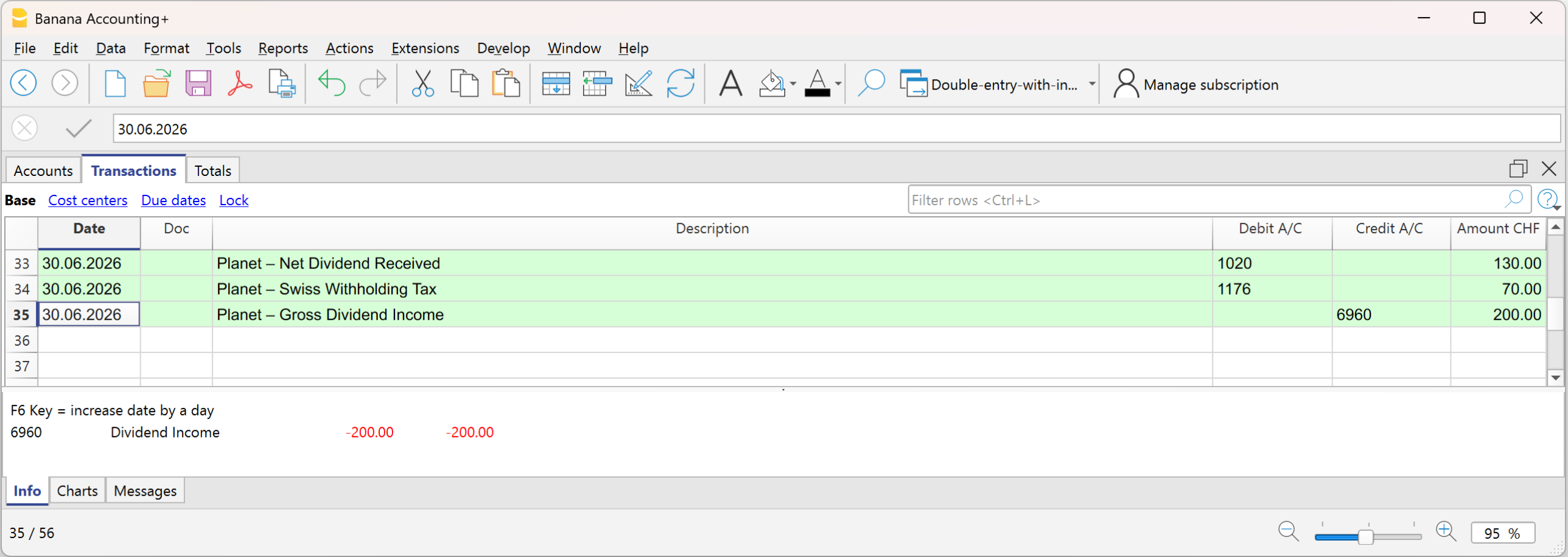
In this example, Planet distributes a gross dividend of CHF 200.00 on 30 June 2026.
The dividend is subject to Swiss withholding tax of 35%, resulting in:
- Gross dividend income: CHF 200.00
- Withholding tax: CHF 70.00
- Net bank receipt: CHF 130.00.
The withholding tax is recorded as a receivable when recoverable.
In General Accounting
Record the corresponding dividend in the Transactions table using:
- 6960 Dividend Income, for the gross dividend.
- 1176 Withholding Tax Receivable, for the recoverable withholding tax.
- Bank for the net amount received.
Compare Investment Balances
Investment balances should be reconciled periodically to ensure that the amounts recorded in the investment subledger agree with General Accounting.
At the reconciliation date, compare the total book value of the securities assigned to each Asset Account with the balance of the corresponding investment account in General Accounting.
In the Investment Subledger
Review the investment balances for the selected reconciliation date. Individual securities are recorded in detail and can be grouped by investment category and Asset Account.

In General Accounting
Review the corresponding investment accounts and compare their balances with the totals in the investment subledger.

For example, after recording the purchases and sales, the balances at 30 June 2026 are:
- Equity Investments: CHF 16'145.45
- Total Financial Investments: CHF 45'154.45
These amounts should agree in both accounting files.
Investment income, expenses, and realized gains or losses should also be checked against the corresponding financial result accounts for the same period.
If the balances agree, no additional reconciliation entry is required.
Reconcile Year-End Valuations
At year-end, review the Book Values and Market Values of the individual securities.
Depending on the applicable accounting rules and valuation policy, adjustments may be necessary to reflect the appropriate closing values.
In the Investment Subledger
At year-end, update the Price Current column in the Items Portfolio table with the current market prices of the securities.
You can enter the prices manually or use the Update market prices command of the Investment Accounting extension.
Then use the Create adjustment transactions command to automatically calculate the differences between the Book Values and Market Values of the individual securities and generate the corresponding accounting entries.
The extension allows you to preview the adjustments before confirming them. The generated transactions update the Book Values and record the corresponding unrealized gains or losses, without changing the quantities held.
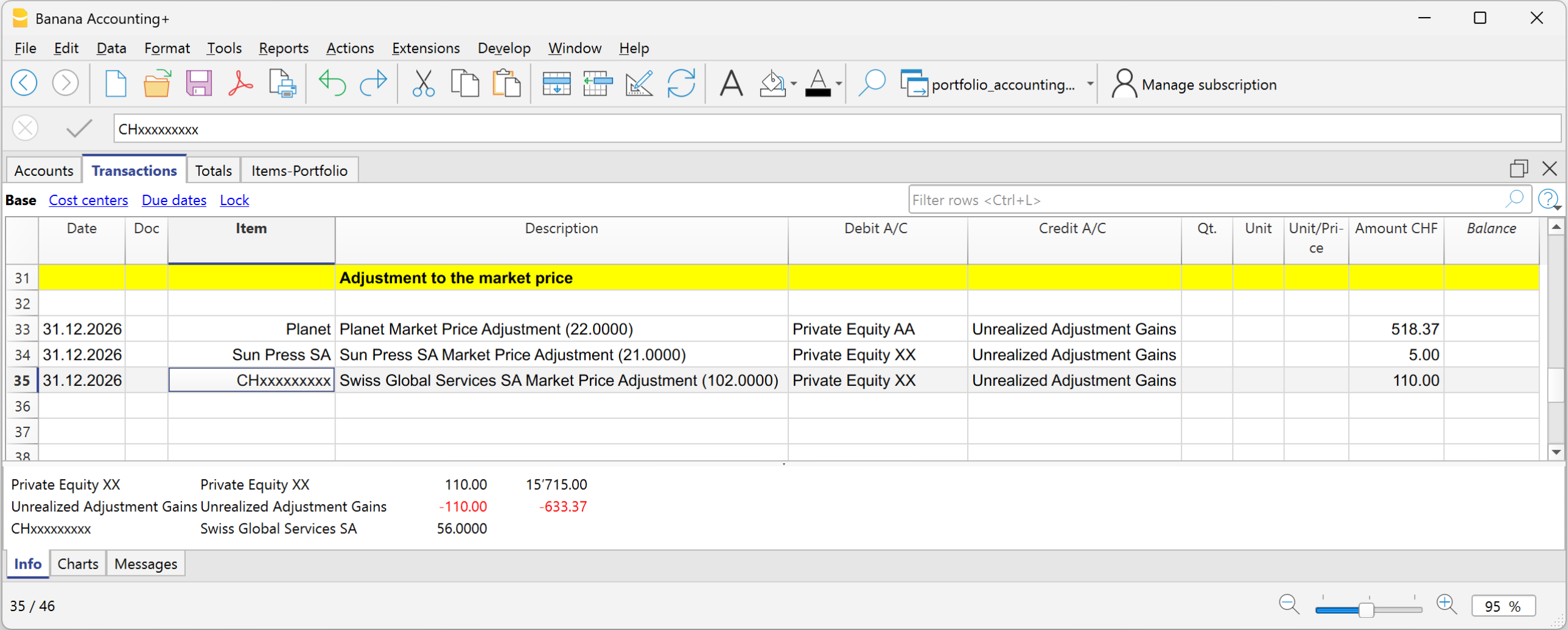
In this example, the adjustments at 31 December 2026 are:
- Planet: CHF 518.37.
- Sun Press SA: CHF 5.00.
- Swiss Global Services SA: CHF 110.00.
The total adjustment is CHF 633.37.
Each adjustment is associated with the corresponding security, maintaining the detailed investment information in the subledger.
In General Accounting
The individual valuation adjustments can be recorded as a single summarized transaction.
On 31 December 2026, record:
- Debit: 1400 Equity Investments, CHF 633.37.
- Credit: 6994 Unrealized Adjustment Gains, CHF 633.37.
Description: Year-end Market Value Adjustment – Equity Investments.
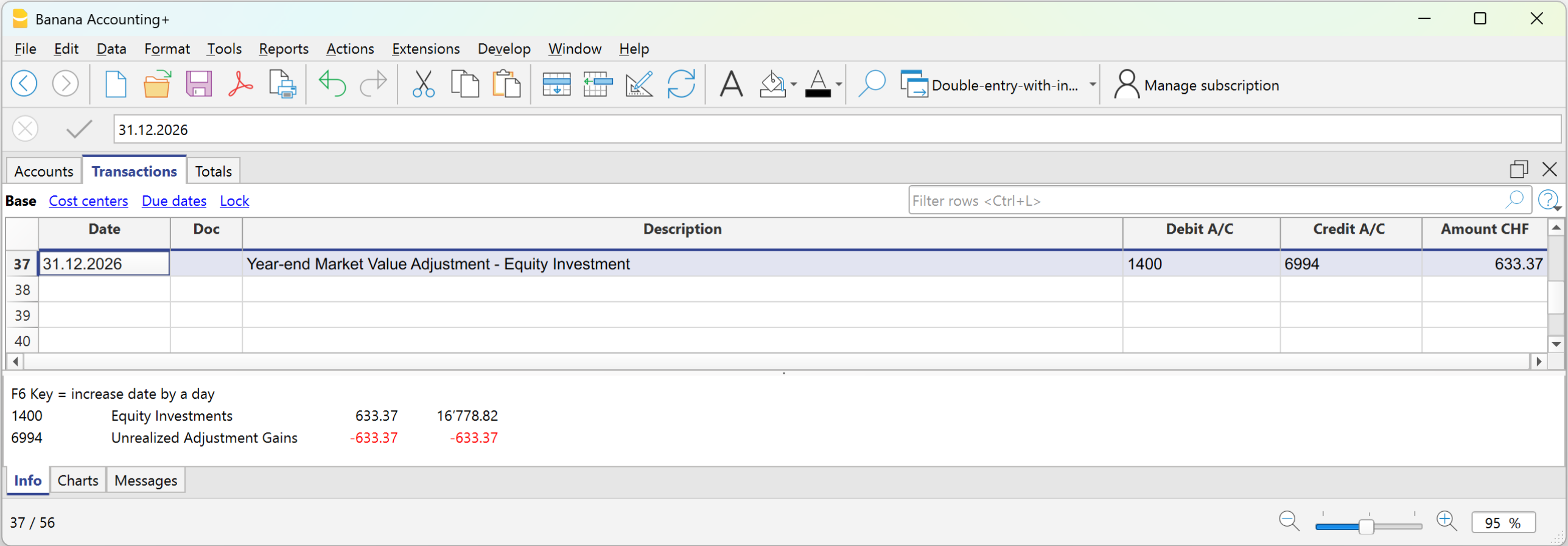
This illustrates an important advantage of using an Investment Subledger: detailed valuations are maintained for individual securities, while General Accounting records the corresponding summarized amount.
Note: The accounting treatment of market value adjustments depends on the applicable accounting standards and valuation rules. An increase in market value does not always permit the recognition of an unrealized gain.
Verify Year-End Balances
After recording all investment transactions and year-end valuation adjustments, verify the Investment Subledger balances as of 31 December 2026.
Check Balances Report
In the Investment Subledger, use the Check Balances Report command of the Investment Accounting extension to verify that the values of individual securities agree with the balances of their assigned Asset Accounts.
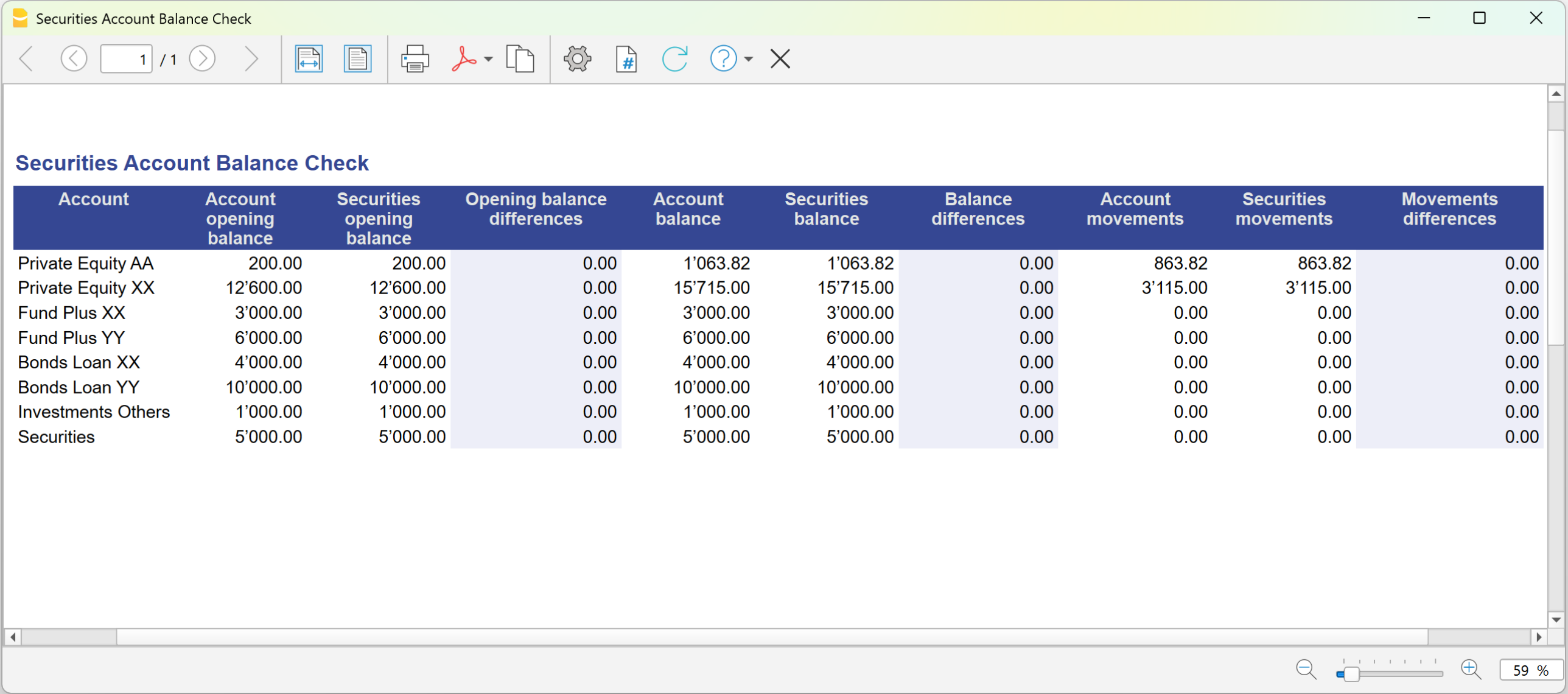
For a more detailed verification, use the Reconciliation Report command of the Investment Accounting extension.
Account Reconciliation Report
This report helps verify that the balances recorded in the Asset Accounts of the Investment Subledger are consistent with the values calculated from the securities assigned to those accounts. It helps identify discrepancies that may indicate missing or incorrect entries.
Select the Asset Accounts to be checked. The report generates a separate table for each selected Asset Account, listing the transactions of the securities assigned to it.
The Reconciliation Summary for each Asset Account shows:
- The opening balance of the Asset Account and the corresponding securities balance.
- Any differences between the opening balances.
- The total securities movements during the period.
- The expected closing balance of the Asset Account.
- The actual balance calculated from the securities.
- Any differences between the expected and actual closing balances.
In the example shown, the Private Equity AA account has an opening balance of CHF 200.00, which agrees with the opening securities balance.
The total securities movements amount to CHF 863.82, resulting in an expected closing balance of CHF 1'063.82.
The actual securities balance is also CHF 1'063.82. Both the opening and closing differences are CHF 0.00, confirming that the Asset Account is internally reconciled.
Any discrepancies are shown in the Differences fields and highlighted in red.
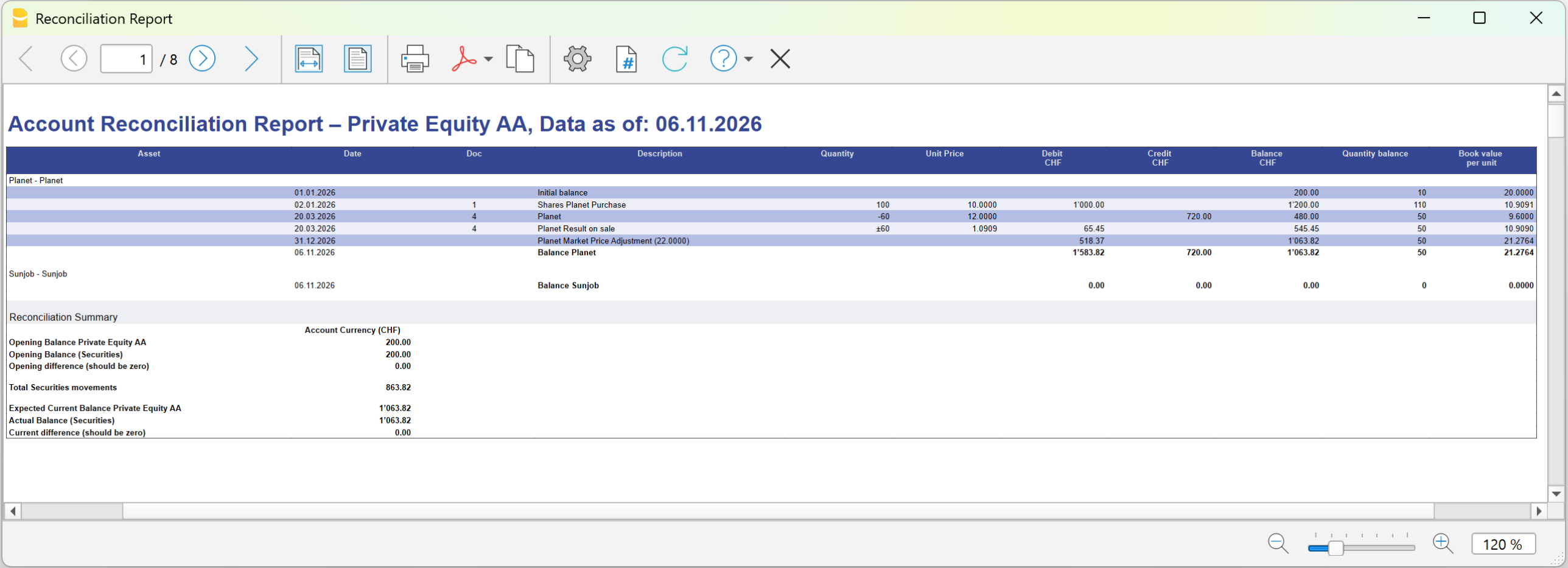
Note: The reports may display the date on which they were generated. This date does not necessarily correspond to the accounting period being verified. In this example, the reconciliation concerns the balances as of 31 December 2026.
Compare with General Accounting
The Check Balances Report and Reconciliation Report help verify the internal consistency of the Investment Subledger. They do not automatically reconcile it with the separate General Accounting file.
Once the Investment Subledger balances have been verified, compare the totals of the relevant Asset Accounts with the corresponding balances in General Accounting.
In this example, the closing balances to be compared are:
- Equity Investments: CHF 16'778.82.
- Total Financial Investments: CHF 45'778.82.
In the Investment Subledger, the Equity Investments balance is the sum of Private Equity XX (CHF 15'715.00) and Private Equity AA (CHF 1'063.82). The following images show the investment balances in the two accounting files.
Investment Subledger

General Accounting:
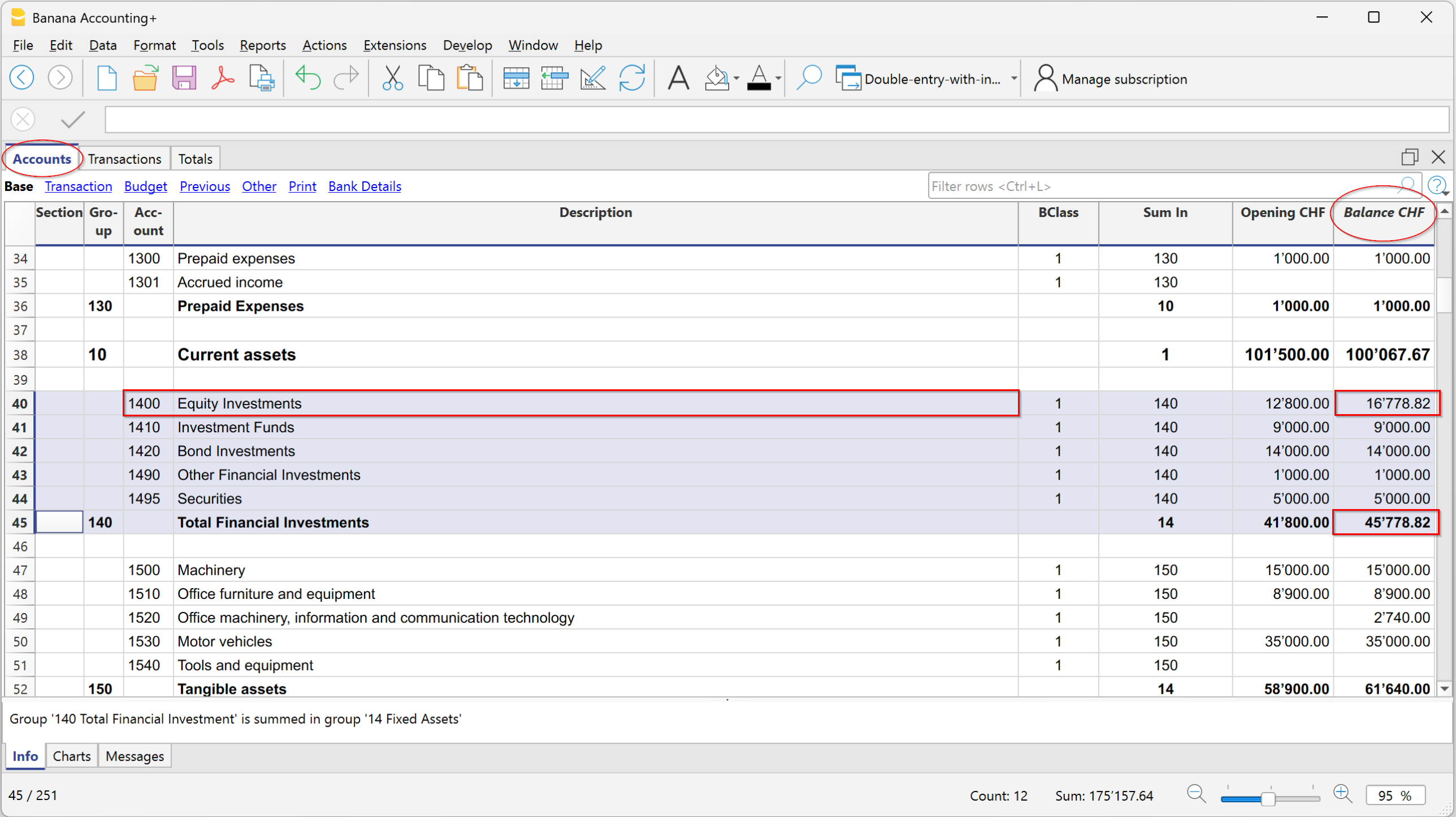
These closing balances agree in both accounting files.
In addition to verifying the investment balances, compare the investment-related income, expenses, and gains or losses recorded in General Accounting with the corresponding transactions in the Investment Subledger.
In this example, the investment-related financial result includes realized gains of CHF 125.45, dividend income of CHF 200.00, unrealized adjustment gains of CHF 633.37, and commissions and fees of CHF 48.33.
The resulting net financial income is CHF 910.49. This amount relates only to the investment transactions covered in this example and should not be confused with the overall profit or loss reported in General Accounting, which also includes income and expenses unrelated to investments.
The following report summarizes the investment-related income and expenses recorded in the Investment Subledger.
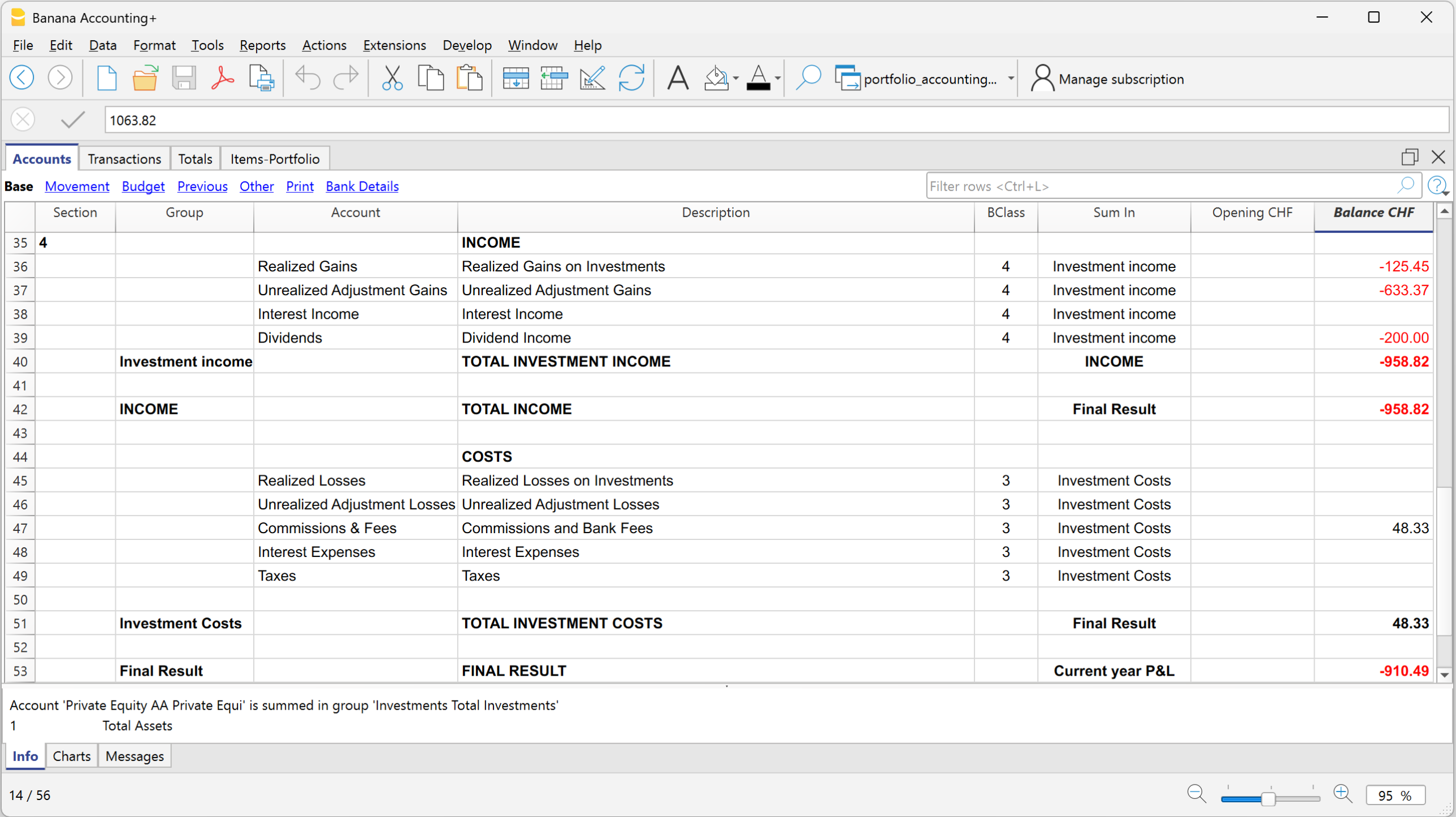
When the investment balances and financial results agree in both accounting files, the reconciliation is complete.
Investigate Any Differences
If the investment balances or financial results do not agree, first identify where the differences occur.
Within the Investment Subledger, examine any discrepancies highlighted by the extension's reports. Check that securities are assigned to the correct Asset Accounts and that their quantities, book values, and transactions have been recorded correctly.
Between the Investment Subledger and General Accounting, check that:
- All relevant transactions have been recorded in both accounting files.
- The correct accounts, amounts, and dates have been used.
- Bank charges, dividends, and realized gains or losses have been recorded consistently.
- The same reconciliation date and accounting currency have been used.
- Year-end valuation adjustments have been reflected correctly in both files.
Correct any missing or incorrect entries in the appropriate accounting file, then repeat the verification.