Investment Accounting – Opening Balances
Beginning of the year
At the beginning of a new accounting year, make sure that the opening quantities and values of the investments in the Items table are consistent with the corresponding opening balances.
When a new accounting year is created from the previous year, Banana Accounting automatically carries forward the closing investment data and account balances required as opening values for the new year.
If you need to add a new security manually, enter its opening information in the Items table and make sure that its opening value is consistent with the opening balance of the Investment Balance Sheet Account specified in the Asset Account column.
Add a new security
To manually add a new security at the beginning of the accounting year, define it in the Items table and enter its opening values:
- Begin Qt. – Enter the opening quantity of the security. For bonds, enter the opening nominal value.
- Price Begin – Enter the opening unit price of the security.
Banana Investment Accounting automatically calculates the Value Begin based on the values entered in Begin Qt. and Price Begin.
In multi-currency accounting, the corresponding opening value in the base currency is also calculated automatically.

Matching Opening Values with the Investment Balance Sheet Account
The total opening value of the securities must correspond to the opening balance of the Investment Balance Sheet Account specified in the Asset Account column of the Items table.
If multiple Items are assigned to the same Investment Balance Sheet Account, the sum of their Value Begin amounts must equal the opening balance of that account.
For example, if two shares are assigned to the same Shares CHF account, the sum of their opening values in the Items table must correspond to the opening balance of the Shares CHF account in the Accounts table.
This correspondence keeps the investment values in the Items table and the related balances in Financial Accounting aligned.

The following image shows that the opening values in the Items table correspond to the opening balance of the related Investment Balance Sheet Account in the Accounts table.

Opening Exchange Rate
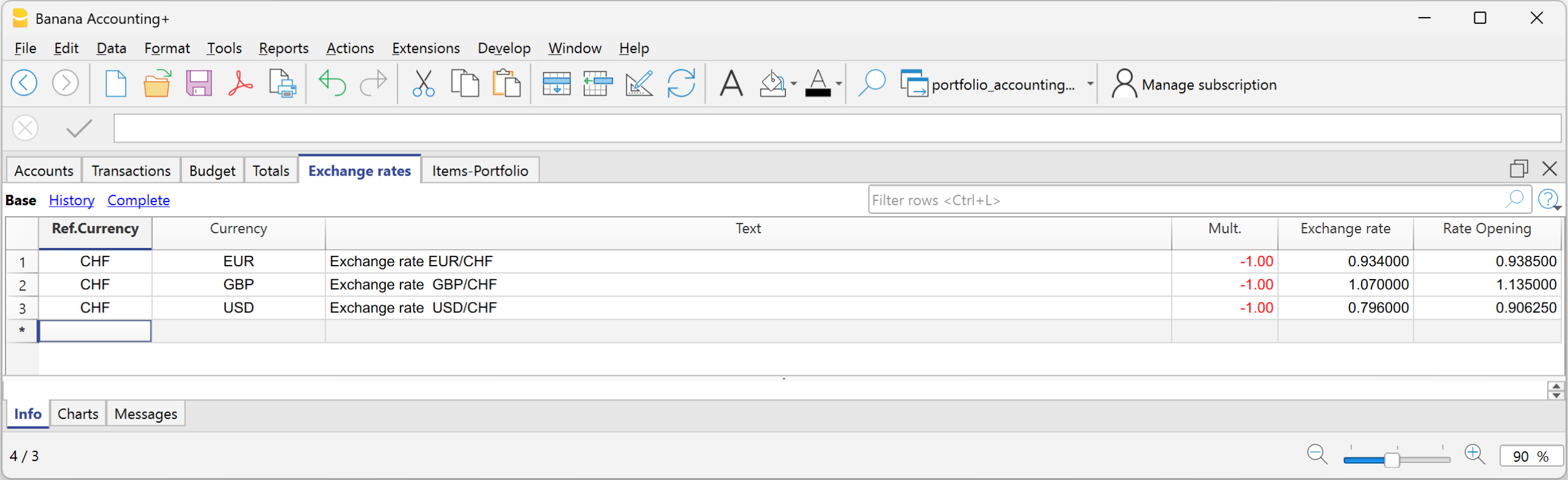
In multi-currency accounting, Banana Investment Accounting automatically calculates the Value Begin of each security in the base currency using the applicable opening exchange rate.
For Investment Balance Sheet Accounts denominated in a foreign currency, the opening exchange rate is used to calculate the corresponding account balance in the base currency.
For Investment Balance Sheet Accounts denominated in the accounting base currency, the opening values of investments in different currencies are converted individually into the base currency. Their sum must correspond to the opening balance of the Investment Balance Sheet Account.
For more information about the values calculated in the Items table, see Data calculated automatically.
Check initial balances
After entering the opening values, you can verify that the opening values of the securities correspond to the opening balances of the related Investment Balance Sheet Accounts:
- Use the Actions > Check Accounting command. Select the Items and Asset accounts opening balances options.

- Use the Check balances report extension to verify that the opening values of the securities are consistent with the corresponding opening accounting balances.
