Canada: Templates and Extensions
The Canada Section of the Banana Template Store offers free templates and specific extensions for Canada, designed for different types of users, purposes, and levels of accounting knowledge:
- Templates are files in .ac2 format, with predefined charts of accounts and some sample entries.
- Extensions are small add-ons that expand the program’s functionality with new features and integrations.
Templates are also accessible directly within the Banana Accounting program (menu File > New).
Templates Canada
Templates Accounting Business Canada
Templates Accounting Business without GST/HST Tax Canada
Double Entry Accounting for Company | Canada | Account numbers
Double Entry Accounting for Company | Canada | Account numbers domenicoMulti-Currency Accounting for Company | Canada | Account numbers
Multi-Currency Accounting for Company | Canada | Account numbers domenicoTemplates Accounting Business with GST/HST Tax Canada
Free Cash manager for with GST/HST Management | Canada
Free Cash manager for with GST/HST Management | Canada domenicoSole Proprietorship with GST/HST Management | Canada | Incomes and Expenses Accounting
Sole Proprietorship with GST/HST Management | Canada | Incomes and Expenses Accounting domenicoDouble entry accounting for business in Canada with GST/HST | Account numbers
Double entry accounting for business in Canada with GST/HST | Account numbersThese double entry accounting template has been prepared by a CPA operating in Ontario for their internal accounting and financial planning. Following is a quote why is using Banana Accounting next to their other accounting solution.
"Here are some benefits that I see for your software:
- Works well without requiring an internet connection – work can usually be completed faster without such delays.
- It allows very high customization.
- It allows easy and complete collaboration between an outside accountant and users.
- Time saving – accounting records can be partially entered and completed later by the same person or the accountant.
- The spreadsheet interface is easy to understand.
- Every transaction can be entered in one form, as opposed to not knowing in what screen in which to enter something.
- Data can be easily copied and pasted into a spreadsheet for further analysis.
- Setup of a new data file is relatively easy with the appropriate template.
- Your program can run on many platforms.
- Tasks can be automated using internal application programs.
- One can purchase an upgrade when it makes sense, as opposed to paying every day for the use of the software.
- The purchase and upgrade prices are affordable."
There is also:
Multi-Currency Accounting for Company GST/HST Tax | Canada | Account numbers
Multi-Currency Accounting for Company GST/HST Tax | Canada | Account numbersThese double entry accounting template has been prepared by a CPA operating in Ontario for their internal accounting and financial planning.
Extensions Canada
Bank of Nova Scotia (Canada) - import transactions .csv
Bank of Nova Scotia (Canada) - import transactions .csvImport extension allows you to import transactions from a CSV file of Bank of Nova Scotia (Canada), using the command Import into Accounting.
Canada Invoice layout 01 for professional services
Canada Invoice layout 01 for professional servicesAttributes
Header
- The header contains information specified in the File and accounting properties (menu File -> File and accounting properties -> Address).
- It is displayed on the top-left of the page.
Invoice and customer information
- Invoice number, invoice date, invoice number, expiration date of the invoice and page number are displayed here.
- The expiration date of the invoice is automatically calculated, but it is possible to overwrite that information using the DocType column options.
Customer address
- The customer address is taken from the Accounts table (address view).
- It is possible to manually define an address on the transactions table using the DocType column options.
- The address is displayed on the left of the page.
Items table
- A table where are listed all the items of the invoice.
- It is composed of four columns: description and total.
- At the end of the items table are displayed Total net, HST amount and final Total of the invoice.
Invoice settings
User can change some settings of the invoice.
From the Menu Apps -> Manage apps… -> Installed -> select Style 1: Canada invoice -> click on the Settings button on the right:
- enable/disable the header
- Set 1 to include the header on the top of the page (default value)
- Set 0 to not include it.
- enable/disable the header
- Set 1 to include the payment slip on the bottom of the page of the page
- Set 0 to not include it. (default value)
- Color1
- Defines the main color of the header used for the invoice label.
- Empty for default value (blue).
- Color2
- Defines the color of the text.
- Empty for default value (black).
Colors can be standard colors (for example: “red”, "yellow", “blue”, “green”, “black”, "grey", etc) or in the Hexadecimal format (for example: #ff0000).
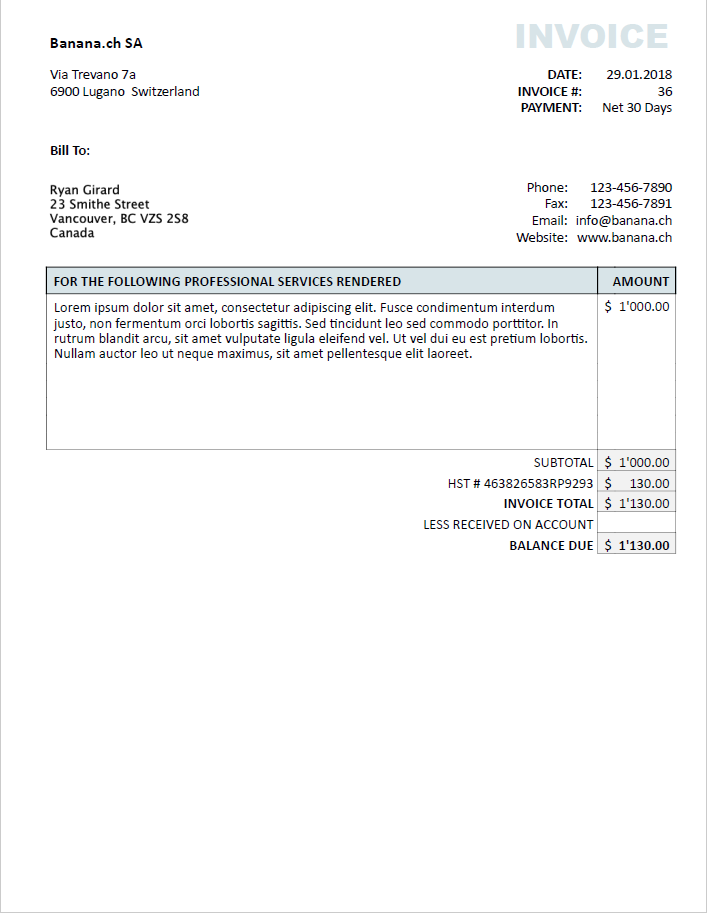
Example of invoice