Extensions Canada
Bank of Nova Scotia (Canada) - import transactions .csv
Bank of Nova Scotia (Canada) - import transactions .csvImport extension allows you to import transactions from a CSV file of Bank of Nova Scotia (Canada), using the command Import into Accounting.
URL Stable release
https://github.com/BananaAccounting/General/raw/master/ImportApps/import.ca.banknovascotia.js
Short Description
Import extension for importing CSV file of Bank of Nova Scotia (Canada) .
Country
Canada
Publisher
Banana.ch
Extension type
Import
Help ID
https://github.com/BananaAccounting/General/tree/master/ImportApps
Canada Invoice layout 01 for professional services
Canada Invoice layout 01 for professional servicesAttributes
Header
- The header contains information specified in the File and accounting properties (menu File -> File and accounting properties -> Address).
- It is displayed on the top-left of the page.
Invoice and customer information
- Invoice number, invoice date, invoice number, expiration date of the invoice and page number are displayed here.
- The expiration date of the invoice is automatically calculated, but it is possible to overwrite that information using the DocType column options.
Customer address
- The customer address is taken from the Accounts table (address view).
- It is possible to manually define an address on the transactions table using the DocType column options.
- The address is displayed on the left of the page.
Items table
- A table where are listed all the items of the invoice.
- It is composed of four columns: description and total.
- At the end of the items table are displayed Total net, HST amount and final Total of the invoice.
Invoice settings
User can change some settings of the invoice.
From the Menu Apps -> Manage apps… -> Installed -> select Style 1: Canada invoice -> click on the Settings button on the right:
- enable/disable the header
- Set 1 to include the header on the top of the page (default value)
- Set 0 to not include it.
- enable/disable the header
- Set 1 to include the payment slip on the bottom of the page of the page
- Set 0 to not include it. (default value)
- Color1
- Defines the main color of the header used for the invoice label.
- Empty for default value (blue).
- Color2
- Defines the color of the text.
- Empty for default value (black).
Colors can be standard colors (for example: “red”, "yellow", “blue”, “green”, “black”, "grey", etc) or in the Hexadecimal format (for example: #ff0000).
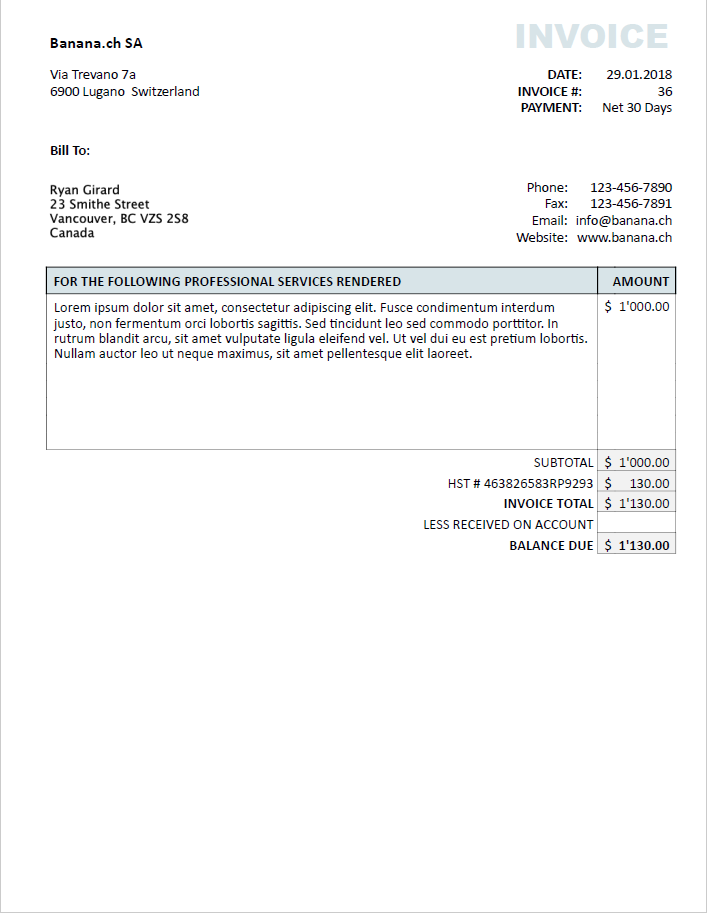
Example of invoice
URL Stable release
https://raw.githubusercontent.com/BananaAccounting/Canada/master/report/customer/invoice/ch.banana.ca.invoice.canada01.js
URL Development
https://github.com/BananaAccounting/Canada/tree/master/report/customer/invoice
Short Description
Invoice layout for a CPA service business, with HST and currency "$". Colors and other setting can be customized.
Country
Canada
Publisher
Banana.ch
Extension type
Invoices
Help ID
ch.banana.ca.invoice.canada01
Title for application - displayed in "manage apps"
[CA01] Canada invoice layout for professional services